


Asynchronous Programming in Python#
KEYWORDS: asyncio, async, await, concurrency, aiohttp, event loop
Introduction: Async vs Parallel#
In the previous chapter on parallel processing, we learned how to use multiple CPU cores to speed up computation. This chapter covers a complementary technique: asynchronous programming.
Parallel Processing |
Async Programming |
|---|---|
Multiple workers doing tasks simultaneously |
One worker switching between tasks |
Best for CPU-bound work |
Best for I/O-bound work |
Uses multiple cores |
Uses one core efficiently |
|
|
The key insight: When your program spends most of its time waiting (for network responses, file I/O, instrument readings), async lets you do useful work during that wait time—all in a single thread.
When to Use Async#
Async programming shines when:
Fetching data from multiple web APIs
Polling multiple sensors or instruments
Handling many concurrent network connections
Reading/writing many files
Async does NOT help when:
Doing heavy numerical computation (use multiprocessing)
Tasks are CPU-bound rather than I/O-bound
You only have one or two sequential I/O operations
import asyncio
import time
import numpy as np
import matplotlib.pyplot as plt

# Note: In Jupyter notebooks, there's already an event loop running.
# We use 'await' directly instead of 'asyncio.run()'
# In regular Python scripts, you would use: asyncio.run(main())
The Event Loop Mental Model#
Think of async programming like a chef in a kitchen:
Synchronous: Cook one dish completely, then start the next. While water boils, stand there waiting.
Asynchronous: Start boiling water, then chop vegetables while waiting. When water boils, come back to it.
The event loop is like the chef’s brain—it keeps track of all the tasks and switches between them when one is waiting.
Event Loop:
┌─────────────────────────────────────────────────────────────┐
│  Task A: [run]──[wait for I/O]──────────────────[run]──done │
│  Task B:       [run]──[wait]────────[run]──done             │
│  Task C:              [run]──[wait]───────────[run]──done   │
│          ─────────────────────────────────────────────────► │
│                              time                           │
└─────────────────────────────────────────────────────────────┘
While Task A waits for I/O, Tasks B and C can run. Total time is much less than running sequentially.
Basic async/await Syntax#
Python’s async programming uses two keywords:
async def: Defines a coroutine (an async function)await: Pauses execution until the awaited coroutine completes
Let’s start with a simple example:
async def say_hello(name, delay):
    """A simple coroutine that waits, then greets."""
    await asyncio.sleep(delay)  # Non-blocking sleep
    print(f"Hello, {name}! (after {delay}s)")
    return f"Greeted {name}"

# Run a single coroutine
result = await say_hello("World", 1)
print(f"Result: {result}")
Hello, World! (after 1s)
Result: Greeted World
Important: asyncio.sleep() is different from time.sleep():
time.sleep()blocks the entire thread—nothing else can runasyncio.sleep()yields control to the event loop—other tasks can run
Sequential vs Concurrent Execution#
The power of async comes from running multiple coroutines concurrently. Let’s compare:
async def simulate_sensor_read(sensor_id, read_time):
    """Simulate reading from a sensor (I/O-bound operation)."""
    await asyncio.sleep(read_time)  # Simulate I/O delay
    value = np.random.normal(100, 5)  # Simulated reading
    return sensor_id, value

sensors = [("temp_1", 0.5), ("temp_2", 0.7), ("pressure", 0.4), ("flow", 0.6)]

# SEQUENTIAL: One at a time
start = time.perf_counter()
sequential_results = []
for sensor_id, read_time in sensors:
    result = await simulate_sensor_read(sensor_id, read_time)
    sequential_results.append(result)
sequential_time = time.perf_counter() - start
print(f"Sequential: {sequential_time:.2f}s")

# CONCURRENT: All at once with asyncio.gather()
start = time.perf_counter()
tasks = [simulate_sensor_read(sid, rt) for sid, rt in sensors]
concurrent_results = await asyncio.gather(*tasks)
concurrent_time = time.perf_counter() - start
print(f"Concurrent: {concurrent_time:.2f}s")
print(f"Speedup: {sequential_time / concurrent_time:.1f}x")
Sequential: 2.21s
Concurrent: 0.70s
Speedup: 3.2x
The concurrent version takes only as long as the slowest task, not the sum of all tasks!
Core asyncio Patterns#
Pattern 1: asyncio.gather() - Run Multiple Coroutines#
The most common pattern. Run multiple coroutines and get all results.
async def fetch_temperature(location):
    """Simulate fetching temperature from a weather API."""
    await asyncio.sleep(np.random.uniform(0.3, 0.8))
    temp = np.random.uniform(15, 35)
    return {"location": location, "temp_C": temp}

locations = ["Pittsburgh", "New York", "Chicago", "Los Angeles", "Houston"]

# Gather all results
results = await asyncio.gather(*[fetch_temperature(loc) for loc in locations])

for r in results:
    print(f"{r['location']}: {r['temp_C']:.1f}°C")
Pittsburgh: 34.4°C
New York: 18.2°C
Chicago: 21.2°C
Los Angeles: 34.5°C
Houston: 23.0°C
Pattern 2: asyncio.create_task() - Fire and Forget (or Join Later)#
Create a task that runs in the background. You can await it later or let it run.
async def background_logger(interval, count):
    """Log messages at regular intervals."""
    for i in range(count):
        await asyncio.sleep(interval)
        print(f"  [Log {i+1}/{count}] Background task running...")
    return "Logging complete"

async def main_work():
    """Do some main work while background task runs."""
    print("Starting main work...")
    await asyncio.sleep(1.5)
    print("Main work complete!")
    return "Main result"

# Create background task
logger_task = asyncio.create_task(background_logger(0.4, 5))

# Do main work while logger runs
main_result = await main_work()

# Wait for background task to finish
logger_result = await logger_task
print(f"\nResults: {main_result}, {logger_result}")
Starting main work...
[Log 1/5] Background task running...
[Log 2/5] Background task running...
[Log 3/5] Background task running...
Main work complete!
  [Log 4/5] Background task running...
  [Log 5/5] Background task running...

Results: Main result, Logging complete
Pattern 3: asyncio.as_completed() - Process Results as They Arrive#
When you want to process results as soon as they’re ready, not wait for all.
async def slow_computation(task_id, duration):
    """A task that takes variable time."""
    await asyncio.sleep(duration)
    return task_id, duration

# Tasks with different durations
task_specs = [("A", 0.8), ("B", 0.3), ("C", 0.5), ("D", 0.2)]
tasks = [slow_computation(tid, dur) for tid, dur in task_specs]

print("Processing results as they complete:")
for coro in asyncio.as_completed(tasks):
    task_id, duration = await coro
    print(f"  Task {task_id} finished (took {duration}s)")
Processing results as they complete:
Task D finished (took 0.2s)
Task B finished (took 0.3s)
Task C finished (took 0.5s)
Task A finished (took 0.8s)
Notice the order: D, B, C, A—shortest tasks finish first!
Pattern 4: Timeouts with asyncio.wait_for()#
In real systems, you need to handle slow or hanging operations.
async def unreliable_sensor(sensor_id):
    """A sensor that sometimes takes too long."""
    delay = np.random.uniform(0.1, 2.0)
    await asyncio.sleep(delay)
    return sensor_id, np.random.normal(25, 2)

async def read_with_timeout(sensor_id, timeout=0.5):
    """Read sensor with timeout protection."""
    try:
        result = await asyncio.wait_for(
            unreliable_sensor(sensor_id),
            timeout=timeout
        )
        return {"sensor": sensor_id, "status": "ok", "value": result[1]}
    except asyncio.TimeoutError:
        return {"sensor": sensor_id, "status": "timeout", "value": None}

# Read from 8 sensors with timeout
sensor_ids = [f"sensor_{i}" for i in range(8)]
results = await asyncio.gather(*[read_with_timeout(sid) for sid in sensor_ids])

ok_count = sum(1 for r in results if r["status"] == "ok")
print(f"Successful reads: {ok_count}/{len(results)}")
for r in results:
    status = f"{r['value']:.2f}" if r['value'] else "TIMEOUT"
    print(f"  {r['sensor']}: {status}")
Successful reads: 1/8
  sensor_0: TIMEOUT
  sensor_1: TIMEOUT
  sensor_2: TIMEOUT
  sensor_3: TIMEOUT
  sensor_4: 20.82
  sensor_5: TIMEOUT
  sensor_6: TIMEOUT
  sensor_7: TIMEOUT
Pattern 5: Semaphores for Rate Limiting#
When calling external APIs, you often need to limit concurrent requests to avoid overwhelming the server or hitting rate limits.
async def rate_limited_request(url, semaphore):
    """Make a request, but limit concurrency."""
    async with semaphore:  # Only N tasks can hold the semaphore at once
        print(f"  Starting request to {url}")
        await asyncio.sleep(0.5)  # Simulate request
        print(f"  Completed request to {url}")
        return f"Data from {url}"

# Limit to 3 concurrent requests
semaphore = asyncio.Semaphore(3)
urls = [f"api/endpoint/{i}" for i in range(6)]

print("Making 6 requests with max 3 concurrent:")
start = time.perf_counter()
results = await asyncio.gather(*[rate_limited_request(url, semaphore) for url in urls])
elapsed = time.perf_counter() - start
print(f"\nTotal time: {elapsed:.2f}s (2 batches of 3)")
Making 6 requests with max 3 concurrent:
  Starting request to api/endpoint/0
  Starting request to api/endpoint/1
  Starting request to api/endpoint/2
  Completed request to api/endpoint/0
  Completed request to api/endpoint/1
  Completed request to api/endpoint/2
  Starting request to api/endpoint/3
  Starting request to api/endpoint/4
  Starting request to api/endpoint/5
  Completed request to api/endpoint/3
  Completed request to api/endpoint/4
  Completed request to api/endpoint/5

Total time: 1.00s (2 batches of 3)
Engineering Example: Fetching Chemical Data from PubChem#
Let’s use async to fetch molecular properties for multiple compounds from the PubChem API. This is a real-world example of concurrent API requests.
We’ll use Python’s built-in urllib for simplicity, wrapped in async. For production code, consider using aiohttp or httpx (discussed later).
import urllib.request
import json

def fetch_pubchem_sync(compound_name):
    """Synchronous fetch of compound data from PubChem."""
    base_url = "https://pubchem.ncbi.nlm.nih.gov/rest/pug"
    url = f"{base_url}/compound/name/{compound_name}/property/MolecularWeight,MolecularFormula,IUPACName/JSON"

    try:
        with urllib.request.urlopen(url, timeout=10) as response:
            data = json.loads(response.read().decode())
            props = data["PropertyTable"]["Properties"][0]
            return {
                "name": compound_name,
                "formula": props.get("MolecularFormula", "N/A"),
                "mw": props.get("MolecularWeight", "N/A"),
                "iupac": props.get("IUPACName", "N/A"),
                "status": "ok"
            }
    except Exception as e:
        return {"name": compound_name, "status": "error", "error": str(e)}

# Test with one compound
result = fetch_pubchem_sync("ethanol")
print(f"Ethanol: {result['formula']}, MW = {result['mw']} g/mol")
Ethanol: C2H6O, MW = 46.07 g/mol
# List of compounds to look up
compounds = [
    "water", "ethanol", "methanol", "acetone", "benzene",
    "toluene", "hexane", "acetic acid", "ammonia", "glucose"
]

# SEQUENTIAL: Fetch one at a time
print("Sequential fetch:")
start = time.perf_counter()
sequential_results = [fetch_pubchem_sync(c) for c in compounds]
sequential_time = time.perf_counter() - start
print(f"  Time: {sequential_time:.2f}s for {len(compounds)} compounds")
Sequential fetch:
Time: 6.49s for 10 compounds
async def fetch_pubchem_async(compound_name, semaphore):
    """Async fetch using run_in_executor for the blocking HTTP call."""
    async with semaphore:  # Rate limit to be nice to PubChem
        loop = asyncio.get_event_loop()
        # Run the synchronous function in a thread pool
        result = await loop.run_in_executor(None, fetch_pubchem_sync, compound_name)
        return result

# CONCURRENT: Fetch all at once (with rate limiting)
print("Concurrent fetch (max 5 simultaneous):")
semaphore = asyncio.Semaphore(5)  # Limit concurrent requests

start = time.perf_counter()
concurrent_results = await asyncio.gather(
    *[fetch_pubchem_async(c, semaphore) for c in compounds]
)
concurrent_time = time.perf_counter() - start
print(f"  Time: {concurrent_time:.2f}s for {len(compounds)} compounds")
print(f"  Speedup: {sequential_time / concurrent_time:.1f}x")
Concurrent fetch (max 5 simultaneous):
  Time: 1.55s for 10 compounds
  Speedup: 4.2x
# Display results in a nice table
print("\n" + "="*70)
print(f"{'Compound':<15} {'Formula':<15} {'MW (g/mol)':<12} {'Status'}")
print("="*70)

for r in concurrent_results:
    if r["status"] == "ok":
        print(f"{r['name']:<15} {r['formula']:<15} {r['mw']:<12} OK")
    else:
        print(f"{r['name']:<15} {'--':<15} {'--':<12} {r['status']}")
======================================================================
Compound        Formula         MW (g/mol)   Status
======================================================================
water           H2O             18.015       OK
ethanol         C2H6O           46.07        OK
methanol        CH4O            32.042       OK
acetone         C3H6O           58.08        OK
benzene         C6H6            78.11        OK
toluene         C7H8            92.14        OK
hexane          C6H14           86.18        OK
acetic acid     --              --           error
ammonia         H3N             17.031       OK
glucose         C6H12O6         180.16       OK
Async Context Managers and Iterators#
Python supports async versions of context managers (async with) and iterators (async for).
Async Context Managers#
Useful for resources that need async setup/teardown (database connections, HTTP sessions, etc.).
class AsyncInstrumentConnection:
    """Simulate an async connection to a lab instrument."""

    def __init__(self, instrument_id):
        self.instrument_id = instrument_id
        self.connected = False

    async def __aenter__(self):
        """Async context manager entry."""
        print(f"Connecting to {self.instrument_id}...")
        await asyncio.sleep(0.3)  # Simulate connection time
        self.connected = True
        print(f"Connected to {self.instrument_id}")
        return self

    async def __aexit__(self, exc_type, exc_val, exc_tb):
        """Async context manager exit."""
        print(f"Disconnecting from {self.instrument_id}...")
        await asyncio.sleep(0.1)  # Simulate disconnect
        self.connected = False
        print(f"Disconnected from {self.instrument_id}")

    async def read_value(self):
        """Read a value from the instrument."""
        if not self.connected:
            raise RuntimeError("Not connected!")
        await asyncio.sleep(0.2)  # Simulate read time
        return np.random.normal(100, 2)

# Use the async context manager
async with AsyncInstrumentConnection("Spectrometer-01") as instrument:
    readings = []
    for i in range(3):
        value = await instrument.read_value()
        readings.append(value)
        print(f"  Reading {i+1}: {value:.2f}")
    print(f"Average: {np.mean(readings):.2f}")
Connecting to Spectrometer-01...
Connected to Spectrometer-01
  Reading 1: 98.82
  Reading 2: 101.00
  Reading 3: 101.67
Average: 100.50
Disconnecting from Spectrometer-01...
Disconnected from Spectrometer-01
Async Iterators#
Perfect for streaming data from instruments or APIs.
class AsyncSensorStream:
    """Stream readings from a sensor asynchronously."""

    def __init__(self, sensor_id, n_readings, interval=0.2):
        self.sensor_id = sensor_id
        self.n_readings = n_readings
        self.interval = interval
        self.current = 0

    def __aiter__(self):
        return self

    async def __anext__(self):
        if self.current >= self.n_readings:
            raise StopAsyncIteration

        await asyncio.sleep(self.interval)  # Wait for next reading
        self.current += 1

        # Simulate a sensor with drift and noise
        base_value = 25 + 0.1 * self.current  # Slight drift
        noise = np.random.normal(0, 0.5)
        return {
            "sensor": self.sensor_id,
            "reading": self.current,
            "value": base_value + noise,
            "timestamp": time.time()
        }

# Stream data from the sensor
print("Streaming sensor data:")
readings = []
async for data in AsyncSensorStream("TempSensor", n_readings=5):
    print(f"  [{data['reading']}] {data['value']:.2f}°C")
    readings.append(data['value'])
Streaming sensor data:
[1] 24.25°C
[2] 25.22°C
[3] 24.91°C
[4] 25.78°C
[5] 25.16°C
Engineering Example: Concurrent Sensor Monitoring#
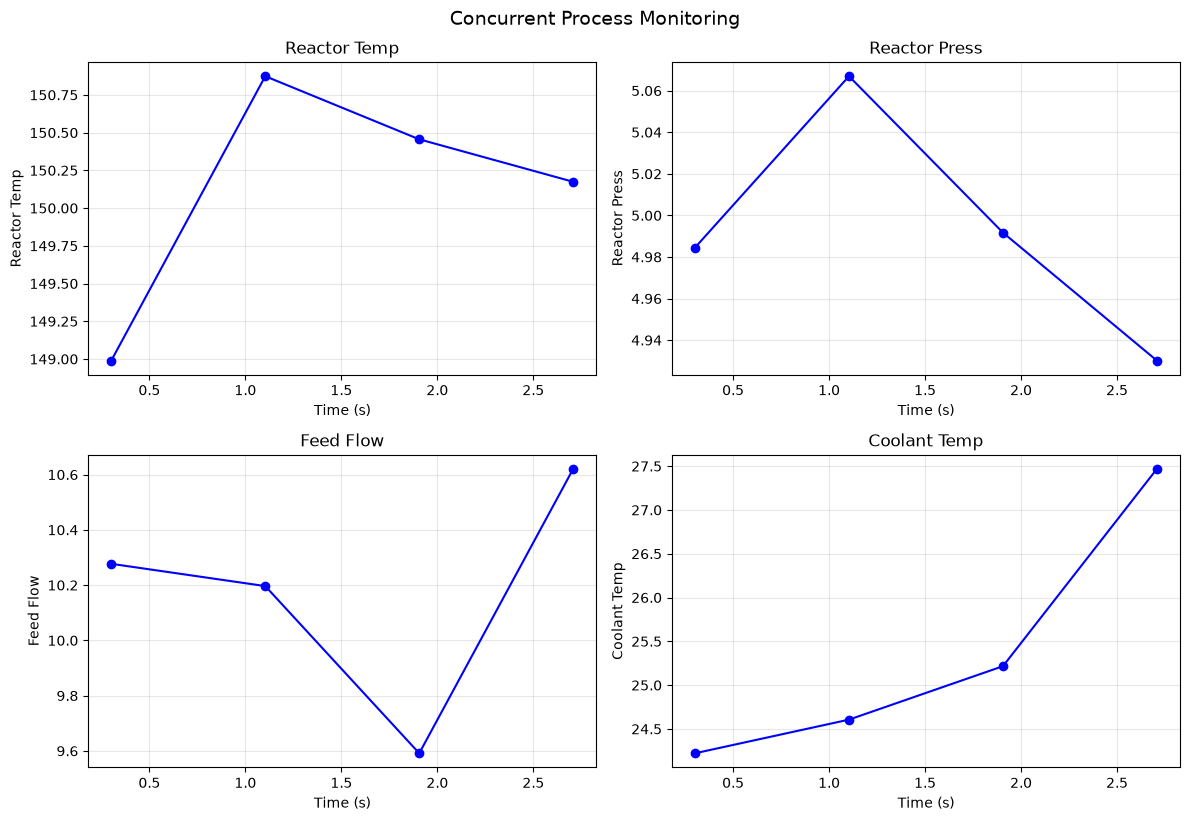
Let’s build a realistic example: monitoring multiple process variables (temperature, pressure, flow rate) from different sensors simultaneously, with data logging.
class ProcessSensor:
    """Simulate a process sensor with realistic behavior."""

    def __init__(self, name, units, setpoint, noise_std, read_time):
        self.name = name
        self.units = units
        self.setpoint = setpoint
        self.noise_std = noise_std
        self.read_time = read_time  # Time to get a reading
        self.value = setpoint

    async def read(self):
        """Read current value (async with simulated I/O delay)."""
        await asyncio.sleep(self.read_time)
        # Simulate process dynamics: random walk around setpoint
        self.value += np.random.normal(0, self.noise_std)
        # Mean reversion toward setpoint
        self.value += 0.1 * (self.setpoint - self.value)
        return {
            "sensor": self.name,
            "value": self.value,
            "units": self.units,
            "timestamp": time.time()
        }

# Create sensors for a chemical process
sensors = [
    ProcessSensor("Reactor_Temp", "°C", setpoint=150, noise_std=2, read_time=0.3),
    ProcessSensor("Reactor_Press", "bar", setpoint=5, noise_std=0.1, read_time=0.2),
    ProcessSensor("Feed_Flow", "L/min", setpoint=10, noise_std=0.5, read_time=0.25),
    ProcessSensor("Coolant_Temp", "°C", setpoint=25, noise_std=1, read_time=0.15),
]
async def monitor_process(sensors, duration=3, poll_interval=0.5):
    """Monitor all sensors concurrently for a specified duration."""
    start_time = time.time()
    all_data = {s.name: [] for s in sensors}

    while time.time() - start_time < duration:
        # Read all sensors concurrently
        readings = await asyncio.gather(*[s.read() for s in sensors])

        # Log the readings
        elapsed = time.time() - start_time
        print(f"\nt = {elapsed:.1f}s:")
        for reading in readings:
            print(f"  {reading['sensor']}: {reading['value']:.2f} {reading['units']}")
            all_data[reading['sensor']].append({
                'time': elapsed,
                'value': reading['value']
            })

        # Wait before next poll
        await asyncio.sleep(poll_interval)

    return all_data

print("Starting process monitoring...")
monitoring_data = await monitor_process(sensors, duration=3, poll_interval=0.5)
Starting process monitoring...
t = 0.3s:
  Reactor_Temp: 148.99 °C
  Reactor_Press: 4.98 bar
  Feed_Flow: 10.28 L/min
  Coolant_Temp: 24.22 °C
t = 1.1s:
  Reactor_Temp: 150.87 °C
  Reactor_Press: 5.07 bar
  Feed_Flow: 10.20 L/min
  Coolant_Temp: 24.61 °C
t = 1.9s:
  Reactor_Temp: 150.46 °C
  Reactor_Press: 4.99 bar
  Feed_Flow: 9.59 L/min
  Coolant_Temp: 25.22 °C
t = 2.7s:
  Reactor_Temp: 150.17 °C
  Reactor_Press: 4.93 bar
  Feed_Flow: 10.62 L/min
  Coolant_Temp: 27.47 °C
# Visualize the monitoring data
fig, axes = plt.subplots(2, 2, figsize=(12, 8))
axes = axes.flatten()

for ax, (sensor_name, data) in zip(axes, monitoring_data.items()):
    times = [d['time'] for d in data]
    values = [d['value'] for d in data]

    ax.plot(times, values, 'b-o', markersize=6)
    ax.set_xlabel('Time (s)')
    ax.set_ylabel(sensor_name.replace('_', ' '))
    ax.set_title(sensor_name.replace('_', ' '))
    ax.grid(True, alpha=0.3)

plt.tight_layout()
plt.suptitle('Concurrent Process Monitoring', y=1.02, fontsize=14);
External Libraries for Async I/O#
While we’ve used asyncio with thread executors for HTTP requests, there are dedicated async libraries that are more efficient:
aiohttp#
aiohttp is the most popular async HTTP client/server library.
import aiohttp

async def fetch_with_aiohttp(url):
    async with aiohttp.ClientSession() as session:
        async with session.get(url) as response:
            return await response.json()

# Fetch multiple URLs concurrently
async def fetch_all(urls):
    async with aiohttp.ClientSession() as session:
        tasks = [session.get(url) for url in urls]
        responses = await asyncio.gather(*tasks)
        return [await r.json() for r in responses]
httpx#
httpx provides a requests-like API with async support.
import httpx

async def fetch_with_httpx(url):
    async with httpx.AsyncClient() as client:
        response = await client.get(url)
        return response.json()
aiofiles#
aiofiles provides async file operations.
import aiofiles

async def read_file_async(filepath):
    async with aiofiles.open(filepath, mode='r') as f:
        contents = await f.read()
    return contents

async def write_file_async(filepath, data):
    async with aiofiles.open(filepath, mode='w') as f:
        await f.write(data)
These libraries are truly non-blocking (unlike our executor-based approach) and are more efficient for high-concurrency applications.
Combining Async with Parallel Processing#
Sometimes you need both: async for I/O and parallel for CPU. The pattern is:
Use async to gather data concurrently
Use multiprocessing to process the data in parallel
asyncio.to_thread() for Blocking Operations#
Python 3.9+ provides asyncio.to_thread() to run blocking code in a thread pool.
from scipy.integrate import solve_ivp

def solve_ode_blocking(k):
    """CPU-bound: Solve an ODE (blocking operation)."""
    def ode(t, C):
        return -k * C
    sol = solve_ivp(ode, [0, 10], [1.0], dense_output=True)
    return k, sol.y[0, -1]

async def fetch_and_compute(k):
    """Async wrapper that runs CPU-bound work in a thread."""
    # Simulate fetching the rate constant from an API
    await asyncio.sleep(0.1)  # I/O wait

    # Run CPU-bound computation in thread pool
    result = await asyncio.to_thread(solve_ode_blocking, k)
    return result

# Process multiple rate constants
k_values = np.linspace(0.1, 2.0, 10)

start = time.perf_counter()
results = await asyncio.gather(*[fetch_and_compute(k) for k in k_values])
elapsed = time.perf_counter() - start

print(f"Completed {len(results)} computations in {elapsed:.2f}s")
for k, final_conc in results[:3]:
    print(f"  k={k:.2f}: C_final={final_conc:.4f}")
print("  ...")
Completed 10 computations in 0.13s
  k=0.10: C_final=0.3680
  k=0.31: C_final=0.0446
  k=0.52: C_final=0.0054
  ...
Full Pattern: Async Fetch + Parallel Process#
For heavy CPU work, combine async with ProcessPoolExecutor:
from concurrent.futures import ProcessPoolExecutor
from joblib import Parallel, delayed

async def fetch_parameters():
    """Async: Fetch parameters from multiple sources."""
    async def fetch_one(source_id):
        await asyncio.sleep(np.random.uniform(0.1, 0.3))  # Simulate API call
        return {"source": source_id, "k": np.random.uniform(0.1, 2.0)}

    sources = [f"source_{i}" for i in range(8)]
    results = await asyncio.gather(*[fetch_one(s) for s in sources])
    return results

def heavy_computation(params):
    """CPU-bound: Heavy computation on fetched data."""
    k = params["k"]
    # Simulate heavy computation
    result = 0
    for i in range(100000):
        result += np.sin(k * i) ** 2
    return {"source": params["source"], "k": k, "result": result}

# Step 1: Fetch data concurrently (async)
print("Step 1: Fetching parameters asynchronously...")
start = time.perf_counter()
parameters = await fetch_parameters()
fetch_time = time.perf_counter() - start
print(f"  Fetched {len(parameters)} parameter sets in {fetch_time:.2f}s")

# Step 2: Process in parallel (joblib)
print("\nStep 2: Processing in parallel...")
start = time.perf_counter()
results = Parallel(n_jobs=-1)(delayed(heavy_computation)(p) for p in parameters)
compute_time = time.perf_counter() - start
print(f"  Processed {len(results)} results in {compute_time:.2f}s")

print(f"\nTotal time: {fetch_time + compute_time:.2f}s")
Step 1: Fetching parameters asynchronously...
  Fetched 8 parameter sets in 0.30s

Step 2: Processing in parallel...
  Processed 8 results in 0.54s

Total time: 0.84s
Common Pitfalls and Best Practices#
Pitfall 1: Blocking the Event Loop#
Never use blocking calls in async code!
# BAD: This blocks the entire event loop!
async def bad_example():
    time.sleep(1)  # WRONG! Blocks everything
    return "done"

# GOOD: Use async sleep
async def good_example():
    await asyncio.sleep(1)  # Correct! Other tasks can run
    return "done"

# For blocking I/O you can't avoid:
async def blocking_io_example():
    # Wrap blocking call in executor
    result = await asyncio.to_thread(time.sleep, 1)
    return "done"
Pitfall 2: Forgetting to await#
async def my_coroutine():
    return 42

# BAD: Forgetting await - you get a coroutine object, not the result
result_bad = my_coroutine()  # This is a coroutine, not 42!
print(f"Without await: {result_bad}")

# GOOD: Use await to get the actual result
result_good = await my_coroutine()
print(f"With await: {result_good}")
Without await: <coroutine object my_coroutine at 0x7f3175029010>
With await: 42
Pitfall 3: Not Handling Exceptions in gather()#
async def might_fail(x):
    if x == 3:
        raise ValueError(f"Don't like {x}!")
    await asyncio.sleep(0.1)
    return x * 2

# By default, gather() raises on first exception
try:
    results = await asyncio.gather(*[might_fail(i) for i in range(5)])
except ValueError as e:
    print(f"Caught error: {e}")

# Better: Use return_exceptions=True to get all results
results = await asyncio.gather(
    *[might_fail(i) for i in range(5)],
    return_exceptions=True
)

print("\nResults with return_exceptions=True:")
for i, r in enumerate(results):
    if isinstance(r, Exception):
        print(f"  Task {i}: ERROR - {r}")
    else:
        print(f"  Task {i}: {r}")
Caught error: Don't like 3!

Results with return_exceptions=True:
  Task 0: 0
  Task 1: 2
  Task 2: 4
  Task 3: ERROR - Don't like 3!
  Task 4: 8
Best Practices Summary#
Never block the event loop: Use
await asyncio.sleep()nottime.sleep(). Useasyncio.to_thread()for unavoidable blocking calls.Always await coroutines: Forgetting
awaitis a common bug.Use
return_exceptions=Trueingather()when you want all results even if some fail.Rate limit external APIs: Use semaphores to avoid overwhelming servers.
Use timeouts: Always set timeouts for external I/O with
asyncio.wait_for().Close resources properly: Use
async withfor connections and sessions.
Alternatives to asyncio#
While asyncio is Python’s built-in solution, there are alternatives worth knowing:
Trio#
Trio is a third-party async library with a focus on usability and correctness. It enforces “structured concurrency”—all tasks must complete before their parent scope exits.
import trio

async def fetch_data(url):
    # Similar to asyncio but with stricter guarantees
    await trio.sleep(1)
    return f"Data from {url}"

async def main():
    async with trio.open_nursery() as nursery:
        nursery.start_soon(fetch_data, "url1")
        nursery.start_soon(fetch_data, "url2")
    # All tasks guaranteed complete here

trio.run(main)
When to consider Trio: If you find asyncio’s task management confusing or want stricter guarantees about task completion.
AnyIO#
AnyIO provides a unified API that works with both asyncio and Trio. Write once, run on either.
import anyio

async def main():
    async with anyio.create_task_group() as tg:
        tg.start_soon(some_task)
        tg.start_soon(another_task)

# Run with asyncio backend
anyio.run(main, backend='asyncio')

# Or run with trio backend
anyio.run(main, backend='trio')
When to consider AnyIO: If you’re writing a library that should work with both asyncio and Trio users.
When to Use What: Decision Guide#
Here’s how async programming fits with the parallel processing techniques from the previous chapter:
Task Type |
Recommended Approach |
|---|---|
Many HTTP requests |
|
Polling multiple sensors |
|
CPU-heavy computations |
|
Mix of I/O and CPU |
|
Simple file reads |
Regular sync code (fast enough) |
Many file reads |
|
Real-time data streams |
|
Web server |
|
Rule of Thumb#
Waiting for responses? → Async
Crunching numbers? → Parallel
Both? → Async for I/O, then parallel for compute
Summary#
This chapter covered asynchronous programming in Python:
The Event Loop Model: One thread efficiently handling many I/O-bound tasks by switching between them during wait times.
Core Patterns:
async def/awaitfor defining and calling coroutinesasyncio.gather()for running multiple coroutines concurrentlyasyncio.create_task()for background tasksasyncio.as_completed()for processing results as they arriveasyncio.wait_for()for timeoutsSemaphores for rate limiting
Async Context Managers and Iterators: Using
async withandasync forfor resource management and streaming data.External Libraries:
aiohttpfor HTTP,httpxfor a requests-like API,aiofilesfor file I/O.Combining with Parallel Processing: Use
asyncio.to_thread()for blocking code, or combine async I/O withjoblibfor CPU-bound work.Best Practices: Don’t block the event loop, always await coroutines, handle exceptions properly, use timeouts.
Key Takeaway: Async is about concurrency (doing many things by interleaving), while parallel processing (previous chapter) is about parallelism (doing many things simultaneously on different cores). Use async when you’re I/O-bound, parallel when you’re CPU-bound, and combine them when you need both.