


Units#
Using units in python#
I think an essential feature in an engineering computational environment is properly handling units and unit conversions. Mathcad supports that pretty well. I wrote a package for doing it in Matlab. Today I am going to explore units in python. Here are some of the packages that I have found which support units to some extent
Handling units with the quantities module#
The quantities module (https://pypi.python.org/pypi/quantities) is another option for handling units in python. We are going to try the previous example. It does not work, because scipy.optimize.fsolve is not designed to work with units.
import quantities as u
import numpy as np

from scipy.optimize import fsolve

CA0 = 1 * u.mol / u.L
CA = 0.01 * u.mol / u.L
k = 1.0 / u.s


def func(t):
    return CA - CA0 * np.exp(-k * t)


tguess = 4 * u.s

print(func(tguess))

print(fsolve(func, tguess))
-0.008315638888734178 mol/L
---------------------------------------------------------------------------
ValueError                                Traceback (most recent call last)
Cell In[1], line 19
     15 tguess = 4 * u.s
     16
     17 print(func(tguess))
     18
---> 19 print(fsolve(func, tguess))

File /opt/hostedtoolcache/Python/3.12.15/x64/lib/python3.12/site-packages/scipy/optimize/_minpack_py.py:171, in fsolve(func, x0, args, fprime, full_output, col_deriv, xtol, maxfev, band, epsfcn, factor, diag)
    161 _wrapped_func.nfev = 0
    163 options = {'col_deriv': col_deriv,
    164            'xtol': xtol,
    165            'maxfev': maxfev,
   (...)    168            'factor': factor,
    169            'diag': diag}
--> 171 res = _root_hybr(_wrapped_func, x0, args, jac=fprime, **options)
    172 res.nfev = _wrapped_func.nfev
    174 if full_output:

File /opt/hostedtoolcache/Python/3.12.15/x64/lib/python3.12/site-packages/scipy/optimize/_minpack_py.py:239, in _root_hybr(func, x0, args, jac, col_deriv, xtol, maxfev, band, eps, factor, diag, **unknown_options)
    237 if not isinstance(args, tuple):
    238     args = (args,)
--> 239 shape, dtype = _check_func('fsolve', 'func', func, x0, args, n, (n,))
    240 if epsfcn is None:
    241     epsfcn = finfo(dtype).eps

File /opt/hostedtoolcache/Python/3.12.15/x64/lib/python3.12/site-packages/scipy/optimize/_minpack_py.py:24, in _check_func(checker, argname, thefunc, x0, args, numinputs, output_shape)
     22 def _check_func(checker, argname, thefunc, x0, args, numinputs,
     23                 output_shape=None):
---> 24     res = atleast_1d(thefunc(*((x0[:numinputs],) + args)))
     25     if (output_shape is not None) and (shape(res) != output_shape):
     26         if (output_shape[0] != 1):

File /opt/hostedtoolcache/Python/3.12.15/x64/lib/python3.12/site-packages/scipy/optimize/_minpack_py.py:159, in fsolve.<locals>._wrapped_func(*fargs)
    154 """
    155 Wrapped `func` to track the number of times
    156 the function has been called.
    157 """
    158 _wrapped_func.nfev += 1
--> 159 return func(*fargs)

Cell In[1], line 12, in func(t)
     11 def func(t):
---> 12     return CA - CA0 * np.exp(-k * t)

File /opt/hostedtoolcache/Python/3.12.15/x64/lib/python3.12/site-packages/quantities/quantity.py:334, in Quantity.__array_wrap__(self, obj, context, return_scalar)
    331 # For NumPy > 2.0 we either do the prepare or the wrap
    332 else:
    333     if not isinstance(obj, Quantity):
--> 334         return self.__array_prepare__(obj, context)
    335     else:
    336         return super().__array_wrap__(obj, context, return_scalar)

File /opt/hostedtoolcache/Python/3.12.15/x64/lib/python3.12/site-packages/quantities/quantity.py:314, in Quantity.__array_prepare__(self, obj, context)
    311     return obj
    313 try:
--> 314     res._dimensionality = p_dict[uf](*objs)
    315 except KeyError:
    316     raise ValueError(
    317         """ufunc %r not supported by quantities
    318         please file a bug report at https://github.com/python-quantities
    319         """ % uf
    320         )

File /opt/hostedtoolcache/Python/3.12.15/x64/lib/python3.12/site-packages/quantities/dimensionality.py:370, in _d_dimensionless(q1, out)
    368 def _d_dimensionless(q1, out=None):
    369     if getattr(q1, 'dimensionality', None):
--> 370         raise ValueError("quantity must be dimensionless")
    371     return Dimensionality()

ValueError: quantity must be dimensionless
Our function works fine with units, but fsolve does not pass numbers with units back to the function, so this function fails because the exponential function gets an argument with dimensions in it. We can create a new function that solves this problem. We need to “wrap” the function we want to solve to make sure that it uses units, but returns a float number. Then, we put the units back onto the final solved value. Here is how we do that.
import quantities as u
import numpy as np

from scipy.optimize import fsolve as _fsolve

CA0 = 1 * u.mol / u.L
CA = 0.01 * u.mol / u.L
k = 1.0 / u.s


def func(t):
    return CA - CA0 * np.exp(-k * t)


def fsolve(func, t0):
    "wrapped fsolve command to work with units"
    tU = t0 / float(t0)  # units on initial guess, normalized

    def wrapped_func(t):
        "t will be unitless, so we add unit to it. t * tU has units."
        return float(func(t * tU))

    (sol,) = _fsolve(wrapped_func, t0)
    return sol * tU


tguess = 4 * u.s

print(fsolve(func, tguess))
---------------------------------------------------------------------------
TypeError                                 Traceback (most recent call last)
Cell In[2], line 29
     25
     26
     27 tguess = 4 * u.s
     28
---> 29 print(fsolve(func, tguess))

Cell In[2], line 23, in fsolve(func, t0)
     19     def wrapped_func(t):
     20         "t will be unitless, so we add unit to it. t * tU has units."
     21         return float(func(t * tU))
     22
---> 23     (sol,) = _fsolve(wrapped_func, t0)
     24     return sol * tU

File /opt/hostedtoolcache/Python/3.12.15/x64/lib/python3.12/site-packages/scipy/optimize/_minpack_py.py:171, in fsolve(func, x0, args, fprime, full_output, col_deriv, xtol, maxfev, band, epsfcn, factor, diag)
    161 _wrapped_func.nfev = 0
    163 options = {'col_deriv': col_deriv,
    164            'xtol': xtol,
    165            'maxfev': maxfev,
   (...)    168            'factor': factor,
    169            'diag': diag}
--> 171 res = _root_hybr(_wrapped_func, x0, args, jac=fprime, **options)
    172 res.nfev = _wrapped_func.nfev
    174 if full_output:

File /opt/hostedtoolcache/Python/3.12.15/x64/lib/python3.12/site-packages/scipy/optimize/_minpack_py.py:239, in _root_hybr(func, x0, args, jac, col_deriv, xtol, maxfev, band, eps, factor, diag, **unknown_options)
    237 if not isinstance(args, tuple):
    238     args = (args,)
--> 239 shape, dtype = _check_func('fsolve', 'func', func, x0, args, n, (n,))
    240 if epsfcn is None:
    241     epsfcn = finfo(dtype).eps

File /opt/hostedtoolcache/Python/3.12.15/x64/lib/python3.12/site-packages/scipy/optimize/_minpack_py.py:24, in _check_func(checker, argname, thefunc, x0, args, numinputs, output_shape)
     22 def _check_func(checker, argname, thefunc, x0, args, numinputs,
     23                 output_shape=None):
---> 24     res = atleast_1d(thefunc(*((x0[:numinputs],) + args)))
     25     if (output_shape is not None) and (shape(res) != output_shape):
     26         if (output_shape[0] != 1):

File /opt/hostedtoolcache/Python/3.12.15/x64/lib/python3.12/site-packages/scipy/optimize/_minpack_py.py:159, in fsolve.<locals>._wrapped_func(*fargs)
    154 """
    155 Wrapped `func` to track the number of times
    156 the function has been called.
    157 """
    158 _wrapped_func.nfev += 1
--> 159 return func(*fargs)

Cell In[2], line 21, in fsolve.<locals>.wrapped_func(t)
     19     def wrapped_func(t):
     20         "t will be unitless, so we add unit to it. t * tU has units."
---> 21         return float(func(t * tU))

TypeError: only 0-dimensional arrays can be converted to Python scalars
It is a little tedious to do this, but we might only have to do it once if we store the new fsolve command in a module. You might notice the wrapped function we wrote above only works for one dimensional problems. If there are multiple dimensions, we have to be a little more careful. In the next example, we expand the wrapped function definition to do both one and multidimensional problems. It appears we cannot use numpy.array element-wise multiplication because you cannot mix units in an array. We will use lists instead. When the problem is one-dimensional, the function will take a scalar, but when it is multidimensional it will take a list or array. We will use try/except blocks to handle these two cases. We will assume multidimensional cases, and if that raises an exception because the argument is not a list, we assume it is scalar. Here is the more robust code example.
import quantities as u
import numpy as np

from scipy.optimize import fsolve as _fsolve


def fsolve(func, t0):
    """wrapped fsolve command to work with units. We get the units on
    the function argument, then wrap the function so we can add units
    to the argument and return floats. Finally we call the original
    fsolve from scipy. Note: this does not support all of the options
    to fsolve."""

    try:
        tU = [t / float(t) for t in t0]  # units on initial guess, normalized
    except TypeError:
        tU = t0 / float(t0)

    def wrapped_func(t):
        "t will be unitless, so we add unit to it. t * tU has units."
        try:
            T = [x1 * x2 for x1, x2 in zip(t, tU)]
        except TypeError:
            T = t * tU

        try:
            return [float(x) for x in func(T)]
        except TypeError:
            return float(func(T))

    sol = _fsolve(wrapped_func, t0)
    try:
        return [x1 * x2 for x1, x2 in zip(sol, tU)]
    except TypeError:
        return sol * tU


### Problem 1
CA0 = 1 * u.mol / u.L
CA = 0.01 * u.mol / u.L
k = 1.0 / u.s


def func(t):
    return CA - CA0 * np.exp(-k * t)


tguess = 4 * u.s
(sol1,) = fsolve(func, tguess)
print("sol1 = ", sol1)


### Problem 2
def func2(X):
    a, b = X
    return [a**2 - 4 * u.kg**2, b**2 - 25 * u.J**2]


Xguess = [2.2 * u.kg, 5.2 * u.J]
s2a, s2b = fsolve(func2, Xguess)
print("s2a = {0}\ns2b = {1}".format(s2a, s2b))
sol1 =  4.605170185988092 s
s2a = 1.9999999999999867 kg
s2b = 5.000000000000002 J
That is pretty good. There is still room for improvement in the wrapped function, as it does not support all of the options that scipy.optimize.fsolve supports. Here is a draft of a function that does that. We have to return different numbers of arguments depending on the value of full_output. This function works, but I have not fully tested all the options. Here are three examples that work, including one with an argument.
import quantities as u
import numpy as np

from scipy.optimize import fsolve as _fsolve


def fsolve(
    func,
    t0,
    args=(),
    fprime=None,
    full_output=0,
    col_deriv=0,
    xtol=1.49012e-08,
    maxfev=0,
    band=None,
    epsfcn=0.0,
    factor=100,
    diag=None,
):
    """wrapped fsolve command to work with units. We get the units on
    the function argument, then wrap the function so we can add units
    to the argument and return floats. Finally we call the original
    fsolve from scipy."""

    try:
        tU = [t / float(t) for t in t0]  # units on initial guess, normalized
    except TypeError:
        tU = t0 / float(t0)

    def wrapped_func(t, *args):
        "t will be unitless, so we add unit to it. t * tU has units."
        try:
            T = [x1 * x2 for x1, x2 in zip(t, tU)]
        except TypeError:
            T = t * tU

        try:
            return [float(x) for x in func(T, *args)]
        except TypeError:
            return float(func(T))

    sol = _fsolve(
        wrapped_func,
        t0,
        args,
        fprime,
        full_output,
        col_deriv,
        xtol,
        maxfev,
        band,
        epsfcn,
        factor,
        diag,
    )

    if full_output:
        x, infodict, ier, mesg = sol
        try:
            x = [x1 * x2 for x1, x2 in zip(x, tU)]
        except TypeError:
            x = x * tU
        return x, infodict, ier, mesg
    else:
        try:
            x = [x1 * x2 for x1, x2 in zip(sol, tU)]
        except TypeError:
            x = sol * tU
        return x


### Problem 1
CA0 = 1 * u.mol / u.L
CA = 0.01 * u.mol / u.L
k = 1.0 / u.s


def func(t):
    return CA - CA0 * np.exp(-k * t)


tguess = 4 * u.s
(sol1,) = fsolve(func, tguess)
print("sol1 = ", sol1)


### Problem 2
def func2(X):
    a, b = X
    return [a**2 - 4 * u.kg**2, b**2 - 25 * u.J**2]


Xguess = [2.2 * u.kg, 5.2 * u.J]
sol, infodict, ier, mesg = fsolve(func2, Xguess, full_output=1)
s2a, s2b = sol
print("s2a = {0}\ns2b = {1}".format(s2a, s2b))


### Problem 3 - with an arg
def func3(a, arg):
    return a**2 - 4 * u.kg**2 + arg**2


Xguess = 1.5 * u.kg
arg = 0.0 * u.kg

(sol3,) = fsolve(func3, Xguess, args=(arg,))

print("sol3 = ", sol3)
sol1 =  4.605170185988092 s
s2a = 1.9999999999999867 kg
s2b = 5.000000000000002 J
sol3 =  2.0 kg
The only downside I can see in the quantities module is that it only handle temperature differences, and not absolute temperatures. If you only use absolute temperatures, this would not be a problem I think. But, if you have mixed temperature scales, the quantities module does not convert them on an absolute scale.
import quantities as u

T = 20 * u.degC

print(T.rescale(u.K))
print(T.rescale(u.degF))
20.0 K
36.0 degF
Nevertheless, this module seems pretty promising, and there are a lot more features than shown here. Some documentation can be found at http://pythonhosted.org/quantities/.
Units in ODEs#
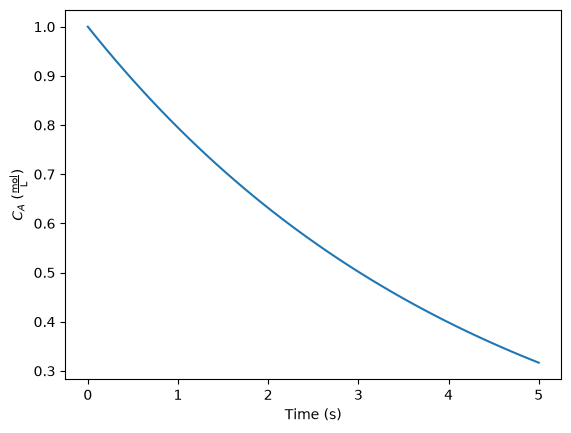
We reconsider a simple ODE but this time with units. We will use the quantities package again.
Here is the ODE, \(\frac{dCa}{dt} = -k Ca\) with \(C_A(0) = 1.0\) mol/L and \(k = 0.23\) 1/s. Compute the concentration after 5 s.
import quantities as u

k = 0.23 / u.s
Ca0 = 1 * u.mol / u.L


def dCadt(Ca, t):
    return -k * Ca


import numpy as np
from scipy.integrate import odeint

tspan = np.linspace(0, 5) * u.s

sol = odeint(dCadt, Ca0, tspan)

print(sol[-1])
[0.31663678]
No surprise, the units are lost. Now we start wrapping odeint. We wrap everything, and then test two examples including a single ODE, and a coupled set of ODEs with mixed units.
import quantities as u
import matplotlib.pyplot as plt

import numpy as np
from scipy.integrate import odeint as _odeint


def odeint(
    func,
    y0,
    t,
    args=(),
    Dfun=None,
    col_deriv=0,
    full_output=0,
    ml=None,
    mu=None,
    rtol=None,
    atol=None,
    tcrit=None,
    h0=0.0,
    hmax=0.0,
    hmin=0.0,
    ixpr=0,
    mxstep=0,
    mxhnil=0,
    mxordn=12,
    mxords=5,
    printmessg=0,
):
    def wrapped_func(Y0, T, *args):
        # put units on T if they are on the original t
        # check for units so we don't put them on twice
        if not hasattr(T, "units") and hasattr(t, "units"):
            T = T * t.units
        # now for the dependent variable units. Y0 may be a scalar or
        # a list or an array. we want to check each element of y0 for
        # units, and add them to the corresponding element of Y0 if we
        # need to.
        try:
            uY0 = [x for x in Y0]  # a list copy of contents of Y0
            # this works if y0 is an iterable, eg. a list or array
            for i, yi in enumerate(y0):
                if not hasattr(uY0[i], "units") and hasattr(yi, "units"):
                    uY0[i] = uY0[i] * yi.units

        except TypeError:
            # we have a scalar
            if not hasattr(Y0, "units") and hasattr(y0, "units"):
                uY0 = Y0 * y0.units

        val = func(uY0, t, *args)

        try:
            return np.array([float(x) for x in val])
        except TypeError:
            return float(val)

    if full_output:
        y, infodict = _odeint(
            wrapped_func,
            y0,
            t,
            args,
            Dfun,
            col_deriv,
            full_output,
            ml,
            mu,
            rtol,
            atol,
            tcrit,
            h0,
            hmax,
            hmin,
            ixpr,
            mxstep,
            mxhnil,
            mxordn,
            mxords,
            printmessg,
        )
    else:
        y = _odeint(
            wrapped_func,
            y0,
            t,
            args,
            Dfun,
            col_deriv,
            full_output,
            ml,
            mu,
            rtol,
            atol,
            tcrit,
            h0,
            hmax,
            hmin,
            ixpr,
            mxstep,
            mxhnil,
            mxordn,
            mxords,
            printmessg,
        )

    # now we need to put units onto the solution units should be the
    # same as y0. We cannot put mixed units in an array, so, we return a list
    m, n = y.shape  # y is an ndarray, so it has a shape
    if n > 1:  # more than one equation, we need a list
        uY = [0 for yi in range(n)]

        for i, yi in enumerate(y0):
            if not hasattr(uY[i], "units") and hasattr(yi, "units"):
                uY[i] = y[:, i] * yi.units
            else:
                uY[i] = y[:, i]

    else:
        uY = y * y0.units

    y = uY

    if full_output:
        return y, infodict
    else:
        return y


##################################################################
# test a single ODE
k = 0.23 / u.s
Ca0 = 1 * u.mol / u.L


def dCadt(Ca, t):
    return -k * Ca


tspan = np.linspace(0, 5) * u.s
sol = odeint(dCadt, Ca0, tspan)

print(sol[-1])

plt.plot(tspan, sol)
plt.xlabel("Time ({0})".format(tspan.dimensionality.latex))
plt.ylabel("$C_A$ ({0})".format(sol.dimensionality.latex))

##################################################################
# test coupled ODEs
lbmol = 453.59237 * u.mol

kprime = 0.0266 * lbmol / u.hr / u.lb
Fa0 = 1.08 * lbmol / u.hr
alpha = 0.0166 / u.lb
epsilon = -0.15


def dFdW(F, W, alpha0):
    X, y = F
    dXdW = kprime / Fa0 * (1.0 - X) / (1.0 + epsilon * X) * y
    dydW = -alpha0 * (1.0 + epsilon * X) / (2.0 * y)
    return [dXdW, dydW]


X0 = 0.0 * u.dimensionless
y0 = 1.0

# initial conditions
F0 = [X0, y0]  # one without units, one with units, both are dimensionless

wspan = np.linspace(0, 60) * u.lb

sol = odeint(dFdW, F0, wspan, args=(alpha,))
X, y = sol

print("Test 2")
print(X[-1])
print(y[-1])

plt.figure()
plt.plot(wspan, X, wspan, y)
plt.legend(["X", "$P/P_0$"])
plt.xlabel("Catalyst weight ({0})".format(wspan.dimensionality.latex));
[0.31663678] mol/L
Test 2
0.6655695781563288 dimensionless
0.26330047068114865
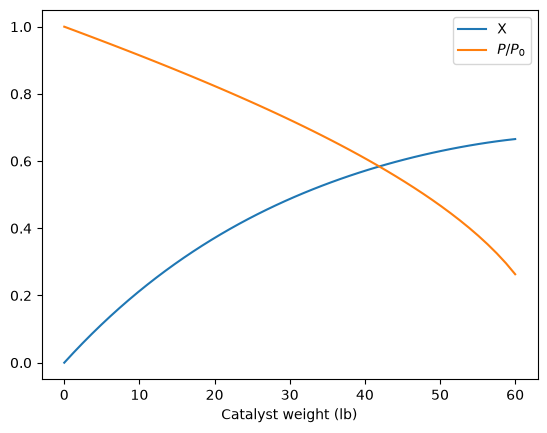
That is not too bad. This is another example of a function you would want to save in a module for reuse. There is one bad feature of the wrapped odeint function, and that is that it changes the solution for coupled ODEs from an ndarray to a list. That is necessary because you apparently cannot have mixed units in an ndarray. It is fine, however, to have a list of mixed units. This is not a huge problem, but it changes the syntax for plotting results for the wrapped odeint function compared to the unwrapped function without units.
Handling units with dimensionless equations#
As we have seen, handling units with third party functions is fragile, and often requires additional code to wrap the function to handle the units. An alternative approach that avoids the wrapping is to rescale the equations so they are dimensionless. Then, we should be able to use all the standard external functions without modification. We obtain the final solutions by rescaling back to the answers we want.
Before doing the examples, let us consider how the quantities package handles dimensionless numbers.
import quantities as u

a = 5 * u.m
L = 10 * u.m  # characteristic length

print(a / L)
print(type(a / L))
0.5 dimensionless
<class 'quantities.quantity.Quantity'>
As you can see, the dimensionless number is scaled properly, and is listed as dimensionless. The result is still an instance of a quantities object though. That is not likely to be a problem.
Now, we consider using fsolve with dimensionless equations. Our goal is to solve \(C_A = C_{A0} \exp(-k t)\) for the time required to reach a desired \(C_A\). We let \(X = Ca / Ca0\) and \(\tau = t * k\), which leads to \(X = \exp{-\tau}\) in dimensionless terms.
import quantities as u
import numpy as np
from scipy.optimize import fsolve

CA0 = 1 * u.mol / u.L
CA = 0.01 * u.mol / u.L  # desired exit concentration
k = 1.0 / u.s

# we need new dimensionless variables
# let X = Ca / Ca0
# so, Ca = Ca0 * X

# let tau = t * k
# so t = tau / k

X = CA / CA0  # desired exit dimensionless concentration


def func(tau):
    return X - np.exp(-tau)


tauguess = 2

print(func(tauguess))  # confirm we have a dimensionless function

(tau_sol,) = fsolve(func, tauguess)
t = tau_sol / k
print(t)
-0.1253352832366127 dimensionless
4.605170185988091 s
Now consider the ODE \(\frac{dCa}{dt} = -k Ca\). We let \(X = Ca/Ca0\), so \(Ca0 dX = dCa\). Let \(\tau = t * k\) which in this case is dimensionless. That means \(d\tau = k dt\). Substitution of these new variables leads to:
\(Ca0*k \frac{dX}{d\tau} = -k Ca0 X \)
or equivalently: \(\frac{dX}{d\tau} = -X \)
import quantities as u

k = 0.23 / u.s
Ca0 = 1 * u.mol / u.L

# Let X = Ca/Ca0  -> Ca = Ca0 * X  dCa = dX/Ca0
# let tau = t * k -> dt = 1/k dtau


def dXdtau(X, tau):
    return -X


import numpy as np
from scipy.integrate import odeint

tspan = np.linspace(0, 5) * u.s
tauspan = tspan * k

X0 = 1
X_sol = odeint(dXdtau, X0, tauspan)

print("Ca at t = {0} = {1}".format(tspan[-1], X_sol.flatten()[-1] * Ca0))
Ca at t = 5.0 s = 0.31663677735141815 mol/L
That is pretty much it. Using dimensionless quantities simplifies the need to write wrapper code, although it does increase the effort to rederive your equations (with corresponding increased opportunities to make mistakes). Using units to confirm your dimensionless derivation reduces those opportunities.