
Linear Programming#
This tutorial introduces Linear Programming (LP) using the discopt modeling API.
By the end, you will be able to:
Formulate an LP in standard form and translate it into
discoptcode.Solve classic LP problems (diet, transportation, production planning).
Understand how
discoptclassifies and dispatches LP models to a specialized LP engine.Recognize infeasible and unbounded LPs from solver output.
Prerequisites: basic linear algebra and familiarity with Python / NumPy.
import discopt.modeling as dm
import numpy as np
What is a Linear Program?#
A linear program is an optimization problem in which the objective function and every constraint are linear in the decision variables [Dantzig, 1963].
Standard Form#
where \(c \in \mathbb{R}^n\) is the cost vector, \(A \in \mathbb{R}^{m \times n}\) is the constraint matrix, and \(b \in \mathbb{R}^m\) is the right-hand side.
Any LP can be rewritten in standard form by introducing slack variables and splitting free variables into their positive and negative parts. For a comprehensive treatment, see [Bertsimas and Tsitsiklis, 1997].
Auto-detection. When you call
model.solve(),discoptanalyses the expression DAG and automatically detects LP structure. If the problem is a pure LP, it is dispatched to a specialised LP engine (HiGHS, with discopt-verified certificates) — no user intervention required.
Example 1 — The Diet Problem#
One of the earliest LP applications: choose quantities of five foods that satisfy daily nutrient requirements at minimum cost.
Food |
Protein |
Calcium |
Iron |
Calories |
Cost ($) |
|---|---|---|---|---|---|
Bread |
3 |
25 |
1.0 |
250 |
2.0 |
Milk |
8 |
120 |
0.1 |
150 |
3.5 |
Cheese |
15 |
200 |
0.5 |
400 |
8.0 |
Fish |
22 |
10 |
3.0 |
200 |
11.0 |
Steak |
31 |
15 |
5.5 |
450 |
25.0 |
Requirements: Protein \(\ge 55\), Calcium \(\ge 800\), Iron \(\ge 12\), Calories \(\ge 2000\).
# Diet problem data
foods = ["Bread", "Milk", "Cheese", "Fish", "Steak"]
nutrients = ["Protein", "Calcium", "Iron", "Calories"]
cost = np.array([2.0, 3.5, 8.0, 11.0, 25.0])

# Nutrient content per unit of each food (nutrients x foods)
A = np.array(
    [
        [3.0, 8.0, 15.0, 22.0, 31.0],  # Protein
        [25.0, 120.0, 200.0, 10.0, 15.0],  # Calcium
        [1.0, 0.1, 0.5, 3.0, 5.5],  # Iron
        [250.0, 150.0, 400.0, 200.0, 450.0],  # Calories
    ]
)
requirements = np.array([55.0, 800.0, 12.0, 2000.0])

print(f"Foods: {len(foods)}, Nutrients: {len(nutrients)}")
Foods: 5, Nutrients: 4
m = dm.Model("diet")

# Decision variables: units of each food (between 0 and 10)
x = m.continuous("x", shape=(5,), lb=0, ub=10)

# Objective: minimise total cost
m.minimize(dm.sum(lambda j: cost[j] * x[j], over=range(5)))

# Constraints: meet each nutrient requirement
for i in range(4):
    m.subject_to(
        dm.sum(lambda j: A[i, j] * x[j], over=range(5)) >= requirements[i],
        name=nutrients[i],
    )

print(m.summary())
Model: diet
  Variables: 5 (5 continuous, 0 integer/binary)
  Constraints: 4
  Objective: minimize Σ[5 terms]
  Parameters: 0
result = m.solve()

print(f"Status : {result.status}")
print(f"Cost   : ${result.objective:.2f}")
print(f"Time   : {result.wall_time:.3f}s\n")

print("Optimal diet:")
for j, food in enumerate(foods):
    qty = result.value(x)[j]
    if qty > 1e-6:
        print(f"  {food:>8s}: {qty:.3f} units  (${cost[j] * qty:.2f})")
Status : optimal
Cost   : $41.56
Time   : 0.036s

Optimal diet:
     Bread: 10.000 units  ($20.00)
      Milk: 4.540 units  ($15.89)
      Fish: 0.515 units  ($5.67)
Interpretation. The solver found the cheapest combination of foods that meets every nutrient requirement. Notice that some foods are at zero — they are too expensive per unit of nutrient delivered. The upper bounds (\(x_j \le 10\)) prevent any single food from dominating the solution unrealistically.
Problem Classification#
discopt ships a problem classifier that inspects the expression DAG and
determines the problem class (LP, QP, MILP, MIQP, NLP, MINLP).
When the model is an LP, the solver algebraically extracts the \(c\), \(A\), \(b\)
matrices and feeds them directly to a specialised LP interior-point method.
from discopt._relax.problem_classifier import classify_problem

pclass = classify_problem(m)
print(f"Problem class: {pclass}")
print(f"Is LP?         {pclass.name == 'LP'}")
Problem class: ProblemClass.LP
Is LP?         True
Example 2 — Transportation Problem#
Ship goods from 3 warehouses to 4 customers at minimum total shipping cost.
supply = np.array([300.0, 400.0, 500.0])
demand = np.array([200.0, 300.0, 250.0, 450.0])
ship_cost = np.array(
    [
        [8.0, 6.0, 10.0, 9.0],
        [9.0, 12.0, 7.0, 5.0],
        [14.0, 9.0, 16.0, 4.0],
    ]
)

n_warehouses, n_customers = ship_cost.shape
print(f"Total supply: {supply.sum()}, Total demand: {demand.sum()}")
Total supply: 1200.0, Total demand: 1200.0
mt = dm.Model("transport")

# Upper bound: no single shipment can exceed the smaller of supply/demand
max_ship = float(max(supply.max(), demand.max()))
x = mt.continuous("ship", shape=(n_warehouses, n_customers), lb=0, ub=max_ship)

# Minimise total shipping cost
mt.minimize(
    dm.sum(
        lambda i: dm.sum(lambda j: ship_cost[i, j] * x[i, j], over=range(n_customers)),
        over=range(n_warehouses),
    )
)

# Supply constraints
for i in range(n_warehouses):
    mt.subject_to(
        dm.sum(lambda j: x[i, j], over=range(n_customers)) <= supply[i],
        name=f"supply_{i}",
    )

# Demand constraints
for j in range(n_customers):
    mt.subject_to(
        dm.sum(lambda i: x[i, j], over=range(n_warehouses)) >= demand[j],
        name=f"demand_{j}",
    )

print(mt.summary())
Model: transport
  Variables: 12 (12 continuous, 0 integer/binary)
  Constraints: 7
  Objective: minimize Σ[3 terms]
  Parameters: 0
rt = mt.solve()

print(f"Status: {rt.status}, Cost: ${rt.objective:.2f}\n")

# Display shipment table
shipments = rt.value(x).reshape(n_warehouses, n_customers)
header = "         " + "".join(f"Cust {j:>2d}  " for j in range(n_customers))
print(header)
for i in range(n_warehouses):
    row = f"WH {i}:   " + "".join(f"{shipments[i, j]:>7.1f}  " for j in range(n_customers))
    print(row)
Status: optimal, Cost: $7250.00

         Cust  0  Cust  1  Cust  2  Cust  3
WH 0:      50.0    250.0      0.0      0.0
WH 1:     150.0      0.0    250.0      0.0
WH 2:       0.0     50.0      0.0    450.0
The transportation problem demonstrates a network-flow LP structure. The solver routes goods along the cheapest paths while respecting every warehouse’s supply limit and every customer’s demand.
Example 3 — Production Planning#
A factory produces 3 products using 4 shared resources. Maximise profit subject to resource availability.
Resource 1 |
Resource 2 |
Resource 3 |
Resource 4 |
Profit |
|
|---|---|---|---|---|---|
Product A |
2 |
1 |
0 |
3 |
20 |
Product B |
1 |
3 |
2 |
1 |
30 |
Product C |
3 |
2 |
1 |
2 |
25 |
Available |
120 |
150 |
80 |
180 |
profit = np.array([20.0, 30.0, 25.0])
usage = np.array(
    [
        [2.0, 1.0, 3.0],  # Resource 1
        [1.0, 3.0, 2.0],  # Resource 2
        [0.0, 2.0, 1.0],  # Resource 3
        [3.0, 1.0, 2.0],  # Resource 4
    ]
)
available = np.array([120.0, 150.0, 80.0, 180.0])

mp = dm.Model("production")
x = mp.continuous("prod", shape=(3,), lb=0)

mp.maximize(dm.sum(lambda j: profit[j] * x[j], over=range(3)))

for i in range(4):
    mp.subject_to(
        dm.sum(lambda j: usage[i, j] * x[j], over=range(3)) <= available[i],
        name=f"resource_{i}",
    )

rp = mp.solve()
print(f"Status: {rp.status}, Profit: ${rp.objective:.2f}")
Status: optimal, Profit: $1920.00
/Users/jkitchin/projects/discopt/python/discopt/debug/__init__.py:98: UserWarning: Variables with very large or infinite declared bounds: prod[0] (lb=0, ub=9.999e+19 [default]), prod[1] (lb=0, ub=9.999e+19 [default]), prod[2] (lb=0, ub=9.999e+19 [default]). Nonlinear tightening can adjust 3 bounds via separable_quadratic_upper_bound. A bound marked [default] is the box applied to a column you declared with no bounds: 9.999e+19, which is FINITE (it sits just below the 1e+20 infinity sentinel), so the solve can return a certified 'optimal' sitting on that corner rather than 'unbounded'. NLP solvers may fail (NaN, iteration_limit) when bounds exceed ~1e15. Add tighter explicit bounds, e.g. m.continuous('x', lb=0, ub=1000).
  return fn(*args, **kwargs)
import matplotlib.pyplot as plt

quantities = [float(v) for v in rp.value(x)]
product_names = ["Product A", "Product B", "Product C"]

fig, ax = plt.subplots(figsize=(6, 3.5))
bars = ax.bar(product_names, quantities, color=["#2196F3", "#4CAF50", "#FF9800"])
ax.set_ylabel("Units produced")
ax.set_title(f"Optimal production plan (profit = ${float(rp.objective):.2f})")
for bar, q in zip(bars, quantities):
    ax.text(
        bar.get_x() + bar.get_width() / 2,
        bar.get_height() + 0.5,
        f"{q:.1f}",
        ha="center",
        fontsize=10,
    )
plt.tight_layout()
plt.show()
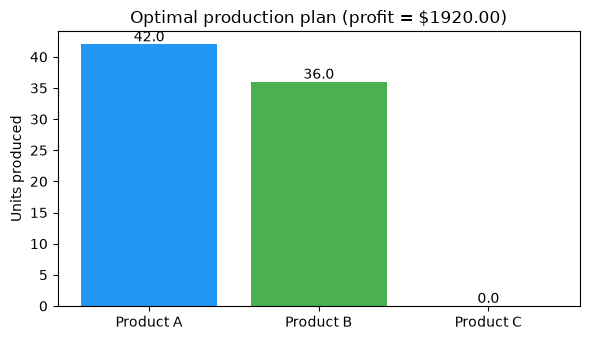
For maximisation problems, use m.maximize(profit_expr) directly.
The solver handles the conversion internally and reports the objective
in the natural (maximised) sense, so no manual negation is needed.
How discopt Solves LPs#
A model that classifies as a pure LP is routed to HiGHS at solve entry
[Huangfu and Hall, 2018], not to the spatial branch-and-bound engine. The route is
implemented in discopt.solvers.lp_milp_highs; set
DISCOPT_LP_MILP_BACKEND=rust to opt out and use discopt’s in-house Rust simplex
instead.
The important design point is that HiGHS’s own status label is never trusted as the certificate. discopt re-derives every claim itself:
Algebraic extraction —
extract_lp_data()walks the expression DAG to build the standard form \(\min c^\top x + d\) s.t. \(Ax = b\), \(l \le x \le u\) directly. No autodiff and no tracing are involved.Readback guard — the returned point is rejected if any component sits at the
1e20open-bound sentinel without a matching declared finite bound, and it must pass a feasibility check against the standard-form data.Recomputed objective — the objective is evaluated from the returned point, never read back from HiGHS.
Safe dual bound — an
optimallabel is certified only when a Neumaier–Shcherbina safe bound [Neumaier and Shcherbina, 2004], computed in Rust with double-double arithmetic from HiGHS’s dual vector, closes the gap to the primal point. Infeasibility needs a Farkas ray discopt verifies; unboundedness needs a primal ray and a verified feasible point.
Anything that fails a check returns status="error" with the reason rather than
falling back to another engine — a fallback would hide precisely the failure
class these guards exist to catch.
Note.
highspyis imported lazily, so a default MINLP solve never loads it; likewise JAX is not on the default solve path at all.
Edge Cases: Infeasible and Unbounded LPs#
Not every LP has an optimal solution. Two common failure modes are infeasibility (no point satisfies all constraints) and unboundedness (the objective can improve without limit). An LP solver detects both from its simplex certificate rather than by running out of iterations [Bertsimas and Tsitsiklis, 1997]: infeasibility from a Farkas dual ray, unboundedness from a primal ray along which the objective decreases without limit.
# --- Infeasible LP ---
mi = dm.Model("infeasible")
y = mi.continuous("y", shape=(2,), lb=0, ub=1)
mi.minimize(y[0] + y[1])

# Contradictory constraints: y0 + y1 >= 5 is impossible when both <= 1
mi.subject_to(y[0] + y[1] >= 5.0, name="impossible")

ri = mi.solve()
print(f"Status: {ri.status}")
Status: infeasible
# --- Unbounded LP ---
# `ub=np.inf` declares a genuinely unbounded variable. This matters: leaving `ub`
# off does NOT mean "no upper bound" -- it applies the default box (see below).
mu = dm.Model("unbounded")
z = mu.continuous("z", shape=(2,), lb=0, ub=np.inf)
mu.minimize(-z[0] - z[1])  # push both variables to +inf

# Only a lower bound constraint, no upper limit
mu.subject_to(z[0] + z[1] >= 1.0, name="lower")

ru = mu.solve()
print(f"Status: {ru.status}")
print(f"Objective: {ru.objective}")
Status: unbounded
Objective: None
/Users/jkitchin/projects/discopt/python/discopt/debug/__init__.py:98: UserWarning: Variables with very large or infinite declared bounds: z[0] (lb=0, ub=inf), z[1] (lb=0, ub=inf). NLP solvers may fail (NaN, iteration_limit) when bounds exceed ~1e15. Add tighter explicit bounds, e.g. m.continuous('x', lb=0, ub=1000).
  return fn(*args, **kwargs)
# The default box is large but FINITE (+/-9.999e19), so the same model without an
# explicit `ub` is a bounded LP and gets an ordinary optimal certificate -- at a
# corner with an enormous objective, not "unbounded".
mb = dm.Model("default_box")
zb = mb.continuous("z", shape=(2,), lb=0)  # ub defaults to 9.999e19
mb.minimize(-zb[0] - zb[1])
mb.subject_to(zb[0] + zb[1] >= 1.0, name="lower")

rb = mb.solve()
print(f"Declared upper bound: {mb._variables[0].ub[0]:.4e}")
print(f"Status: {rb.status}")
print(f"Objective: {rb.objective:.4e}")
Declared upper bound: 9.9990e+19
Status: optimal
Objective: -1.9998e+20
/Users/jkitchin/projects/discopt/python/discopt/debug/__init__.py:98: UserWarning: Variables with very large or infinite declared bounds: z[0] (lb=0, ub=9.999e+19 [default]), z[1] (lb=0, ub=9.999e+19 [default]). A bound marked [default] is the box applied to a column you declared with no bounds: 9.999e+19, which is FINITE (it sits just below the 1e+20 infinity sentinel), so the solve can return a certified 'optimal' sitting on that corner rather than 'unbounded'. NLP solvers may fail (NaN, iteration_limit) when bounds exceed ~1e15. Add tighter explicit bounds, e.g. m.continuous('x', lb=0, ub=1000).
  return fn(*args, **kwargs)
When formulating real-world LPs, always sanity-check that:
The feasible region is non-empty (constraints are not contradictory).
The objective is bounded over the feasible region (add upper/lower bounds if needed).
Bounds are not optional detail. Omitting
ubdoes not declare an unbounded variable – it applies the default box[-9.999e19, 9.999e19], and the solver then certifies the problem as posed: bounded, with an optimum at a corner of that box. If you mean unbounded, sayub=np.inf; if you mean a real limit, give it. A huge finite objective is the signal that a default bound became the binding constraint. Bounds beyond ~1e15 also cost accuracy in the nonlinear solvers, so prefer a tight, physically meaningful box wherever you have one.
Exercise — Blending Problem#
A refinery blends 4 crude oils into 2 products. Each crude has a quality rating and a cost per barrel:
Crude |
Quality |
Cost ($/bbl) |
Available (bbl) |
|---|---|---|---|
C1 |
8 |
45 |
5000 |
C2 |
6 |
35 |
5000 |
C3 |
4 |
25 |
5000 |
C4 |
2 |
15 |
5000 |
Product specifications:
Product |
Min quality |
Demand (bbl) |
Price ($/bbl) |
|---|---|---|---|
Premium |
6 |
3000 |
60 |
Regular |
4 |
4000 |
40 |
Decision variables: \(x_{ij}\) = barrels of crude \(i\) used in product \(j\).
Objective: maximise profit = revenue \(-\) cost.
Constraints:
Supply: \(\sum_j x_{ij} \le \text{available}_i\)
Demand: \(\sum_i x_{ij} \ge \text{demand}_j\)
Quality: \(\sum_i q_i\, x_{ij} \ge \bar{q}_j \sum_i x_{ij}\) (quality blending)
# Data
quality = np.array([8.0, 6.0, 4.0, 2.0])
crude_cost = np.array([45.0, 35.0, 25.0, 15.0])
avail = np.array([5000.0, 5000.0, 5000.0, 5000.0])
min_quality = np.array([6.0, 4.0])
demand_prod = np.array([3000.0, 4000.0])
price = np.array([60.0, 40.0])

n_crudes, n_products = 4, 2

# YOUR CODE HERE
# 1. Create a Model
# 2. Add continuous variables x with shape (n_crudes, n_products), lb=0
# 3. Set the objective: m.maximize(revenue - cost)
#    Revenue = sum over j: price[j] * sum over i: x[i,j]
#    Cost    = sum over j: sum over i: crude_cost[i] * x[i,j]
# 4. Add supply constraints for each crude
# 5. Add demand constraints for each product
# 6. Add quality blending constraints:
#    sum_i quality[i]*x[i,j] >= min_quality[j] * sum_i x[i,j]
# 7. Solve and print results
Solution#
Click to reveal
mb = dm.Model("blending")
x = mb.continuous("x", shape=(n_crudes, n_products), lb=0)

# Revenue - Cost
revenue = dm.sum(
    lambda j: price[j] * dm.sum(lambda i: x[i, j], over=range(n_crudes)),
    over=range(n_products),
)
total_cost = dm.sum(
    lambda j: dm.sum(lambda i: crude_cost[i] * x[i, j], over=range(n_crudes)),
    over=range(n_products),
)
mb.maximize(revenue - total_cost)

# Supply constraints
for i in range(n_crudes):
    mb.subject_to(
        dm.sum(lambda j: x[i, j], over=range(n_products)) <= avail[i],
        name=f"supply_{i}",
    )

# Demand constraints
for j in range(n_products):
    mb.subject_to(
        dm.sum(lambda i: x[i, j], over=range(n_crudes)) >= demand_prod[j],
        name=f"demand_{j}",
    )

# Quality blending constraints (linearised)
for j in range(n_products):
    mb.subject_to(
        dm.sum(lambda i: (quality[i] - min_quality[j]) * x[i, j], over=range(n_crudes)) >= 0,
        name=f"quality_{j}",
    )

rb = mb.solve()
print(f"Status: {rb.status}, Profit: ${rb.objective:.2f}")
blend = rb.value(x).reshape(n_crudes, n_products)
for i in range(n_crudes):
    for j in range(n_products):
        if blend[i, j] > 1.0:
            prod_name = ["Premium", "Regular"][j]
            print(f"  C{i + 1} -> {prod_name}: {blend[i, j]:.0f} bbl")
Status: optimal, Profit: $400000.00
  C1 -> Premium: 5000 bbl
  C2 -> Premium: 2500 bbl
  C2 -> Regular: 2500 bbl
  C3 -> Regular: 5000 bbl
  C4 -> Premium: 2500 bbl
  C4 -> Regular: 2500 bbl
/Users/jkitchin/projects/discopt/python/discopt/debug/__init__.py:98: UserWarning: Variables with very large or infinite declared bounds: x[0] (lb=0, ub=9.999e+19 [default]), x[1] (lb=0, ub=9.999e+19 [default]), x[2] (lb=0, ub=9.999e+19 [default]), x[3] (lb=0, ub=9.999e+19 [default]), x[4] (lb=0, ub=9.999e+19 [default]). Nonlinear tightening can adjust 8 bounds via separable_quadratic_upper_bound. A bound marked [default] is the box applied to a column you declared with no bounds: 9.999e+19, which is FINITE (it sits just below the 1e+20 infinity sentinel), so the solve can return a certified 'optimal' sitting on that corner rather than 'unbounded'. NLP solvers may fail (NaN, iteration_limit) when bounds exceed ~1e15. Add tighter explicit bounds, e.g. m.continuous('x', lb=0, ub=1000).
  return fn(*args, **kwargs)
Summary#
In this tutorial you learned to:
Formulate linear programs using
discopt.modeling— defining continuous variables, linear objectives, and linear constraints.Solve classic LP instances (diet, transportation, production planning) and interpret the results.
Classify problems using
classify_problem()to verify LP structure.Diagnose edge cases (infeasibility, unboundedness) from the solver status.
The LP class is the foundation of mathematical programming. Every MILP and many NLP relaxations reduce to LP subproblems [Boyd and Vandenberghe, 2004].
Next: Quadratic Programming (QP) extends the LP framework with quadratic objectives.