Indexing text in screenshots so they are searchable

| categories: search, image | tags:

I had an interesting conversation with someone yesterday about using screenshots to document a process. This has an appeal of simplicity, since it is agnostic to the process, but I wondered about the long-term utility. If the documentation is valuable, you would like to search it in the future, and we so far have limited capability to search images. But, if there is important text in the image, we might be able to recognize the text, and use it to index the images. Then they would become searchable at least for the text in the image. Don't get me wrong, it would be better if we could store that text directly, but suppose that just isn't possible, maybe because it is all stored in some kind of gui, or it is locked up in proprietary software. Here we explore the potential utility of this. We only explore getting text out of images here, not the actual indexing part. See this post for how we could integrate this into an actual index and search tool.

First we need an OCR engine. Tesseract (tesseract-ocr/tesseract) is supposed to be pretty good, and it easily installs via brew:

brew install tesseract
(shell-command-to-string "tesseract -v")
tesseract 3.02.02
 leptonica-1.72
  libjpeg 8d : libpng 1.6.17 : libtiff 4.0.3 : zlib 1.2.5

We will test it on some screenshots taken with the default settings on my Mac. Here is an example. This example has text in color boxes, and some shadowing on the left side because another window was near it and that is some OS effect.
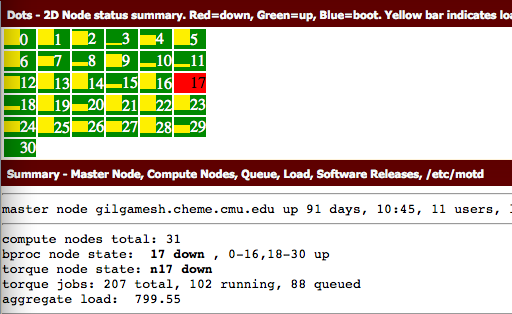
And here is the simplest text extraction.

tesseract ./screenshots/date-23-07-2015-time-19-56-52.png test
cat test.txt
rm test.txt
M. ~ an an. -.2... nuIunIrv- I.nd=d¢wn, a.....=.-p. u|u.=u_x. van" bar imam-

smm-ry ~ nu... ma, Camilla man Qu-In lui. Sdlwnu u._-. /-x/mu


master node q)l9amesh.chemc.cmn.edn up 9: days, mas, n nsersv

cutflmltc nude: men): :1

bpxoc node sum 17 dmln , o.1s,u.:n up
cuxque node state: n17 dawn

tuxqng jobs: 207 max, m2 nmmnq. as queued
aggregate laud: 799.55

That is not too good. I am skeptical it would be useful for anything. This page suggests improvements can be made with image clean up, but that image is pretty clear to me. There is a little shadow on the left side, but otherwise it is very readable to me. Let us try doubling the size of the image. Maybe that will help. Imagemagick lets us resize the image pretty easily.

convert -resize 200% ./screenshots/date-23-07-2015-time-19-56-52.png ./screenshots/doubled.png

tesseract ./screenshots/doubled.png test
cat test.txt
rm test.txt ./screenshots/doubled.png
- 2D Node status summary. Rnd=down, Groun=up, BIu¢=boot. Vdlow bur indium --


Summlry - Hnflnr Mods, Compuh Nodu, Quuue, Land, Sofiwan Ric:-as, /dzc/maul

master node gilqnmesh.cheme.cmu.edu up 91 days, 10:45, 11 users, .'

compute nodes total: 31

bproc node state: 17 down , 0-16,18-30 up
torque node state: n17 down

torque jobs: 207 total, 102 running, 88 queued
aggregate load: 799.55

That is a very remarkable improvement! This looks very useful, and could even be used for indexing. Interestingly, the white text on colored backgrounds does not do as well. That could be important to remember in designing the GUI front end if you have any say in it. Let's try a few others.
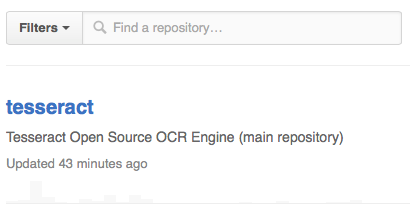
convert -resize 200% ./screenshots/date-23-07-2015-time-20-01-43.png ./screenshots/doubled.png

tesseract ./screenshots/doubled.png test
cat test.txt
rm test.txt ./screenshots/doubled.png
Fllbn V Q I-"Ind a repository...

tesseract
Tesseract Open Source OCR Enghe (main repository)
Updated 43 minutes ago

That is also pretty good. Again, the text on colored backgrounds is less good than that on a white background. And one more from Twitter.

convert -resize 200% ./screenshots/date-23-07-2015-time-20-05-59.png ./screenshots/doubled.png

tesseract ./screenshots/doubled.png test
cat test.txt
rm test.txt ./screenshots/doubled.png
chEnected AIchE .-.ChEnected - 5h
C h E AlChE Academy: Take AlChE‘s Pneumatic Conveying 0! Bulk Solids Course and
learn practical design principles. r1m.ag/|IJcN

Overall pretty good. I am pretty convinced that the right screenshots could be an easy way to document some processes conveniently and that they could be searched in the future. Some testing would need to be done on how to do the OCR, and it does not appear that one recipe will work for all images.

Nevertheless, a program could pretty easily be developed to index a directory of screenshots, do the OCR on each image, and index the resulting text so it can be searched. It is even conceivable that several indexes could be made using different OCR methods that might work better for different types of images. Another improvement would be if some metadata could be associated with the screenshot including what instrument it is a shot of, who took it, etc… This starts to move in a direction that requires dedicated screenshot tools, and away from the simplicity of the PrintScreen button, but it adds value to the data that makes it easier to find later.

The beauty of the screenshot is that it is what you saw at the time, and it captures things as they were. It doesn't capture anything "behind the scenes" or off-screen of course, so there is certainly room to lose information this way. A careful analysis of what information is captured and what is lost would be important to assess the long-term value of capturing the process this way as opposed to any other way. There certainly is a balance of how much effort it takes to capture it and the value of the information in the future, and cost to rerun it if it isn't found in the future.

Copyright (C) 2015 by John Kitchin. See the License for information about copying.

org-mode source

Org-mode version = 8.2.10

Discuss on Twitter

A sudo org-link and sh block

| categories: orgmode, babel, emacs | tags:

Shell blocks in org-mode are pretty useful, but they are a little limited in that it is not obvious how to run a sudo command in them.

So for example, this gives me a permission denied error.

ls /var/audit

One way to get around this is to create an org-mode link like this one:

;http://stackoverflow.com/questions/2472273/how-do-i-run-a-sudo-command-in-emacs
(org-add-link-type
 "sudo"
 (lambda (cmd)
   "Run CMD with sudo."
   (shell-command
    (concat "echo " (shell-quote-argument (read-passwd "Password? "))
            " | sudo -S " cmd))))

Now you can create a link like ls /var/audit, and when you click on it you will be prompted for a password, and then you will see a buffer containing the output. To get an actual sudo code block, you need a new org babel library. Here is an example of what it might look like. Tangle this file to generate the library. Note: This is a lightly modified version of ob-emacs-lisp.el, and I have not tested it very thoroughly.

;;; ob-sudo.el --- An org-mode source block to run shell commands as sudo

;;; Commentary:
;; Runs the block of code as a shell command with sudo.

;;; Code:

(defun org-babel-execute:sudo (body params)
  "Run BODY as a shell command using sudo."
  (let* ((passwd (shell-quote-argument (read-passwd "Password? ")))
         (result (shell-command-to-string
                  (concat "echo " passwd
                          " | sudo -S " body))))
    ;; this is verbatim from ob-emacs-lisp
    (org-babel-result-cond (cdr (assoc :result-params params))
      (let ((print-level nil)
            (print-length nil))
        (if (or (member "scalar" (cdr (assoc :result-params params)))
                (member "verbatim" (cdr (assoc :result-params params))))
            (format "%S" result)
          (format "%s" result)))
      (org-babel-reassemble-table
       result
       (org-babel-pick-name (cdr (assoc :colname-names params))
                            (cdr (assoc :colnames params)))
       (org-babel-pick-name (cdr (assoc :rowname-names params))
                            (cdr (assoc :rownames params)))))))

(provide 'ob-sudo)
;;; ob-sudo.el ends here

Let us add the current dir to our path so we can load it. If you use this a lot, you should put the library on your permanent path.

(add-to-list 'load-path (expand-file-name "."))

Now, add the sudo "language" to org-babel-load-languages.

(org-babel-do-load-languages
 'org-babel-load-languages
 '((emacs-lisp . t)
   (python . t)
   (sh . t)
   (matlab . t)
   (sqlite . t)
   (ruby . t)
   (perl . t)
   (org . t)
   (dot . t)
   (plantuml . t)
   (R . t)
   (sudo . t)))

And, here it is in action. Hopefully I am not giving away some important information here!

ls /var/audit
20141106003522.20141110021519
20141110021548.crash_recovery
20141112154126.crash_recovery
20141119201541.20141122145259
20141122145317.20141124214930
20141124215000.crash_recovery
20141126062011.20141202192451
20141202192507.crash_recovery
20141210133306.crash_recovery
20141225181819.20150106015256
20150106015325.20150111010018
20150111010121.crash_recovery
20150115195518.20150115200101
20150115200110.crash_recovery
20150123061227.20150215123411
20150215123454.crash_recovery
20150225004740.20150310201600
20150310201633.20150314214730
20150314214807.crash_recovery
20150323145600.20150329170647
20150329170721.crash_recovery
20150407215846.20150413000423
20150413000438.20150421122044
20150421122104.20150518122545
20150518122616.20150518124432
20150518124432.20150518124513
20150518124513.20150518125437
20150518125437.20150518125935
20150518125935.20150518132111
20150518132111.20150531202621
20150531202719.20150601123612
20150601123612.20150601124932
20150601124932.20150601125151
20150601125151.20150601125555
20150601125555.20150601131947
20150601131947.20150601132421
20150601132421.20150601133735
20150601133735.20150601140740
20150601140740.20150601154012
20150601154012.20150601155125
20150601155125.20150601155215
20150601155215.20150601160937
20150601160937.crash_recovery
20150613061543.20150614054541
20150614054541.20150625165357
20150625165432.20150625200623
20150625200623.20150628042242
20150628042242.20150628103628
20150628103628.20150630052100
20150630052100.20150701232519
20150702005345.20150710203212
20150710203226.not_terminated
current

Summary thoughts: I will reiterate again I have not tested this a lot, I was mostly interested in trying to make a new sh block with sudo support. Let me know if it has issues for you, and make sure you have backups of things it could mess up!

Copyright (C) 2015 by John Kitchin. See the License for information about copying.

org-mode source

Org-mode version = 8.2.10

Discuss on Twitter

Drag images and files onto org-mode and insert a link to them

| categories: video, emacs | tags:

I want to drag and drop an image onto an org mode file and get a link to that file. This would be used for finding images in Finder, and then dragging them to the Emacs buffer. There is org-download.el which looks like it should do something like this too, but it did not work out of the box for me, and I want to add a few wrinkles to it. For a simple drag-n-drop, I just want the link to appear. With ctrl-drag-n-drop I want to add an attr_org line to set the image size, add a caption line, insert the image at the beginning of the line where the mouse cursor is, put the cursor on the caption line and then refresh the inline images in org-mode so the image is immediately visible.

While we are at let us also make it possible to drag file links onto org-files, instead of having the files open. Again, for a simple drag-n-drop, I want a link inserted. For ctrl-drag-n-drop we open the file, and for Meta (alt) drag-n-drop, we insert an attachfile link. You can also define s-drag-n-drop (Super/command) and C-s and M-s drag-n-drop if you can think of things to do with that.

Here is the code to make those things happen. Or watch the video: https://www.youtube.com/watch?v=ahqKXbBVjpQ

(defun my-dnd-func (event)
  (interactive "e")
  (goto-char (nth 1 (event-start event)))
  (x-focus-frame nil)
  (let* ((payload (car (last event)))
         (type (car payload))
         (fname (cadr payload))
         (img-regexp "\\(png\\|jp[e]?g\\)\\>"))
    (cond
     ;; insert image link
     ((and  (eq 'drag-n-drop (car event))
            (eq 'file type)
            (string-match img-regexp fname))
      (insert (format "[[%s]]" fname))
      (org-display-inline-images t t))
     ;; insert image link with caption
     ((and  (eq 'C-drag-n-drop (car event))
            (eq 'file type)
            (string-match img-regexp fname))
      (insert "#+ATTR_ORG: :width 300\n")
      (insert (concat  "#+CAPTION: " (read-input "Caption: ") "\n"))
      (insert (format "[[%s]]" fname))
      (org-display-inline-images t t))
     ;; C-drag-n-drop to open a file
     ((and  (eq 'C-drag-n-drop (car event))
            (eq 'file type))
      (find-file fname))
     ((and (eq 'M-drag-n-drop (car event))
           (eq 'file type))
      (insert (format "[[attachfile:%s]]" fname)))
     ;; regular drag and drop on file
     ((eq 'file type)
      (insert (format "[[%s]]\n" fname)))
     (t
      (error "I am not equipped for dnd on %s" payload)))))


(define-key org-mode-map (kbd "<drag-n-drop>") 'my-dnd-func)
(define-key org-mode-map (kbd "<C-drag-n-drop>") 'my-dnd-func)
(define-key org-mode-map (kbd "<M-drag-n-drop>") 'my-dnd-func)
my-dnd-func

jkitchin.json

Copyright (C) 2015 by John Kitchin. See the License for information about copying.

org-mode source

Org-mode version = 8.2.10

Discuss on Twitter

Acronym minor mode for Emacs

| categories: tooltip, emacs, video | tags:

Three letter acronyms (TLA) are pretty common, as are other kinds of acronyms, e.g. ferromagnetic (FM), anti-ferromagnetic (AFM), National Security Agency (NSA), even Escape-Meta-Alt-Control-Shift (EMACS) etc… in technical documents. As you get away from the definition, it can get hard to remember what they are, so here we develop a minor mode that will put a tooltip over acronyms that hopefully shows what they mean.

You can see this in action here: https://www.youtube.com/watch?v=2G2isMO6E2c

When we turn the mode on, it will scan the buffer looking for an acronym pattern, deduce its likely meaning, and put tooltips on every subsequent use of the acronym. The pattern we will look for is a sequence of uppercase letters surrounded by parentheses. We will assume that if we find N uppercase letters, that the previous N words contain the definition of the acronym. This is pretty approximate, but it is not likely to be that wrong. Then, we will use button-lock to put the tooltips on all subsequent instances of acronyms. We don't want flyspell interfering with the tooltips, so we remove the overlays if they are there.

Unlike previous examples where we just use button-lock, here we wrap the feature into a minor mode that you can turn on and off. Note, you cannot add new acronyms and have them have tooltips. You have to refresh the buttons.

Here is the minor mode code. We use the interesting rx package to build the regular expression. It is more verbose, but a little easier to read than a straight regexp like (concat "\\<" (match-string 1) "\\>") in my opinion.

(make-variable-buffer-local
  (defvar *acronym-buttons* '() "list of acronym buttons"))

(require 'rx)

(defun highlight-acronyms ()
  (save-excursion
    (let ((case-fold-search nil))
      (goto-char (point-min))
      (while (re-search-forward "(\\([A-Z]+\\))" nil t)
        (when flyspell-mode
          (flyspell-delete-region-overlays (match-beginning 1)
                                           (match-end 1)))
        (let* ((acronym (match-string 1))
               (p (point))
               (definition (save-excursion
                             (goto-char (match-beginning 1))
                             (backward-word (length acronym))
                             (buffer-substring (point) p))))
          (add-to-list '*acronym-buttons*
                       (button-lock-set-button
                        (rx word-start (eval (match-string 1)) word-end)
                        nil
                        :help-echo definition)))))))


(defun remove-acronym-buttons ()
  (dolist (button *acronym-buttons*)
      (button-lock-unset-button button))
  (setq *acronym-buttons* '()))


(defun refresh-acronyms ()
  "Refresh acronym tooltips in buffer."
  (interactive)
  (remove-acronym-buttons)
  (highlight-acronyms))


;;;###autoload
(define-minor-mode acronym-mode
  "Put definitions on acronyms."
  :lighter " AM"
  (if acronym-mode
      (highlight-acronyms)
    (remove-acronym-buttons)))


(provide 'acronym-mode)
acronym-mode

There it is. Now any time we have an acronym like EMACS we can mouse over it, or type C-h . on the acronym to see how it was previously defined. If you don't like it, you can turn it off!

Copyright (C) 2015 by John Kitchin. See the License for information about copying.

org-mode source

Org-mode version = 8.2.10

Discuss on Twitter

Indexing headlines in org files with swish-e with laser-sharp results

| categories: swishe, orgmode, emacs | tags:

So far, it looks like swish-e is able to do some pretty focused searches on specific content types. However, the return results are not actually that sharp; in the way we have been using swish-e, it can only tell us the document path that matches, not where in the document the match is. To fix that, we need a new approach to what a "document" is, and a new approach to indexing. We will finally use the "-s prog" option in swish-e which runs an external program that prints stuff to stdout for swish-e to index. We will treat each headline in an org file as a "document" but rather than have the path to the file, we will put an org-mode link there that will take us right to the point of interest.

You can see this in action here: https://www.youtube.com/watch?v=bTwXtEb5Ng8

Basically, we need a program to output chunks like this for each headline in an org-file:

Path-Name: [[elisp:(progn (find-file "/Users/jkitchin/blogofile-jkitchin.github.com/_blog/ase-db.org") (goto-char 1))]]
Content-Length: 247
Document-Type: XML*

<headline><title>Using the ase database module</title><properties><FILE>/Users/jkitchin/blogofile-jkitchin.github.com/_blog/ase-db.org</FILE><BLOCKED></BLOCKED><categories>python, ase</categories><CATEGORY>ase-db</CATEGORY></properties></headline>

Then we need to tell swish-e to run the program and index its output. Here is the program to do that.

:;exec emacs -batch -l $0 "$@"
(require 'org)
(require 'xml)
(require 'cl)

(add-to-list 'load-path "~/Dropbox/kitchingroup/jmax/elpa/f-20140828.716")
(add-to-list 'load-path "~/Dropbox/kitchingroup/jmax/elpa/s-20140910.334")
(add-to-list 'load-path "~/Dropbox/kitchingroup/jmax/elpa/dash-20141201.2206")
(require 'f)

(defun print-tag (name attrs &optional closingp)
  "Print an xml tag with symbol NAME and ATTRS (a cons list of (attribute . value)).
if CLOSINGP print the closing tag instead."
  (format
   "<%s%s%s>"
   (if closingp "/" "")
   name
   (if (and attrs (not closingp))
       (concat
        " "
        (mapconcat
         (lambda (x)
           (format "%s=\"%s\""
                   (car x)
                   (xml-escape-string (cdr x))))
         attrs
         " "))
     "")))

(defmacro tag (name attributes &rest body)
  "macro to create an xml tag with NAME, ATTRIBUTES. BODY is executed in the tag."
  `(format "%s%s%s"
           (print-tag ,name ,attributes nil)
           (concat
            ,@body)
           (print-tag ,name nil t)))

(defun headline-xml (headline)
  "Return xml representation of an element HEADLINE."
  (let ((title (org-element-property :title headline))
        (properties (save-excursion
                      (goto-char
                       (org-element-property :begin headline))
                      (org-entry-properties))))
    (tag 'headline ()
         (tag 'title () (xml-escape-string (mapconcat 'identity title " ")))
         (when properties
           (tag 'properties ()
                (mapconcat
                 'identity
                 (loop for (p . v) in properties
                       collect (tag p () (xml-escape-string v)))
                 ""))))))

(defun headline-document (headline)
  "Return the headline \"document\" for swish-e to index."
  (let ((xml (replace-regexp-in-string
              "[^[:ascii:]]" ""
              (headline-xml headline))))
    (format "Path-Name: [[elisp:(progn (find-file \"%s\") (goto-char %s) (show-children))][link]]
Content-Length: %s
Document-Type: XML*

%s" (buffer-file-name)
(org-element-property :begin headline)
(length xml)
xml)))

(defun process-file (fname)
  "Print the `headline-document' for each headline in FNAME."
  (with-current-buffer (find-file-noselect fname)
    (mapconcat 'identity
               (org-element-map (org-element-parse-buffer)
                   'headline
                 (lambda (headline)
                   (princ (headline-document headline))))
               "")))

;; Here is the main work in the script.
(loop for dir in '("/Users/jkitchin/blogofile-jkitchin.github.com/_blog")
      do
      (loop for fname in (f-entries
                          dir
                          (lambda (x)
                            (string=  "org"  (file-name-extension x)))
                          t)
            do (ignore-errors
                 (princ (process-file fname)))))

Now we need a configuration file:

# Example configuration file

# where to save the index
IndexFile /Users/jkitchin/blogofile-jkitchin.github.com/_blog/index-org-headlines.swish-e

# index all tags for searching
UndefinedMetaTags auto
UndefinedXMLAttributes auto

And we run the indexer, I did this in an actual shell. For some reason, it was not possible to run here. The output is pretty useful though, as it tells you what MetaNames are searchable.

swish-e -c swish-org-headlines.conf -S prog -i ./swish-org-headlines.el
10:17 $ swish-e -c swish-org-headlines.conf -S prog -i ./swish-org-headlines.el
Indexing Data Source: "External-Program"
Indexing "./swish-org-headlines.el"
External Program found: ./swish-org-headlines.el
**Adding automatic MetaName 'headline' found in file '[[elisp:(progn (find-file "/Users/jkitchin/blogofile-jkitchin.github.com/_blog/writing-exams-in-orgmode.org") (goto-char 18) (show-children))][link]]'
**Adding automatic MetaName 'title' found in file '[[elisp:(progn (find-file "/Users/jkitchin/blogofile-jkitchin.github.com/_blog/writing-exams-in-orgmode.org") (goto-char 18) (show-children))][link]]'
**Adding automatic MetaName 'properties' found in file '[[elisp:(progn (find-file "/Users/jkitchin/blogofile-jkitchin.github.com/_blog/writing-exams-in-orgmode.org") (goto-char 18) (show-children))][link]]'
**Adding automatic MetaName 'file' found in file '[[elisp:(progn (find-file "/Users/jkitchin/blogofile-jkitchin.github.com/_blog/writing-exams-in-orgmode.org") (goto-char 18) (show-children))][link]]'
**Adding automatic MetaName 'blocked' found in file '[[elisp:(progn (find-file "/Users/jkitchin/blogofile-jkitchin.github.com/_blog/writing-exams-in-orgmode.org") (goto-char 18) (show-children))][link]]'
**Adding automatic MetaName 'categories' found in file '[[elisp:(progn (find-file "/Users/jkitchin/blogofile-jkitchin.github.com/_blog/writing-exams-in-orgmode.org") (goto-char 18) (show-children))][link]]'
**Adding automatic MetaName 'date' found in file '[[elisp:(progn (find-file "/Users/jkitchin/blogofile-jkitchin.github.com/_blog/writing-exams-in-orgmode.org") (goto-char 18) (show-children))][link]]'
**Adding automatic MetaName 'updated' found in file '[[elisp:(progn (find-file "/Users/jkitchin/blogofile-jkitchin.github.com/_blog/writing-exams-in-orgmode.org") (goto-char 18) (show-children))][link]]'
**Adding automatic MetaName 'category' found in file '[[elisp:(progn (find-file "/Users/jkitchin/blogofile-jkitchin.github.com/_blog/writing-exams-in-orgmode.org") (goto-char 18) (show-children))][link]]'
**Adding automatic MetaName 'points' found in file '[[elisp:(progn (find-file "/Users/jkitchin/blogofile-jkitchin.github.com/_blog/writing-exams-in-orgmode.org") (goto-char 1391) (show-children))][link]]'
**Adding automatic MetaName 'tags' found in file '[[elisp:(progn (find-file "/Users/jkitchin/blogofile-jkitchin.github.com/_blog/why-org-mode.org") (goto-char 25) (show-children))][link]]'
**Adding automatic MetaName 'alltags' found in file '[[elisp:(progn (find-file "/Users/jkitchin/blogofile-jkitchin.github.com/_blog/why-org-mode.org") (goto-char 25) (show-children))][link]]'
**Adding automatic MetaName 'todo' found in file '[[elisp:(progn (find-file "/Users/jkitchin/blogofile-jkitchin.github.com/_blog/why-org-mode.org") (goto-char 1733) (show-children))][link]]'
**Adding automatic MetaName 'closed' found in file '[[elisp:(progn (find-file "/Users/jkitchin/blogofile-jkitchin.github.com/_blog/why-org-mode.org") (goto-char 1733) (show-children))][link]]'
**Adding automatic MetaName 'timestamp_ia' found in file '[[elisp:(progn (find-file "/Users/jkitchin/blogofile-jkitchin.github.com/_blog/pdfsync.org") (goto-char 28) (show-children))][link]]'
**Adding automatic MetaName 'id' found in file '[[elisp:(progn (find-file "/Users/jkitchin/blogofile-jkitchin.github.com/_blog/org-to-docx-pandoc.org") (goto-char 5056) (show-children))][link]]'
**Adding automatic MetaName 'custom_id' found in file '[[elisp:(progn (find-file "/Users/jkitchin/blogofile-jkitchin.github.com/_blog/org-db.org") (goto-char 1311) (show-children))][link]]'
**Adding automatic MetaName 'calculation' found in file '[[elisp:(progn (find-file "/Users/jkitchin/blogofile-jkitchin.github.com/_blog/org-db.org") (goto-char 1311) (show-children))][link]]'
**Adding automatic MetaName 'volume' found in file '[[elisp:(progn (find-file "/Users/jkitchin/blogofile-jkitchin.github.com/_blog/org-db.org") (goto-char 1311) (show-children))][link]]'
**Adding automatic MetaName 'total_energy' found in file '[[elisp:(progn (find-file "/Users/jkitchin/blogofile-jkitchin.github.com/_blog/org-db.org") (goto-char 1311) (show-children))][link]]'
**Adding automatic MetaName 'stress' found in file '[[elisp:(progn (find-file "/Users/jkitchin/blogofile-jkitchin.github.com/_blog/org-db.org") (goto-char 1311) (show-children))][link]]'
**Adding automatic MetaName 'priority' found in file '[[elisp:(progn (find-file "/Users/jkitchin/blogofile-jkitchin.github.com/_blog/blog.org") (goto-char 15327) (show-children))][link]]'
**Adding automatic MetaName 'export_title' found in file '[[elisp:(progn (find-file "/Users/jkitchin/blogofile-jkitchin.github.com/_blog/blog.org") (goto-char 506769) (show-children))][link]]'
**Adding automatic MetaName 'export_author' found in file '[[elisp:(progn (find-file "/Users/jkitchin/blogofile-jkitchin.github.com/_blog/blog.org") (goto-char 506769) (show-children))][link]]'
**Adding automatic MetaName 'export_file_name' found in file '[[elisp:(progn (find-file "/Users/jkitchin/blogofile-jkitchin.github.com/_blog/blog.org") (goto-char 506769) (show-children))][link]]'
**Adding automatic MetaName 'export_date' found in file '[[elisp:(progn (find-file "/Users/jkitchin/blogofile-jkitchin.github.com/_blog/blog.org") (goto-char 506769) (show-children))][link]]'
**Adding automatic MetaName 'scheduled' found in file '[[elisp:(progn (find-file "/Users/jkitchin/blogofile-jkitchin.github.com/_blog/blog.org") (goto-char 516502) (show-children))][link]]'
**Adding automatic MetaName 'deadline' found in file '[[elisp:(progn (find-file "/Users/jkitchin/blogofile-jkitchin.github.com/_blog/blog.org") (goto-char 516502) (show-children))][link]]'
**Adding automatic MetaName 'votes' found in file '[[elisp:(progn (find-file "/Users/jkitchin/blogofile-jkitchin.github.com/_blog/blog.org") (goto-char 532031) (show-children))][link]]'
**Adding automatic MetaName 'timestamp' found in file '[[elisp:(progn (find-file "/Users/jkitchin/blogofile-jkitchin.github.com/_blog/blog.org") (goto-char 571125) (show-children))][link]]'
**Adding automatic MetaName 'clock' found in file '[[elisp:(progn (find-file "/Users/jkitchin/blogofile-jkitchin.github.com/_blog/blog-2014.org") (goto-char 21059) (show-children))][link]]'
**Adding automatic MetaName 'level' found in file '[[elisp:(progn (find-file "/Users/jkitchin/blogofile-jkitchin.github.com/_blog/blog-2014.org") (goto-char 46582) (show-children))][link]]'
**Adding automatic MetaName 'correct' found in file '[[elisp:(progn (find-file "/Users/jkitchin/blogofile-jkitchin.github.com/_blog/blog-2014.org") (goto-char 46582) (show-children))][link]]'
**Adding automatic MetaName 'permalink' found in file '[[elisp:(progn (find-file "/Users/jkitchin/blogofile-jkitchin.github.com/_blog/blog-2014.org") (goto-char 61814) (show-children))][link]]'
**Adding automatic MetaName 'hint' found in file '[[elisp:(progn (find-file "/Users/jkitchin/blogofile-jkitchin.github.com/_blog/blog-2014.org") (goto-char 340534) (show-children))][link]]'
**Adding automatic MetaName 'answer' found in file '[[elisp:(progn (find-file "/Users/jkitchin/blogofile-jkitchin.github.com/_blog/blog-2014.org") (goto-char 355206) (show-children))][link]]'
**Adding automatic MetaName 'correct-answer' found in file '[[elisp:(progn (find-file "/Users/jkitchin/blogofile-jkitchin.github.com/_blog/blog-2014.org") (goto-char 377210) (show-children))][link]]'
**Adding automatic MetaName 'post_filename' found in file '[[elisp:(progn (find-file "/Users/jkitchin/blogofile-jkitchin.github.com/_blog/blog-2014.org") (goto-char 415454) (show-children))][link]]'
**Adding automatic MetaName 'ordered' found in file '[[elisp:(progn (find-file "/Users/jkitchin/blogofile-jkitchin.github.com/_blog/blog-2014.org") (goto-char 423900) (show-children))][link]]'
**Adding automatic MetaName 'grade' found in file '[[elisp:(progn (find-file "/Users/jkitchin/blogofile-jkitchin.github.com/_blog/add-subheadings-to-headings.org") (goto-char 2822) (show-children))][link]]'
**Adding automatic MetaName ':export_file_name:' found in file '[[elisp:(progn (find-file "/Users/jkitchin/blogofile-jkitchin.github.com/_blog/add-properties-to-headings.org") (goto-char 2) (show-children))][link]]'
**Adding automatic MetaName 'firstname' found in file '[[elisp:(progn (find-file "/Users/jkitchin/blogofile-jkitchin.github.com/_blog/org-contacts/referee-contacts.org") (goto-char 155) (show-children))][link]]'
**Adding automatic MetaName 'lastname' found in file '[[elisp:(progn (find-file "/Users/jkitchin/blogofile-jkitchin.github.com/_blog/org-contacts/referee-contacts.org") (goto-char 155) (show-children))][link]]'
**Adding automatic MetaName 'email' found in file '[[elisp:(progn (find-file "/Users/jkitchin/blogofile-jkitchin.github.com/_blog/org-contacts/referee-contacts.org") (goto-char 155) (show-children))][link]]'
**Adding automatic MetaName 'affiliation' found in file '[[elisp:(progn (find-file "/Users/jkitchin/blogofile-jkitchin.github.com/_blog/org-contacts/referee-contacts.org") (goto-char 155) (show-children))][link]]'
**Adding automatic MetaName 'lettergrade' found in file '[[elisp:(progn (find-file "/Users/jkitchin/blogofile-jkitchin.github.com/_blog/org-report/Slim-Shady-HW1.org") (goto-char 29) (show-children))][link]]'
**Adding automatic MetaName 'difficulty' found in file '[[elisp:(progn (find-file "/Users/jkitchin/blogofile-jkitchin.github.com/_blog/problem-selection/problem-selection.org") (goto-char 1) (show-children))][link]]'
Removing very common words...
no words removed.
Writing main index...
Sorting words ...
Sorting 6,044 words alphabetically
Writing header ...
Writing index entries ...
  Writing word text: Complete
  Writing word hash: Complete
  Writing word data: Complete
6,044 unique words indexed.
4 properties sorted.
5,084 files indexed.  1,760,249 total bytes.  368,569 total words.
Elapsed time: 00:00:37 CPU time: 00:00:01
Indexing done!

Ok, now for the proof in the approach!

swish-e -f index-org-headlines.swish-e -w headline=generating

1000 link "separate-bib.org") (goto-char 1) (show-children))][link]]" 393 1000 link "blog-2014.org") (goto-char 158456) (show-children))][link]]" 229 1000 link "blog-2014.org") (goto-char 272383) (show-children))][link]]" 400 1000 link "blog-2014.org") (goto-char 158456) (show-children))][link]]" 229 1000 link "blog.org") (goto-char 448965) (show-children))][link]]" 389 1000 link "org-db.org") (goto-char 575) (show-children))][link]]" 204 1000 link "org-db.org") (goto-char 575) (show-children))][link]]" 204 1000 link "separate-bib.org") (goto-char 1) (show-children))][link]]" 393 1000 link "blog-2014.org") (goto-char 272383) (show-children))][link]]" 400 .

swish-e -f index-org-headlines.swish-e -w todo=TODO

1000 link "blog.org") (goto-char 16933) (show-children))][link]]" 342 1000 link "blog-2014.org") (goto-char 61231) (show-children))][link]]" 207 1000 link "blog-2014.org") (goto-char 60802) (show-children))][link]]" 274 1000 link "blog-2014.org") (goto-char 60289) (show-children))][link]]" 207 1000 link "blog-2014.org") (goto-char 61568) (show-children))][link]]" 246 1000 link "blog-2014.org") (goto-char 61231) (show-children))][link]]" 207 1000 link "blog-2014.org") (goto-char 60802) (show-children))][link]]" 274 1000 link "blog-2014.org") (goto-char 60289) (show-children))][link]]" 207 1000 link "blog.org") (goto-char 632875) (show-children))][link]]" 266 1000 link "blog.org") (goto-char 529123) (show-children))][link]]" 202 1000 link "blog.org") (goto-char 529087) (show-children))][link]]" 206 1000 link "blog.org") (goto-char 518108) (show-children))][link]]" 280 1000 link "blog.org") (goto-char 30559) (show-children))][link]]" 337 1000 link "blog-2014.org") (goto-char 61568) (show-children))][link]]" 246 .

1 Summary thoughts

This could be super useful for a lot of different elements: headlines, src-blocks, links, tables, paragraphs are the main ones that come to mind. You could have pretty focused searches that go straight to the matches!

Copyright (C) 2015 by John Kitchin. See the License for information about copying.

org-mode source

Org-mode version = 8.2.10

Discuss on Twitter
« Previous Page -- Next Page »