Computing a pipe diameter

| categories: nonlinear algebra | tags: fluids

Matlab post A heat exchanger must handle 2.5 L/s of water through a smooth pipe with length of 100 m. The pressure drop cannot exceed 103 kPa at 25 degC. Compute the minimum pipe diameter required for this application.

Adapted from problem 8.8 in Problem solving in chemical and Biochemical Engineering with Polymath, Excel, and Matlab. page 303.

We need to estimate the Fanning friction factor for these conditions so we can estimate the frictional losses that result in a pressure drop for a uniform, circular pipe. The frictional forces are given by \(F_f = 2f_F \frac{\Delta L v^2}{D}\), and the corresponding pressure drop is given by \(\Delta P = \rho F_f\). In these equations, \(\rho\) is the fluid density, \(v\) is the fluid velocity, \(D\) is the pipe diameter, and \(f_F\) is the Fanning friction factor. The average fluid velocity is given by \(v = \frac{q}{\pi D^2/4}\).

For laminar flow, we estimate \(f_F = 16/Re\), which is a linear equation, and for turbulent flow (\(Re > 2100\)) we have the implicit equation \(\frac{1}{\sqrt{f_F}}=4.0 \log(Re \sqrt{f_F})-0.4\). Of course, we define \(Re = \frac{D v\rho}{\mu}\) where \(\mu\) is the viscosity of the fluid.

It is known that \(\rho(T) = 46.048 + 9.418 T -0.0329 T^2 +4.882\times10^{-5}-2.895\times10^{-8}T^4\) and \(\mu = \exp\left({-10.547 + \frac{541.69}{T-144.53}}\right)\) where \(\rho\) is in kg/m^3 and \(\mu\) is in kg/(m*s).

The aim is to find \(D\) that solves: \(\Delta p = \rho 2 f_F \frac{\Delta L v^2}{D}\). This is a nonlinear equation in \(D\), since D affects the fluid velocity, the Re, and the Fanning friction factor. Here is the solution

import numpy as np
from scipy.optimize import fsolve
import matplotlib.pyplot as plt

T = 25 + 273.15
Q = 2.5e-3       # m^3/s
deltaP = 103000  # Pa
deltaL = 100     # m

#Note these correlations expect dimensionless T, where the magnitude
# of T is in K

def rho(T):
    return 46.048 + 9.418 * T -0.0329 * T**2 +4.882e-5 * T**3 - 2.895e-8 * T**4

def mu(T):
    return np.exp(-10.547 + 541.69 / (T - 144.53))

def fanning_friction_factor_(Re):
    if Re < 2100:
        raise Exception('Flow is probably not turbulent, so this correlation is not appropriate.')
    # solve the Nikuradse correlation to get the friction factor
    def fz(f): return 1.0/np.sqrt(f) - (4.0*np.log10(Re*np.sqrt(f))-0.4)
    sol, = fsolve(fz, 0.01)
    return sol

fanning_friction_factor = np.vectorize(fanning_friction_factor_)

Re = np.linspace(2200, 9000)
f = fanning_friction_factor(Re)

plt.plot(Re, f)
plt.xlabel('Re')
plt.ylabel('fanning friction factor')
# You can see why we use 0.01 as an initial guess for solving for the
# Fanning friction factor; it falls in the middle of ranges possible
# for these Re numbers.
plt.savefig('images/pipe-diameter-1.png')

def objective(D):
    v = Q / (np.pi * D**2 / 4)
    Re = D * v * rho(T) / mu(T)

    fF = fanning_friction_factor(Re)

    return deltaP - 2 * fF * rho(T) * deltaL * v**2 / D
    
D, = fsolve(objective, 0.04)

print('The minimum pipe diameter is {0} m\n'.format(D))
The minimum pipe diameter is 0.0389653369531 m

Any pipe diameter smaller than that value will result in a larger pressure drop at the same volumetric flow rate, or a smaller volumetric flowrate at the same pressure drop. Either way, it will not meet the design specification.

Copyright (C) 2013 by John Kitchin. See the License for information about copying.
org-mode source

Discuss on Twitter

Confidence interval on an average

| categories: statistics | tags:

nil has a statistical package available for getting statistical distributions. This is useful for computing confidence intervals using the student-t tables. Here is an example of computing a 95% confidence interval on an average.

import numpy as np
from scipy.stats.distributions import  t

n = 10 # number of measurements
dof = n - 1 # degrees of freedom
avg_x = 16.1 # average measurement
std_x = 0.01 # standard deviation of measurements

# Find 95% prediction interval for next measurement

alpha = 1.0 - 0.95

pred_interval = t.ppf(1-alpha/2.0, dof) * std_x / np.sqrt(n)

s = ['We are 95% confident the next measurement',
       ' will be between {0:1.3f} and {1:1.3f}']
print ''.join(s).format(avg_x - pred_interval, avg_x + pred_interval)
We are 95% confident the next measurement will be between 16.093 and 16.107

Copyright (C) 2013 by John Kitchin. See the License for information about copying.
org-mode source

Discuss on Twitter

Solving Bessel's Equation numerically

| categories: math, ode | tags:

Matlab post

Reference Ch 5.5 Kreysig, Advanced Engineering Mathematics, 9th ed.

Bessel's equation \(x^2 y'' + x y' + (x^2 - \nu^2)y=0\) comes up often in engineering problems such as heat transfer. The solutions to this equation are the Bessel functions. To solve this equation numerically, we must convert it to a system of first order ODEs. This can be done by letting \(z = y'\) and \(z' = y''\) and performing the change of variables:

$$ y' = z$$

$$ z' = \frac{1}{x^2}(-x z - (x^2 - \nu^2) y$$

if we take the case where \(\nu = 0\), the solution is known to be the Bessel function \(J_0(x)\), which is represented in Matlab as besselj(0,x). The initial conditions for this problem are: \(y(0) = 1\) and \(y'(0)=0\).

There is a problem with our system of ODEs at x=0. Because of the \(1/x^2\) term, the ODEs are not defined at x=0. If we start very close to zero instead, we avoid the problem.

import numpy as np
from scipy.integrate import odeint
from scipy.special import jn # bessel function
import matplotlib.pyplot as plt

def fbessel(Y, x):
    nu = 0.0
    y = Y[0]
    z = Y[1]
  
    dydx = z
    dzdx = 1.0 / x**2 * (-x * z - (x**2 - nu**2) * y)
    return [dydx, dzdx]

x0 = 1e-15
y0 = 1
z0 = 0
Y0 = [y0, z0]

xspan = np.linspace(1e-15, 10)
sol = odeint(fbessel, Y0, xspan)

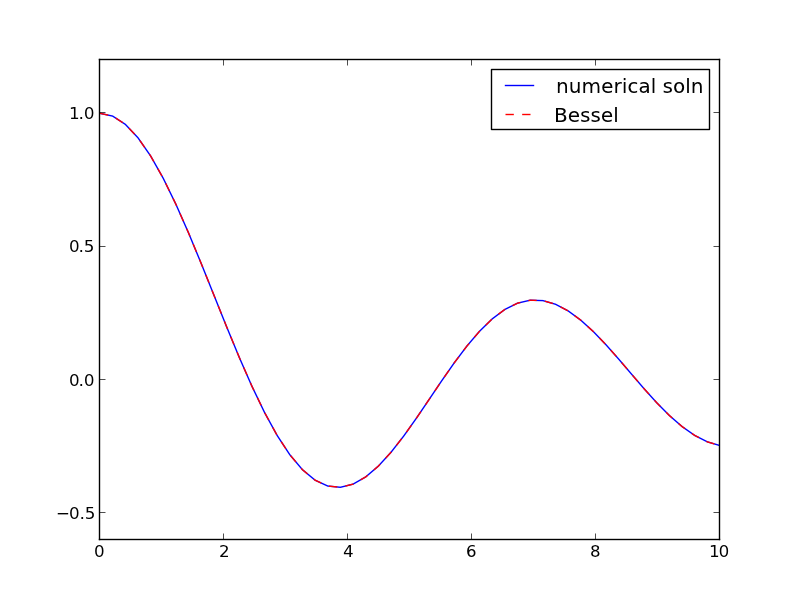
plt.plot(xspan, sol[:,0], label='numerical soln')
plt.plot(xspan, jn(0, xspan), 'r--', label='Bessel')
plt.legend()
plt.savefig('images/bessel.png')

You can see the numerical and analytical solutions overlap, indicating they are at least visually the same.

Copyright (C) 2013 by John Kitchin. See the License for information about copying.
org-mode source

Discuss on Twitter

Solving parameterized ODEs over and over conveniently

| categories: ode | tags: reaction engineering

Matlab post Sometimes we have an ODE that depends on a parameter, and we want to solve the ODE for several parameter values. It is inconvenient to write an ode function for each parameter case. Here we examine a convenient way to solve this problem; we pass the parameter to the ODE at runtime. We consider the following ODE:

$$\frac{dCa}{dt} = -k Ca(t)$$

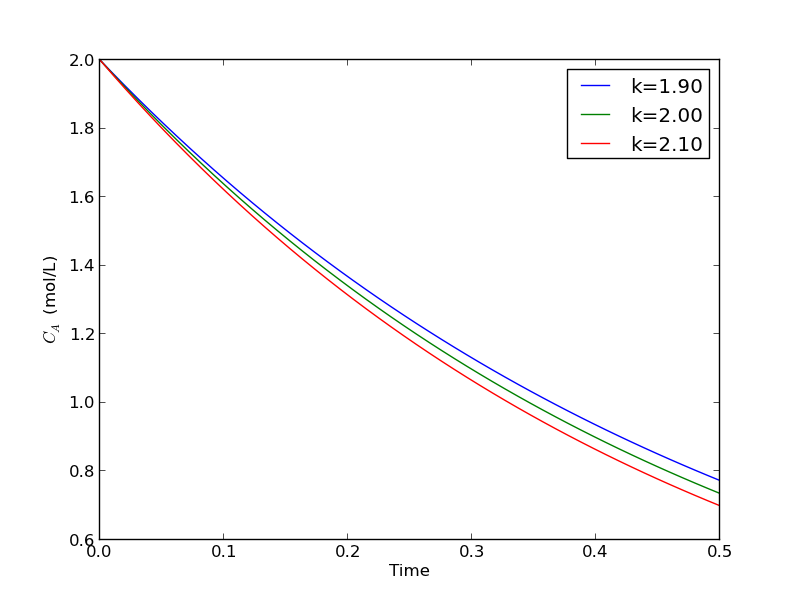
where \(k\) is a parameter, and we want to solve the equation for a couple of values of \(k\) to test the sensitivity of the solution on the parameter. Our question is, given \(Ca(t=0)=2\), how long does it take to get \(Ca = 1\), and how sensitive is the answer to small variations in \(k\)?

import numpy as np
from scipy.integrate import odeint
import matplotlib.pyplot as plt

def myode(Ca, t, k):
    'ODE definition'
    dCadt = -k * Ca
    return dCadt

tspan = np.linspace(0, 0.5)
k0 = 2
Ca0 = 2

plt.figure(); plt.clf()

for k in [0.95 * k0, k0, 1.05 * k0]:
    sol = odeint(myode, Ca0, tspan, args=(k,))
    plt.plot(tspan, sol, label='k={0:1.2f}'.format(k))
    print 'At t=0.5 Ca = {0:1.2f} mol/L'.format(sol[-1][0])

plt.legend(loc='best')
plt.xlabel('Time')
plt.ylabel('$C_A$ (mol/L)')
plt.savefig('images/parameterized-ode1.png')
At t=0.5 Ca = 0.77 mol/L
At t=0.5 Ca = 0.74 mol/L
At t=0.5 Ca = 0.70 mol/L

You can see there are some variations in the concentration at t = 0.5. You could over or underestimate the concentration if you have the wrong estimate of $k$! You have to use some judgement here to decide how long to run the reaction to ensure a target goal is met.

Copyright (C) 2013 by John Kitchin. See the License for information about copying.

org-mode source

Discuss on Twitter

Plotting ODE solutions in cylindrical coordinates

| categories: ode | tags:

Matlab post

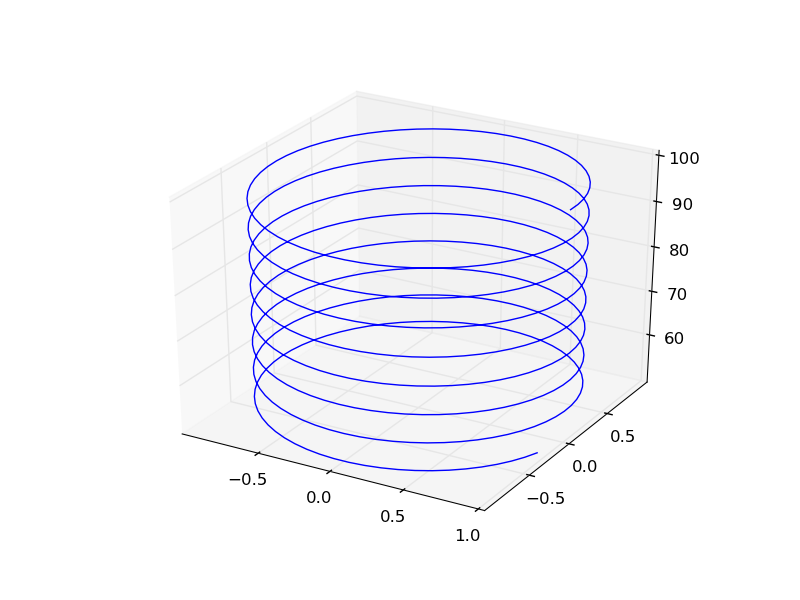
It is straightforward to plot functions in Cartesian coordinates. It is less convenient to plot them in cylindrical coordinates. Here we solve an ODE in cylindrical coordinates, and then convert the solution to Cartesian coordinates for simple plotting.

import numpy as np
from scipy.integrate import odeint

def dfdt(F, t):
    rho, theta, z = F
    drhodt = 0   # constant radius
    dthetadt = 1 # constant angular velocity
    dzdt = -1    # constant dropping velocity
    return [drhodt, dthetadt, dzdt]

# initial conditions
rho0 = 1
theta0 = 0
z0 = 100

tspan = np.linspace(0, 50, 500)
sol = odeint(dfdt, [rho0, theta0, z0], tspan)

rho = sol[:,0]
theta = sol[:,1]
z = sol[:,2]

# convert cylindrical coords to cartesian for plotting.
X = rho * np.cos(theta)
Y = rho * np.sin(theta)

from mpl_toolkits.mplot3d import Axes3D
import matplotlib.pyplot as plt
fig = plt.figure()
ax = fig.gca(projection='3d')
ax.plot(X, Y, z)
plt.savefig('images/ode-cylindrical.png')

Copyright (C) 2013 by John Kitchin. See the License for information about copying.

org-mode source

Discuss on Twitter
« Previous Page -- Next Page »