words - some interesting utilities for text in emacs

| categories: emacs | tags:

Recently I posted about an org-link with a menu. Here I extend the idea to a command that will do approximately the same thing. The idea is a command called words that will be run interactively. It will grab the word at point, or operate on a selected region, and then offer a menu to lookup the definition, find it in a thesaurus, google it, etc… We structure the code so you can add functions to it later, without directly modifying this code. The only limitation of this code is that the functions must have a signature with no arguments. That does not seem terribly limiting, as we can check for a region, and use it if we want (see the words-google function).

(defun words-dictionary ()
  (interactive)
  (browse-url
   (format
    "http://dictionary.reference.com/browse/%s?s=t"
    (thing-at-point 'word))))

(defun words-thesaurus ()
  (interactive)
  (browse-url
   (format
    "http://www.thesaurus.com/browse/%s"
    (thing-at-point 'word))))

(defun words-google ()
  (interactive)  
  (browse-url
   (format
    "http://www.google.com/search?q=%s"
    (if (region-active-p)
        (url-hexify-string (buffer-substring (region-beginning)
                                             (region-end)))
      (thing-at-point 'word)))))


(defvar words-funcs '()
 "functions to run in `words'. Each entry is a list of (key menu-name function).")

(setq words-funcs
  '(("d" "ictionary" words-dictionary)
    ("t" "hesaurus" words-thesaurus)
    ("g" "oogle" words-google)))
 

(defun words ()
  (interactive)
   (message
   (concat
    (mapconcat
     (lambda (tup)
       (concat "[" (elt tup 0) "]"
               (elt tup 1) " "))
     words-funcs "") ": "))
   (let ((input (read-char-exclusive)))
     (funcall
      (elt 
       (assoc
        (char-to-string input) words-funcs)
       2))))
words

This works nicely. Now, let us add a new function that looks up the word or selection on twitter. We just define a new function, and add the menu selection to the words-func variable.

(defun words-twitter ()
  (interactive)
  (browse-url
   (format
    "https://twitter.com/search?q=%s"
    (if (region-active-p)
        (url-hexify-string (buffer-substring (region-beginning)
                                             (region-end)))
      (thing-at-point 'word)))))

(add-to-list 'words-funcs
  '("w" "twitter" words-twitter)
  t) ; append
d ictionary words-dictionary
t hesaurus words-thesaurus
g oogle words-google
w twitter words-twitter

Finally, the most complicated idea: spelling and grammar. I know there is flyspell, and such, but they are build on an ancient dictionary. Here, for fun, we explore a web api. This next function is not a trivial one, and I will not explain it here beyond saying it sends a selection of text to a url, gets an xml response back, and that response is parsed and printed to a buffer by this function. The main point is to illustrate we can do interesting things with a selection of text!

(defun words-atd ()
  "Send paragraph at point to After the deadline for spell and grammar checking."
  (interactive)
  
  (let* ((url-request-method "POST")
         (url-request-data (format
                            "key=some-random-text-&data=%s"
                            (url-hexify-string
                             (thing-at-point 'paragraph))))
         (xml  (with-current-buffer
                   (url-retrieve-synchronously
                    "http://service.afterthedeadline.com/checkDocument")
                 (xml-parse-region url-http-end-of-headers (point-max))))
         (results (car xml))
         (errors (xml-get-children results 'error)))
    
    (switch-to-buffer-other-frame "*ATD*")
    (erase-buffer)
    (dolist (err errors)
      (let* ((children (xml-node-children err))
             ;; for some reason I could not get the string out, and had to do this.
             (s (car (last (nth 1 children))))
             ;; the last/car stuff doesn't seem right. there is probably
             ;; a more idiomatic way to get this
             (desc (last (car (xml-get-children children 'description))))
             (type (last (car (xml-get-children children 'type))))
             (suggestions (xml-get-children children 'suggestions))
             (options (xml-get-children (xml-node-name suggestions) 'option))
             (opt-string  (mapconcat
                           (lambda (el)
                             (when (listp el)
                               (car (last el))))
                           options
                           " ")))

        (insert (format "** %s ** %s
Description: %s
Suggestions: %s

" s type desc opt-string))))))

(add-to-list 'words-funcs
  '("s" "spell/grammar" words-atd)
  t) ; append
words-atd

My final words menu looks like:

If I have the cursor in the previous paragraph, run the words command and select "s" I get a buffer with these contents:

#+BEGINEXAMPLE

1 flyspell ** (spelling)

Description: (Spelling) Suggestions: flywheel flyball

2 are build on ** (grammar)

Description: (Auxiliary Verb Agreement) Suggestions: are built on

3 api ** (spelling)

Description: (Spelling) Suggestions: app ape apt ai ami

4 url ** (spelling)

Description: (Spelling) Suggestions: urn ure curl hurl burl

5 xml ** (spelling)

Description: (Spelling) Suggestions: xl ml

6 selection ** (suggestion)

Description: (Complex Expression) Suggestions: choice

7 an xml ** (grammar)

Description: (Wrong article) Suggestions: a xml

8 a selection of ** (grammar)

Description: (Hidden Verbs) Suggestions:

9 is parsed ** (grammar)

Description: (Passive voice) Suggestions:

10 selection ** (suggestion)

Description: (Complex Expression) Suggestions: choice

11 a selection of ** (grammar)

Description: (Hidden Verbs) Suggestions: #+ENDEXAMPLE

It might be nice to link back to those words, so you could click on them and fix them, but that is a beyond today's goal. In summary, today we looked at a framework to create a user-modifiable menu of commands that are launched from a single command. Here we called the command words, and then built up some different things we might want to do with the word or selection at point. While you can of course just remember the individual commands, remembering one command and then being prompted might have some advantages.

Copyright (C) 2014 by John Kitchin. See the License for information about copying.

org-mode source

Org-mode version = 8.2.7c

Discuss on Twitter

A generalized org-link with an extendable menu of actions

| categories: org | tags:

In org-ref the cite links are actually a menu of options. Here I want to explore generalizing the concept, and enable users to add new menu items. When you click on a cite link, it calls a function that constructs the menu as a string. Then, we read something from the minibuffer to say what should be done. We could store these things in variables, so that a user could add their own things. We need a list of characters, menu strings, and functions to run when to create the menu. Here we put together a little example code that shows the idea.

(defun option-a (link)
  (message "You picked option A for %s" link))

(defun option-b (link)
  (message "You picked option B for %s" link))

(defvar menu-funcs
 '(("a" "Option 1" option-a)
   ("b" "Option 2" option-b)))

(defun menu-click (path)
  (message
   (concat
    (mapconcat
     (lambda (tup)
       (concat "[" (elt tup 0) "]"
               (elt tup 1) " "))
     menu-funcs "") ": "))
  (setq input (read-char-exclusive))
  (funcall
   (elt 
    (assoc
     (char-to-string input) menu-funcs)
    2)
   path))

(org-add-link-type
 "menu"
 'menu-click)

element Clicking on that link in Emacs gives me the desired menu!

and

Now, we test adding a new function.

(defun option-c (link)
  (message "You picked option C for %s" link))

(add-to-list 'menu-funcs
 '("c" "Option C" option-c))
c Option C option-c
a Option 1 option-a
b Option 2 option-b

Well, that worked fine! You might want to append to the list instead of put it at the beginning, but that is really your choice.

(defun option-4 (link)
  (message "You picked option 4 for %s" link))

(add-to-list 'menu-funcs
 '("4" "Option 4" option-4) t)
c Option C option-c
a Option 1 option-a
b Option 2 option-b
4 Option 4 option-4

I think this example more or less shows the basic idea here. These external functions may do a variety of things, like look up something on google, or some other web service, search for something on your hard drive, etc… For example in org-ref, clicking on a cite link gives you options to open the bibtex file, a pdf, a url or notes. This would allow you to open other things too, if you felt like it. For better or worse, you can modify the behavior of the link after it is defined.

Copyright (C) 2014 by John Kitchin. See the License for information about copying.

org-mode source

Org-mode version = 8.2.7c

Discuss on Twitter

Annotating matplotlib figures

| categories: python matplotlib | tags:

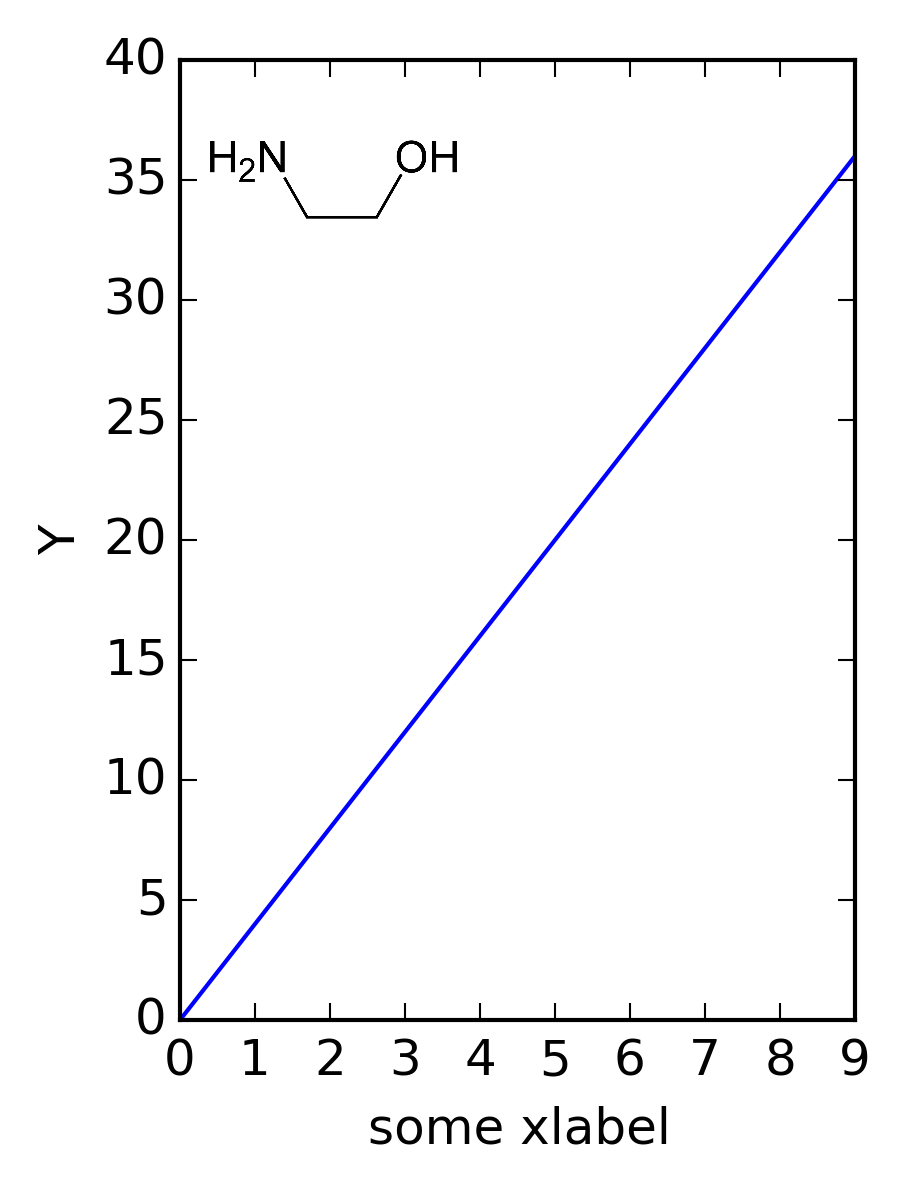
There is a nice picture of an ethanolamine molecule here . The first thing we consider is embedding this figure in a matplotlib figure. It is a little tricky because we have to create a special axes to put the image in. The axes are created in a fractional coordinate systems that is defined by [left, bottom, width, height]. Placing the figure where you want it is an iterative process that involves changing those values to get the image where you want.

So, note that (0, 0) is the bottome left corner of the figure, and (1, 1) is the upper right corner. So, to make an axes for the main figure that takes up 75% of the width and 80% of the height, and starts 20% from the left, 15% from the bottom, we use [0.2, 0.15, 0.75, 0.8]. That covers most of the space, and leaves room for labels.

The axes for the image is about the same, but it is a little trickier to figure out the width and height. In this example these arguments appear to just rescale the image.

Here is some code that puts the image near the upper left-corner of the plot.

import matplotlib.pyplot as plt
from scipy.misc import imread
import numpy as np

im = imread('images/Ethanolamine-2D-skeletal-B.png')

fig = plt.figure(figsize=(3, 4))
#                    left bottom width height
f_ax = fig.add_axes([0.2, 0.15, 0.75, 0.8], zorder=1)

# plot some function
f_ax.plot(np.arange(10), 4 * np.arange(10))
plt.xlabel('some xlabel')
plt.ylabel('Y')

# axes for the image
i_ax = fig.add_axes([0.22, 0.8, 0.3, 0.1],
                    frameon=False, xticks=[], yticks=[],
                    zorder=2)

# add the image. zorder>1 makes sure it is on top
i_ax.imshow(im)

# print dir(i_ax)

plt.savefig('images/fig-in-plot-2.png', dpi=300)

Figure 1: A matplotlib figure with an embedded images.

There it is.

Copyright (C) 2014 by John Kitchin. See the License for information about copying.

org-mode source

Org-mode version = 8.2.7c

Discuss on Twitter

Generating your bibliography in another file

| categories: bibtex | tags:

It has been proposal season. This particular round of proposals had a requirement to print the references in a separate file from the proposal. Usually I just build a pdf from org-mode, and then manually separate the references. That is not very fun if you have to do it several times. Here we examine a way to avoid this issue by using a new nobibliography link from org-ref with the bibentry LaTeX package.

We wrote this paper mehta-2014-ident-poten and this one xu-2014-relat.

Bibliography

Here is the resulting pdf, with no references: separate-bib.pdf.

1 Getting the references in another file

Now, we need to get the reference file. We create a new file, in org-mode, mostly for the convenience of exporting that to a pdf. Here is the code that does that.

(let* ((base (file-name-sans-extension
              (file-name-nondirectory (buffer-file-name))))
       (bbl (concat base ".bbl"))
       (orgfile (concat base "-references.org"))
       (pdffile (concat base "-references.pdf")))
  (with-temp-file orgfile
    (insert
     (format "#+LATEX_CLASS: cmu-article
#+OPTIONS: toc:nil

#+BEGIN_LaTeX
\\input{%s}
#+END_LaTeX
" bbl)))

  (find-file orgfile)
  (org-latex-export-to-pdf)
  (org-open-file pdffile))

And, here is the reference file: separate-bib.pdf

I think this would be integrated into a noexport build section of a document that would generate the pdf and references.

Copyright (C) 2014 by John Kitchin. See the License for information about copying.

org-mode source

Org-mode version = 8.2.7c

Discuss on Twitter

New publication in J. Physical Chemistry C

| categories: news, publ | tags:

"Probing the Coverage Dependence of Site and Adsorbate Configurational Correlations on (111) Surfaces of Late Transition Metals"

Zhongnan Xu and John R. Kitchin J. Phys. Chem. C, Just Accepted Manuscript DOI: 10.1021/jp508805h Publication Date (Web): October 14, 2014 Copyright © 2014 American Chemical Society

@article{xu-2014-probin-cover,
  author =       {Zhongnan Xu and John R. Kitchin},
  title =        {Probing the Coverage Dependence of Site and
                  Adsorbate Configurational Correlations on (111)
                  Surfaces of Late Transition Metals},
  journal =      {J. Phys. Chem. C},
  volume =       {118},
  number =       {44},
  pages =        {25597–25602},
  year =         2014,
  doi =          {10.1021/jp508805h},
  url =          {https://doi.org/10.1021/jp508805h},
}

https://doi.org/10.1021/jp508805h

Congratulations Zhongnan!

Copyright (C) 2014 by John Kitchin. See the License for information about copying.

org-mode source

Org-mode version = 8.2.7c

Discuss on Twitter
« Previous Page -- Next Page »