Update on org-ref - it is now all emacs-lisp

| categories: orgmode, emacs, orgref | tags:

The org-ref code is finally all in emacs-lisp! This should make it much easier to install, and is another step closer to getting org-ref into MELPA. Previously, I had written the most significant code in org-mode source blocks that were intended to be tangled out. I found this was not really portable, because what gets tangled depends on your org-mode setup. I had to specifically set example blocks to not tangle, or org-ref would not work for other people, and if I forgot to set a block to tangle, it also would not work for others. That should not happen again now, since there is no more tangling.

There are some relatively new features in org-ref:

  1. New colored org-ref links to differentiate them from other org-links. Citations are greenish, refs and labels are maroonish.
  2. Context messages about links. With your cursor on a cite, ref or label link you will get a context message, e.g. a formatted citation, some context about the label a ref refers to, or a count of the labels in the mini-buffer.
  3. There is now an org-ref menu in the Org menu.
  4. There is a new org-ref-help function that opens an org-file of org-ref documentation.
  5. Pretty thorough integration of helm throughout org-ref, and some integration of hydra.
  6. A few utility libraries: doi-utils, isbn, wos, pubmed, arxiv, jmax-bibtex, sci-id, x2bib. Not all these are new, but if you didn't know about them, check them out.
  7. Cask integration. This mostly provides access to testing and dependencies right now. org-ref is also now tested continuously at https://travis-ci.org/jkitchin/org-ref .

org-ref is basically feature complete I think (which is to say that once again, I do not have any big ideas for new features ;). There are some places where it could be refactored a little, e.g. there are some bibtex only functions in org-ref.el that really should go into jmax-bibtex.el (which also could be renamed). This is a very low priority though, because things are working fine as far as I can tell.

What does it need before going into MELPA? Probably some tests would be a good idea. On Travis, all that is really tested is that it loads with no errors. I would like to see some stability on my end, e.g. at least a week where no commits get made, and no errors are reported. And finally, I would like to make sure I have some time to handle issues that come up when a broader audience is trying it out.

My target date to get this in MELPA is June 1, 2015. Try out the new org-ref, and let me know how it goes!

Copyright (C) 2015 by John Kitchin. See the License for information about copying.

org-mode source

Org-mode version = 8.2.10
Discuss on Twitter

A helm-mu4e contact selector

| categories: helm, email, emacs | tags:

I have been using mu4e in Emacs for email for about three months now. It is pretty good, and I hardly ever use the gmail web interface any more. The email completion in mu4e is ok, but I am frequently surprised at what it does not find, and totally spoiled by how good Gmail is at this. The built in completion seems to get lost if you don't start the search with the first few letters. Not always, but too often for me. I don't always remember the first letters, and want to search by name, or company. I would love to search by tags in org-contacts. This should be simple in helm, where you can build up candidates with different bits of information. Here I explore a helm interface, which I think might be better than the built in mu4e support, and even be better than gmail.

In my dream email completer, I want some easy way to define my own groups, I want to use org-contacts (and its tags), and I want every email address in the mails I have in my archive as completion candidates. helm supports multiple sources, so I initially tried a separate source for each of these. Preliminary efforts suggested it is not possible to mark multiple selections from different sources and pass them all to one function. So, we combine all email candidates into one list of (searchable-string . email-address) cons cells. To get an idea of how many contacts we are looking at:

Here is what I have in my org-contacts file:

(length (org-contacts-db))
173

And here is what mu4e knows about. Interestingly, it takes a while for this variable to get populated because the request is asynchronous. After the first time though it sticks around. I think just opening mu4e will populate this variable.

(length mu4e~contacts-for-completion)
12717

So, I have close to 13,000 potential email addresses to choose from. For my email groups, I will just use a list of cons cells like (group-name . "comma-separated emails"). Then, I will loop through the org-contacts-db and the mu4e completion list to make the helm candidates. Finally, we add some functions to open our org-contact, and to tag org-contacts so it is easier to make groups.

Here is the code I have been using.

;; here we set aliases for groups.
(setq email-groups
      '(("ms" . "email1, email2")
        ("phd" . "email3, email4")))


(defun org-contacts-open-from-email (email)
  "Open org-contact with matching EMAIL. If no match, create new
entry with prompts for first and last name."
  (let ((contact (catch 'contact
                   (loop for contact in  (org-contacts-db)
                         do
                         (when (string= email (cdr (assoc "EMAIL" (elt contact 2))))
                           (throw 'contact contact))))))

    (unless contact
                (set-buffer (find-file-noselect (ido-completing-read
                                                 "Select org-contact file: "
                                                 org-contacts-files)))
                (goto-char (point-max))
                (insert (format  "\n* %s %s\n"
                                 (read-input "First name: ")
                                 (read-input "Last name: ")))
                (org-entry-put (point) "EMAIL" email)
                (save-buffer))

    (when contact
      (find-file  (cdr (assoc "FILE" (elt contact 2))))
      (goto-char (elt contact 1))
      (show-subtree))))


(defun org-contacts-tag-selection (selection)
  "Prompts you for a tag, and tags each entry in org-contacts
that has a matching email in `helm-marked-candidates'. Ignore
emails that are not in an org-contact file. I am not sure what
the best thing to do there is. Probably prompt for a file, and
add an entry to the end of it."
  (save-excursion
    (let ((tag (read-input "Tag: ")))
      (loop for email in (helm-marked-candidates)
            do
            (let ((contact (catch 'contact
                             (loop for contact in  (org-contacts-db)
                                   do
                                   (when (string=
                                          email
                                          (cdr (assoc
                                                "EMAIL"
                                                (elt contact 2))))
                                     (throw 'contact contact))))))
              ;; add new contact and tag it
              (unless contact
                (set-buffer (find-file-noselect (ido-completing-read
                                                 "Select org-contact file: "
                                                 org-contacts-files)))
                (goto-char (point-max))
                (insert (format  "\n* %s %s\n"
                                 (read-input "First name: ")
                                 (read-input "Last name: ")))
                (org-entry-put (point) "EMAIL" email)
                (org-set-tags-to (list tag))
                (save-buffer))
              ;; update tags on existing entry
              (when contact
                (find-file-noselect  (cdr (assoc "FILE" (elt contact 2))))
                (set-buffer (marker-buffer (elt contact 1)))
                (goto-char (elt contact 1))
                (org-set-tags-to (append (org-get-tags) (list tag)))))))))


(defun j-insert-emails ()
  "Helm interface to email addresses"
  (interactive)

  (helm :sources `(((name . "Email address candidates")
                   (candidates . ,(append
                                   ;; my aliases
                                   email-groups
                                   ;; org-contacts
                                   (loop for contact in (org-contacts-db)
                                         collect
                                         (cons (format
                                                "%s %s %s <%s> org-contact"
                                                (cdr (assoc "FIRSTNAME" (elt contact 2)))
                                                (cdr (assoc "LASTNAME" (elt contact 2)))
                                                (cdr (assoc "TAGS" (elt contact 2)))
                                                (cdr (assoc "EMAIL" (elt contact 2))))
                                               (cdr (assoc "EMAIL" (elt contact 2)))))
                                   ;; mu contacts
                                   (loop for contact in mu4e~contacts-for-completion
                                         collect (cons contact contact))))
                   ;; only action is to insert string at point.
                   (action . (("insert" . (lambda (x)
                                            (insert
                                             (mapconcat
                                              'identity
                                              (helm-marked-candidates)
                                              ","))))
                              ("open" . org-contacts-open-from-email)
                              ("tag"  . org-contacts-tag-selection)))))))

;; Finally, let us bind this to something probably convenient. I use c-c ] for
;; citations. Lets try that in compose mode.
(define-key mu4e-compose-mode-map "\C-c]" 'j-insert-emails)
j-insert-emails

Now, I have a sweet helm interface with nearly 13,000 email candidates (there is a decent amount of duplication in this list, and some garbage emails from spam, but helm is so fast, this does not bother me). I can pretty quickly narrow to any tagged set of emails from org-contacts with a search that looks like :phd: for example, or [^phd]:group: to get org-contacts tagged group, but not phd. I can narrow the selection on first name, lastname, parts of email addresses, tags in org-contacts, etc… I can open a contact, or tag contacts, even add new contacts to org-contacts. I have been using this for a few weeks, and so far I like it. Occasionally I find mu4e~contacts-for-completion is empty, and then I only get my org-contacts emails, but that seems to only happen when I first open emacs. Since Emacs is usually open for days at a time, this has not been an issue very often.

Copyright (C) 2015 by John Kitchin. See the License for information about copying.

org-mode source

Org-mode version = 8.2.10

Discuss on Twitter

Making org-mode Python sessions look better

| categories: orgmode, python | tags:

Using sessions for python in org-mode has always bugged me a little bit. Mostly the appearance of >>> and … in the output. For example:

print 8
>>> >>> >>> 8

Today on the org-mode mailing list someone suggested a patch that might fix that up. Hopefully that patch makes it into org-mode, but if you run off of ELPA like I do it will be some time before it appears in your working version.

In the meantime, inspired by my recent post on updating multiple results, here we add a new hook function that removes these annoying characters from a Python session results section. Here is my version of this code. "^: >>>$"

(defun org-babel-python-strip-session-chars ()
  "Remove >>> and ... from a Python session output."
  (when (and (string=
              "python"
              (org-element-property :language (org-element-at-point)))
             (string-match
              ":session"
              (org-element-property :parameters (org-element-at-point))))

    (save-excursion
      (when (org-babel-where-is-src-block-result)
        (goto-char (org-babel-where-is-src-block-result))
        (end-of-line 1)
        ;(while (looking-at "[\n\r\t\f ]") (forward-char 1))
        (while (re-search-forward
                "\\(>>> \\|\\.\\.\\. \\|: $\\|: >>>$\\)"
                (org-element-property :end (org-element-at-point))
                t)
          (replace-match "")
          ;; this enables us to get rid of blank lines and blank : >>>
          (beginning-of-line)
          (when (looking-at "^$")
            (kill-line)))))))

(add-hook 'org-babel-after-execute-hook 'org-babel-python-strip-session-chars)
org-babel-python-strip-session-chars (lambda nil (org-refresh-images))
import matplotlib.pyplot as plt
plt.plot([3, 4, 5])
plt.show()

def f(s):
    x = 2 * s
    # blank lines look like indentation errors
    return x

print f(4)
[<matplotlib.lines.Line2D object at 0x10955c290>]
8
print f(9)
18

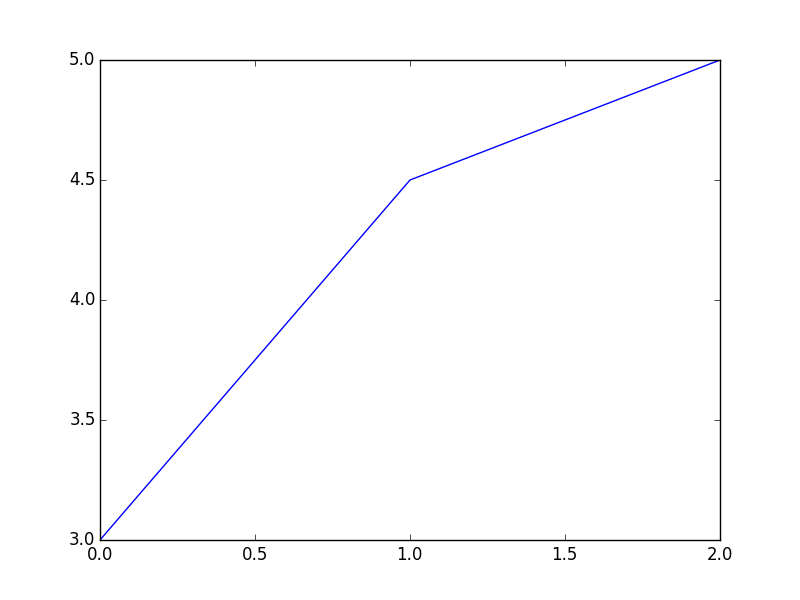
Here we can make an inline figure.

plt.figure()
plt.plot([3, 4.5, 5])
plt.savefig('images/session-fig.png')
'images/session-fig.png'

Not bad. It seems to work! Maybe this will make sessions more usable for me.

[2015-03-12 Thu] New corner case, do not cause an error when results are silenced.

print 6

Testing getting rid of blank lines and empty : >>> lines.

a = 2
b = 3
c = 4
print
print 'a=      ', a
print 'b =     ', b
print 'a + b = ', a+b
a=       2
b =      3
a + b =  5

Copyright (C) 2015 by John Kitchin. See the License for information about copying.

org-mode source

Org-mode version = 8.2.10

Discuss on Twitter

Updating Multiple RESULTS blocks in org-mode

| categories: orgmode | tags:

There was a recent question on the org-mode mailing list about getting multiple named block results to update when a named code block is run. I suppose you might want to do this if you need to see the results in more than one place. org-mode (at the moment) only updates the first named block that it finds from the beginning of the buffer. Challenge accepted ;)

Here is a function that will update all the named RESULTS blocks. The idea is to make a hook function that runs after you run a block. The hook function will get the block name, and if there is one, find all the named results in the buffer and update them.

(defun update-results ()
  ;; get name of src block
  (let ((name (org-element-property :name (org-element-at-point)))
        (results)
        (begin))
    (when name
      (setq results
            (save-excursion
              (goto-char (org-babel-find-named-result name))
              (forward-line)
              (buffer-substring
               (point) (org-element-property :end (org-element-at-point)))))
      (save-excursion
        (goto-char (point-min))
        (while (setq begin (org-babel-find-named-result name (point)))
          (goto-char begin)
          (forward-line)
          (setf (buffer-substring
                 (point)
                 (org-element-property :end (org-element-at-point)))
                results))))))

(add-hook 'org-babel-after-execute-hook 'update-results)
update-results (lambda nil (org-refresh-images))

Now let us test it out. Here is an unnamed block that should be ignored.

print 4
4

Here we have a named results block from a code block we will see later.

[0.0825119635983067, 0.12793443834890417, 0.5235765147357154]

Here is our named code block that just prints three random numbers.

import random

print [random.random() for i in range(3)]
[0.0825119635983067, 0.12793443834890417, 0.5235765147357154]

Swell, everytime I run the block, the named results get updated everywhere! It isn't tested more than this post, so I would spend some time trying out your use cases before doing anything mission critical. Your mileage might vary. For example, if you have a named block outside a narrowed region it is not clear to me it would update. In other words, there might be other corners where this doesn't update like you thing.

Copyright (C) 2015 by John Kitchin. See the License for information about copying.

org-mode source

Org-mode version = 8.2.10

Discuss on Twitter

Bibtex Entries from Arxiv.org

| categories: emacs, bibtex | tags:

http://arxiv.org is an open-source physics preprint server where copies of scientific manuscripts can be found. For example, http://arxiv.org/abs/0801.1144 is a paper I wrote, and you can find the PDF for that paper here: http://arxiv.org/pdf/0801.1144v1 . Each entry at Arxiv has an arxiv number, and for this paper the number is "0801.1144". In this post, we explore some capabilities of the arxiv.el library which is part of org-ref (https://github.com/jkitchin/org-ref ).

To use this library, get the org-ref distribution, make sure it is on your path, and then require the library:

(require 'arxiv)

First, there is a new org-link: arxiv:0801.1144. This is a clickable link that simply opens arxiv.org at the URL for an arxiv number, and exports as a link to that entry in arxiv.

On the right hand side of the arxiv page, there is a link under References & Citations that takes you to a page where you can get a bibtex entry. The link for this entry is http://adsabs.harvard.edu/cgi-bin/bib_query?arXiv:0801.1144 . On that page, there is a link to a bibtex entry (http://adsabs.harvard.edu/cgi-bin/nph-bib_query?bibcode=2008PhRvB..77g5437K&data_type=BIBTEX&db_key=PHY&nocookieset=1 ). We can construct this link pretty easily, we just need the bibcode for that entry. arxiv.el provides a function for that.

(arxiv-get-bibliographic-code "0801.1144")
2008PhRvB..77g5437K

Next, once we have a url, we can get the text of the bibtex entry.

(arxiv-get-bibtex-entry "2008PhRvB..77g5437K")
@ARTICLE{2008PhRvB..77g5437K,
   author = {{Kitchin}, J.~R. and {Reuter}, K. and {Scheffler}, M.},
    title = "{Alloy surface segregation in reactive environments: First-principles atomistic thermodynamics study of Ag$_{3}$Pd(111) in oxygen atmospheres}",
  journal = {\prb},
archivePrefix = "arXiv",
   eprint = {0801.1144},
 primaryClass = "cond-mat.mtrl-sci",
 keywords = {Ab initio calculations of adsorbate structure and reactions, Density functional theory local density approximation gradient and other corrections, Oxidation},
     year = 2008,
    month = feb,
   volume = 77,
   number = 7,
      eid = {075437},
    pages = {075437},
      doi = {10.1103/PhysRevB.77.075437},
   adsurl = {http://adsabs.harvard.edu/abs/2008PhRvB..77g5437K},
  adsnote = {Provided by the SAO/NASA Astrophysics Data System}
}

Finally, arxiv.el wraps those to functions together into an interactive function arxiv-add-bibtex-entry which prompts you for an arxiv number, and then a bibtex file, and then adds the text above to your bibtex file. You can then clean the entry as you see fit. It is also possible to get the pdf for an arxiv entry via arxiv-get-pdf. This is an interactive function that will prompt you for an arxiv number and a pdf file name, and it will then get the pdf for you and open it. I have not integrated this with the bibtex entry function yet, but one would ideally clean the bibtex entry to get a uniform key, and then get the pdf and name it according to the key like we do in org-ref.

(arxiv-get-pdf "0801.1144" "0801.1144.pdf")

If you use words.el you will find a new function words-arxiv which allows you to search the selected text or word at point on arxiv.org.

I do not use arxiv.org a lot, so this is not super well tested on many articles in arxiv.org, but it has worked on the few examples I have tested so far.

Copyright (C) 2015 by John Kitchin. See the License for information about copying.

org-mode source

Org-mode version = 8.2.10

Discuss on Twitter
« Previous Page -- Next Page »