New publication in J. Phys. Chem. C

| categories: publication, news | tags:

Predicting the relative stability of oxide polymorphs is critical to predicting which structures are likely to be experimentally observed. The energetics of TiO2 polymorphs are particularly challenging because the energies of the different polymorphs are relatively close together. Consequently, one predicts different relative stabilities using different exchange correlation functionals with DFT. In this paper, we show that DFT+U is able to give experimentally consistent relative orderings for the GGA functionals, and that linear response U can be used to predict a reasonable value of U. Hybrid functionals can also do this for some ranges of the exact exchange fraction, but there is not yet a method to calculate from first-principles the amount of exact exchange required to achieve that. Notably, the U-values are pseudopotential and functional dependent.

This paper is open-access.

@article{curnan-2015-inves-energ,
  author =       {Matthew Curnan and John R. Kitchin},
  title =        {Investigating the Energetic Ordering of Stable and Metastable
                  TiO$_2$ Polymorphs Using DFT+U and Hybrid Functionals},
  journal =      {The Journal of Physical Chemistry C},
  volume =       0,
  number =       {},
  pages =        {},
  year =         2015,
  doi =          {10.1021/acs.jpcc.5b05338},
  url =          { https://doi.org/10.1021/acs.jpcc.5b05338 },
  eprint =       { https://doi.org/10.1021/acs.jpcc.5b05338 },
}

http://pubs.acs.org/doi/abs/10.1021/acs.jpcc.5b05338

Copyright (C) 2015 by John Kitchin. See the License for information about copying.

org-mode source

Org-mode version = 8.2.10
Discuss on Twitter

Author impact factors

| categories: bibliometrics | tags:

In this new letter http://pubs.acs.org/doi/pdf/10.1021/acs.jpclett.5b01527 , the editors suggest a new "Author Impact Factor" as a way to measure the productivity and impact of an author independently of the journals they publish in. The AIF is defined for a year like this: take the paper published in two consecutive years, get the citations for those papers in the following year, and compute:

\(AIF = \frac{Y3 citations for papers_{Y1,Y2}}{Number of papers in Y1, Y2}\).

Here I do this for myself, using Scopus as the source of papers and citations. My Scopus ID is scopusid:7004212771. First, we need to get the articles published in 2012 and 2013. Here is the query, and the results.

from scopus import *
from scopus.scopus_api import ScopusAbstract

s = ScopusSearch(query='au-id(7004212771) and (pubyear is 2012 or pubyear is 2013)',
                 fields='dc:identifier')

abstracts = [ScopusAbstract(eid) for eid in s.EIDS
             if ScopusAbstract(eid).aggregationType == 'Journal']

print('<ol>')
for ab in abstracts:
    print('<li>' + ab.html + '</li>')
print('</ol>')
  1. Anita S. Lee, John C. Eslick, David C. Miller and John R. Kitchin, Comparisons of amine solvents for post-combustion CO2 capture: A multi-objective analysis approach, International Journal of Greenhouse Gas Control, 18, p. 68-74, (2013-10-01). doi:10.1016/j.ijggc.2013.06.020.
  2. Alexander P. Hallenbeck and John R. Kitchin, Effects of O2 and SO2 on the capture capacity of a primary-amine based polymeric CO2 sorbent, Industrial and Engineering Chemistry Research, 52(31), p. 10788-10794, (2013-08-07). doi:10.1021/ie400582a.
  3. James X. Mao, Anita S. Lee, John R. Kitchin, Hunaid B. Nulwala, David R. Luebke and Krishnan Damodaran, Interactions in 1-ethyl-3-methyl imidazolium tetracyanoborate ion pair: Spectroscopic and density functional study, Journal of Molecular Structure, 1038, p. 12-18, (2013-04-24). doi:10.1016/j.molstruc.2013.01.046.
  4. Federico Calle-Vallejo, Nilay G. Inoglu, Hai-Yan Su, José I. Martínez, Isabela C. Man, Marc T. M. Koper, John R. Kitchin and Jan Rossmeisl, Number of outer electrons as descriptor for adsorption processes on transition metals and their oxides, Chemical Science, 4(3), p. 1245-1249, (2013-03-01). doi:10.1039/c2sc21601a.
  5. Anita S. Lee and John R. Kitchin, Chemical and molecular descriptors for the reactivity of amines with CO 2 , Industrial and Engineering Chemistry Research, 51(42), p. 13609-13618, (2012-10-24). doi:10.1021/ie301419q.
  6. Edward S. Rubin, Hari Mantripragada, Aaron Marks, Peter Versteeg and John Kitchin, The outlook for improved carbon capture technology, Progress in Energy and Combustion Science, 38(5), p. 630-671, (2012-10-01). doi:10.1016/j.pecs.2012.03.003.
  7. Sneha A. Akhade and John R. Kitchin, Effects of strain, d-band filling, and oxidation state on the surface electronic structure and reactivity of 3d perovskite surfaces, Journal of Chemical Physics, 137(8), Art. No. 084703, , (2012-08-28). doi:10.1063/1.4746117.
  8. James Landon, Ethan Demeter, Nilay Inoǧlu, Chris Keturakis, Israel E. Wachs, Relja Vasić, Anatoly I. Frenkel and John R. Kitchin, Spectroscopic characterization of mixed Fe-Ni oxide electrocatalysts for the oxygen evolution reaction in alkaline electrolytes, ACS Catalysis, 2(8), p. 1793-1801, (2012-08-03). doi:10.1021/cs3002644.
  9. Robin Chao, Ratiporn Munprom, Rumyana Petrova, Kirk Gerdes, John R. Kitchin and Paul A. Salvador, Structure and relative thermal stability of mesoporous (La, Sr) MnO 3powders prepared using evaporation-induced self-assembly methods, Journal of the American Ceramic Society, 95(7), p. 2339-2346, (2012-07-01). doi:10.1111/j.1551-2916.2012.05236.x.
  10. John Kitchin, Preface: Trends in computational catalysis, Topics in Catalysis, 55(5-6), p. 227-228, (2012-06-01). doi:10.1007/s11244-012-9808-0.
  11. W. Richard Alesi and John R. Kitchin, Evaluation of a primary amine-functionalized ion-exchange resin for CO 2 capture, Industrial and Engineering Chemistry Research, 51(19), p. 6907-6915, (2012-05-16). doi:10.1021/ie300452c.

Now, we need to get the citing articles for each one of these, and only count them if they were published in 2014 or earlier. Each abstract has a cite_link in it, which points to the API url to get the articles citing it. Let's see what we are up against here. First, we see how many citations there are in total.

from scopus import *
from scopus.scopus_api import get_encoded_text, ScopusAbstract
from scopus.my_scopus import MY_API_KEY

s = ScopusSearch(query='au-id(7004212771) and (pubyear is 2012 or pubyear is 2013)',
                 fields='dc:identifier')

abstracts = [ScopusAbstract(eid) for eid in s.EIDS
             if ScopusAbstract(eid).aggregationType == 'Journal']

import requests
import xml.etree.ElementTree as ET

TOTAL = 0
for ab in abstracts:
    xml = requests.get(ab.cite_link,
                       headers={'Accept': 'application/xml',
                                'X-ELS-APIKey': MY_API_KEY}).text.encode('utf-8')

    results = ET.fromstring(xml)
    N = int(get_encoded_text(results, 'opensearch:totalResults'))
    TOTAL += N
    print N

print '{} total citations'.format(TOTAL)
print TOTAL / float(11)
4
9
5
18
5
98
10
50
4
0
16
219 total citations
19.9090909091

Not bad looking, but some of those citations might be from 2015, and some of them might be self-citations. Let's see about removing those. Usually, there are just 25 results per query, and some of the ones above have more than 25 results, so we will have to run a loop to get them all. For now, we just remove the citations from papers newer than the desired year It is a little tougher to remove the self-citations; that would require another request to Scopus to get authors and look for matches.

Here is some code that calculates my AIF for 2012, 2013 and 2014. The only issue I currently have with this code is the use of the abstract coverDate to get the publication year. I don't have a better way to do this, but I have seen a lot of cover dates that start on Jan 1 of a year, and that seems improbable to me. On the other hand, that might reflect a lot of submissions near the end of a year that just make it into the next one.

from scopus import *
from scopus.scopus_api import get_encoded_text, ns, ScopusAbstract
from scopus.my_scopus import MY_API_KEY
import requests
import xml.etree.ElementTree as ET


QUERY = 'au-id(7004212771) and ((pubyear is {0}) or (pubyear is {1}))'

for YEAR in [2012, 2013, 2014]:

    print(QUERY.format(YEAR - 2, YEAR - 1))
    s = ScopusSearch(query=QUERY.format(YEAR - 2, YEAR - 1),
                     fields='dc:identifier')

    abstracts = [ScopusAbstract(eid) for eid in s.EIDS
                 if ScopusAbstract(eid).aggregationType == 'Journal']
    print '{0}-{1} papers'.format(YEAR - 2, YEAR - 1)
    print ' '.join(['doi:{}'.format(ab.doi) for ab in abstracts])
    TOTAL = 0 # citation count

    for ab in abstracts:
        xml = requests.get(ab.cite_link,
                           headers={'Accept': 'application/xml',
                                    'X-ELS-APIKey': MY_API_KEY}).text.encode('utf-8')

        results = ET.fromstring(xml)
        N = int(get_encoded_text(results, 'opensearch:totalResults'))

        start = 0
        count = 25

        while N > 0:
            xml = requests.get(ab.cite_link,
                               headers={'Accept': 'application/xml',
                                        'X-ELS-APIKey': MY_API_KEY},
                               params={'count': count,
                                       'start': start}).text.encode('utf-8')
            results = ET.fromstring(xml)

            start += count
            N -= count

            for el in results.findall('atom:entry/prism:coverDate', ns):
                year = int(el.text.split('-')[0])
                if year <= YEAR:
                    TOTAL += 1

    s = 'Author Impact Factor ({1}) = {0:1.3f} ({2} papers, {3} citations)\n'
    print(s.format(float(TOTAL) / len(abstracts),
                   YEAR,
                   len(abstracts),
                   TOTAL))
au-id(7004212771) and ((pubyear is 2010) or (pubyear is 2011))
2010-2011 papers
doi:10.1063/1.3631948 doi:10.1002/cctc.201000397 doi:10.1021/cs200039t doi:10.1063/1.3561287 doi:10.1002/cssc.201000056 doi:10.1149/1.3432440 doi:10.1103/PhysRevB.82.045414 doi:10.1016/j.fuel.2009.11.036 doi:10.1080/08927022.2010.481794
Author Impact Factor (2012) = 9.667 (9 papers, 87 citations)

au-id(7004212771) and ((pubyear is 2011) or (pubyear is 2012))
2011-2012 papers
doi:10.1021/ie301419q doi:10.1016/j.pecs.2012.03.003 doi:10.1063/1.4746117 doi:10.1021/cs3002644 doi:10.1111/j.1551-2916.2012.05236.x doi:10.1007/s11244-012-9808-0 doi:10.1021/ie300452c doi:10.1063/1.3631948 doi:10.1002/cctc.201000397 doi:10.1021/cs200039t doi:10.1063/1.3561287
Author Impact Factor (2013) = 14.000 (11 papers, 154 citations)

au-id(7004212771) and ((pubyear is 2012) or (pubyear is 2013))
2012-2013 papers
doi:10.1016/j.ijggc.2013.06.020 doi:10.1021/ie400582a doi:10.1016/j.molstruc.2013.01.046 doi:10.1039/c2sc21601a doi:10.1021/ie301419q doi:10.1016/j.pecs.2012.03.003 doi:10.1063/1.4746117 doi:10.1021/cs3002644 doi:10.1111/j.1551-2916.2012.05236.x doi:10.1007/s11244-012-9808-0 doi:10.1021/ie300452c
Author Impact Factor (2014) = 14.000 (11 papers, 154 citations)

Just a reminder of what these AIFs are. It is the ratio of the number of citations papers from two consecutive years (Y1 and Y2) have received in the next year Y3. These numbers suggest that on average my recent papers are getting 14 citations a year. I printed the DOIs above because I was skeptical that my AIF in 2013 and 2014 were identical, but it seems clear the papers are different, and it must be a coincidence that the number of citations is the same (I am still a bit skeptical though ;).

Is this a useful measure of author impact? That would take some study. The way this is defined it is a short-term impact which might be biased to some fields that have more than a three year time-frame before citations build up. That is fixed easily enough by increasing the window of publications, and/or counting citations two years out, for example. It is interesting this decouples the impact from the journals the articles are published in. I think this says I should be submitting my papers to higher impact journals though! My AIF exceeds the JIF of the journals I usually publish in.

Copyright (C) 2015 by John Kitchin. See the License for information about copying.

org-mode source

Org-mode version = 8.2.10

Discuss on Twitter

Altmetrics meet my publications

| categories: publication, bibliometric | tags:

Altmetrics is an alternative to simple citation counts of articles. Altmetrics looks at how your papers are mentioned in Tweets, google+, blog posts, news, how many Mendeley users have the article, etc… They are partnering with publishers to provide additional metrics on your papers.

You can put some Altmetric badges on your papers so you can see how they are doing. In this post, we scrape out my papers from my orcid page, and add Altmetric badges to them. This is basically just a little snippet of html code that will put the Altmetric donut in the citation, which has some information about the number of times each paper is tweeted, etc…

So, here is a python script that will print some html results. We print each title with the Altmetric donut, and we add a Scopus Cited by count for each paper.

import requests
import json

resp = requests.get("http://pub.orcid.org/0000-0003-2625-9232/orcid-works",
                    headers={'Accept':'application/orcid+json'})
results = resp.json()

data = []
TITLES, DOIs = [], []

badge = "<div data-badge-type='medium-donut' class='altmetric-embed' data-badge-details='right' data-doi='{doi}'></div>"
scopus_cite = "<img src=\"http://api.elsevier.com/content/abstract/citation-count?doi={doi}&amp;httpAccept=image/jpeg&amp;apiKey=5cd06d8a7df3de986bf3d0cd9971a47c\">"
html = '<a href="https://doi.org/{doi}">{title}</a>'

print '<ol>'
for i, result in enumerate( results['orcid-profile']['orcid-activities']
                            ['orcid-works']['orcid-work']):
    title = str(result['work-title']['title']['value'].encode('utf-8'))
    doi = 'None'

    for x in result.get('work-external-identifiers', []):
        for eid in result['work-external-identifiers']['work-external-identifier']:
            if eid['work-external-identifier-type'] == 'DOI':
                doi = str(eid['work-external-identifier-id']['value'].encode('utf-8'))

    # AIP journals tend to have a \n in the DOI, and the doi is the second line. we get
    # that here.
    if len(doi.split('\n')) == 2:
        doi = doi.split('\n')[1]

    pub_date = result.get('publication-date', None)
    if pub_date:
        year = pub_date.get('year', None).get('value').encode('utf-8')
    else:
        year = 'Unknown'

    # Try to minimize duplicate entries that are found
    dup = False
    if title.lower() in TITLES:
        dup = True
    if (doi != 'None'
        and doi.lower() in DOIs):
        dup = True

    if not dup and doi != 'None':
        # truncate title to first 50 characters
        print('<li>' + html.format(doi=doi, title=title)
              + badge.format(doi=doi) + scopus_cite.format(doi=doi)
              + '</li>\n')

    TITLES.append(title.lower())
    DOIs.append(doi.lower())

print '</ol>'

It is a little humbling to see these results! The Altmetric data shows a very different dimension than the citation metrics. It is hard to tell what impact these will have, but they give you another view of who is talking about your work.

  1. A Linear Response DFT+ U Study of Trends in the Oxygen Evolution Activity of Transition Metal Rutile Dioxides
  2. Relationships between the surface electronic and chemical properties of doped 4d and 5d late transition metal dioxides
  3. Core level shifts in Cu–Pd alloys as a function of bulk composition and structure
  4. Estimating bulk-composition-dependent H2 adsorption energies on CuxPd1- x alloy (111) surfaces
  5. Probing the Coverage Dependence of Site and Adsorbate Configurational Correlations on (111) Surfaces of Late Transition Metals
  6. Relating the electronic structure and reactivity of the 3d transition metal monoxide surfaces
  7. Electrocatalytic Oxygen Evolution with an Immobilized TAML Activator
  8. Identifying Potential BO 2 Oxide Polymorphs for Epitaxial Growth Candidates
  9. Simulating temperature programmed desorption of oxygen on Pt(111) using DFT derived coverage dependent desorption barriers
  10. Probing the effect of electron donation on CO2 absorbing 1,2,3-triazolide ionic liquids
  11. Effects of concentration, crystal structure, magnetism, and electronic structure method on first-principles oxygen vacancy formation energy trends in perovskites
  12. Effects of O 2 and SO 2 on the Capture Capacity of a Primary-Amine Based Polymeric CO 2 Sorbent
  13. Interactions in 1-ethyl-3-methyl imidazolium tetracyanoborate ion pair: Spectroscopic and density functional study
  14. Comparisons of amine solvents for post-combustion CO2 capture: A multi-objective analysis approach
  15. Chemical and Molecular Descriptors for the Reactivity of Amines with CO 2
  16. Spectroscopic Characterization of Mixed Fe–Ni Oxide Electrocatalysts for the Oxygen Evolution Reaction in Alkaline Electrolytes
  17. Modeling Coverage Dependence in Surface Reaction Networks
  18. The outlook for improved carbon capture technology
  19. Structure and Relative Thermal Stability of Mesoporous (La,Sr)MnO3 Powders Prepared Using Evaporation-Induced Self-Assembly Methods
  20. Preface: Trends in computational catalysis
  21. Evaluation of a Primary Amine-Functionalized Ion-Exchange Resin for CO2 Capture
  22. Effects of strain, d-band filling, and oxidation state on the surface electronic structure and reactivity of 3d perovskite surfaces
  23. Coverage dependent adsorption properties of atomic adsorbates on late transition metal surfaces
  24. Universality in Oxygen Evolution Electrocatalysis on Oxide Surfaces
  25. Preparation of Mesoporous La 0.8Sr 0.2MnO 3 infiltrated coatings in porous SOFC cathodes using evaporation-induced self-assembly methods
  26. Identification of sulfur-tolerant bimetallic surfaces using dft parametrized models and atomistic thermodynamics
  27. Effects of strain, d-band filling, and oxidation state on the bulk electronic structure of cubic 3d perovskites
  28. Configurational correlations in the coverage dependent adsorption energies of oxygen atoms on late transition metal fcc(111) surfaces
  29. CO2 Adsorption on Supported Molecular Amidine Systems on Activated Carbon
  30. Separation of CO2 from flue gas using electrochemical cells
  31. New solid-state table: estimating d-band characteristics for transition metal atoms
  32. Simple model explaining and predicting coverage-dependent atomic adsorption energies on transition metal surfaces
  33. Electrochemical concentration of carbon dioxide from an oxygen/carbon dioxide containing gas stream
  34. Uncertainty and figure selection for DFT based cluster expansions for oxygen adsorption on Au and Pt (111) surfaces
  35. Sulphur poisoning of water-gas shift catalysts: Site blocking and electronic structure modification
  36. Step decoration of chiral metal surfaces
  37. Relating the coverage dependence of oxygen adsorption on Au and Pt fcc(111) surfaces through adsorbate-induced surface electronic structure effects
  38. Hydrogen Dissociation and Spillover on Individual Isolated Palladium Atoms
  39. Correlations in coverage-dependent atomic adsorption energies on Pd(111)
  40. Atomistic thermodynamics study of the adsorption and the effects of water-gas shift reactants on Cu catalysts under reaction conditions
  41. Rotational isomeric state theory applied to the stiffness prediction of an anion polymer electrolyte membrane
  42. Density functional theory studies of alloys in heterogeneous catalysis
  43. Alloy surface segregation in reactive environments: First-principles atomistic thermodynamics study of Ag3Pd(111) in oxygen atmospheres
  44. Response to "comment on 'Trends in the exchange current for hydrogen evolution' J. Electrochem. Soc., 152, J23 (2005) "
  45. Trends in the exchange current for hydrogen evolution
  46. Trends in the chemical properties of early transition metal carbide surfaces: A density functional study
  47. Role of strain and ligand effects in the modification of the electronic and chemical properties of bimetallic surfaces
  48. Origin of the overpotential for oxygen reduction at a fuel-cell cathode
  49. Modification of the surface electronic and chemical properties of Pt(111) by subsurface 3d transition metals
  50. Elucidation of the active surface and origin of the weak metal-hydrogen bond on Ni/Pt(111) bimetallic surfaces: a surface science and density functional theory study
  51. A four-point probe correlation of oxygen sensitivity to changes in surface resistivity of TiO2(001) and Pd-modified TiO2(001)
  52. A comparison of gold and molybdenum nanoparticles on TiO2(110) 1 x 2 reconstructed single crystal surfaces
  53. H3PW12O40-functionalized tip for scanning tunneling microscopy
  54. Preparation and Characterization of a Bis-Semiquinone: a Bidentate Dianion Biradical

Copyright (C) 2015 by John Kitchin. See the License for information about copying.

org-mode source

Org-mode version = 8.2.10

Discuss on Twitter

A highlight annotation mode for Emacs using font-lock

| categories: annotation, emacs | tags:

Table of Contents

One of my students asked about highlighting text in emacs for note-taking. I can see some advantages for doing it while teaching, for example, and for students studying, so here we we work it out.

You will definitely want to see the video on this one, the highlights do not show up in the published html. https://www.youtube.com/watch?v=Cvz2tiT12-I

For temporary use, highlighting is pretty easy, you just set a property on a region, e.g. the background color. For example, we can do this:

; this seems to be necessary to get the tooltips to work.
(setq font-lock-extra-managed-props (delq 'help-echo font-lock-extra-managed-props))

(defun highlight-region (beg end)
 (interactive "r")
 (set-text-properties
  beg end
  '(font-lock-face (:background "Light Salmon")
                   highlighted t
                   help-echo "highlighted")))

(global-set-key (kbd "s-h") 'highlight-region)
highlight-region

This sets the background color, and another property "highlighted" that we will use later. The trouble is this is transient. When I close the file, the highlights are lost. We can save them to a file though, and reload them later. As long as we are diligent about that we should be able to provide persistent highlights.

First we need a function to get all the highlights, their start and end, their color, and if there is a help-echo which provides a tooltip. We will see why later. Here we loop through the buffer collecting highlights, and return a list of them.

(defun highlight-get-highlights ()
  "Scan buffer for list of highlighted regions.
These are defined only by the highlighted property. That means
adjacent highlighted regions will be merged into one region with
the color of the first one."
  (save-excursion
    (goto-char (point-min))
    (let ((highlights '())
          (p)
          (beg)
          (end)
          (note)
          (color))
      ;; corner case of first point being highlighted
      (when (get-text-property (point) 'highlighted)
        (setq beg (point)
              end (next-single-property-change (point) 'highlighted)
              color (background-color-at-point)
              help-echo (get-text-property (point) 'help-echo))
        (add-to-list 'highlights (list beg end color help-echo) t)
        (goto-char end))

      ;; Now the rest of the buffer
      (while (setq p (next-single-property-change (point) 'highlighted))
        (setq beg (goto-char p))
        (setq color (background-color-at-point))
        (setq note (get-text-property (point) 'help-echo))
        (setq end (next-single-property-change (point) 'highlighted))
        (when (and beg end)
          (goto-char end)
          (add-to-list 'highlights (list beg
                                         end
                                         color
                                         note)
                       t)
          (goto-char end)))
      highlights)))

(highlight-get-highlights)
438 454 Light Salmon highlighted
1014 1031 Light Salmon highlighted

Next, we generate a filename, and a function to save the highlights to disk. We make it a hook function that runs every time we save the buffer.

(defun highlight-save-filename ()
  "Return name of file to save overlays in."
  (when (buffer-file-name)
    (concat "." (file-name-nondirectory (buffer-file-name)) ".highlights")))

(defun highlight-save ()
  "Loop through buffer and save regions with property highlighted.
Save beginning, end of each region, color and help-echo on the
first character of the region. Delete highlight file if it is empty."
  (interactive)
  (let ((fname (highlight-save-filename))
        (highlights (highlight-get-highlights)))
    (if (and fname highlights)
          (with-temp-file fname
            (print highlights (current-buffer)))
        ;; get rid of file if there are not highlights
        (when (and fname (file-exists-p fname))
          (delete-file fname)))))

(add-hook 'after-save-hook 'highlight-save)
highlight-save helm-swoop–clear-cache
cat .highlights.org.highlights
((438 454 "Light Salmon" "highlighted") (1014 1031 "Light Salmon" "highlighted"))

Here, we can read the contents and apply the highlights. We set this up on a hook for org-mode, so it will apply them on when we open org-files. You could make this more general if you plan to highlight in code files, for example.

(defun highlight-load ()
  "Load and apply highlights."
  (interactive)
  (setq font-lock-extra-managed-props (delq 'help-echo font-lock-extra-managed-props))
  (let ((fname (highlight-save-filename)))
    (when (and fname (file-exists-p fname))
      (mapcar
       (lambda (entry)
         (let ((beg (nth 0 entry))
               (end (nth 1 entry))
               (color (nth 2 entry))
               (help-echo (nth 3 entry)))
           (set-text-properties
            beg end
            `(font-lock-face (:background ,color)
                             help-echo ,help-echo
                             highlighted t))))
       (with-temp-buffer (insert-file-contents fname)
                         (read (current-buffer)))))))


(add-hook 'org-mode-hook 'highlight-load)

Now, let's outdo ourselves in ridiculosity. We will add a helm-colors selector to give you unprecedented highlighting capability in multicolor magnificence. This function will highlight selected text, or update the color of an existing highlight.

(defun highlight (beg end &optional color)
  "Highlight region from BEG to END with COLOR.
COLOR is selected from `helm-colors' when run interactively."
  (interactive "r")
  (unless (or (get-text-property (point) 'highlighted)
              (region-active-p))
    (error "No region selected or not on a highlight."))
  (unless color
    (setq color (s-trim (helm-colors))))
  (if (get-text-property (point) 'highlighted)
      ;; update color
      (let ((beg (previous-single-property-change (point) 'highlighted))
            (end (next-single-property-change (point) 'highlighted)))
        (set-text-properties
         beg end
         `(font-lock-face (:background ,color)
                          highlighted t)))
  (set-text-properties
   beg end
   `(font-lock-face (:background ,color)
                    highlighted t))))

;; For convenience
(global-set-key (kbd "s-h") 'highlight)
highlight

Now, we can conveniently highlight text in whatever color we want. How about list your highlights? After we have highlighted a lot, it might be nice to see a list of these we can click on to find our highlights more quickly.

(defun highlight-list ()
  "Make a list of highlighted text in another buffer. "
  (interactive)
  (let ((cb (current-buffer))
        (fname (buffer-file-name))
        (hls (mapcar
              (lambda (entry)
                (list (nth 0 entry)
                      (buffer-substring (nth 0 entry) (nth 1 entry))))
              (highlight-get-highlights))))
    (if hls
        (progn
          (split-window-right)
          (switch-to-buffer-other-window "*highlights*") (org-mode)
          (setq buffer-read-only nil)
          (erase-buffer)
          (insert "Click on text to jump to the position.\n\n")

          (dolist (s hls)
            (let ((map (make-sparse-keymap)))
              (define-key map [mouse-1]
                `(lambda ()
                   (interactive)
                   (find-file ,fname)
                   (goto-char ,(nth 0 s))))
              (insert (propertize
                       (concat (nth 1 s) "\n")
                       'local-map map))))
          (setq buffer-read-only t))
      (message "No highlights found."))))
highlight-list

You probably would like to just select some text with your mouse, and have it highlighted. That requires us to advise the mouse-set-region function.

(defun highlight-green ()
  "Highlight region in green."
  (interactive)
  (highlight (region-beginning) (region-end) "Darkolivegreen1"))

;; create the advice for use later
(defadvice mouse-set-region (after my-highlight () disable)
  "Highlight"
  (highlight-green))

(defun highlight-mouse-on ()
  "Turn on mouse highlighting"
  (interactive)
  (ad-enable-advice 'mouse-set-region 'after 'my-highlight)
  (ad-activate 'mouse-set-region))

(defun highlight-mouse-off ()
  (interactive)
  (ad-disable-advice 'mouse-set-region 'after 'my-highlight)
  (ad-deactivate 'mouse-set-region))
highlight-mouse-off
(defun highlight-picasso-blues ()
 (interactive)
 (save-excursion
   (let ((colors '("PowderBlue"
                   "Lightskyblue1"
                   "Lightskyblue2"
                   "Lightskyblue3"
                   "Lightskyblue4"))
         (beg (region-beginning))
         (end (region-end)))
     (goto-char beg)
     (while (< (point) (- end 1))
       (highlight (point) (+ 1 (point))
                  (nth (mod (- (point) (region-beginning)) (length colors)) colors))
       (forward-char)))))

(defun highlight-rainbow ()
 (interactive)
 (save-excursion
   (let ((colors '("Red1"
                   "Orange1"
                   "Yellow1"
                   "Darkolivegreen1"
                   "Skyblue1"
                   "Blue1"
                   "DarkViolet"))
         (beg (region-beginning))
         (end (region-end)))
     (goto-char beg)
     (while (< (point) (- end 1))
       (highlight (point) (+ 1 (point))
                  (nth (mod (- (point) (region-beginning)) (length colors)) colors))
       (forward-char)))))

=These look cool, but they don't get properly saved. The code that finds the highlights finds the region, but only saves the first color. That means that adjacent highlights of different color will also not be saved correctly.

How about a highlight with your own tooltip? In theory we can set the help-echo property to some text. In practice I have found this tricky because font-lock occasionally erases help-echo properties on re-fontifying. We remove help-echo from a list of properties that are affected by this, but another library may add it back, and there might be some unintended consequences of that. Here we design a function to highlight with a user-defined tooltip.

(defun highlight-note (beg end color &optional note)
  "Highlight selected text and add NOTE to it as a tooltip."
  (interactive
   (list
    (region-beginning)
    (region-end)
    (s-trim (helm-colors))))
  (unless note (setq note (read-input "Note: ")))
  (unless (region-active-p)
    (error "No region selected."))
  (set-text-properties
   beg end
   `(help-echo ,note font-lock-face (:background ,color)
               highlighted t)))


(defun highlight-note-edit (new-note)
  "Set tooltip of highlight at point to NEW-NOTE."
  (interactive (list (read-input "Note: " (get-text-property (point) 'help-echo))))
  (let* ((region (button-lock-find-extent (point) 'highlighted))
         (beg (car region))
         (end (cdr region)))
    (put-text-property beg end 'help-echo new-note)))

=highlight-note-edit ==highlight-note-edit ==highlight-note-edit ==highlight-note-edit =C Want to get rid of the highlights? We may want to delete one or all. We make a function for each.

(defun highlight-clear ()
  "Clear highlight at point."
  (interactive)
  (when (get-text-property (point) 'highlighted)
    (set-text-properties
     (next-single-property-change (point) 'highlighted)
     (previous-single-property-change (point) 'highlighted)
     nil)))


(defun highlight-clear-all ()
  "Clear all highlights.
They are really deleted when you save the buffer."
  (interactive)
  (mapcar
   (lambda (entry)
     (let ((beg (nth 0 entry))
           (end (nth 1 entry)))
       (set-text-properties
        beg end nil)))
   (highlight-get-highlights))
  (when (get-buffer "*highlights*")
    (kill-buffer "*highlights*")))
highlight-clear-all

Let's define a few convenience functions for common colors, a hydra to quickly select them and bind it to a key for convenience. While we are at it, we add a menu to Org too.

(defun highlight-yellow ()
  "Highlight region in yellow."
  (interactive)
  (highlight (region-beginning) (region-end) "Yellow"))

(defun highlight-blue ()
  "Highlight region in blue."
  (interactive)
  (highlight (region-beginning) (region-end) "LightBlue"))

(defun highlight-pink ()
  "Highlight region in pink."
  (interactive)
  (highlight (region-beginning) (region-end) "Pink"))

(defun highlight-green ()
  "Highlight region in green."
  (interactive)
  (highlight (region-beginning) (region-end) "Darkolivegreen1"))


(defhydra highlighter (:color blue) "highlighter"
  ("b" highlight-blue "blue")
  ("g" highlight-green "Green")
  ("p" highlight-pink "Pink")
  ;; define as many special colors as you like.
  ("s" (highlight (region-beginning) (region-end) "Lightsalmon1") "Salmon")
  ("y" highlight-yellow "yellow")
  ("c" highlight "Choose color")
  ("n" (highlight-note (region-beginning) (region-end) "Thistle") "Note")
  ("N" highlight-note "Note (c)")
  ("m" highlight-mouse-on "Mouse")
  ("M" highlight-mouse-off "Mouse off")
  ("e" highlight-note-edit "Edit note")
  ("l" highlight-list "List highlights")
  ("r" highlight-load "Reload")
  ("S" highlight-save "Save")
  ("d" highlight-clear "Delete")
  ("D" highlight-clear-all "Delete All"))

(easy-menu-change
 '("Org") "highlighter"
 '(["Highlight" highlight]
   ["Highlight (B)" highlight-blue]
   ["Highlight (G)" highlight-green]
   ["Highlight (P)" highlight-pink]
   ["Highlight (Y)" highlight-yellow]
   ["Highlight note" highlight-note]
   ["List highlights" highlight-list]
   ["Delete highlight" highlight-clear]
   ["Delete highlights" highlight-clear-all])
 "Show/Hide")


(global-set-key (kbd "s-h") 'highlighter/body)
highlighter/body

1 Known limitations

The tooltips seem especially fragile, and if there is code that undoes the removal of help-echo from font-lock-extra-managed-props, it seems possible they would easily get lost. I wouldn't use them a lot without a lot of testing. You have to rely on the hook functions defined to keep the highlights synchronized between the buffer and the external highlight file. If you were to rename a file externally, e.g. in the OS, or with a shell command, then the highlights will be lost unless you also rename the external file.

Highlights are not robust enough to survive refiling an org-mode section from one file to another. Personally I don't see these as too big a problem; I don't put a lot of value of highlights, but I can see it being pretty annoying to lose them!

Still, if you want to give this a try, you can use the code here: highlights.el . You should bind the functions to whatever keys you want. Also, it is setup to only work for org-mode. I am not sure what the best hook to use for any file might be. Maybe find-file-hook.

Copyright (C) 2015 by John Kitchin. See the License for information about copying.

org-mode source

Org-mode version = 8.2.10

Discuss on Twitter

Running scientific instruments in Emacs and recording the results

| categories: orgmode, notebook, emacs | tags:

Today we look at running a scientific instrument via http requests from Emacs and org-mode. We will use a Gamry Ref600 potentiostat because Gamry has very nicely provide a COM interface we can access via Python. This will be only a proof of concept to see what it is like. We will not consider any issues of security, etc…, only what is it like to do it.

The setup will look like this: we will run a flask web app that uses python to control the instrument via http requests. Why? Because I want to run the instrument from my Mac ;) and so far there are only Windows drivers for the instrument. So, we run the flask app on the Windows machine, and I run it from here on my Mac by sending requests. Flask takes care of converting requests to action using Python. You can see the Flask app here.

Let's see what is online:

curl jkitchin-win.cheme.cmu.edu:5000/pstats
(u'REF600-13089',)

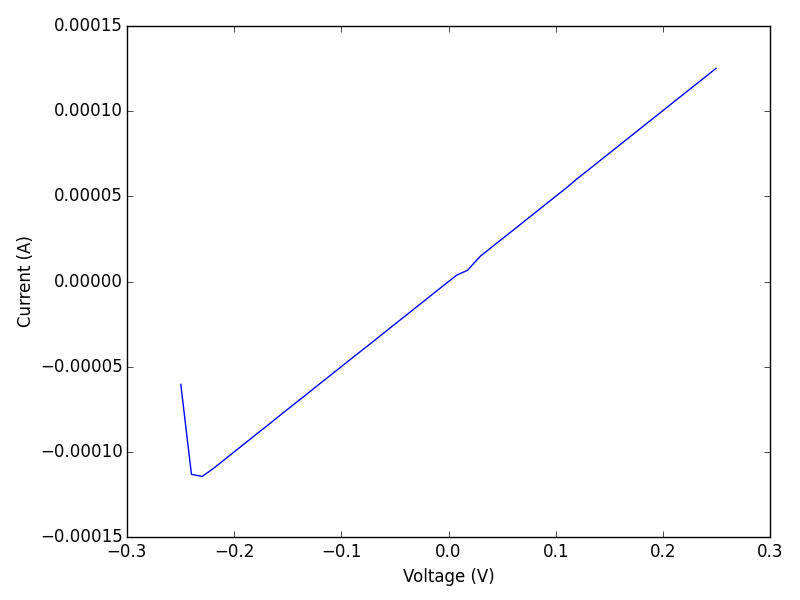
We have one potentiostat online with serial number 13089. I have a dummy cell connected to it which has a little resistor on it. So we can run a cyclic voltammogram and it should be a straight line. We have to know a bit about what is returned. We will get a json file back, and it will have the data in it. The data will be a list of lists. The data we want is in columns 1 and 3 (python indexing). Obviously you need some prior knowledge of what data comes back to use this. That would come from reading some documentation.

import requests
import numpy as np
import matplotlib.pyplot as plt

resp = requests.get('http://jkitchin-win.cheme.cmu.edu:5000/cv?endv=0.25&startv=-0.25')

dj = resp.json()
data = np.array(dj['data'])

plt.plot(data[:, 1], data[:, 3])
plt.xlabel('Voltage (V)')
plt.ylabel('Current (A)')
plt.tight_layout()
plt.savefig('cv-1.png')

Well, there you have it. Possibly the first Gamry Ref600 to ever have been driven from a Mac ;) Let me be more explicit about that; I could also run this from Linux, an iPad, etc… You could do this in a browser, or in an IPython notebook, or in Matlab, among many other possibilities. You could write a script in perl, shell, ruby, emacs-lisp, or any other language that supports http requests.

I am not sure why the graph is not perfectly linear, maybe there is some capacitive charging that starts out. The resistance based on the current at 0.2V is about 2000 ohms, which is in good agreement with what is listed on the board the dummy cell is on.

1 Summary thoughts

There are a host of interesting issues one eventually has to consider here including security, but also error management and debugging. I hacked something like an http api here by running flask on the windows machine running the instrument. That is a layer of abstraction on an abstraction to start with. I think later instruments are likely to run these webservers themselves on small dedicated computers, e.g. via a Raspberry pi or Arduino chipset. It is not obvious how sophisticated you can make this with respect to triggering different instruments, etc…

In running this, my "notebook" was blocked while the experiment ran. It is possible to run things asynchronously, and sometimes that would make sense. In the example here, we have provided a very limited set of functions to "run" the potentiostat. It was only a proof of concept to get a sense for what it is like. In practice a fuller set of functions would be implemented. Another point to consider is how the data comes back from the potentiostat. We used json here because it is convenient, but we could just as well send files, and other sorts of data too.

This lays out the possibility to walk up to an instrument with an electronic notebook, setup and run the experiment, capture the results in the notebook and take it back to the office for analysis. Pretty cool.

2 Flask app

So, here is my flask app. We setup a few routes using get requests to do things like get a list of the potentiostats online, and to run a cyclic voltamogram. As a side note, after this post is over, I am turning off the app, so you won't be able to repeat the codes ;) This is not a beautiful, secure or error tolerant code. It works enough for a proof of concept of simple experiments.

from flask import Flask, request, jsonify
import time

app = Flask(__name__)

@app.route('/')
def hello_world():
    return 'Hello World!'

@app.route('/pstats')
def get_pstats():
    import win32com.client as client
    devices = client.Dispatch('GamryCOM.GamryDeviceList')
    result = str(devices.EnumSections())
    return result

@app.route('/close_pstat')
def close():
    import win32com.client as client
    devicelist = client.Dispatch('GamryCOM.GamryDeviceList')

    x = devicelist.EnumSections()[0]
    pstat = client.Dispatch('GamryCOM.GamryPstat')
    pstat.Init(x)

    pstat.Close()


def run_ramp(Sinit,  # start value
             Sfinal, # end value
             ScanRate=1,
             SampleRate=0.01,
             CtrlMode=1,  # GamryCOM.PstatMode
             fname=None):
    '''We assume the first device is the one you want.
    '''
    import win32com.client as client
    import numpy as np
    devicelist = client.Dispatch('GamryCOM.GamryDeviceList')

    x = devicelist.EnumSections()[0]

    pstat = client.Dispatch('GamryCOM.GamryPstat')
    pstat.Init(x)

    pstat.Open()

    dtaqcpiv=client.Dispatch('GamryCOM.GamryDtaqCpiv')
    dtaqcpiv.Init(pstat)

    sigramp=client.Dispatch('GamryCOM.GamrySignalRamp')
    sigramp.Init(pstat, Sinit, Sfinal, ScanRate, SampleRate, CtrlMode)

    pstat.SetSignal(sigramp)
    pstat.SetCell(1) # 1 == GamryCOM.CellOn

    try:
        dtaqcpiv.Run(True)
    except Exception as e:
        pstat.Close()
        raise

    # NOTE:  The comtypes example in this same directory illustrates the use of com
    # notification events.  The comtypes package is recommended as an alternative
    # to win32com.
    time.sleep(2) # just wait sufficiently long for the acquisition to complete.

    acquired_points = []
    count = 1
    while count > 0:
        count, points = dtaqcpiv.Cook(10)
        # The columns exposed by GamryDtaq.Cook vary by dtaq and are
        # documented in the Toolkit Reference Manual.
        acquired_points.extend(zip(*points))

    acquired_points = np.array(acquired_points)
    if fname is not None:
        np.savetxt(fname, acquired_points)

    pstat.Close()
    return jsonify({'data': acquired_points.tolist()})

@app.route('/cv')
def run_cv():
    result = str(request.values)
    startv = float(request.values.get('startv', -0.1))
    endv = float(request.values.get('endv', 0.1))
    scanrate = float(request.values.get('scanrate', 1.0))
    samplerate = float(request.values.get('samplerate', 0.01))

    data = run_ramp(startv, endv, scanrate, samplerate)
    return data


if __name__ == '__main__':
    app.run(host='jkitchin-win.cheme.cmu.edu', port=5000, debug=True)

Copyright (C) 2015 by John Kitchin. See the License for information about copying.

org-mode source

Org-mode version = 8.2.10

Discuss on Twitter
« Previous Page -- Next Page »