New publication in International Journal of Digital Libraries

| categories: publication, news | tags:

We have a new paper out on using org-mode in publishing. The idea is to use org-mode to automate data embedding in publications. For example, in org-mode tables can serve as data sources. We show how you can automatically embed the tables as csv files in PDF or HTML when the org-file is exported. Similarly, all the code blocks are embedded as extractable files at export time. This increases the reusability of the data and code in papers.

Check out the preprint here: https://github.com/KitchinHUB/kitchingroup-66

@Article{Kitchin2016,
  author =       "Kitchin, John R. and Van Gulick, Ana E. and Zilinski, Lisa D.",
  title =        "Automating data sharing through authoring tools",
  journal =      "International Journal on Digital Libraries",
  year =         "2016",
  pages =        "1--6",
  abstract =     "In the current scientific publishing landscape, there is a
                  need for an authoring workflow that easily integrates data and
                  code into manuscripts and that enables the data and code to be
                  published in reusable form. Automated embedding of data and
                  code into published output will enable superior communication
                  and data archiving. In this work, we demonstrate a proof of
                  concept for a workflow, org-mode, which successfully provides
                  this authoring capability and workflow integration. We
                  illustrate this concept in a series of examples for potential
                  uses of this workflow. First, we use data on citation counts
                  to compute the h-index of an author, and show two code
                  examples for calculating the h-index. The source for each
                  example is automatically embedded in the PDF during the export
                  of the document. We demonstrate how data can be embedded in
                  image files, which themselves are embedded in the document.
                  Finally, metadata about the embedded files can be
                  automatically included in the exported PDF, and accessed by
                  computer programs. In our customized export, we embedded
                  metadata about the attached files in the PDF in an Info field.
                  A computer program could parse this output to get a list of
                  embedded files and carry out analyses on them. Authoring tools
                  such as Emacs + org-mode can greatly facilitate the
                  integration of data and code into technical writing. These
                  tools can also automate the embedding of data into document
                  formats intended for consumption.",
  issn =         "1432-1300",
  doi =          "10.1007/s00799-016-0173-7",
  url =          "https://doi.org/10.1007/s00799-016-0173-7"
}

Copyright (C) 2016 by John Kitchin. See the License for information about copying.

org-mode source

Org-mode version = 8.3.4

Discuss on Twitter

Dynamic sorting with ivy

| categories: ivy, emacs | tags:

I have been exploring ivy a lot these days as a general purpose completion backend. One need I have is dynamic resorting of candidates. I illustrate how to achieve that here. A big thanks to Oleh Krehel (author of ivy) for a lot help today getting this working!

You may want to check out the video: https://www.youtube.com/watch?v=nFKfM3MOAd0

First, a typical ivy-read example. Below I have a set of contact data for some people, and have setup an ivy-read command that inserts the email in the current buffer by default, and a second action for the phone. What is missing that I would like to do is dynamically reorder the candidates, including sorting all the candidates, swapping candidates up and down to fine tune the order, and then finally applying an action to all the candidates.

(defun ct ()
  (interactive)
  (ivy-read "contact: " '(("Kno Body" "kb@true.you" "555-1212")
                          ("A. Person" "ap@some.come" "867-5304")
                          ("G. Willikers" "gw@not.me" "555-5555"))
            :action '(1
                      ("o" (lambda (x)
                             (with-ivy-window
                               (insert
                                (if (not (looking-back " ")) ", " "")
                                (elt x 0))))
                       "insert email")
                      ("p" (lambda (x)
                             (with-ivy-window
                               (insert
                                (if (not (looking-back " ")) ", " "")
                                (elt x 1))))
                       "insert phone"))))

So, first a set of functions to manipulate the candidates. We create a swap function, two functions to move candidates up and down, and two functions that sort the whole list of candidates in ascending and descending order. In each case, we just update the ivy collection with the new modified collection, we save the currently selected candidate, and then reset the state to update the candidates.

(defun swap (i j lst)
  "Swap index I and J in the list LST." 
  (let ((tempi (nth i lst)))
    (setf (nth i lst) (nth j lst))
    (setf (nth j lst) tempi))
  lst)

(defun ivy-move-up ()
  "Move ivy candidate up."
  (interactive)
  (setf (ivy-state-collection ivy-last)
        (swap ivy--index (1- ivy--index) (ivy-state-collection ivy-last)))
  (setf (ivy-state-preselect ivy-last) ivy--current)
  (ivy--reset-state ivy-last))

(defun ivy-move-down ()
  "Move ivy candidate down."
  (interactive)
  (setf (ivy-state-collection ivy-last)
        (swap ivy--index (1+ ivy--index) (ivy-state-collection ivy-last)))
  (setf (ivy-state-preselect ivy-last) ivy--current)
  (ivy--reset-state ivy-last))

(defun ivy-a-z ()
  "Sort ivy candidates from a-z."
  (interactive)
  (setf (ivy-state-collection ivy-last)
        (cl-sort (ivy-state-collection ivy-last)
                 (if (listp (car (ivy-state-collection ivy-last)))
                     (lambda (a b)
                       (string-lessp (car a) (car b)))
                   (lambda (a b)
                     (string-lessp a b)))))
  (setf (ivy-state-preselect ivy-last) ivy--current)
  (ivy--reset-state ivy-last))

(defun ivy-z-a ()
  "Sort ivy candidates from z-a."
  (interactive)
  (setf (ivy-state-collection ivy-last)
        (cl-sort (ivy-state-collection ivy-last)
                 (if (listp (car (ivy-state-collection ivy-last)))
                     (lambda (a b)
                       (string-greaterp (car a) (car b)))
                   (lambda (a b)
                     (string-greaterp a b)))))
  (setf (ivy-state-preselect ivy-last) ivy--current)
  (ivy--reset-state ivy-last))

Now, we make a keymap to bind these commands so they are convenient to use. I will use C-arrows for swapping, and M-arrows for sorting the whole list. I also add M-<return> which allows me to use a numeric prefix to apply an action to all the candidates. M-<return> applies the default action. M-1 M-<return> applies the first action, M-2 M-<return> the second action, etc…

This specific implementation assumes your candidates have a cdr.

(setq ivy-sort-keymap
      (let ((map (make-sparse-keymap)))
        (define-key map (kbd "C-<up>") 'ivy-move-up)
        (define-key map (kbd "C-<down>") 'ivy-move-down)

        ;; sort all keys
        (define-key map (kbd "M-<up>") 'ivy-a-z)
        (define-key map (kbd "M-<down>") 'ivy-z-a)

        ;; map over all all entries with nth action
        (define-key map (kbd "M-<return>")
          (lambda (arg)
            "Apply the numeric prefix ARGth action to every candidate."
            (interactive "P")
            ;; with no arg use default action
            (unless arg (setq arg (car (ivy-state-action ivy-last))))
            (ivy-beginning-of-buffer)
            (let ((func (elt (elt (ivy-state-action ivy-last) arg) 1)))
              (loop for i from 0 to (- ivy--length 1)
                    do 
                    (funcall func
                             (let ((cand (elt
                                          (ivy-state-collection ivy-last)
                                          ivy--index)))
                               (if (listp cand)
                                   (cdr cand)
                                 cand)))
                    (ivy-next-line)))
            (ivy-exit-with-action
             (lambda (x) nil))))
        map))

Ok, now we modify our ivy-read function to use the keymap.

(defun ctn ()
  (interactive)
  (ivy-read "contact: " '(("Kno Body" "kb@true.you" "555-1212")
                          ("A. Person" "ap@some.come" "867-5304")
                          ("G. Willikers" "gw@not.me" "555-5555"))
            :keymap ivy-sort-keymap
            :action '(1
                      ("o" (lambda (x)
                             (with-ivy-window
                               (insert
                                (if (not (looking-back " ")) ", " "")
                                (elt x 0))))
                       "insert email")
                      ("p" (lambda (x)
                             (with-ivy-window
                               (insert
                                (if (not (looking-back " ")) ", " "")
                                (elt x 1))))
                       "insert phone"))))

kb@true.you, gw@not.me, ap@some.come, 555-1212, 555-5555, 867-5304

Copyright (C) 2016 by John Kitchin. See the License for information about copying.

org-mode source

Org-mode version = 8.3.4

Discuss on Twitter

Writing lisp code from Python

| categories: lisp, python | tags:

Some time ago I wrote about converting python data structures to lisp . I have expanded on that idea to writing lisp programs from Python! The newly expanded code that makes this possible can be found at https://github.com/jkitchin/pycse/blob/master/pycse/lisp.py .

Here are the simple data types known to pycse.lisp:

import pycse.lisp
import numpy as np

print("a string".lisp)
a = 5
b = 5.0
print(a.lisp)
print(b.lisp)
print([1, 2, 3].lisp)
print((1, 2, 3).lisp)
print({'a': 4}.lisp)
print(np.array([1, 2, 3]).lisp)
print(np.array([1.0, 2.0, 3.0]).lisp)
"a string"
5
5.0
(1 2 3)
(1 2 3)
(:a 4)
(1 2 3)
(1.0 2.0 3.0)

There are also some more complex types.

import pycse.lisp as pl

print(pl.Symbol('lambda'))
print(pl.Quote('lambda'))
print(pl.SharpQuote('lambda'))
print(pl.Cons("a", 5))
print(pl.Alist(["a", 2, "b", 5]))
print(pl.Vector([1, 2, 3]))

print(pl.Backquote([]))
print(pl.Comma([1, 2, 3]))
print(pl.Splice([1, 2, 3]))
lambda
'lambda
#'lambda
("a" . 5)
(("a" . 2) ("b" . 5))
[1 2 3]
`()
,(1 2 3)
,@(1 2 3)

You can nest these too.

import pycse.lisp as pl
print(pl.Quote(pl.Alist(["a", 2, "b", 5])))
print(pl.Backquote([pl.Symbol('+'), pl.Comma(pl.Symbol('b')), 5]))
'(("a" . 2) ("b" . 5))
`(+ ,b 5)

All that means we can use Python code to generate lisp programs. Here is an example where we make two sub-programs, and combine them into an overall program, then add one more subprogram to it. We wrap the results in an emacs-lisp block, then actually run the block!

import pycse.lisp as pl

p1 = [pl.Symbol('mapcar'),
      [pl.Symbol('lambda'),
       [pl.Symbol('x')],
       [pl.Symbol('*'),
        pl.Symbol('x'),
        pl.Symbol('x')]],
      pl.Quote([1, 2, 3, 4])]

p2 = [pl.Symbol('princ'), "Hello world"]

p = [pl.Symbol('list'), p1, p2]
p.append([pl.Symbol('+'), 5, 5])

print(p.lisp)
(list (mapcar (lambda (x) (* x x)) '(1 2 3 4)) (princ "Hello world") (+ 5 5))
(1 4 9 16) Hello world 10

Wow, it worked! Here is another example of setting up a macro and then running it.

import pycse.lisp as pl
s = pl.Symbol
bq = pl.Backquote
c = pl.Comma

p1 = [s('defmacro'), s('f'), [s('x')],
      "A docstring",
      bq([s('*'), c(s('x')), 5])]


p2 = [s('f'), 5]

print(p1.lisp)

print(p2.lisp)
(defmacro f (x) "A docstring" `(* ,x 5))
(f 5)
25

I am not too sure where this will be super useful, but it is an interesting proof of concept. I haven't tested this much beyond the original post and this one. Let me know if you find issues with it.

Copyright (C) 2016 by John Kitchin. See the License for information about copying.

org-mode source

Org-mode version = 8.2.10

Discuss on Twitter

Expanding orgmode.py to get better org-python integration

| categories: orgmode, python | tags:

I have only ever been about 80% satisfied with Python/org-mode integration. I have developed a particular workflow that I like a lot, and works well for solving scientific and engineering problems. I typically use stand-alone Python blocks, i.e. not sessions. I tend to use print statements to create output that I want to see, e.g. the value of a calculation. I also tend to create multiple figures in a single block, which I want to display in the buffer. This workflow is represented extensively in PYCSE and dft-book which collectively have 700+ src blocks! So I use it alot ;)

There are some deficiencies though. For one, I have had to hand build any figures/tables that are generated from the code blocks. That means duplicating filenames, adding the captions, etc… It is not that easy to update captions from the code blocks, and there has been limited ability to use markup in the output.

Well finally I had some ideas to change this. The ideas are:

  1. Patch matplotlib so that savefig actually returns a figure link that can be printed to the output. savefig works the same otherwise.
  2. Patch matplotlib.pyplot.show to save the figure, and print a figure link in thhe output.
  3. Create special functions to generate org tables and figures.
  4. Create some other functions to generate some blocks and elements.

Then we could just import the library in our Python scripts (or add it as a prologue) and get this nice functionality. You can find the code for this here:

https://github.com/jkitchin/pycse/blob/master/pycse/orgmode.py

Finally, it seems like a good idea to specify that we want our results to be an org drawer. This makes the figures/tables export, and allows us to generate math and other markup in our programs. That has the downside of making exported results not be in the "verbatim" markup I am used to, but that may be solvable in other ways. We can make the org drawer output the default like this:

(setq org-babel-default-header-args:python
      (cons '(:results . "output org drawer replace")
            (assq-delete-all :results org-babel-default-header-args)))

With these, using Python blocks in org-mode gets quite a bit better!

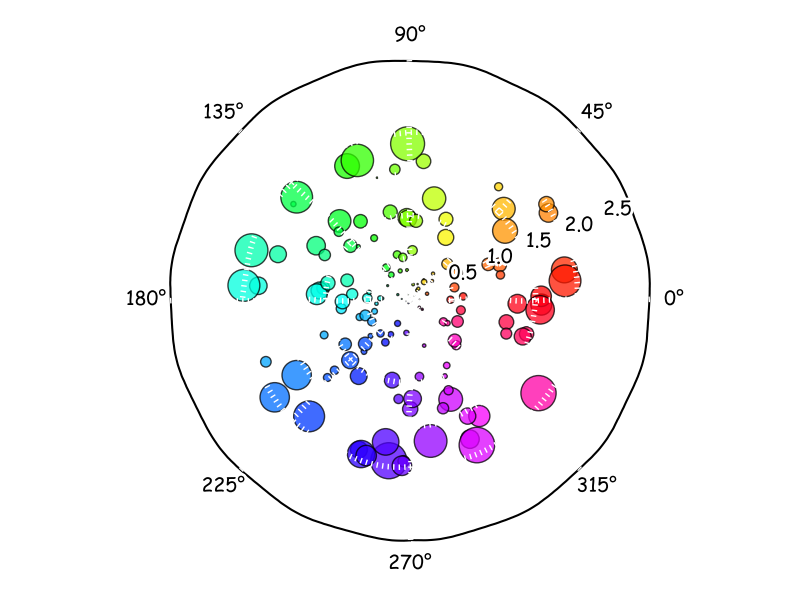
Here is the first example, with savefig. I have the savefig function return the link, so we have to print it. We use this feature later. The figure is automatically inserted to the buffer. Like magic!

Here is a fun figure from http://matplotlib.org/xkcd/examples/pie_and_polar_charts/polar_scatter_demo.html

import pycse.orgmode

import numpy as np
import matplotlib.pyplot as plt
plt.xkcd()

N = 150
r = 2 * np.random.rand(N)
theta = 2 * np.pi * np.random.rand(N)
area = 200 * r**2 * np.random.rand(N)
colors = theta

ax = plt.subplot(111, polar=True)
c = plt.scatter(theta, r, c=colors, s=area, cmap=plt.cm.hsv)
c.set_alpha(0.75)

print(plt.savefig('test.png'))

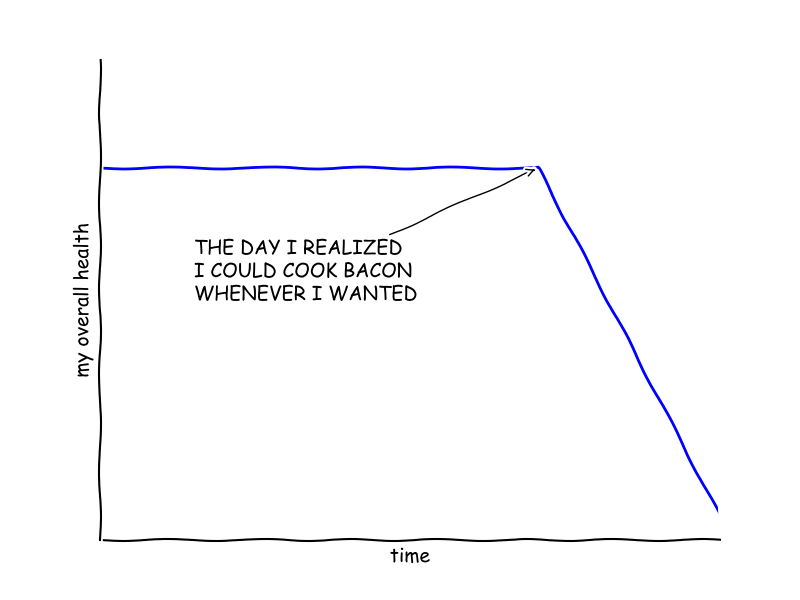
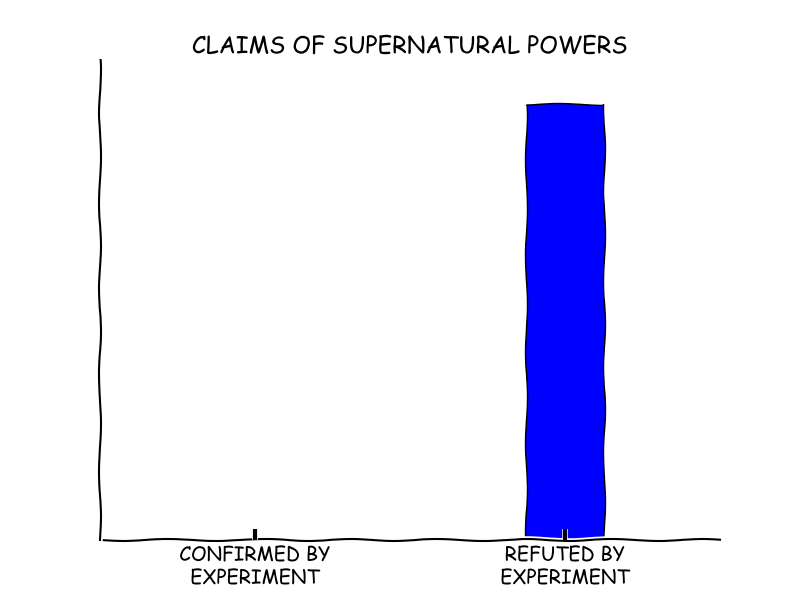
How about another example with show. This just prints the link directly. It seems to make sense to do it that way. This is from http://matplotlib.org/xkcd/examples/showcase/xkcd.html .

import pycse.orgmode as org

from matplotlib import pyplot as plt
import numpy as np

plt.xkcd()

fig = plt.figure()
ax = fig.add_subplot(1, 1, 1)
ax.spines['right'].set_color('none')
ax.spines['top'].set_color('none')
plt.xticks([])
plt.yticks([])
ax.set_ylim([-30, 10])

data = np.ones(100)
data[70:] -= np.arange(30)

plt.annotate(
    'THE DAY I REALIZED\nI COULD COOK BACON\nWHENEVER I WANTED',
    xy=(70, 1), arrowprops=dict(arrowstyle='->'), xytext=(15, -10))

plt.plot(data)

plt.xlabel('time')
plt.ylabel('my overall health')
plt.show()

# An intermediate result
print('Some intermediate result for x - 4 = 6:')
x = 6 + 4
org.fixed_width('x = {}'.format(x))

# And another figure
fig = plt.figure()
ax = fig.add_subplot(1, 1, 1)
ax.bar([-0.125, 1.0-0.125], [0, 100], 0.25)
ax.spines['right'].set_color('none')
ax.spines['top'].set_color('none')
ax.xaxis.set_ticks_position('bottom')
ax.set_xticks([0, 1])
ax.set_xlim([-0.5, 1.5])
ax.set_ylim([0, 110])
ax.set_xticklabels(['CONFIRMED BY\nEXPERIMENT', 'REFUTED BY\nEXPERIMENT'])
plt.yticks([])

plt.title("CLAIMS OF SUPERNATURAL POWERS")

plt.show()
Some intermediate result for x - 4 = 6:

x = 10

See, the figures show where they belong, with intermediate results that have some formatting, and they export correctly. Nice.

1 A Figure from Python

It has been a long desire of mine to generate full figures with captions from code blocks, and to get them where I want like this one:

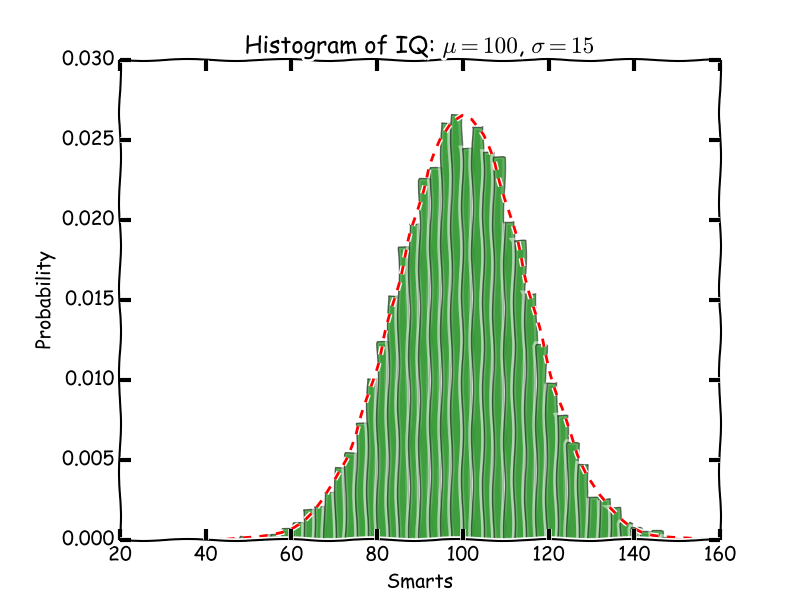
Figure 3: An italicized histogram of 10000 points

Here is the code to generate the full figure. Note we use the output of savefig as the filename. That lets us save some intermediate variable construction. That seems nice.

import pycse.orgmode as org
import matplotlib.pyplot as plt
plt.xkcd()

import numpy as np
import matplotlib.mlab as mlab
import matplotlib.pyplot as plt

# example data
mu = 100 # mean of distribution
sigma = 15 # standard deviation of distribution
x = mu + sigma * np.random.randn(10000)

num_bins = 50
# the histogram of the data
n, bins, patches = plt.hist(x, num_bins, normed=1, facecolor='green', alpha=0.5)
# add a 'best fit' line
y = mlab.normpdf(bins, mu, sigma)
plt.plot(bins, y, 'r--')
plt.xlabel('Smarts')
plt.ylabel('Probability')
plt.title(r'Histogram of IQ: $\mu=100$, $\sigma=15$')

# Tweak spacing to prevent clipping of ylabel
plt.subplots_adjust(left=0.15)

org.figure(plt.savefig('smarts.png'),
           label='fig:1',
           caption='An italicized /histogram/ of {} points'.format(len(x)),
           attributes=[('LATEX', ':width 3in'),
                       ('HTML', ':width 300'),
                       ('ORG', ':width 300')])

That is pretty awesome. You cannot put figures in more than one place like this, and you might not want to mix results with this, but it is still pretty awesome!

2 An example table.

Finally, I have wanted the same thing for tables. Here is the resulting table.

Table 1: Dependence of the energy on the encut value.
ENCUT Energy (eV)
100 11.233
200 21.233
300 31.233
400 41.233
500 51.233

Here is the code block that generated it.

import pycse.orgmode as org

data = [['<5>', '<11>'],  # Column aligners
        ['ENCUT', 'Energy (eV)'],
        None]

for encut in [100, 200, 300, 400, 500]:
    data += [[encut, 1.233 + 0.1 * encut]]

org.table(data,
          name='table-1',
          caption='Dependence of the energy on the encut value.')

The only obvious improvement on this is similar to getting images to redisplay after running a code block, it might be nice to reformat tables to make sure they are pretty looking. Otherwise this is good.

Let's go ahead and try that. Here we narrow down to the results, and align the tables in that region.

(defun org-align-visible-tables ()
  "Align all the tables in the results."
  (let ((location (org-babel-where-is-src-block-result)) start)
    (when location
      (setq start (- location 1))
      (save-restriction
        (save-excursion
          (goto-char location) (forward-line 1)
          (narrow-to-region start (org-babel-result-end))
          (goto-char (point-min))
          (while (re-search-forward org-table-any-line-regexp nil t)
            (save-excursion (org-table-align))
            (or (looking-at org-table-line-regexp)
                (forward-char 1)))
          (re-search-forward org-table-any-border-regexp nil 1))))))

(add-hook 'org-babel-after-execute-hook
          (lambda () (org-align-visible-tables)))
lambda nil (org-align-visible-tables)
lambda nil (org-refresh-images)

And that seems to solve that problem now too!

3 Miscellaneous outputs

Here are some examples of getting org-output from the pycse.orgmode module.

import pycse.orgmode as org

org.verbatim('One liner verbatim')

org.verbatim('''multiline
output
   with indentation
       at a few levels
that is verbatim.''')

org.fixed_width('your basic result')

org.fixed_width('''your
  basic
    result
on a few lines.''')

# A latex block
org.latex('\(e^{i\pi} - 1 = 0\)')

org.org(r'The equation is \(E = h \nu\).')

One liner

multiline
output
   with indentation
       at a few levels
that is verbatim.
your basic result
your
  basic
    result
on a few lines.

The equation is \(E = h \nu\).

4 Summary

This looks promising to me. There are a few things to get used to, like always having org output, and some minor differences in making figures. On the whole this looks like a big improvement though! I look forward to working with it more.

Copyright (C) 2016 by John Kitchin. See the License for information about copying.

org-mode source

Org-mode version = 8.2.10
Discuss on Twitter

When in python do as Pythonistas unless...

| categories: python | tags:

Many lisps have a when/unless conditional syntax that works like this:

(when t (print "when evaluated"))

(unless nil (print "unless evaluated"))
"when evaluated"

"unless evaluated"

Those are actually just macros that expand to the more verbose if function:

(macroexpand '(unless nil (print "unless evaluated")))
(if nil nil
  (print "unless evaluated"))

In Python, we only have this syntax for this kind of construct:

if True: print "when equivalent"

if not False: print "unless equivalent"
when equivalent
unless equivalent

I thought is would be fun to get as close as possible to the lisp syntax in Python. It is not that easy though. The benefit of a macro is we do not evaluate the arguments until they need to be evaluated. In Python, all arguments of functions are immediately evaluated.

One way to avoid this is to put code inside a function. Then it will not be executed until the function is called. So, here is an example of how to get an unless function in Python that conditionally evaluates a function.

def unless(condition, f):
    if not condition:
        return f()

def func():
    return "executed. Condition was not true."


print unless(1 > 0, func)

print unless(1 < 0, func)
None
executed. Condition was not true.

That is close, but requires us to wrap our code in a function. There does not seem to be any alternative though. It thought maybe a context manager could be used, but there does not seem to be a way to bypass the execution of the code (https://www.python.org/dev/peps/pep-0377/ ). Still, it might be a useful way to change how to think about doing some things differently in Python.

Copyright (C) 2016 by John Kitchin. See the License for information about copying.

org-mode source

Org-mode version = 8.2.10
Discuss on Twitter
« Previous Page -- Next Page »