Better equation numbering in LaTeX fragments in org-mode

| categories: orgmode, latex, emacs | tags:

In org-mode we can use LaTeX equations, and toggle an overlay that shows what the rendered equation will look like. One thing that has always bothered me though, is that each fragment is created in isolation. That means numbering is almost always wrong, and typically with each numbered equation starting with (1). Here we look at a way to fix that. Fixing it means we have to find a way to not create each fragment image in isolation; each one needs a context that enables the numbering to be correct. The idea we try here is simple: we just figure out in advance what the numbering for each equation should be, and then figure out how to get that information to the image generation.

See this video of the post in action:

Here are some example equations to see how it works.

This should be numbered (1)

\begin{equation} \int x^2 dx \end{equation}

This is a numbered equation with a custom number. This should have (E1) as the number.

\begin{equation}\tag{E1} \int x^2 dx \end{equation}

But equation* is not numbered

\begin{equation*} \int x^2 dx \end{equation*}

LaTeX align environments are numbered. The first line is (2), the second line is not numbered (because we put \nonumber in the line), and the third line is (3).

\begin{align} a = 5 \\ b=6 \nonumber \\ c = 8 \end{align}

But align* environments are not numbered.

\begin{align*} a = 5 \\ b=6 \end{align*}

This should be numbered (4).

\begin{equation} \int x^3 dx \end{equation}

These should be numbered (5), (6) and (7).

\begin{align} a = 5 \\ b=6 \\ c = 8 \end{align}

This should be numbered with (E2).

\begin{equation}\tag{E2} \int x^2 dx \end{equation}

And this should be numbered (8).

\begin{equation} \int x^2 dx \end{equation}

Note: This will be numbered (1) because it is exactly the same equation as a previous one!

\begin{equation} \int x^2 dx \end{equation}

We can change the numbering of an equation with code like this. After this code, the next equation will be numbered (5).

The only fragments that should be numbered are equation environments, and align environments (these are the main ones that we consider here). The align environment is tricky since there is potentially more than one number in the environment.

So, we get all the fragments, and generate a list of which ones should be numbered, and if they should what the number should be. That means we will need to count the number of numbered equations in an align environment. We will do that by getting the number of line breaks, and subtracting the number of nonumbers.

Here is the code block that does that, using advice again. A downside of this approach is that we generate the list for every fragment, which is not efficient, since it should not change in a synchronous approach to generating them.

(defun org-renumber-environment (orig-func &rest args)
  (let ((results '()) 
        (counter -1)
        (numberp))

    (setq results (loop for (begin .  env) in 
                        (org-element-map (org-element-parse-buffer) 'latex-environment
                          (lambda (env)
                            (cons
                             (org-element-property :begin env)
                             (org-element-property :value env))))
                        collect
                        (cond
                         ((and (string-match "\\\\begin{equation}" env)
                               (not (string-match "\\\\tag{" env)))
                          (incf counter)
                          (cons begin counter))
                         ((string-match "\\\\begin{align}" env)
                          (prog2
                              (incf counter)
                              (cons begin counter)                          
                            (with-temp-buffer
                              (insert env)
                              (goto-char (point-min))
                              ;; \\ is used for a new line. Each one leads to a number
                              (incf counter (count-matches "\\\\$"))
                              ;; unless there are nonumbers.
                              (goto-char (point-min))
                              (decf counter (count-matches "\\nonumber")))))
                         (t
                          (cons begin nil)))))

    (when (setq numberp (cdr (assoc (point) results)))
      (setf (car args)
            (concat
             (format "\\setcounter{equation}{%s}\n" numberp)
             (car args)))))
  
  (apply orig-func args))

(advice-add 'org-create-formula-image :around #'org-renumber-environment)

You can remove the advice like this.

(advice-remove 'org-create-formula-image #'org-renumber-environment)

Copyright (C) 2016 by John Kitchin. See the License for information about copying.

org-mode source

Org-mode version = 9.0

Discuss on Twitter

Justifying LaTeX preview fragments in org-mode

| categories: orgmode, latex, emacs | tags:

A colleague asked if I knew how to center the preview images of LaTeX equations in an org-buffer. This might make org-mode notes look nicer when lecturing, for example. We thought it might be possible to just offset the overlay with a before-string made up of the right number of spaces. I worked out a full solution that lets you "justify" the preview images. You have to add a :justify option to org-format-latex-options, and the option is either 'center or 'right (anything else means left-justified as the default). This will only justify equations that start at the beginning of a line to avoid modifying fragments that are in text. You should see the video to see this in action:

Equation 1: \(e^{i\pi} + 1 = 0\)

An \(x^2 = -1\) equation in the text is not affected.

A display equation with some space after the equation: \[e^{i \cdot \pi} + 1 = 0\]

This is a numbered equation.

\begin{equation} \int x^2 dx \end{equation}

The idea is pretty simple, we get the width of the window, and the width of the image, and compute the offset that approximately centers or right justifies the overlay, and then add the before-string property to the overlay. While we are at it, I will add a tooltip to the image so you can see the LaTeX code that created it, and make it clickable so you can toggle it back to the code. I apply the functions as after advice to the function that creates the overlay, so we do not have to adapt the org code at all. Here is the code that does it.

;; specify the justification you want
(plist-put org-format-latex-options :justify 'center)

(defun org-justify-fragment-overlay (beg end image imagetype)
  "Adjust the justification of a LaTeX fragment.
The justification is set by :justify in
`org-format-latex-options'. Only equations at the beginning of a
line are justified."
  (cond
   ;; Centered justification
   ((and (eq 'center (plist-get org-format-latex-options :justify)) 
         (= beg (line-beginning-position)))
    (let* ((img (create-image image 'imagemagick t))
           (width (car (image-size img)))
           (offset (floor (- (/ (window-text-width) 2) (/ width 2)))))
      (overlay-put (ov-at) 'before-string (make-string offset ? ))))
   ;; Right justification
   ((and (eq 'right (plist-get org-format-latex-options :justify)) 
         (= beg (line-beginning-position)))
    (let* ((img (create-image image 'imagemagick t))
           (width (car (image-display-size (overlay-get (ov-at) 'display))))
           (offset (floor (- (window-text-width) width (- (line-end-position) end)))))
      (overlay-put (ov-at) 'before-string (make-string offset ? ))))))

(defun org-latex-fragment-tooltip (beg end image imagetype)
  "Add the fragment tooltip to the overlay and set click function to toggle it."
  (overlay-put (ov-at) 'help-echo
               (concat (buffer-substring beg end)
                       "mouse-1 to toggle."))
  (overlay-put (ov-at) 'local-map (let ((map (make-sparse-keymap)))
                                    (define-key map [mouse-1]
                                      `(lambda ()
                                         (interactive)
                                         (org-remove-latex-fragment-image-overlays ,beg ,end)))
                                    map)))

;; advise the function to a
(advice-add 'org--format-latex-make-overlay :after 'org-justify-fragment-overlay)
(advice-add 'org--format-latex-make-overlay :after 'org-latex-fragment-tooltip)

That is it. If you get tired of the advice, remove it like this:

(advice-remove 'org--format-latex-make-overlay 'org-justify-fragment-overlay)
(advice-remove 'org--format-latex-make-overlay 'org-latex-fragment-tooltip)

Copyright (C) 2016 by John Kitchin. See the License for information about copying.

org-mode source

Org-mode version = 9.0

Discuss on Twitter

New link features in org 9

| categories: orgmode | tags:

Org 9.0 is finally out, and it comes with a totally overhauled link capability! This post documents some of those capabilities. These new capabilities include support for:

  1. Custom link faces
  2. Custom tooltips on links
  3. More consistent interface for completion
  4. Special keymaps on links
  5. Customized folding of bracketed links

This post will make more sense with this video: https://www.youtube.com/watch?v=5haX95nk02E

1 A colored link with a static tooltip.

All links in elisp are now defined with org-link-set-parameters.

(org-link-set-parameters
 "red"
 :follow (lambda (path) (message "You clicked me."))
 :export (lambda (path desc backend)
           (cond
            ((eq 'html backend)
             (format "<font color=\"red\">%s</font>"
                     (or desc path)))))
 :face '(:foreground "red")
 :help-echo "Click me for a message.")

A link that is colored red. In bracketed form: A link with a description.

You can change a parameter like this.

(org-link-set-parameters
 "red"
 :face '(:foreground "red" :underline t))

A link that is colored red and underlined.

You can use any face for a link. Here we define one and use it.

(defface org-link-green
  '((t (:inherit org-link :foreground "green")))
  "A green link.")

(org-link-set-parameters
   "green"
   :follow (lambda (path) (message "You clicked me."))
   :export (lambda (path desc backend)
     (cond
      ((eq 'html backend)
       (format "<font color=\"green\">%s</font>"
               (or desc path)))))
   :face 'org-link-green
   :help-echo "Click me for a message.")

A link works.

2 A colored link with a static tooltip and no folding.

This link will be shown in full unfolded form even when other links are folded in descriptive format.

(org-link-set-parameters
 "red-full"
 :follow (lambda (path) (message "You clicked me."))
 :export (lambda (path desc backend)
           (cond
            ((eq 'html backend)
             (format "<font color=\"red\">%s</font>"
                     (or desc path)))))
 :face '(:foreground "red")
 :display 'full
 :help-echo "Click me for a message.")

A link that is colored red. In bracketed form: A link with a description. This regular bracketed doi is still folded.

3 A dynamic tooltip

You can make tooltips dynamic. The function must take these arguments (window object position), and construct the tooltip from that information. Here we show what the cursor is on and the point that it is on. \(x^2\)

(defun redd-tip (window object position)
  (save-excursion
    (goto-char position)
    (goto-char (org-element-property :begin (org-element-context)))
    (cond ((looking-at org-plain-link-re)
           (format "Looking at %s with mouse at %s" (match-string 0) position))
          ((looking-at org-bracket-link-regexp)
           (format "Looking at %s in a bracketed link with mouse at %s"
                   (match-string 0) position))
          (t
           "No match"))))

(org-link-set-parameters
 "redd"
 :face '(:underline t)
 :help-echo 'redd-tip)

A link with a dynamic tooltip: link or this one another-link bracketed redd

4 A better file link

Say you want to get a menu of options for file links. For example to find the file, open it in dired, copy the link, etc… We use helm here to make that happen.

(org-link-set-parameters
 "file"
 :follow (lambda (path)
           (funcall
            (helm :sources
                  `((name . "Action")
                    (candidates . ,(append
                                    (loop for f in '(find-file
                                                     org-open-file)
                                          collect (cons (symbol-name f) f))
                                    '(("dired" . (lambda (path)
                                                   (dired (file-name-directory path))
                                                   (re-search-forward (file-name-nondirectory path))))
                                      ("copy org link" . (lambda (path)
                                                           (kill-new (format "[[file:%s]]" path)))))))
                    (action . identity)))
            path)))

5 A link with a new keymap.

To get a special keymap, we have to create a new keymap. We can make a copy of org-mouse-map and add new keys to it that are specific to this link. With this link, you can use arrow-keys with a modifier key to jump between links. We define C-left and C-right to go to the previous and next links, and for fun a C-up and super-mouse-1 bindings that are in effect only on the links.

(defun prev-link ()
  (interactive)
  (re-search-backward "keym:" nil t))

(defun next-link ()
  (interactive)
  (re-search-forward "keym:" nil t))

(org-link-set-parameters
 "keym"
 :follow (lambda (path)
           (interactive)
           (message "You followed me."))
 :keymap (let ((map (copy-keymap org-mouse-map)))
           (define-key map (kbd "C-<left>") 'prev-link)
           (define-key map (kbd "C-<right>") 'next-link)
           (define-key map (kbd "C-<up>")
             (lambda ()
               (interactive)(message-box "special C-up")))
           (define-key map [s-mouse-1]
             (lambda ()
               (interactive)
               (message-box "s-Followed")))
           map))

one then two and finally three

6 A completion example with a dynamic face for validation

This example shows how to add a completion function, and use a dynamic face to show when a bad link has been made (in this case there are 4 allowed fruits, and anything else should be red.

(defun my-comp (&optional arg)
  (format "fruit:%s"
          (completing-read "Choose a fruit: " '("apple" "orange" "grapes" "kiwi"))))

(defun fruit-link-face (path)
  (if (member path '("apple" "orange" "grapes" "kiwi"))
      'org-link
    '(:foreground "red")))

(defun fruit-tooltip (_win _obj position)
  (save-match-data
    (save-excursion
      (goto-char position)
      (let ((path (org-element-property :path (org-element-context))))
        (if (member path '("apple" "orange" "grapes" "kiwi"))
            "A fruit"
          (format "%s: Illegal value. Must be one of apple, orange, grapes or kiwi."
                  path))))))

(org-link-set-parameters "fruit"
                         :help-echo 'fruit-tooltip
                         :face 'fruit-link-face
                         :complete 'my-comp)

apple an orange in brackets

a bad grapefruit. kiwi

kiwi

7 A store link example

A store link example Put your cursor on a headline, and type C-c l. Then move it and type C-c C-l to insert the link.

(defun store-my-headline ()
  (when (and (eq major-mode 'org-mode)
             (org-at-heading-p))
    (org-store-link-props
     :type "head"
     :link (format "head:*%s" (nth 4 (org-heading-components)))
     :description (nth 4 (org-heading-components)))))

(defun follow-head (path)
  (org-open-link-from-string (format "[[%s]]" path)))

(org-link-set-parameters
 "head" :follow 'follow-head :store 'store-my-headline)

8 An activate-func example

You may want to do some additional things when a link is activated. For example, maybe it makes sense for different parts of the link to have different actions, or colors. Here is an example where we make an rgb link of three numbers, and color each number, and make the link color dynamic.

We make a keymap so C-up increments a color, and C-down decrements a color.

(require 'color)

(defun rgb-face (path)
  (let* ((f (split-string path ","))
         (red (/ (string-to-number (nth 0 f)) 255.0))
         (green (/ (string-to-number (nth 1 f)) 255.0))
         (blue (/ (string-to-number (nth 2 f)) 255.0))
         (hex (color-rgb-to-hex red green blue)))
    (list :foreground hex)))


(defun rgb-func (start end path bracketp)
  (save-excursion
    (goto-char start)
    (save-match-data
      (cl-loop for num in (split-string path ",")
               for face in (list '(:foreground "red")
                                 '(:foreground "green")
                                 '(:foreground "blue"))
               do
               (progn
                 (re-search-forward num end t)
                 (add-text-properties
                  (match-beginning 0)
                  (match-end 0)
                  (list 'face face)))))))

(defun ninc ()
  (interactive)
  (skip-chars-backward "0-9")
  (or (looking-at "[0-9]+")
      (error "No number at point"))
  (replace-match (number-to-string (1+ (string-to-number (match-string 0))))))


(defun NINC ()
  (interactive)
  (let* ((link (org-element-context))
         (path (org-element-property :path link))
         (beg (org-element-property :begin link))
         (end (org-element-property :end link))
         (rgb (mapcar 'string-to-number (split-string path ","))))
    (setq rgb (mapcar (lambda (x) (+ x 10)) rgb))
    (setf (buffer-substring beg end)
          (format "rgb:%s" (mapconcat 'identity (mapcar 'number-to-string rgb) ",")))))

(defun NDEC ()
  (interactive)
  (let* ((link (org-element-context))
         (path (org-element-property :path link))
         (beg (org-element-property :begin link))
         (end (org-element-property :end link))
         (rgb (mapcar 'string-to-number (split-string path ","))))
    (setq rgb (mapcar (lambda (x) (- x 10)) rgb))
    (setf (buffer-substring beg end)
          (format "rgb:%s" (mapconcat 'identity (mapcar 'number-to-string rgb) ",")))))


(defun ndec ()
  (interactive)
  (skip-chars-backward "0-9")
  (or (looking-at "[0-9]+")
      (error "No number at point"))
  (replace-match (number-to-string (1- (string-to-number (match-string 0))))))

(org-link-set-parameters "rgb" :face 'rgb-face
                         :activate-func 'rgb-func
                         :keymap (let ((map (copy-keymap org-mouse-map)))
                                   (define-key map (kbd "C-<up>") 'ninc)
                                   (define-key map (kbd "C-<down>") 'ndec)
                                   (define-key map (kbd "s-<up>") 'NINC)
                                   (define-key map (kbd "s-<down>") 'NDEC)
                                   map))

83,29,238 This is a violet color. 112,17,19

This is an rgb link with three comma separated numbers. We color each number accordingly, and set the rgb link to the color represented by the RGB pair.

225,225,225 This is a light gray.

A subtle point in this example is the need to save-match-data. Some functions modify the match-data, and this will mess up the whole font-lock system. I learned that by trial and error.

Copyright (C) 2016 by John Kitchin. See the License for information about copying.

org-mode source

Org-mode version = 9.0

Discuss on Twitter

Sending html emails from org-mode with org-mime

| categories: email, orgmode | tags:

On the org-mode mailing list there was some discussion about sending html mail using orgmode. The support for this in mu4e is deprecated. There is the org-mime library though, and it supports a lot of what is needed for this. As I played around with it though, I came across some limitations:

  1. I found equations were not rendered as images in the html, and files (in links) were not attached out of the box. I fixed that here.
  2. I found it useful to modify the org-mime commands to leave point in the To: field when composing emails from org-buffers.
  3. For use with mu4e, I created a function to open a message in org-mu4e-compose-org-mode, and added a C-cC-c hook to allow me to send it easily (here).

This post documents some work I did figuring out how to send html mails. After some testing, some of these should probably be patched in org-mime.

First, you need to require this library.

(require 'org-mime)

You can send a whole org buffer in html like with this command: org-mime-org-buffer-htmlize. Not all of the internal links work for me (at least in gmail).

The default behavior leaves you at the end of the buffer, which is not too nice. We lightly modify the function here to leave in the To: field.

(defun org-mime-org-buffer-htmlize ()
  "Create an email buffer containing the current org-mode file
  exported to html and encoded in both html and in org formats as
  mime alternatives."
  (interactive)
  (org-mime-send-buffer 'html)
  (message-goto-to))

1 From an org-headline in an org-file

You can compose an email as an org-heading in any org-buffer, and send it as html. In an org-heading, you need to specify a MAIL_FMT property of html, e.g.:

   :PROPERTIES:
   :MAIL_FMT: html
   :END:

Note the following properties can also be set to modify the composed email.

           (subject (or (funcall mp "MAIL_SUBJECT") (nth 4 (org-heading-components))))
           (to (funcall mp "MAIL_TO"))
           (cc (funcall mp "MAIL_CC"))
           (bcc (funcall mp "MAIL_BCC"))

Then, send it with org-mime-subtree

Here I modify this function to leave me in the To: field.

(defun org-mime-subtree ()
  "Create an email buffer containing the current org-mode subtree
  exported to a org format or to the format specified by the
  MAIL_FMT property of the subtree."
  (interactive)
  (org-mime-send-subtree
   (or (org-entry-get nil "MAIL_FMT" org-mime-use-property-inheritance) 'org))
  (message-goto-to))

Here are some sample elements to see if they convert to html reasonably.

1.1 Markup

bold

underlined

italics

strikethrough

code

Subscripts: H2O Superscripts: H+ An entity: To ∞ and beyond

1.2 Equations

\(x^2\)

\[x^4\]

\(e^x\)

1.3 Tables

Table 1: A table for you.
x y
1 2

1.4 Lists

A nested list.

  • one
    • Subentry under one.
  • two

A definition list:

def1
first definition

A checklist:

  • [ ] A checkbox

Here is a numbered list:

  1. number 1
  2. number 2

1.5 Code block

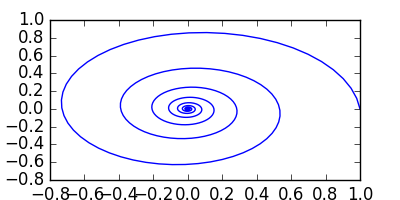
import numpy as np
import matplotlib.pyplot as plt

t = np.linspace(0, 10)
x = np.cos(t) * np.exp(-t)
y = np.sin(t) * np.exp(-t)

plt.plot(x, y)
plt.savefig('spiral.png')

1.6 An image from somewhere other than this directory

2 In a mail message

You might prefer to do this directly in an email. Here is how you can do it in mu4e. I use this command to open a message in org-mode. The mode switches if you are in the header, or in the body. If you always do this, you could use a hook instead on message-mode. I do not want default html so I do not do it.

(defun mu4e-compose-org-mail ()
 (interactive)
 (mu4e-compose-new)
 (org-mu4e-compose-org-mode))

For sending, we will use org-mime to htmlize it, and add a C-c C-c hook function to send it. This hook is a little tricky, we want to preserve C-c C-c behavior in org-mode, e.g. in code blocks, but send it if there is no other C-c C-c action that makes sense, so we add it to the end of the hook. Alternatively, you could bind a special key for it, or run the special command. Note the C-c C-c hook only works in the body of the email. From the header, a plain text message is sent.

(defun htmlize-and-send ()
  "When in an org-mu4e-compose-org-mode message, htmlize and send it."
  (interactive)
  (when (member 'org~mu4e-mime-switch-headers-or-body post-command-hook)
    (org-mime-htmlize) 
    (message-send-and-exit)))

(add-hook 'org-ctrl-c-ctrl-c-hook 'htmlize-and-send t)

Here is a way to do this for non-mu4e users. It doesn't have the nice mode switching capability though, so you lose completion in emails, and header specific functions. You can switch back to message-mode to regain those.

(defun compose-html-org ()
  (interactive)
  (compose-mail)
  (message-goto-body)
  (setq *compose-html-org* t)
  (org-mode))

(defun org-htmlize-and-send ()
  "When in an org-mu4e-compose-org-mode message, htmlize and send it."
  (interactive)
  
  (when *compose-html-org*
    (setq *compose-html-org* nil)
    (message-mode)
    (org-mime-htmlize) 
    (message-send-and-exit)))

(add-hook 'org-ctrl-c-ctrl-c-hook 'org-htmlize-and-send t)

3 Equations and file attachments do not seem to work out of the box

\(e^{i\pi} - 1 = 0\)

Out of the box, org-mime does not seem to attach file links to emails or make images for equations..

html-email.org

Here is an adaptation of org-mime-compose that does that for html messages.

(defun org-mime-compose (body fmt file &optional to subject headers)
  (require 'message)
  (let ((bhook
         (lambda (body fmt)
           (let ((hook (intern (concat "org-mime-pre-"
                                       (symbol-name fmt)
                                       "-hook"))))
             (if (> (eval `(length ,hook)) 0)
                 (with-temp-buffer
                   (insert body)
                   (goto-char (point-min))
                   (eval `(run-hooks ',hook))
                   (buffer-string))
               body))))
        (fmt (if (symbolp fmt) fmt (intern fmt)))
        (files (org-element-map (org-element-parse-buffer) 'link
                 (lambda (link)
                   (when (string= (org-element-property :type link) "file")
                     (file-truename (org-element-property :path link)))))))
    (compose-mail to subject headers nil)
    (message-goto-body)
    (cond
     ((eq fmt 'org)
      (require 'ox-org)
      (insert (org-export-string-as
               (org-babel-trim (funcall bhook body 'org)) 'org t)))
     ((eq fmt 'ascii)
      (require 'ox-ascii)
      (insert (org-export-string-as
               (concat "#+Title:\n" (funcall bhook body 'ascii)) 'ascii t)))
     ((or (eq fmt 'html) (eq fmt 'html-ascii))
      (require 'ox-ascii)
      (require 'ox-org)
      (let* ((org-link-file-path-type 'absolute)
             ;; we probably don't want to export a huge style file
             (org-export-htmlize-output-type 'inline-css)
             (org-html-with-latex 'dvipng)
             (html-and-images
              (org-mime-replace-images
               (org-export-string-as (funcall bhook body 'html) 'html t)))
             (images (cdr html-and-images))
             (html (org-mime-apply-html-hook (car html-and-images))))
        (insert (org-mime-multipart
                 (org-export-string-as
                  (org-babel-trim
                   (funcall bhook body (if (eq fmt 'html) 'org 'ascii)))
                  (if (eq fmt 'html) 'org 'ascii) t)
                 html)
                (mapconcat 'identity images "\n")))))
    (mapc #'mml-attach-file files)))

4 Summary

This makes it pretty nice to send rich-formatted html text to people.

Copyright (C) 2016 by John Kitchin. See the License for information about copying.

org-mode source

Org-mode version = 8.3.5

Discuss on Twitter

Using Twitter cards for better tweets

| categories: publication | tags:

@article{thirumalai-2015-pt-pd,
  author =       "Hari Thirumalai and John R. Kitchin",
  title =        {The Role of Vdw Interactions in Coverage Dependent Adsorption
                  Energies of Atomic Adsorbates on Pt(111) and Pd(111)},
  journal =      "Surface Science ",
  pages =        " - ",
  year =         2015,
  doi =          {10.1016/j.susc.2015.10.001},
  url =
                  "http://www.sciencedirect.com/science/article/pii/S0039602815003052",
  issn =         "0039-6028",
}

See it here: http://www.sciencedirect.com/science/article/pii/S0039602815003052.

The main goal of this post is to test run using a Twitter card to make better tweets about publications.

This post did not work quite like I anticipated, mostly because of the way I publish my blog which focuses only on the HTML body. The meta tags that are needed for Twitter do not seem to get put in the header as needed. If I do a regular org export with HTML_HEAD options to get this page: http://kitchingroup.cheme.cmu.edu/publications/twitter-card.html, it did work. The page is pretty bare, but it could be embellished without much work.

Tweeting that URL led to this tweet:

On Twitter, this showed an image of the picture on the page, and linked directly to the page I made. The image is sized a little large and doesn't fit in card quite right, but this is probably fixable. This whole process could be smoothed out a lot with a custom export to get the twitter meta tags in the right place, and maybe provide links to bibtex files, analytics, etc. Sounds like a fun project ;)

Copyright (C) 2016 by John Kitchin. See the License for information about copying.

org-mode source

Org-mode version = 8.3.5

Discuss on Twitter
« Previous Page -- Next Page »