Successful PhD Defense for Ethan Demeter

| categories: news | tags:

Congratulations to Ethan Demeter for successfully defending his dissertation entitled “The Promotion of Base Metal Catalysts for the Electrochemical Oxygen Evolution Reaction”!

Copyright (C) 2013 by John Kitchin. See the License for information about copying.

org-mode source
Discuss on Twitter

Mail merge with python

| categories: email, programming | tags:

Suppose you are organizing some event, and you have a mailing list of email addresses and people you need to send a mail to telling them what room they will be in. You would like to send a personalized email to each person, and you do not want to type each one by hand. Python can automate this for you. All you need is the mailing list in some kind of structured format, and then you can go through it line by line to create and send emails.

We will use an org-table to store the data in.

First name Last name email address Room number
Jane Doe jane-doe@gmail.com 1
John Doe john-doe@gmail.com 2
Jimmy John jimmy-john@gmail.com 3

We pass that table into an org-mode source block as a variable called data, which will be a list of lists, one for each row of the table. You could alternatively read these from an excel spreadsheet, a csv file, or some kind of python data structure.

We do not actually send the emails in this example. To do that you need to have access to a mail server, which could be on your own machine, or it could be a relay server you have access to.

We create a string that is a template with some fields to be substituted, e.g. the firstname and room number in this case. Then we loop through each row of the table, and format the template with those values, and create an email message to the person. First we print each message to check that they are correct.

import smtplib
from email.MIMEMultipart import MIMEMultipart
from email.MIMEText import MIMEText
from email.Utils import  formatdate

template = '''
Dear {firstname:s},

I am pleased to inform you that your talk will be in room {roomnumber:d}.

Sincerely,
John
'''

for firstname, lastname, emailaddress, roomnumber in data:
    msg = MIMEMultipart()
    msg['From'] = "youremail@gmail.com"
    msg['To'] = emailaddress
    msg['Date'] = formatdate(localtime=True)

    msgtext = template.format(**locals())
    print msgtext

    msg.attach(MIMEText(msgtext))

    ## Uncomment these lines and fix 
    #server = smtplib.SMTP('your.relay.server.edu')
    #server.sendmail('your_email@gmail.com', # from
    #                emailaddress,
    #                msg.as_string())
    #server.quit()

    print msg.as_string()
    print '------------------------------------------------------------------'
Dear Jane,

I am pleased to inform you that your talk will be in room 1.

Sincerely,
John

Content-Type: multipart/mixed; boundary="===============1191311863=="
MIME-Version: 1.0
From: youremail@gmail.com
To: jane-doe@gmail.com
Date: Tue, 16 Apr 2013 16:10:23 -0400

--===============1191311863==
Content-Type: text/plain; charset="us-ascii"
MIME-Version: 1.0
Content-Transfer-Encoding: 7bit


Dear Jane,

I am pleased to inform you that your talk will be in room 1.

Sincerely,
John

--===============1191311863==--
------------------------------------------------------------------

Dear John,

I am pleased to inform you that your talk will be in room 2.

Sincerely,
John

Content-Type: multipart/mixed; boundary="===============1713881863=="
MIME-Version: 1.0
From: youremail@gmail.com
To: john-doe@gmail.com
Date: Tue, 16 Apr 2013 16:10:23 -0400

--===============1713881863==
Content-Type: text/plain; charset="us-ascii"
MIME-Version: 1.0
Content-Transfer-Encoding: 7bit


Dear John,

I am pleased to inform you that your talk will be in room 2.

Sincerely,
John

--===============1713881863==--
------------------------------------------------------------------

Dear Jimmy,

I am pleased to inform you that your talk will be in room 3.

Sincerely,
John

Content-Type: multipart/mixed; boundary="===============0696685580=="
MIME-Version: 1.0
From: youremail@gmail.com
To: jimmy-john@gmail.com
Date: Tue, 16 Apr 2013 16:10:23 -0400

--===============0696685580==
Content-Type: text/plain; charset="us-ascii"
MIME-Version: 1.0
Content-Transfer-Encoding: 7bit


Dear Jimmy,

I am pleased to inform you that your talk will be in room 3.

Sincerely,
John

--===============0696685580==--
------------------------------------------------------------------

Copyright (C) 2013 by John Kitchin. See the License for information about copying.

org-mode source

Discuss on Twitter

Tool tips on text in Emacs

| categories: emacs | tags:

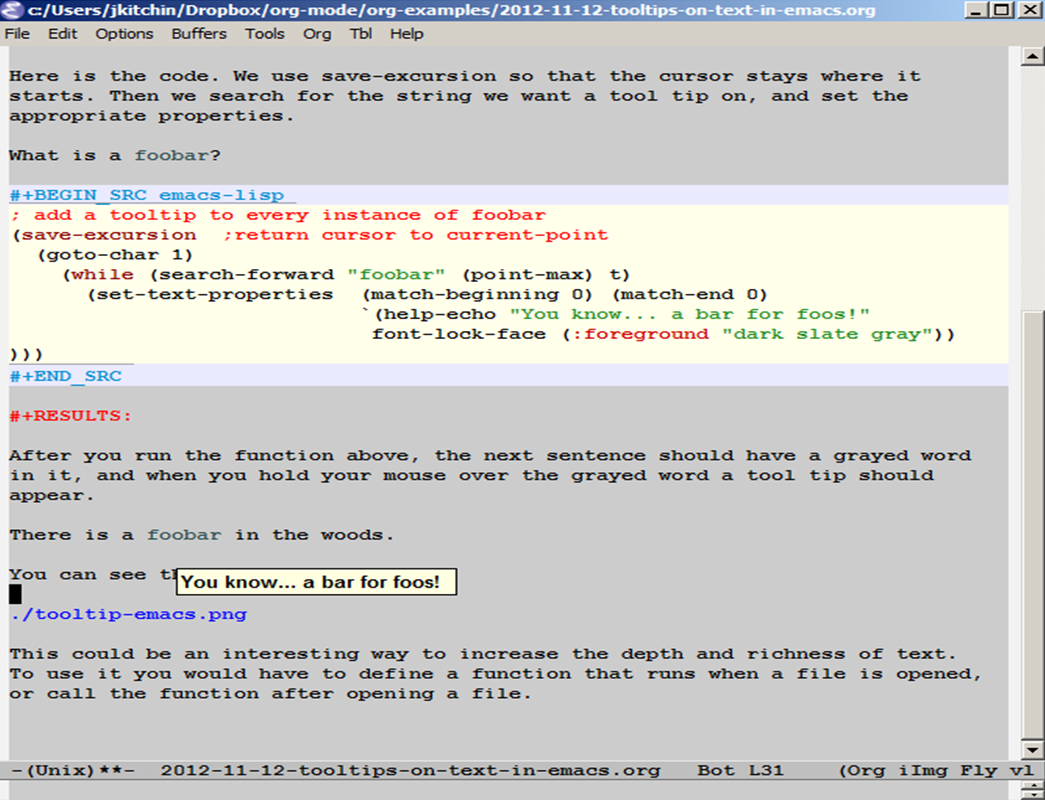
Here we look at a way to get tool tips on text in Emacs. This would be helpful for giving hints, or definitions, or reminders about something. Tool tips are created by setting the help-echo text property for the string of interest. We will write a function that adds the tool tip to every instance of a string in the current buffer. We will also change the color of the string slightly to give the reader a hint there might be something there.

Here is the code. We use save-excursion so that the cursor stays where it starts. Then we search for the string we want a tool tip on, and set the appropriate properties.

What is a foobar?

; add a tooltip to every instance of foobar
(save-excursion  ;return cursor to current-point
  (goto-char 1)
    (while (search-forward "foobar" (point-max) t)
      (set-text-properties  (match-beginning 0) (match-end 0)
                            `(help-echo "You know... a bar for foos!"
                             font-lock-face (:foreground "dark slate gray"))
)))

After you run the function above, the next sentence should have a grayed word in it, and when you hold your mouse over the grayed word a tool tip should appear.

There is a foobar in the woods.

You can see the effect here:

This could be an interesting way to increase the depth and richness of text. To use it you would have to define a function that runs when a file is opened, or call the function after opening a file.

Copyright (C) 2013 by John Kitchin. See the License for information about copying.

org-mode source

Discuss on Twitter

Working with lists

| categories: programming | tags:

It is not too uncommon to have a list of data, and then to apply a function to every element, to filter the list, or extract elements that meet some criteria. In this example, we take a string and split it into words. Then, we will examine several ways to apply functions to the words, to filter the list to get data that meets some criteria. Here is the string splitting.

text = '''
 As we have seen, handling units with third party functions is fragile, and often requires additional code to wrap the function to handle the units. An alternative approach that avoids the wrapping is to rescale the equations so they are dimensionless. Then, we should be able to use all the standard external functions without modification. We obtain the final solutions by rescaling back to the answers we want.

Before doing the examples, let us consider how the quantities package handles dimensionless numbers.

import quantities as u

a = 5 * u.m
L = 10 * u.m # characteristic length

print a/L
print type(a/L)

'''

words = text.split()
print words
... ... ... ... ... ... ... ... ... ... ... ... >>> >>> >>> ['As', 'we', 'have', 'seen,', 'handling', 'units', 'with', 'third', 'party', 'functions', 'is', 'fragile,', 'and', 'often', 'requires', 'additional', 'code', 'to', 'wrap', 'the', 'function', 'to', 'handle', 'the', 'units.', 'An', 'alternative', 'approach', 'that', 'avoids', 'the', 'wrapping', 'is', 'to', 'rescale', 'the', 'equations', 'so', 'they', 'are', 'dimensionless.', 'Then,', 'we', 'should', 'be', 'able', 'to', 'use', 'all', 'the', 'standard', 'external', 'functions', 'without', 'modification.', 'We', 'obtain', 'the', 'final', 'solutions', 'by', 'rescaling', 'back', 'to', 'the', 'answers', 'we', 'want.', 'Before', 'doing', 'the', 'examples,', 'let', 'us', 'consider', 'how', 'the', 'quantities', 'package', 'handles', 'dimensionless', 'numbers.', 'import', 'quantities', 'as', 'u', 'a', '=', '5', '*', 'u.m', 'L', '=', '10', '*', 'u.m', '#', 'characteristic', 'length', 'print', 'a/L', 'print', 'type(a/L)']

Let us get the length of each word.

print [len(word) for word in words]

# functional approach with a lambda function
print map(lambda word: len(word), words)

# functional approach with a builtin function
print map(len, words)

# functional approach with a user-defined function
def get_length(word):
    return len(word)

print map(get_length, words)
[2, 2, 4, 5, 8, 5, 4, 5, 5, 9, 2, 8, 3, 5, 8, 10, 4, 2, 4, 3, 8, 2, 6, 3, 6, 2, 11, 8, 4, 6, 3, 8, 2, 2, 7, 3, 9, 2, 4, 3, 14, 5, 2, 6, 2, 4, 2, 3, 3, 3, 8, 8, 9, 7, 13, 2, 6, 3, 5, 9, 2, 9, 4, 2, 3, 7, 2, 5, 6, 5, 3, 9, 3, 2, 8, 3, 3, 10, 7, 7, 13, 8, 6, 10, 2, 1, 1, 1, 1, 1, 3, 1, 1, 2, 1, 3, 1, 14, 6, 5, 3, 5, 9]
>>> ... [2, 2, 4, 5, 8, 5, 4, 5, 5, 9, 2, 8, 3, 5, 8, 10, 4, 2, 4, 3, 8, 2, 6, 3, 6, 2, 11, 8, 4, 6, 3, 8, 2, 2, 7, 3, 9, 2, 4, 3, 14, 5, 2, 6, 2, 4, 2, 3, 3, 3, 8, 8, 9, 7, 13, 2, 6, 3, 5, 9, 2, 9, 4, 2, 3, 7, 2, 5, 6, 5, 3, 9, 3, 2, 8, 3, 3, 10, 7, 7, 13, 8, 6, 10, 2, 1, 1, 1, 1, 1, 3, 1, 1, 2, 1, 3, 1, 14, 6, 5, 3, 5, 9]
>>> [2, 2, 4, 5, 8, 5, 4, 5, 5, 9, 2, 8, 3, 5, 8, 10, 4, 2, 4, 3, 8, 2, 6, 3, 6, 2, 11, 8, 4, 6, 3, 8, 2, 2, 7, 3, 9, 2, 4, 3, 14, 5, 2, 6, 2, 4, 2, 3, 3, 3, 8, 8, 9, 7, 13, 2, 6, 3, 5, 9, 2, 9, 4, 2, 3, 7, 2, 5, 6, 5, 3, 9, 3, 2, 8, 3, 3, 10, 7, 7, 13, 8, 6, 10, 2, 1, 1, 1, 1, 1, 3, 1, 1, 2, 1, 3, 1, 14, 6, 5, 3, 5, 9]
>>> ... ... ... >>> [2, 2, 4, 5, 8, 5, 4, 5, 5, 9, 2, 8, 3, 5, 8, 10, 4, 2, 4, 3, 8, 2, 6, 3, 6, 2, 11, 8, 4, 6, 3, 8, 2, 2, 7, 3, 9, 2, 4, 3, 14, 5, 2, 6, 2, 4, 2, 3, 3, 3, 8, 8, 9, 7, 13, 2, 6, 3, 5, 9, 2, 9, 4, 2, 3, 7, 2, 5, 6, 5, 3, 9, 3, 2, 8, 3, 3, 10, 7, 7, 13, 8, 6, 10, 2, 1, 1, 1, 1, 1, 3, 1, 1, 2, 1, 3, 1, 14, 6, 5, 3, 5, 9]

Now let us get all the words that start with the letter “a”. This is sometimes called filtering a list. We use a string function startswith to check for upper and lower-case letters. We will use list comprehension with a condition.

print [word for word in words if word.startswith('a') or word.startswith('A')]

# make word lowercase to simplify the conditional statement
print [word for word in words if word.lower().startswith('a')]
['As', 'and', 'additional', 'An', 'alternative', 'approach', 'avoids', 'are', 'able', 'all', 'answers', 'as', 'a', 'a/L']
['As', 'and', 'additional', 'An', 'alternative', 'approach', 'avoids', 'are', 'able', 'all', 'answers', 'as', 'a', 'a/L']

A slightly harder example is to find all the words that are actually numbers. We could use a regular expression for that, but we will instead use a function we create. We use a function that tries to cast a word as a float. If this fails, we know the word is not a float, so we return False.

def float_p(word):
    try:
        float(word)
        return True
    except ValueError:
        return False

print [word for word in words if float_p(word)]

# here is a functional approach
print filter(float_p, words)
... ... ... ... ... >>> ['5', '10']
['5', '10']

Finally, we consider filtering the list to find all words that contain certain symbols, say any character in this string “./=*#”. Any of those characters will do, so we search each word for one of them, and return True if it contains it, and False if none are contained.

def punctuation_p(word):
    S = './=*#'
    for s in S:
        if s in word:
            return True
    return False

print [word for word in words if punctuation_p(word)]
print filter(punctuation_p, words)
... ... ... ... ... >>> ['units.', 'dimensionless.', 'modification.', 'want.', 'numbers.', '=', '*', 'u.m', '=', '*', 'u.m', '#', 'a/L', 'type(a/L)']
['units.', 'dimensionless.', 'modification.', 'want.', 'numbers.', '=', '*', 'u.m', '=', '*', 'u.m', '#', 'a/L', 'type(a/L)']

In this section we examined a few ways to interact with lists using list comprehension and functional programming. These approaches make it possible to work on arbitrary size lists, without needing to know in advance how big the lists are. New lists are automatically generated as results, without the need to preallocate lists, i.e. you do not need to know the size of the output. This can be handy as it avoids needing to write loops in some cases and leads to more compact code.

Copyright (C) 2013 by John Kitchin. See the License for information about copying.

org-mode source

Discuss on Twitter

Using Excel in Python

| categories: programming | tags: excel

There may be a time where you have an Excel sheet that already has a model built into it, and you normally change cells in the sheet, and it solves the model. It can be tedious to do that a lot, and we can use python to do that. Python has a COM interface that can communicate with Excel (and many other windows programs. see http://my.safaribooksonline.com/1565926218 for Python Programming on Win32). In this example, we will use a very simple Excel sheet that calculates the volume of a CSTR that runs a zeroth order reaction (\(-r_A = k\)) for a particular conversion. You set the conversion in the cell B1, and the volume is automatically computed in cell B6. We simply need to set the value of B1, and get the value of B6 for a range of different conversion values. In this example, the volume is returned in Liters.

import win32com.client as win32
excel = win32.Dispatch('Excel.Application')

wb = excel.Workbooks.Open('c:/Users/jkitchin/Dropbox/pycse/data/cstr-zeroth-order.xlsx')
ws = wb.Worksheets('Sheet1')

X = [0.1, 0.5, 0.9]
for x in X:
    ws.Range("B1").Value = x
    V = ws.Range("B6").Value
    print 'at X = {0} V = {1:1.2f} L'.format(x, V)
 
# we tell Excel the workbook is saved, even though it is not, so it
# will quit without asking us to save.
excel.ActiveWorkbook.Saved = True 
excel.Application.Quit()
at X = 0.1 V = 22.73 L
at X = 0.5 V = 113.64 L
at X = 0.9 V = 204.55 L

This was a simple example (one that did not actually need Excel at all) that illustrates the feasibility of communicating with Excel via a COM interface.

Copyright (C) 2013 by John Kitchin. See the License for information about copying.

org-mode source

Discuss on Twitter
« Previous Page -- Next Page »