Enabling right-clicks in org-mode links

| categories: org-mode | tags:

Out of the box you can click on org-mode links to make the do things. On my machine, all clicks are equal, left mouse, middle mouse, and right mouse all act as a "click". I was curious about whether I could get different behavior on a link with a left or right mouse click. It is easy enough to define a new link type . You define a function that is run when you click on the link.

To figure out what to do here, I looked into the events handling in emacs. According to this page , there are click events. So, after we click on a link, there should be a click event which was the last input event. We can get that, figure out which button was pressed, and run code accordingly. We will make the code add some lines to the buffer after the link about what happened.

Here is my link definition.

(setq counter 1)
(org-add-link-type
 "test"
 ;; this function is run when you click
 (lambda (link-string) 
   (let ((button (car last-input-event)))
     (cond ((eq button 'mouse-1) 
            (end-of-line)
            (insert (format "\nclick %s. mouse-1 pressed %s\n" counter last-input-event))
            (setq counter (+ counter 1)))
           ((eq button 'mouse-2) 
            (end-of-line) 
            (insert (format "\nclick %s. mouse-2 pressed %s\n" counter last-input-event))
            (setq counter (+ counter 1)))
           ((eq button 'mouse-3) 
            (end-of-line)
            (insert (format "\nclick %s. mouse-3 pressed %s\n" counter last-input-event))
            (setq counter (+ counter 1))))))
 ;; formatting
(lambda (keyword desc format)
   (cond
    ((eq format 'html) (format "<pre>%s:%s</pre>" keyword desc)))))

Here we make a link. When you click on it, it adds lines right after the link telling you what was clicked on. I left-clicked, middle-clicked and right-clicked. The right-clicked result is the first line.

test:which-button
click 3. mouse-3 pressed (mouse-3 (#<window 46 on blog.org> 56959 (57 . 456) -320964819 nil 56959 (7 . 28) nil (1 . 8) (8 . 16)))

click 2. mouse-2 pressed (mouse-2 (#<window 46 on blog.org> 56959 (57 . 456) -320965724 nil 56959 (7 . 28) nil (1 . 8) (8 . 16)))

click 1. mouse-2 pressed (mouse-2 (#<window 46 on blog.org> 56959 (57 . 456) -320966660 nil 56959 (7 . 28) nil (1 . 8) (8 . 16)))

Curiously, this only shows that mouse-2 (for left or middle mouse) or mouse-3 (for right click) was pressed, never mouse-1. I am not sure what causes that. If I try to capture an event it does show mouse-1 is active.

(princ (read-event))
(down-mouse-1 (#<window 34 on blog.org> 56437 (253 . 308) -322917920 nil 56437 (31 . 19) nil (93 . 4) (8 . 16)))

Anyway, it looks conceivable that you could have different link actions occur for different mouse clicks. I could see using this in a citation link, where a left click might open the citation in my bibtex file, and right clicking would open a pdf of the citation if it existed.

I have not figured out how flexible this might be, for example could you use modifier keys with mouse clicks? This code suggests that it is possible in emacs, but so far none of these make it into the last-input-event in the org-link clicks.

(princ (read-event))
(S-down-mouse-1 (#<window 34 on blog.org> 56725 (1 . 299) -322897656 nil 56725 (0 . 18) nil (1 . 11) (8 . 16)))

It might be difficult remembering all the modifiers and clicks, but it would be cool if it was possible!

Copyright (C) 2013 by John Kitchin. See the License for information about copying.
org-mode source

Discuss on Twitter

Posting articles to CiteULike from bibtex

| categories: emacs, python, citeulike | tags:

Table of Contents

I have been using CiteULike for a while now to keep a list of articles that are probably worth reading. Basically, each month I get a table of contents from many journals, and as I read through them, if an article catches my attention I add it to my CiteULike account.

This list is not synchronized with my bibtex database however. These serve different purposes. The CiteULike list is for articles that are probably worth reading, while the bibtex file contains articles I am probably going to cite. It should be that every article in my bibtex file is on CiteULike, but not necessarily the other way around. The problem is I do not have a way to push files from my bibtex file to CiteULike easily.

CiteULike allows you to import a bibtex file though. I want to explore automatically importing a bibtex file by simulating the form. We need a set of cookies to make this happen so CiteULike knows who we are. I stored my username and password in a file called citeulike.json and use them to get cookies that I save here in a pickle file. I think this cookie gives you access to your CiteULike account, so it should be kept secret.

import json, pickle, requests

with open('citeulike.json') as f:
    d = json.loads(f.read())

url = 'http://www.citeulike.org/login.do'

data = "username={0}&password={1}&perm=1".format(d['username'], d['password'])

r = requests.post(url, data=data, allow_redirects=False)

with open('cookies.pckl', 'wb') as f:
    pickle.dump(r.cookies, f)

By inspecting the import page with Firebug, I constructed this http request to upload a bibtex string.

import pickle, requests

# reload cookies
with open('cookies.pckl', 'rb') as f:
    cookies = pickle.load(f)

url = 'http://www.citeulike.org/profile/jkitchin/import_do'

bibtex = '''
@article{zhuo-2010-co2-induc,
  author =       {Zhuo, Shengchi and Huang, Yongmin and Peng, Changjun
                  and Liu, Honglai and Hu, Ying and Jiang, Jianwen},
  title =        {CO2-Induced Microstructure Transition of Surfactant
                  in Aqueous Solution: Insight from Molecular Dynamics
                  Simulation},
  journal =      {The Journal of Physical Chemistry B},
  volume =       114,
  number =       19,
  pages =        {6344-6349},
  year =         2010,
  doi =          {10.1021/jp910253b},
  URL =          {http://pubs.acs.org/doi/abs/10.1021/jp910253b},
  eprint =       {http://pubs.acs.org/doi/pdf/10.1021/jp910253b}
}'''

data = {'pasted':bibtex,
        'to_read':2,
        'tag_parsing':'simple',
        'strip_brackets':'no',
        'update_id':'bib-key',
        'btn_bibtex':'Import BibTeX file ...'}

headers = {'content-type': 'multipart/form-data',
           'User-Agent':'jkitchin/johnrkitchin@gmail.com bibtexupload'}

r = requests.post(url, headers=headers, data=data, cookies=cookies, files={})

The result is that article is now listed in my CiteULike at http://www.citeulike.org/user/jkitchin/article/12728895 . This opens the possibility of integrating this into my bibtex workflow. I could implement this in emacs-lisp, and have it automatically upload new entries in the bibtex file to CiteULike.

1 Doing this in emacs

I think the easiest thing to do here is to write a python script that takes the bibtex string and posts it. We will use emacs to get the bibtex string. We will use the example at http://ergoemacs.org/emacs/elisp_perl_wrapper.html to put this together. This example uses an external script that takes a string on stdin, and returns a result on stdout.

We will run the function in a bibtex buffer. We will narrow the buffer to the current entry, and use that to define the boundaries of the string. We do the command in a temp-buffer to prevent it from modifying our bibtex file. There is some way to make the command not do this with optional arguments, but I did not figure it out. It is a little ugly I had to use an absolute path below. An alternative would be to put the script into a directory on your path. Here is the function.

(defun j/upload-bibtex-entry-to-citeulike ()
  "get bibtex string and submit to citeulike"
  (interactive)
  (save-restriction
    (bibtex-narrow-to-entry)
    (let ((startpos (point-min))
          (endpos (point-max))
          (bibtex-string (buffer-string))
          (script "python c:/Users/jkitchin/Dropbox/blogofile-jkitchin.github.com/_blog/upload_bibtex_citeulike.py"))
      (with-temp-buffer (insert bibtex-string)
                        (shell-command-on-region (point-min) (point-max) script t nil nil t)))))

Now, let us define the python script.

#!python
import pickle, requests, sys

# reload cookies
with open('c:/Users/jkitchin/Dropbox/blogofile-jkitchin.github.com/_blog/cookies.pckl', 'rb') as f:
    cookies = pickle.load(f)

url = 'http://www.citeulike.org/profile/jkitchin/import_do'

bibtex = sys.stdin.read()

data = {'pasted':bibtex,
        'to_read':2,
        'tag_parsing':'simple',
        'strip_brackets':'no',
        'update_id':'bib-key',
        'btn_bibtex':'Import BibTeX file ...'}

headers = {'content-type': 'multipart/form-data',
           'User-Agent':'jkitchin/johnrkitchin@gmail.com bibtexupload'}

r = requests.post(url, headers=headers, data=data, cookies=cookies, files={})

That is it. Now, in my bibtex file with the cursor in an entry, I type M-x j/upload-bibtex-entry-to-citeulike, and a few seconds later the entry has been uploaded!

Copyright (C) 2013 by John Kitchin. See the License for information about copying.

org-mode source

Discuss on Twitter

Serializing jasp calculations as json data

| categories: jasp, ase, vasp | tags:

We use VASPto calculate materials properties in our research We use the jasppython module we have developed to setup, run and analyze those calculations. One of the things we have worked on developing recently is to more transparently share how do this kind of work by using org-mode supporting information files. Doing this should make our research more reproducible, and allow others to build off of it more easily.

We have run into the following problem trying to share VASP results however. The VASP license prohibits us from sharing the POTCAR files that are used to run the calculations. That is unfortunate, but since these files are also what give VASP some competitive advantage, they are protected, and we agreed to that when we bought the license. The problem is that the jasp module requires the POTCAR files to work, so without them, our scripts are not reproducible by researchers without a VASP license.

So, we have been looking at new ways to share the data from our calculations. In this post, we consider representing the calculation as a JSON file. We will look at a couple of new features built into the development branch of jasp

1 The simplest case of a simple calculation

Here we setup and run a simple calculation, and output the JSON file.

from ase import Atoms, Atom
from jasp import *
import numpy as np
np.set_printoptions(precision=3, suppress=True)

co = Atoms([Atom('C',[0,   0, 0]),
            Atom('O',[1.2, 0, 0])],
            cell=(6., 6., 6.))

with jasp('molecules/simple-co', #output dir
          xc='PBE',  # the exchange-correlation functional
          nbands=6,  # number of bands
          encut=350, # planewave cutoff
          ismear=1,  # Methfessel-Paxton smearing
          sigma=0.01,# very small smearing factor for a molecule
          atoms=co) as calc:
    print 'energy = {0} eV'.format(co.get_potential_energy())
    print co.get_forces()
    with open('JSON', 'w') as f:
        f.write(calc.json)
energy = -14.687906 eV
[[ 5.095  0.     0.   ]
 [-5.095  0.     0.   ]]

Now, we can analyze the JSON file independently of jasp. The json data contains all the inputs we used for the VASP calculation, the atomic geometry, and many of the outputs of the calculation. Here is the JSONfile.

import json
with open('molecules/simple-co/JSON', 'rb') as f:
    d = json.loads(f.read())

print('The energy is {0}'.format(d['data']['total_energy']))
print('The forces are {0}'.format(d['data']['forces']))
The energy is -14.687906
The forces are [[5.095488, 0.0, 0.0], [-5.095488, 0.0, 0.0]]

2 Including extra information in the JSON file

If we use a slightly different syntax, we can also include the total DOS in the JSON file.

from jasp import *

with jasp('molecules/simple-co') as calc:
    with open('JSON-DOS', 'w') as f:
        f.write(calc_to_json(calc, dos=True))

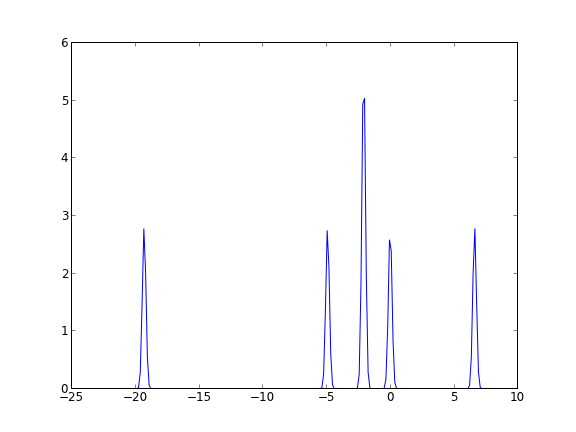
To illustrate that we have done that, let us plot the DOS without using jasp from the JSON-DOSfile.

import json
import matplotlib.pyplot as plt

with open('molecules/simple-co/JSON-DOS', 'rb') as f:
    d = json.loads(f.read())

energies = d['data']['dos']['e']
dos = d['data']['dos']['dos']
plt.plot(energies, dos)
plt.savefig('molecules/simple-co/dos.png')

We are still working on getting atom-projected DOS into the json file, and ensuring that all the spin cases are handled (e.g. the spin-up and spin-down DOS).

3 Limitations?

JSON is flexible, and can store text and numeric data. It does not store numpy arrays, but rather it is limited to storing lists of data. You would have to convert them back to arrays if you want to do array math. You probably wouldn't want to store a 3d array of electron density in this format, although it probably isn't worse than a CUBE file format. We haven't tested these files very significantly yet at a large scale to see how fast it is to read from lots of them.

Nonetheless, this looks like a reasonable format to share data in human and machine readable form, without violating the VASP licence conditions.

Copyright (C) 2013 by John Kitchin. See the License for information about copying.

org-mode source

Discuss on Twitter

Limitations?

| categories: uncategorized | tags:

JSON is flexible, and can store text and numeric data. It does not store numpy arrays, but rather it is limited to storing lists of data. You would have to convert them back to arrays if you want to do array math. You probably wouldn't want to store a 3d array of electron density in this format, although it probably isn't worse than a CUBE file format. We haven't tested these files very significantly yet at a large scale to see how fast it is to read from lots of them.

Nonetheless, this looks like a reasonable format to share data in human and machine readable form, without violating the VASP licence conditions.

Copyright (C) 2013 by John Kitchin. See the License for information about copying.

org-mode source

Discuss on Twitter

Lisp links in org-mode to dynamically generated content

| categories: org-mode | tags:

1 Converting elisp links to their value on export

Someone asked on the mailing list if it would be possible to replace a lisp expression in org-mode with its value. I thought this should work with the filter system I have been exploring. The idea is to preprocess the org buffer, get all the links, and handle the elisp links specially. Then, we use a filter to replace elisp links with the output we got from preprocessing. We need to have a few different links in this file to make it more obvious what we are doing. For example we do not want this link to be changed. The link to http://orgmode.org should not be changed. But we want a link like elisp:(+ 2 3) to be replaced by 5.

The following text:

This file was exported on [[elisp:(format-time-string "%Y-%m-%d at %H:%m %p")]].

The answer to 2 + 3 is [[elisp:(+ 2 3)]].

Renders like this:

This file was exported on 2013-10-20 at 10:10 AM.

The answer to 2 + 3 is 5.

First, we get the links. If there is an elisp link we set the list value to the value of the link evaluated, otherwise we set it to nil. In the filter, we will replace the output of the link if the value in this list is not nil.

(setq link-list (let ((parsetree (org-element-parse-buffer))
                      (counter 0))
                  (org-element-map parsetree 'link
                    (lambda (link) 
                      (let* ((plist (nth 1 link))
                             (content (plist-get plist :content))
                             (path (plist-get plist :path))
                             (type (plist-get plist ':type))
                             (fname (car (last (split-string path "/"))))
                             )
                       (if (string-match "elisp" type) (format "%s" (eval (read (plist-get plist :path)))) "nil"))))))

(princ link-list)
(nil nil 2013-10-20 at 10:10 AM 5 nil)

Now, we have the output of what we want for each link. Now, we will setup the filter, and export this file to a blogpost.

(let ((counter 0))

  (defun ox-mrkup-filter-link (text back-end info)
    (let ((link-content (nth counter link-list)))
      (if (not (string= link-content "nil")) 
          (setq output (format "%s" link-content)) ;; this was an elisp link
        (setq output text))) ; this was some other kind of link
      (setq counter (+ counter 1))
      output)

  (let ((org-export-filter-link-functions '(ox-mrkup-filter-link))
        (async nil)
        (subtreep nil)
        (visible-only nil)
        (body-only t)
        (ext-plist '()))
    (org-html-export-as-html async subtreep visible-only body-only ext-plist))

    ; now get the output into the org output
    (switch-to-buffer "*Org HTML Export*")

    (setq HTML (buffer-string))
    (setq YAML "---
title: Lisp links in org-mode to dynamically generated content
date: 2013/10/14 22:49:00
updated: 2013/10/20 10:19:00
categories: org-mode
---


")
  (with-temp-buffer
(insert YAML)
(insert HTML)
(write-region (point-min) (point-max) "../_posts/2013-10-14-Lisp-links-in-org-mode-to-dynamically-generted-content.html")))
(princ "Done.")
Done.

Finally, let us check ../_posts/2013-10-14-Lisp-links-in-org-mode-to-dynamically-generted-content.html.

1.1 empty section

Discuss on Twitter
« Previous Page -- Next Page »