Using data in a table in another org-file

| categories: org-mode | tags:

I have found using tables in an org-file as data sources to code blocks very convenient for documenting work. A typical work flow might go like this:

  1. Use a code block to generate some data in an org-table.
  2. Use another code block to analyze the data.

For example, here is a code block that prints data in a table 1:

import numpy as np

print '#+tblname: cos-data'
print '| x | cos(x)|'
print '|-'

for x in np.linspace(0, 2*np.pi, 10):
    print '|{0}|{1}|'.format(x, np.cos(x))
x cos(x)
0.0 1.0
0.698131700798 0.766044443119
1.3962634016 0.173648177667
2.09439510239 -0.5
2.79252680319 -0.939692620786
3.49065850399 -0.939692620786
4.18879020479 -0.5
4.88692190558 0.173648177667
5.58505360638 0.766044443119
6.28318530718 1.0

Now, we use that table in a code block to plot the data. We do this by using some header arguments to the code block:

#+BEGIN_SRC python :var data=cos-data

Then we can use the data variable inside the code block like this:

import numpy as np
import matplotlib.pyplot as plt

data = np.array(data) # data is a list coming in
x = data[:, 0]
y = data[:, 1]
plt.plot(x, y)
plt.xlabel('x')
plt.ylabel('cos(x)')
plt.savefig('images/cos-plot.png')
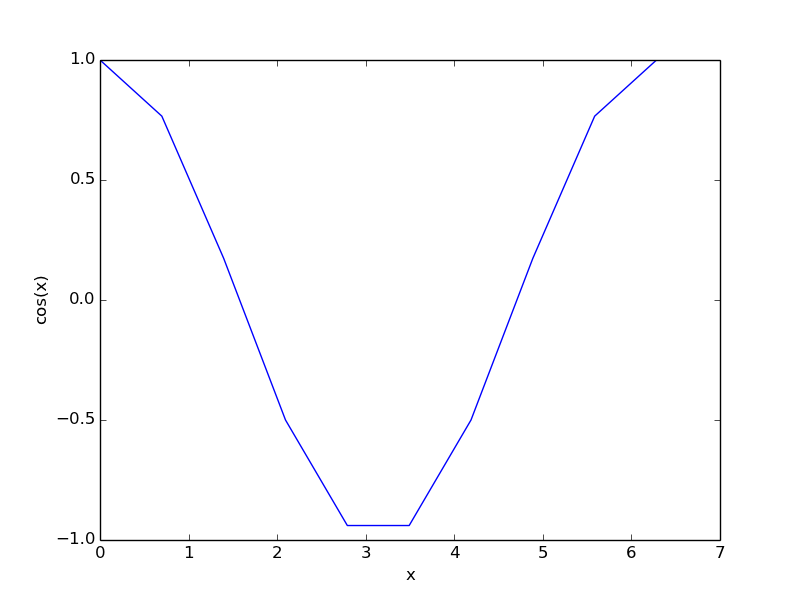
That is pretty awesome, but what if we have data in a table from another org-file? It turns out we can use it too. I have data for the sin(x) stored in a table called sin-data in sin.org , which I now want to use. We can access that table like this in a header arg:

#+BEGIN_SRC python :var data=sin.org:sin-data

And now use the data variable just like before!

import numpy as np
import matplotlib.pyplot as plt

data = np.array(data) # data is a list coming in
x = data[:, 0]
y = data[:, 1]
plt.plot(x, y)
plt.xlabel('x')
plt.ylabel('sin(x)')
plt.savefig('images/sin-plot.png')
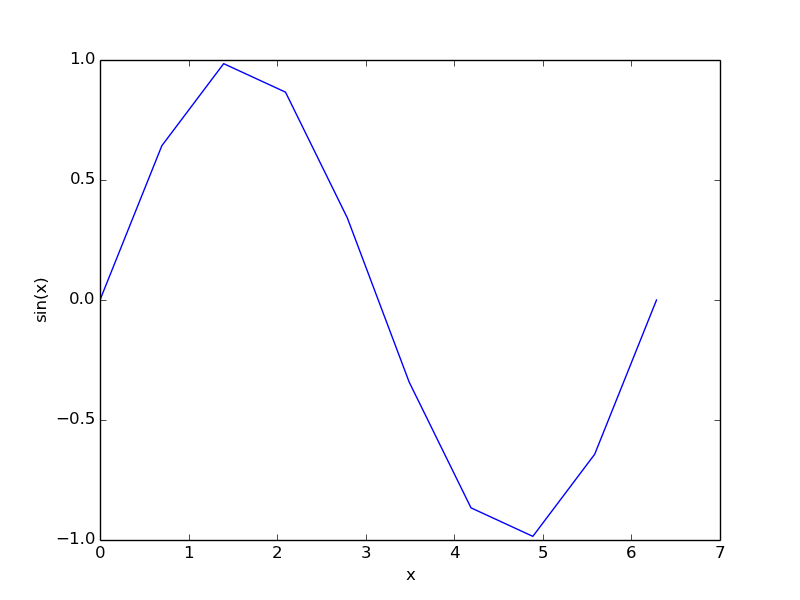
This is a powerful capability, as it allows you to pull data from other files into your current analysis. For example, the supporting information files from some of our recent publications have org-files embedded in them with data stored in org-tables. You could use that data in your own analysis without having to type it in yourself. The only thing you need to do is make sure each table in a document is uniquely named.

Special thanks to Eric Schulte for pointing out the syntax for using external tables!

Footnotes:

1

You will have to read the raw org-source to see how the code-block arguments look.

Copyright (C) 2014 by John Kitchin. See the License for information about copying.

org-mode source

Org-mode version = 8.2.5c

Discuss on Twitter

An improved index function for emacs-lisp

| categories: emacs-lisp | tags:

I previously worked out an index function for a list of strings in emacs-lisp, but at the end I showed it would not work for arbitrary elements of a list. Here is an exercise to improve on that. The goal is a function that looks like this:

(index 1 '("a" 2 1 "b"))

that would return 2 in this case. Last time I used string=, which is why I could not find a number in the list. This time, we will use equal (see http://www.gnu.org/software/emacs/manual/html_node/elisp/Equality-Predicates.html ) which compares components of objects for equality. That should let us find arbitrary objects in a list.

Here is our improved function:

(defun index (object list)
  "return the index of object in list"
  (let ((counter 0)
        (found nil))
    (catch 'finished
      (dolist (listelement list counter)
        (if (equal object listelement)
            (progn
              (setq found t)
              (throw 'finished counter))
          ;; else increment counter
          (incf counter)))
    ;; if we found it return counter otherwise return nil
    (if found counter nil))))

Now, let us test some examples:

(index 1 '("a" 2 1 "b"))
2

No problem finding a number in a list.

(index "b" '("a" 2 1 "b"))
3

How about something more complicated, like a list in a list?

(index '(1 2) '("a" 2 1 (1 2) "b"))
3

That looks good.

(princ (index '(1 2) '("a" 2 1 (2 (1 2)) "b")))
nil

Note, we do not find the nested object. That is ok, the location of that object would require two indices, which this function is not designed for.

Here we consider an object of an a-list

(index '("nut" . "acorn") '(("nut" . "acorn") ("fruit" . "apple")))
0

I am not quite sure how you would use that, but it does illustrate the generality of the index function!

Copyright (C) 2013 by John Kitchin. See the License for information about copying.

org-mode source

Discuss on Twitter

Finding the box root directory on a local machine

| categories: box | tags:

I am working to automate some aspects of box.com, specifically to create collaborations in folders and tasks on files on my local computer at the command-line. I use Box Sync to mirror folders and files on my local computer, and I would like to open a prompt in one of these folders and type something like:

box collaborate --role editor someone@gmail.com

to add that person as an editor to my box folder.

The challenge is that I need to know the id of that folder on box. Box stores the files on their server by id, not by name, and the root box folder has an id of 0. On my local computer, the box root folder is where Box Sync puts my synchronized files. In my boxcourse python module I wrote a function that will return the id of an item in box given the box path which is relative to the box root directory. For example, here we can get the id for a folder called group-course.

from box_course import box

print box.get_item('/group-course')
{u'sequence_id': u'1', u'etag': u'1', u'type': u'folder', u'id': u'1328895168', u'name': u'group-course'}

On my local computer, group course is located at C:\Users\jkitchin\Box Sync\group-course, and C:\Users\jkitchin\Box Sync is like the box root directory. So, the challenge is, if I am on the local computer in some directory, how do I determine the box path to that directory?

What I worked out is to start in the current directory, and check directories above this for a file that indicates you are in the box root directory. With Box Sync 3, that file was "Box Sync ReadMe.pdf", but Box Sync 4 does not include that file anymore. I just put a folder of that name in the Box Sync 4 root directory 1.

Here is a way to start in a box directory, and walk up the path to look for the file. We get the path, and then split each directory off the end, checking for the existence of the file, until the path is gone.

import os
# change into a box directory
os.chdir('C:\Users\jkitchin\Box Sync\group-course')

wd, last = os.getcwd(), True
while last:
    wd, last = os.path.split(wd)
    
    cfile = os.path.join(wd, 'Box Sync ReadMe.pdf')
    if os.path.exists(cfile):
        # we found box root
        break

print wd
C:\Users\jkitchin\Box Sync

That gets us the box root directory. Now, we need to strip this off of the current working directory. We also need to replace all the backslashes that Windows uses with forward slashes so that we can get the id.

import os
os.chdir('C:\Users\jkitchin\Box Sync\group-course')

cwd = os.getcwd()

wd, last = os.getcwd(), True
while last:
    wd, last = os.path.split(wd)
    
    cfile = os.path.join(wd, 'Box Sync ReadMe.pdf')
    if os.path.exists(cfile):
        # we found box root
        break

print wd
print cwd
print cwd.replace(wd, '').replace('\\','/')
C:\Users\jkitchin\Box Sync
C:\Users\jkitchin\Box Sync\group-course
/group-course

This seems to work pretty well, but on some Windows machines, the drive letter is lower case, and then this does not work. In that case, we use os.path.normcase to make everything consistent.

import os
os.chdir('C:\Users\jkitchin\Box Sync\group-course')

from box_course import box

cwd = os.getcwd()

wd, last = os.getcwd(), True
while last:
    wd, last = os.path.split(wd)
    
    cfile = os.path.join(wd, 'Box Sync ReadMe.pdf')
    if os.path.exists(cfile):
        # we found box root
        break

print wd
print cwd
bpath = os.path.normcase(cwd).replace(os.path.normcase(wd), '').replace('\\','/')

print bpath
print box.get_item(bpath)
C:\Users\jkitchin\Box Sync
C:\Users\jkitchin\Box Sync\group-course
/group-course
{u'sequence_id': u'1', u'etag': u'1', u'type': u'folder', u'id': u'1328895168', u'name': u'group-course'}

This seems to work so far. Something similar this is probably done in git repositories, to find the .git file. This is also a useful way to find a config file higher up the path.

Footnotes:

1

Box Sync 4 renames your sync directory from "~/Documents/My Box Files" to "~/Box Sync".

Copyright (C) 2013 by John Kitchin. See the License for information about copying.

org-mode source

Discuss on Twitter

New MS students join the Kitchin Research Group

| categories: news | tags:

Three new M.S. students have joined the Kitchin Research Group! We are pleased to welcome Wenqin You, Meiheng Lu, and Nitish Govindarajan!

Wenqin will work on modeling CO2 capture processes, Meiheng will work on a data sharing project, and Nitish will use density functional theory to model oxide materials relevant to SOFCs and CO2 conversion.

Copyright (C) 2014 by John Kitchin. See the License for information about copying.

org-mode source

Org-mode version = 8.2.5c

Discuss on Twitter

Selectively exporting headlines in org-mode

| categories: org-mode | tags:

I have on several occasions needed to selectively export only portions of an org document. For example, I may write a problem set or exam, and have some headlines that are the problems, and others that are the solutions. Or, I may have done some analysis in a headline, e.g. statistics of problem scores that I do not want in exported content, or I have a manuscript with a supporting information section that does not go in the exported manuscript, and the manuscript cannot go in the supporting information file.

org-mode supports selective export through use of tags. However, this is inflexible if you want to export multiple different documents with different selective exports, unless you don't mind changing the settings, or commenting and uncommenting lines all the time.

Enter dynamic binding of variables in emacs-lisp. We can temporarily define variables, especially org-export-select-tags and org-export-exclude-tags, and write emacs-lisp code blocks to export the current document the way we want. First, let us create some headlines.

1 problem 1   problem

description of a hard problem

1.1 solution to problem 1   solution

it is an easy solution

2 problem 2   problem

what is the square root of 100?

2.1 solution to problem 2   solution

why it's 10 of course.

3 Code to export   code

3.1 Export just the problems

First, let us output this document with just the problems. The code block does that, just put your cursor in in block and press C-c C-c (in emacs of course).

(let ((org-export-exclude-tags '("solution" "code"))
      (org-latex-default-packages-alist
       '(("" "lmodern" nil)
         ("linktocpage,
  pdfstartview=FitH,
  colorlinks,
  linkcolor=blue,
  anchorcolor=blue,
  citecolor=blue,
  filecolor=blue,
  menucolor=blue,
  urlcolor=blue" "hyperref" t)))
      (async nil)
      (subtreep nil)
      (visible-only nil)
      (body-only nil)
      (ext-plist '()))
  (org-latex-export-to-pdf async subtreep visible-only body-only ext-plist))
(rename-file "blog.pdf" "blog-1.pdf")

You get this: blog-1.pdf which only has the problems in it.

3.2 Problems and solutions

Next, we consider the problems and the solutions. We cannot just get solutions in this document because solutions are nested in the problems.

(let ((org-export-exclude-tags '("code"))
      (org-latex-default-packages-alist
       '(("" "lmodern" nil)
         ("linktocpage,
  pdfstartview=FitH,
  colorlinks,
  linkcolor=blue,
  anchorcolor=blue,
  citecolor=blue,
  filecolor=blue,
  menucolor=blue,
  urlcolor=blue" "hyperref" t)))
      (async nil)
      (subtreep nil)
      (visible-only nil)
      (body-only nil)
      (ext-plist '()))
  (org-latex-export-to-pdf async subtreep visible-only body-only ext-plist))
(rename-file "blog.pdf" "blog-2.pdf" t)

This document (blog-2.pdf ) now has problems and solutions. Note that neither of these documents has the section we labeled :code:.

4 Summary

Tags are a nice way to label sections. In combination with dynamic binding, you can build code blocks that selectively export pieces of an org-file by temporarily defining the values of variables. In this example, there are four versions of this document: 1) the org-file that contains everything, 2) the html blog post, 3) a pdf with the problems, and 4) a pdf with problems and solutions. Good luck getting that out of a Word file ;)

Copyright (C) 2013 by John Kitchin. See the License for information about copying.

org-mode source

Discuss on Twitter
« Previous Page -- Next Page »