Reproducing the research

| categories: org-mode | tags:

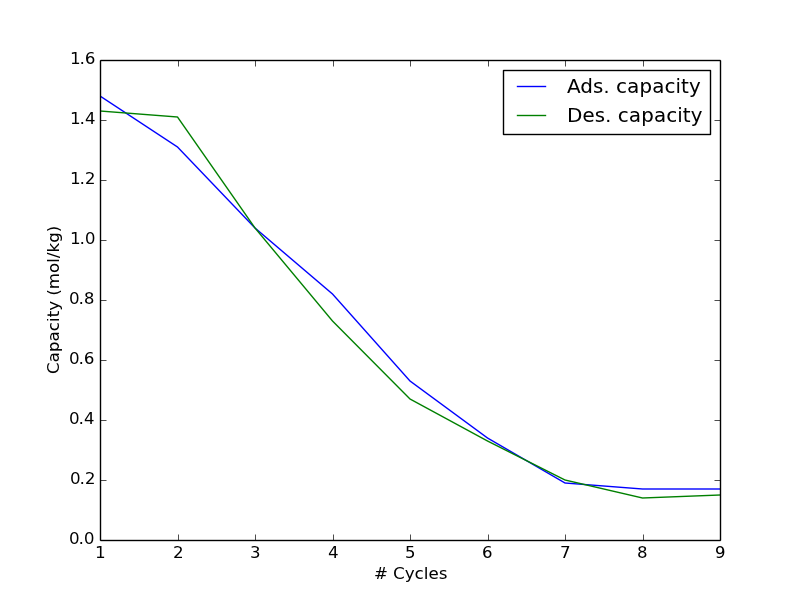
We have over the past year published a few papers using org-mode. You can find one of them here: http://pubs.acs.org/doi/abs/10.1021/ie400582a . There is a corresponding supporting information file that is freely available, which contains within it an org-mode file that documents our work, and that contains the data in it. In this post, I want to explore how easy it is to access that data, and use it. First, download the file:

wget http://pubs.acs.org/doi/suppl/10.1021/ie400582a/suppl_file/ie400582a_si_001.pdf

Then, open it in Acrobat Reader, and extract the org-file. I saved it as supporting-information.org . In that file, there is a table of data that is the SO2 adsorption and desorption capacity of a resin as a function of cycles. The table is named so2-capacity-1.

Here is how simple it is to grab that data, and use it. We need to use this header in our source block:

#+BEGIN_SRC python :var data=supporting-information.org:so2-capacity-1

In the block, data will be a list of lists. I like to convert it into a numpy array, so that indexing it is simple to extract out the data.

import numpy as np
data = np.array(data)
cycles = data[:, 0]
ads_cap = data[:, 1]
des_cap = data[:, 2]

import matplotlib.pyplot as plt
plt.plot(cycles, ads_cap, cycles, des_cap)
plt.legend(['Ads. capacity', 'Des. capacity'])
plt.xlabel('# Cycles')
plt.ylabel('Capacity (mol/kg)')
plt.savefig('images/si-image.png')

That is pretty easy. There are also Excel sheets embedded in that supporting information file, along with scripts that illustrate how to use the data in the Excel sheets for further analysis. How about that for data sharing!

Copyright (C) 2014 by John Kitchin. See the License for information about copying.

org-mode source

Org-mode version = 8.2.5h

Discuss on Twitter

Using YAML in python for structured data

| categories: yaml, template, python | tags:

YAML is a data format that is most text, with some indentation. It is like JSON, but without the braces. What is important here is that you can read a yaml document into a python dictionary. Here is an example of reading a yaml string so you can see the format.

import yaml
document = """
a: 1
b:
  c: 3
  d: 4
"""
print yaml.load(document)
{'a': 1, 'b': {'c': 3, 'd': 4}}

Everything indented by the same level is grouped in its own dictionary. If we put that string into a file (test.yaml ), we can read that in to python like this.

import yaml
document = open('test.yaml').read()
print yaml.load(document)
{'a': 1, 'b': {'c': 3, 'd': 4}}

That example is pretty trivial. What I want to do is have yaml file that represents a course syllabus. Then, if I had a set of these files, I could write code to analyze the collection of syllabi. For example, to figure out how many units of particular category there are. Alternatively, I could create different representations of the document, e.g. a pdf or html file for students or accreditation boards. Below is a YAML representtion of an ABET syllabus. It is pretty readable for a person.

import yaml
document = """
course:
  course-number: 06-364
  title: Chemical Reaction Engineering
  units: 9
  description: Fundamental concepts in the kinetic modeling of chemical reactions, the treatment and analysis of rate data. Multiple reactions and reaction mechanisms. Analysis and design of ideal and non-ideal reactor systems. Energy effects and mass transfer in reactor systems. Introductory principles in heterogeneous catalysis. 

  textbook: H. S. Fogler, Elements of Chemical Reaction Engineering, 4th edition, Prentice Hall, New York, 2006.
  prerequisites: [06-321, 06-323, 09-347]
  required: Yes

  goals:
    goal1: 
      description: To analyze kinetic data and obtain rate laws 
      outcomes: [a, k]
      criteria: [A, F]
    goal2:
      description: To develop a mechanism that is consistent with an experimental rate law 
    goal3:
      description: To understand the behavior of different reactor types when they are used either individually or in combination 
    goal4: 
      description: To choose a reactor and determine its size for a given application
    goal5:
      description: To work with mass and energy balances in the design of non-isothermal reactors 
    goal6:
      description: To understand the importance of selectivity and know the strategies that are commonly used in maximizing yields
    goal7:
      description: To effectively use mathematical software in the design of reactors and analysis of data 

  topics:
    - Conversion and reactor sizing
    - Rate laws and stoichiometry
    - Isothermal reactor design
    - Collection and analysis of rate data
    - Multiple reactions and selectivity
    - Non-elementary reaction kinetics
    - Non-isothermal reactor design
    - Unsteady operation of reactors
    - Catalysis and catalytic reactors
"""
with open('06-364.yaml', 'w') as f:
    f.write(document)

print yaml.load(document)
{'course': {'description': 'Fundamental concepts in the kinetic modeling of chemical reactions, the treatment and analysis of rate data. Multiple reactions and reaction mechanisms. Analysis and design of ideal and non-ideal reactor systems. Energy effects and mass transfer in reactor systems. Introductory principles in heterogeneous catalysis.', 'title': 'Chemical Reaction Engineering', 'prerequisites': ['06-321', '06-323', '09-347'], 'topics': ['Conversion and reactor sizing', 'Rate laws and stoichiometry', 'Isothermal reactor design', 'Collection and analysis of rate data', 'Multiple reactions and selectivity', 'Non-elementary reaction kinetics', 'Non-isothermal reactor design', 'Unsteady operation of reactors', 'Catalysis and catalytic reactors'], 'required': True, 'textbook': 'H. S. Fogler, Elements of Chemical Reaction Engineering, 4th edition, Prentice Hall, New York, 2006.', 'goals': {'goal6': {'description': 'To understand the importance of selectivity and know the strategies that are commonly used in maximizing yields'}, 'goal7': {'description': 'To effectively use mathematical software in the design of reactors and analysis of data'}, 'goal4': {'description': 'To choose a reactor and determine its size for a given application'}, 'goal5': {'description': 'To work with mass and energy balances in the design of non-isothermal reactors'}, 'goal2': {'description': 'To develop a mechanism that is consistent with an experimental rate law'}, 'goal3': {'description': 'To understand the behavior of different reactor types when they are used either individually or in combination'}, 'goal1': {'outcomes': ['a', 'k'], 'description': 'To analyze kinetic data and obtain rate laws', 'criteria': ['A', 'F']}}, 'units': 9, 'course-number': '06-364'}}

You can see here the whole document is now stored as a dictionary. You might ask why? I have the following interests:

  1. If I have a set of these files, I could loop through them and generate some kind of summary, e.g. total units of some category.
  2. I could generate a consistent format using a template.

Let us explore the template. We will generate a LaTeX document using the Cheetah template engine (http://www.cheetahtemplate.org/ ). I have also used Mako , and jinja . A template is a fancy string that has code in that can be evaluated and substituted at generation time. We use this to replace elements of the template with data from our yaml document. Below I created a template that generates a LaTeX document.

import yaml
from Cheetah.Template import Template

with open('06-364.yaml', 'r') as f:
    document = yaml.load(f.read())

data = document['course']

template = r'''\documentclass{article}
\renewcommand{\abstractname}{Course Description}

\begin{document}
\title{$data['course-number'] $data['title']}
\maketitle
\begin{abstract}
$data['description']
\end{abstract}

\textbf{Required:} $data['required']

\textbf{Prerequisites:} #echo ', '.join($data['prerequisites'])

{\textbf{Textbook:} $data['textbook']

\section{Course goals}
\begin{enumerate}
#for $goal in $data['goals']
\item $data['goals'][$goal]['description'] \label{$goal}
#end for
\end{enumerate}

\section{Topics}
\begin{itemize}
#for $topic in $data['topics']
\item $topic
#end for
\end{itemize}
\end{document}'''

t = Template(template, searchList=locals())

#import sys; sys.exit()
with open('06-364.tex', 'w') as f:
    f.write(t.respond())
None

You can see the results of the tex file here: 06-364.tex , and the corresponding pdf here: 06-364.pdf . It is not spectacular by any means, but if I had 16 of these to create, this sure would be convenient! And if we need some other format, we just make a new template!

Some notes about this:

  1. The course goals are not in the order defined in the yaml file. That is not too surprising, since dictionaries do not preserve order.
  2. Yes in yaml apparently is read in as a boolean, so in the pdf, it is printed as True.
  3. I have not thought about how to prepare a table that maps student outcomes (a-k in ABET) to the course goals
  4. It would be nice if there were links in the pdf to other syllabi, e.g. the prerequisites. See http://ctan.mirrorcatalogs.com/macros/latex/required/tools/xr.pdf

Copyright (C) 2014 by John Kitchin. See the License for information about copying.

org-mode source

Org-mode version = 8.2.5g
Discuss on Twitter

Printing unicode characters in Python strings

| categories: unicode, python | tags:

Are you tired of printing strings like this:

print 'The volume is {0} Angstrom^3'.format(125)
The volume is 125 Angstrom^3

Wish you could get Å in your string? That is the unicode character U+212B. We can get that to print in Python, but we have to create it in a unicode string, and print the string properly encoded. Let us try it out.

print u'\u212B'.encode('utf-8')

We use u'' to indicate a unicode string. Note we have to encode the string to print it, or will get this error:

Traceback (most recent call last):
  File "<stdin>", line 1, in <module>
UnicodeEncodeError: 'ascii' codec can't encode character u'\u212b' in position 0: ordinal not in range(128)

Do more, do more, we wish we could! Unicode also supports some superscripted and subscripted numbers (http://en.wikipedia.org/wiki/Unicode_subscripts_and_superscripts ). Let us see that in action.

print u'\u212B\u00B3'.encode('utf-8')
ų

Pretty sweet. The code is not all that readable if you aren't fluent in unicode, but if it was buried in some library it would just print something nice looking. We can use this to print chemical formulas too.

print u'''The chemical formula of water is H\u2082O.
Water dissociates into H\u207A and OH\u207B'''.encode('utf-8')

=The chemical formula of water is H₂O. Water dissociates into H⁺ and OH⁻

There are other encodings too. See the symbols here: http://en.wikipedia.org/wiki/Number_Forms

print u'1/4 or \u00BC'.encode('latin-1')
1/4 or ¼

That seems like:

print u'A good idea\u00AE'.encode('latin-1')
A good idea®

I can not tell how you know exactly what encoding to use. If you use utf-8 in the example above, you get a stray character in front of the desired trademark symbol. Still, it is interesting you can get prettier symbols!

Copyright (C) 2014 by John Kitchin. See the License for information about copying.

org-mode source

Org-mode version = 8.2.5g
Discuss on Twitter

Using tags to filter lists in Python

| categories: python | tags:

Suppose you have a collection of items in a list, and you want to filter the list based on some properties of the items, and then accumulate some other property on the filtered items. We will look at some strategies for this here.

The particular application is that I have a list of courses that make up a curriculum, and I want to summarize the curriculum in a variety of ways. For example, I might want to know how many Gen Ed courses there are, or how many math, chemistry, biology and physics courses there are. I may want to know how may units overall are required.

A course will be represented by a class, which simply holds the data about the course. Here we consider the course number (which is really a string), the number of units of the course, and what category the course fits into. There will be 7 categories here: chemistry, biology, physics, math, engineering, general education, and free elective.

We will use some binary math to represent the categories. Essentially we define tags as if they are binary numbers, and then we can use binary operators to tell if an item is tagged a particular way. We use & to do a logical AND between a variable and a TAG. If it comes out True, the variable has that tag.

This works basically by defining a TAG like a binary number, e.g. TAG1 = 100, TAG2 = 010, TAG3 = 001. Then, if you have a number like 110, you know it is tagged with TAG1 and TAG2, but not TAG3. We can figure that out with code too.

100 & 110 = 100 = 1
010 & 110 = 010 = 2
print 1 & 3
print 2 & 3
1
2

Let us try out an example. The easiest way to define the tags, is as powers of two.

# define some tags
TAG1 = 2**0  # 100
TAG2 = 2**1  # 010

# Now define a variable that is "tagged"
a = TAG1
print a & TAG1 # remember that 0 = False, everything else is true
print a & TAG2
1
0

We can use multiple tags by adding them together.

# define some tags
TAG1 = 2**0  # 100
TAG2 = 2**1  # 010
TAG3 = 2**2  # 001

# Now define a variable that is "tagged"
a = TAG1 + TAG2  # 1 + 2 = 3 = 110 in binary
print a & TAG1 
print a & TAG2
print a & TAG3
1
2
0

You can see that the variable is not tagged by TAG3, but is tagged with TAG1 and TAG2. We might want to tag an item with more than one tag. We create groups of tags by simply adding them together. We can still check if a variable has a particular tag like we did before.

# define some tags
TAG1 = 2**0  # 100
TAG2 = 2**1  # 010
TAG3 = 2**2  # 001

# Now define a variable that is "tagged"
a = TAG1 + TAG2  # 1 + 2 = 3 = 110 in binary
print a & TAG1
print a & TAG2
print a & TAG3
1
2
0

It is trickier to say if a variable is tagged with a particular set of tags. Let us consider why. The binary representation of TAG1 + TAG2 is 110. The binary representation of TAG2 + TAG3 is 011. If we simply consider (TAG1 + TAG2) & (TAG2 & TAG3) we get 010. That actually tells us that we do not have a match, because 010 is not equal to (TAG2 & TAG3 = 011). In other words, the logical AND of the tag with some sum of tags is equal to the sum of tags when there is a match. So, we can check if that is the case with an equality comparison.

# define some tags
TAG1 = 2**0  # 100
TAG2 = 2**1  # 010
TAG3 = 2**2  # 001

# Now define a variable that is "tagged"
a = TAG1 + TAG2  # 1 + 2 = 3 = 110 in binary
print (a & (TAG1 + TAG2)) == TAG1 + TAG2
print (a & (TAG1 + TAG3)) == TAG1 + TAG3
print (a & (TAG2 + TAG3)) == TAG2 + TAG3
True
False
False

Ok, enough binary math, let us see an application. Below we create a set of tags indicating the category a course falls into, a class definition to store course data in attributes of an object, and a list of courses. Then, we show some examples of list comprehension filtering based on the tags to summarize properties of the list. The logical comparisons are simple below, as the courses are not multiply tagged at this point.

CHEMISTRY = 2**0
BIOLOGY = 2**1
PHYSICS = 2**2
MATH = 2**3
ENGINEERING = 2**4
GENED = 2**5
FREE = 2**6

class Course:
    '''simple container for course information'''
    def __init__(self, number, units, category):
        self.number = number
        self.units = units
        self.category = category
    def __repr__(self):
        return self.number


courses = [Course('09-105', 9, CHEMISTRY),
           Course('09-106', 9, CHEMISTRY),
           Course('33-105', 12, PHYSICS),
           Course('33-106', 12, PHYSICS),
           Course('21-120', 10, MATH),
           Course('21-122', 10, MATH),
           Course('21-259', 10, MATH),
           Course('06-100', 12, ENGINEERING),
           Course('xx-xxx', 9, GENED),     
           Course('xx-xxx', 9, FREE), 
           Course('03-232', 9, BIOLOGY)]

# print the total units
print ' Total units = {0}'.format(sum([x.units for x in courses]))

# get units of math required
math_units = sum([x.units  for x in courses if x.category & MATH])

# get total units of math, chemistry, physics and biology a | b is a
# logical OR. This gives a prescription for tagged with MATH OR
# CHEMISTRY OR PHYSICS OR BIOLOGY
BASIC_MS = MATH | CHEMISTRY | PHYSICS | BIOLOGY

# total units in those categories
basic_math_science = sum([x.units for x in courses if x.category & BASIC_MS])

print 'We require {0} units of math out of {1} units of basic math and science courses.'.format(math_units, basic_math_science)

# We are required to have at least 96 units of Math and Sciences.
print 'We are compliant on number of Math and science: ',basic_math_science >= 96
 Total units = 111
We require 30 units of math out of 81 units of basic math and science courses.
We are compliant on number of Math and science:  False

That is all for this example. With more data for each course, you could see what courses are taken in what semesters, how many units are in each semester, maybe create a prerequisite map, and view the curriculum by categories of courses, etc…

Copyright (C) 2014 by John Kitchin. See the License for information about copying.

org-mode source

Org-mode version = 8.2.5g

Discuss on Twitter

Clocking your time in org-mode

| categories: org-mode | tags:

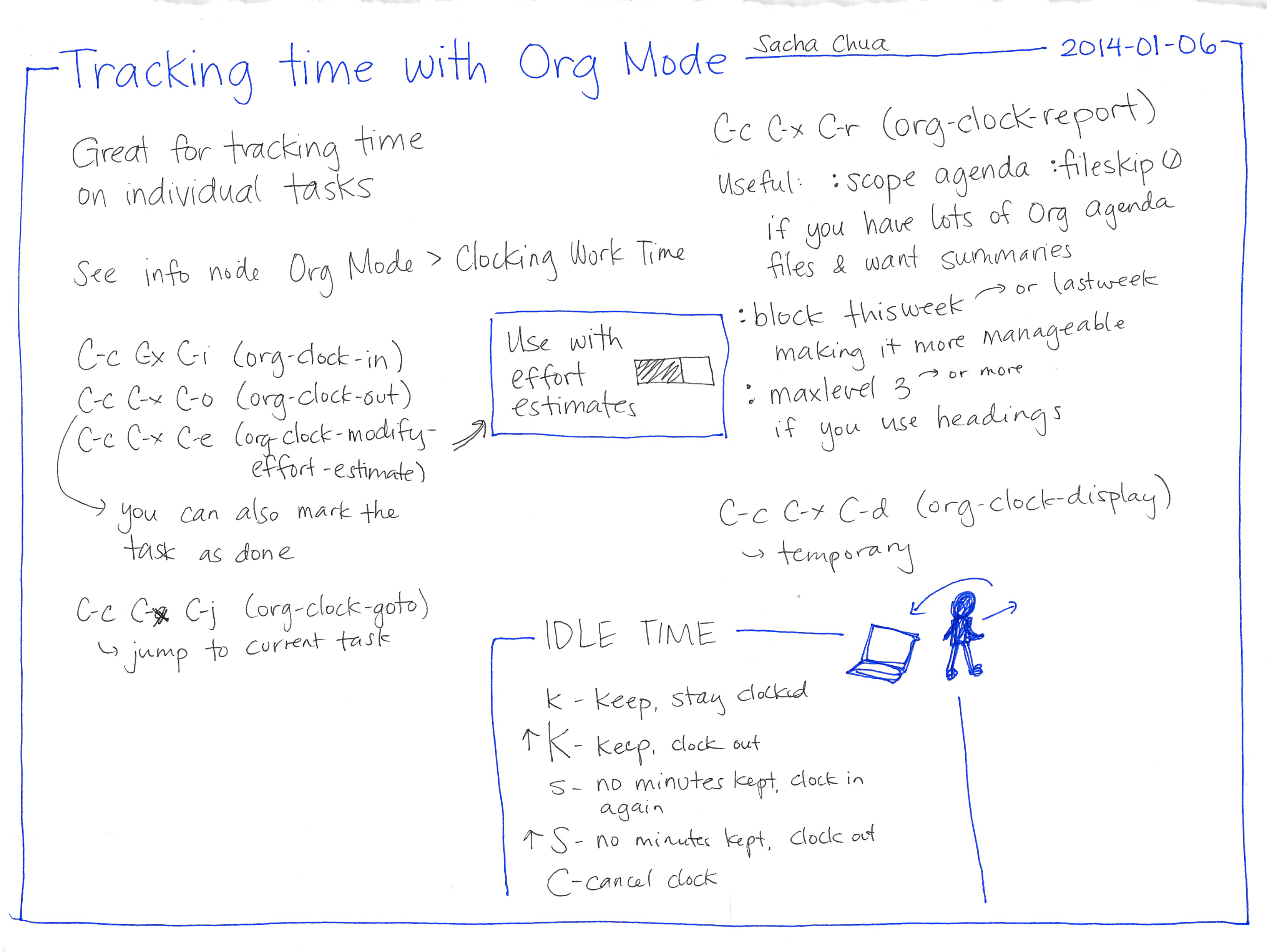
I have some need for tracking how much time I spend on certain jobs, e.g. committees, etc… because 1) I have to report this information, 2) I need a better idea of how much time some things take. Org-mode supports the idea of "clocking in to a task". You run (org-clock-in) in a heading, and it stores a time stamp. You do your work in that heading, and when done, you (org-clock-out).

You can summarize your time with (org-clock-report) which puts a dynamic block in your file like this.

Table 1: Clock summary at [2014-01-26 Sun 13:36]
Headline Time  
Total time 0:24  
Clocking your time in org-mode 0:24  
\__ work in subheadings   0:06
\__ Using clocking effectively   0:05

You can update it by putting your cursor in the #+BEGIN line, and pressing C-c C-c.

1 work in subheadings

It seems that the clock-in mechanism works on the heading you are in. So whenever you clock in, it is specific to that heading. If you clock-in more than once, multiple CLOCK entries are stored, unless you modify org-clock-into-drawer. It seems like you probably want these CLOCK entries in a drawer, so you should put this in your init.el file:

(setq org-clock-into-drawer t)

2 Clock in to the right task

By default, (org-clock-in) creates clocks-in to the current headline. Org-mode seems to store a list of recently clocked tasks. You can access them by typing C-u C-c C-x C-i. You will be given some choices of which task to clock in to. You can switch to another task by doing this too.

3 Using clocking effectively

It will take some discipline and practice to use this effectively. It appears you can clock in any heading, and then use the clock report to aggregate all the times into one summary. That report can have a variety of scopes, from subtree to file. In that case, if you keep all relevant task information to a project in a file, you just clock in wherever you work in that file, and let the report keep track of it for you.

You could use this to track the amount of time you spend reviewing manuscripts, or doing work for a committee. You just need to remember to actually use it!

It might be interesting to setup code that would automatically clock in when you open a file, and then clock out when you close it. Probably this would be done with hooks.

There is a nice map of using org-mode for clocking time here .

Copyright (C) 2014 by John Kitchin. See the License for information about copying.

org-mode source

Org-mode version = 8.2.5g

Discuss on Twitter
« Previous Page -- Next Page »