Pandoc does org-mode now

| categories: uncategorized | tags:

Pandoc (http://johnmacfarlane.net/pandoc/ ) is a document converter. It does a pretty good job of converting a document in one format to another. Pandoc also knows about org-mode now, and can convert an org-file to a Word document! We are going to test it out in this post to see what it does well with.

1 A subsection with some equations

Einstein showed us that \(E = mc^2\).

A matrix looks like this:

\begin{equation} \begin{matrix} a & b & c \\ d & e & f \\ g & h & i \end{matrix} \end{equation}

2 A section with a figure

Here is a figure in the document.
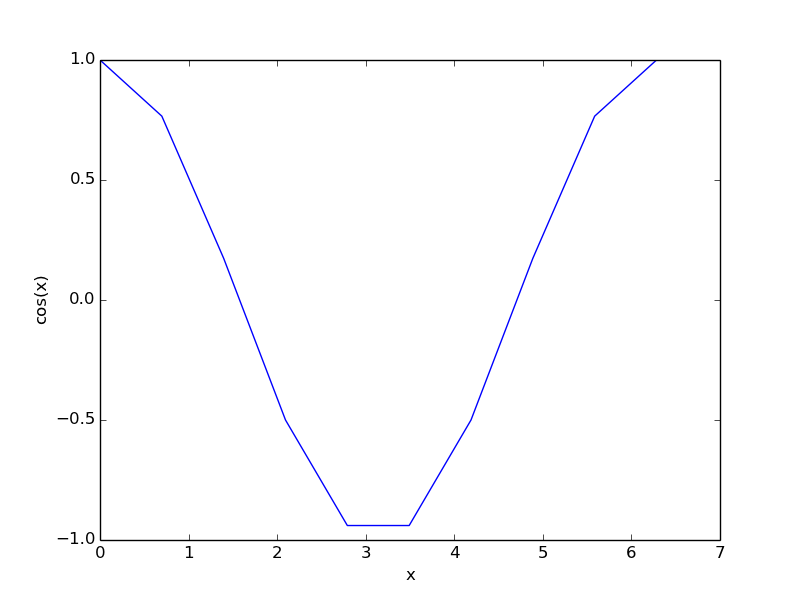
Figure 1: A cosine function.

3 A section with a table

Table 1: A simple table.
x y
1 1
2 4
3 9

4 Some citations

For fun, a reference to the org-mode book dominik-2010-org-mode.

5 some source code

here is a python block.

print 'hello pandoc'
hello pandoc

and finally, we write a block that will convert this file to a word document.

(save-buffer)
(shell-command "pandoc -s -s org-to-word.org -o org-to-word.docx")
0

Now, here is that org-to-word.docx

it is pretty good, and blazing fast. The output is not quite as good as the native org to pdf (org-to-word.pdf ), but since the translation is happening outside of Emacs the results are still pretty impressive, and if you need a Word document there is no substitute 1. The simple equation was translated to a Word equation format (cool!) but the matrix did not show up in the word document, nor did the figure caption. The code does show up, but the lines are not numbered as they are in the pdf. The citation did not work out of the box. The User guide suggests it might be possible to get this to work with a citations extension though.

I am impressed that the Word document has proper section headings. Overall, my impression is that this is a very good way to get 90+% of the way to a finished word document with an org-source file!

Footnotes:

1

Ok, there is the ODT export engine. So far I have not been able to make that export documents that Word can open though, and it takes more configuration than just installing Pandoc.

Copyright (C) 2014 by John Kitchin. See the License for information about copying.

org-mode source

Org-mode version = 8.2.6

Discuss on Twitter

Org-mode is awesome

| categories: org | tags:

I made a video on Youtube (https://www.youtube.com/watch?v=fgizHHd7nOo ) demonstrating how we use Emacs and org-mode. The source for that file can be found here .

There are some other good org-mode videos out there. Here are few:

Copyright (C) 2014 by John Kitchin. See the License for information about copying.

org-mode source

Org-mode version = 8.2.6

Discuss on Twitter

Another parsing of links for citations with pre and post text.

| categories: org-mode, emacs, org-ref | tags:

Some LaTeX citations look like \cite[pretext][post text]{key}. Here I explore parsing a link like (pre text)(post text)key. Note you cannot use [] inside the link, as it breaks the link syntax. Also, these links must be wrapped in [[]] because of the parentheses and spaces in the parentheses. This is a very different approach than used here which used the description of the link to define the pre and post text. The disadvantage of that approach is that the key is hidden, whereas in this approach it is not; you can see the key and pre/post text.

The basic strategy will be to use a regexp to parse the link path. The regexp below is pretty hairy, but basically it looks for optional text in () and uses numbered groups to store what is found. Then, we use what we found to construct the LaTeX syntax. We redefine the function in org-ref that gets the key for clicking, and we redefine the cite format function. The result is that we retain the click functionality that shows us what the key refers to.

(defun org-ref-parse-key (s)
  "return pretext, posttext and bibtex key from a string like \"(pre text)(post text)bibtexkey\""
  (string-match "\\(?1:(\\(?2:[^)]*\\))\\)?\\(?3:(\\(?4:[^]]*\\))\\)?\\(?5:.*\\)" s)
  ;; return pretext postext key
  (list (match-string 2 s) (match-string 4 s) (match-string 5 s)))

(defun org-ref-get-bibtex-key-and-file (&optional key)
  "returns the bibtex key and file that it is in. If no key is provided, get one under point"
 (interactive)
 (let ((org-ref-bibliography-files (org-ref-find-bibliography))
       (file))
   (unless key
     ;; get the key
     (setq key (nth 2 (org-ref-parse-key (org-ref-get-bibtex-key-under-cursor)))))
   (setq file     (catch 'result
		    (loop for file in org-ref-bibliography-files do
			  (if (org-ref-key-in-file-p key (file-truename file)) 
			      (throw 'result file)))))
   (cons key file)))

(defun org-ref-format-cite (keyword desc format)
   (cond
    ((eq format 'latex)
     (let* ((results (org-ref-parse-key keyword))
	    (pretext (nth 0 results))
	    (posttext (nth 1 results))
	    (key (nth 2 results)))
       (concat "\\cite" 
	       (when pretext (format "[%s]" pretext))
	       (when posttext (format "[%s]" posttext))
	       (format "{%s}" key))))))
org-ref-format-cite
(org-ref-format-cite "(pre text)(post text)key" nil 'latex)
\cite[pre text][post text]{key}
(org-ref-format-cite "(pre text)key" nil 'latex)
\cite[pre text]{key}
(org-ref-format-cite "key" nil 'latex)
\cite{key}

It looks like they all work! Let us test the links: mehta-2014-ident-poten, (pre text)mehta-2014-ident-poten and (pre text)(post text)biskup-2014-insul-ferrom-films. a multiple citation mehta-2014-ident-poten,thompson-2014-co2-react,calle-vallejo-2013-number.

This seems to work from an export point of view. You can not mix multiple citations with this syntax, and I did not define the html export above. Otherwise, it looks like this might be a reasonable addition to org-ref.

Copyright (C) 2014 by John Kitchin. See the License for information about copying.

org-mode source

Org-mode version = 8.2.6

Discuss on Twitter

Using org-files like el-files

| categories: org-mode, emacs | tags:

I wrote some emacs-lisp code in org-mode, and load them with org-babel-load-file. I thought it would be nice if there was load path for org-files, similar to the one for lisp files. Here I document what it might look like.

We need a load path to search for the org-file.

(setq org-load-path '("~/Dropbox/kitchingroup/jmax/"))
~/Dropbox/kitchingroup/jmax/

Next, we need the function to do the loading. We need to find the org-file, and then load it.

(defun org-require (orgfile)
  "orgfile is a symbol to be loaded"
  (let ((org-file (concat (symbol-name orgfile) ".org"))
	(path))

  ;; find the org-file
  (catch 'result
    (loop for dir in org-load-path do
	  (when (file-exists-p
		 (setq path
		       (concat
			(directory-file-name dir)
			"/"
			org-file)))
	    (throw 'result path))))
  (org-babel-load-file path)))


(org-require 'org-ref)
Loaded ~/Dropbox/kitchingroup/jmax/org-ref.el

That looks pretty simple. You do need write access to the location where the org-file is though. Let us look at a version that copies the file to a temporary directory. For some reason, I am not able to use org-babel-load-file with this. But, it does look like I can tangle the file, and assuming (big assumption) that the file tangles to a regularly named .el file, this seems to work too.

(defun org-require (orgfile)
  "orgfile is a symbol to be loaded"
  (let ((org-file (concat (symbol-name orgfile) ".org"))
        (el-file (concat (symbol-name orgfile) ".el"))
	(path))

  ;; find the org-file
  (catch 'result
    (loop for dir in org-load-path do
	  (when (file-exists-p
		 (setq path
		       (concat
			(directory-file-name dir)
			"/"
			org-file)))
	    (throw 'result path))))
  (copy-file path temporary-file-directory t)

  (org-babel-tangle-file (concat temporary-file-directory (file-name-nondirectory path)))
  (load-file (concat temporary-file-directory el-file))
))

(org-require 'org-ref)
t

This actually seems pretty reasonable. I have not thought about complications but for simple cases, e.g. single org-file, it looks ok.

Copyright (C) 2014 by John Kitchin. See the License for information about copying.

org-mode source

Org-mode version = 8.2.6

Discuss on Twitter

Better integration of org-mode and email

| categories: email, org-mode | tags:

I like to email org-mode headings and content to people. It would be nice to have some records of when a heading was sent, and to whom. We store this information in a heading. It is pretty easy to write a simple function that emails a selected region.

(defun email-region (start end)
  "Send region as the body of an email."
  (interactive "r")
  (let ((content (buffer-substring start end)))
    (compose-mail)
    (message-goto-body)
    (insert content)
    (message-goto-to)))

that function is not glamorous, and you still have to fill in the email fields, and unless you use gnus and org-contacts, the only record keeping is through the email provider.

What I would like is to send a whole heading in an email. The headline should be the subject, and if there are TO, CC or BCC properties, those should be used. If there is no TO, then I want to grab the TO from the email after you enter it and store it as a property. You should be able to set OTHER-HEADERS as a property (this is just for fun. There is no practical reason for this yet). After you send the email, it should record in the heading when it was sent.

It turned out that is a relatively tall order. While it is easy to setup the email if you have everything in place, it is tricky to get the information on TO and the time sent after the email is sent. Past lispers had a lot of ideas to make this possible, and a day of digging got me to the answer. You can specify some "action" functions that get called at various times, e.g. after sending, and a return action when the compose window is done. Unfortunately, I could not figure out any way to do things except to communicate through some global variables.

So here is the code that lets me send org-headings, with the TO, CC, BCC properties, and that records when I sent the email after it is sent.

(defvar *email-heading-point* nil
  "global variable to store point in for returning")

(defvar *email-to-addresses* nil
  "global variable to store to address in email")

(defun email-heading-return ()
  "after returning from compose do this"
  (switch-to-buffer (marker-buffer  *email-heading-point*))
  (goto-char (marker-position  *email-heading-point*))
  (setq *email-heading-point* nil)
  (org-set-property "SENT-ON" (current-time-string))
  ;; reset this incase you added new ones
  (org-set-property "TO" *email-to-addresses*)
  )

(defun email-send-action ()
  "send action for compose-mail"
  (setq *email-to-addresses* (mail-fetch-field "To")))

(defun email-heading ()
  "Send the current org-mode heading as the body of an email, with headline as the subject.

use these properties
TO
OTHER-HEADERS is an alist specifying additional
header fields.  Elements look like (HEADER . VALUE) where both
HEADER and VALUE are strings.

save when it was sent as s SENT property. this is overwritten on
subsequent sends. could save them all in a logbook?
"
  (interactive)
  ; store location.
  (setq *email-heading-point* (set-marker (make-marker) (point)))
  (org-mark-subtree)
  (let ((content (buffer-substring (point) (mark)))
	(TO (org-entry-get (point) "TO" t))
	(CC (org-entry-get (point) "CC" t))
	(BCC (org-entry-get (point) "BCC" t))
	(SUBJECT (nth 4 (org-heading-components)))
	(OTHER-HEADERS (eval (org-entry-get (point) "OTHER-HEADERS")))
	(continue nil)
	(switch-function nil)
	(yank-action nil)
	(send-actions '((email-send-action . nil)))
	(return-action '(email-heading-return)))
    
    (compose-mail TO SUBJECT OTHER-HEADERS continue switch-function yank-action send-actions return-action)
    (message-goto-body)
    (insert content)
    (when CC
      (message-goto-cc)
      (insert CC))
    (when BCC
      (message-goto-bcc)
      (insert BCC))
    (if TO
	(message-goto-body)
      (message-goto-to))       
    ))

This works pretty well for me. Since I normally use this to send tasks to people, it keeps the task organized where I want it, and I can embed an org-id in the email so if the person replies to it telling me the task is done, I can easily navigate to the task to mark it off. Pretty handy.

Copyright (C) 2014 by John Kitchin. See the License for information about copying.

org-mode source

Org-mode version = 8.2.6

Discuss on Twitter
« Previous Page -- Next Page »