Getting information about named tables in exported org-files

| categories: orgmode | tags:

I have found that the names of tables typically get lost when you export an org-file to another format like html or pdf. Since we may use named tables as data sources, it can become unclear in the exported file what has happened, or which table data came from. In this post, we examine how to include the name of a table in exported html. Here are two named tables tbl-1 and tbl-2 that will form the beginning of our effort.

x y
1 2
2 3

Another table, so we have something to work with later.

a
5
3

Org-buffers get parsed into nested lists, with properties usually in plists. It will be convenient to get a list of the keys for an element, so we can tell what information we have on each element. Some code for this can be found here: http://www.emacswiki.org/emacs/mon-plist-utils.el . Rather than use that recursive approach, here we just loop through the plist and accumulate the keys.

(defun plist-get-keys (plist)
  (interactive)
  (let ((keys))
    (while (car plist)
      (add-to-list 'keys (car plist) t)
      (setq plist (cddr plist)))
    keys))

; example of use
(plist-get-keys '(:a 1 :b 3 :parent '(another plist)))
:a :b :parent

Now, when we parse a buffer for elements, we get a nested lisp data structure, and the best I can tell is we need the cadr of that list to get to the relevant plist of properties. So, here, we map over the tables, and see what properties are available.

(org-element-map
    (org-element-parse-buffer) 'table
  (lambda (element)  (plist-get-keys (cadr element))))
:begin :end :type :tblfm :contents-begin :contents-end :value :post-blank :post-affiliated :name :parent  
:begin :end :type :tblfm :contents-begin :contents-end :value :post-blank :post-affiliated :results :parent  
:begin :end :type :tblfm :contents-begin :contents-end :value :post-blank :post-affiliated :caption :parent  
:begin :end :type :tblfm :contents-begin :contents-end :value :post-blank :post-affiliated :name :caption :parent
:begin :end :type :tblfm :contents-begin :contents-end :value :post-blank :post-affiliated :results :parent  

Depending on when you run the codeblock above (i.e. I ran it at different stages of development of this document, so some tables after this point are shown), you see different results; some of the tables are RESULTS from code blocks with no names, and two tables have a caption.

Let us now map over the tables and see if they have names. We add an unnamed table, and a named table, both with captions.

Table 1: an unnamed table of category counts.
category count
emacs 4
orgmode 3
Table 2: an named table of category counts on python.
category count
Python 4
pep8 3

Here we get the names of the tables. Only three tables have names, and several are unnamed.

(org-element-map
    (org-element-parse-buffer) 'table
  (lambda (element)  (plist-get (cadr element) :name)))
tbl-1 tbl-2 python-table

If you think that is a little awkward, I agree. Here is probably a better way to get that information using features in org-mode..

(org-element-map
    (org-element-parse-buffer) 'table
  (lambda (element)  (org-element-property :name element)))
tbl-1 tbl-2 python-table

I had thought we could use a filter to add the name to each table. The issue with filtering is that we get the transcoded text directly, and no practical way to get back to the element it came from (at least none I could find). I have previously used filters (e.g. for changing links on export ) for something like this, but it involved parsing the document once, then exporting, and iterating through the results to change the output. I want to do something different here, and fix the issue on the export.

That requires us to derive a new backend for export, with our new function for formatting. This will give us access to the actual table element, and we can use the original transcoding function to get most of the table, and our own code to modify that before it is exported.

Basically, we just want to add an HTML anchor to the table with some text to indicate the table name. With the anchor we can then link to it elsewhere like this:

See tbl-2

We just define a function that satisfies the transcoding function signature (element contents info), and if our element has a :name property, we will prepend it onto the usual table output for html. We will go ahead and code in some conditional code for different backends, although for now only handle the html backend.

(defun my-table-format (table contents info)
  (let ((tblname (org-element-property :name table)))    
    (cond
     ((eq (elt (plist-get info :back-end) 2) 'html)  
      (concat
       (when tblname
         (format "<br>TBLNAME: <a name=\"%s\"></a>%s<br>" tblname tblname))
       (org-html-table table contents info))))))

(org-export-define-derived-backend 'my-html 'html
  :translate-alist '((table . my-table-format)))


(browse-url (org-export-to-file 'my-html "custom-src-table-export.html"))
#<process open custom-src-table-export.html>

That seems to do it. You may need to see custom-src-table-export.html to see the newly annotated tables, since they probably do not show up in the blog post.

Copyright (C) 2014 by John Kitchin. See the License for information about copying.

org-mode source

Org-mode version = 8.2.7c

Discuss on Twitter

A git status Emacs modeline

| categories: emacs, git | tags:

I am using git more and more in Emacs, and I would like a way to know the status of the git repo I am working in by looking at the modeline. I know about magit , and other git modes, but none of them provide something as easy as useful as say bash-git-prompt in the bash shell, which is to say I do not want to run a command to see the status (I might as well be in the shell then). Part of this need comes from a project with hundreds of git repos in it, and I want convenient status when I open any one of them.

Here, I want to emulate the bash-git-prompt feature in the Emacs modeline where it will show you when you are in a git repo, and then some basic information like what branch you are on, the number of untracked, modified files, and the commit status with respect to a remote. First, we only want this when we are in a git repo. We can check for that like this. The command in this block returns a string that starts with fatal when not in a git repo.

(not (string-match "^fatal" (shell-command-to-string "git rev-parse --git-dir")))
t

Let us wrap that in a nice function so we can use it later..

(defun in-git-p ()
  (not (string-match "^fatal" (shell-command-to-string "git rev-parse --git-dir"))))

(in-git-p)
t

Next, we would like to know how many untracked, modified and other (e.g. unmerged, deleted, etc…) files we have. We can get this from git status --porcelain. I am going to set these to be red if they are not zero, so they stand out, and be green otherwise. We will also store a list of each file type so we can make a tooltip on the counter to see what is there.

(defun git-parse-status ()
  (interactive)
  (let ((U 0)   ; untracked files
        (M 0)   ; modified files
        (O 0)   ; other files
        (U-files "")
        (M-files "")
        (O-files ""))
    (dolist (line (split-string
                   (shell-command-to-string "git status --porcelain")
                   "\n"))
      (cond

       ;; ignore empty line at end
       ((string= "" line) nil)

       ((string-match "^\\?\\?" line)
        (setq U (+ 1 U))
        (setq U-files (concat U-files "\n" line)))

       ((string-match "^ M" line)
        (setq M (+ 1 M))
        (setq M-files (concat M-files "\n" line))
        )

       (t
        (message "detected other in %s" line)
        (setq O (+ 1 O))
        (setq O-files (concat O-files "\n" line)))))
      
    ;; construct propertized string
    (concat
     "("
     (propertize 
      (format "M:%d" M)
      'face (list ':foreground (if (> M 0)
                                   "red"
                                 "forest green"))
      'help-echo M-files)
     "|"
     (propertize 
      (format "U:%d" U)
      'face (list ':foreground (if (> U 0)
                                   "red"
                                 "forest green"))
      'help-echo U-files)
     "|"
     (propertize 
      (format "O:%d" O)
      'face (list ':foreground (if (> O 0)
                                   "red"
                                 "forest green"))
      'help-echo O-files)                   
      ") ")))

(git-parse-status)
(M:1|U:2|O:0) 

Finally, let us get the branch we are on, and the commits with respect to a remote. We can do that like this. We use some unicode characters to indicate what direction things go, e.g. an up arrow to indicate you need to push, and a down arrow to indicate you should pull.

(defun git-remote-status ()
  (interactive)
  (let* (;; get the branch we are on.
         (branch (s-trim
                  (shell-command-to-string
                   "git rev-parse --abbrev-ref HEAD")))
         ;; get the remote the branch points to.
         (remote (s-trim
                  (shell-command-to-string
                   (format "git config branch.%s.remote" branch))))
         (remote-branch (s-trim
                         (shell-command-to-string
                          "git for-each-ref --format='%(upstream:short)' $(git symbolic-ref -q HEAD)")))
         (commits (split-string
                   (s-trim
                    (shell-command-to-string
                     (format
                      "git rev-list --count --left-right HEAD...%s"
                      remote-branch)))))
         (local (nth 0 commits))
         (remotes (nth 1 commits)))
    (concat
     "["
     (propertize
      (format "%s" branch)
      'face (list :foreground "magenta"))
     "|"
     (format "↑%s|↓%s" local remotes)
     "]"))) 

(git-remote-status)
[source|↑0|↓0]

Now, we can finally put this together in a little minor mode. We add an element to the mode-line-format variable that evaluates those functions. When we turn off the minor mode, we remove the element from the modeline.

(define-minor-mode git-mode
  "minor mode to put git repo status in modeline"
  nil nil nil
  (let ((git-modeline '(:eval (if (not (in-git-p))
                                  ""
                                (concat 
                                 (git-remote-status)
                                 (git-parse-status))))))
    (if git-mode
        ;; put in modeline
        (push git-modeline mode-line-format)
      ;; remove from modeline
      (setq mode-line-format
            (-remove (lambda (x)
                       (equal x git-modeline))                                  
                     mode-line-format)))))

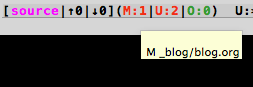
This leads to a modeline that looks like this (when my mouse is hovered over the M):

This seems to have some performance issue, since pretty much everytime I type a key, it updates the modeline, and runs git. That is too often. Let us redefine the mode here so we have a minimum time between updates, say 15 seconds. We will store the last time updated, and the last value of the mode-line. Then each time the modeline updates, if the time since the last update is greater than our interval, then we will run the git commands. Otherwise, we just use the old modeline value.

(defvar git-modeline-last-update (float-time) "Last time we updated")
(defvar git-modeline-update-interval 15 "Minimum time between update in seconds")
(defvar git-modeline "" "Last value of the modeline")

(define-minor-mode git-mode
  "minor mode to put git repo status in modeline"
  nil nil nil
  (let ((git-modeline '(:eval (if
                                  (> (- (float-time) git-modeline-last-update)
                                     git-modeline-update-interval)
                                  ;; we are updating                              
                                  (setq git-modeline
                                        (if (not (in-git-p))
                                            ""                                   
                                          (setq  git-modeline-last-update (float-time))
                                          (concat 
                                           (git-remote-status)
                                           (git-parse-status))))
                                
                              ;; use last value of the modeline
                              git-modeline))))
    (if git-mode
        ;; put in modeline
        (push git-modeline mode-line-format)
      ;; remove from modeline
      (setq mode-line-format
            (-remove (lambda (x)
                       (equal x git-modeline))                                  
                     mode-line-format)))))

That does it I think. I don't have any performance issues here now. I have not tested this super thoroughly on many git repos, but it seems to be pretty consistent and correct so far. The remote status code is where there is the most probability for issues. I still do not know that part of git very well. I wonder if there is a more elegant solution than this, perhaps an idle timer. I notice a little lag in updating the data when I switch to another git repo. That might be a little confusing one day.

Otherwise, this seems like a pretty nice solution so far. There are still some things that would be nice to see on here. For example, a pop-up menu on the modeline to switch branches, push or pull, and with actions for the files, e.g. add/commit, etc… Those do not seem to hard to

Copyright (C) 2014 by John Kitchin. See the License for information about copying.

org-mode source

Org-mode version = 8.2.7c

Discuss on Twitter

Colorized text in Emacs

| categories: emacs | tags:

As I continue investigating Emacs + org-mode as a platform for creating applications, it has come up a few times that it would be useful to display colored text. For example, in a summary report of a git repo, you might want to see some information in red, e.g. if you have uncommitted changes, and some information in green, e.g. the repo is clean and consistent with a remote.

We can set colors on a string in Emacs like this:

(propertize "Red Text" 'font-lock-face '(:foreground "red"))

The only tricky part is that we need to insert the text into a font-locked buffer to see it. That is also a tad tricky to illustrate in a code block, so here is a way to try it:

(re-search-forward "-> ")
(insert
  (propertize "Red Text" 'font-lock-face '(:foreground "red")))

-> Red Text

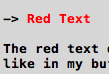
The red text does not show in the HTML post, so this is a screenshot of what it looks like in my buffer:

Now, here is how we might use this in a summary report. Say we have a git repo, and we want to know various facts about it. We can get information about tracked/ untracked and modified files like this:

git status --porcelain
 M _blog/blog.html
 M _blog/blog.org
A  _blog/images/red-text.png

This shows we have two tracked, but modified files, and on added but not committed file. We can use this code to show if we have any untracked files.

(let ((n 0) s)
  (dolist (line (split-string
                 (shell-command-to-string "git status --porcelain")
                 "\n"))
    (when (string-match "^\\?\\?" line)
      (setq n (+ 1 n))))
  (if (> n 0)
      (setq s (propertize (format "%s untracked files" n)
                          'font-lock-face '(:foreground "red")))
    (setq s (propertize "No untracked files" 
                        'font-lock-face '(:foreground "forest green"))))
  (re-search-forward "->")
  (insert s))

->No untracked files

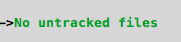
In HTML (i.e. the blog post) you cannot really see the green text, so here is a screenshot illustrating it.

Similarly, we can check for modified files. We add a wrinkle and add a tooltip like text that shows the output of the git command.

(let ((n 0)
      (output (shell-command-to-string "git status --porcelain"))
      s)
  (dolist (line (split-string
                 output
                 "\n"))
    (when (string-match "^ M" line)
      (setq n (+ 1 n))))
  (if (> n 0)
      (setq s (propertize (format "%s modified files" n)
                          'help-echo output
                          'font-lock-face '(:foreground "red")))
    (setq s (propertize "No modified files" 
                        'font-lock-face '(:foreground "forest green"))))
  (re-search-forward "-> ")
  (insert s))

-> 2 modified files

That looks like this in emacs:

That is the main idea in this post. You can create strings with properties, and use code to determine what they e.g. what color the text is, etc… There are lots of properties listed at http://www.gnu.org/software/emacs/manual/html_node/elisp/Special-Properties.html that might be helpful in an application. Here are some previous posts that examined similar ideas.

http://kitchingroup.cheme.cmu.edu/blog/2014/02/06/Invisible-text-in-emacs/

Copyright (C) 2014 by John Kitchin. See the License for information about copying.

org-mode source

Org-mode version = 8.2.7c

Discuss on Twitter

Make some org-sections read-only

| categories: orgmode, emacs | tags:

There are times where I want an org-file to be partly read-only. For example, there might be instructions that should not be modified. In this post we consider how to implement that. For now, we only want an org-section to be read-only, and we will designate those sections by a tag readonly. Then, the idea is that a hook function would be run when the org-file is loaded, and mark regions of text as read-only before the user can do anything.

In Emacs, you can mark a section of text, and set it to have a property of read-only. So, we can just map over the entries, and any heading that is tagged as readonly can be made read-only!

Here we set the first few characters of this buffer to be read-only.

(add-text-properties 1 8 '(read-only t))
t

Emacs is semi-serious about what read-only means. You cannot even change properties of read-only text, unless you set inhibit-read-only as a variable.

(let ((inhibit-read-only t))
 (remove-text-properties 1 8 '(read-only t)))
t

Now, we can map over the entries in this buffer, and set any heading tagged readonly to actually be that way like this.

(org-map-entries (lambda ()
                   (let* ((element (org-element-at-point))
                          (begin (org-element-property :begin element))
                          (end (org-element-property :end element)))
                     (add-text-properties begin end '(read-only t))))
                 "read_only")
t

To get this to work when org-mode is turned on, we just wrap it in a function, add the function to a hook, and a function to undo the read-only behavior. I found that if I use the end reported by org-element-at-point, it includes the first character of the next section, we take one away from the end to avoid that.

(defun org-mark-readonly ()
  (interactive)
  (org-map-entries
   (lambda ()
     (let* ((element (org-element-at-point))
            (begin (org-element-property :begin element))
            (end (org-element-property :end element)))
       (add-text-properties begin (- end 1) '(read-only t))))
   "read_only")
 (message "Made readonly!"))


(defun org-remove-readonly ()
  (interactive)
  (org-map-entries
   (lambda ()
     (let* ((element (org-element-at-point))
            (begin (org-element-property :begin element))
            (end (org-element-property :end element))
            (inhibit-read-only t))
         (remove-text-properties begin (- end 1) '(read-only t))))
     "read_only"))

(add-hook 'org-mode-hook 'org-mark-readonly)

That seem to be all there is. After executing the code above, when I open this file, the next section is read-only! I can use the other function to remove that if I need to edit it. Score one for Emacs + org-mode!

1 Read-only section   read_only

This text is so important, it should be read-only.

2 Editable section

You can do what you want here. Like add text.

Copyright (C) 2014 by John Kitchin. See the License for information about copying.

org-mode source

Org-mode version = 8.2.7c

Discuss on Twitter

Randomize a list in Emacs

| categories: emacs_lisp | tags:

I have an application where I have a list of userids, and I want to randomize the order of the list. Today, I explore some ways to do that. The first idea is to simply mimic the algorithm in Python's random.shuffle algorithm.

    def shuffle(self, x, random=None):
        """x, random=random.random -> shuffle list x in place; return None.

        Optional arg random is a 0-argument function returning a random
        float in [0.0, 1.0); by default, the standard random.random.

        """

        if random is None:
            random = self.random
        _int = int
        for i in reversed(xrange(1, len(x))):
            # pick an element in x[:i+1] with which to exchange x[i]
            j = _int(random() * (i+1))
            x[i], x[j] = x[j], x[i]

It looks like we loop through the elements, and swap them at random.

We have a similar feature for xrange in emacs-lisp:

(number-sequence 1 5)
1 2 3 4 5

Note that number-sequence includes the last value, unlike xrange. And for reverse:

(reverse (number-sequence 1 5))
5 4 3 2 1

Of course, we can select random numbers:

(random 5) ; random between 0 and 5
4

Last, we need to work out how to swap to elements. It looks like this will swap elements 2 and 3. We store element 3 temporarily, set 3 to 2, and then set 2 to the temporarily stored value of 3.

(let* ((L '(1 2 3 4))
       (tmp (nth 3 L)))
  (setf (nth 3 L) (nth 2 L))
  (setf (nth 2 L) tmp)
L)
1 2 4 3

So, now we can shuffle our list.

(setq userids '(user1 user2 user3 user4 user5 user6))

(defun swap (LIST el1 el2)
  "in LIST swap indices EL1 and EL2 in place"
  (let ((tmp (nth el1 LIST)))
    (setf (nth el1 LIST) (nth el2 LIST))
    (setf (nth el2 LIST) tmp)))

;; now run the loop
(loop for i in (reverse (number-sequence 1 (1- (length userids))))
      do (let ((j (random (+ i 1))))
           (swap userids i j)))

userids
user4 user6 user3 user2 user1 user5

The order has certainly changed. It is a little difficult to tell how randomized it actually is, but what is important for my application is that the order is different each time I use it. It looks like this will accomplish that objective. I think this basically implements the algorithm in the Python random.shuffle code. That code does something a little differently. It generates a random float between 0-1, multiplies it by i + 1, and converts the result to an integer. We directly get an integer in the range of 0 to i + 1. I think the result is practically the same.

Finally, let us wrap the whole thing up in a nice neat function for future use. We will use elt instead of nth so it works for arrays too.

(defun swap (LIST el1 el2)
  "in LIST swap indices EL1 and EL2 in place"
  (let ((tmp (elt LIST el1)))
    (setf (elt LIST el1) (elt LIST el2))
    (setf (elt LIST el2) tmp)))


(defun shuffle (LIST)
  "Shuffle the elements in LIST.
shuffling is done in place."
  (loop for i in (reverse (number-sequence 1 (1- (length LIST))))
        do (let ((j (random (+ i 1))))
             (swap LIST i j)))
  LIST)
shuffle

Example usage for a list:

(shuffle '(user1 user2 user3 user4 user5 user6))
user4 user2 user3 user5 user6 user1

And for a vector:

(shuffle [user1 user2 user3 user4 user5 user6])
[user3 user2 user6 user4 user5 user1]

1 Addendum

Artur at http://endlessparentheses.com suggested one can use psetf to swap values. Thanks for the tip, I was not aware of that cool function. It evaluates the values first, then sets them, so there is no need for a temporary storage of a value! Here is an example usage. We could rewrite our swap function like this if we wanted.

(let ((LIST '(1 2 3 4 5)))
  (psetf (elt LIST 2) (elt LIST 1)
         (elt LIST 1) (elt LIST 2))
LIST)
1 3 2 4 5

Copyright (C) 2014 by John Kitchin. See the License for information about copying.

org-mode source

Org-mode version = 8.2.7c

Discuss on Twitter
« Previous Page -- Next Page »