Using Pymacs to integrate Python into Emacs

| categories: emacs, python | tags:

Pymacs is a project that aims to integrate Python into Emacs, and vice versa. In this post, I am going to examine the Python into Emacs integration. I cloned the git repository, ran make install, and setup my init.el file like this, as suggested in the manual.

(add-to-list 'load-path (expand-file-name "Pymacs" starter-kit-dir))
(require 'pymacs)
(autoload 'pymacs-apply "pymacs")
(autoload 'pymacs-call "pymacs")
(autoload 'pymacs-eval "pymacs" nil t)
(autoload 'pymacs-exec "pymacs" nil t)
(autoload 'pymacs-load "pymacs" nil t)
(autoload 'pymacs-autoload "pymacs")

Pymacs provides some mapping of Python modules to emacs-lisp functions. You load modules in emacs-lisp, and then a dash-mangled version of the Python functions are available, in emacs lisp. Here is an example. We will load numpy, and find the maximum element of an array. For comparison, here is the Python script.

import numpy as np
print np.max(np.array([[1, 1], [2, 4]]))
4

Now, the corresponding emacs version using Pymacs.

(pymacs-load "numpy" "np-")
(np-max (np-array '((1 1) (2 4))))
4

Neat! The dot notation is basically replaced with dash notation, and we use a lisp list as the argument instead of an array. Otherwise, this looks almost identical. Now, let us consider something more complicated, and get the determinant of the array. We add a PREFIX to the load statement for numpy.linalg similar to what we would do in Python:

import numpy as np
import numpy.linalg as la
print la.det(np.array([[1, 1], [2, 4]]))
2.0

And in emacs-lisp:

(pymacs-load "numpy" "np-")
(pymacs-load "numpy.linalg" "la-")
(la-det (np-array '((1 1) (2 4))))
2.0

We can call functions from matplotlib to make a figure. For example:

(pymacs-load "matplotlib.pyplot" "plt-")
(let* ((x  '(1 2 3 4))
       (y  (mapcar (lambda (z) (* z z)) x)))
  (plt-plot x y)
  (plt-xlabel "x values")
  (plt-ylabel "x$^2$")
  (plt-savefig "plt-pymacs.png"))
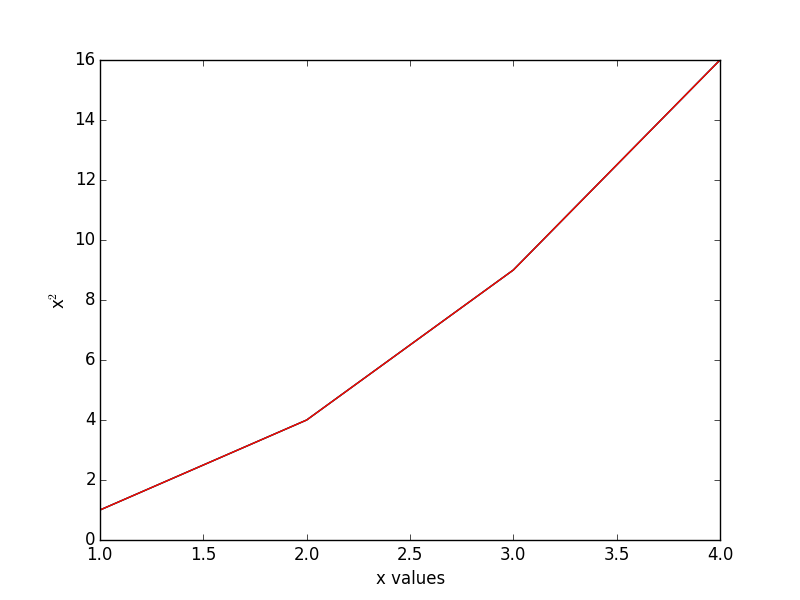
This was a little subtle. It was necessary to save the lists as variables, and use the variables in the plot command.

I am not sure what this offers over just having a Python block present in org-mode though. Maybe it is more useful in emacs-lisp libraries where you want to bring in some numerical analysis. Or if you have some custom library of Python you would like to use in elisp. Here is a highly contrived example. Suppose we have a Python module with this special function that converts an argument to "J":

def special_func(x):
    return "J"

In Python, we might use it like this:

import my_python as mp
print [mp.special_func(x) for x in [1, 2, 3]]
['J', 'J', 'J']

We can import the module, and use the function in emacs-lisp too. The underscore in the function name is turned into a dash, which is a little confusing, but it works otherwise.

(pymacs-load "my_python" "mp-")
(mapcar 'mp-special-func '(1 2 3))
J J J

It does not seem possible to do everything though. For example, It is not clear how to pass functions through either side. For example, this does not work for fsolve, although it seems like it should.

(pymacs-load "scipy.optimize" "so-")

(defun objective (x)
  (- x 5))

(so-fsolve 'objective 3)

I get an error like this:

Pymacs loading scipy.optimize...done
pymacs-report-error: Python: Emacs: "(wrong-type-argument number-or-marker-p (pymacs-python . 47))"

The Python equivalent is here:

from scipy.optimize import fsolve
def objective(x):
    return x - 5

print fsolve(objective, 3)
[ 5.]

There is an open question on StackOverflow here on this issue. Overall, I find the project very interesting. It would be awesome if you could extend emacs more easily in other languages, especially scripting languages such as Python that have numerical and plotting capabilities. Right now, this is possible in limited ways. For example, Xah Lee describes an approach where an arbitrary script can take data on stdin, process it, and output the results to stdout. Emacs can capture this and use it to modify the buffer. This uses the shell-command features in Emacs. These scripts could be written in Python, Perl, Ruby, etc… This seems like a simpler and more flexible approach, except that it requires creating the shell commands and putting them on the executable path (as opposed to having Python modules on a PYTHONPATH). These lack the deep integration of documentation you get with emacs-lisp and Python functions.

Copyright (C) 2014 by John Kitchin. See the License for information about copying.

org-mode source

Org-mode version = 8.2.7c

Discuss on Twitter

Generate emacs-lisp documentation

| categories: emacs_lisp | tags:

Emacs has some pretty amazing features to get help on a function (describe-function), to navigate quickly to functions in an elisp file (speedbar and imenu). Other languages have tools for generating documentation for all the functions in a file, e.g. epydoc, javadoc, Doxygen,… I have not found an equivalent to this in emacs-lisp. Here, we explore some options to get something similar to this. Our goal will be to take an emacs-lisp file, and generate an org-file of documentation, and then convert that to PDF for reading.

Say we have a function, jmax-bibtex-next-entry, and we want some information about it. Here are three functions that give us the argument list, documentation string, and function definition.

(help-function-arglist 'jmax-bibtex-next-entry)
&optional n
(documentation 'jmax-bibtex-next-entry)
Jump to the beginning of the next bibtex entry. N is a prefix
argument. If it is numeric, jump that many entries
forward. Negative numbers do nothing.
(symbol-function 'jmax-bibtex-next-entry)
lambda (&optional n) Jump to the beginning of the next bibtex entry. N is a prefix\nargument. If it is numeric, jump that many entries\nforward. Negative numbers do nothing. (interactive P) (if (= (point) (save-excursion (bibtex-beginning-of-entry))) (progn (forward-char) (bibtex-next-entry))) (if (re-search-forward bibtex-entry-head nil t (and (numberp n) n)) (progn (bibtex-beginning-of-entry)))

That will not always be the code we wrote, but it is functionally similar.

So we could create an org-entry like this:

(defun fun2org (function-symbol)
  (let ((args (help-function-arglist function-symbol))
        (doc  (documentation function-symbol))
        (code (symbol-function function-symbol)))
    (format "** %s %s
%s

#+BEGIN_SRC emacs-lisp
%S
#+END_SRC
" function-symbol args doc code)))

(fun2org 'jmax-bibtex-next-entry)
** jmax-bibtex-next-entry (&optional n)
Jump to the beginning of the next bibtex entry. N is a prefix
argument. If it is numeric, jump that many entries
forward. Negative numbers do nothing.

#+BEGIN_SRC emacs-lisp
(lambda (&optional n) "Jump to the beginning of the next bibtex entry. N is a prefix
argument. If it is numeric, jump that many entries
forward. Negative numbers do nothing." (interactive "P") (if (= (point) (save-excursion (bibtex-beginning-of-entry))) (progn (forward-char) (bibtex-next-entry))) (if (re-search-forward bibtex-entry-head nil t (and (numberp n) n)) (progn (bibtex-beginning-of-entry))))
#+END_SRC

The code is not that beautifully indented, but it is optional.

For variables, there are similar functions to get their documentation:

(documentation-property 'jmax-bibtex-journal-abbreviations 'variable-documentation)
List of (string journal-full-name journal-abbreviation). Find abbreviations at http://cassi.cas.org/search.jsp.

The problem still is, you have to know the variable and function names in advance. I want to take a file, and generate this for each function, and variable.

I posted a question on StackOverflow on how to get the functions defined in a file. The most feasible suggestion was to use the variable load-history, which contains a history of the variables and functions loaded, and the files they are in.

Here is an example of getting the entries associated with jmax-bibtex.el

(cdr (assoc "/Users/jkitchin/Dropbox/kitchingroup/jmax/jmax-bibtex.el" load-history ))
(jmax-bibtex-journal-abbreviations
 (defun . jmax-bibtex-generate-longtitles)
 (defun . jmax-bibtex-generate-shorttitles)
 (defun . jmax-stringify-journal-name)
 (defun . jmax-set-journal-string)
 jmax-nonascii-latex-replacements
 (defun . jmax-replace-nonascii)
 jmax-lower-case-words
 (defun . jmax-title-case-article)
 (defun . jmax-sentence-case-article)
 (defun . jmax-bibtex-next-entry)
 (defun . jmax-bibtex-previous-entry)
 (defun . jmax-bibtex-mode-keys)
 (provide . jmax-bibtex))

Each element in this case is either a variable, defun or provide. Here, we can use this to print some information about the variables defined in this file. I think it is sufficient to check if the element in the list is a symbol, because all the other elements are cons elements. I suppose there are other possibilities, including defcustom, defgroup, defalias, defsubst, and maybe others.

(dolist (element (cdr
                  (assoc
                   "/Users/jkitchin/Dropbox/kitchingroup/jmax/jmax-bibtex.el"
                   load-history )))
  (when (symbolp element)
    (princ 
    (format "%s
Documentation: %s

" element (documentation-property element 'variable-documentation)))))
jmax-bibtex-journal-abbreviations
Documentation: List of (string journal-full-name journal-abbreviation). Find abbreviations at http://cassi.cas.org/search.jsp.

jmax-nonascii-latex-replacements
Documentation: Cons list of non-ascii characters and their LaTeX representations

jmax-lower-case-words
Documentation: List of words to keep lowercase

We can handle functions by checking if an element is a cons cell with a first element of defun.

(dolist (element (cdr
                  (assoc
                   "/Users/jkitchin/Dropbox/kitchingroup/jmax/jmax-bibtex.el"
                   load-history )))
  (when (and (consp element)
             (eq (car element) 'defun))
    (princ (format "%s is a function\n" (cdr element))))))
jmax-bibtex-generate-longtitles is a function
jmax-bibtex-generate-shorttitles is a function
jmax-stringify-journal-name is a function
jmax-set-journal-string is a function
jmax-replace-nonascii is a function
jmax-title-case-article is a function
jmax-sentence-case-article is a function
jmax-bibtex-next-entry is a function
jmax-bibtex-previous-entry is a function
jmax-bibtex-mode-keys is a function

So, we have the important pieces to mash up what I am looking for. Let us refine the goal. I want to create a PDF documentation of what is in an elisp file with a section on variables, and a section on functions.

(let* ((elements (cdr
                  (assoc
                   "/Users/jkitchin/Dropbox/kitchingroup/jmax/jmax-bibtex.el"
                   load-history)))
       (vars (-filter 'symbolp elements))
       (funcons (-filter (lambda (x)
                           (and (consp x)
                                (eq 'defun (car x))))
                         elements))
       (funcs (mapcar 'cdr funcons)))
  (switch-to-buffer "*org-doc*")
  (erase-buffer)
  (insert (format "#+TITLE: Documentation for %s
#+OPTIONS: toc:nil
\\maketitle
\\tableofcontents
" "/Users/jkitchin/Dropbox/kitchingroup/jmax/jmax-bibtex.el"))
  (insert "* Variables\n")
  (dolist (var (sort vars 'string-lessp))
    (insert (format "** %s
Documentation: %s\n\n" var  (documentation-property var 'variable-documentation))))

  (insert "* Functions\n\n")
  (dolist (funcs (sort funcs 'string-lessp))
    (insert (format "** %s %s
Documentation: %s

Code:
#+BEGIN_SRC emacs-lisp
%S
#+END_SRC
"
                    funcs
                    (or (help-function-arglist funcs) "")
                    (documentation funcs)
                    (symbol-function funcs))))

  (org-mode)
  (write-file "jmax-bibtex-doc.org")
  (org-export-to-file 'latex "jmax-bibtex-doc.tex")
  (org-latex-compile "jmax-bibtex-doc.tex")
  (kill-buffer "*org-doc*")
  (kill-buffer "jmax-bibtex-doc.org"))

Here is the resulting pdf: jmax-bibtex-doc.pdf . It is not too bad. The code is not beautiful, and it would take some work to get that looking nice. It might be nice to find all instances of '` and replace them with links to variable names, but I leave that for another day. There is also no information about the header comments, but I leave this for another day to.

Copyright (C) 2014 by John Kitchin. See the License for information about copying.

org-mode source

Org-mode version = 8.2.7c

Discuss on Twitter

Sentence casing your bibtex entry journal titles

| categories: bib | tags:

I previously talked about title-casing the titles of journal articles in bibtex entries. Here we describe an alternative transformation: sentence-casing. In sentence case the first word is capitalized, and all others (except proper nouns). We also should capitalize the first word of any subtitles, which we take to be the first word after a :. That is usually correct. We should also ignore any LaTeX commands, or protected words in the title.

(defun jmax-sentence-case-article (&optional key start end)
  "Convert a bibtex entry article title to sentence-case. The
arguments are optional, and are only there so you can use this
function with `bibtex-map-entries' to change all the title
entries in articles."
  (interactive)
  (bibtex-beginning-of-entry)

  (let* ((title (bibtex-autokey-get-field "title"))
         (words (split-string title))
         (start 0))
    (when
        (string= "article" (downcase (cdr (assoc "=type=" (bibtex-parse-entry)))))
      (setq words (mapcar
                   (lambda (word)
                     (if
                         ;; match words containing {} or \ which are probably
                         ;; LaTeX or protected words
                         (string-match "\\$\\|{\\|}\\|\\\\" word)
                         word
                       (s-downcase word)))
                   words))
      
      ;; capitalize first word
      (setf (car words) (s-capitalize (car words)))

      ;; join the words
      (setq title (mapconcat 'identity words " "))

      ;; capitalize a word after a :, eg. a subtitle, and protect it
      (while
          (string-match "[a-z]:\\s-+\\([A-Z]\\)" title start)
        (let ((char (substring title (match-beginning 1) (match-end 1))))
          (setf (substring title (match-beginning 1) (match-end 1))
                (format "%s" (upcase char)))
          (setq start (match-end 1))))
            
      ;; this is defined in doi-utils
      (bibtex-set-field
       "title" title)

      ;; clean and refill entry so it looks nice
      (bibtex-clean-entry)
      (bibtex-fill-entry))))
jmax-sentence-case-article

Now, we can easily convert this entry in title-case:

@article{arroyave-2005-ab-ni,
  author =       {R. Arroyave and D. Shin and Z.-K. Liu},
  title =        {Ab Initio Thermodynamic Properties of Stoichiometric
                  Phases in the {Ni-Al} System},
  journal =      {Acta Materialia },
  volume =       53,
  number =       6,
  pages =        {1809 - 1819},
  year =         2005,
  doi =          {10.1016/j.actamat.2004.12.030},
  url =
                  {http://www.sciencedirect.com/science/article/pii/S1359645404007669},
  issn =         {1359-6454},
  keywords =     {Ab initio},
}

To this in sentence case:

@article{arroyave-2005-ab-ni,
  author =       {R. Arroyave and D. Shin and Z.-K. Liu},
  title =        {Ab initio thermodynamic properties of stoichiometric
                  phases in the {Ni-Al} system},
  journal =      {Acta Materialia },
  volume =       53,
  number =       6,
  pages =        {1809 - 1819},
  year =         2005,
  doi =          {10.1016/j.actamat.2004.12.030},
  url =
                  {http://www.sciencedirect.com/science/article/pii/S1359645404007669},
  issn =         {1359-6454},
  keywords =     {Ab initio},
}

The function is written so you can use it with bibtex-map-entries to change all the titles in one shot like this:

% (bibtex-map-entries 'jmax-sentence-case-article)

The function is not perfect. For example in this next entry, the chemical symbols Mn, Fe, Co, Ni, are incorrectly lower-cased.

@article{arroyo-2010-first-princ,
  author =       {Arroyo y de Dompablo, M. E. and Lee, Yueh-Lin and
                  Morgan, D.},
  title =        {First principles investigation of oxygen vacancies
                  in columbite \ce{MNb_2O_6} ({M = Mn, Fe, Co, Ni,
                  Cu})},
  journal =      {Chemistry of Materials},
  volume =       22,
  number =       3,
  pages =        {906-913},
  year =         2010,
  doi =          {10.1021/cm901723j},
  url =          {http://pubs.acs.org/doi/abs/10.1021/cm901723j},
  eprint =       {http://pubs.acs.org/doi/pdf/10.1021/cm901723j},
}

Here is the result of sentence casing:

@article{arroyo-2010-first-princ,
  author =       {Arroyo y de Dompablo, M. E. and Lee, Yueh-Lin and
                  Morgan, D.},
  title =        {First principles investigation of oxygen vacancies
                  in columbite \ce{MNb_2O_6} ({M = mn, fe, co, ni,
                  Cu})},
  journal =      {Chemistry of Materials},
  volume =       22,
  number =       3,
  pages =        {906-913},
  year =         2010,
  doi =          {10.1021/cm901723j},
  url =          {http://pubs.acs.org/doi/abs/10.1021/cm901723j},
  eprint =       {http://pubs.acs.org/doi/pdf/10.1021/cm901723j},
}

The Cu is not lower-cased because it has a } attached to it after the title is split into words. The original entry is not properly formatted, in my opinion. I was lazy in wrapping the whole string in braces, {M = Mn, Fe, Co, Ni, Cu}, to protect the capitalization of the elements in bibtex. The correct way to do this is the more verbose: {M} = {M}n, {F}e, {C}o, {N}i, {C}u, where each letter is individually protected.

Still, the function can save a lot of keystrokes. You should still inspect the final results, to catch any unusual modifications. You do have your bibtex file under version control right?

This function can also be found at https://github.com/jkitchin/jmax/blob/master/jmax-bibtex.el .

Copyright (C) 2014 by John Kitchin. See the License for information about copying.

org-mode source

Org-mode version = 8.2.7c

Discuss on Twitter

Navigating your bibtex file

| categories: bibtex | tags:

You may be able to tell I am spending some time cleaning up bibtex files these days. One of the things I need to do is navigate around a bibtex file easily. There are some built-in navigation keys within an entry.

navigation key strokes
next field C-j
end of field TAB
beginning of entry C-M-a
end of entry C-M-e

I am not aware of an easy way to navigate to the next or previous entry though. I would like something simple to do that. There is a regexp defined in bibtex "bibtex-entry-head", to search for the next or previous entry.

bibtex-entry-head
^[      ]*\(@[  ]*\(?:\(?:Article\|Book\(?:let\)?\|In\(?:Book\|Collection\|Proceedings\)\|M\(?:a\(?:nual\|stersThesis\)\|isc\)\|P\(?:\(?:hdThesi\|roceeding\)s\)\|TechReport\|Unpublished\)\)\)[        ]*[({][         
]*\([][[:alnum:].:;?!`'/*@+|()<>&_^$-]+\)

Here are two functions that do it. This was a little more subtle than I anticipated. The subtlety comes about if you are at the beginning of the entry, we need to move the cursor by a character, and then search forward because of the way re-search-forward works. I also wrote in an option for a prefix argument, so you can go forward or backward several entries.

(defun bibtex-next-entry (&optional n)
  "Jump to the beginning of the next bibtex entry. N is a prefix
argument. If it is numeric, jump that many entries
forward. Negative numbers do nothing."
  (interactive "P")
  ;; Note if we start at the beginning of an entry, nothing
  ;; happens. We need to move forward a char, and call again.
  (when (= (point) (save-excursion
                     (bibtex-beginning-of-entry)))
    (forward-char)
    (bibtex-next-entry))

  ;; search forward for an entry 
  (when 
      (re-search-forward bibtex-entry-head nil t (and (numberp n) n))
    ;; go to beginning of the entry
    (bibtex-beginning-of-entry)))


(defun bibtex-previous-entry (&optional n)
  "Jump to beginning of the previous bibtex entry. N is a prefix
argument. If it is numeric, jump that many entries back."
  (interactive "P")
  (bibtex-beginning-of-entry)
 (when 
     (re-search-backward bibtex-entry-head nil t (and (numberp n) n))
   (bibtex-beginning-of-entry)))
bibtex-previous-entry

That is pretty simple. Let us go ahead and bind these to M-n, and M-p, but only in bibtex-mode. Thanks to Xah Lee for this idea.

(defun jmax-bibtex-mode-keys ()
  "Modify keymaps used by `bibtex-mode'."
  (local-set-key (kbd "M-n") 'bibtex-next-entry)
  (local-set-key (kbd "M-p") 'bibtex-previous-entry))

;; add to bibtex-mode-hook
(add-hook 'bibtex-mode-hook 'jmax-bibtex-mode-keys)
jmax-bibtex-mode-keys

Now, C-n moves forward an entry, C-u 2 C-n moves you two entries, etc… and C-p moves you back an entry, while C-u 2 C-p moves you back two entries.

Finally, I sometimes want to jump to a field in an entry. Basically, I want a completion enabled function that lists the fields in the current entry, and then jumps to the selected field. Yes, you could simply do an incremental search forward or backward that is about as simple. But, then I would not get to remind myself how to do a completion command ;)

(defun jmax-bibtex-get-fields ()
  "Get a list of fields in a bibtex entry."
  (bibtex-beginning-of-entry)
  (remove "=type="
          (remove "=key="
                  (mapcar 'car (bibtex-parse-entry)))))

(defun jmax-bibtex-jump-to-field (field)
  "Jump to FIELD in the current bibtex entry"
  (interactive
   (list
    (ido-completing-read "Field: " (jmax-bibtex-get-fields))))
  (save-restriction
    (bibtex-narrow-to-entry)
    (bibtex-beginning-of-entry)
    (when
        ;; fields start with spaces, a field name, possibly more
        ;; spaces, then =
        (re-search-forward (format "^\\s-*%s\\s-*=" field) nil t))))
jmax-bibtex-jump-to-field

These functions live in https://github.com/jkitchin/jmax/blob/master/jmax-bibtex.el , which is the version we use on a regular basis.

Copyright (C) 2014 by John Kitchin. See the License for information about copying.

org-mode source

Org-mode version = 8.2.7c

Discuss on Twitter

Title casing bibtex entry journal titles

| categories: bibtex | tags:

I mostly love bibtex. You keep bibliographic entries in a central file, and you can cite them in your writing. Bibtex takes care of most of the formatting for you, but not always all of it. Lately, we have been writing some manuscripts for submission to ACS journals. They want the titles of journal articles included in the bibliography, preferrably in title-case, or in sentence case, but all the same format either way. Unfortunately, the achemso.bst bibtex format does not make this happen. You have to title-case or sentence case the titles themselves in your bibtex file. Well, at least we can get Emacs to do the heavy lifting on that for us.

First, the manual approach. Open your bibtex file, navigate to a title field, put your cursor on the first letter of the title, and press M-c until you get to the end of the title. That runs (capitalize-word). For a few titles, you might just do this. It does not take long.

For a lot of entries though, you might prefer some code to do it. Here we consider how to convert all article titles to Title case. The current code can be found at https://github.com/jkitchin/jmax/blob/master/jmax-bibtex.el .

First, we need to decide on some rules. We will capitalize every word in a title except for words like a, an, the, … unless they start the title. We do not want to change words with $, {} in them, or \, because these are either protected or LaTeX commands and we probably do not want to change them. The gist of our idea is to get the title, split it into words, capitalize each word that needs to be, join the words together, and then set the entry title to the new capitalized title.

We use functions from s.el , and doi-utils.org here.

(defvar jmax-lower-case-words
  '("a" "an" "on" "and" "for"
    "the" "of" "in")
  "List of words to keep lowercase")

(defun jmax-title-case-article (&optional key start end)
  "Convert a bibtex entry article title to title-case. The
arguments are optional, and are only there so you can use this
function with `bibtex-map-entries' to change all the title
entries in articles."
  (interactive)
  (bibtex-beginning-of-entry)

  (let* ((title (bibtex-autokey-get-field "title"))
         (words (split-string title))
         (lower-case-words '("a" "an" "on" "and" "for"
                             "the" "of" "in")))
    (when
        (string= "article" (downcase (cdr (assoc "=type=" (bibtex-parse-entry)))))
      (setq words (mapcar
                   (lambda (word)
                     (if (or
                          ;; match words containing {} or \ which are probably
                          ;; LaTeX or protected words
                          (string-match "\\$\\|{\\|}\\|\\\\" word)
                          ;; these words should not be capitalized, unless they
                          ;; are the first word
                          (-contains? lower-case-words (s-downcase word)))
                         word
                       (s-capitalize word)))
                   words))

      ;; Check if first word should be capitalized
      (when (-contains? jmax-lower-case-words (car words))
        (setf (car words) (s-capitalize (car words))))

      ;; this is defined in doi-utils
      (bibtex-set-field
       "title"
       (mapconcat 'identity words " "))
      (bibtex-fill-entry))))
jmax-title-case-article

Now, a single command converts this:

@article{campbell-2013-enthal-entrop,
  author =       {Charles T. Campbell and Jason R. V. Sellers},
  title =        {Enthalpies and entropies of adsorption on
                  well-defined oxide surfaces: experimental
                  measurements},
  journal =      CR,
  volume =       113,
  number =       6,
  pages =        {4106-4135},
  year =         2013,
  doi =          {10.1021/cr300329s},
  url =          {https://doi.org/10.1021/cr300329s},
  month =        6,
}

to this:

@article{campbell-2013-enthal-entrop,
  author =       {Charles T. Campbell and Jason R. V. Sellers},
  title =        {Enthalpies and Entropies of Adsorption on
                  Well-defined Oxide Surfaces: Experimental
                  Measurements},
  journal =      CR,
  volume =       113,
  number =       6,
  pages =        {4106-4135},
  year =         2013,
  doi =          {10.1021/cr300329s},
  url =          {https://doi.org/10.1021/cr300329s},
  month =        6,
}

We wrote the title case function so we can use it with bibtex-map-entries. That means we can fix every entry in a file by putting a comment at the top like this:

% (bibtex-map-entries 'jmax-title-case-article)  <- put cursor here. C-x C-e

The function is not perfect, and does not include every word that should not be capitalized. You will still want to review your entries, but hopefully this saves some typing in the end.

Copyright (C) 2014 by John Kitchin. See the License for information about copying.

org-mode source

Org-mode version = 8.2.7c

Discuss on Twitter
« Previous Page -- Next Page »