Building atomic clusters in ase

| categories: ase, python | tags:

I was perusing the ase codebase, and came across the cluster module . This does not seem to be documented in the main docs, so here are some examples of using it. The module provides some functions to make atomic clusters for simulations.

Below I show some typical usage. First, we look at an icosahedron with three shells.

from ase.cluster.icosahedron import Icosahedron
from ase.io import write

atoms = Icosahedron('Au', noshells=3)
print atoms

write('images/Au-icosahedron-3.png', atoms)
Atoms(symbols='Au55', positions=..., tags=..., cell=[9.816495585723144, 9.816495585723144, 9.816495585723144], pbc=[False, False, False])
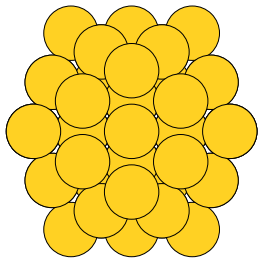
Even with only three shells, there are already 55 atoms in this cluster!

How about a decahedron? There are more parameters to set here. I am not sure what the depth of the Marks re-entrance is.

from ase.cluster.decahedron import Decahedron
from ase.io import write

atoms = Decahedron('Pt',
                   p=5,  # natoms on 100 face normal to 5-fold axis
                   q=2,  # natoms 0n 100 parallel to 5-fold axis
                   r=0)  # depth of the Marks re-entrance?

print('#atoms = {}'.format(len(atoms)))

write('images/decahedron.png', atoms)
#atoms = 156
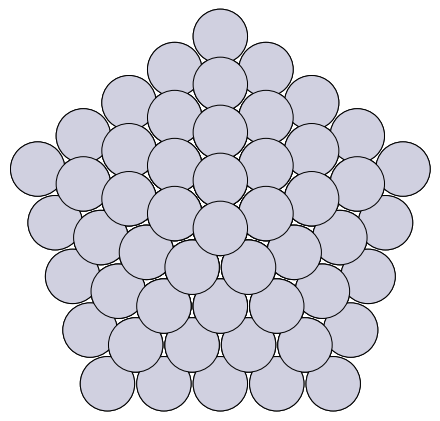
You can see the 5-fold symmetry here. We can make octahedra too. Here, the length is the number of atoms on the edge.

from ase.cluster.octahedron import Octahedron
from ase.io import write

atoms = Octahedron('Cu', length=5)
print atoms
write('images/octahedron.png', atoms)
Cluster(symbols='Cu85', positions=..., cell=[14.44, 14.44, 14.44], pbc=[False, False, False])

Finally, we can make particles based on a Wulff construction! We provide a list of surfaces, and their surface energies, with an approximate size we want, the structure to make the particle in, and what to do if there is not an exact number of atoms matching our size. We choose to round below here, so that the particle is not bigger than our size. In this example I totally made up the surface energies, with (100) as the lowest, so the particle comes out looking like a cube.

from ase.cluster.wulff import wulff_construction
from ase.io import write

atoms = wulff_construction('Pd',
                           surfaces=[(1, 0, 0),
                                     (1, 1, 1),
                                     (1, 1, 0)],
                           energies=[0.1, 0.5, 0.15],
                           size=100,
                           structure='fcc',
                           rounding='below')

print atoms
write('images/wulff.png', atoms)
Cluster(symbols='Pd63', positions=..., cell=[7.779999999999999, 7.779999999999999, 7.779999999999999], pbc=[False, False, False])

This is one handy module, if you need to make clusters for some kind of simulation!

Copyright (C) 2014 by John Kitchin. See the License for information about copying.

org-mode source

Org-mode version = 8.2.10

Discuss on Twitter

Capturing stderr from Python in org-mode - take 2

| categories: orgmode, emacs, python | tags:

In a previous post I wrote about a sandbox module to help capture stderr in Python code blocks in org-mode. That module worked, but ran as a script.

stderr is not captured in the output of a code block in org-mode. For example:

import sys
print >>sys.stdout, "message on stdout"
print >>sys.stderr, "testing stderr"
message on stdout

The messages to stderr just disappears. Not good for code like this:

from scipy.integrate import odeint

def ode(y, x):
    return -k * x

xspan = [0, 1]
y0 = 1

sol = odeint(ode, y0, xspan)
print sol
[[ 1.]
 [ 1.]]

There is an error in that code, k is not defined. If you run that as a script, you get this output:

>>> Traceback (most recent call last):
  File "/var/folders/5q/lllv2yf95hg_n6h6kjttbmdw0000gn/T//python-69413hLF.py", line 4, in ode
    return -k * x
NameError: global name 'k' is not defined
Traceback (most recent call last):
  File "/var/folders/5q/lllv2yf95hg_n6h6kjttbmdw0000gn/T//python-69413hLF.py", line 4, in ode
    return -k * x
NameError: global name 'k' is not defined
Traceback (most recent call last):
  File "/var/folders/5q/lllv2yf95hg_n6h6kjttbmdw0000gn/T//python-69413hLF.py", line 4, in ode
    return -k * x
NameError: global name 'k' is not defined
Traceback (most recent call last):
  File "/var/folders/5q/lllv2yf95hg_n6h6kjttbmdw0000gn/T//python-69413hLF.py", line 4, in ode
    return -k * x
NameError: global name 'k' is not defined

But, that is evidently going to stderr, and not getting captured in org-mode. Boo. A silent error that returns a value! This behavior of odeint may be fixed in scipy 0.15, but it is a general deficiency of org-mode babel code blocks. So, today I am looking back into a way to fix it. We try something as mundane as just redefining stderr in Python at runtime.

import sys
sys.stderr = sys.stdout

print >>sys.stdout, "message on stdout"
print >>sys.stderr, "testing stderr"
message on stdout
testing stderr

That works fine. Let us test it with the other block.

import sys
sys.stderr = sys.stdout

from scipy.integrate import odeint

def ode(y, x):
    return -k * x

xspan = [0, 1]
y0 = 1

sol = odeint(ode, y0, xspan)
print sol
Traceback (most recent call last):
  File "<stdin>", line 6, in ode
NameError: global name 'k' is not defined
Traceback (most recent call last):
  File "<stdin>", line 6, in ode
NameError: global name 'k' is not defined
Traceback (most recent call last):
  File "<stdin>", line 6, in ode
NameError: global name 'k' is not defined
Traceback (most recent call last):
  File "<stdin>", line 6, in ode
NameError: global name 'k' is not defined
[[ 1.]
 [ 1.]]

Sweet, we get the errors. We still get the returned value, but it is immediately obvious something is wrong. I have wrapped that little tidbit into a Python module in pycse.orgmode , which you can import to get the same effect.

import pycse.orgmode

from scipy.integrate import odeint

def ode(y, x):
    return -k * x

xspan = [0, 1]
y0 = 1

sol = odeint(ode, y0, xspan)
print sol
Traceback (most recent call last):
  File "<stdin>", line 2, in ode
NameError: global name 'k' is not defined
Traceback (most recent call last):
  File "<stdin>", line 2, in ode
NameError: global name 'k' is not defined
Traceback (most recent call last):
  File "<stdin>", line 2, in ode
NameError: global name 'k' is not defined
Traceback (most recent call last):
  File "<stdin>", line 2, in ode
NameError: global name 'k' is not defined

[[ 1.]
 [ 1.]]

Finally, you can avoid the import by setting your org-babel Python command like this:

(setq org-babel-python-command "python -i -c \"import pycse.orgmode\"")
python -i -c "import pycse.orgmode"

Now, we run our faulty block again:

from scipy.integrate import odeint

def ode(y, x):
    return -k * x

xspan = [0, 1]
y0 = 1

sol = odeint(ode, y0, xspan)
print sol
Traceback (most recent call last):
  File "<stdin>", line 2, in ode
NameError: global name 'k' is not defined
Traceback (most recent call last):
  File "<stdin>", line 2, in ode
NameError: global name 'k' is not defined
Traceback (most recent call last):
  File "<stdin>", line 2, in ode
NameError: global name 'k' is not defined
Traceback (most recent call last):
  File "<stdin>", line 2, in ode
NameError: global name 'k' is not defined

[[ 1.]
 [ 1.]]

Excellent. The stderr is captured.

And we get basically the same output as before for regular code blocks. There is an extra line before and after the output for some reason. I can live with that!

print 6 + 7
13

Copyright (C) 2014 by John Kitchin. See the License for information about copying.

org-mode source

Org-mode version = 8.2.10

Discuss on Twitter

A new mode for Python documentation

| categories: emacs, python | tags:

[2014-12-22 Mon] update: See this in action at http://www.youtube.com/watch?v=G_r7wTcVK54 , and see the latest source at https://github.com/jkitchin/jmax/blob/master/pydoc.el .

The emacs-lisp documentation in Emacs is inspiring. It is interlinked, you can click on links to open source files, other commands, etc… Python documentation is not that nice. It should be.

I wrote a little pydoc function:

(defun pydoc (name)
  "Display pydoc information for NAME in a buffer named *pydoc*."
  (interactive "sName of function or module: ")
  (switch-to-buffer-other-window "*pydoc*")
  (erase-buffer)
  (insert (shell-command-to-string (format "python -m pydoc %s" name)))
  (goto-char (point-min)))

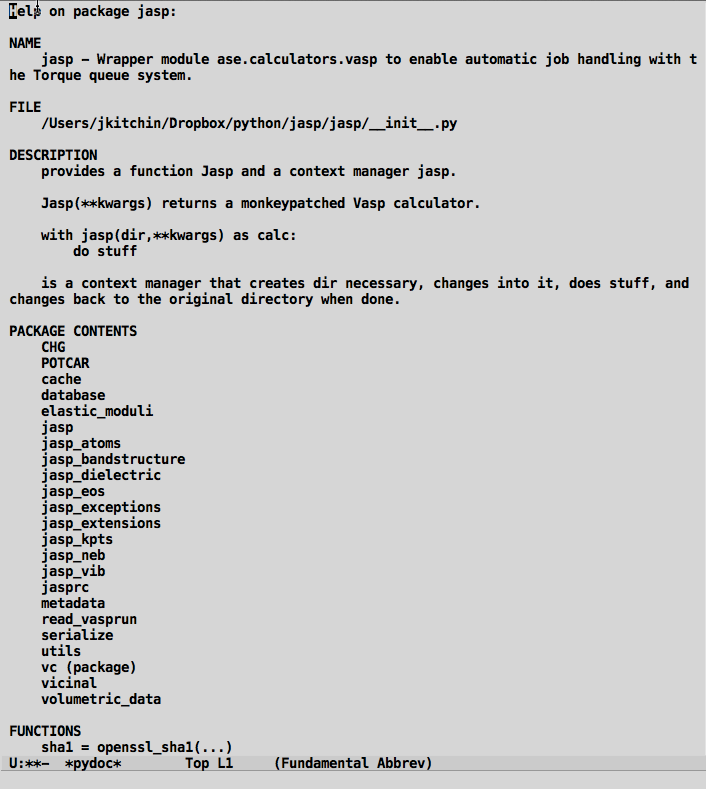
which at least accesses python documentation in emacs. It looks like this:

But, this lacks functionality. I want there to be useful links in this, so I can click on the filename to open the source, or click on the packages to get their documentation. Below, we walk through a few functions that will operate on the buffer and put text properties on different pieces.

First, let us make the source file clickable so it opens the source.

(defun pydoc-make-file-link ()
  "Find FILE in a pydoc buffer and make it a clickable link"
  (goto-char (point-min))
  (when (re-search-forward "^FILE
    \\(.*\\)$" nil t)

    (let ((map (make-sparse-keymap))
          (start (match-beginning 1))
          (end (match-end 1))
          (source-file (match-string 1)))
      
      ;; set file to be clickable to open the source
      (define-key map [mouse-1]
        `(lambda ()
          (interactive)
          (find-file ,source-file)))

      (set-text-properties
       start end
       `(local-map, map
                   font-lock-face (:foreground "blue"  :underline t)
                   mouse-face highlight
                   help-echo "mouse-1: click to open")))))
pydoc-make-file-link

Next, sometimes there are URLs in the python documentation. These should all open up in a browser when you click on them. Here we propertize anything we recognize as a URL to make it open when clicked on.

(defun pydoc-make-url-links ()
  (goto-char (point-min))
  (while (re-search-forward "\\(http\\(s\\)?://.*$\\)" nil t)
    (let ((map (make-sparse-keymap))
          (start (match-beginning 1))
          (end (match-end 1)))
        
      (define-key map [mouse-1]
        `(lambda ()
          (interactive)
          (browse-url ,(buffer-substring start end))))
        
      (set-text-properties
       start end
       `(local-map ,map
                   font-lock-face (:foreground "blue"  :underline t)
                   mouse-face highlight
                   help-echo (format "mouse-1: click to open"))))))

When we get documentation for a package, we should make each entry of the package clickable, so we can get to the documentation for that package easily. We store the name of the current package so we can construct the path to the subpackage.

(defun pydoc-get-name ()
  "get NAME and store locally"
  (make-variable-buffer-local 'pydoc-name)
  (goto-char (point-min))
  (when (re-search-forward "^NAME
\\s-*\\([^-][a-zA-Z]*\\)" nil t)
    (setq pydoc-name (match-string 1))))


(defun pydoc-make-package-links ()
  "make links in PACKAGE CONTENTS"
  (goto-char (point-min))
  (when (re-search-forward "^PACKAGE CONTENTS" nil t)
    (forward-line)

    (while (string-match
            "^    \\([a-zA-Z0-9_]*\\)[ ]?\\((package)\\)?"
            (buffer-substring
             (line-beginning-position)
             (line-end-position)))
                
      (let ((map (make-sparse-keymap))
            (start (match-beginning 1))
            (end (match-end 1))
            (package (concat
                      pydoc-name "."
                      (match-string 1
                                    (buffer-substring
                                     (line-beginning-position)
                                     (line-end-position))))))
        
        (define-key map [mouse-1]
          `(lambda ()
            (interactive)
            (pydoc ,package)))
          
        (set-text-properties
         (+ (line-beginning-position) start)
         (+ (line-beginning-position) end)
         `(local-map, map
                      font-lock-face (:foreground "blue"  :underline t)
                      mouse-face highlight
                      help-echo (format "mouse-1: click to open %s" ,package))))
      (forward-line))))

Next, we put some eye candy on function names and arguments. This won't do anything functionally, but it breaks up the monotony of all black text.

(defun pydoc-colorize-functions ()
  "Change color of function names and args."
  (goto-char (point-min))
  (when (re-search-forward "^Functions" nil t)  
    (while (re-search-forward "    \\([a-zA-z0-9-]+\\)(\\([^)]*\\))" nil t)
      (set-text-properties
       (match-beginning 1)
       (match-end 1)
       '(font-lock-face (:foreground "brown")))

      (set-text-properties
       (match-beginning 2)
       (match-end 2)
       '(font-lock-face (:foreground "red"))))))

I have gotten used to the [back] link in emacs-lisp documentation, so we try to emulate it here.

(defun pydoc-insert-back-link ()
  "Insert link to previous buffer"
  (goto-char (point-max)) 
  (insert "
[back]")
  (let ((map (make-sparse-keymap)))
    
    ;; set file to be clickable to open the source
    (define-key map [mouse-1]
      (lambda ()
        (interactive)
        (pydoc *pydoc-last*)))

      (set-text-properties
       (line-beginning-position)
       (line-end-position)
       `(local-map, map
                    font-lock-face (:foreground "blue"  :underline t)
                    mouse-face highlight
                    help-echo "mouse-1: click to return"))))
pydoc-insert-back-link

Ok, finally we remake the pydoc function.

(defvar *pydoc-current* nil
 "Stores current pydoc command")

(defvar *pydoc-last* nil
 "Stores the last pydoc command")

(defun pydoc (name)
  "Display pydoc information for NAME in a buffer named *pydoc*."
  (interactive "sName of function or module: ")

  (switch-to-buffer-other-window "*pydoc*")
  (setq buffer-read-only nil)
  (erase-buffer)
  (insert (shell-command-to-string (format "python -m pydoc %s" name)))
  (goto-char (point-min))

  ;; save 
  (when *pydoc-current*
      (setq *pydoc-last* *pydoc-current*))
  (setq *pydoc-current* name)


  (save-excursion
    (pydoc-get-name)
    (pydoc-make-url-links)
    (pydoc-make-file-link)
    (pydoc-make-package-links)
    (pydoc-colorize-functions)
    (pydoc-insert-back-link))

  ;; make read-only and press q to quit
  (setq buffer-read-only t)
  (use-local-map (copy-keymap org-mode-map))
  (local-set-key "q" #'(lambda () (interactive) (kill-buffer)))

  (font-lock-mode))
pydoc

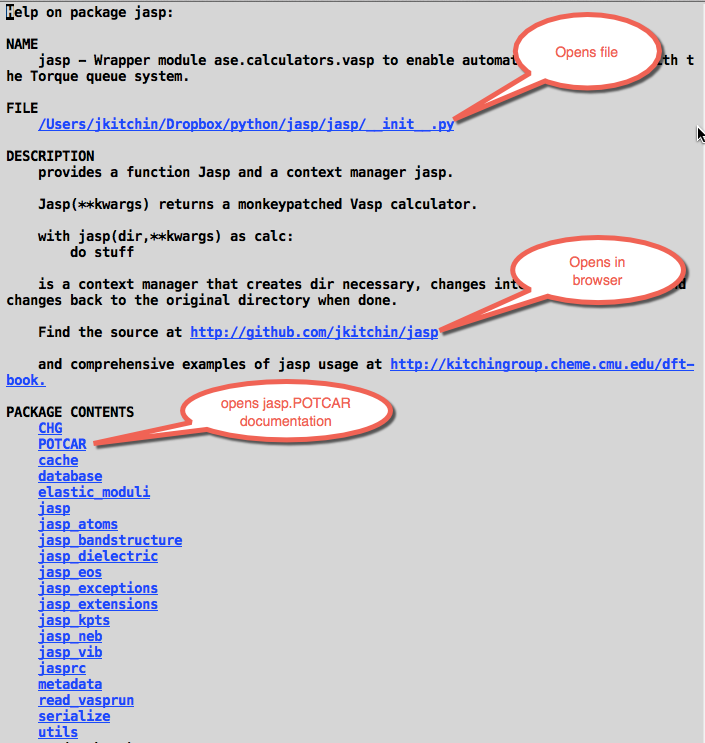
Now, we get a much more functional pydoc:

Figure 2: Annotated screenshot

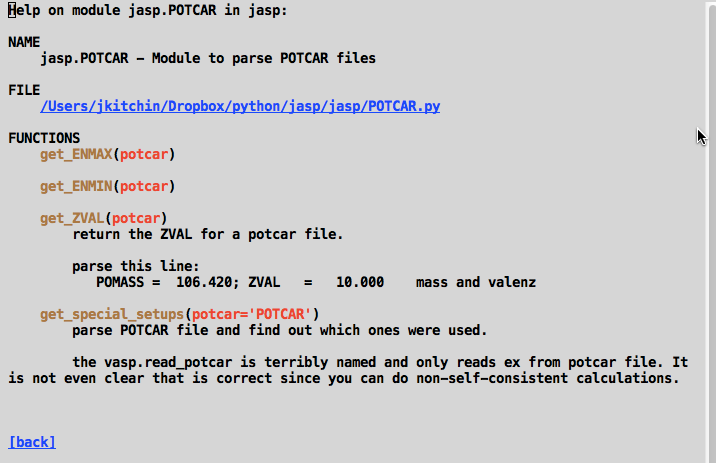
and with the colorized function names:

Admittedly, there seems to be a lot of boilerplate code for propertizing the strings, but it doesn't seem too bad. I will probably use this documentation tool this spring, so maybe I will think of new functionality to add to pydoc. Any ideas?

Copyright (C) 2014 by John Kitchin. See the License for information about copying.

org-mode source

Org-mode version = 8.2.10

Discuss on Twitter

org-mode + Python + git in a graduate engineering course

| categories: orgmode, education | tags:

The Fall 2014 semester is over! I thought I would summarize here what we did. I taught a Master's course in Chemical Reaction Engineering for the second time. This time we had 58 students from around the world. What is remarkable about this course is that this time it was taught completely from Emacs. Every lecture was given from Emacs, every assignment completed in Emacs, turned in from Emacs, graded in Emacs, returned in Emacs.

Students came to class, opened Emacs, and ran a command that downloaded the latest syllabus and opened it. They opened the day's lecture notes from a link in the syllabus. I lectured from the notes in Emacs, editing them on the screen live, running Python code to illustrate engineering concepts. Students did exercises in class in Emacs, and ran an Emacs command to "turn it in" which pushed their work to a git server. Later, I ran an Emacs command to collect and grade the work, then return it. Students could run a menu command in Emacs to see their grade report.

Techela provided a menu of commands to turn in assignments, check grade reports, send me feedback, open the syllabus, etc… The notes were written in org-mode, and we used org-latex-fragments to see the equations. We used code-blocks to show Python examples of problem solving, every day in class. It was awesome!

The way this worked is that most of my students got laptops as part of the MS program they enrolled in. I had my jmax repo installed on those computers, along with git, TexLive and Canopy Python. jmax provided a starter-kit for emacs that gave it the functionality I use on a regular basis. In jmax, I created a package of code I call techela, which interfaces Emacs with git, and which provides commands to download and turn in assignments, and to control permissions on each repo. This enabled me to change repos to read-only after they were due, and to grant read access when I wanted students to see them. About 15% of the class had their own computer, and we had to help them get this software installed. This got done in the first week of class, thanks to the help of my teaching assistants.

I ran a gitolite server that served the course materials, and a repo for each assignment for each student. When students first ran techela, it created a set of ssh keys which were used to authenticate each student in the gitolite server. Techela automates creation of the repos, and the permissions on each repo. Grading of assignments was done in Emacs. Every assignment turned in was an org-file, and we stored grades in the assignments as file tags. Techela constructed a dynamic gradebook on demand, among other things.

Org-mode played a central role in the success of this course! It enabled the distribution of the notes in a readable, functional form. The programmable aspects of org-mode made it possible to create custom links for machine-gradable multiple choice questions, assignments, and solutions. It made it possible to use the assignments as a data storage source for grades, and later to pull the grades out for analysis.

Overall, the experience was just awesome. Techela has a few edges that need smoothed out, but I look forward to using it again this spring, this time on a course on Molecular Simulation!

Copyright (C) 2014 by John Kitchin. See the License for information about copying.

org-mode source

Org-mode version = 8.2.10

Discuss on Twitter

New MS students joining the Kitchin Research Group

| categories: news | tags:

Four new MS students are joining the group!

Zhaofeng Chen will use density functional theory to model segregation in noble metal alloys.

Venkatesh Naik will investigate the apeciation of carbon dioxide in alkaline and amine‐containing solutions using Raman spectroscopy.

Hari Thirumalai will examine the effects of dispersion on scaling relations of atomic adsorbates using density functional theory.

Siddharth Deshpande will be co-advised by Prof. Viswanathan in Mechanical Engineering to use density functional theory to investigate non-precious metal sulfides for the oxygen reduction reaction.

Welcome to the group!

Copyright (C) 2014 by John Kitchin. See the License for information about copying.

org-mode source

Org-mode version = 8.2.10

Discuss on Twitter
« Previous Page -- Next Page »