ob-hy.el - or better integration of hylang in org-mode

| categories: orgmode, hylang, emacs | tags:

The point of this post is to develop and test a more substantial integration of Hy into org-mode. We develop ob-hy.el here. This is based off of ob-clojure.el.

The next few blocks will get tangled to ob-hy.el. First, some variables.

(require 'ob)

(add-to-list 'org-structure-template-alist
             '("hy" "#+BEGIN_SRC hy\n?\n#+END_SRC" "<src lang=\"hy\">\n?\n</src>"))

(defvar org-babel-tangle-lang-exts)
(add-to-list 'org-babel-tangle-lang-exts '("hy" . "hy"))

(defvar org-babel-default-header-args:hy '())
(defvar org-babel-header-args:hy '((:results . "output")))
org-babel-header-args:hy

Next a function to expand the code body. This will allow us to pass vars in the header.

(defun org-babel-expand-body:hy (body params)
  "Expand BODY according to PARAMS, return the expanded body."
  (let* ((vars (mapcar #'cdr (org-babel-get-header params :var)))
         (result-params (cdr (assoc :result-params params)))
         (print-level nil)
         (print-length nil)
         (body (org-babel-trim
                (if (> (length vars) 0)
                    (concat "(let ["
                            (mapconcat
                             (lambda (var)
                               (format
                                "%S (quote %S)"
                                (car var)
                                (cdr var)))
                             vars "\n      ")
                            "]\n" body ")")
                  body))))
    (when (not (member "output" result-params))
      (setq body (format "(print (do  %s\n))" body)))
    body))
org-babel-expand-body:hy

And a function to execute the body. We still use a simple approach to write the code to a temp-file, execute it, capture the output, and delete the file. This limits things to

(defun org-babel-execute:hy (body params)
  "Execute a block of hy code with Babel."
  (let* ((temporary-file-directory ".")
         (tempfile (make-temp-file "hy-"))
         result
         (result-params (cdr (assoc :result-params params)))
         (body (org-babel-expand-body:hy body params)))

    (with-temp-file tempfile
      (insert body))

    (unwind-protect
        (progn
          (cond
           ((member "body" result-params)
            (setq result body))
           ((member "python" result-params)
            (setq result (shell-command-to-string
                          (format "hy2py %s" tempfile))))
           ((member "ast" result-params)
            (setq result (shell-command-to-string
                          (format "hy2py -a -np %s" tempfile))))
           (t
            (setq result (shell-command-to-string
                          (format "hy %s" tempfile)))))

          (org-babel-result-cond result-params
            result
            (condition-case nil (org-babel-script-escape result)
              (error result))))
      (delete-file tempfile))))

(provide 'ob-hy)
ob-hy

Now we tangle and load those blocks.

(org-babel-tangle)
(load-file "ob-hy.el")
t

Next, we do some tests. They are all simple tests.

1 Tests

1.1 Simple

(print "Hy world")
Hy world

We can see how this turns into Python:

(print "Hy world")
print(u'Hy world')

or the AST:

(print "Hy world")
Module(
    body=[Expr(value=Call(func=Name(id='print'), args=[Str(s=u'Hy world')], keywords=[], starargs=None, kwargs=None))])

Let's test :results value. It is not quite the value since we seem to get everything that is output from the script, but if you don't print stuff, it seems to get it right.

"test"
(+ 1 2 3)
6

1.2 vars in header

Here we test out adding variables to the header lines.

(print "Hy" data)
Hy world

Interesting, I am not sure where the space between them comes from. Let's check out the :results body option. It will show us the hy script that gets run.

(print "Hy" data)
(let [data (quote "world")]
(print "Hy" data))

Nothing obvious about the space there. We can test out passing block results in here.

(print data)
Hy  world

Here is the body of that:

(print data)
(let [data (quote "Hy world
")]
(print data))

2 Summary

It works well enough to make testing in org-mode pretty convenient. I can't think of anything else it "needs" right now, although communication with a repl might make it faster, and sessions are not supported at the moment. Saving that for another day ;)

Copyright (C) 2016 by John Kitchin. See the License for information about copying.

org-mode source

Org-mode version = 8.2.10
Discuss on Twitter

More on Hy and why I think it is a big deal

| categories: hylang, emacs, python | tags:

Yesterday I talked about hylang , a Lisp that basically compiles to and runs Python code. Today, I want to show a few reasons why this is a great idea, and an important one. Below I give a few examples of why the hylang approach is better (in my opinion of course) than Python with a few examples of things I have always wanted in Python but couldn't get.

1 Editing with hy-mode and lispy

There is a major mode for Hy: https://github.com/hylang/hy-mode also on MELPA. It gives us some syntax highlighting and better access to a REPL.

Let's load lispy (https://github.com/abo-abo/lispy ) for it so we also get amazing editing. I always wanted to use lispy style navigation and editing in Python, but the whitespace and indentation did not make it that easy. Problem solved with these. @abo-abo already added basic eval support for Hy to lispy since the post yesterday (https://github.com/abo-abo/lispy/commit/f7f71e38e241d92b6add05be6628ac987067b11c ); Thanks!

(add-hook 'hy-mode-hook
          (lambda ()
            (lispy-mode 1)))

2 Python with no whitespace, or commas in lists

You can still use indentation (it is good style), but this works!

(for [x [0 1 2 3 4 5]]
(if (> x 3) (print "too big")
(print x)))
0
1
2
3
too big
too big

This looks nicer.

(for [x [0 1 2 3 4 5]]
  (if (> x 3)
    (print "too big")
    (print x)))
0
1
2
3
too big
too big

This is a big deal too. Using Python in sessions in org-mode has always been a little complicated by the indentation and whitespace, especially with nested loops and functions. That problem is probably gone.

3 No confusion in expressions in statements

In Python you can do this:

a = 5
print(a)
print(a + 5)
5
10

But not this:

print(a=5)
print(a + 5)
  File "<stdin>", line 1
   print(a=5)
          ^
SyntaxError: invalid syntax

You can't put assignment statements and expression statements anywhere you want, they are only legal syntax in some places. For example, a=5 above actually looks like the print function has an argument of a that set to 5. Not true in Lisp; there are only expressions! So this works fine.

(print (setv a 5))
(print (+ a 5))
5
10

I just like this style of simple syntax.

4 Proper multiline lambda functions

Python syntax fundamentally limits you to one line lambdas. Not so for Hy. Let's use one in a filter to print even numbers. Here is an example with a two-liner but you could make them more complicated. In Python, you have to make a separate function for this. That isn't terrible, but if it is never used for anything else, it could be avoided.

(setv a [0 1 2 3 4 5 6 7 8])

(defn display [list filter]
  (for [x list] (if (filter x) (print x))))

(display a (lambda [x]
             (= (% x 2) 0)))
0
2
4
6
8

5 Macros and Extensible syntax

It is not easy to get real macro (code expansion) behavior in Python. Yes, there are decorators, and closures, and related things that get close to it. But there are not lisp-like macros.

Here is a (too) simple macro to allow for infix notation. It only works for two arguments, but could be extended for multiple arguments.

(defmacro infix [code]
  (quasiquote ((unquote (get code 1))
               (unquote (get code 0))
               (unquote (get code 2)))))

(print (infix (1 + 1)))
2

If we want new syntax we can get it!

(defreader $ [code]
  (quasiquote
   ((unquote (get code 1))
    (unquote (get code 0))
    (unquote (get code 2)))))

(print #$(1 + 1))
2

Why is this nice? Here is a math example that shows why you might want to change syntax.

5.1 Some math

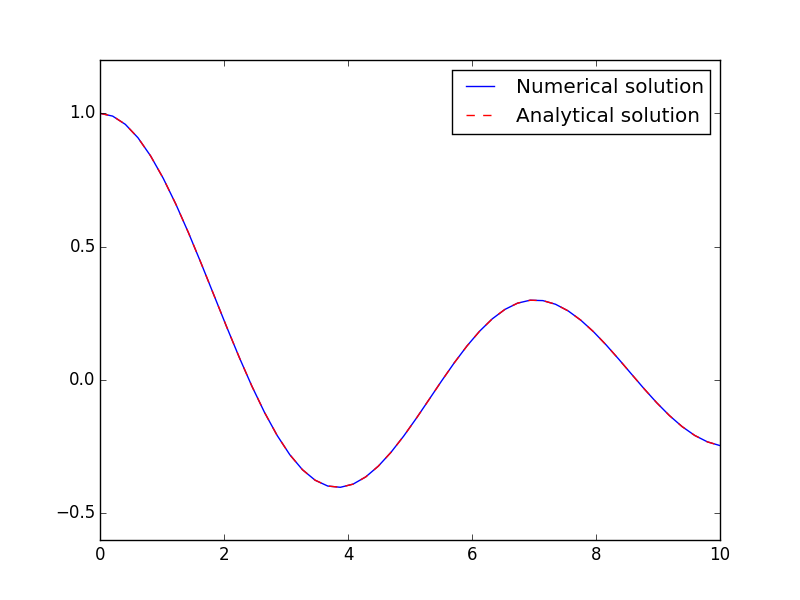
See http://kitchingroup.cheme.cmu.edu/blog/2013/02/07/Solving-Bessel-s-Equation-numerically/ for the Python version of solving the Bessel equation numerically. Here we do it with hylang.

Why would we want infix notation? Here is a good reason. The prefix notation is not easy to read. Compare:

dzdx = 1.0 / x**2 * (-x * z - (x**2 - nu**2) * y)

to

(setv dzdx (* (/ 1.0 (** x 2)) (- (* (* -1 x) z) (* (- (** x 2) (** nu 2)) y))))

The infix notation is simpler to read. Still, the code below is not that hard to figure out, especially if there was a generalized infix notation that allowed (with parens for explicit operation precedence):

(setv dzdx (nfx (1.0 / x**2) * ((-x * z) - ((x**2 - nu**2) * y))))

So, here is the hylang equivalent to my previous Python version.

(import [numpy :as np])
(import [scipy.integrate [odeint]])
(import [scipy.special [jn]])
(import [matplotlib.pyplot :as plt])

(defn fbessel [Y x]
  "System of 1st order ODEs for the Bessel equation."
  (setv nu 0.0
        y (get Y 0)
        z (get Y 1))

  ;; define the derivatives
  (setv dydx z
        dzdx (* (/ 1.0 (** x 2)) (- (* (* -1 x) z) (* (- (** x 2) (** nu 2)) y))))
  ;; return derivatives
  [dydx dzdx])

(setv x0 1e-15
      y0 1.0
      z0 0.0
      Y0 [y0 z0])

(setv xspan (np.linspace 1e-15 10)
      sol (odeint fbessel Y0 xspan))

(plt.plot xspan (. sol [[Ellipsis 0]]) :label "Numerical solution")
(plt.plot xspan (jn 0 xspan) "r--" :label "Analytical solution")
(plt.legend :loc "best")

(plt.savefig "hy-ode.png")
2016-04-01 13:48:17.499 Python[12151:d13] CoreText performance note: Client called CTFontCreateWithName() using name "Lucida Grande" and got font with PostScript name "LucidaGrande". For best performance, only use PostScript names when calling this API.
2016-04-01 13:48:17.499 Python[12151:d13] CoreText performance note: Set a breakpoint on CTFontLogSuboptimalRequest to debug.
None

This looks really good to me, except for that prefix math. The array slice syntax is interesting. Not that obvious yet.

6 Interoperability with Python

http://docs.hylang.org/en/latest/tutorial.html#hy-python-interop

Write Hy code and use it in Python. Use Python code in Hy. Repeat. Sweet.

7 Integration of emacs and Hy

This isn't so beautiful but it illustrates a pretty awesome integration of Hy(python) into Emacs!

(defmacro hy (body)
  `(let* ((temporary-file-directory ".")
          (tempfile (make-temp-file "hy-")))
     (message (format "code: %S" ,body))
     (with-temp-file tempfile
       (mapc (lambda (form) (insert (format "%s" form))) ,body))
     (read (unwind-protect
               (shell-command-to-string
                (format "hy %s" tempfile))
             (delete-file tempfile)))))

(aref (hy '((import numpy)
            (setv a (numpy.array [1 2 3]))
            (setv b (numpy.array [1 2 3]))
            (print (* a b))))
      1)
4

This isn't perfect, and there are many ways it could break down. But if you are careful to make the output "read"able, you can literally embed Hy code in Emacs lisp and use the results, a total win for Science! I feel like it might need something like progn, but that would not change what this does dramatically.

8 Hypster and Hy Society.

http://notes.pault.ag/hy-survival-guide/ ROTFL. ironically of course ;)

And the @hylang Twitter account is run by Hy Society. Nice.

9 What do we still need?

  1. Experience. Hy seems relatively young compared to other Lisps. It isn't clear yet if this could work like Python does at scale in research. I sure look forward to finding out though!
  2. Proper infix notation for engineering math. I could live with no operator precedence if it led to a quicker solution for now. As long as something like (1.0 / x**2 * (-x * z - (x**2 - nu**2) * y)) is legal!
  3. A proper integration with org-mode and the REPL.
  4. Toolchains like emacs-lisp has. I just love those. Killer debugging, access to hyperlinked documentation, code navigation, … Maybe integration with something like SLIME or CIDER? Hyder?
  5. Use it in a proper big project to find out where the limitations are, maybe Hycse as a companion to Pycse (http://kitchingroup.cheme.cmu.edu/pycse/ )? or a rewrite of http://kitchingroup.cheme.cmu.edu/dft-book/ in Hy?

Overall, I am pretty excited about this project. The syntax is a bit reminiscent of Clojure, and Racket, the former by design. Lots of new ideas still seem to be percolating in, so there is likely good stuff to see in the future!

I haven't used it enough to see the warts yet, but already the top issues I had with Python are largely addressed, so I see this as a way to continue progress with all the benefits of Python.

Copyright (C) 2016 by John Kitchin. See the License for information about copying.

org-mode source

Org-mode version = 8.2.10

Discuss on Twitter

OMG A Lisp that runs python

| categories: lisp, python | tags:

For a year now I have struggled with abandoning Python for Lisp. It's complicated, I have used Python for 15 years now, and have a lot of skill and knowledge in it. I have used emacs-lisp for about 5 years now, and have a far bit of skill with it too. They solve really different problems. Between the two, I find I like writing and editing elisp lots better than writing Python, except it lacks the scipy+numpy+matplotlib stack. I looked into Racket and Common Lisp, but they also don't really have that as nicely as Python does at the moment. It hit me earlier today that a Lisp that compiled to Python might be the right middle ground. I had seen this project Hy (http://docs.hylang.org/en/latest/quickstart.html ) earlier, but didn't connect the dots to this.

Let me do that here. First, an obligatory execute function to run org-mode code blocks.

(defun org-babel-execute:hy (body params)
  (let* ((temporary-file-directory ".")
         (tempfile (make-temp-file "hy-")))
    (with-temp-file tempfile
      (insert body))
    (unwind-protect
        (shell-command-to-string
         (format "hy %s" tempfile))
      (delete-file tempfile))))
org-babel-execute:hy

Now the basic Hello world example. It looks like lisp.

(print "Hy world")
Hy world

Now for a use that looks like Python:

(import numpy)
(setv a (numpy.array [1 2 3]))
(setv b (numpy.array [1 2 3]))
(print (numpy.dot a b))
14

WHAT!!!!

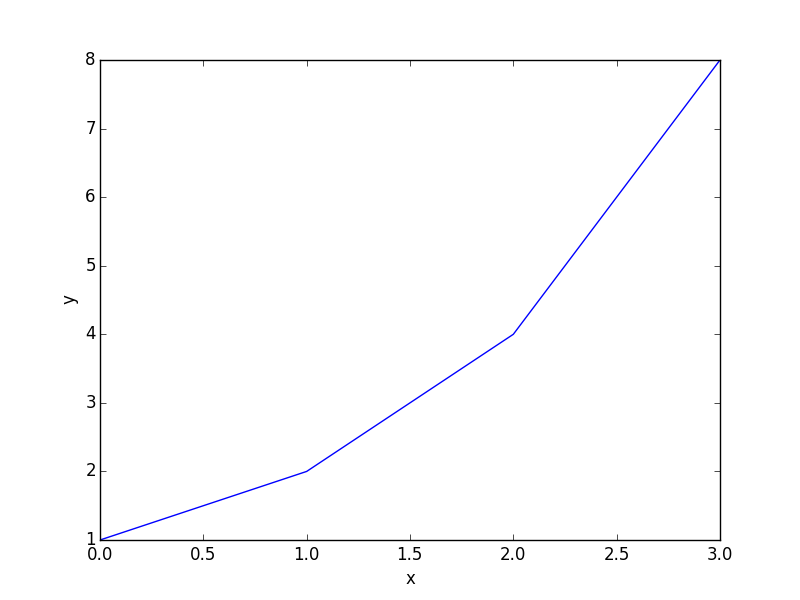
A simple plot? Surely it can't be so easy…

(import [matplotlib.pyplot :as plt])
(plt.plot [1 2 4 8])
(plt.xlabel "x")
(plt.ylabel "y")
(plt.savefig "hy-test.png")
2016-03-30 17:09:40.826 Python[94292:d13] CoreText performance note: Client called CTFontCreateWithName() using name "Lucida Grande" and got font with PostScript name "LucidaGrande". For best performance, only use PostScript names when calling this API.
2016-03-30 17:09:40.826 Python[94292:d13] CoreText performance note: Set a breakpoint on CTFontLogSuboptimalRequest to debug.

Wow. I am not sure what the warnings are, I seem to get them on my Mac for some reason. How about solving an equation?

(import [scipy.optimize [fsolve]])
(defn objective [x] (- 2 x))
(print (fsolve objective -1))
[ 2.]
     _.-^^---....,,--
 _--                  --_
<                        >)
|                         |
 \._                   _./
    ```--. . , ; .--'''
          | |   |
       .-=||  | |=-.
       `-=#$%&%$#=-'
          | ;  :|
 _____.,-#%&$@%#&#~,._____
       _---~~(~~-_.
     _{        )   )
   ,   ) -~~- ( ,-' )_
  (  `-,_..`., )-- '_,)
 ( ` _)  (  -~( -_ `,  }
 (_-  _  ~_-~~~~`,  ,' )  <---- My brain right now...
   `~ -^(    __;-,((()))
         ~~~~ {_ -_(())
                `\  }
                  { }

I may not be able to sleep tonight…

Ascii art courtesy of http://chris.com/ascii/index.php?art=people/body%20parts/brains and http://www.ascii-code.com/ascii-art/weapons/explosives.php .

Copyright (C) 2016 by John Kitchin. See the License for information about copying.

org-mode source

Org-mode version = 8.2.10
Discuss on Twitter

Jump to a tagged src block

| categories: orgmode, emacs | tags:

If you have a lot of src-blocks in your org-file, it might be nice to "tag" them and be able to jump around between them using tag expressions, or by the name of the block, language etc… Here we develop a way to do that and create a handy function to jump to blocks in the current buffer.

First, we look at how to "tag" a src-block. One way is to use a header like this:

#+header: :tags cool idiom two

These are not tags in the usual org-mode sense, they are just a space separated list of words we will later treat as tags. We can get the tags on a src-block with this function.

(defun src-block-tags (src-block)
  "Return tags for SRC-BLOCK (an org element)."
  (let* ((headers (-flatten
                   (mapcar 'org-babel-parse-header-arguments
                           (org-element-property :header src-block))))
         (tags (cdr (assoc :tags headers))))
    (when tags
      (split-string tags))))
src-block-tags

Now, we make a src-block with the tags "test" "one" and "idiom", and see how to tell if the block matches the tag expression "test+idiom".

(let* ((lexical-binding nil)
       (todo-only nil)
       (tags-list (src-block-tags (org-element-context)))
       (tag-expression "test+idiom"))
  (eval (cdr (org-make-tags-matcher tag-expression))))
t

It does, so we wrap that up into a function that tells us if a src-block matches some tag expression.

(defun src-block-match-tag-expression-p (src-block tag-expression)
  "Determine if SRC-BLOCK matches TAG-EXPRESSION."
  (let* ((lexical-binding nil)
         (todo-only nil)
         (tags-list (src-block-tags src-block)))
    (eval (cdr (org-make-tags-matcher tag-expression)))))
src-block-match-tag-expression-p

Here we test that on a block tagged "one three" on the expression "one-two" which means tagged one and not two.

(src-block-match-tag-expression-p (org-element-context) "one-two")
t

Those are the main pieces we need to jump around. We just need a selection tool with a list of filtered candidates. We get a list of src-block candidates to choose from in the next block as an example. Here we get blocks tagged one but not two. We can incorporate this into a selection backend like helm or ivy.

(org-element-map (org-element-parse-buffer) 'src-block
  (lambda (src-block)
    (when (src-block-match-tag-expression-p src-block "one-two")
      ;; Get a string and marker
      (cons
       (format "%15s|%15s|%s"
               (org-element-property :name src-block)
               (org-element-property :language src-block)
               (org-element-property :header src-block))
       (org-element-property :begin src-block)))))
(("    tag-matcher|     emacs-lisp|(:tags test one idiom)" . 1222)
 ("            nil|     emacs-lisp|(:tags one)" . 1641)
 ("            nil|     emacs-lisp|(:tags one three)" . 2120))

Now let us put that into ivy. We will ask for an expression to filter the blocks on, and then use ivy to narrow what is left, and the only action is to jump to the position of the selected block. You can start with a tag expression, or press enter to get all the tags. Then you can use ivy to further narrow by language, block name, or other tags.

(defun ivy-jump-to-src (tag-expression)
  (interactive "sTag expression: ")
  (ivy-read "Select: "
            (org-element-map (org-element-parse-buffer) 'src-block
              (lambda (src-block)
                (when (src-block-match-tag-expression-p src-block tag-expression)
                  ;; Get a string and marker
                  (cons
                   (format "%15s|%15s|%s"
                           (org-element-property :name src-block)
                           (org-element-property :language src-block)
                           (org-element-property :header src-block))
                   (org-element-property :begin src-block)))))
            :require-match t
            :action '(1
                      ("j" (lambda (pos) (interactive) (goto-char pos))))))
ivy-jump-to-src

For fun, here is a python block just for testing.

print(42)
42

That is it! It seems to work ok. There are some variations that might be preferrable, like putting the tags in as params in the src-block header to avoid needing a separate header line. It isn't clear how much I would use this, and it is slow if you have a lot of src blocks in a /large/org-file because of the parsing. (how large? I noticed a notable lag on my 22,800 line org-file this is in ;).

Copyright (C) 2016 by John Kitchin. See the License for information about copying.

org-mode source

Org-mode version = 8.2.10
Discuss on Twitter

Another approach to embedded molecular data in org-mode

| categories: chemistry, orgmode, emacs | tags:

In the last post we examined a molecule link to a src-block defining a molecule in some format. We blurred the distinction between program and data there. Here we re-separate them to try out some different ideas. We will use an org-mode special block to contain the "data" which is a molecular representation in some format. Then, we will use open-babel to convert the format to various other formats to explore using the data.

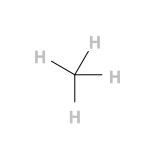
Here is a methane molecule (with 4 implicit hydrogens in the SMILES format). We put it in a named special block in org-mode, and even put a header on it to indicate the format and a display name!

C

We can use the SMILES representation block as input to a new command that converts it to the CML format, with coordinates. We use a simple shell command here and pass the contents of the molecule in as a variable. That is nice because in SMILES methane is represented by a single "C", and this CML is much more verbose.

echo $input | obabel -ismi -o cml --gen3d
<?xml version="1.0"?>
<molecule xmlns="http://www.xml-cml.org/schema">
 <atomArray>
  <atom id="a1" elementType="C" x3="1.047517" y3="-0.064442" z3="0.060284"/>
  <atom id="a2" elementType="H" x3="2.139937" y3="-0.064341" z3="0.059898"/>
  <atom id="a3" elementType="H" x3="0.683568" y3="-0.799429" z3="-0.661322"/>
  <atom id="a4" elementType="H" x3="0.683566" y3="0.927794" z3="-0.216100"/>
  <atom id="a5" elementType="H" x3="0.683669" y3="-0.321317" z3="1.056822"/>
 </atomArray>
 <bondArray>
  <bond atomRefs2="a1 a2" order="1"/>
  <bond atomRefs2="a1 a3" order="1"/>
  <bond atomRefs2="a1 a4" order="1"/>
  <bond atomRefs2="a1 a5" order="1"/>
 </bondArray>
</molecule>

We can also use the CML output as input to a command that generates an SVG image, again, passing the CML in via a variable in the header.

echo $cml | obabel -icml -o svg

With our previous molecule link we can refer to these in our text now as methane-smiles and methane-cml.

So far it all looks good. Let us do something new. We will use the SMILES representation to create an ase.atoms object in Python. First, we create an xyz format that ase can read. Rather than clutter up our document with the output, we silence it.

echo $input | obabel -ismi -o xyz --gen3d

Now, we can use the string generated in a Python file to generate a tempfile (or you could have saved the result above to a file and just read it in here). I was too lazy to make the file link to the image myself, so I setup a :file header and just print the result to stdout in this block. Although all we do here is create a new image, this demonstrates you can use data from a MOLECULE block and pass it into a Python script where other kinds of calculations might occur.

from ase.io import read, write

from tempfile import mkstemp
fd, fname = mkstemp(suffix=".xyz")
with open(fname, 'w') as f:
    f.write(xyz)

atoms = read(fname)
write('-', atoms, format="png")

The last point to discuss is discoverability. It would be helpful if we could use a program to "extract" molecular information about the molecules we use in our work. Here is a block that will map over the MOLECULE blocks and summarize what is found with a common format (SMILES again). We generate a table of clickable links to each molecule found in the documents. There is a small appendix in this document containing h2o and caffeine that will show in this table.

(defun mlc-to-smiles (blk)
  "Convert a molecule BLK to smiles format using openbabel."
  (let* ((headers (-flatten
                   (mapcar 'org-babel-parse-header-arguments
                           (org-element-property :header blk))))
         (format (cdr (assoc :format headers)))
         (content (buffer-substring-no-properties
                   (org-element-property :contents-begin blk)
                   (org-element-property :contents-end blk)))
         (tempfile (make-temp-file "obabel-")))
    (with-temp-file tempfile
      (insert content))

    ;; convert to smiles. This outputs a smiles string and the file it was
    ;; generated from. I don't know how to suppress the file, so we use awk to
    ;; just get the SMILEs strings. It is not pretty. I know.
    (prog1
        (s-trim (shell-command-to-string
                 (format  "obabel %s %s -osmi 2> /dev/null | awk '{print $1}'"
                          (format "-i%s" format) tempfile)))
      (delete-file tempfile))))


;; Generate the table of molecules
(append '(("Display name" "Name" "format" "SMILES representation"))
        '(hline)
        (org-element-map (org-element-parse-buffer) 'special-block
          (lambda (sb)
            (when (string= "MOLECULE" (org-element-property :type sb))
              (let ((headers (-flatten
                              (mapcar 'org-babel-parse-header-arguments
                                      (org-element-property :header sb)))))

                (list
                 (format "[[molecule:%s][%s]]" (org-element-property :name sb)
                         (cdr (assoc :display-name headers)))
                 (org-element-property :name sb)
                 (cdr (assoc :format headers))
                 (mlc-to-smiles sb)))))))
Display name Name format SMILES representation
methane-smiles methane-smiles smiles C
h2o h2o cml OO
caffeine caffeine xyz Cn1cnc2n(C)c(=O)n(C)c(=O)c12

That seems pretty discoverable to me. We not only can discover the molecules in this post, but can pretty easily convert them to other formats (SMILES) in this case. Since we can run any code we want on them, we could just as well import them to a database, or do subsequent calculations on them.

The MOLECULE block is not standard, and I have only demonstrated here that it is suitable for this purpose. But, it looks like we could extend it and deal with a variety of formats. We can use headers to add metadata, format, etc… Some features I find missing are similar to those in code blocks where we can type C-c ' to edit them in special modes, and the nice syntax highlighting that often comes with that.

It might be helpful to make the export of MOLECULE blocks nicer looking and more functional. The default export, for example doesn't put an id attribute in the block. First, we rewrite an org-function to add the id attribute to the exported blocks so our molecule links will work.

(defun org-html-special-block (special-block contents info)
  "Transcode a SPECIAL-BLOCK element from Org to HTML.
CONTENTS holds the contents of the block.  INFO is a plist
holding contextual information."
  (let* ((block-type (downcase
                      (org-element-property :type special-block)))
         (contents (or contents ""))
         (html5-fancy (and (org-html-html5-p info)
                           (plist-get info :html-html5-fancy)
                           (member block-type org-html-html5-elements)))
         (attributes (org-export-read-attribute :attr_html special-block)))
    (unless html5-fancy
      (let ((class (plist-get attributes :class)))
        (setq attributes (plist-put attributes :class
                                    (if class (concat class " " block-type)
                                      block-type)))
        (when (org-element-property :name special-block)
          (setq attributes (plist-put
                            attributes :id
                            (org-element-property :name special-block))))))
    (setq attributes (org-html--make-attribute-string attributes))
    (when (not (equal attributes ""))
      (setq attributes (concat " " attributes)))
    (if html5-fancy
        (format "<%s%s>\n%s</%s>" block-type attributes
                contents block-type)
      (format "<div%s>\n%s\n</div>" attributes contents))))
org-html-special-block

It would be nice to add some additional information around the block, e.g. that it is a molecule, maybe some tooltip about the format, etc…, but we leave that to another day. These should probably be handled specially with a dedicated export function. You will note that MOLECULE blocks don't export too well, they should probably be wrapped in <pre> for HTML export. We will at least make them stand out with this bit of css magic.

#+HTML_HEAD_EXTRA:  <style>.molecule {background-color:LightSkyBlue;}</style>

1 Summary thoughts

This looks pretty promising as a way to embed molecular data into org-files so that the data is reusable and discoverable. If there is metadata that cannot go into the MOLECULE format we can put it in headers instead. This seems like it could be useful.

2 Appendix of molecules

2.1 Water

Here is water in the CML format.

<?xml version="1.0"?> <molecule xmlns="http://www.xml-cml.org/schema"> <atomArray> <atom id="a1" elementType="O"/> <atom id="a2" elementType="O"/> </atomArray> <bondArray> <bond atomRefs2="a1 a2" order="1"/> </bondArray> </molecule>

2.2 Caffeine

This is a simple xyz format of caffeine.

24

C 1.02887 -0.01688 -0.03460 N 2.46332 0.11699 -0.03522 C 3.33799 -0.94083 -0.03530 N 4.59156 -0.53767 -0.03594 C 4.50847 0.82120 -0.03623 N 5.57252 1.69104 -0.03687 C 6.93040 1.17620 -0.03898 C 5.33446 3.06602 -0.03685 O 6.26078 3.88171 -0.03594 N 3.98960 3.48254 -0.03830 C 3.70813 4.90531 -0.04199 C 2.87287 2.63769 -0.03747 O 1.71502 3.04777 -0.03830 C 3.21603 1.25723 -0.03610 H 0.54478 0.95872 -0.03440 H 0.73663 -0.56946 0.86233 H 0.73584 -0.56959 -0.93118 H 3.00815 -1.97242 -0.03493 H 7.67209 1.97927 -0.03815 H 7.07929 0.56516 -0.93486 H 7.08112 0.56135 0.85404 H 4.61163 5.51902 -0.04152 H 3.11230 5.15092 0.84340 H 3.11643 5.14660 -0.93127

Copyright (C) 2016 by John Kitchin. See the License for information about copying.

org-mode source

Org-mode version = 8.2.10

Discuss on Twitter
« Previous Page -- Next Page »