Automated bibtex entry tweeting

| categories: bibtex, twitter | tags:

The goal in this post is to develop an elisp function that will tweet a bibtex entry. What I want is to be on a bibtex entry, and run a command that will generate a tweet and tweet it. Here is an example bibtex entry I will use in this post. Clearly, I couldn't simply tweet the entry, it is too long. What I want instead is to generate a picture of a formatted citation, to make a gist out of the bibtex entry so we can link to it, and then to provide links in the tweet to the doi, and the bibtex entry gist.

(with-current-buffer (find-file-noselect "~/Dropbox/bibliography/references.bib")
  (goto-char (point-min))
  (re-search-forward "kitchin-2016-autom-data,")
  (bibtex-copy-entry-as-kill)
  (with-temp-buffer
    (bibtex-yank 1)
    (buffer-string)))

First, we tackle making an image. Emacs has some capability to generate svg, and we can readily convert that to png for the tweet. Here we just go to the entry, and then generate a png. I build off the citation capability of org-ref to generate a pretty reasonably formatted entry. It isn't perfect; the volume is missing in the entry, so there is a blank space between two commas, but this is good enough for me. Note we need a png for twitter. It appears you cannot upload svg yet.

(let* ((entry (with-current-buffer (find-file-noselect "~/Dropbox/bibliography/references.bib")
                (goto-char (point-min))
                (re-search-forward "kitchin-2016-autom-data,")
                (bibtex-beginning-of-entry)
                (bibtex-parse-entry t)))
       (formatted-entry (orhc-formatted-citation entry))
       (lines (with-temp-buffer
                (insert formatted-entry)
                (fill-paragraph)
                (split-string  (buffer-string) "\n")))
       (svg (svg-create 500 (* 20 (length lines)))))

  (loop for i from 0
        for line in lines
        do
        (svg-text svg line
                  :font-size "12"
                  :stroke "black"
                  :x 0
                  :y (+ 15 (* i 15))
                  :stroke-width 0.3))

  (with-temp-file "authoring.svg"
    (svg-print svg)))

(shell-command "convert authoring.svg authoring.png")

It is easy enough to get the doi, and generate the url to it.

(let* ((entry (with-current-buffer (find-file-noselect "~/Dropbox/bibliography/references.bib")
                (goto-char (point-min))
                (re-search-forward "kitchin-2016-autom-data,")
                (bibtex-beginning-of-entry)
                (bibtex-parse-entry t))))
  (format "https://doi.org/%s" (cdr (assoc "doi" entry ))))

Next, we will put the entry as a gist on Github, so we can provide a link to it. I use the gist.el package, and here just do some trickery to put the entry in a temp-file named by the key so that the gist has a nice name. This returns the url to the gist, which we would want to incorporate into a tweet.

(with-current-buffer (find-file-noselect "~/Dropbox/bibliography/references.bib")
  (goto-char (point-min))
  (re-search-forward "kitchin-2016-autom-data,")
  (save-restriction
    (bibtex-narrow-to-entry)
    (bibtex-beginning-of-entry)
    (let* ((entry-string (buffer-string))
           (entry (bibtex-parse-entry))
           (key (cdr (assoc "=key=" entry)))
           (tfile (expand-file-name (format "%s.bib" key) temporary-file-directory)))
      (with-temp-file tfile
        (insert entry-string))
      (with-current-buffer (find-file-noselect tfile)
        (gist-buffer)))
    (with-temp-buffer
      (yank)
      (buffer-string))))

Ok, All the pieces are in place. The only piece left is creating the tweet, and tweeting it. I couldn't see an obvious way to do this with twittering mode, since I didn't see where to add an image. There is a Python library for this though, and it looks pretty easy to use. Here is an example usage.

from TwitterAPI import TwitterAPI
from twitter_secrets import CONSUMER_KEY, CONSUMER_SECRET, ACCESS_TOKEN_KEY, ACCESS_TOKEN_SECRET

api = TwitterAPI(CONSUMER_KEY, CONSUMER_SECRET, ACCESS_TOKEN_KEY, ACCESS_TOKEN_SECRET)
file = open('authoring.png', 'rb')
data = file.read()
r = api.request('statuses/update_with_media', {'status':'A test tweet using the TwitterAPI with an image.'}, {'media[]':data})
print(r.status_code)

200

It will be a tad hacky, but the script is so simple we can just make a template, and run it. We need to do these things: 1) make the image, 2) make the gist 3) format and send the tweet. Here is the elisp function to do that.

(defun tweet-bibtex ()
  "Tweet the bibtex entry at point."
  (interactive)
  (bibtex-beginning-of-entry)
  (bibtex-set-field "tweeted" (current-time-string))

  (let* ((entry-string (save-restriction
                         (bibtex-beginning-of-entry)
                         (bibtex-narrow-to-entry)
                         (buffer-substring-no-properties (point-min) (point-max))))
         (entry (bibtex-parse-entry t))
         (key (cdr (assoc "=key=" entry)))
         (doi (cdr (assoc "doi" entry)))
         (svg-file (expand-file-name (format "%s.svg" key) temporary-file-directory))
         (png-file (expand-file-name (format "%s.png" key) temporary-file-directory))
         (bib-file (expand-file-name (format "%s.bib" key) temporary-file-directory))
         (py-file (expand-file-name (format "%s.py" key) temporary-file-directory))
         (formatted-entry (orhc-formatted-citation entry))
         (lines (with-temp-buffer
                  (insert formatted-entry)
                  (fill-paragraph)
                  (split-string  (buffer-string) "\n")))
         (svg (svg-create 500 (* 20 (length lines))))
         (tweet (read-string "Tweet: "))
         gist-url
         full-tweet)

    ;; delete buffers and files
    (loop for buf in (list (concat key ".bib")
                           (concat key ".png")
                           (concat key ".svg")
                           (concat key ".py"))
          do
          (when (get-buffer buf)
            (kill-buffer (get-buffer buf))))

    ;; Step 1 make the image
    (loop for i from 0
          for line in lines
          do
          (svg-text svg line
                    :font-size "12"
                    :stroke "black"
                    :x 0
                    :y (+ 15 (* i 15))
                    :stroke-width 0.3))

    (with-temp-file svg-file
      (svg-print svg))

    (shell-command (format "convert %s %s" svg-file png-file))

    ;; Step 2, make the gist. Make a temp-file so the gist has a reasonable name
    (with-temp-file bib-file
      (insert entry-string))

    (let ((bib-buffer (find-file-noselect bib-file)))
      (with-current-buffer bib-buffer
        (gist-buffer))
      (kill-buffer bib-buffer))

    ;; get url off clipboard
    (setq gist-url (with-temp-buffer
                     (yank)
                     (buffer-string)))

    ;; Format and send the tweet:
    (setq full-tweet (format "#publication %s\nhttps://doi.org/%s\nbibtex: %s" tweet doi gist-url))

    (with-temp-file py-file
      (insert (format "from TwitterAPI import TwitterAPI
from twitter_secrets import CONSUMER_KEY, CONSUMER_SECRET, ACCESS_TOKEN_KEY, ACCESS_TOKEN_SECRET

api = TwitterAPI(CONSUMER_KEY, CONSUMER_SECRET, ACCESS_TOKEN_KEY, ACCESS_TOKEN_SECRET)
file = open('%s', 'rb')
data = file.read()
r = api.request('statuses/update_with_media', {'status':'''%s'''}, {'media[]':data})"
                      png-file
                      full-tweet)))

    (if (= 0 (shell-command (format "python %s" py-file)))
        (message "%s" full-tweet)
      (message "tweet failed ;("))))

;; Now, try it out.
(with-current-buffer (find-file-noselect "~/Dropbox/bibliography/references.bib")
  (goto-char (point-min))
  (re-search-forward "kitchin-2016-autom-data,")
  (tweet-bibtex))

You can see what this tweet looks like here:

That seems pretty reasonable. Now I only need to use it about 48,000 times to benefit from the time-savings M-x tweet-bibtex offers compared to manually making all those tweets ;)

Copyright (C) 2016 by John Kitchin. See the License for information about copying.

org-mode source

Org-mode version = 8.3.4

Discuss on Twitter

A new take on altmetrics - the Altmetrics API

| categories: altmetrics | tags:

Table of Contents

I previously wrote about altmetrics, and in that post showed how to embed an altmetric badge in html about a paper. Since then, I have learned about the Altmetric API which allows you to gather the altmetric data into tabular form. You will need my scopus Python library, my pycse library, and to follow along with this, and the Python code in Section A new take on altmetrics to do this analysis yourself.

So, here, we get a list of my publications from Scopus (scopusid:7004212771), get the DOI and current citations for each of these that are categorized as "Journal", and then the altmetric data for each of those where there is altmetric data. The altmetric data is returned as json, which we can easily convert to a dictionary for easy analysis.

from scopus.scopus_search import ScopusSearch
from scopus.scopus_api import ScopusAbstract
from altmetric import altmetric
import pycse.orgmode as org

s = ScopusSearch(query='au-id(7004212771)', fields='dc:identifier', refresh=True)

abstracts = [ScopusAbstract(eid) for eid in s.EIDS
             if ScopusAbstract(eid).aggregationType == 'Journal']

DOIs = [ab.doi for ab in abstracts]
cites = [ab.citedby_count for ab in abstracts]
dates = [ab.coverDate for ab in abstracts]

data = [altmetric('doi/' + doi) if doi is not None else None for doi in DOIs ]

results = sorted([[j.get('title', 'No title').replace('\n', ''),
                   '[[{}][doi]]'.format(j['url']),
                   '[[{}][details]]'.format(j['details_url']),
                   j.get('cited_by_tweeters_count', 0),
                   j.get('cited_by_fbwalls_count', 0),
                   int(j['readers'].get('mendeley', 0)),
                   j.get('cited_by_posts_count', 0),
                   cite, date]
                  for j, cite, date in zip(data, cites, dates) if j],
                 key=lambda x: x[3], reverse=True)

results = [['title', 'doi', 'details', 'tweets', 'facebook', 'Mendeley', 'blogs', 'cites', 'date'],
           ['<50>',  '',    '',         '',      '',         '',   '', ''],
           None] + results

org.table(results, caption='Altmetric data for my publications.', name='alt-met')
Table 1: Altmetric data for my publications.
title doi details tweets facebook Mendeley blogs cites date
Examples of Effective Data Sharing in Scientific Publishing doi details 24 0 36 38 2 2015-06-05
Towards Benchmarking in Catalysis Science:Best Practices, Opportunities, and Challenges doi details 15 0 56 18 2 2016-04-01
Neural network and ReaxFF comparison for Au properties doi details 9 0 5 12 0 2016-01-01
Estimating Bulk-Composition-Dependent H2 Adsorption Energies on CuxPd1–x Alloy (111) Surfaces doi details 4 1 9 8 5 2015-02-06
Relationships between the surface electronic and chemical properties of doped 4d and 5d late transition metal dioxides doi details 2 0 17 2 2 2015-03-14
The role of vdW interactions in coverage dependent adsorption energies of atomic adsorbates on Pt(111) and Pd(111) doi details 2 0 4 2 0 2016-08-01
Comparative microfluidic screening of amino acid salt solutions for post-combustion CO2 capture doi details 2 0 4 2 0 2015-12-01
Alkaline Electrolyte and Fe Impurity Effects on the Performance and Active-phase Structure of NiOOH Thin Films for OER Catalysis Applications doi details 2 0 17 2 6 2015-05-28
Property Prediction of Crystalline Solids from Composition and Crystal Structure doi details 1 0 4 1 0 2016-01-01
Property Prediction of Crystalline Solids from Composition and Crystal Structure doi details 1 0 4 1 0 2016-08-01
High-throughput methods using composition and structure spread libraries doi details 1 0 0 1 0 2016-01-01
A Linear Response DFT+U Study of Trends in the Oxygen Evolution Activity of Transition Metal Rutile Dioxides doi details 1 0 30 1 9 2015-01-01
Electrocatalytic Oxygen Evolution with an Immobilized TAML Activator doi details 1 0 40 1 10 2014-04-16
The outlook for improved carbon capture technology doi details 1 0 183 1 150 2012-10-01
The redox mediated separation of carbon dioxide from flue gas doi details 1 0 4 1 0 2015-11-19
Core level shifts in Cu–Pd alloys as a function of bulk composition and structure doi details 1 0 6 1 0 2015-01-01
Chemical and Molecular Descriptors for the Reactivity of Amines with CO 2 doi details 0 0 6 0 11 2012-10-24
Simulating Temperature Programmed Desorption of Oxygen on Pt(111) Using DFT Derived Coverage Dependent Desorption Barriers doi details 0 0 22 0 6 2014-02-01
Comparisons of amine solvents for post-combustion CO2 capture: A multi-objective analysis approach doi details 0 0 30 0 10 2013-10-01
Correlation of Electronic Structure with Catalytic Activity: H 2 –D 2 Exchange across Cu x Pd 1– x Composition Space doi details 0 0 3 0 0 2015-05-01
Origin of the Overpotential for Oxygen Reduction at a Fuel-Cell Cathode doi details 0 0 743 1 1464 2004-11-18
Interactions in 1-ethyl-3-methyl imidazolium tetracyanoborate ion pair: Spectroscopic and density functional study doi details 0 0 27 0 11 2013-04-24
Separation of CO2 from flue gas using electrochemical cells doi details 0 0 17 1 26 2010-06-01
Universality in Oxygen Evolution Electrocatalysis on Oxide Surfaces doi details 0 0 359 5 373 2011-07-11
Probing the effect of electron donation on CO2 absorbing 1,2,3-triazolide ionic liquids doi details 0 0 13 0 7 2014-03-17

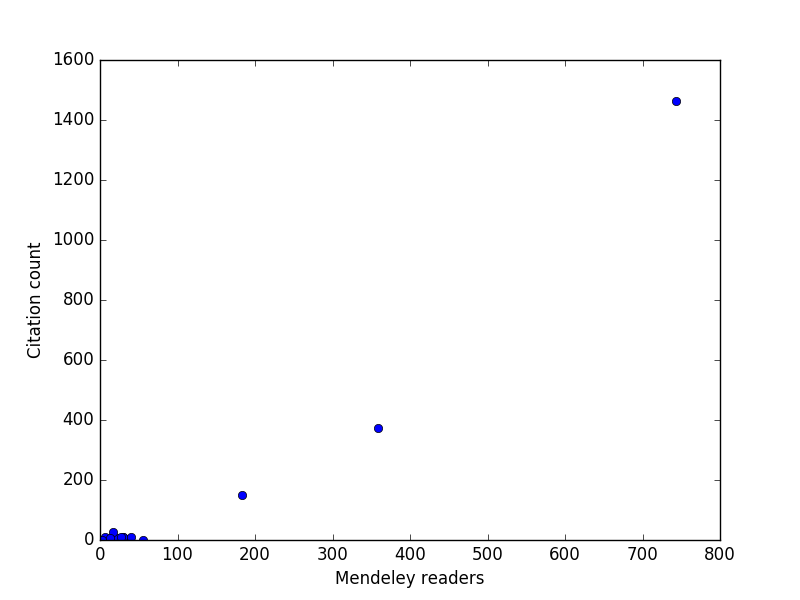
Obviously not all of my papers (67 now) have altmetric data, and most of the ones that do have very little altmetric data ;(. The Mendeley data is interesting, and this next analysis shows it is reasonably correlated with the number of citations, at least for the few highly cited papers I have. For my typical papers though, it is not clear the correlation is that high.

import matplotlib.pyplot as plt
import pycse.orgmode as org

mendeley = [x[5] for x in data[2:]]
cites = [x[7] for x in data[2:]]

plt.plot(mendeley, cites, 'bo')
plt.xlabel('Mendeley readers')
plt.ylabel('Citation count')
org.figure(plt.savefig('images/alt-metrics.png'))

In summary, the Altmetric API gives you access to data, and (in conjunction with Scopus) an ability to systematically compare metrics and altmetrics across any set of documents you can create via queries.

1 The altmetric Python code

You may want to look at https://pypi.python.org/pypi/pyaltmetric and https://github.com/ropensci/rAltmetric for more advance Python code to work with the Altmetric API. This one has some features they do not, and was easy to write.

import hashlib
import os
import json
import requests
import time

def altmetric(query, version='v1', refresh=False, throttle=1):
    """Return dictionary of altmetric data for query.
    query is a string like: doi/10.1007/s00799-016-0173-7

    Results are cached in ~/.altmetric_data, unless refresh is True.
    throttle is a delay in seconds to avoid too many requests too fast.

    see http://api.altmetric.com

    """
    m = hashlib.md5()
 
    url = 'http://api.altmetric.com/' + version + '/' + query
    m.update(url.encode('utf-8'))
    md5 = m.hexdigest()

    datafile = os.path.join('/Users/jkitchin/.altmetric_data', md5)

    if os.path.exists(datafile) and not refresh:
        with open(datafile) as f:
            results = json.loads(f.read())
    else:
        req = requests.get(url)
        if req.status_code != 404:
            results = req.json()
        else:
            results = {}
        with open(datafile, 'w') as f:
            f.write(json.dumps(results))
        if throttle:
            time.sleep(throttle)  # throttle how many requests we make.

    return results

Copyright (C) 2016 by John Kitchin. See the License for information about copying.

org-mode source

Org-mode version = 8.3.4

Discuss on Twitter

New publication in ACS Catalysis

| categories: publication, news | tags:

DFT calculations are not exact, and the uncertainties in a calculation can impact conclusions you draw from the results. In this work, we quantify the uncertainty in the adsorption energies on Pt(111) and (100) of oxygenated intermediates relevant to the oxygen reduction reaction mechanism. We then propagate these uncertainties to the volcano plot of activity that results from them, and show how this approach helps inform us about the reliability of the predicted trends.

@article{deshpande16_quant_uncer_activ_volcan_relat,
  author =       {Siddharth Deshpande and John R. Kitchin and Venkatasubramanian
                  Viswanathan },
  title =        {Quantifying Uncertainty in Activity Volcano Relationships for
                  Oxygen Reduction Reaction},
  journal =      {ACS Catalysis},
  volume =       0,
  number =       {ja},
  pages =        {null},
  year =         2016,
  doi =          {10.1021/acscatal.6b00509},
  URL =          { https://doi.org/10.1021/acscatal.6b00509 },
  eprint =       { https://doi.org/10.1021/acscatal.6b00509 },
}

Copyright (C) 2016 by John Kitchin. See the License for information about copying.

org-mode source

Org-mode version = 8.3.4

Discuss on Twitter

Copy formatted org-mode text from Emacs to other applications

| categories: rtf, emacs | tags:

I do a lot of writing in org-mode and I thought it would be great if I could copy text from an org-file and paste it with formatting into other applications, e.g. Word, Gmail, etc…. Curiosity got the better of me and I wondered how this is done in other applications. It works by creating a Rich Text Format version of what you want to copy and then putting that on the clipboard. It isn't quite enough to just copy it, it needs to go in the clipboard as an RTF datatype. On Mac OSX I used pbcopy to make that happen.

Check out this video of this post in action: https://www.youtube.com/watch?v=irkmQnggVpE

One simple strategy to do this from org-mode is to generate HTML by export, and then convert it to RTF with a utility, e.g. textutil. For example like this.

(defun formatted-copy ()
  "Export region to HTML, and copy it to the clipboard."
  (interactive)
  (save-window-excursion
    (let* ((buf (org-export-to-buffer 'html "*Formatted Copy*" nil nil t t))
           (html (with-current-buffer buf (buffer-string))))
      (with-current-buffer buf
        (shell-command-on-region
         (point-min)
         (point-max)
         "textutil -stdin -format html -convert rtf -stdout | pbcopy"))
      (kill-buffer buf))))

(global-set-key (kbd "H-w") 'formatted-copy)

This works well for everything but equations and images. Citations leave a bit to be desired, but improving this is still a challenge.

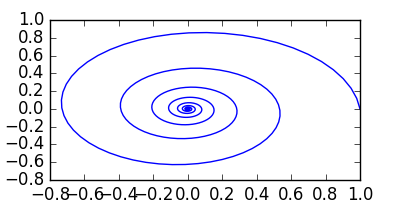
Let us try this on some text. Some bold, italic, underline, struck and verbatim text to copy. Here are some example Formulas: H2O ionizes to form H+. We simply must have an equation: \(e^{i\pi} + 1 = 0\) 1. We should also have a citation kitchin-2015-examp and multiple citations kitchin-2016-autom-data,kitchin-2015-data-surfac-scien 2.

A code block:

import pycse.orgmode as org
import numpy as np
import matplotlib.pyplot as plt

x = np.linspace(0, 60, 500)
plt.figure(figsize=(4, 2))
plt.plot(np.exp(-0.1 * x) * np.cos(x),
         np.exp(-0.1 * x) * np.sin(x))
org.figure(plt.savefig('spiral.png'),
           caption='A spiral.',
           attributes=[['org', ':width 100']])
print('')
org.table([['H1', 'H2'], None, [1, 2], [2, 4]],
          caption='A simple table')
print('')
org.result(6 * 7)

Figure 1: A spiral.

Table 1: A simple table
H1 H2
1 2
2 4
42

In summary, this simple approach to generating RTF from exported HTML works really well for the simplest markups. To improve on getting figures in, getting cross-references, captions, proper references, etc… will require a more sophisticated export approach, and probably one that exports RTF directly. That is a big challenge for another day!

Bibliography

Footnotes:

1

There are probably some ways to get better images for equations. To get equation numbers and references to them will probably require a two pass build process.

2

This is another place where configuration will be required for bibliography style. Also, some checks to join neighboring footnotes.

Copyright (C) 2016 by John Kitchin. See the License for information about copying.

org-mode source

Org-mode version = 8.3.4

Discuss on Twitter

Using prefix args in ivy actions

| categories: ivy, emacs | tags:

Table of Contents

There is a brand new feature in ivy which allows you to pass prefix args to the action functions. This change has made it into MELPA by now, so you can try it out. Check out this 1 for an emacs -Q setup that I used for this post. This installs ivy and org-ref with some minimal setup.

The video for this post can be found here: https://www.youtube.com/watch?v=Y8HHLAE_-yA

In this post I will show how to use this new feature to create an ivy selection function that inserts a citation from a bibtex file, and with a prefix arg lets you choose the type of citation to insert.

org-ref provides a function that generates candidates for selection. Each candidate is a list where the car of the list is a display string, and the cdr is an a-list of properties. I have a lot of entries in here, so it is important to have a convenient selection tool.

(setq org-ref-bibtex-files '("references.bib"))
(length (orhc-bibtex-candidates))

Here is an example of the first entry in my bibliography. We will need to extract the key from that.

(elt (orhc-bibtex-candidates) 0)

Here is the key from that entry.

(cdr (assoc "=key=" (elt (orhc-bibtex-candidates) 0)))

By default we will insert that as kitchin-2015-examp but there are other types of citations we might use too like kitchin-2015-examp. org-ref provides a list of citation types we could insert. Here they are. This somewhat complicated code just wraps the string so it fits in the blog post nicely.

(with-temp-buffer 
  (insert (format "%s" org-ref-cite-types))
  (fill-region (point-min) (point-max))
  (buffer-string))

So, we are now prepared to make a simple ivy function to query our bibliography that has a default action to insert a standard citation, but we can use a prefix to change the citation type. The prefix arg is stored in the global variable ivy-current-prefix-arg which can be checked inside the action function. We can check for it in the action function and do something different if a prefix arg is used. Here is the function.

(defun cite ()
  (interactive)
  (ivy-read "select: " (orhc-bibtex-candidates)
            :action (lambda (entry) 
                      (let ((key (cdr (assoc "=key=" entry)))
                            (type (if ivy-current-prefix-arg
                                      (ivy-read "type: " org-ref-cite-types)
                                    "cite")))
                        (with-ivy-window
                          (insert (format "%s:%s" type key)))))))

To get the default action, we run M-x cite, enter our query, select an entry and press return. To get an alternate cite type, we run M-x cite, enter the query, select an entry, then type C-u return, which will prompt you for an alternate citation type, then insert your choice and the citation. Here are some examples. kitchin-2015-examp kitchin-2015-examp kitchin-2015-examp

In summary, these aren't functions you would want to use; they don't handle a lot of the nuances of multiple citations. They are just to illustrate in a pretty simple way how easy it is to use a prefix arg in an ivy action function now!

1 Bare bones setup

This will setup the bare bones emacs that I used for this post.

(setq package-user-dir (expand-file-name "sandbox"))

(setq package-archives
      '(("melpa" . "http://melpa.org/packages/")))

(require 'package)

;;; Code:

(package-initialize)

(unless (package-installed-p 'use-package)
  (package-refresh-contents)
  (package-install 'use-package))

(eval-when-compile
  (require 'use-package))

(setq use-package-always-ensure t)

(use-package ivy)

(use-package org-ref
 :init 
 (setq org-ref-default-bibliography '("~/Dropbox/bibliography/references.bib"))
 :config (require 'org-ref-helm-cite))

(global-visual-line-mode 1)
(setq org-confirm-babel-evaluate nil)
(load-theme 'leuven)

Copyright (C) 2016 by John Kitchin. See the License for information about copying.

org-mode source

Org-mode version = 8.3.4

Discuss on Twitter
« Previous Page -- Next Page »