New publication in Molecular Simulation

| categories: publication, news | tags:

Molecules interact with each other when they adsorb on surfaces and these interactions are coverage dependent. Modeling these interactions is a challenge though, because there are many configurations of adsorbates on the surface, and the surface changes due to the interactions. To mitigate these challenges, one often simplifies the model, e.g. by using a cluster expansion or lattice gas Hamiltonian. These approaches have their own limitations though, and are not that useful for modeling dynamic processes like diffusion. Using molecular potentials enables the dynamic simulations, but not at the same level of accuracy as density functional theory. In this work we use density functional theory to train a neural network, and then use the neural network to model coverage-dependent adsorption isotherms and the dynamics of oxygen diffusion on a Pd(111) surface. We show the neural network can capture the onset of surface oxidation, and that the simulation results have comparable accuracy to the DFT calculations it was trained from.

@article{boes-2017-neural-networ,
  author =       {Jacob R. Boes and John R. Kitchin},
  title =        {Neural Network Predictions of Oxygen Interactions on a Dynamic
                  Pd Surface},
  journal =      {Molecular Simulation},
  pages =        {1-9},
  year =         2017,
  doi =          {10.1080/08927022.2016.1274984},
  url =          {https://doi.org/10.1080/08927022.2016.1274984},
  keywords =     {CBET-1506770},
}

Copyright (C) 2017 by John Kitchin. See the License for information about copying.

org-mode source

Org-mode version = 9.0.3

Discuss on Twitter

New publication in J. Phys. Chem. C

| categories: publication, news | tags:

The surface composition of an alloy is rarely the same as the bulk composition due to segregation, and it changes with changing reaction conditions. Segregation is a ubiquitous issue in alloy catalysis, and makes modeling alloy surfaces a challenge, because we need to know the surface composition to model them! In this work, we take a first step in using density functional theory to build a neural network potential that we can use with Monte Carlo simulations to predict the temperature dependent surface composition of an Au-Pd bulk alloy in a vacuum. This approach yielded quantitative predictions in good agreement with experimental measurements over the entire bulk composition range.

@article{boes-2017-model-segreg,
  author =       {Jacob R. Boes and John R. Kitchin},
  title =        {Modeling Segregation on AuPd(111) Surfaces With Density
                  Functional Theory and Monte Carlo Simulations},
  journal =      {The Journal of Physical Chemistry C},
  volume =       121,
  number =       6,
  pages =        {3479-3487},
  year =         2017,
  doi =          {10.1021/acs.jpcc.6b12752},
  url =          {https://doi.org/10.1021/acs.jpcc.6b12752},
  eprint =       { https://doi.org/10.1021/acs.jpcc.6b12752 },
}

Copyright (C) 2021 by John Kitchin. See the License for information about copying.

org-mode source

Org-mode version = 9.4.6

Discuss on Twitter

ob-ipython and inline figures in org-mode

| categories: ipython, python | tags:

ob-ipython provides some nice support for inline images, but it is a little limited. You can only have one inline plot, and you cannot capture the printed output. I often want both, and use more than one figure in a code block. So, here I look at a way to get that.

When ob-ipython executes a cell, it gets two things internally: the output and a list of result elements. The output is all the stuff that is printed, and the result contains result cells. So, we just have to check these for images, and append them to the output in an appropriate way. I will do that using file links so that org automatically renders them. We will save the images as temp files, since they are regenerated each time you run the cell.

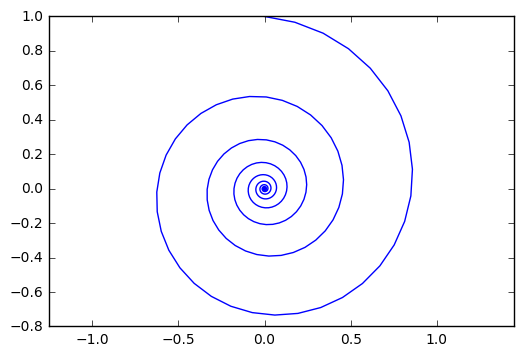
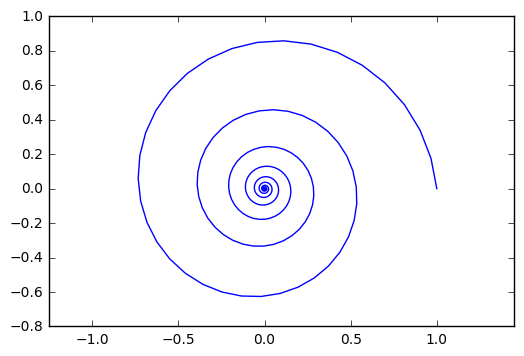
I want output and inline figures. This ipython block should output some text and two figures. Note we do not define file names anywhere! See this section for details on how to get ob-ipython to do this.

%matplotlib inline
import matplotlib.pyplot as plt
import numpy as np

t = np.linspace(0, 20 * np.pi, 350)
x = np.exp(-0.1 * t) * np.sin(t)
y = np.exp(-0.1 * t) * np.cos(t)

plt.plot(x, y)
plt.axis('equal')

plt.figure()
plt.plot(y, x)
plt.axis('equal')

print('Length of t = {}'.format(len(t)))
print('x .dot. y = {}'.format(x @ y))

Length of t = 350 x .dot. y = 1.3598389888491538

Nice, success! Now my code blocks export more cleanly to jupyter notebooks. Speaking of which, if you liked the post on that, there is a new library for it in scimax: https://github.com/jkitchin/scimax/blob/master/ox-ipynb.el. Yes, one day I will put it in its own repo, and probably put it up on MELPA. If it turns out to be useful over the next semester.

1 code for getting output and inline figures

I wrote one new function that writes the base64 data out to a temporary file and returns a link to it. Then, I modified the org-babel-execute:ipython function to append these links onto the output. It seems like you need to use a header like this in your ob-ipython block, notably the results need to be in a drawer like this if you want org-mode to render the images. They do not show up in the results that have colons starting them.

#+BEGIN_SRC ipython :session :results output drawer

Here is the code.

(defun ob-ipython-inline-image (b64-string)
  "Write the b64-string to a temporary file.
Returns an org-link to the file."
  (let* ((tfile (make-temp-file "ob-ipython-" nil ".png"))
         (link (format "[[file:%s]]" tfile)))
    (ob-ipython--write-base64-string tfile b64-string)
    link))


(defun org-babel-execute:ipython (body params)
  "Execute a block of IPython code with Babel.
This function is called by `org-babel-execute-src-block'."
  (let* ((file (cdr (assoc :file params)))
         (session (cdr (assoc :session params)))
         (result-type (cdr (assoc :result-type params))))
    (org-babel-ipython-initiate-session session params)
    (-when-let (ret (ob-ipython--eval
                     (ob-ipython--execute-request
                      (org-babel-expand-body:generic (encode-coding-string body 'utf-8)
                                                     params (org-babel-variable-assignments:python params))
                      (ob-ipython--normalize-session session))))
      (let ((result (cdr (assoc :result ret)))
            (output (cdr (assoc :output ret))))
        (if (eq result-type 'output)
            (concat
             output 
             (format "%s"
                     (mapconcat 'identity
                                (loop for res in result
                                      if (eq 'image/png (car res))
                                      collect (ob-ipython-inline-image (cdr res)))
                                "\n")))
          (ob-ipython--create-stdout-buffer output)
          (cond ((and file (string= (f-ext file) "png"))
                 (->> result (assoc 'image/png) cdr (ob-ipython--write-base64-string file)))
                ((and file (string= (f-ext file) "svg"))
                 (->> result (assoc 'image/svg+xml) cdr (ob-ipython--write-string-to-file file)))
                (file (error "%s is currently an unsupported file extension." (f-ext file)))
                (t (->> result (assoc 'text/plain) cdr))))))))
org-babel-execute:ipython

Copyright (C) 2017 by John Kitchin. See the License for information about copying.

org-mode source

Org-mode version = 9.0.3

Discuss on Twitter

Exporting org-mode to Jupyter notebooks

| categories: orgmode, emacs, jupyter, python | tags:

I am going to use Jupyter notebooks to teach from this semester. I really dislike preparing notebooks though. A browser is a really poor editor, and I really dislike Markdown. Notebooks do not seem to have any real structure in them, e.g. the collapsible outline that I am used to in org-mode, so for long notebooks, it is difficult to get a sense for the structure. I am anticipating spending up to 80 hours preparing notebooks this semester, so today I worked out some code to export org-mode to an ipython notebook!

This will let me use the power tools I am accustomed to for the creation of IPython notebooks for my students, and perhaps others who do not use org-mode.

Jupyter notebooks are just json files, so all we need to do is generate it from an org document. The basic strategy was to build up a lisp data structure that represents the notebook and then just convert that data structure to json. I split the document up into sequential markdown and code cells, and then encode those in the format required for the notebook (json).

So, here is an example of what can be easily written in org-mode, posted to this blog, and exported to an IPython notebook, all from one org-document.

Check out the notebook: exporting-orgmode-to-ipynb.ipynb .

1 Solve a nonlinear problem

Consider the equation \(x^2 = 4\). Find a solution to it in Python using a nonlinear solver.

To do that, we need to define an objective function that will be equal to zero at the solution. Here is the function:

def objective(x):
    return x**2 - 4

Next, we use fsolve with an initial guess. We get fsolve from scipy.optimize.

from scipy.optimize import fsolve

ans = fsolve(objective, 3)
print(ans)
[ 2.]

That should have been an obvious answer. The answer is in brackets because fsolve returns an array. In the next block we will unpack the solution into the answer using the comma operator. Also, we can see that using a different guess leads to a different answer. There are, of course, two answers: \(x = \pm 2\)

ans, = fsolve(objective, -3)
print(ans)
-2.0

Now you see we get a float answer!

Here are some other ways to get a float:

ans = fsolve(objective, -3)

print(float(ans))
print(ans[0])
-2.0000000000000084
-2.0

It is worth noting from the first result that fsolve is iterative and stops when it reaches zero within a tolerance. That is why it is not exactly -2.

2 Benefits of export to ipynb

  1. I can use org-mode
  2. And emacs
  3. and ipynb for teaching.

The export supports org-markup: bold, italic, underlined, and ~~strike~~.

We can use tables:

Table 1: A table of squares.
x y
1 2
2 4
3 9
4 16

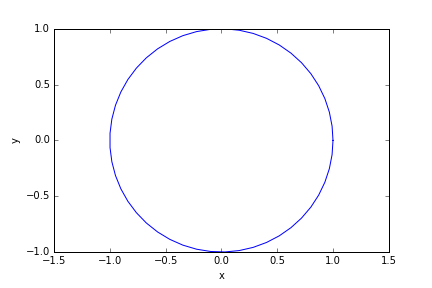
We can make plots.

import numpy as np

t = np.linspace(0, 2 * np.pi)

x = np.cos(t)
y = np.sin(t)

import matplotlib.pyplot as plt
plt.plot(x, y)
plt.axis('equal')
plt.xlabel('x')
plt.ylabel('y')
plt.savefig('circle.png')

Even include HTML: <font color="red">Pay special attention to the axis labels!</font>

3 Limitations

  • Only supports iPython blocks
  • Does not do inline images in results
  • Will not support src-block variables
  • Currently only supports vanilla output results

4 Summary

The code that does this is here: ox-ipynb.el . After I use it a while I will put it in scimax. There are some tricks in it to fix up some markdown export of latex fragments and links with no descriptions.

I just run this command in Emacs to get the notebook. Even it renders reasonably in the notebook.

(export-ipynb-buffer)

Overall, this looks extremely promising to develop lecture notes and assignments in org-mode, but export them to Ipython notebooks for the students.

Copyright (C) 2017 by John Kitchin. See the License for information about copying.

org-mode source

Org-mode version = 9.0.3

Discuss on Twitter

A simple emacs-lisp interface to CRUD operations in mongodb

| categories: mongodb, emacs, database, emacslisp | tags:

In this post I showed that MongoDB is pretty easy to use for simple database applications. I showed a way to get data out of the database that is native to Emacs, but to use Mongo in emacs applications comfortably, it would be really helpful to be able to create, read, update and delete (CRUD) entries. There is a minimal interface to mongodb for emacs-lisp here: https://github.com/m2ym/mongo-el. From what I can see, it seems limited to simple, single queries, and it is written with advanced features of emacs-lisp I do not understand enough to extend it. In the last post, I showed an easy way to use mongoexport to get data from a query out of a mongo database. Here I explore a similar approach to round out the CRUD (create, read, update and delete) operations for using emacs-lisp to work with mongodb. This will enable Emacs to easily use MongoDB in applications.

We use the mongo cli with the –eval option, which allows you to run commands on the database. The basic idea is to generate the json we need from a lisp data structure, and use that json in mongo commands as needed. This sounds simple, but below you will see there are plenty of corners to take care of.

The goal here is to get something that is pretty functional. It will not be able to support all the capabilities of MongoDB and the options available in the cli.

1 Inserting entries

Here we insert a document into the contacts collection of the contacts database. As in the Python example we considered earlier, this database is automatically created when we run this command.

(require 'json))
(let* ((json (json-encode '((first-name . "John")
                            (last-name . "Kitchin")
                            (email . "jkitchin@cmu.edu"))))
       (cmd (format "mongo 127.0.0.1/contacts --quiet --eval 'db.contacts.insert(%s)'"
                    json)))
  (shell-command-to-string cmd))
json

Here is a function we can use for inserting, and as you can see it works for multiple inserts too. There is a limit on how long the json string can be for this, so you cannot add too many entries at once with this. I do not know what the limit is, and suspect it is related to using a shell command. When this succeeds there is data returned about what happened, which we try to get in lisp form. Also, I noticed I had to do a little bit of escaping, especially for entries containing a single quote, which messes up the quoting on the shell command, and for non-ascii characters which the shell did not handle well. Maybe this could be avoided with a file-based approach, or if we used a pipe to a process.

(defun mongo-insert (db collection document)
  "Insert into DB.COLLECTION the DOCUMENT.
DOCUMENT will be some lisp structure that is converted to json."
  ;; we have to escape quote any single quotes. This came from
  ;; http://stackoverflow.com/questions/1250079/how-to-escape-single-quotes-within-single-quoted-strings
  (let* ((json (replace-regexp-in-string "'" "'\"'\"'" (json-encode document)))
         ;; it seems utf-8 characters may cause issues. Let's just remove them.
         (json (replace-regexp-in-string "[^[:ascii:]]" "" json))
         (cmd (format "mongo %s --quiet --eval 'db.%s.insert(%s)'"
                      db collection
                      json))
         (output (shell-command-to-string cmd)))
    (cond
     ((string-match "BulkWriteResult(" output)
      (json-read-from-string (substring output 16 -2)))
     ((string-match "WriteResult(" output)
      (json-read-from-string (substring output 12 -2)))
     (t
      output))))
mongo-insert

Here it is in action.

(mongo-insert "contacts" "contacts"
              '(((first-name . "John")
                 (last-name . "Kitchin")
                 (email . "jkitchin@cmu.edu"))
                ((first-name . "Someone")
                 (last-name . "Else")
                 ("email" . "someone@out.there"))))
((writeErrors . []) (writeConcernErrors . []) (nInserted . 2) (nUpserted . 0) (nMatched . 0) (nModified . 0) (nRemoved . 0) (upserted . []))

Seems like an ok way to get data from Emacs into a Mongo DB, and we get lisp data returned telling us what happened.

2 Finding a document

To update documents we need to find them. We would like to find a document by the _id, but we have a small dilemma. The json we need for that needs to look like: {"_id": ObjectId("587babfaef131d0d4603b3ad")}, where the ObjectId is not quoted. The json library does not seem to be able to do that. So, we have to modify our find code to do this. This is possible by manipulating the json string after it is generated with regular expression replacement. It feels hacky, and hopefully there are not many more examples of that. If there are, we will need another approach to generating the json data. Here is the modified find function, also with the projection option. Here is another place we have to tread somewhat lightly with the _id, in this case we have to requote it so that it can be read by emacs. It might make sense to just replace it with the quoted _id string, rather than the ObjectId call. Time will tell.

Here we create two helper functions to unquote input, and requote output. We also need some code to make an array of all the results, and put commas between all the results so that we end up with valid json in the output.

(defun mongo-unquote-query (query)
  "Json encodes QUERY, and unquotes any ObjectId calls.

We don't have syntax for the ObjectId call that mongo wants in
 lisp, so a query has to look like this:
'((_id .  \"ObjectId(\"587babfaef131d0d4603b3ad\")\"))

Mongo can't have the quotes around the call, so this function
removes them.
"
  (replace-regexp-in-string "\"\\(ObjectID(\\\\\"\\(.*?\\)\\\\\")\\)\""
                            "ObjectId(\"\\2\")"
                            (json-encode query)))

(defun mongo-requote-output (output)
  "Adds quotes around ObjectId in OUTPUT.
When mongo outputs json, it has unquoted ObjectIds in it that
emacs cannot interpret as json. "
  (replace-regexp-in-string
   "ObjectId(\"\\(.*?\\)\")"
   "\"ObjectId(\\\\\"\\1\\\\\")\""
   output))

(defun mongo-find (db collection query &optional projection)
  (let* ((query-json (mongo-unquote-query query))
         (projection-json
          (and projection (json-encode projection)))
         (output (mongo-requote-output
                  ;; add [] to make an array of output in json,
                  ;; and separate results by a comma
                  (concat "["
                          (replace-regexp-in-string
                           "\n" ""
                           (shell-command-to-string
                            (format "mongo %s --quiet --eval 'db.%s.find(%s).forEach(function(myDoc) { printjsononeline(myDoc); print( \",\"); })'"
                                    db collection
                                    (if projection
                                        (format "%s, %s" query-json projection-json)
                                      query-json))))
                          "]")))) 
    (json-read-from-string output)))
mongo-find

So, finally we can run something like this:

(mongo-find "contacts" "contacts" '((email . "someone@out.there")))
[((_id . "ObjectId(\"587c166cdfcd649d3acf99fd\")") (first-name . "Someone") (last-name . "Else") (email . "someone@out.there")) ((_id . "ObjectId(\"587c16ad410565dd4c16c748\")") (first-name . "Someone") (last-name . "Else") (email . "someone@out.there")) ((_id . "ObjectId(\"587c17550e586b4f8df21de0\")") (first-name . "Someone") (last-name . "Else") (email . "someone@out.there")) ((_id . "ObjectId(\"587c1764d75279a55ffec483\")") (first-name . "Someone") (last-name . "Else") (email . "someone@out.there")) ((_id . "ObjectId(\"587c17743281f1e9d5054396\")") (first-name . "Someone") (last-name . "Else") (email . "someone@out.there")) ((_id . "ObjectId(\"587c178ad92706d2bd5a6e3c\")") (first-name . "Someone") (last-name . "Else") (email . "someone@out.there")) ((_id . "ObjectId(\"587c1794756bb2bd0f0ac499\")") (first-name . "Someone") (last-name . "Else") (email . "someone@out.there"))]

Here is an example usage with a projection that returns only the information you want, in this case, just the id.

(mongo-find "contacts" "contacts" '((email . "someone@out.there"))
            '((_id . 1)))
[((_id . "ObjectId(\"587c166cdfcd649d3acf99fd\")")) ((_id . "ObjectId(\"587c16ad410565dd4c16c748\")")) ((_id . "ObjectId(\"587c17550e586b4f8df21de0\")")) ((_id . "ObjectId(\"587c1764d75279a55ffec483\")")) ((_id . "ObjectId(\"587c17743281f1e9d5054396\")")) ((_id . "ObjectId(\"587c178ad92706d2bd5a6e3c\")")) ((_id . "ObjectId(\"587c1794756bb2bd0f0ac499\")"))]

3 Updating an entry

Ok, back to the update. To make sure that we update exactly the document we want, we will use the document _id. First, we define an update command.

(defun mongo-update (db collection query $set)
  "In DB.COLLECTION update records matching QUERY with the contents of $SET."
  (let* ((query-json (mongo-encode-query query))
         ($set-json (mongo-encode-query $set))
         (cmd (format "mongo %s --quiet --eval 'db.%s.update(%s, %s)'"
                      db collection
                      query-json $set-json))
         (output (shell-command-to-string cmd)))
    (if (string-match "WriteResult(" output)
        (json-read-from-string
         (substring output 12 -2))
      output)))
mongo-update

First a reminder of what is in this record.

(mongo-find "contacts" "contacts" '((_id . "ObjectId(\"587c16ad410565dd4c16c748\")")))
[((_id . "ObjectId(\"587c16ad410565dd4c16c748\")") (first-name . "Someone") (last-name . "Else") (email . "someone@out.there"))]

Here we set the email field to a new address. Without $set, the whole document gets replaced.

(mongo-update "contacts" "contacts"
              '((_id . "ObjectId(\"587c16ad410565dd4c16c748\")"))
              '(($set . ((email . "someone@out.there.com")))))
((nMatched . 1) (nUpserted . 0) (nModified . 1))

Finally, let's see the document again to verify it is modified.

(mongo-find "contacts" "contacts" '((_id . "ObjectId(\"587c16ad410565dd4c16c748\")")))
[((_id . "ObjectId(\"587c16ad410565dd4c16c748\")") (first-name . "Someone") (last-name . "Else") (email . "someone@out.there.com"))]

Looks good, you can see it got changed. There is a potential gotcha though. This next command looks like it should do the same thing, but it does not. The whole document gets replaced!

(mongo-update "contacts" "contacts"
              '((_id . "ObjectId(\"587c16ad410565dd4c16c748\")"))
              '((email . "someone@out.there.com")))
((nMatched . 1) (nUpserted . 0) (nModified . 1))
(mongo-find "contacts" "contacts" '((_id . "ObjectId(\"587c16ad410565dd4c16c748\")")))
[((_id . "ObjectId(\"587c16ad410565dd4c16c748\")") (email . "someone@out.there.com"))]

Do not forget the $set operator if you just want to update some fields!

4 Deleting a document

Next, let's get a delete function. I will only implement the deleteMany function here since you can give it a document id to delete only one, and usually I would want to delete all documents that meet a criteria anyway.

(defun mongo-deleteMany (db collection filter)
  "Delete records in DB.COLLECTION matched by FILTER.
TODO: add write concern."
  (let* ((filter-json (mongo-encode-query filter)) 
         (cmd (format "mongo %s --quiet --eval 'db.%s.deleteMany(%s)'"
                      db collection
                      filter-json))
         (output (shell-command-to-string cmd)))
    (json-read-from-string output)))
mongo-deleteMany

Since we borked that last document, let's just delete it.

(mongo-deleteMany "contacts" "contacts" '((_id . "ObjectId(\"587be3fa6009a569a277b680\")")))
((acknowledged . t) (deletedCount . 0))

5 Generic commands

We may want some flexibility to run collection commands. The most generic command will simply be to write the shell-command completely. We can keep a little syntax by encapsulating most of the boilerplate though. Here is a function for that.

(defun mongo-cmd (db collection cmd &rest args)
  "In DB.COLLECTION run CMD. 
ARGS if present will be used to format CMD."
  (shell-command-to-string
   (format "mongo %s --quiet --eval 'db.%s.%s'"
           db collection
           (apply #'format cmd args))))
mongo-cmd

We can get the number of documents with this:

(mongo-cmd "contacts" "contacts" "count()")
4341

Or run a more sophisticated command with arguments like this.

(mongo-cmd "contacts" "contacts" "explain().remove(%s)" (json-encode '(("category" . "enemy"))))
{
	"queryPlanner" : {
		"plannerVersion" : 1,
		"namespace" : "contacts.contacts",
		"indexFilterSet" : false,
		"parsedQuery" : {
			"category" : {
				"$eq" : "enemy"
			}
		},
		"winningPlan" : {
			"stage" : "DELETE",
			"inputStage" : {
				"stage" : "COLLSCAN",
				"filter" : {
					"category" : {
						"$eq" : "enemy"
					}
				},
				"direction" : "forward"
			}
		},
		"rejectedPlans" : [ ]
	},
	"serverInfo" : {
		"host" : "Johns-MacBook-Air.local",
		"port" : 27017,
		"version" : "3.4.1",
		"gitVersion" : "5e103c4f5583e2566a45d740225dc250baacfbd7"
	},
	"ok" : 1
}

Or, drop the collection with:

(mongo-cmd "contacts" "contacts" "drop()")
true

All gone! Note, we do not try to handle the output of any of those, and they are returned as strings.

6 A MongoDB contacts database

Now, let's re-populate it for real. I store my contacts in a variable called "contacts" as a list of a descriptive string and then cons cells. These are actually harvested from a set of org-files. It is way to slow to parse these files each time, so I keep the contacts cached in memory and only update them if a file changes.

(length contacts)
6047

There are over 6000 contacts. Let's put them in a MongoDB.

Here is a limitation of our approach. This will not work because the generated shell command ends up being too long for the shell.

(mongo-insert "contacts" "contacts"
              (loop for contact in contacts
                    collect
                    (append `((desc . ,(car contact))) (cdr contact))))

So, we do them one at time here:

(let ((ct (current-time)))
  (loop for contact in contacts
        do
        (let ((output (mongo-insert "contacts" "contacts"
                                    (append `((desc . ,(car contact))) (cdr contact)))))
          (unless (= 1 (cdr (assoc 'nInserted output)))
            (warn "error: %S for %S" (cdr (assoc 'nInserted output)) contact))))
  (message "Elapsed time %.02f seconds" (float-time (time-since ct))))
Elapsed time 762.95 seconds

That took a little over 10 minutes to add. That seems long to me. This next step confirms that they were added.

(mongo-cmd "contacts" "contacts" "count()")
6047

Next we will compare some timing of finding data in the database vs looping through the cached contacts. Here is a timing macro to measure how long it takes to run a bit of code.

;; http://stackoverflow.com/questions/23622296/emacs-timing-execution-of-function-calls-in-emacs-lisp
(defmacro measure-time (&rest body)
  "Measure the time it takes to evaluate BODY."
  `(let ((time (current-time)))
     ,@body
     (message "%.06f seconds elapsed" (float-time (time-since time)))))
measure-time

Here is the old way I would extract data. Many contacts I have are academics, and I have stored their academic ranks in each contact.

(loop for contact in contacts
      if (string= "Professor" (cdr (assoc "RANK" (cdr contact))))
      collect contact into professors
      if (string= "Associate Professor" (cdr (assoc "RANK" (cdr contact))))
      collect contact into associate-professors
      if (string= "Assistant Professor" (cdr (assoc "RANK" (cdr contact))))
      collect contact into assistant-professors
      finally return `(("Assistant Professor" ,(length assistant-professors))
                       ("Associate Professor" ,(length associate-professors))
                       ("Professor" ,(length professors))))
Assistant Professor 313
Associate Professor 283
Professor 879

How long did it take to do that?

(measure-time
 (loop for contact in contacts
       if (string= "Professor" (cdr (assoc "RANK" (cdr contact))))
       collect contact into professors
       if (string= "Associate Professor" (cdr (assoc "RANK" (cdr contact))))
       collect contact into associate-professors
       if (string= "Assistant Professor" (cdr (assoc "RANK" (cdr contact))))
       collect contact into assistant-professors
       finally return (list (length assistant-professors)
                            (length associate-professors)
                            (length professors))))
0.008772 seconds elapsed

Not long at all! Comparatively, it is very slow to get this information out of the mongodb, although considerably less code is required. That might not be surprising, considering the json parsing that has to get done here.

Here is the equivalent code to extract that data from the database.

(loop for rank in '("Assistant Professor" "Associate Professor" "Professor")
       collect (list rank (length (mongo-find "contacts" "contacts"
                                              `((RANK . ,rank))))))
Assistant Professor 313
Associate Professor 283
Professor 879

It is comparatively slow to do this. This requires three json parses, and profiling indicates that alot of the work is done in parsing the json.

(measure-time
 (loop for rank in '("Assistant Professor" "Associate Professor" "Professor")
       collect (list rank (length (mongo-find "contacts" "contacts"
                                              `((RANK . ,rank)))))))
1.914817 seconds elapsed

Here is smarter way to do it that avoids the json parsing.

(loop for rank in '("Assistant Professor" "Associate Professor" "Professor")
      collect (list rank (mongo-cmd "contacts" "contacts" "count(%s)"
                                    (json-encode `((RANK . ,rank))))))
Assistant Professor 313
Associate Professor 283
Professor 879

And you can see here it is about 10 times faster, but not nearly as fast as running the lisp code on the cache.

(measure-time
 (loop for rank in '("Assistant Professor" "Associate Professor" "Professor")
       collect (list rank (mongo-cmd "contacts" "contacts" "count(%s)"
                                     (json-encode `((RANK . ,rank)))))))
0.349413 seconds elapsed

This is how you might integrate this into a completion command:

(ivy-read "choose: "
          (loop for c across (mongo-find "contacts" "contacts" "")
                collect
                (list (cdr (assoc 'desc c)) c)))

This is basically unusable though, because it takes so long to generate the candidates (over six seconds).

(measure-time
 (loop for c across (mongo-find "contacts" "contacts" "")
       collect
       (list (cdr (assoc 'desc c)) c)))
6.228225 seconds elapsed

We can get back to usable by making the database do more work for us. Here, we simply make the database print a list of cons cells that we can read into lisp. We have to use a javascript function, with some escaping and quoting. The escaping was necessary because there is some bad data in the email field that messed up the cons cells, e.g. some things like "name" <email> with nested single and double quoting, etc., and the quoting was necessary to get cons cells of the form ("desc" . "email"), and finally we wrap them in parentheses and read back the list of cons cells. At about a quarter of a second, this is very usable to get a list of over 6000 candidates. It is still many times slower than working on the contacts list in memory though. I am not a super fan of the one-line javascript, and if it was much more complicated than this another strategy would probably be desirable.

(measure-time
 (read
  (concat
   "("
   (shell-command-to-string "mongo contacts --quiet --eval 'db.contacts.find().forEach(function (doc) {print(\"(\\\"\" + doc.desc + \"\\\" . \\\"\" + escape(doc.EMAIL) +\"\\\")\");})'")
   ")")))
0.284730 seconds elapsed
7 Text searching

Finally, let us make a text index to make searching easy. This allows us a very flexible search where we do not have to specify what field or use regular expressions. We setup the index on all the fields, so we can find entries that match even on fields that do not exist in all documents.

(mongo-cmd "contacts" "contacts" "createIndex(%s)" (json-encode '(("$**" . "text"))))
{
	"createdCollectionAutomatically" : false,
	"numIndexesBefore" : 1,
	"numIndexesAfter" : 2,
	"ok" : 1
}

Now, let's use that to find the GOOGLE-SCHOLAR url of contacts matching the following query.

(mongo-find "contacts" "contacts" '(($text . (($search . "\"Carnegie Mellon\"")))
                                    ($text . (($search . "\"John Kitchin\""))))
            '((GOOGLE-SCHOLAR . 1) (_id . 0)))
[((GOOGLE-SCHOLAR . "https://scholar.google.com/citations?hl=en&user=jD_4h7sAAAAJ"))
 nil nil]

So, you can see there were three contacts, and one of them lists my google-scholar url.

8 Summary

This looks like the foundation of a mongo/emacs-lisp interface. This interface is not that fast though, and suffers from some limitations related to the use of the shell. Depending on the actual use, it is clear you can gain performance by passing some work on the database, which requires some javascript coding. Even that revealed some subtlety, e.g. making sure the database output text that was compatible with the lisp reader. That mostly means taking care of quotes, and other special characters, which I managed with a simple escape mechanism. It is probably worth investing a few more days in building an interface that uses a process and communicates with the mongo cli directly before moving forward with any significant application that uses Mongo in emacs. There are many good ideas for that:

  1. Index all your org files (e.g. http://kitchingroup.cheme.cmu.edu/blog/2017/01/03/Find-stuff-in-org-mode-anywhere/)
  2. Index all your bibtex files (e.g. http://kitchingroup.cheme.cmu.edu/blog/2017/01/15/Querying-a-MongoDB-bibtex-database-with-Python-and-emacs-lisp/)
  3. Download RSS feeds into a searchable database
  4. Manage your contacts
  5. Index your email? mu and notmuch use xapian for this, but I have found they cannot search for things like hashtags. Maybe MongoDB would be better?

The tradeoffs between this and sqlite are more clear now. With Mongo we do not have to create the normalized tables (although it is still a good idea to think about how to structure the documents, and if they should be a little normalized). It is much easier to map lisp data structures to Mongo queries than it is to do that with SQL queries. On the other hand, it is necessary to do some javascript programming with Mongo to get some desired output. It still seems worth exploring further.

Copyright (C) 2017 by John Kitchin. See the License for information about copying.

org-mode source

Org-mode version = 9.0.3

Discuss on Twitter
« Previous Page -- Next Page »