Advanced string formatting

| categories: python | tags:

There are several more advanced ways to include formatted values in a string. In the previous case we examined replacing format specifiers by positional arguments in the format command. We can instead use keyword arguments.

s = 'The {speed} {color} fox'.format(color='brown', speed='quick')
print s
The quick brown fox

If you have a lot of variables already defined in a script, it is convenient to use them in string formatting with the locals command:

speed = 'slow'
color= 'blue'

print 'The {speed} {color} fox'.format(**locals())
The slow blue fox

If you want to access attributes on an object, you can specify them directly in the format identifier.

class A:
    def __init__(self, a, b, c):
        self.a = a
        self.b = b
        self.c = c

mya = A(3,4,5)

print 'a = {obj.a}, b = {obj.b}, c = {obj.c:1.2f}'.format(obj=mya)
a = 3, b = 4, c = 5.00

You can access values of a dictionary:

d = {'a': 56, "test":'woohoo!'}

print "the value of a in the dictionary is {obj[a]}. It works {obj[test]}".format(obj=d)
the value of a in the dictionary is 56. It works woohoo!.

And, you can access elements of a list. Note, however you cannot use -1 as an index in this case.

L = [4, 5, 'cat']

print 'element 0 = {obj[0]}, and the last element is {obj[2]}'.format(obj=L)
element 0 = 4, and the last element is cat

There are three different ways to “print” an object. If an object has a format function, that is the default used in the format command. It may be helpful to use the str or repr of an object instead. We get this with !s for str and !r for repr.

class A:
    def __init__(self, a, b):
        self.a = a; self.b = b

    def __format__(self, format):
        s = 'a={{0:{0}}} b={{1:{0}}}'.format(format)
        return s.format(self.a, self.b)

    def __str__(self):
        return 'str: class A, a={0} b={1}'.format(self.a, self.b)

    def __repr__(self):
        return 'representing: class A, a={0}, b={1}'.format(self.a, self.b)

mya = A(3, 4)

print '{0}'.format(mya)   # uses __format__
print '{0!s}'.format(mya) # uses __str__
print '{0!r}'.format(mya) # uses __repr__
a=3 b=4
str: class A, a=3 b=4
representing: class A, a=3, b=4

This covers the majority of string formatting requirements I have come across. If there are more sophisticated needs, they can be met with various string templating python modules. the one I have used most is Cheetah.

Copyright (C) 2013 by John Kitchin. See the License for information about copying.

org-mode source

Discuss on Twitter

Subclassing an ase.calculators.vasp calculator to do post analysis

| categories: ase, vasp | tags:

Recently someone reported on the ase-users mail list an issue they had with the Vasp calculator where the maximum number of electronic steps and then stops, even though the calculation is not converged. They asked how to make this raise an exception. This is not a built in feature in ase.calculators.vasp, but we can add it via a subclass. The idea is create a new class that inherits from ase.calculators.vasp, and then augment the calculate function to do some post analysis. In this case, we will parse the OUTCAR file looking for lines like:

----------------------------------------- Iteration    1(   1)  ---------------------------------------

I think the first integer corresponds to an ionic iteration, while the number in parentheses corresponds to an electronic iteration. We will just count them up, and see if they match the values we specified. If they do, we can print an error message, or raise an exception. Here is the code:

from ase.calculators.vasp import Vasp
from ase import Atom, Atoms
import os, re

os.chdir('h2o-relax')

class myvasp(Vasp):
    '''subclass to run VASP and then check OUTCAR to see if the number
    of electronic steps is equal to the max NELM specified, or if the
    number of geometry steps is equal to NSW. Either case indicates
    VASP may not be converged, but just stopped because it was told
    too.'''

    #save original function
    
    def calculate(self, *args):
        'Run VASP, then check if nsw or nelm is met'

        #run original calculate method
        Vasp.calculate(self, *args)
        
        # now do post analysis
        NELM = self.int_params['nelm']
        NSW = self.int_params['nsw']

        max_nelm, max_nsw = 0, 0

        # open OUTCAR and check for what you want
        # parse this line: - Iteration    1(   1)
        regexp = re.compile('Iteration\s+(?P<nsw>\d*)\(\s+(?P<nelm>\d*)\)')
        count = 0
        with open('OUTCAR') as f:
            for line in f:
                if 'Iteration' in line:
                    m = regexp.search(line)
                    nsw = int(m.groupdict().get('nsw'))
                    if nsw > max_nsw:
                        max_nsw = nsw
                    nelm = int(m.groupdict().get('nelm'))
                    if nelm > max_nelm:
                        max_nelm = nelm

        if max_nelm == NELM:
            # raise exception here if you prefer
            print ('{0} NELM steps taken! check convergence'.format(max_nelm))
        if max_nsw == NSW:
            print('{0} NSW steps taken! check convergence'.format(max_nsw))


atoms = Atoms([Atom('H', [0.5960812, -0.7677068, 0.0000000]),
               Atom('O', [0.0000000, 0.0000000, 0.0000000]),
               Atom('H', [0.5960812, 0.7677068, 0.0000000])],
               cell=(8, 8, 8))

calc = myvasp(xc='PBE',
              nelm=2,
              encut=400,
              ismear=0,# Gaussian smearing
              ibrion=2,
              ediff=1e-8,
              nsw=3)

atoms.set_calculator(calc)

print 'Forces'
print '==========================='
print atoms.get_forces()
Forces
===========================
 running on    1 nodes
 distr:  one band on    1 nodes,    1 groups
 vasp.5.2.12 11Nov11 complex                                                    
  
 POSCAR found :  2 types and       3 ions
 LDA part: xc-table for Pade appr. of Perdew
 found WAVECAR, reading the header
 POSCAR, INCAR and KPOINTS ok, starting setup
 WARNING: small aliasing (wrap around) errors must be expected
 FFT: planning ...(           1 )
 reading WAVECAR
 the WAVECAR file was read sucessfully
 initial charge from wavefunction
 entering main loop
       N       E                     dE             d eps       ncg     rms          rms(c)
DAV:   1    -0.142298749169E+02   -0.14230E+02   -0.10298E-01    24   0.330E+00    0.231E-01
DAV:   2    -0.142281671566E+02    0.17078E-02   -0.36659E-03    24   0.581E-01
   1 F= -.14228167E+02 E0= -.14228167E+02  d E =-.142282E+02
 curvature:   0.00 expect dE= 0.000E+00 dE for cont linesearch  0.000E+00
 trial: gam= 0.00000 g(F)=  0.114E-04 g(S)=  0.000E+00 ort = 0.000E+00 (trialstep = 0.100E+01)
 search vector abs. value=  0.114E-04
 bond charge predicted
       N       E                     dE             d eps       ncg     rms          rms(c)
DAV:   1    -0.142273929196E+02    0.24820E-02   -0.17613E-03    24   0.419E-01    0.149E-02
DAV:   2    -0.142274190765E+02   -0.26157E-04   -0.20256E-04    16   0.115E-01
   2 F= -.14227419E+02 E0= -.14227419E+02  d E =0.748080E-03
 trial-energy change:    0.000748  1 .order   -0.000006   -0.000011   -0.000001
 step:   1.0700(harm=  1.0700)  dis= 0.00047  next Energy=   -14.228173 (dE=-0.609E-05)
 bond charge predicted
       N       E                     dE             d eps       ncg     rms          rms(c)
DAV:   1    -0.142274279955E+02   -0.35076E-04   -0.72088E-06    32   0.308E-02    0.758E-03
DAV:   2    -0.142274385490E+02   -0.10553E-04   -0.97783E-07    24   0.858E-03
   3 F= -.14227439E+02 E0= -.14227439E+02  d E =0.728608E-03
 curvature:  -0.53 expect dE=-0.133E-03 dE for cont linesearch -0.931E-08
 trial: gam=21.74088 g(F)=  0.248E-03 g(S)=  0.000E+00 ort = 0.445E-06 (trialstep = 0.204E-02)
 search vector abs. value=  0.565E-02
 writing wavefunctions
Running vanilla serial job
2 NELM steps taken! check convergence
3 NSW steps taken! check convergence
[[ 0.024 -0.028  0.   ]
 [-0.048  0.     0.   ]
 [ 0.024  0.028  0.   ]]

Copyright (C) 2013 by John Kitchin. See the License for information about copying.

org-mode source

Discuss on Twitter

Graphical methods to help get initial guesses for multivariate nonlinear regression

| categories: data analysis, plotting | tags:

Matlab post

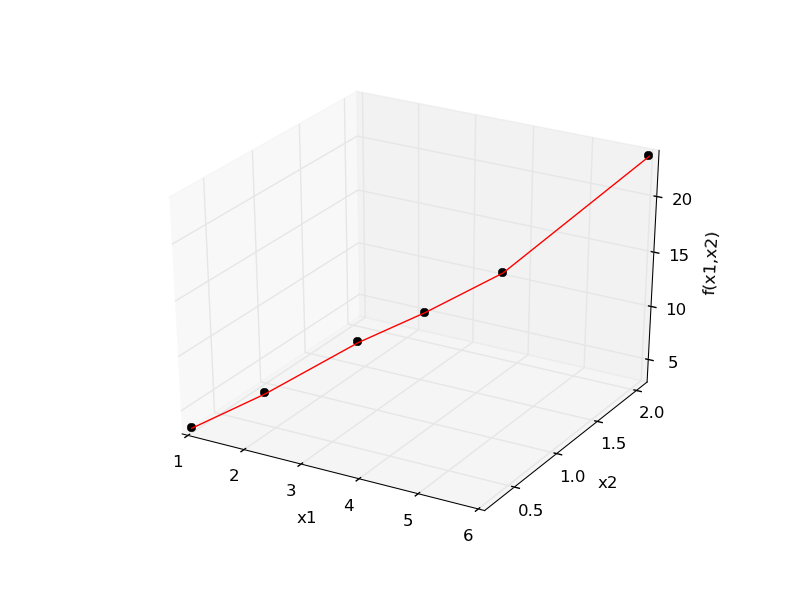
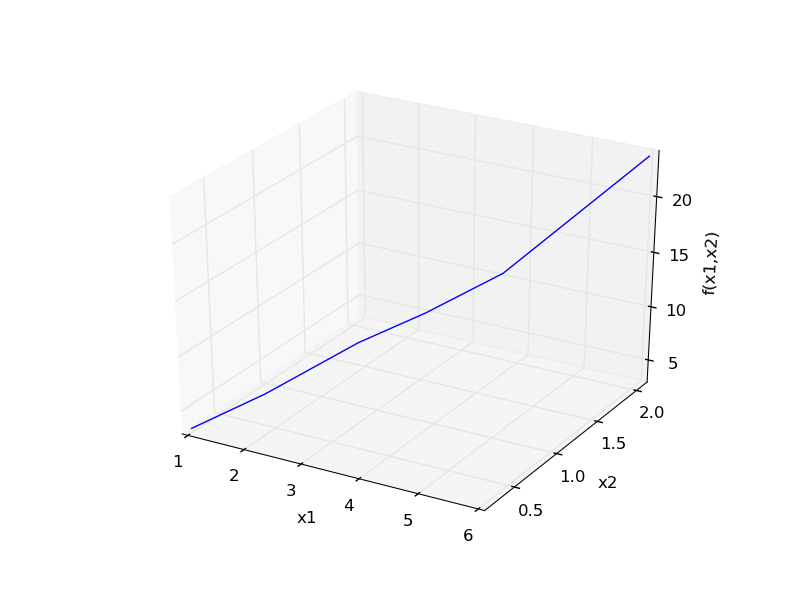
Fit the model f(x1,x2; a,b) = a*x1 + x2^b to the data given below. This model has two independent variables, and two parameters.

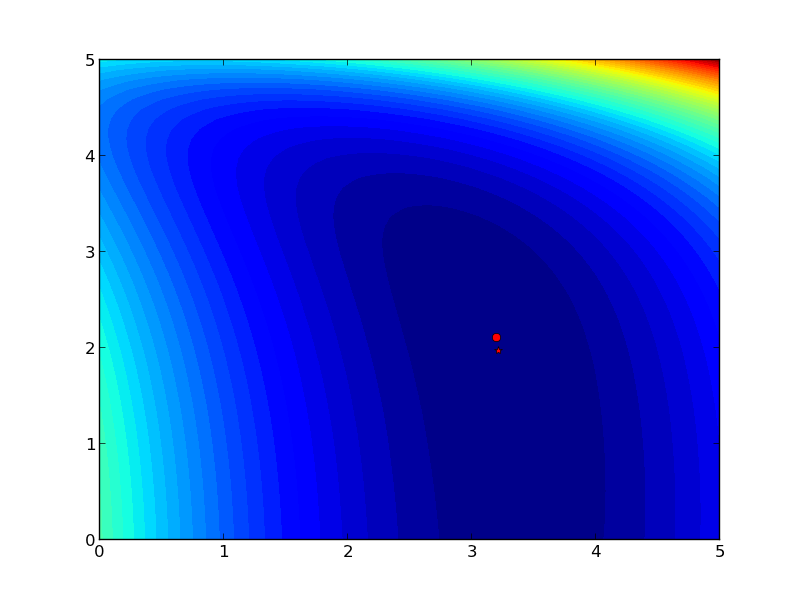
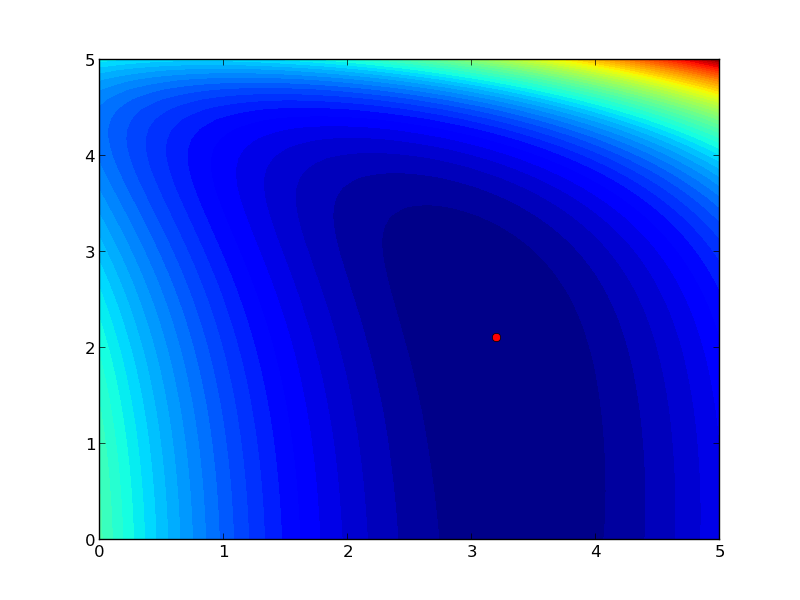
We want to do a nonlinear fit to find a and b that minimize the summed squared errors between the model predictions and the data. With only two variables, we can graph how the summed squared error varies with the parameters, which may help us get initial guesses. Let us assume the parameters lie in a range, here we choose 0 to 5. In other problems you would adjust this as needed.

import numpy as np
from mpl_toolkits.mplot3d import Axes3D
import matplotlib.pyplot as plt

x1 = [1.0, 2.0, 3.0, 4.0, 5.0, 6.0]
x2 = [0.2, 0.4, 0.8, 0.9, 1.1, 2.1]
X = np.column_stack([x1, x2]) # independent variables

f = [ 3.3079,    6.6358,   10.3143,   13.6492,   17.2755,   23.6271]

fig = plt.figure()
ax = fig.gca(projection = '3d')

ax.plot(x1, x2, f)
ax.set_xlabel('x1')
ax.set_ylabel('x2')
ax.set_zlabel('f(x1,x2)')

plt.savefig('images/graphical-mulvar-1.png')


arange = np.linspace(0,5);
brange = np.linspace(0,5);

A,B = np.meshgrid(arange, brange)

def model(X, a, b):
    'Nested function for the model'
    x1 = X[:, 0]
    x2 = X[:, 1]
    
    f = a * x1 + x2**b
    return f

@np.vectorize
def errfunc(a, b):
    # function for the summed squared error
    fit = model(X, a, b)
    sse = np.sum((fit - f)**2)
    return sse

SSE = errfunc(A, B)

plt.clf()
plt.contourf(A, B, SSE, 50)
plt.plot([3.2], [2.1], 'ro')
plt.figtext( 3.4, 2.2, 'Minimum near here', color='r')

plt.savefig('images/graphical-mulvar-2.png')

guesses = [3.18, 2.02]

from scipy.optimize import curve_fit

popt, pcov = curve_fit(model, X, f, guesses)
print popt

plt.plot([popt[0]], [popt[1]], 'r*')
plt.savefig('images/graphical-mulvar-3.png')

print model(X, *popt)

fig = plt.figure()
ax = fig.gca(projection = '3d')

ax.plot(x1, x2, f, 'ko', label='data')
ax.plot(x1, x2, model(X, *popt), 'r-', label='fit')
ax.set_xlabel('x1')
ax.set_ylabel('x2')
ax.set_zlabel('f(x1,x2)')

plt.savefig('images/graphical-mulvar-4.png')
[ 3.21694798  1.9728254 ]
[  3.25873623   6.59792994  10.29473657  13.68011436  17.29161001
  23.62366445]

It can be difficult to figure out initial guesses for nonlinear fitting problems. For one and two dimensional systems, graphical techniques may be useful to visualize how the summed squared error between the model and data depends on the parameters.

Copyright (C) 2013 by John Kitchin. See the License for information about copying.

org-mode source

Discuss on Twitter

Model selection

| categories: data analysis, statistics | tags:

Matlab post

adapted from http://www.itl.nist.gov/div898/handbook/pmd/section4/pmd44.htm

In this example, we show some ways to choose which of several models fit data the best. We have data for the total pressure and temperature of a fixed amount of a gas in a tank that was measured over the course of several days. We want to select a model that relates the pressure to the gas temperature.

The data is stored in a text file download PT.txt , with the following structure:

Run          Ambient                            Fitted
 Order  Day  Temperature  Temperature  Pressure    Value    Residual
  1      1      23.820      54.749      225.066   222.920     2.146
...

We need to read the data in, and perform a regression analysis on P vs. T. In python we start counting at 0, so we actually want columns 3 and 4.

import numpy as np
import matplotlib.pyplot as plt

data = np.loadtxt('data/PT.txt', skiprows=2)
T = data[:, 3]
P = data[:, 4]

plt.plot(T, P, 'k.')
plt.xlabel('Temperature')
plt.ylabel('Pressure')
plt.savefig('images/model-selection-1.png')
>>> >>> >>> >>> >>> >>> [<matplotlib.lines.Line2D object at 0x00000000084398D0>]
<matplotlib.text.Text object at 0x000000000841F6A0>
<matplotlib.text.Text object at 0x0000000008423DD8>
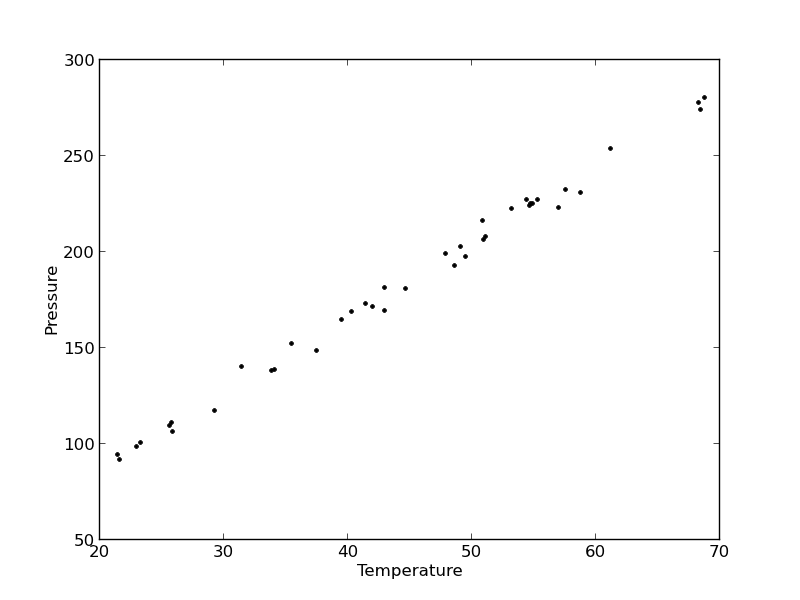
It appears the data is roughly linear, and we know from the ideal gas law that PV = nRT, or P = nR/V*T, which says P should be linearly correlated with V. Note that the temperature data is in degC, not in K, so it is not expected that P=0 at T = 0. We will use linear algebra to compute the line coefficients.

A = np.vstack([T**0, T]).T
b = P

x, res, rank, s = np.linalg.lstsq(A, b)
intercept, slope = x
print 'b, m =', intercept, slope

n = len(b)
k = len(x)

sigma2 = np.sum((b - np.dot(A,x))**2) / (n - k)

C = sigma2 * np.linalg.inv(np.dot(A.T, A))
se = np.sqrt(np.diag(C))

from scipy.stats.distributions import  t
alpha = 0.05

sT = t.ppf(1-alpha/2., n - k) # student T multiplier
CI = sT * se

print 'CI = ',CI
for beta, ci in zip(x, CI):
    print '[{0} {1}]'.format(beta - ci, beta + ci)
>>> >>> >>> >>> b, m = 7.74899739238 3.93014043824
>>> >>> >>> >>> >>> >>> >>> >>> >>> >>> >>> >>> >>> >>> >>> CI =  [ 4.76511545  0.1026405 ]
... ... [2.98388194638 12.5141128384]
[3.82749994079 4.03278093569]

The confidence interval on the intercept is large, but it does not contain zero at the 95% confidence level.

The R^2 value accounts roughly for the fraction of variation in the data that can be described by the model. Hence, a value close to one means nearly all the variations are described by the model, except for random variations.

ybar = np.mean(P)
SStot = np.sum((P - ybar)**2)
SSerr = np.sum((P - np.dot(A, x))**2)
R2 = 1 - SSerr/SStot
print R2
>>> >>> >>> 0.993715411798
plt.figure(); plt.clf()
plt.plot(T, P, 'k.', T, np.dot(A, x), 'b-')
plt.xlabel('Temperature')
plt.ylabel('Pressure')
plt.title('R^2 = {0:1.3f}'.format(R2))
plt.savefig('images/model-selection-2.png')
<matplotlib.figure.Figure object at 0x0000000008423860>
[<matplotlib.lines.Line2D object at 0x00000000085BE780>, <matplotlib.lines.Line2D object at 0x00000000085BE940>]
<matplotlib.text.Text object at 0x0000000008449898>
<matplotlib.text.Text object at 0x000000000844CCF8>
<matplotlib.text.Text object at 0x000000000844ED30>
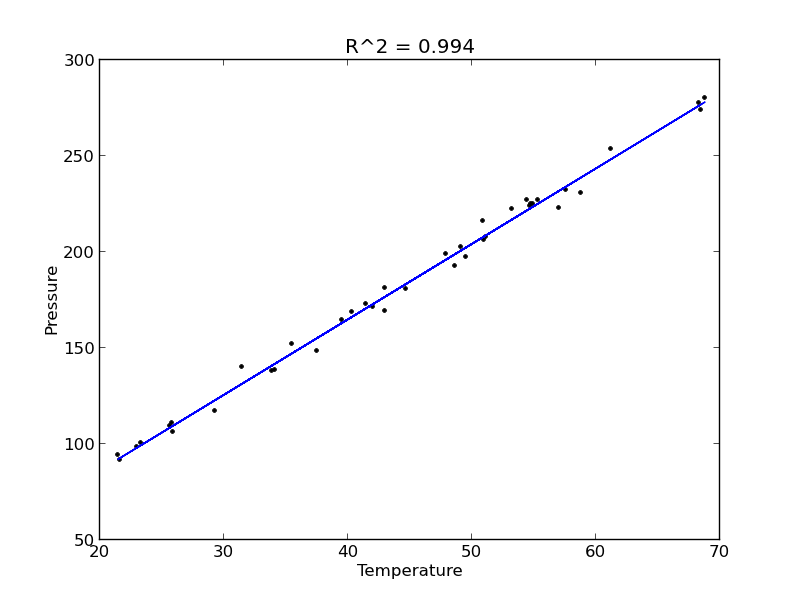
The fit looks good, and R^2 is near one, but is it a good model? There are a few ways to examine this. We want to make sure that there are no systematic trends in the errors between the fit and the data, and we want to make sure there are not hidden correlations with other variables. The residuals are the error between the fit and the data. The residuals should not show any patterns when plotted against any variables, and they do not in this case.

residuals = P - np.dot(A, x)

plt.figure()

f, (ax1, ax2, ax3) = plt.subplots(3)

ax1.plot(T,residuals,'ko')
ax1.set_xlabel('Temperature')


run_order = data[:, 0]
ax2.plot(run_order, residuals,'ko ')
ax2.set_xlabel('run order')

ambientT = data[:, 2]
ax3.plot(ambientT, residuals,'ko')
ax3.set_xlabel('ambient temperature')

plt.tight_layout() # make sure plots do not overlap

plt.savefig('images/model-selection-3.png')
>>> <matplotlib.figure.Figure object at 0x00000000085C21D0>
>>> >>> >>> [<matplotlib.lines.Line2D object at 0x0000000008861CC0>]
<matplotlib.text.Text object at 0x00000000085D3A58>
>>> >>> >>> [<matplotlib.lines.Line2D object at 0x0000000008861E80>]
<matplotlib.text.Text object at 0x00000000085EC5F8>
>>> >>> [<matplotlib.lines.Line2D object at 0x0000000008861C88>]
<matplotlib.text.Text object at 0x0000000008846828>
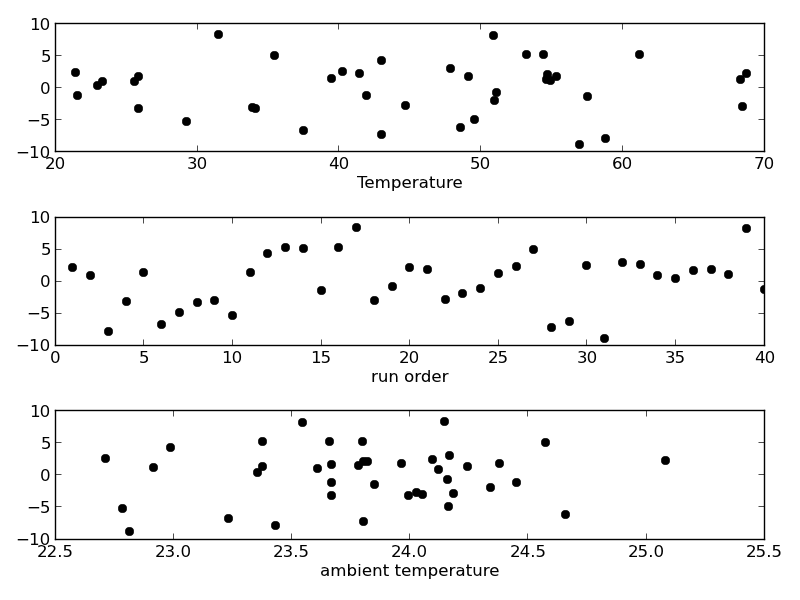
There may be some correlations in the residuals with the run order. That could indicate an experimental source of error.

We assume all the errors are uncorrelated with each other. We can use a lag plot to assess this, where we plot residual[i] vs residual[i-1], i.e. we look for correlations between adjacent residuals. This plot should look random, with no correlations if the model is good.

plt.figure(); plt.clf()
plt.plot(residuals[1:-1], residuals[0:-2],'ko')
plt.xlabel('residual[i]')
plt.ylabel('residual[i-1]')
plt.savefig('images/model-selection-correlated-residuals.png')
<matplotlib.figure.Figure object at 0x000000000886EB00>
[<matplotlib.lines.Line2D object at 0x0000000008A02908>]
<matplotlib.text.Text object at 0x00000000089E8198>
<matplotlib.text.Text object at 0x00000000089EB908>
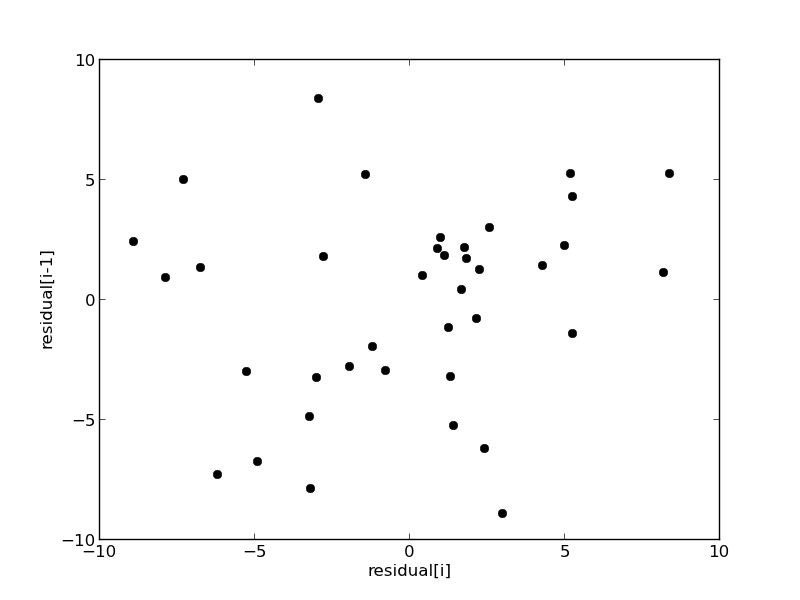
It is hard to argue there is any correlation here.

Lets consider a quadratic model instead.

A = np.vstack([T**0, T, T**2]).T
b = P;

x, res, rank, s = np.linalg.lstsq(A, b)
print x

n = len(b)
k = len(x)

sigma2 = np.sum((b - np.dot(A,x))**2) / (n - k)

C = sigma2 * np.linalg.inv(np.dot(A.T, A))
se = np.sqrt(np.diag(C))

from scipy.stats.distributions import  t
alpha = 0.05

sT = t.ppf(1-alpha/2., n - k) # student T multiplier
CI = sT * se

print 'CI = ',CI
for beta, ci in zip(x, CI):
    print '[{0} {1}]'.format(beta - ci, beta + ci)


ybar = np.mean(P)
SStot = np.sum((P - ybar)**2)
SSerr = np.sum((P - np.dot(A,x))**2)
R2 = 1 - SSerr/SStot
print 'R^2 = {0}'.format(R2)
>>> >>> >>> [  9.00353031e+00   3.86669879e+00   7.26244301e-04]
>>> >>> >>> >>> >>> >>> >>> >>> >>> >>> >>> >>> >>> >>> >>> CI =  [  1.38030344e+01   6.62100654e-01   7.48516727e-03]
... ... [-4.79950412123 22.8065647329]
[3.20459813681 4.52879944409]
[-0.00675892296907 0.00821141157035]
>>> >>> >>> >>> >>> R^2 = 0.993721969407

You can see that the confidence interval on the constant and T^2 term includes zero. That is a good indication this additional parameter is not significant. You can see also that the R^2 value is not better than the one from a linear fit, so adding a parameter does not increase the goodness of fit. This is an example of overfitting the data. Since the constant in this model is apparently not significant, let us consider the simplest model with a fixed intercept of zero.

Let us consider a model with intercept = 0, P = alpha*T.

A = np.vstack([T]).T
b = P;

x, res, rank, s = np.linalg.lstsq(A, b)

n = len(b)
k = len(x)

sigma2 = np.sum((b - np.dot(A,x))**2) / (n - k)

C = sigma2 * np.linalg.inv(np.dot(A.T, A))
se = np.sqrt(np.diag(C))

from scipy.stats.distributions import  t
alpha = 0.05

sT = t.ppf(1-alpha/2.0, n - k) # student T multiplier
CI = sT * se

for beta, ci in zip(x, CI):
    print '[{0} {1}]'.format(beta - ci, beta + ci)

plt.figure()
plt.plot(T, P, 'k. ', T, np.dot(A, x))
plt.xlabel('Temperature')
plt.ylabel('Pressure')
plt.legend(['data', 'fit'])

ybar = np.mean(P)
SStot = np.sum((P - ybar)**2)
SSerr = np.sum((P - np.dot(A,x))**2)
R2 = 1 - SSerr/SStot
plt.title('R^2 = {0:1.3f}'.format(R2))
plt.savefig('images/model-selection-no-intercept.png')
>>> >>> >>> >>> >>> >>> >>> >>> >>> >>> >>> >>> >>> >>> >>> >>> >>> >>> ... ... [4.05680124495 4.12308349899]
<matplotlib.figure.Figure object at 0x0000000008870BE0>
[<matplotlib.lines.Line2D object at 0x00000000089F4550>, <matplotlib.lines.Line2D object at 0x00000000089F4208>]
<matplotlib.text.Text object at 0x0000000008A13630>
<matplotlib.text.Text object at 0x0000000008A16DA0>
<matplotlib.legend.Legend object at 0x00000000089EFD30>
>>> >>> >>> >>> >>> <matplotlib.text.Text object at 0x000000000B26C0B8>
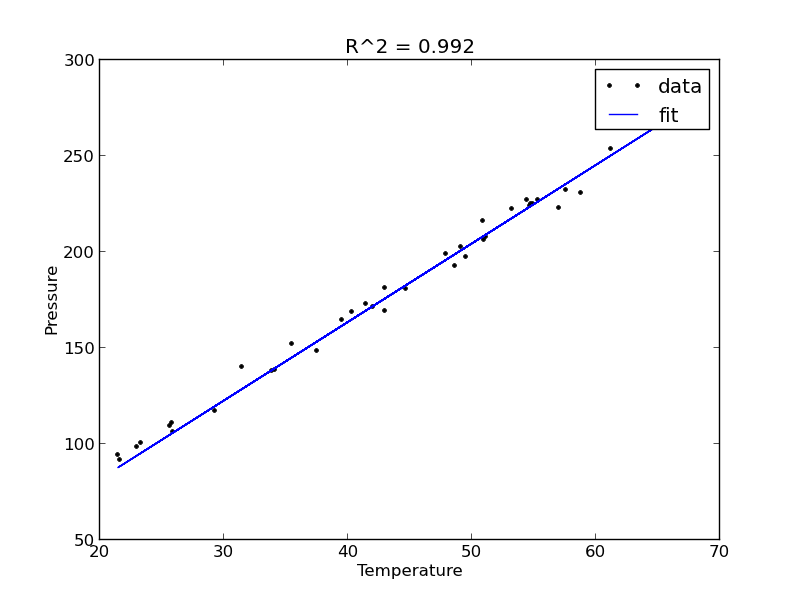
The fit is visually still pretty good, and the R^2 value is only slightly worse. Let us examine the residuals again.

residuals = P - np.dot(A,x)

plt.figure()
plt.plot(T,residuals,'ko')
plt.xlabel('Temperature')
plt.ylabel('residuals')
plt.savefig('images/model-selection-no-incpt-resid.png')
>>> <matplotlib.figure.Figure object at 0x0000000008A0F5C0>
[<matplotlib.lines.Line2D object at 0x000000000B29B0F0>]
<matplotlib.text.Text object at 0x000000000B276FD0>
<matplotlib.text.Text object at 0x000000000B283780>
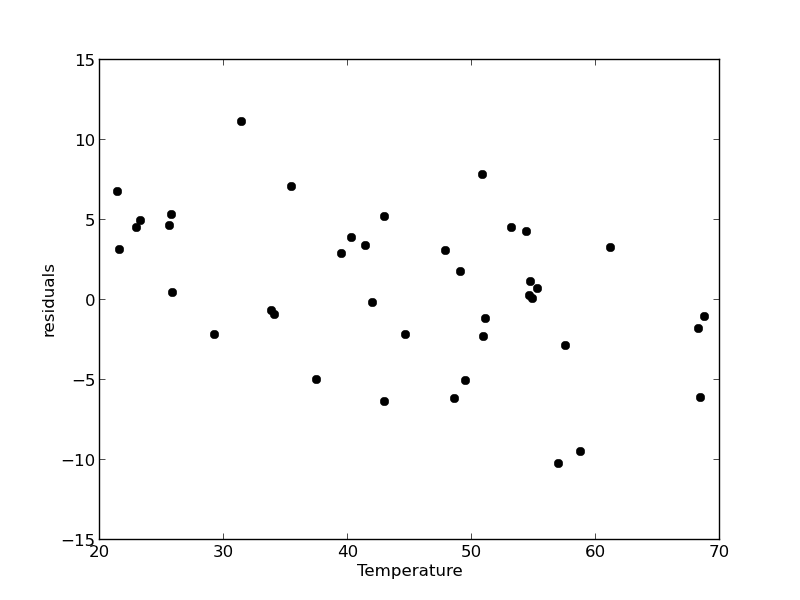
You can see a slight trend of decreasing value of the residuals as the Temperature increases. This may indicate a deficiency in the model with no intercept. For the ideal gas law in degC: \(PV = nR(T+273)\) or \(P = nR/V*T + 273*nR/V\), so the intercept is expected to be non-zero in this case. Specifically, we expect the intercept to be 273*R*n/V. Since the molar density of a gas is pretty small, the intercept may be close to, but not equal to zero. That is why the fit still looks ok, but is not as good as letting the intercept be a fitting parameter. That is an example of the deficiency in our model.

In the end, it is hard to justify a model more complex than a line in this case.

Copyright (C) 2013 by John Kitchin. See the License for information about copying.

org-mode source
Discuss on Twitter

Linear least squares fitting with linear algebra

| categories: data analysis, linear algebra | tags:

Matlab post

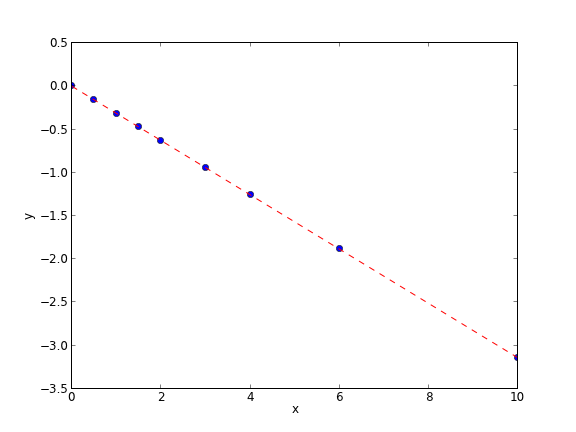
The idea here is to formulate a set of linear equations that is easy to solve. We can express the equations in terms of our unknown fitting parameters \(p_i\) as:

x1^0*p0 + x1*p1 = y1
x2^0*p0 + x2*p1 = y2
x3^0*p0 + x3*p1 = y3
etc...

Which we write in matrix form as \(A p = y\) where \(A\) is a matrix of column vectors, e.g. [1, x_i]. \(A\) is not a square matrix, so we cannot solve it as written. Instead, we form \(A^T A p = A^T y\) and solve that set of equations.

import numpy as np
x = np.array([0, 0.5, 1, 1.5, 2.0, 3.0, 4.0, 6.0, 10])
y = np.array([0, -0.157, -0.315, -0.472, -0.629, -0.942, -1.255, -1.884, -3.147])

A = np.column_stack([x**0, x])

M = np.dot(A.T, A)
b = np.dot(A.T, y)

i1, slope1 = np.dot(np.linalg.inv(M), b)
i2, slope2 = np.linalg.solve(M, b) # an alternative approach.

print i1, slope1
print i2, slope2

# plot data and fit
import matplotlib.pyplot as plt

plt.plot(x, y, 'bo')
plt.plot(x, np.dot(A, [i1, slope1]), 'r--')
plt.xlabel('x')
plt.ylabel('y')
plt.savefig('images/la-line-fit.png')
0.00062457337884 -0.3145221843
0.00062457337884 -0.3145221843

This method can be readily extended to fitting any polynomial model, or other linear model that is fit in a least squares sense. This method does not provide confidence intervals.

Copyright (C) 2013 by John Kitchin. See the License for information about copying.

org-mode source
Discuss on Twitter
« Previous Page -- Next Page »