Some basic data structures in python

| categories: python | tags:

Matlab post

We often have a need to organize data into structures when solving problems.

1 the list

A list in python is data separated by commas in square brackets. Here, we might store the following data in a variable to describe the Antoine coefficients for benzene and the range they are relevant for [Tmin Tmax]. Lists are flexible, you can put anything in them, including other lists. We access the elements of the list by indexing:

c = ['benzene', 6.9056, 1211.0, 220.79, [-16, 104]]
print c[0]
print c[-1]

a,b = c[0:2]
print a,b

name, A, B, C, Trange = c
print Trange
benzene
[-16, 104]
benzene 6.9056
[-16, 104]

Lists are “mutable”, which means you can change their values.

a = [3, 4, 5, [7, 8], 'cat']
print a[0], a[-1]
a[-1] = 'dog'
print a
3 cat
>>> [3, 4, 5, [7, 8], 'dog']

2 tuples

Tuples are immutable; you cannot change their values. This is handy in cases where it is an error to change the value. A tuple is like a list but it is enclosed in parentheses.

a = (3, 4, 5, [7, 8], 'cat')
print a[0], a[-1]
a[-1] = 'dog'
3 cat
Traceback (most recent call last):
  File "<stdin>", line 1, in <module>
TypeError: 'tuple' object does not support item assignment

3 struct

Python does not exactly have the same thing as a struct in Matlab. You can achieve something like it by defining an empty class and then defining attributes of the class. You can check if an object has a particular attribute using hasattr.

class Antoine:
    pass

a = Antoine()
a.name = 'benzene'
a.Trange = [-16, 104]

print a.name
print hasattr(a, 'Trange')
print hasattr(a, 'A')
benzene
True
False

4 dictionaries

The analog of the containers.Map in Matlab is the dictionary in python. Dictionaries are enclosed in curly brackets, and are composed of key:value pairs.

s = {'name':'benzene',
     'A':6.9056,
     'B':1211.0}

s['C'] = 220.79
s['Trange'] = [-16, 104]

print s
print s['Trange']
{'A': 6.9056, 'C': 220.79, 'B': 1211.0, 'name': 'benzene', 'Trange': [-16, 104]}
[-16, 104]
s = {'name':'benzene',
     'A':6.9056,
     'B':1211.0}

print 'C' in s
# default value for keys not in the dictionary
print s.get('C', None)

print s.keys()
print s.values()
False
None
['A', 'B', 'name']
[6.9056, 1211.0, 'benzene']

5 Summary

We have examined four data structures in python. Note that none of these types are arrays/vectors with defined mathematical operations. For those, you need to consider numpy.array.

Copyright (C) 2013 by John Kitchin. See the License for information about copying.
org-mode source

Discuss on Twitter

Numerical solution to a simple ode

| categories: interpolation, ode | tags:

Matlab post

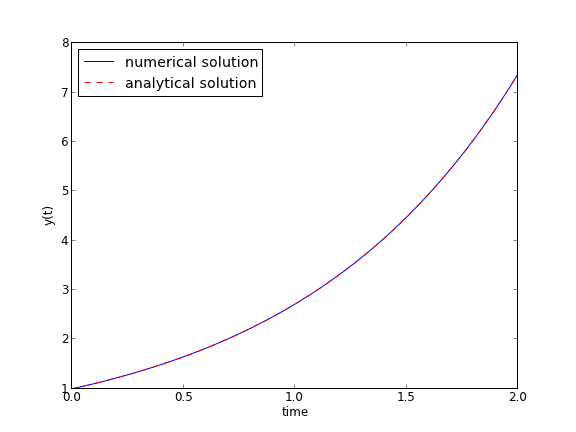
Integrate this ordinary differential equation (ode):

$$\frac{dy}{dt} = y(t)$$

over the time span of 0 to 2. The initial condition is y(0) = 1.

to solve this equation, you need to create a function of the form: dydt = f(y, t) and then use one of the odesolvers, e.g. odeint.

import numpy as np
from scipy.integrate import odeint
import matplotlib.pyplot as plt

def fprime(y,t):
    return y

tspan = np.linspace(0, 2)
y0 = 1
ysol = odeint(fprime, y0, tspan)

plt.plot(tspan, ysol, label='numerical solution')
plt.plot(tspan, np.exp(tspan), 'r--', label='analytical solution')
plt.xlabel('time')
plt.ylabel('y(t)')
plt.legend(loc='best')
plt.savefig('images/simple-ode.png')

The numerical and analytical solutions agree.

Now, suppose you want to know at what time is the solution equal to 3? There are several approaches to this, including setting up a solver, or using an event like approach to stop integration at y=3. A simple approach is to use reverse interpolation. We simply reverse the x and y vectors so that y is the independent variable, and we interpolate the corresponding x-value.

import numpy as np
from scipy.integrate import odeint
import matplotlib.pyplot as plt

def fprime(y,t):
    return y

tspan = np.linspace(0, 2)
y0 = 1
ysol = odeint(fprime, y0, tspan)

from scipy.interpolate import interp1d

ip = interp1d(ysol[:,0], tspan) # reverse interpolation
print 'y = 3 at x = {0}'.format(ip(3))
y = 3 at x = 1.09854780564

Copyright (C) 2013 by John Kitchin. See the License for information about copying.
org-mode source

Discuss on Twitter

Derivatives by FFT

| categories: differentiation | tags:

import numpy as np
import matplotlib.pyplot as plt

N = 101 #number of points
L = 2 * np.pi #interval of data

x = np.arange(0.0, L, L/float(N)) #this does not include the endpoint

#add some random noise
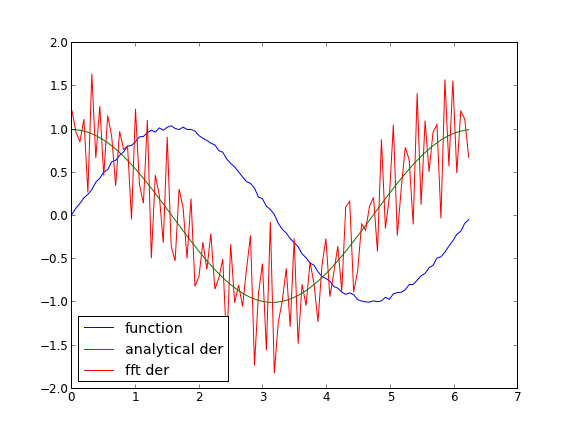
y = np.sin(x) + 0.05 * np.random.random(size=x.shape)
dy_analytical = np.cos(x)

'''
http://sci.tech-archive.net/Archive/sci.math/2008-05/msg00401.html

you can use fft to calculate derivatives!
'''

if N % 2 == 0:
    k = np.asarray(range(0, N / 2) + [0] + range(-N / 2 + 1,0))
else:
    k = np.asarray(range(0,(N - 1) / 2) + [0] + range(-(N - 1) / 2, 0))

k *= 2 * np.pi / L

fd = np.real(np.fft.ifft(1.0j * k * np.fft.fft(y)))

plt.plot(x, y, label='function')
plt.plot(x,dy_analytical,label='analytical der')
plt.plot(x,fd,label='fft der')
plt.legend(loc='lower left')

plt.savefig('images/fft-der.png')
plt.show()

Copyright (C) 2013 by John Kitchin. See the License for information about copying.

org-mode source

Discuss on Twitter

Sums products and linear algebra notation - avoiding loops where possible

| categories: linear algebra | tags:

Matlab comparison

Today we examine some methods of linear algebra that allow us to avoid writing explicit loops in Matlab for some kinds of mathematical operations.

Consider the operation on two vectors \(\bf{a}\) and \(\bf{b}\).

$$y=\sum\limits_{i=1}^n a_ib_i$$

a = [1 2 3 4 5]

b = [3 6 8 9 10]

1 Old-fashioned way with a loop

We can compute this with a loop, where you initialize y, and then add the product of the ith elements of a and b to y in each iteration of the loop. This is known to be slow for large vectors

a = [1, 2, 3, 4, 5]
b = [3, 6, 8, 9, 10]

sum = 0
for i in range(len(a)):
    sum = sum + a[i] * b[i]
print sum
125

This is an old fashioned style of coding. A more modern, pythonic approach is:

a = [1, 2, 3, 4, 5]
b = [3, 6, 8, 9, 10]

sum = 0
for x,y in zip(a,b):
    sum += x * y
print sum
125

2 The numpy approach

The most compact method is to use the methods in numpy.

import numpy as np

a = np.array([1, 2, 3, 4, 5])
b = np.array([3, 6, 8, 9, 10])

print np.sum(a * b)
125

3 Matrix algebra approach.

The operation defined above is actually a dot product. We an directly compute the dot product in numpy. Note that with 1d arrays, python knows what to do and does not require any transpose operations.

import numpy as np

a = np.array([1, 2, 3, 4, 5])
b = np.array([3, 6, 8, 9, 10])

print np.dot(a, b)
125

4 Another example

Consider \(y = \sum\limits_{i=1}^n w_i x_i^2\). This operation is like a weighted sum of squares. The old-fashioned way to do this is with a loop.

w = [0.1, 0.25, 0.12, 0.45, 0.98];
x = [9, 7, 11, 12, 8];
y = 0
for wi, xi in zip(w,x):
   y += wi * xi**2
print y
162.39

Compare this to the more modern numpy approach.

import numpy as np
w = np.array([0.1, 0.25, 0.12, 0.45, 0.98])
x = np.array([9, 7, 11, 12, 8])
y = np.sum(w * x**2)
print y
162.39

We can also express this in matrix algebra form. The operation is equivalent to \(y = \vec{x} \cdot D_w \cdot \vec{x}^T\) where \(D_w\) is a diagonal matrix with the weights on the diagonal.

import numpy as np
w = np.array([0.1, 0.25, 0.12, 0.45, 0.98])
x = np.array([9, 7, 11, 12, 8])
y = np.dot(x, np.dot(np.diag(w), x))
print y
162.39

This last form avoids explicit loops and sums, and relies on fast linear algebra routines.

5 Last example

Consider the sum of the product of three vectors. Let \(y = \sum\limits_{i=1}^n w_i x_i y_i\). This is like a weighted sum of products.

import numpy as np

w = np.array([0.1, 0.25, 0.12, 0.45, 0.98])
x = np.array([9, 7, 11, 12, 8])
y = np.array([2, 5, 3, 8, 0])

print np.sum(w * x * y)
print np.dot(w, np.dot(np.diag(x), y))
57.71
57.71

6 Summary

We showed examples of the following equalities between traditional sum notations and linear algebra

$$\bf{a}\bf{b}=\sum\limits_{i=1}^n a_ib_i$$

$$\bf{x}\bf{D_w}\bf{x^T}=\sum\limits_{i=1}^n w_ix_i^2$$

$$\bf{x}\bf{D_w}\bf{y^T}=\sum\limits_{i=1}^n w_i x_i y_i$$

These relationships enable one to write the sums as a single line of python code, which utilizes fast linear algebra subroutines, avoids the construction of slow loops, and reduces the opportunity for errors in the code. Admittedly, it introduces the opportunity for new types of errors, like using the wrong relationship, or linear algebra errors due to matrix size mismatches.

Copyright (C) 2013 by John Kitchin. See the License for information about copying.

org-mode source

Discuss on Twitter

Creating arrays in python

| categories: python | tags:

Often, we will have a set of 1-D arrays, and we would like to construct a 2D array with those vectors as either the rows or columns of the array. This may happen because we have data from different sources we want to combine, or because we organize the code with variables that are easy to read, and then want to combine the variables. Here are examples of doing that to get the vectors as the columns.

import numpy as np

a = np.array([1, 2, 3])
b = np.array([4, 5, 6])

print np.column_stack([a, b])

# this means stack the arrays vertically, e.g. on top of each other
print np.vstack([a, b]).T
[[1 4]
 [2 5]
 [3 6]]
[[1 4]
 [2 5]
 [3 6]]

Or rows:

import numpy as np

a = np.array([1, 2, 3])
b = np.array([4, 5, 6])

print np.row_stack([a, b])

# this means stack the arrays vertically, e.g. on top of each other
print np.vstack([a, b])
[[1 2 3]
 [4 5 6]]
[[1 2 3]
 [4 5 6]]

The opposite operation is to extract the rows or columns of a 2D array into smaller arrays. We might want to do that to extract a row or column from a calculation for further analysis, or plotting for example. There are splitting functions in numpy. They are somewhat confusing, so we examine some examples. The numpy.hsplit command splits an array “horizontally”. The best way to think about it is that the “splits” move horizontally across the array. In other words, you draw a vertical split, move over horizontally, draw another vertical split, etc… You must specify the number of splits that you want, and the array must be evenly divisible by the number of splits.

import numpy as np

A = np.array([[1, 2, 3, 5], 
              [4, 5, 6, 9]])

# split into two parts
p1, p2 = np.hsplit(A, 2)
print p1
print p2

#split into 4 parts
p1, p2, p3, p4 = np.hsplit(A, 4)
print p1
print p2
print p3
print p4
[[1 2]
 [4 5]]
[[3 5]
 [6 9]]
[[1]
 [4]]
[[2]
 [5]]
[[3]
 [6]]
[[5]
 [9]]

In the numpy.vsplit command the “splits” go “vertically” down the array. Note that the split commands return 2D arrays.

import numpy as np

A = np.array([[1, 2, 3, 5], 
              [4, 5, 6, 9]])

# split into two parts
p1, p2 = np.vsplit(A, 2)
print p1
print p2
print p2.shape
[[1 2 3 5]]
[[4 5 6 9]]
(1, 4)

An alternative approach is array unpacking. In this example, we unpack the array into two variables. The array unpacks by row.

import numpy as np

A = np.array([[1, 2, 3, 5], 
              [4, 5, 6, 9]])

# split into two parts
p1, p2 = A
print p1
print p2
[1 2 3 5]
[4 5 6 9]

To get the columns, just transpose the array.

import numpy as np

A = np.array([[1, 2, 3, 5], 
              [4, 5, 6, 9]])

# split into two parts
p1, p2, p3, p4 = A.T
print p1
print p2
print p3
print p4
print p4.shape
[1 4]
[2 5]
[3 6]
[5 9]
(2,)

Note that now, we have 1D arrays.

You can also access rows and columns by indexing. We index an array by [row, column]. To get a row, we specify the row number, and all the columns in that row like this [row, :]. Similarly, to get a column, we specify that we want all rows in that column like this: [:, column]. This approach is useful when you only want a few columns or rows.

import numpy as np

A = np.array([[1, 2, 3, 5], 
              [4, 5, 6, 9]])

# get row 1
print A[1]
print A[1, :]  # row 1, all columns

print A[:, 2]  # get third column 
print A[:, 2].shape
[4 5 6 9]
[4 5 6 9]
[3 6]
(2,)

Note that even when we specify a column, it is returned as a 1D array.

Copyright (C) 2013 by John Kitchin. See the License for information about copying.

org-mode source

Discuss on Twitter
« Previous Page -- Next Page »