Introduction
POUNCE is a general interior-point method, implemented in pure Rust — one
numerical backbone that now spans nonlinear, conic/quadratic, and polynomial
global optimization rather than a single problem class. Its
nonlinear-programming core began as a faithful port of the
Ipopt filter line-search method —
the algorithm, console output, and option semantics follow upstream Ipopt
closely enough that anyone used to reading ipopt logs can drop in
pounce without relearning where the numbers live — and it has since grown
into a family of solvers sharing that backbone:
-
Nonlinear programming — the filter line-search interior-point method (the Ipopt port) plus an active-set SQP path, for general smooth problems
min  f(x)
s.t. g_L <= g(x) <= g_U
     x_L <=   x  <= x_U
where
fandgare twice-continuously-differentiable. -
Conic & quadratic — LP, convex QP, second-order (SOCP), positive-semidefinite (SDP), and the non-symmetric exponential and power cones, each solved to the global optimum.
-
Global optimization — certified global optima for nonconvex polynomial problems via SOS / Lasserre relaxations. Nonconvex problems that are not polynomial get a local answer; POUNCE has no spatial branch-and-bound solver.
See Choosing a Solver for which solver fits which problem.
Pure Rust by default
The default build is pure Rust — no Fortran, no commercial solver, no system BLAS
required. The bundled FERAL backend provides a sparse symmetric LDLᵀ
factorization. The HSL MA57 backend is available behind the optional
ma57 feature for users who have a license for libcoinhsl and have it installed (see
Installation).
Status
Production-ready for the core IPM workflow. The algorithm-side core,
NLP interface, line search, filter, barrier update (monotone +
Mehrotra adaptive), KKT solve, restoration phase, AMPL .nl reader,
the C ABI (pounce-cinterface), the Python wrapper (pounce-solver),
and the CLI all solve a wide range of NLPs from the standard test
suites (Hock-Schittkowski, CUTEst, Mittelmann ampl-nlp, CHO parameter
estimation, gas/water network design). Sensitivity analysis (sIPOPT
port), reduced-Hessian computation, the auxiliary-equality + FBBT
presolve, and the active-set SQP path are all wired
in and available behind option keys. Existing PyIpopt / cyipopt / JuMP / AMPL clients
link against libpounce_cinterface in place of libipopt
unchanged.
The conic and global solvers are wired end-to-end alongside the NLP
core: the convex interior-point solver (pounce-convex) handles
LP / QP, SOCP, exponential / power cones, and small SDPs — with a Conic
Benchmark Format (.cbf) reader cross-checked against the CBLIB tier —
and adds SOS / Lasserre polynomial global optimization (sos_minimize).
These are reachable from the CLI, the Python package, and the JSON solve
report. There is no spatial branch-and-bound solver for general factorable
nonconvex problems — outside the polynomial case, nonconvex models are solved
locally.
License
EPL-2.0, the same license as upstream Ipopt.
Where to go next
- Installation — build and install POUNCE.
- Quick Start — solve your first problem.
- Running Solves — the command-line driver in depth.
- Acknowledgments — the papers behind the algorithm.
Installation
Three routes, in the order most people want them:
| Command | When | |
|---|---|---|
| pip | pip install pounce-solver | you just want to solve something |
| container | docker pull ghcr.io/jkitchin/pounce | clusters, or nothing installed on the host |
| source | make && make install | developing POUNCE, or you want the ma57 backend |
With pip
pip install pounce-solver
Prebuilt wheels for Linux, macOS, and Windows (CPython 3.9+). No Rust toolchain is involved. This installs both interfaces at once:
pounce problem.nl                       # the CLI
python -c "import pounce; print(pounce.__version__)"
For Pyomo models:
pip install pyomo-pounce
import pyomo.environ as pyo
results = pyo.SolverFactory("pounce").solve(model)
Optional extras — none needed for a normal solve:
pip install "pounce-solver[jax]"     # pounce.jax autodiff frontend
pip install "pounce-solver[torch]"   # pounce.torch autodiff frontend
pip install "pounce-solver[viz]"     # debugger plots (pounce-dbg-viz)
pip install "pounce-solver[gams]"    # GAMS solver link — see gams.md
If the CLI will not start (GLIBC_2.39 not found)
Releases up to and including 0.9.0 bundled a Linux CLI built against a
newer glibc than the wheel advertised, so pounce fails to exec on older
distributions (Debian 12, Ubuntu 22.04, RHEL/Rocky/Alma 8 and 9, and most
HPC images) with:
pounce/bin/pounce: /lib/x86_64-linux-gnu/libc.so.6: version `GLIBC_2.39' not found
import pounce still works; only the CLI (and therefore Pyomo, which
shells out to it) is affected. This is fixed from 0.10.0 on — the CLI
is now built inside the manylinux container, and the published 0.10.0
wheel’s binary references nothing above GLIBC_2.16, under the
manylinux2014 floor the wheel advertises. scripts/check-cli-portability.sh
asserts that on every build. If you are pinned to 0.9.0 or earlier and hit
this, upgrade, or use the container or a source build below.
With a container
No toolchain and nothing installed on the host:
docker run --rm -v "$PWD:/work" ghcr.io/jkitchin/pounce:latest problem.nl
apptainer pull pounce.sif docker://ghcr.io/jkitchin/pounce:0.11.0
Both images carry the CLI, the Python API, and the Pyomo plugin. See Docker & Containers for tags, bind mounts, and a Slurm example.
From source
Prerequisites
A stable Rust toolchain. Nothing else is needed for the default pure-Rust build. Install Rust via rustup:
curl --proto '=https' --tlsv1.2 -sSf https://sh.rustup.rs | sh
source "$HOME/.cargo/env"
Verify the install:
rustc --version && cargo --version
Build
From the repository root:
make            # release build of the workspace
make test       # run all tests
make clippy     # lint
make doc        # rustdoc for the Rust API
Install
make install                          # installs to $HOME/.local
sudo make install PREFIX=/usr/local   # or system-wide
This drops the pounce binary into $PREFIX/bin and the
libpounce_cinterface shared library into $PREFIX/lib. Make sure
$HOME/.local/bin is on your PATH, then verify:
pounce --version
HSL MA57 backend (optional)
The default FERAL backend needs no external libraries. To build with
the HSL MA57 linear solver instead, you need a CoinHSL install whose
lib/ directory holds libcoinhsl. Point the COINHSL_DIR
environment variable at it and build with the ma57 feature:
export COINHSL_DIR=/path/to/CoinHSL
cargo build -p pounce-cli --release --features ma57
The feature makes MA57 available; selecting it is a separate step,
because linear_solver defaults to feral in every build:
pounce problem.nl linear_solver=ma57
Build CoinHSL from https://www.hsl.rl.ac.uk/ipopt/. MA57 is
primarily useful for benchmarking against upstream Ipopt; the FERAL
backend is the supported default for everyday use, and a build without
--features ma57 never touches COINHSL_DIR.
The build embeds $COINHSL_DIR/lib as an rpath, so the resulting
binary finds libcoinhsl and its own dependencies (openblas, metis,
libgfortran, libgomp) without LD_LIBRARY_PATH or
DYLD_LIBRARY_PATH. If you relocate the CoinHSL install afterwards,
rebuild — or, on macOS, rewrite the path with install_name_tool -rpath <old> <new>, which works because the link reserves header
padding for it.
The ma57_* options (ma57_pivtol, ma57_pivot_order,
ma57_pre_alloc, and the rest — see
Options) are honoured by this build, and can be scoped to
the restoration sub-solve with a resto. prefix, e.g.
resto.ma57_pivtol=0.5. Before
issue #825 they were
accepted and silently discarded.
One of them is a POUNCE addition rather than an Ipopt option:
ma57_batched_backsolve
lets the limited-memory correction hand MA57 several right-hand sides
at once. It is off by default because turning it on perturbs the
iterate by about one bit and therefore moves the trajectory — read that
section before using it.
Using POUNCE as a Rust library
The workspace is a set of library crates (see Algorithm & Workspace for the layout). To browse the Rust API, build and open the rustdoc:
make doc # generates target/doc
Docker & Containers
Prebuilt images carry the whole POUNCE surface — the pounce CLI, the
Python API, and the Pyomo plugin — with no Rust toolchain and no pip install on your side. This is the path of least resistance on a cluster,
where you often cannot install a toolchain anyway, and the quickest way to
try POUNCE without touching your environment.
docker pull ghcr.io/jkitchin/pounce:latest
docker run --rm ghcr.io/jkitchin/pounce:latest --version
Which tag
| Tag | Contains | Use it when |
|---|---|---|
latest | the newest release | you just want POUNCE |
X.Y.Z (e.g. 0.9.0) | exactly that release, forever | reproducibility — papers, cluster job scripts, CI |
X.Y (e.g. 0.9) | newest patch of that minor series | you want fixes but not feature changes |
Pin X.Y.Z for anything you intend to re-run months later — latest and
X.Y both move under you.
Published images are cut from releases only. There are edge and
sha-<short> tags in the registry from when every commit to main was
built, but they are frozen at whatever commit last published them — do
not read edge as “tip of main”. To run an unreleased fix, build the
image yourself from a checkout; it takes minutes and needs no Rust
toolchain on your side beyond Docker:
git clone https://github.com/jkitchin/pounce && cd pounce
make docker          # -> pounce:dev, compiled from the tree you checked out
docker run --rm pounce:dev --version
Running solves
The entrypoint is the pounce CLI, so arguments after the image name go
straight to it:
docker run --rm ghcr.io/jkitchin/pounce:latest --list-problems
docker run --rm ghcr.io/jkitchin/pounce:latest --problem rosenbrock
Your own problems live on the host, so mount a directory. The working
directory inside the image is /work:
docker run --rm -v "$PWD:/work" ghcr.io/jkitchin/pounce:latest \
  problem.nl print_level=5 tol=1e-10
That writes problem.sol next to problem.nl in the mounted directory —
see Running Solves for the full option surface. The image runs as
UID 1000 rather than root, so files it creates in a bind mount are not
root-owned on the host. If your host UID differs, add --user "$(id -u):$(id -g)".
Python and Pyomo
Override the entrypoint to get a shell or an interpreter:
docker run --rm -it --entrypoint python ghcr.io/jkitchin/pounce:latest
docker run --rm -it --entrypoint bash -v "$PWD:/work" ghcr.io/jkitchin/pounce:latest
Both import pounce (with numpy and scipy) and Pyomo’s
SolverFactory('pounce') work out of the box:
docker run --rm -v "$PWD:/work" --entrypoint python \
  ghcr.io/jkitchin/pounce:latest my_model.py
The optional extras are not installed — no JAX, no PyTorch, no plotly,
no GAMS bindings. Add what you need in a derived image:
FROM ghcr.io/jkitchin/pounce:0.12.0
USER root
RUN pip install --no-cache-dir "pounce-solver[jax]==0.11.0"
USER pounce
On a cluster (Apptainer / Singularity)
Most HPC sites run Apptainer (formerly Singularity) rather than Docker, because it needs no daemon and no root. It pulls Docker images directly:
apptainer pull pounce.sif docker://ghcr.io/jkitchin/pounce:0.12.0
apptainer run pounce.sif problem.nl
Two differences from docker run are worth knowing before you write a job
script:
- You are yourself. Apptainer runs the container as your own user, not
the image’s, so output files land with your ownership and no
--userflag is needed. $HOMEand$PWDare already there. Apptainer bind-mounts them by default, so a.nlfile in your submit directory is usually visible with no-Bflag at all. Add-B /scratch:/scratch(or your site’s equivalent) for anything outside them.
Build the .sif once on a login node and reuse it — pulling on every array
task hammers the registry and will get rate-limited. In a Slurm script:
#!/bin/bash
#SBATCH --job-name=pounce
#SBATCH --cpus-per-task=4

apptainer exec $HOME/images/pounce.sif \
  pounce $SLURM_SUBMIT_DIR/problem.nl --json-output result.json
Pin the digest rather than the tag if the run has to be reproducible years later — a tag can be re-pushed, a digest cannot:
apptainer pull pounce.sif docker://ghcr.io/jkitchin/pounce@sha256:<digest>
Building your own
You do not need the images to be published — both Dockerfiles are in the repository and build from a clone. From the repository root:
make docker          # compiles the current working tree -> pounce:dev
make docker-release  # installs the released wheels -> pounce:<version>
make docker is the one to reach for when testing a branch: it compiles
whatever is checked out, and stamps the commit into pounce --about so the
image can say what it contains. make docker-release needs no Rust
toolchain and takes seconds. See docker/README.md
for build arguments and the .dockerignore caveat.
What is not in the image
The HSL MA57 backend is absent, and cannot be added by us: CoinHSL is
license-restricted and not redistributable. Passing linear_solver=ma57
will not work in a container. The pure-Rust FERAL backend is the default
everywhere and needs no external libraries — see
Installation if you have a
CoinHSL license and want a local build with it.
The GAMS link is likewise absent, since it needs your own GAMS install and license on the host. See GAMS.
Quick Start
This page assumes POUNCE is built and on your PATH
(see Installation).
Solve an AMPL .nl file
pounce problem.nl
This solves the problem and writes a sibling problem.sol next to the
input, following the AMPL solver convention. The console output
mirrors upstream ipopt’s banner, per-iteration table, and final
summary.
Append KEY=VALUE pairs to override options — the syntax and
semantics match the upstream Ipopt CLI:
pounce problem.nl print_level=8 max_iter=500 tol=1e-10
See Solver Options for details.
Try a built-in problem
POUNCE ships several self-contained test problems that exercise the
full pipeline without parsing a .nl file (run pounce --list-problems
for the full set):
pounce --list-problems
pounce --problem rosenbrock
pounce --problem quadratic
From Python
import numpy as np
from pounce import minimize

res = minimize(lambda x: ((x - 1) ** 2).sum(), x0=np.zeros(3))
print(res.fun, res.x)
See the Python API chapter for the full cyipopt-compatible interface.
From Pyomo
import pyomo_pounce  # registers 'pounce'
from pyomo.environ import SolverFactory

SolverFactory('pounce').solve(model)
See the Pyomo chapter for details.
Full help
pounce --help
Choosing a Solver
POUNCE is not a single solver but a small family of them sharing one numerical backbone. This page is the map: what each solver is, when to reach for it, and how they fit together.
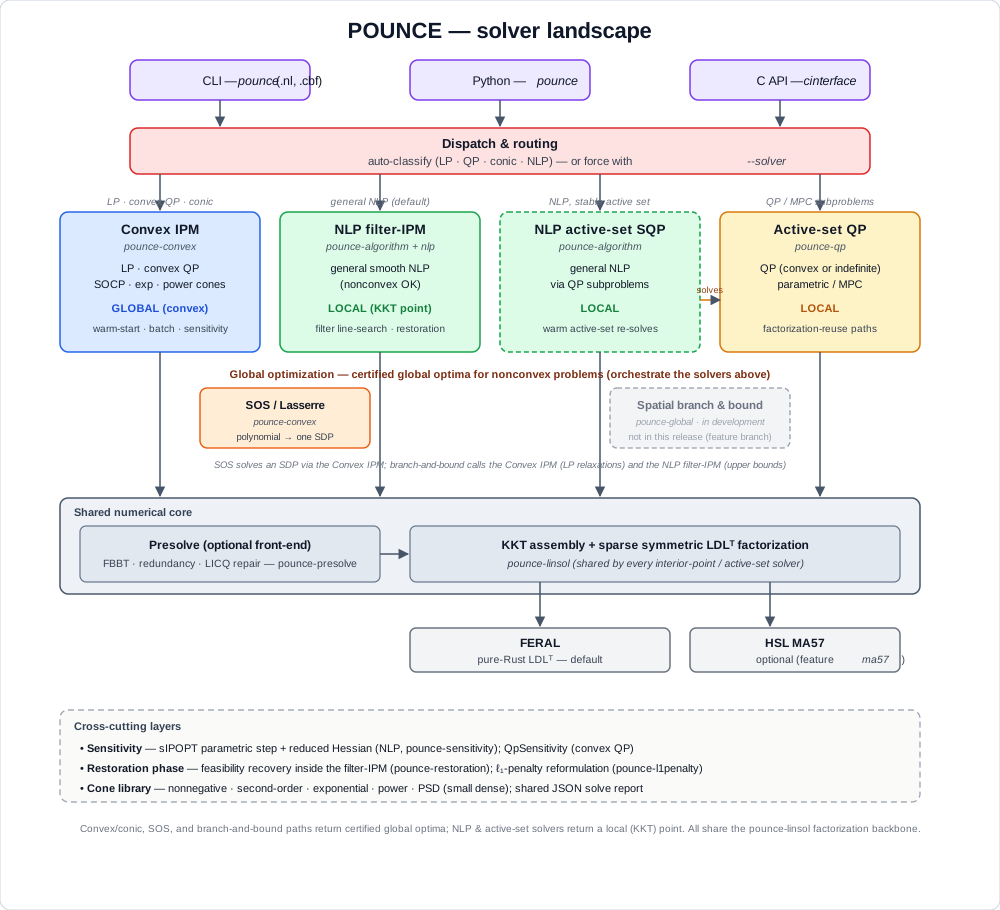
The one-sentence version: convex and conic problems are solved to the global
optimum; nonconvex problems are solved locally by default, or to a certified
global optimum via the SOS (polynomial) and spatial branch-and-bound (general)
paths. Every solver, whatever its flavor, ultimately factorizes a symmetric
KKT system through the shared pounce-linsol layer, which in turn drives a
pluggable backend (FERAL by default, HSL MA57 optionally).
The solvers at a glance
| Solver | Problem class | Optimum | Crate | Entry points |
|---|---|---|---|---|
| NLP filter-IPM | general smooth NLP (nonconvex OK) | local (KKT) | pounce-algorithm + pounce-nlp | CLI default; Python Problem/minimize; solver_selection=nlp |
| NLP active-set SQP | general smooth NLP | local | pounce-algorithm (subproblems via pounce-qp) | algorithm=active-set-sqp |
| Convex IPM (LP/QP) | LP, convex QP | global | pounce-convex | solve_qp_ipm; pounce.qp.solve_qp; solver_selection=lp-ipm/qp-ipm |
| Convex IPM (conic) | SOCP, exp/power/PSD cones, convex QCQP | global | pounce-convex | solve_socp_ipm; pounce.qp.solve_socp; minimize (convex QCQP); solver_selection=socp; pounce <file>.cbf |
| Active-set QP | QP (linear rows), convex or indefinite | local | pounce-qp | ParametricActiveSetSolver; pounce.qp.solve_qp(method="active-set"); solver_selection=qp-active-set — opt-in only; auto never picks it (see note) |
| SOS / Lasserre | polynomial (nonconvex) | global | pounce-convex | sos_minimize; pounce.sos_minimize |
When to reach for the active-set QP.
autonever selects it: a cold, one-shot convex QP goes to the interior-point path, which is materially more robust on that workload (137 of the 138 Maros-Mészáros problems, against substantially fewer for a cold active-set solve). That is the character of the method rather than a defect — an active-set iteration count is combinatorial in the size of the active set, while an interior-point count is nearly independent of problem size. Choosesolver_selection=qp-active-setwhen you want an exact vertex solution, or when you are solving a sequence of similar QPs — MPC steps, branch-and-bound nodes, continuation — where the working set carries across solves andsolve_parametriccan trace the homotopy from the previous solution instead of starting over.
POUNCE has no spatial branch-and-bound solver for general factorable nonconvex NLPs — no
solver_selection=globalCLI route, nominimize_globalPython entry point. The only certified-global path for a nonconvex problem is SOS / Lasserre, and it covers polynomials only.
When to choose each
General nonlinear program (the common case) → NLP filter-IPM
If your model has nonlinear objective or constraints and you don’t know (or can’t assume) convexity, this is the default and the most mature path. It is POUNCE’s port of Ipopt’s filter line-search interior-point method: robust on nonconvex problems, with a feasibility restoration phase for hard starts and exact or limited-memory Hessians. It returns a local KKT point — for a nonconvex problem there is no global guarantee.
- CLI:
pounce model.nl(or a built-in problem). - Python: the cyipopt-style
Problemclass, or the scipy-styleminimizefacade. - Reach for limited-memory Hessians (
hessian_approximation=limited-memory) when second derivatives are unavailable or expensive.
A sequence of related NLPs, or a stable active set → NLP active-set SQP
Selected with algorithm=active-set-sqp. It solves the NLP as a sequence
of quadratic subproblems (handed to pounce-qp), which warm-starts
extremely well when the active set is stable across solves — e.g. a
parametric sweep or a control loop. For a single cold solve of a general
NLP, prefer the filter-IPM.
Linear or convex quadratic program → Convex IPM (LP/QP)
If P ⪰ 0 (or P = 0 for an LP), use the convex interior-point solver:
it returns the global optimum, detects primal/dual infeasibility, and
offers warm-starting, batched and multiple-RHS solving, a build-once /
solve-many QpFactorization handle, and post-optimal sensitivity
(QpSensitivity — the sIPOPT analog). The CLI’s auto routing classifies
an .nl and sends LP/convex-QP problems here automatically, and a .nl
carrying the sIPOPT sens_* suffixes is now answered here rather than
rerouted to the general NLP engine — see
LP/QP routing
for what still routes away and why.
- Python:
pounce.qp.solve_qp(andsolve_qp_batch,solve_qp_multi_rhs).
Second-order, exponential, or power cones → Convex IPM (conic)
The same convex solver handles conic programs: second-order cones, the
exponential and power cones that express geometric programming,
entropy / log-sum-exp, logistic models, and p-norm constraints, and the
positive-semidefinite cone for small dense SDPs. Also global. This
is the path to use when you can cast a nominally-nonconvex problem into a
convex cone — you trade modeling effort for a global guarantee. (The PSD
cone is self-scaled and runs on the symmetric driver; the exp/power cones
run on the non-symmetric HSDE driver, so the two families can’t yet be
mixed in one problem.)
A common special case routes here automatically: a convex
quadratically-constrained QP (QCQP). When auto routing finds a
convex-quadratic inequality ½xᵀHx + aᵀx + b ≤ 0 (H ⪰ 0), it reformulates
each such constraint to one second-order cone (H = FᵀF) and sends the whole
problem to the conic solver — no .cbf and no manual cone bookkeeping needed.
This works from a .nl/Pyomo model on the CLI and from minimize() in Python
(which probes each constraint’s Hessian and only routes when it can prove the
feasible set is convex). See LP / QP Solver Routing.
- Python:
pounce.qp.solve_socp(..., cones=[("exp", 3), ("pow", 0.5), ...])for an explicit cone program, or justminimize(...)for a convex QCQP. - CLI: a Conic Benchmark Format file,
pounce model.cbf(see the CBLIB benchmark tier), or any convex-QCQP.nlunderautorouting.
Nonconvex problem, global optimum required → SOS (polynomials only)
When the problem is genuinely nonconvex and a local optimum is not good enough, the one path to a certified global optimum is for polynomials:
- Polynomial objective/constraints → SOS / Lasserre (
sos_minimize, orpounce.sos_minimize). A single semidefinite program certifies the global minimum (the largestγwithp − γin the Putinar cone), and the global minimizers are recovered from the moment matrix — even multiple ones, via a facial-reduction step. Best for modest degree and dimension; the SDP grows with the relaxation order.
If the problem is nonconvex and not polynomial (exp/ln/trig), POUNCE
cannot certify a global optimum. Reformulate into the convex cone library if
you can; otherwise multistart the local NLP solver and accept that the result
is uncertified.
See Global Optimization for the SOS path in depth, and for the multistart fallback.
Indefinite QP, or a QP inner-solver → Active-set QP
pounce-qp is a sparse parametric active-set solver that accepts an
indefinite Hessian (via inertia control), with two-sided bounds and
factorization-reuse across a homotopy. It is the engine behind the
active-set SQP path, and is the right choice for MPC-style problems or any
setting where you re-solve a slowly-changing QP many times. Use the convex
IPM instead when P ⪰ 0 and you want a single robust solve with
infeasibility certificates.
It is the only entry point here that will take an indefinite P; both the
convex IPM and the conic solver refuse one, because without a PSD Hessian the
IPM’s optimality test accepts a saddle point and reports it as optimal
(issue #112). Ask for the engine by name:
from pounce.qp import solve_qp
r = solve_qp(P=P_indefinite, c=c, lb=lb, ub=ub, method="active-set")
pounce model.nl solver_selection=qp-active-set # class: nonconvex QP
Two things to hold onto about the answer. It is local: a nonconvex QP can
have many KKT points, and what you get is the one the active set walked to,
the same guarantee minimize gives on a nonconvex NLP. It is at least a
minimum, though, which took a fix — inertia control leaves the first-order
conditions satisfied at a saddle, and until
issue #848 the engine
reported one as optimal (min ½xᵀ[[1,5],[5,1]]x over [−1,1]² came back at
objective 0 against a true minimum of −4). From 0.11.0 two guards stand behind an
optimal here. The engine tests the reduced Hessian on its working set’s null
space, and when it finds a feasible direction of negative curvature it follows
it — to a better point, to an unbounded verdict if nothing blocks it, or to
an honest non-optimal status if it runs out of budget. The driver then
screens the result by exhibition, refusing a verdict only where it can walk a
direction and hand you a strictly better feasible point; that one is not
confined to the working set’s null space, so it reaches negative curvature
hidden behind a bound whose multiplier is exactly zero, which the first cannot
see. What you do not get is a global minimum, or a guarantee in the case
where neither guard concludes — the first-order verdict stands there, as it
always did. And the constraints
must be linear — the curvature this engine controls is the objective’s, so
an indefinite objective over any quadratic row, convex row or not, is a
nonconvex QCQP and goes to the NLP filter-IPM instead (see
LP/QP routing).
How to override the automatic routing
The CLI classifies each .nl problem and picks a solver, but you can force
the choice:
pounce model.nl solver_selection=auto          # default: classify, then route
pounce model.nl solver_selection=nlp           # filter-IPM (or active-set-sqp via algorithm=)
pounce model.nl solver_selection=lp-ipm        # convex LP interior-point
pounce model.nl solver_selection=qp-ipm        # convex QP interior-point
pounce model.nl solver_selection=socp          # conic interior-point (convex QCQP)
pounce model.nl solver_selection=qp-active-set # active-set QP
solver_selection is an ordinary POUNCE option, not a command-line flag:
it is passed as a trailing KEY=VALUE pair (the ipopt CLI convention), and
so also works from an options file, the pounce_options environment
variable, or Pyomo’s solver.options. Forcing a value the problem class
does not support is rejected with a message rather than silently ignored.
See LP / QP Solver Routing for how classification works and when it falls back to the more general solver.
The shared backbone
Every interior-point and active-set solver above assembles a symmetric KKT
system and factorizes it through pounce-linsol. That trait layer is
backend-agnostic:
- FERAL (
pounce-feral) — a pure-Rust sparse symmetric LDLᵀ factorization. The default; no external dependencies. - HSL MA57 (
pounce-hsl) — the well-known Harwell solver vialibcoinhsl, enabled with thema57build feature for large or ill-conditioned systems.
Because the backend is pluggable, the same solver code runs on either without change.
Cross-cutting layers
These are not solvers you select, but stages and tools the solvers share:
- Presolve (
pounce-presolve) — an optional front-end that tightens bounds (feasibility-based bound tightening), removes redundant rows, and repairs LICQ degeneracies before the solve. - Restoration (
pounce-restoration) — the feasibility-recovery phase the filter-IPM enters when a step cannot reduce both infeasibility and the objective;pounce-l1penaltyoffers an ℓ₁-exact penalty reformulation for degenerate / LICQ-violating problems. - Sensitivity —
pounce-sensitivitygives sIPOPT-style parametric steps and reduced Hessians for the NLP.QpSensitivitydoes the same kind of thing for the convex QP and conic arms — the parametric step, fix-relax, path following, activity classification, and a face decomposition for every cone family — over a shared core (pounce-sens-core), so the two cannot drift on what a kink is. They are not the same surface: the NLP arm additionally has the corrector, the covariance/identifiability statistics, and the directional decision at a kink, and the two reduced Hessians are different computations behind one word (sIPOPT’s Schur route vs a null-space projection). See Sensitivity Analysis and The convex/conic solver. - Cone library (
pounce-convex) — nonnegative, second-order, exponential, power, and (for small dense problems) positive-semidefinite cones, so small SDPs solve as a convex class. The PSD cone cannot yet be mixed with the exponential/power cones in one problem (they use different drivers). - Solve report — every path can emit the machine-readable
pounce.solve-report/v1JSON (status, iterations, residuals, timing). See JSON Solve Report.
Global vs. local — the honest summary
POUNCE settles a problem globally along two routes, and locally along one:
- Global by convexity — LP, convex QP, SOCP, and the exponential / power / PSD cone classes. Local is global, so a convex or conic reformulation buys the guarantee outright.
- Global by certificate (polynomials) — the SOS / Lasserre optimizer certifies the global minimum of a nonconvex polynomial from a single SDP; see Global Optimization.
- Local for general NLP — the filter-IPM and SQP paths converge to a KKT point, which for a nonconvex problem carries no global guarantee.
There is no third route: a nonconvex, non-polynomial problem gets a local answer, and no certificate.
Two practical levers for a “global” answer: modeling (cast as much as you can into the convex cone library) and, when that is not possible, the SOS / Lasserre optimizer for polynomials.
Running Solves
The pounce command-line driver solves built-in TNLPs and AMPL .nl
files. Its console output mirrors upstream ipopt’s banner,
per-iteration table, and final summary, so anyone used to reading
ipopt logs can read pounce logs unchanged.
Basic usage
pounce problem.nl
pounce problem.nl print_level=8 max_iter=500 tol=1e-10
pounce problem.nl linear_solver=ma57            # with --features ma57
pounce problem.nl --options-file tuned.opt      # upstream-format options file
pounce problem.nl option_file_name=tuned.opt   # the Ipopt spelling; same thing
pounce problem.nl --no-options-file            # ignore ./pounce.opt, ./ipopt.opt
Trailing KEY=VALUE pairs follow the same syntax and semantics as the
upstream Ipopt CLI; they override values loaded from the options file.
With no options file named, ./pounce.opt or ./ipopt.opt is read if
present, as ipopt reads ./ipopt.opt. See
Solver Options.
Built-in problems
pounce --list-problems
pounce --problem quadratic
pounce --problem rosenbrock
quadratic—min (x[0]-3)² + (x[1]-4)²(unconstrained, optimum(3, 4)).rosenbrock—min 100·(x[1]-x[0]²)² + (1-x[0])²(unconstrained, optimum(1, 1)).bounded-quadratic—quadraticwith box bounds0 ≤ x ≤ 2(optimum at the upper corner(2, 2)).eq-quadratic—min x[0]² + x[1]²s.t.x[0] + x[1] = 1(a single equality).circle—min x[0]s.t.x[0]² + x[1]² = 1(a nonlinear equality).infeasible-eq— two contradictory equalities (x[0]+x[1]=1and=2); exercises the infeasibility-detection path.
Run pounce --list-problems for the authoritative list.
Built-in problems have no .nl stub, so they only write a .sol file
when --sol-output is given explicitly.
Degenerate / MPCC NLPs — the ℓ₁-exact penalty-barrier wrapper
For problems where the standard IPM thrashes in restoration because LICQ fails at the iterate (degenerate equalities, MPCC-like complementarity), enable the Thierry–Biegler ℓ₁-exact penalty-barrier wrapper:
pounce problem.nl l1_exact_penalty_barrier=yes
The wrapper turns every equality row c_i(x) = g_i into a
slack-relaxed c_i(x) − p_i + n_i = g_i with (p_i, n_i) ≥ 0,
augments the objective by ρ · Σ(p + n), and runs a
Byrd–Nocedal–Waltz outer loop that escalates ρ until the slacks
collapse (constraints satisfied) or saturate (locally infeasible
problem detected). The user-visible (x*, λ*) are reported in the
original variable space.
For everyday use, the simpler form is an auto-fallback:
pounce problem.nl l1_fallback_on_restoration_failure=yes
POUNCE first runs the standard solve. If it terminates in
Restoration_Failed, Infeasible_Problem_Detected,
Solved_To_Acceptable_Level, Maximum_Iterations_Exceeded, or
Not_Enough_Degrees_Of_Freedom, the wrapper is invoked transparently
and the result is promoted to Solve_Succeeded only if the retry
succeeds. Otherwise the original status is preserved.
The tuning knobs are listed under Solver Options.
AMPL / Pyomo solver mode
AMPL drivers — and Pyomo’s ASL interface — invoke a solver as
solver problem.nl -AMPL. Pass -AMPL to run pounce that way:
pounce problem.nl -AMPL
It changes nothing about the solve itself; it switches the process to
the AMPL exit-code contract (see below), so the driver reads the
termination from the .sol file rather than the exit status. The
pyomo-pounce package builds on top of this mode.
Dual sign conventions
Two different quantities are in play, and they differ by a sign. Getting them confused is easy, so pounce names them differently:
| Surface | Quantity | Meaning |
|---|---|---|
.sol dual block, Pyomo model.dual | marginal | d obj / d b — the shadow price |
mult_g (Python API, JSON solution.lambda) | Lagrange multiplier | the λ of L = f + λ'g − z_L(x−x_L) + z_U(x−x_U) |
They are related by marginal = −λ. The .sol writer performs this
negation, so a .sol (and therefore Pyomo’s model.dual) carries shadow
prices with the same sign Ipopt, glpk, CBC and CONOPT report. For
min x₀²+x₁² s.t. x₀+x₁ = b the optimum is b²/2, so a .sol written at
b = 2 reports +2.
The Python API’s mult_g keeps the Lagrange-multiplier convention, which
matches cyipopt and satisfies the stationarity identity above directly.
If you are comparing a mult_g against a model.dual for the same solve,
expect them to differ by a sign — that is by design, not a bug.
Before v0.9.0 the
.solwriter emitted the Lagrange multiplier without converting it, so every AMPL/Pyomo dual came back negated relative to every other solver (#271). Objectives and primal solutions were never affected.
Exit codes
0—Solve_Succeeded,Solved_To_Acceptable_Level, orFeasible_Point_Found. These are exactly the statuses whosesolve_result_numfalls in the0–99solved band, and the two channels are held to that by a test: the exit code and the.sola run writes can never disagree about whether the solve succeeded.- non-zero — any other
ApplicationReturnStatus.
In AMPL solver mode (-AMPL) the exit code instead follows the AMPL
contract: 0 for any solve that ran and produced a .sol file —
limit-reached, infeasible, even a failed solve — since the termination
is carried by the file’s solve_result_num. Genuine startup failures
(unreadable .nl, bad option) still exit non-zero.
Diagnostics & introspection
pounce --about                                   # version, build info, features, backends
pounce problem.nl --dump kkt:5-10 --dump iterate # dump per-iteration diagnostics
pounce problem.nl --dump kkt --dump-dir /tmp/d   # override the dump root
--about— print version, build info, enabled features, and linear-solver backends, then exit.--dump <cat>[:<spec>]— write the diagnostic category to per-iteration files (JSONL). Wired categories arekktanditerate; an optional:<spec>selects iterations (e.g.kkt:5,kkt:2-10,iterate:all).--dump-dir <path>— override the dump root (default./pounce-dump-<timestamp>).--dump-format <fmt>— dump format (defaultjsonl).
Help
pounce --help
pounce --version          # also -v, -V
Solver Options
POUNCE accepts options the same way upstream Ipopt does. Option names
and semantics follow Ipopt’s, so an existing Ipopt options file or
KEY=VALUE invocation works unchanged.
Setting options
On the command line — append KEY=VALUE pairs after the input:
pounce problem.nl tol=1e-10 max_iter=500 print_level=8
From an options file — upstream ipopt.opt format (one name value
pair per line, # comments):
pounce problem.nl --options-file tuned.opt
pounce problem.nl option_file_name=tuned.opt   # the Ipopt spelling; same thing
From an options file nobody named. With neither of the above, POUNCE
looks in the working directory for pounce.opt, then ipopt.opt, and
reads the first one it finds — the way ipopt picks up ./ipopt.opt:
printf 'max_iter 5\n' > ipopt.opt
pounce problem.nl        # → Using option file "ipopt.opt".
The run says which file configured it (on the same sb gate as the
banner). If both default names are present, pounce.opt wins and the
other is named in a warning rather than left to look applied.
--no-options-file skips the lookup entirely — the escape hatch for a
directory holding an options file written for some other run.
Command-line KEY=VALUE pairs — and $pounce_options, AMPL’s
<solver>_options channel — override values loaded from the options
file, never the reverse.
An options file that was named but cannot be read is an error, not a shrug:
$ pounce problem.nl option_file_name=typo.opt
pounce: failed to load options file: options file "typo.opt" does not exist. …
Upstream opens a named file with a bare ifstream and reads nothing if
that fails, so a typo there runs at stock defaults without a word. That
silence is the one thing this path exists to remove
(#518): a run configured
entirely through an options file that quietly ran at defaults still
reported success, which invalidates any benchmark set up that way.
One upstream quirk is inherited: option_file_name set inside an
options file chains nowhere, because the file has already been chosen by
the time it is read. POUNCE warns about that rather than ignoring it.
Commonly used options
| Option | Meaning |
|---|---|
tol | Overall convergence tolerance on the KKT error. |
max_iter | Maximum number of outer iterations. |
print_level | Console verbosity, 0 (silent) – 12 (maximum debug). |
linear_solver | KKT linear-solver backend: feral (default) or ma57 (needs a --features ma57 build). Any other registered name is refused. See below. |
mu_strategy | Barrier-parameter update strategy (monotone / adaptive). |
solver_selection | Route LP/convex-QP to the specialized convex IPM. See LP/QP Routing. |
qp_presolve | Presolve on the convex LP/QP path, and on the conic (convex QCQP) path with the cone rows protected (yes / no, default yes). See LP/QP Routing. |
obj_scaling_factor | Constant multiplier on the objective; negative maximizes. See below. |
bound_relax_factor | Relaxation applied to variable/constraint bounds before the solve. Default 1e-8 on the NLP arm; the convex (LP/QP/conic) arms solve the model as declared unless you set this explicitly. See below. |
honor_original_bounds | Project the reported point back into the un-relaxed bounds (yes / no, default no). See below. |
For the full upstream option catalogue, see the Ipopt options reference; POUNCE reuses those names.
For scaling-specific options (nlp_scaling_method, target-gradient
overrides, linear_system_scaling), see the Scaling
reference page. For nonlinear bound tightening (presolve_fbbt,
fbbt_tol, fbbt_max_iter, fbbt_max_constraints), see the
FBBT reference page.
Options POUNCE does not implement
POUNCE’s option registry is a faithful port of Ipopt’s: every name Ipopt
registers is registered here, so an ipopt.opt written for Ipopt parses
unchanged. Registering an option is not the same as implementing it,
though — and for a long time setting an unimplemented one did nothing at
all, silently.
Options naming a feature POUNCE does not have now fail the solve, naming the option, the feature, and what to use instead:
$ pounce model.nl dependency_detector=mumps
pounce: `dependency_detector` configures linear-dependency detection on the
equality constraints, which pounce does not implement. It is registered so an
ipopt.opt written for Ipopt still parses, but setting it used to do nothing at
all — silently — so it is refused instead. Instead: pounce's presolve removes
structurally redundant rows; see `presolve`. Remove it to run.
The features in question: the Chen-Goldfarb (CG-penalty) / inexact-Newton
line search, derivative approximation by finite differences,
linear-dependency detection, the per-iteration NaN/Inf derivative check,
multiplier recalculation by least squares, least-square initialization of
all duals (least_square_init_duals), oracle-driven μ on the switch
into fixed mode (fixed_mu_oracle; POUNCE implements that option’s
default, average_compl), a selectable constraint-violation norm, magic
steps, bound replacement, the L-BFGS augmented-system variants, skipping
the finalize callback, the dynamic HSL loader, and suppress_all_output
/ debug_print_level.
Two line-search knobs joined that list with
#551. theta_min is the
CG-penalty acceptor’s threshold, not the filter’s — the filter line
search derives its own theta_min from theta_min_fact * max(1, θ₀), as
upstream does, and never takes it directly, so set theta_min_fact if
that is what you meant. alpha_for_y_tol configures only the
primal-and-full / dual-and-full multiplier-step rules, which POUNCE
does not have; alpha_for_y supports primal (the default),
bound-mult, min, max and full.
Four corrector knobs joined it too. corrector_type and its
safeguards skip_corr_if_neg_curv, skip_corr_in_monotone_mode and
corrector_compl_avrg_red_fact select and gate the corrector step Ipopt
tries inside the line search (FilterLSAcceptor::TryCorrector).
POUNCE’s line search takes no corrector trial at all. The
predictor-corrector POUNCE does implement is Mehrotra’s, applied to the
search-direction right-hand side: mehrotra_algorithm=yes is read and
honoured, and it also selects mu_strategy=adaptive and
mu_oracle=probing.
And three sub-capabilities of features that do run, where the
refusal message has to say so or it reads as “restoration is missing”:
expect_infeasible_problem_ctol / _ytol steer
IpBacktrackingLineSearch’s count_successive_shortened_steps_
machinery, which POUNCE does not have — the restoration phase itself
runs, and expect_infeasible_problem and
required_infeasibility_reduction are read;
resto_failure_feasibility_threshold asks for a threshold below which a
stopped restoration is reclassified as a failure, and POUNCE has no such
reclassification (max_resto_iter, below, is what bounds a restoration);
and limited_memory_special_for_resto=yes asks for the special
quasi-Newton update Ipopt dropped in Nov 2010 — L-BFGS runs in the
restoration sub-solve with the regular update, which is what upstream’s
own default no asks for.
The same rule applies one level down, to a single value of an option
that otherwise works. bound_mult_init_method is read and honoured, but
only its default constant is implemented; mu-based parses (an
ipopt.opt written for Ipopt still loads) and is then refused, because
serving it as constant would run a different initialization than the
one you asked for under the name you asked for.
And it applies per entry point, for an option whose feature exists but
sits somewhere this caller cannot reach. option_file_name is refused by
a library caller that reads no options file, and the convex qp_* knobs
(see LP/QP Routing) are refused
by one that cannot route a model to the convex engines. Both are
registered centrally, so they parse everywhere and the message can say
which surface honours them — rather than the caller getting Unknown option for a name that exists.
option_file_name was on that list until
#518 implemented it;
refusing an option is the cheap half of “implement it or fail loudly”,
and an entry leaves this table by getting the other half.
Two deliberate exceptions:
-
Setting an option to its registered default is allowed. A generated
ipopt.optspells out defaults, anddependency_detector=noneasks for nothing. Only a value that differs from the default is a request POUNCE cannot honour. -
Caching hints are checked, not trusted.
grad_f_constant,hessian_constant,jac_c_constantandjac_d_constanttell the solver a derivative does not change between iterations. Ipopt takes such a hint on faith and silently returns a wrong answer if it is false. POUNCE asks the model first, and there are three cases:- POUNCE proves the derivative constant — from an
.nlmodel’s own algebra — and reuses it across iterations whether or not you set the option. Setting it is harmless and unnecessary. - POUNCE proves the derivative is not constant and you set the
option anyway: the option is ignored, with a warning. A QCQP’s
∇²L = σQ₀ + Σᵢλᵢ Qᵢgenuinely varies with the multipliers, sohessian_constant=yesthere is not a hint but a false statement, and honouring it would trade a correct answer for a fast wrong one. - POUNCE cannot tell — every callback front end (the C interface,
the Python
Problemcallbacks, both GAMS links) hands POUNCE numbers rather than algebra — and your assertion is honoured on trust, exactly as upstream. “Unproved” is not “disproved”; overriding you here would be its own silent wrong answer.
POUNCE_DBG_CONSTDERIV=1prints which of the three fired for each of the four options. - POUNCE proves the derivative constant — from an
Options whose feature runs and whose value simply is not read yet are not in this category; they still solve, with the default in effect. Wiring those is tracked on #191 and #483.
Derivative checker
Wrong analytic derivatives are the most common cause of an NLP that
stalls, cycles, or converges to something that is not a solution — and
they are invisible from the iteration log. derivative_test compares
what your TNLP returns against finite differences at the (bound-projected)
starting point, before the solve:
pounce problem.nl derivative_test=first-order
| Option | Default | Effect |
|---|---|---|
derivative_test | none | none / first-order / second-order / only-second-order. |
derivative_test_perturbation | 1e-8 | Relative finite-difference step: `perturbation · max(1, |
derivative_test_tol | 1e-4 | Flag an entry when |analytic − fd| > tol · max(1, |fd|). |
derivative_test_first_index | -2 (all) | First variable for the first-order test; first constraint for the second-order one, where -1 is the objective’s Hessian. |
derivative_test_print_all | no | List every entry, not just the suspicious ones. |
first-order checks eval_grad_f and eval_jac_g; second-order adds
eval_h; only-second-order checks the Hessian alone. The Hessian is
checked one multiplier block at a time — obj_factor = 1, λ = 0 against
differences of eval_grad_f, then obj_factor = 0, λ = eⱼ against
differences of row j of eval_jac_g.
Entries that look wrong are marked *:
Derivative checker: first derivatives at the starting point (perturbation 1.0e-8, tolerance 1.0e-4).
* grad_f[    1]       =    3.5000000000000000e0    ~    3.0000000119209290e0  [  1.667e-1]
1 suspicious derivative(s) and 0 missing sparsity entrie(s) out of 6 checked (8 evaluations).
Two checks beyond upstream Ipopt’s, because both catch a class of bug no value-by-value comparison can:
- A Jacobian or Hessian entry whose finite difference is nonzero but
which the sparsity structure omits (
!in the report). A missing structural entry is not a wrong number — it is a derivative the solver can never see. - The perturbation is taken downward when stepping up would leave a
variable’s box, so a model using
sqrt,log, or1/xis not evaluated outside its own domain by the checker.
The test is advisory: it reports and the solve continues. It is written
to stderr, so it survives print_level=0 and never mixes into
--json-output’s stdout. It is slow — the second-order test costs
roughly (m+1)·n evaluations — so leave it off for production runs.
check_derivatives_for_naninfis a separate upstream option, for a per-iteration NaN/Inf guard, and is not implemented.
Choosing a linear solver
POUNCE implements two KKT backends:
feral— pure-Rust sparse symmetric indefinite solver. The effective default; no Fortran toolchain, no HSL licence.ma57— HSL MA57, available only in acargo build --features ma57build.
The option’s registered value list is a faithful port of upstream
Ipopt’s (ma27, ma77, ma86, ma97, mumps, pardiso,
pardisomkl, spral, wsmp, custom), so an ipopt.opt written for
Ipopt parses here unchanged. Selecting one of those fails the solve
with a message naming it. They used to fall through to FERAL silently,
which meant linear_solver=ma97 “worked” and a benchmark comparing
backends compared FERAL with itself.
The registered default is feral, which diverges from upstream’s
ma57 on purpose: a default has to name a solver the binary actually
contains. Under the upstream default a pure-Rust build advertised MA57 to
every print_user_options dump while running FERAL, and an
HSL-enabled build used MA57 without being asked. If you build
--features ma57 and want it, select it explicitly — that is the one
behavioural change here.
Not a failure: explicit ma57 on a build without the feature falls
back to FERAL and says so in the banner (FERAL (ma57 requested but not compiled)). That substitution is reported rather than hidden, and
failing a portable ipopt.opt over a build flag would cost more than it
buys.
The per-backend tuning options (ma97_scaling, mumps_pivtolmax,
pardiso_*, wsmp_*, spral_*, …) remain registered for the same
ipopt.opt-compatibility reason. They are unreachable now that their
backend cannot be selected, so setting one alongside options POUNCE does
read warns and solves — it does not fail the run:
$ pounce model.nl ma97_order=metis tol=1e-8
pounce: warning: `ma97_order` configures the HSL MA97 sparse symmetric linear
solver, which pounce does not implement, so it is ignored — as is every other
`ma97_*` option. pounce factors the KKT system with `feral` (pure Rust, the
default) or MA57 (`linear_solver=ma57`, in a `--features ma57` build); no
setting written for another backend transfers to either. The name is registered
so an `ipopt.opt` written for Ipopt still parses unchanged — which is why this
is a warning and not an error: the solve runs, and its result is unaffected.
A warning rather than a refusal, unlike the options above, because a
portable ipopt.opt routinely carries settings for several backends at
once so that one file runs everywhere. Refusing would fail that file over
knobs the run never touches — for a user who is not using MA97 and never
asked POUNCE to. One line is printed per backend family, listing the
options it saw, and only for a value that differs from the registered
default: a file that spells out defaults asks for nothing and gets
nothing said about it. pardisolib warns with the pardiso_* family;
hsllib is still refused, because POUNCE has an HSL backend (MA57) and
the refusal points you at --features ma57 rather than leaving you to
believe a library was loaded.
…unless they are all you set
That reasoning assumes the file has other business here. If the backend knobs are everything the run sets, nothing in the file survives, and warning-then-solving would answer “tune the linear solver” by tuning nothing and reporting success. That case is refused:
$ pounce model.nl ma97_order=metis
pounce: error: every option this run sets configures a linear-solver backend
pounce does not implement, so there is nothing left for it to act on. […] Set
`linear_solver=feral` (or `ma57`) if the defaults are what you want.
The rule in full:
| what the run sets | result |
|---|---|
| backend knobs only | error, exit 2 |
| backend knobs + any option POUNCE reads | warning, solve continues |
| backend knobs at their registered defaults | silent, solve continues |
| no backend knobs | silent, solve continues |
Two details worth knowing. The second row counts an option’s presence,
not whether you changed it — writing tol at its default is still a
statement about this solve, and it is enough to put you back on the
warning path. And option_file_name does not count as content: it says
where the options came from, not what to solve, so pointing at a
backend-only ipopt.opt is refused exactly as passing the same knobs on
the command line would be.
A file that selects the backend it tunes never reaches this: linear_solver=ma97
is refused on its own, as above.
MA57 backend knobs
Only relevant in a --features ma57 build running linear_solver=ma57;
see Installation. All of them
are the upstream Ipopt names with the upstream meanings, so an
ipopt.opt written for Ipopt-MA57 transfers unchanged.
| option | default | MA57 control | what it does |
|---|---|---|---|
ma57_pivtol | 1e-8 | CNTL(1) | Relative pivot threshold. Smaller pivots for sparsity, larger for stability. |
ma57_pivtolmax | 1e-4 | — | Ceiling the solver may raise ma57_pivtol to when it needs a more accurate solve. Must be ≥ ma57_pivtol. |
ma57_pre_alloc | 1.05 | — | Safety factor on the work-space MA57 suggests. Larger avoids a reallocation when the suggestion falls short. |
ma57_pivot_order | 5 | ICNTL(6) | Pivot-ordering strategy (0–5). |
ma57_automatic_scaling | no | ICNTL(15) | Let MA57 scale the matrix itself. See Scaling. |
ma57_block_size | 16 | ICNTL(11) | Block size for the Level-3 BLAS in MA57BD. |
ma57_node_amalgamation | 16 | ICNTL(12) | Node amalgamation parameter. |
ma57_small_pivot_flag | 0 | ICNTL(16) | 1 moves small pivots to the end of the factorization instead of using them — efficient on a highly rank-deficient matrix. |
ma57_print_level | 0 | — | MA57’s own printing: 0 silent, 1 errors, 2 +warnings, 3 +terse monitoring, ≥4 everything. |
ma57_batched_backsolve | no | — | POUNCE extension, not an Ipopt option — see below. |
Each can be scoped to the restoration sub-solve with a resto. prefix,
e.g. resto.ma57_pivtol=0.5, which leaves the main solve’s value alone.
Up to and including 0.10.0 none of the nine reached the backend. They were registered, documented, parsed and validated — and then discarded:
Ma57Options::from_options_listwas a correct reader with no callers, because every construction site went throughMa57SolverInterface::new(), which hard-codes the defaults. Set to any value, the factorization behaved as though you had set nothing (#825). They are wired from 0.11.0 on, which means a build that was tuning MA57 through these knobs will now actually be tuned by them — expect the trajectory to move.ma57_pivtolmaxalso now refuses a value belowma57_pivtolrather than accepting an empty escalation range.
MA57 batched back-substitution (ma57_batched_backsolve)
Only relevant in a --features ma57 build running linear_solver=ma57.
Under the limited-memory quasi-Newton Hessian the solver builds a Sherman-Morrison-Woodbury correction from a handful of extra right-hand sides. Those could go to the linear solver in one call instead of one call per column, which saves traversals of the factor — but only if the backend’s multi-RHS answer is bit-identical to solving the columns one at a time, because these columns feed an iterate whose trajectory must not move. So the solver asks first, and a backend that blocks its triangular substitution across columns has to say no.
MA57 blocks. Its batched answer is tolerance-equal but not bit-equal, so it says no by default, and this option is how you overrule it.
| Option | Default | Meaning |
|---|---|---|
ma57_batched_backsolve | no | yes lets the SMW correction hand MA57 all its columns in one blocked back-substitution. Accepts a ~1-ulp difference in the resulting iterate. Also takes a resto. prefix. |
Turning this on is a trajectory change, not a free speed-up.
Measured on a 118276-row KKT system, the same binary with and without
the batch diverges in the last printed digit of the objective at
iteration 20 and finishes at a different iteration count. On a
nonconvex problem a perturbation that size can select a different local
optimum — issue #729
is MA57 taking pooling_rt2stp to an objective 25% worse while still
reporting Optimal Solution Found.
What it buys, per iteration on that model:
| per iteration | column at a time | batched | Δ |
|---|---|---|---|
| back-solve | 0.1256 s | 0.0854 s | −32.0% |
| numeric factorization | 0.1443 s | 0.1711 s | +18.5% |
| linear algebra total | 0.2796 s | 0.2678 s | −4.2% |
against a 3–5% replicate spread, so the net is small and the headline row is not the whole story. Against Ipopt/MA57 on an equal-iteration basis it is more interesting: the back-solve row goes from 51% worse to 19% better.
Do not compare wall-clock across this option. The two settings walk different trajectories, so the difference is dominated by how many iterations each run happened to take rather than by work removed. In the measurement above the runs finished in 201 / 206 / 173 / 160 iterations, and the fastest arm was luck, not throughput.
Full write-up, including why the option has no width ceiling the way
the FERAL backend’s equivalent does: dev-notes/ma57-batched-backsolve.md.
Withdrawing the constraint perturbation (perturb_delta_c_max_rungs)
POUNCE extension; not an upstream Ipopt option. Default 3; 0
restores the pre-#592
escalation exactly.
When the KKT factorization does not deliver the requested inertia, the
solver climbs a ladder of perturbations: delta_w on the Hessian block,
and delta_c on the constraint block. delta_c is the remedy for a
rank-deficient constraint Jacobian, and it is reached for when the
factorization reports Singular.
Since #540 a
factorization also reports Singular when its inertia is
unmeasurable — the count disagrees and the smallest pivot sits at the
noise floor. That is evidence about the measurement, not about the
Jacobian’s rank. When the Jacobian in fact has full rank delta_c
cannot help, and because it stays switched on for the rest of that
augmented system, the delta_w ladder then has to climb against a
matrix delta_c has made harder to hit the requested inertia on. On
the #592 model that cost five rungs, ending at delta_w = 1e2 where
Ipopt accepted the step at 1e-4; the over-damped step froze the
objective for eight iterations and the solver exited at a point a
restart improved by 0.08%.
Rather than predict which kind of Singular a report was — the counts
are the very thing #540 established are noise — the ladder answers it
empirically. After this many rungs with delta_c on and still no
acceptable inertia, delta_c is withdrawn, the delta_w ladder
restarts, and delta_c is latched off for the remainder of that
augmented system; the next iterate starts clean. Lower values withdraw
sooner.
Where delta_c is the right remedy this never fires: on eigena2 and
eigenb2 it is followed by at most one rung. See
crates/pounce-common/src/pd_perturbation.rs
(maybe_withdraw_delta_c) and
dev-notes/issue-592-restart-non-idempotence.md.
Inertia-free curvature test (neg_curv_test_tol)
By default every KKT factorization is checked for the right inertia — as many negative eigenvalues as there are constraints — and the primal regularization δ_x is escalated until it has it. The inertia-free alternative of Zavala & Chiang (2014) factors without that check and instead asks whether the direction the system produced actually curves upward:
dxᵀ W dx + dxᵀ Σ_x dx + dsᵀ Σ_s ds [+ δ_x‖dx‖² + δ_s‖ds‖²]
    ≥ neg_curv_test_tol · (‖dx‖² + ‖ds‖²)
| Option | Default | Meaning |
|---|---|---|
neg_curv_test_tol | 0.0 | 0 keeps the inertia check. Positive is the test’s α_n: the factorization is accepted only if the direction clears the bound above, and otherwise δ_x is escalated exactly as a wrong inertia would. Upstream recommends 1e-12–1e-11. |
neg_curv_test_reg | yes | Whether the bracketed primal-regularization term counts toward the curvature. no is the original Ipopt form that ignores it. Only read when neg_curv_test_tol > 0. |
This is a heuristic, and turning it on is not free — it can change
the answer, not just the path to it. Measured over POUNCE’s fixture
corpus at the recommended 1e-11 (scripts/sweep-fixtures.sh, both
legs), 11 of 59 models move:
| model | default | neg_curv_test_tol=1e-11 |
|---|---|---|
csfi2 | Solved_To_Acceptable_Level, 35 it | Solve_Succeeded, 27 it |
unbounded_cubic | Diverging_Iterates, 290 it | Diverging_Iterates, 61 it |
cresc4 | 81 it | 90 it |
infeasible_equalities | Infeasible_Problem_Detected, 28 it | same, 37 it |
unbounded_exp | Error_In_Step_Computation, 27 it | same, 32 it |
eigena2 | 26 it | 421 it |
eigenb2 | 67 it | 960 it |
autocorr_bern55-06 | Solve_Succeeded, 72 it, obj -2304.000028 | 1042 it, obj -2288.000022 |
pooling_rt2stp | Solve_Succeeded, 298 it, obj -3273.954992 | Solved_To_Acceptable_Level, 537 it, obj -3085.16078 |
deb7 | Solve_Succeeded, 154 it | Error_In_Step_Computation, 183 it |
eigenb2 (L-BFGS leg) | Solve_Succeeded, 56 it | Error_In_Step_Computation, 76 it |
The last four rows are the reason to read this before switching it on.
deb7 and eigenb2-under-L-BFGS stop converging at all;
autocorr_bern55-06 and pooling_rt2stp still report success but land
on a worse objective — a tolerance-legal wrong answer, which is the
failure mode that is invisible to a suite asserting status and
objective-to-a-tolerance. Accepting a factorization whose inertia is
wrong is exactly the kind of change that produces it.
It is off by default (neg_curv_test_tol=0 keeps the inertia check),
and nothing above happens to a solve that leaves it alone. If you turn
it on, measure your own model.
Escaping a stationary point that is not a minimum (neg_curv_escapes)
The convergence test is a first-order test. On a nonconvex model that
is strictly weaker than “local minimum”: at a point where the reduced
Hessian on null(A) is negative definite every KKT residual is zero, so
the test has nothing to object to, and the point reported as
Solve_Succeeded can be a constrained maximum.
The CLI fixture nonconvex_qp.nl is that case in three lines:
min x₀·x₁ s.t. x₀ + x₁ = 2, 0 ≤ x ≤ 4
On the feasible segment the objective is f(x₀) = x₀(2 − x₀), which is
concave — maximized at (1, 1) with f = 1, minimized at the endpoints
(0, 2) and (2, 0) with f = 0. From the bound-pushed start
(0.01, 0.01) the first Newton step lands exactly on (1, 1), and every
iteration after it takes a step of size 1e-14.
Inertia correction does not prevent this and never could. It engages —
the iteration log shows lg(rg) from the second iteration on — but δ_x I
is symmetric, the model and the iterate are symmetric under x₀ ↔ x₁, and
a symmetric correction applied to a zero gradient gives a zero step however
indefinite the reduced Hessian is. Regularization makes the step
well-posed; nothing else in the algorithm asks whether the point it
converged to is a minimum.
| Option | Default | Meaning |
|---|---|---|
neg_curv_escapes | 1 | How many times a certified stationary point with an indefinite reduced Hessian may be left along a direction of negative curvature instead of reported. 0 reports the first-order certificate whatever its curvature. |
With this on, a point about to be certified is first tested for
second-order necessity: one extra factorization of the augmented system
with the inertia check on and no perturbation, whose correct inertia is
exactly the statement that W + Σ is positive definite on null(A). A
point that passes costs that one factorization and nothing else. A point
that fails gets δ_x escalated until the inertia is right, and a few
inverse-iteration back-solves against that factor recover the
most-negative-curvature direction — which is then measured, not trusted.
The solve steps along it (capped by the fraction-to-the-boundary rule,
backtracked against the second-order decrease model, refused outright if it
raises the constraint violation past constr_viol_tol) and continues.
It cannot return a worse answer than leaving it off would have. The
stationary point is snapshotted before the step and is restored and
reported unless the continuation comes back with a certificate of its own
at a better point — the same floor-and-deadline accounting as
resto_decline_deferrals, and the continuation is cut after 30 iterations
either way. Raising the option above 1 does not weaken that (gh #805):
the floor holds the best certificate the escapes have left, not the
most recent one, so every bet is placed against the same baseline the
first one was — the point a neg_curv_escapes = 0 build reports. Each
escape does buy its continuation its own 30 iterations, so the cost
scales with the option and the guarantee does not. On nonconvex_qp.nl — and on nonconvex_qp_ineq.nl, the same
model with its row relaxed to x₀ + x₁ ≥ 2 — it turns Solve_Succeeded at
obj = 1 into Solve_Succeeded at obj = 0; across the rest of the
fixture corpus (scripts/sweep-fixtures.sh, both legs, 152 fixture-legs) it
moves nothing.
Two limits are worth knowing:
- It is still a local method. An escape finds a point that is second-order suspect and leaves it; it does not certify global optimality, and a stationary point whose reduced Hessian is positive definite is never touched.
- Under
hessian_approximation=limited-memoryit does nothing. The curvature it reads isB, and BFGS maintainsBpositive definite by construction, so the inertia test passes atδ_x = 0and the escape declines. The L-BFGS leg of the fixture sweep still reportsobj = 1on both nonconvex-QP fixtures.
Bound relaxation and honor_original_bounds
Before the solve, the NLP arm widens every variable and constraint
bound by bound_relax_factor (default 1e-8, capped by
constr_viol_tol), exactly as upstream Ipopt does — a feasible-iterate
log-barrier needs x strictly inside its bounds, and this keeps the
iterates there without the user’s bounds becoming numerically
degenerate. The consequence is that a solution pinned to a bound is
reported just past it:
min (x − 3)² s.t. 0 ≤ x ≤ 1 → x = 1.00000000937
honor_original_bounds=yes projects the reported point back into the
bounds you declared, so that solve returns exactly x = 1. Reach for it
whenever the value flows somewhere that cares about the domain — a
sqrt(1 − x), a domain assertion, or a Pyomo Var the value is loaded
back into.
The default is no, matching upstream. As upstream also documents, the
constraint-violation and complementarity figures in the end-of-run
summary are for the non-projected point; only the reported x (and
the objective and constraint values evaluated at it) move.
Note what honor_original_bounds does not do: it moves the reported
point, not the solve. The iterate still stopped where the relaxed bounds
put it, and any question of the form “is this constraint active” is still
being asked about a point ~1e-8 shy of the bound. Projection cannot
recover that, because the projection has no way to tell “pinned to the
bound” from “genuinely 1e-8 inside it”. Crossover
answers that question instead: it re-solves against the bounds you
declared, so the returned point sits on them and the active set is
established rather than inferred.
The convex arm does not widen by default
The LP / convex-QP / conic arms solve the model exactly as declared.
Widening moves the optimum by δ times the bound’s multiplier, and
nothing bounds that product: on LISWET1 — every one of 10 000
monotonicity rows active, multipliers summing to 1.6e9 — a 1e-8
widening buys 9.0 of objective, a 33 % error against the published
optimum. Scored on the Maros–Mészáros optima (DOC 97/6) the convex arm
is 138/138 correct without it and 130/138 with it, so it is off by
default there.
Set bound_relax_factor explicitly and the convex arm applies it and
reproduces the NLP arm’s model exactly, so Ipopt parity remains
available on request.
The two arms therefore disagree on constraint-degenerate models, by
design. final_declared_constr_viol reports how far outside the model
as declared a returned point sits, on either arm, so the difference is
readable rather than silent; the console prints it as one extra line
whenever it differs materially from Constraint violation.
A convex solve that declines to certify is handed to the NLP arm (gh #535), and that re-solve also runs on the declared model unless you asked for a widening by name.
Large constraint values and primal_noise_floor_kappa
On a model whose constraint values run to ~1e7 and beyond, a converged
solve could exit Search_Direction_Becomes_Too_Small while holding the
correct optimum. The cause is arithmetic, not the model.
The KKT error the convergence test compares against tol is
max( ‖∇L‖∞ / s_d , max(‖c‖∞, ‖d − s‖∞) , ‖compl‖∞ / s_c )
The dual and complementarity terms are normalised; the primal one — like
upstream Ipopt’s — is a bare absolute residual. But c_i = g_i(x) − b_i
and d_i − s_i are each a difference of quantities the row’s own size,
so they are quantised in units of eps · |b_i|. At |b| ~ 1e8 the
smallest nonzero value the primal term can take is one ulp,
1.5e-8 — already larger than the default tol = 1e-8. Asking for
nlp_err <= tol there is asking the residual to land on a bitwise-exact
0 rather than on one ulp, which is arithmetic luck rather than a
property of the iterate.
POUNCE therefore judges the primal term in the strict test against
each row’s own floating-point resolution: a row’s residual counts only
where it exceeds max(placement floor, kappa · eps · |row magnitude|),
with kappa = primal_noise_floor_kappa (default 64). Verdicts are flat
across kappa from 8 to 1024 on the measured set.
Three things bound what this can do:
- Only the strict test reads it.
constr_violis still checked againstconstr_viol_tol(default1e-4) on the full, unfloored residual, so nothing the floor forgives can exceed the feasibility tolerance you set — however large your data grows. - The acceptable-level band keeps the raw error. It sits two decades
above
tol, clear of any realistic quantum. - It cannot rescue an infeasible model. On a model with no feasible point the filter and restoration phase reach a verdict on their own criteria; the floor only ever participates at a point the rest of the algorithm already believes is converged.
Set primal_noise_floor_kappa = 0 to switch the floor off and restore
upstream Ipopt’s bare-absolute primal term exactly.
When the floor changes the reported picture, the end-of-run summary says
so — a large-|b| solve prints the tested value under the raw one:
Overall NLP error.......:   2.3841857910156250e-07    2.3841857910156250e-07
  ...above the per-row floating-point noise floor:   0.0000000000000000e+00
Solves where the two agree — every model whose data is O(1) — print the
usual block unchanged.
One case this does not paper over: tightening constr_viol_tol below
a row’s own ulp (say 1e-8 on data at 1e8) still will not certify. That
is the tolerance gate doing what you asked — the residual you requested is
not representable at that scale.
Solved_To_Acceptable_Level and acceptable_progress_kappa
Solved_To_Acceptable_Level is the fallback verdict for a solve that
cannot reach tol: after acceptable_iter (default 15) consecutive
iterates with an NLP error under acceptable_tol (default 1e-6), the
solver stops and hands back the point it has. That criterion is a count of
iterates inside a band, and on its own it asks only is the error small —
never has anything stopped moving.
Those come apart. An interior-point iterate can be near-stationary for the
current barrier subproblem — a much weaker statement than near-KKT for
the NLP — for fifteen iterations running while the solve is still
descending. Two measured cases: the kissing model stopped with objective
1.00000108 where continuing reaches 0.84544259 and a strict
certificate, 18% lower; NARX_CFy stopped with both residuals near 1e-7
where sixty more iterations collapse them by five orders.
POUNCE therefore also requires the streak to have flattened. Across the
acceptable_iter iterates that made it up:
- the spread (
max − min) of the NLP error must be withinacceptable_progress_kappa · acceptable_tol; and - the spread of the objective within the same fraction of
acceptable_tol · max(1, |f|).
acceptable_progress_kappa defaults to 0.1, so at default tolerances
both quantities must have stayed inside a tenth of the acceptable band over
the whole streak.
It is a spread, not a trend, and either signal alone is enough to keep
solving. Both choices are deliberate: kissing’s error was an order of
magnitude worse at the iterate it stopped on than at one it had already
reached inside the same streak — it was wandering across the band, not
converging inside it — while its objective was flat to all eight printed
figures over the same iterates.
Three things bound what this can do:
- It cannot lose a verdict. The refused termination is recorded, and
a run that fails to do better ends at exactly that iterate under exactly
that status. A misfire costs iterations, never the answer — you will not
see
Maximum_Iterations_Exceededwhere the count alone would have saidSolved_To_Acceptable_Level. - It never looks at a solve that converges. A solve that reaches
tolnever completes an acceptable-level streak, so nothing here runs. - A genuine stall flattens. When the iterate, the objective and the error are all pinned — the case the acceptable-level exit exists for — the window is flat and termination happens as before.
Set acceptable_progress_kappa = 0 to switch the progress test off and
restore upstream Ipopt’s bare consecutive-count criterion. Widening
acceptable_tol widens the flat bar with it, so asking for a looser band
still gets you the early exit.
A settled point with a runaway multiplier (dual_divergence_retry)
Some models have a solution at which a constraint’s gradient vanishes. The row is satisfied, the primal iterate is exact — but the multiplier that would certify it is arbitrary rather than nonexistent, and the barrier drives it off to infinity.
The standard case is a complementarity constraint lowered as a product,
G(x)·H(x) = 0, at a point where the pair is biactive: G = 0 and
H = 0 together. The product’s gradient is H∇G + G∇H, and both terms
vanish there. MPCC lowerings (ncp_eq, prod_eq) reach such points
routinely; MacMPEC’s qpec_small does at its solution (1, 1, 0).
This used to ship a wrong verdict, because the convergence gate reads an
NLP error normalised by s_d, and s_d grows with the mean multiplier
magnitude — so a runaway multiplier divides itself out of the number the
gate tests. One line of the summary block, on qpec_small at
bound_relax_factor=0:
                                   (scaled)                 (unscaled)
Overall NLP error.......:   8.2335532426389998e-11    7.8965510781517834e+04
Fifteen orders apart. The gate read the left column and reported
Solved_To_Acceptable_Level.
POUNCE now watches for the signature directly. At one and the same iterate:
- the primal infeasibility is at zero (
≤ 1e-8); - the step has settled —
maxᵢ |dᵢ| / (1 + |xᵢ|), over thexandsblocks, is at or belowdual_divergence_retry_step_tol(default1e-5); and - the unscaled Lagrangian-gradient norm is at or above
dual_divergence_retry_du_floor(default1e2).
The middle conjunct is the one doing the work, and it is what separates
this from an iterate that is simply diverging: a diverging solve has a
large step, not a zero one. It is also the only barrier protecting models
with no sign-feasible multiplier, where the remedy below reaches a
plausible-looking answer below the true optimum. Measured: qpec_small
settles to 4.3e-8, MacMPEC ralph1 — which has no multiplier at all —
bottoms out at 7.2e-3. The 1e-5 default sits between them, and a fixture
pinning that gap ships in
crates/pounce-algorithm/tests/issue_884_biactive_dual_divergence.rs.
Only a model with at least one constraint row is eligible: on an
unconstrained model ∇L ≡ ∇f, so the third conjunct would be a second,
much looser copy of dual_inf_tol.
When the signature is seen and the solve ends Solved_To_Acceptable_Level
or Restoration_Failed, POUNCE re-solves once from cold with
perturb_always_cd=yes — regularising the constraint block from the first
factorisation rather than waiting for an inertia failure that a vanishing
gradient never produces. The second answer is returned only if all of:
- the retry ends
Solve_Succeeded; - its unscaled KKT error and constraint violation are both within
acceptable_tol; - its unscaled KKT error is strictly better than the first attempt’s; and
- its answer is admissible next to the first attempt’s — it may not
return a strictly worse objective, and an objective improvement may
not be bought with primal slack (a better objective at a larger
constraint violation is refused). Both comparisons use
acceptable_tolscaled bymax(1, |first objective|), and both stand down when the first attempt is not itself feasible within that tolerance, since there is then no admissible answer to protect.
Those two statuses are the whole scope, and they are the two a vanishing
gradient row produces directly: Solved_To_Acceptable_Level is gh#884
verbatim, and Restoration_Failed is the same defect one step earlier.
Error_In_Step_Computation and Maximum_Iterations_Exceeded are
deliberately not on the list even though the detector can legitimately
fire before them — they are generic exhaustion exits that any hard model
can reach for unrelated reasons, and retrying there buys nothing while
costing a full second budget. See the cost note below for the measurement
that set this.
Otherwise the first attempt’s status, point, statistics and final trace row are all put back — the retry costs iterations, never the answer. Condition 2 is what stops the gate reproducing the bug one attempt later: the defect was a status its own unscaled residual contradicted, so a promotion rule reading the status alone would launder it again.
Condition 4 is a separate barrier, not a restatement of the others.
Conditions 1–3 rank the two attempts on their certificates, and a
certificate cannot say which of two feasible points you should receive:
any other KKT point satisfies the KKT conditions in the model’s own units
just as well. Without condition 4, measured over 400 random QPECs under
the exact-product lowering, 42 of 68 promotions returned a different local
solution and three returned a strictly worse feasible point — worst case
-13.0057 given up for -1.2072. On MacMPEC’s scholtes4, whose optimum
is exactly 0, the retry returned -6.61e-05 — unreachable by any
feasible point — by moving the complementarity row from 2.07e-25 to
1.09e-09, and reported Optimal Solution Found.
When condition 4 is what refuses a retry, the console says so explicitly — “declined on the ANSWER, not the certificate” — with both attempts’ objectives and constraint violations, because a converged retry with a clean certificate being refused otherwise reads as a contradiction.
On qpec_small the retry takes the unscaled KKT error from
7.8966e+04 to 9.9636e-08 — nine orders — at the cost of a primal
residual that goes from 1.1e-16 to 5.5e-12, and a point 3.7e-06
further from (1, 1, 0). That trade is the point: a marginally looser
answer that comes with a certificate a reader can check.
Cost. The detector runs once per iteration and reads quantities the
convergence check already computes. The retry itself is the outermost
wrapper, so it never runs where an inner one already won — at default
options qpec_small is rescued by the μ-strategy fallback (see
“Barrier-parameter (μ) strategy” below) and the dual-divergence retry
spends nothing. Worst case is one extra solve, under your own max_iter,
on a run that was already reporting a non-success verdict.
Among acceptable-level exits in the 80-fixture regression corpus, on both
sweep legs, nothing else reaches the floor: the closest non-MPCC approach
is eigena2 under L-BFGS at an unscaled dual of 37, and its step is
7.9e-9 — settled, but two orders under the 1e2 floor. One fixture does
reach the floor at another status, and it is why the scope names statuses:
deb7 under L-BFGS settles at iteration 346 to a step of 6.5e-6 with an
unscaled dual of 9.2e+05 — above qpec_small’s on the dual conjunct,
so no floor excludes it, and separable on the step conjunct only by
tightening the default onto one fixture and spending the margin that holds
ralph1 out. There the detector is right and the remedy is not: an
earlier build that retried on Error_In_Step_Computation spent 715 → 3000
iterations to return the same status and the same objective.
Scoping by status is only as complete as the status is stable, and on that
same fixture it is not: under limited_memory_ls_failure_restarts=1 (off
by default) deb7 exits Restoration_Failed instead of
Error_In_Step_Computation, so it is in scope.
So there is a second gate, and it reads the answer rather than the
trajectory. The detector fires on an iterate; nothing in it says the
solve ends there. A run can pass through a settled point with a diverged
multiplier, work its way back down, and report something ordinary — and
then there is nothing left for perturb_always_cd to repair.
What #884’s defect looks like in the answer is a point converged except
that one multiplier ran away: the primal is exact, complementarity is met,
and the whole residual is dual infeasibility. So the retry runs only when
the reported answer’s unscaled constraint violation and unscaled
complementarity are both at or below 1e-6 times its unscaled dual
infeasibility:
| run | unscaled dual | viol | compl | ratio |
|---|---|---|---|---|
| the #884 reproducer | 7.90e+04 | 1.1e-16 | 1.1e-09 | 1.5e-14 |
deb7 + L-BFGS + rung, macOS | 9.90e+01 | 8.0e-13 | 4.65e+00 | 4.7e-02 |
Twelve orders. deb7’s complementarity is five percent of its own KKT
error — that answer is not a converged point with a runaway multiplier, it
is an unconverged point, and before this gate that run paid a full cold
re-solve (6.1 s to 25.2 s) to decline an answer that was never going to be
promoted (#887).
The test is a ratio within one answer on purpose. A floor on the
reported residual would be a threshold on a scale-dependent quantity, and
it does not even separate these cases — deb7’s 9.9e+01 sits one percent
under the detector’s own 1e2. Comparing the answer against the runaway
the detector saw does separate them, but it reads two numbers from a
trajectory, and a trajectory is not stable across platforms. A ratio
between two residuals of the same answer carries no units and cannot move
that way.
One consequence is worth knowing if you are reading a report from a hard
model: whether this gate opens is a property of the answer, not of the
machine, but which answer a hard model reaches can differ between
platforms. deb7 under that rung is the measured example — objective
99.677 on macOS against 99.651 on Linux, and on Linux the answer it
reaches genuinely does carry the runaway, so the retry runs there and is
supposed to.
Set dual_divergence_retry=no if you are running a hard model to a
failure verdict and even one extra attempt is not worth the clock.
Two off switches, coarse and fine:
dual_divergence_retry=nodisables the retry outright. The detector still runs and the report still records what it saw.dual_divergence_retry_step_tol=0holds the detector off, so nothing downstream of it can fire.
Both the signature and the retry’s outcome are reported. The summary block prints
Biactive dual divergence (gh#884) = detected
when the signature was seen and the solve did not end Solve_Succeeded
(passing through such an iterate and recovering is routine on an MPCC, and
a warning over a correct answer is noise), and the retry prints its own
verdict line when it runs. In the JSON report the two are
statistics.dual_divergence_signature and
statistics.dual_divergence_retry_promoted.
Big models that start feasible and the theta_max ceiling
The filter has a hard ceiling. Any trial iterate whose constraint
violation θ exceeds
theta_max = theta_max_fact · max(1, θ₀)
is rejected outright, before any of the filter’s usual tests run. It is a global-convergence safeguard: it keeps the line search from wandering arbitrarily far from feasibility.
The trouble is the 1. POUNCE’s θ is a 1-norm over constraint rows —
‖c‖₁ + ‖d − s‖₁, a sum of m residuals — so a ceiling of T really
says “a mean per-row violation of T/m”, and that allowance shrinks as the
model grows. And on a problem started at a feasible point, θ₀ = 0,
the max collapses and the ceiling is the bare constant theta_max_fact
however large the model is.
robot_a is the measured case: 52 013 constraint rows, a feasible start,
so theta_max locked at 1e4 — a mean per-row allowance of 0.19 — while
the route to the optimum passes through θ ≈ 9.4e7. Every step toward the
solution was refused at the gate, and the solve ground to its iteration
limit at objective 8.173304 instead of the true 1.0431952.
POUNCE’s answer is theta_max_adaptive_trigger (default 3), described
below. theta_max_row_scale_kappa (default 0, off) is an earlier,
static attempt at the same problem, kept because it is occasionally the
more direct lever; it floors the reference at the row count instead:
theta_max = theta_max_fact · max(θ₀, theta_max_row_scale_kappa · rows, 1)
so the ceiling means a mean per-row violation of theta_max_fact
regardless of m. Measured under defaults otherwise, against Ipopt 3.14
on the same machine:
| model | POUNCE default | POUNCE kappa = 1 | Ipopt (default) |
|---|---|---|---|
robot_a | Maximum_CpuTime_Exceeded, 8.173304 | Optimal, 1.0431952, 112 it | Maximum_Iterations_Exceeded, 8.173304 |
robot_b | Maximum_CpuTime_Exceeded, 15.484684 | Optimal, 2.3330990, 252 it | Maximum_Iterations_Exceeded, 15.484684 |
robot_c | Maximum_CpuTime_Exceeded, 29.039906 | Optimal, 1.4059756, 109 it | Maximum_Iterations_Exceeded, 29.039906 |
Ipopt has the same defect and no correction for it; all three solve under
theta_max_fact = 1e8 set by hand, which is the blunt version of the same
move.
The adaptive rule: theta_max_adaptive_trigger
On by default. Rather than guessing from problem size whether a model needs headroom, POUNCE measures whether the ceiling is what is refusing the line search, and raises it only then.
A trial refused because θ_trial > theta_max takes a distinct early exit,
before the filter and Armijo tests run at all. So the acceptor can count
those refusals and compare them against the number of trials attempted.
When every trial of a line search was refused at the gate, for
theta_max_adaptive_trigger consecutive line searches, the ceiling is
demonstrably the binding constraint — not the filter — and it is
multiplied by theta_max_adaptive_factor (default 100), at most
theta_max_adaptive_max_raises times per solve (default 4).
| option | default | meaning |
|---|---|---|
theta_max_adaptive_trigger | 3 | consecutive fully gate-refused line searches before a raise; 0 disables |
theta_max_adaptive_factor | 100 | geometric factor per raise |
theta_max_adaptive_max_raises | 4 | cap on raises per solve |
Three properties follow, and they are what the static floor could not offer:
- A converging model cannot trip it. Converging means trials are
getting past the gate; a model accepting steps never accumulates the
streak.
brainpc1/3/5/7— the family the static floor damaged at everykappa— are untouched by construction, not by a lucky constant. - A blocked model trips it immediately.
robot_ais refused at the gate from its first line search onward. - The ceiling stays finite. Wächter–Biegler’s global-convergence
argument (Thm. 2) needs
theta_maxfinite, not fixed. A bounded number of bounded raises keeps it finite, so a solve cannot ratchet the safeguard away one line search at a time.
Requiring a streak rather than a single line search is deliberate: one
Newton direction that overshoots into a huge θ can legitimately have
all its trials refused, and backtracking is the right response to that.
Only a model that cannot get past the gate repeatedly is one whose route
needs the headroom.
Measured, defaults otherwise:
| model | rule off (trigger = 0) | rule on (default) |
|---|---|---|
robot_a | Maximum_Iterations_Exceeded, 14.23 | Optimal, 1.0432009, 190 it |
robot_b | max time, 15.484684 | Optimal, 2.3330990, 269 it |
robot_c | max time, 29.039906 | Optimal, 1.4059756, 222 it |
brainpc1 | Optimal, 64 it | Optimal, 64 it — identical |
brainpc3 | Optimal, 43 it | Optimal, 43 it — identical |
brainpc5 | Optimal, 982 it | Optimal, 982 it — identical |
brainpc7 | Optimal, 43 it | Optimal, 43 it — identical |
bt4 | Optimal, 9 it, −3.7047681836394486 | identical |
Across the whole Vanderbei corpus (733 problems) the rule changes four
outcomes: britgas goes from its iteration limit to Optimal in 16
iterations, catenary solves to the same objective in 50 iterations
instead of 56, and coshfun and brainpc0 fail either way — coshfun
now reporting diverging iterates, which is what Ipopt 3.14 also does on
it. Net Optimal count 702 → 703.
Note brainpc0 does trip the rule while brainpc1/3/5/7 do not,
despite identical row counts. That is precisely the distinction a
size-based floor cannot draw.
The restoration sub-IPM always runs with the rule disabled. Upstream
already corrects the resto phase’s instance of this degeneracy by
hard-coding resto.theta_max_fact = 1e8 (IpRestoMinC_1Nrm.cpp:91), so a
rule that ratchets further would be compounding a correction already made.
Set theta_max_adaptive_trigger = 0 to restore upstream Ipopt’s fixed
ceiling exactly.
When to reach for the static floor instead
Symptoms, all three together:
- a large number of constraint rows (thousands upward);
- a feasible or near-feasible starting point — the iteration log’s
first
inf_pris0or very small; - the solve stalls with
inf_prflat andalpha_prtiny, and raisingmax_iterdoes not help.
The quick confirmation is to set theta_max_fact = 1e8 by hand. If that
unsticks the model, theta_max_row_scale_kappa = 1 is the principled
version of it — it scales the ceiling to the model rather than to a
constant you picked.
Why the static floor is off by default
Because raising the ceiling unconditionally is not free. It relaxes a global-convergence
safeguard, and a model that was not being blocked by it can wander
instead. On the Vanderbei corpus, brainpc1/3/5/7 (m = 6900,
θ₀ = 1e-2) all regress — brainpc1 from Optimal in 64 iterations to
divergent, objective 3.7e3 against the correct 4.4e-04.
A scan over kappa showed why this cannot be tuned away. The damage is a
step function, not a gradient:
| kappa | robot_a | brainpc1 | brainpc3 | brainpc7 |
|---|---|---|---|---|
| 0 (default) | max time, 616 it | Optimal, 64 it | Optimal, 43 it | Optimal, 43 it |
| 0.01 | Optimal, 287 it | max time, 3.8e8 | Acceptable, 149 it | Acceptable, 552 it |
| 0.05 | Optimal, 153 it | max time | Acceptable, 149 it | Acceptable, 552 it |
| 0.2 | Optimal, 127 it | max time | Acceptable, 149 it | Acceptable, 552 it |
| 1.0 | Optimal, 112 it | max time | Acceptable, 149 it | Acceptable, 552 it |
brainpc3 and brainpc7 land on the identical worse answer at every
nonzero kappa, even 0.01 — where the ceiling moves only from 1e4 to
6.9e5. The instant it rises at all, they break. robot_a meanwhile
improves monotonically all the way to kappa = 1. There is no separating
value.
That is a verdict on the design, not on the tuning: the real question is whether a model’s route to the optimum needs the extra headroom, and the row count does not answer it. A static floor cannot know — which is why the adaptive rule above, which asks the question directly, is the default and this one is not.
What still bounds the option when you do turn it on:
- It only ever raises the reference. A model whose own
θ₀already exceedskappa · rowsgets exactly upstream’s ceiling. - It reduces to upstream on a single-row problem, where the floor is
max(kappa · 1, 1) = 1— upstream’s constant. theta_maxis still finite, and still fixed for the whole solve after its first line search. This rescales the safeguard; it does not remove it.- The restoration sub-IPM is untouched, at any
kappa. Upstream already fixes its own instance of this by hard-codingresto.theta_max_fact = 1e8(IpRestoMinC_1Nrm.cpp:91) — the resto NLP is also initialised feasible, so it hit the same degeneracy. Stacking the row floor on top would push that inner ceiling to1e8 · m, i.e. remove it, so the sub-IPM always runs withkappa = 0.
Large gradients and dual_inf_scale_kappa
The dual side of the same story. dual_inf_tol (default 1.0) is a bare
absolute bound on ‖∇L‖∞ — but the aggregate above normalises
that quantity, dividing it by s_d, which grows with the mean magnitude
of the multipliers. On a model whose gradients live at 1e10 the two
gates are judging one number by standards ten orders apart.
Vanderbei’s orthrds2 is the reported case: s_d ≈ 1.6e10 with
‖∇L‖∞ = 89.7, so the aggregate’s dual term is 5.6e-09 — comfortably
inside the default tol = 1e-8, i.e. stationary to nine digits relative
to the size of the gradients involved — while the component gate refused
it against 1.0. The solve exited Solved_To_Acceptable_Level holding
the answer, and dual_inf_tol=1e3 alone turned it into
Optimal Solution Found at the same objective.
The simplest statement of the defect: multiply an objective by a positive
constant. Same feasible set, same solution, same active set, same Newton
step — and every multiplier, s_d and ‖∇L‖∞ scale with it, so a large
enough constant costs the certificate.
The strict test therefore judges the unscaled dual infeasibility against
max( dual_inf_tol , kappa · tol · dual_scale )
with kappa = dual_inf_scale_kappa (default 1) and dual_scale the
magnitude of the largest single term ∇L is assembled from (∇f,
Jᵀy, the bound multipliers). Since ∇L is the sum of those terms,
‖∇L‖∞ / dual_scale is the fraction of them that failed to cancel — a
scale-invariant statement of stationarity, and the thing the absolute
bound was standing in for.
What bounds it:
- It cannot forgive non-stationarity. A point where nothing cancelled
has
‖∇L‖∞ ≈ dual_scale, a ratio of1against a bar of1e-8.min −exp(x) s.t. x >= 0running away toinf_du = 8.8e+47is refused by eight orders, because its∇fruns away by exactly the same factor. - The aggregate still has to pass.
nlp_err <= tolis tested on the same iterate; this only removes the second, inconsistent standard. - It is inert on ordinary models. At the defaults the floor does not
rise above
dual_inf_toluntildual_scaleexceedsdual_inf_tol / tol = 1e8, so every model withO(1)gradients keeps upstream’s comparison bit for bit. - Only the strict gate reads it.
acceptable_dual_inf_tol(1e10) is untouched.
Set dual_inf_scale_kappa = 0 to switch the floor off and restore
upstream Ipopt’s bare-absolute bound. That is also the setting to reach
for if you tighten dual_inf_tol and want that absolute standard
honoured unconditionally — the floor is a floor, so it can override a
tightened dual_inf_tol on a large-gradient model.
s_max — where s_d and s_c come from
The two normalising factors above are built from the multipliers
themselves, capped by s_max (default 100, upstream’s):
s_d = max( s_max , (‖y_c‖₁+‖y_d‖₁+‖z‖₁+‖v‖₁) / (their total dimension) ) / s_max
s_c = max( s_max , (‖z‖₁+‖v‖₁) / (their dimension) ) / s_max
Both are exactly 1 while the multipliers average below the cap — which
is every well-scaled problem, and why the option is invisible there — and
grow as mean / s_max once the average passes it. Raising s_max
therefore delays the normalisation (the KKT error stays closer to the raw
residuals); lowering it applies the normalisation sooner and makes the
scaled error smaller for the same iterate, so the solve certifies
earlier. The scaled and unscaled numbers are both reported: --json-output
carries final_kkt_error and final_unscaled_kkt_error, and their ratio
is exactly what s_max controls.
Objective sense and obj_scaling_factor
obj_scaling_factor multiplies the objective the IPM minimizes, so a
negative value maximizes — upstream’s documented spelling for a
maximization problem stated as a minimization. Because it changes what is
being optimized rather than just its conditioning, it is honored only by
the general NLP interior-point path: a model that would otherwise route
to the specialized convex solvers (LP / convex QP / SOCP, see
LP/QP Routing) is re-routed under
solver_selection=auto, and an explicit convex solver_selection is
refused rather than silently answering with the minimizer.
A positive factor is a pure conditioning knob; the convex path reports natural units either way, so it keeps the fast path.
Starting-point conditioning
Three options displace the starting point before the barrier solve, and one turns the automatic retry that uses them on or off. All are off by default except the retry, which fires only after a solve has already failed. Full rationale and the measurements behind the defaults: Conditioning the starting point.
| Option | Default | Meaning |
|---|---|---|
infeasibility_perturbed_start_retry | yes | Rung 3 of the second-opinion ladder: on Infeasible_Problem_Detected, Invalid_Number_Detected or Restoration_Failed, re-solve once from a displaced start. Promoted only on Solve_Succeeded / Solved_To_Acceptable_Level. |
start_point_perturbation | 0.0 | Relative displacement scale·(1 + |x_i|)·u_i, u_i uniform on [-1, 1), clipped into bounds. 0 disables. Non-finite entries are repaired to a finite in-bounds value first. |
start_point_perturbation_seed | 0 | SplitMix64 seed for that displacement — no clock, no address, no thread identity, so the same seed gives the same point on every platform. |
start_point_conditioner | none | none, or adam to run a first-order warm-up on f(x) + ρ‖violation(x)‖² and start from where it lands. |
start_point_conditioner=adam reads three more. They are ignored unless
it is set, and their defaults are KRONOS’s published stage-0 values
(Ahmed & Hasan 2026, see
Acknowledgments).
| Option | Default | Meaning |
|---|---|---|
adam_warmup_iters | 200 | Iteration budget. Adam’s step is size-capped near the learning rate, so this buys about iters × learning_rate units of travel per coordinate. |
adam_warmup_learning_rate | 5e-2 | Step size. Because Adam normalizes by its second-moment estimate this is nearly the per-coordinate step in the model’s units, so set it against the size of the variables, not the derivatives. |
adam_warmup_penalty | 10.0 | ρ on the squared violation. Trades objective against feasibility during the warm-up only. The fixed, unscaled default is the likeliest cause of the measured tail on badly-scaled models — the first knob to move if the warm-up hurts. |
The warm-up is guarded: if it does not reduce the merit it hands back
the original point unchanged. It is off by default because across 40
problems POUNCE already solves it cut the median iteration count to
0.83× while raising the total 1.62×, on the strength of two
outliers (palmer1c 71 → 1023). A median win with a 14× tail is an
option, not a default.
Barrier-parameter (μ) strategy
The barrier parameter μ controls the inner subproblem’s relaxation of
complementarity. The two strategies are monotone (default — geometric
schedule) and adaptive (quality-function oracle picks each μ from the
current iterate’s complementarity). See
μ-strategy for when to switch.
| Option | Default | Meaning |
|---|---|---|
mu_strategy | monotone | monotone (Fiacco–McCormick schedule) or adaptive (oracle-driven). |
mu_oracle | quality-function | Adaptive oracle: quality-function / loqo / probing. |
mu_init | 0.1 | Seed value for μ at the first iterate. |
mu_min | 1e-11 | Floor on μ; the solver stops decreasing past this. In both μ strategies the effective floor is capped at `compl_inf_tol· |
mu_max | 1e5 | Cap on μ (adaptive mode). When set explicitly it overrides the mu_max_fact initialization. |
mu_max_fact | 1e3 | Initializes mu_max as mu_max_fact · curr_avrg_compl at the first iterate (adaptive mode). |
mu_target | 0.0 | Stop target for μ in monotone mode. |
mu_linear_decrease_factor | 0.2 | κ_μ in μ ← min(κ_μ · μ, μ^θ_μ). |
mu_superlinear_decrease_power | 1.5 | θ_μ in the same formula. |
barrier_tol_factor | 10.0 | Inner-subproblem tolerance scales as barrier_tol_factor · μ. |
tau_min | 0.99 | Floor on the fraction-to-the-boundary parameter τ = max(tau_min, 1 − μ); a step may cover at most τ of the distance to a bound. Read by both μ strategies (and by the restoration sub-solve). |
sigma_max | 1e2 | Upper clamp on σ chosen by the quality-function oracle. |
sigma_min | 1e-6 | Lower clamp on σ (raising this to 1e-2 can break a stair-stepping stall on some problems). |
adaptive_mu_globalization | obj-constr-filter | Adaptive-mode globalization: kkt-error, obj-constr-filter, or never-monotone-mode. |
Quality-function oracle (adaptive-μ details)
These are only consumed when mu_strategy=adaptive and
mu_oracle=quality-function. Defaults mirror upstream
IpQualityFunctionMuOracle::RegisterOptions.
| Option | Default | Meaning |
|---|---|---|
quality_function_norm_type | 2-norm-squared | Norm used to aggregate KKT components inside q(σ): 1-norm, 2-norm, 2-norm-squared, max-norm. |
quality_function_centrality | none | Centrality penalty term: none, log, reciprocal, cubed-reciprocal. |
quality_function_balancing_term | none | Balancing penalty when complementarity ≪ infeasibilities: none or cubic. |
quality_function_max_section_steps | 8 | Cap on golden-section iterations when picking σ. |
quality_function_section_sigma_tol | 1e-2 | Width tolerance in σ-space terminating the golden-section search. |
quality_function_section_qf_tol | 0.0 | Relative flatness tolerance on q(σ) terminating golden section. |
Adaptive-μ globalization
Tuning the safeguards that fall back to monotone-μ mode when the
adaptive oracle stops making progress. Defaults mirror upstream
IpAdaptiveMuUpdate::RegisterOptions.
| Option | Default | Meaning |
|---|---|---|
adaptive_mu_safeguard_factor | 0.0 | LOQO safeguard floor on the oracle’s μ candidate. |
adaptive_mu_monotone_init_factor | 0.8 | Multiplier on avrg_compl when seeding monotone mode after a bailout. |
adaptive_mu_restore_previous_iterate | no | Restore the latest free-mode iterate when switching to fixed mode. |
adaptive_mu_kkterror_red_iters | 4 | Window length for the kkt-error globalization history. |
adaptive_mu_kkterror_red_fact | 0.9999 | Required relative KKT-error reduction over that window. |
adaptive_mu_kkt_norm_type | 2-norm-squared | Norm used to score the iterate in adaptive globalization decisions. |
adaptive_mu_max_free_returns | -1 | Cap on returns to free-μ mode after entering monotone mode; -1 is unlimited (upstream). POUNCE extension (#749). |
adaptive_mu_budget_pin_fraction | 0.75 | Fraction of an explicitly set max_cpu_time/max_wall_time after which the strategy finishes monotone; 1 disables. Inert without a time budget. POUNCE extension (#753). |
Hessian approximation (hessian_approximation)
Which second-derivative information the algorithm works from. Four values; the first two are Ipopt’s, the last two are POUNCE extensions with no upstream counterpart.
| value | needs from the model | when |
|---|---|---|
exact (default) | eval_h — real second derivatives | the fast path whenever they exist |
limited-memory | nothing beyond the gradient | no second derivatives available |
finite-difference | the analytic Jacobian plus a sparsity pattern | no eval_h, but the Jacobian is exact and sparse |
partitioned | the declared Jacobian sparsity | structured models, above all direct collocation |
exact and limited-memory are documented under
L-BFGS initialization
and throughout this page. The other two are below.
finite-difference
Recovers the exact Lagrangian Hessian by differencing the analytic Jacobian along a set of probe directions, rather than approximating it from step/gradient pairs. Where L-BFGS presents the linear solver a dense low-rank correction over a diagonal, this hands it the model’s real sparse Hessian, so a structured problem factors like one.
The cost is one Jacobian evaluation per probe group, per rebuild. Three options control how many groups there are and how often you pay for them:
| option | default | values | what it does |
|---|---|---|---|
fd_hessian_pattern | declared | declared, jacobian | where the sparsity pattern comes from |
fd_hessian_coloring | cpr | cpr, star | how columns are grouped into probes |
fd_hessian_reuse_tol | 0 | ≥ 0 | relative movement below which the previous Hessian is reused |
fd_hessian_pattern. declared uses the TNLP’s declared Hessian
structure — the structure call only, never the values, so it is
available to any model that cannot evaluate second derivatives; every
.nl declares one through AMPL’s AD. jacobian derives it from the
Jacobian pattern alone, as the union over rows of
supp(∇g) ⊗ supp(∇g). That is a strict superset of the true pattern,
so it is safe — a superset costs extra probe groups, never a wrong
answer — but it is not free: on benchmarks/large_scale laptime it is
146 267 nonzeros against the true 28 000. There is deliberately no mode
that guesses a subset, which would silently drop curvature.
fd_hessian_coloring. A star colouring needs fewer groups than
Curtis-Powell-Reid — on the Jacobian-derived laptime pattern, 42 where
CPR needs 76 — and its recovery is algebraically exact, so it looks like
the better default and is not. A forward difference is not an exact
Hessian-vector product: it carries a third-derivative cross term into
each row, and CPR’s distance-2 property forbids the two columns that
term needs from sharing a group, while a star colouring does not.
Measured on laptime, star over the Jacobian pattern takes 404
iterations to a wrong objective where CPR takes 38 to the right one;
over the sparser declared pattern both take 30. Group size is not the
cause — declared/star has the largest groups of the four and is fine.
Use star only on a sparse declared pattern, and measure.
fd_hessian_reuse_tol. A rebuild costs one Jacobian evaluation per
group, so skipping it when nothing has moved is the cheapest saving
available. Both the primal iterate and the multipliers are tested, not
just x: the Lagrangian Hessian is ∇²f + Σⱼ yⱼ ∇²cⱼ, so a cached
Hessian is stale the moment y moves even if x has not — and the
endgame of an interior-point solve is full of short steps with moving
duals. 0, the default, rebuilds every iteration.
finite-differencewill produce a Hessian for a model whose second derivatives do not exist, because it never asks for them.hessian_approximation=exactrefuses such a model; this one does not. That is the point of it, and also the risk: the answer is only as good as the Jacobian is differentiable.
partitioned
Keeps one small dense quasi-Newton block per element function — the objective, and each constraint row, whose support is a row of the Jacobian — and assembles them into a genuine sparse Hessian. The linear solver then sees the model’s real block structure instead of the diagonal the limited-memory low-rank path presents. Intended for structured problems where second derivatives are unavailable but the Jacobian sparsity is declared; direct-collocation trajectory optimization above all.
| option | default | values | what it does |
|---|---|---|---|
partitioned_elements | per-constraint | per-constraint, blocks | how the Lagrangian is split into elements |
partitioned_update_type | sr1 | sr1, bfgs | update formula applied to each element block |
partitioned_max_element | 64 | ≥ 1 | widest element that keeps a dense block |
partitioned_block_size | 64 | ≥ 1 | target block width, elements=blocks only |
partitioned_curvature_cap | off (inf) | > 0 | cap on one update’s movement. Leave off |
partitioned_elements. per-constraint gives each block a
multiplier-independent target and assumes nothing about variable
ordering, at the cost of as many blocks as there are constraints.
blocks is the partition of Asprion, Chinellato and Guzzella: a direct
collocation transcription orders its variables by stage, so the
Lagrangian Hessian is close to block diagonal in contiguous blocks and
the block count is the stage count. Set partitioned_block_size to
what one stage contributes (states × collocation points, plus controls)
— too small and the block misses genuine intra-stage coupling, too large
and each block carries more parameters than its one curvature pair per
iteration can determine. The ordering assumption is reported rather than
trusted: POUNCE_PARTITIONED_ORACLE prints the fraction of the exact
Hessian’s Frobenius mass that falls inside the block pattern.
partitioned_update_type. SR1 is the default because an individual
constraint is not convex. Damped BFGS would force every element model
PSD, the solve would then scale it by a multiplier of either sign, and
the indefiniteness would never reach the inertia correction.
elements=blocks defaults to damped BFGS instead, since there the
element is the Lagrangian restricted to a block, which is the object
an interior-point method wants a positive-definite model of.
partitioned_max_element. An element with k nonzeros costs
k(k+1)/2 stored reals, so one wide constraint row would dominate the
memory. Elements wider than this degrade to a diagonal approximation
satisfying the weak secant condition rather than being dropped, so a
separable objective is still represented exactly and a coupled one
approximately.
partitioned_curvature_cap — off, and every finite value measured was
worse than off, non-monotonically so. On benchmarks/large_scale
laptime at N=80 with max_iter=1200 (true optimum 65.462928):
cap=1e1 exits ErrorInStepComputation at 1071 iterations and
65.518586; cap=1e2 hits the iteration limit at 67.202124; cap=1e6
hits it at 80.398129; off converges in 559 iterations at 65.462802.
Rejecting an update is selective — it drops exactly the elements whose
curvature is moving fastest and leaves those blocks stale while their
neighbours update, and the resulting inconsistent Hessian costs more
than a uniformly noisy but coherent one. Kept as a knob so the effect
can be re-measured against a different element decomposition. Do not
enable it without measuring.
Limited-memory Hessian (L-BFGS) initialization
Under hessian_approximation=limited-memory the Hessian model is
B = σ I + V Vᵀ − U Uᵀ. The rank-2 corrections come from the curvature
history; σ is the diagonal they are built on, and
limited_memory_initialization chooses the formula for it.
| Option | Default | Meaning |
|---|---|---|
limited_memory_initialization | scalar1 | Formula for σ: scalar1 (σ = sᵀy/sᵀs), scalar2 (σ = yᵀy/sᵀy), scalar3 (arithmetic mean of the two), scalar4 (geometric mean), constant (σ = limited_memory_init_val), history-max (the scalar1 formula over the whole history, largest wins — POUNCE extension, #818). |
limited_memory_init_val | 1.0 | σ on the first iteration, before any curvature pair exists — and every iteration under constant. |
limited_memory_init_val_min / _max | 1e-8 / 1e8 | Clamp applied to σ however it was computed. |
The default matches Ipopt’s scalar1. Note that it changed in #677:
every earlier release used scalar2 and ignored this option entirely —
it was registered but never read, so setting it had no effect and no
warning. The two differ by σ_scalar2/σ_scalar1 = (yᵀy·sᵀs)/(sᵀy)², which
is ≥ 1 by Cauchy–Schwarz and grows without bound as the curvature pair
becomes ill-conditioned, so on a badly scaled problem they are far
apart. If you are reproducing results from an older POUNCE, set
limited_memory_initialization scalar2.
history-max (#818)
Every upstream rule reads the newest curvature pair. history-max
is POUNCE’s, and reads all of them: it applies the scalar1 formula to
each pair in the history window and keeps the largest.
σ is the curvature the model assigns to every direction outside the
span of the stored pairs — the rank-2 corrections say nothing there.
sᵀy/sᵀs is a Rayleigh quotient of the true Hessian along one step, so
when the problem’s curvature spans orders of magnitude it is an
arbitrary sample of the spectrum. Land near the small end and B
understates the curvature of every unexplored direction by up to
cond(H); the step is longer than the truth by that factor and the
line search has to claw it back. Over-stating σ costs an iteration;
under-stating it costs a backtracking sweep and then feeds a tiny s
back into the history. history-max takes the conservative reading.
Nothing is lost on the directions the model does know: the last rank-2
update enforces B s_last = y_last whatever B0 was.
This is not the default, because it wins where the window cannot
span the spectrum and loses where it can. On #818’s separable quadratic
f(x) = Σ (sᵢxᵢ − 1)² with s = 10^linspace(0, 4, n) (iterations to
converge, max_iter 2000, * = did not converge):
| case | scalar1 | history-max |
|---|---|---|
n = 4, cond 1e4 | 12 | 29 |
n = 4, cond 1e8 | 18 | 21 |
n = 4, cond 1e12 | 61 | 28 |
n = 8, cond 1e4 | 396 | 166 |
n = 8, cond 1e8 | 2000* | 2000* |
n = 8, m = 10 | 34 | 66 |
Reach for it when a limited-memory solve is stalling with a long
backtracking sweep every iteration on a problem you know is badly
conditioned, and the memory (limited_memory_max_history) is small
relative to the number of variables. A running maximum over the whole
solve rather than over the window was measured too and is worse than
scalar1 at every size — it never comes back down, so a stiff early
transient stays in B0 long after the iterate has left it.
recalc_y under L-BFGS
A quasi-Newton dual step is computed from an approximate Hessian, so an
L-BFGS solve can settle a feasible primal and still fail to drive dual
infeasibility to tolerance. recalc_y yes re-estimates the equality and
inequality multipliers by least squares on every iteration whose
constraint violation is below recalc_y_feas_tol (default 1e-6),
side-stepping the approximation. Each firing costs one extra
augmented-system solve.
Ipopt’s option text says this is used by default with a quasi-Newton
Hessian. POUNCE does not enable it by default, because doing so
regressed 7 of 57 fixtures on the L-BFGS leg — re-estimating y every
iteration also overwrites Newton multipliers that were converging
perfectly well. Reach for it when dual infeasibility oscillates without
descending while the objective and the primal have already settled; that
is the shape it fixes.
σ cannot be observed directly, but the symptom of a badly chosen one is
recognisable: a search direction much larger than the problem’s scale,
primal step sizes collapsing to 1e-3 or below, primal infeasibility
that barely moves, and dual infeasibility climbing by orders of magnitude
while the objective drifts.
Backtracking trial steps and alpha_red_factor_min
When the filter rejects a trial step the line search shortens it and
tries again. Upstream reduces by a fixed factor,
alpha *= alpha_red_factor (default 0.5), so reaching a step of size
α takes log(1/α) trial points — each one a full objective
evaluation.
That is cheap when the Hessian model is roughly right and ruinous when
it is not. Under hessian_approximation=limited-memory the model’s
scale can be wrong by orders of magnitude in any direction its
curvature pairs do not span, so the acceptable step can be α ≈ 1e-6
and every iteration spends 19–20 trial points walking down to it
(#818).
POUNCE therefore picks the next trial step by fitting the quadratic through the barrier objective’s value and slope at the current iterate and its value at the rejected trial, and jumping to that quadratic’s minimizer — the textbook safeguarded backtracking step. Two clamps bound it:
| Option | Default | Meaning |
|---|---|---|
alpha_red_factor | 0.5 | Upper bound on one reduction: the trial sequence still contracts at least as fast as upstream’s. |
alpha_red_factor_min | 0.05 under limited-memory, = alpha_red_factor (off) under an exact Hessian | Lower bound on one reduction, so a badly shaped objective cannot collapse α to noise in a single trial. |
Acceptance is unchanged — this only decides which α is tried next, so
no step it proposes can be accepted that the fixed sequence would have
rejected. Set alpha_red_factor_min equal to alpha_red_factor to
restore upstream’s fixed geometric sequence; an explicit value is
honoured on both Hessian paths.
The default is off for the exact-Hessian path because a Newton step’s
length is meaningful — the acceptable α is normally within a couple of
halvings of 1, so interpolation buys nothing — and because enabling it
there was measured to move 3 of the 156 fixture-legs in
scripts/sweep-fixtures.sh — eigena2 27 → 31,
issue_508_infeasible_gap_1em4 441 → 580 to the same certificate, and
an objective digit on hs13_bigstart — with nothing on that leg
improving in exchange.
It engages only once the fixed sequence has already spent six trial
points. The interpolation treats a long line search, and it is only
harmless where the line search is long: one that accepts in two or three
trials never had the problem, and interpolating into it swaps a step
length the filter was about to accept for a different one — a trajectory
change bought for nothing. The threshold is not an option; it is the
constant ALPHA_INTERP_MIN_TRIALS in
crates/pounce-algorithm/src/line_search/backtracking.rs, which carries
the sweep that chose it, every row against one baseline. Interpolating
from the first trial instead moves 12 fixture-legs, three of them to a
status the baseline did not have; gating at six moves four, one of them
a gain (cresc4, Restoration_Failed/1323 → Solve_Succeeded/281) and
none of them a loss.
Six rather than five because of two measurements. deb7 changes verdict
at a gate of 5 (Error_In_Step_Computation → Restoration_Failed) and
keeps it at 6; and one line search in the race_starts regression suite
reaches exactly 5–6 trial points, so a gate of 5 interpolates into it and
reroutes a whole multistart race, costing 32% more solver evaluations on
one model there.
Where it loses, and what to do about it. Over a 32-cell sweep of the
#818 model family (n ∈ {4, 8, 12, 20} × cond ∈ {1e2, 1e4, 1e8, 1e12} ×
limited_memory_max_history ∈ {6, 10}) the same 22 cells converge before
and after — no cell gains or loses Solve_Succeeded — but it is not
free: of those 22, 13 take fewer iterations, 5 are unchanged and 4 take
more. The worst is n = 8 at cond 1e4 with memory 10, 188 → 580, a 3.1×
regression to the same answer.
If a limited-memory solve stalls where it used to crawl, the first thing
to try is limited_memory_max_history 10 — the cells this change
does not fix are bounded by the quality of the quasi-Newton model, not
by the trial sequence, and a wider window is what moves that bound. The
8-variable cond-1e8 case is the example: at memory 6 it exhausts
max_iter — reaching f ≈ 9e-13 and x to 6e-7 relative, so it has
found the answer but cannot certify it — and at memory 10 it converges
in 61 iterations. The general escape hatch is alpha_red_factor_min
equal to alpha_red_factor, which collapses the clamp and restores
upstream’s sequence exactly.
One cell of that sweep, n = 8 at cond 1e12 with memory 6, read as a
status regression during review — Diverging_Iterates at 352, at every
alpha_red_factor_min and every gate measured. The cause was not the
line search: the divergence guard was pronouncing unboundedness on a
watchdog trial iterate, a point the line search had already rejected
and was holding a snapshot to revert to. That is fixed separately. The
cell still does not converge — it reports Error_In_Step_Computation at
521 iterations — but it no longer claims divergence, and it gets to a
better objective than upstream’s sequence does in four times as many
iterations (6.4e-11 against 2.8e-10 at max_iter).
When the line search fails anyway: limited_memory_ls_failure_restarts
When no trial step is acceptable, either the point is bad —
infeasible, and the restoration phase is exactly the right tool — or the
direction is, because W is a quasi-Newton model carrying curvature
the iterate has left behind. Upstream has one answer for both, because
restoration is the only fallback it has.
At an already-feasible point that answer is a no-op. The restoration NLP
minimizes the constraint violation and there is none to minimize, so it
wanders at θ ≈ 1e-13 and reports Restoration_Failed. On the deb7
fixture under limited-memory the solve stalls at inf_pr ≈ 1e-12 with
inf_du ≈ 1e5, enters restoration at a point feasible to 8e-13, and
spends 340 of its 1242 iterations there. On an unconstrained model θ
is identically zero, so restoration cannot move at all.
| Option | Default | Meaning |
|---|---|---|
limited_memory_ls_failure_restarts | 0 (off) | How many times a line-search failure at a feasible point may drop every curvature pair but the newest and retry, before handing off to restoration. 0 is upstream’s unconditional hand-off. |
The newest pair is kept rather than the history cleared, because σ is
read off the history and an empty one falls back to
limited_memory_init_val — a bare 1.0, which throws the model back to
its first-iteration state on a problem whose curvature the solver has by
now measured. This is L-BFGS-B’s col = 0 restart, adapted.
It is a rung and not a refusal: it fires only where restoration has nothing to reduce, it runs after the acceptable-point decline (so a point that already passes the acceptable tolerances is still reported rather than re-anchored and continued), and every path that reached restoration before still reaches it once the rung is spent. The bound is structural as well as counted — the re-anchor gives up once the history is down to one pair, so a second failure at the same iterate falls straight through. It has no effect under an exact Hessian, which has no curvature history to re-anchor.
It ships off, and it is not what fixes #818. The safeguarded
interpolation above is; the rung was measured separately on top of it
and does not pay for itself across the fixture corpus. Turning it on
moves six lbfgs legs: deb7 715 → 610 iterations and
issue_508_infeasible_gap_1em4 79 → 76 in its favour, against
eigena2 91 → 98, pooling_rt2stp 295 → 307 and
infeasible_square_scaled_1em4 24 → 26 — the last two being models the
shipped configuration leaves exactly where main had them, so the rung
introduces those two regressions rather than inheriting them. It stays
in the tree, and stays documented, because the failure mode it treats is
real and reproducible: on a model that stalls at inf_pr ≈ 1e-12 with
inf_du large, limited_memory_ls_failure_restarts 1 is worth trying
before concluding the solve is stuck.
Note that setting it — to any value, 0 included — opts the solve out
of the automatic Solved_To_Acceptable_Level re-solve ladder, like
every other option in TERMINATION_POLICY_OPTIONS. Leaving it unset is
therefore not the same as passing limited_memory_ls_failure_restarts 0.
ℓ₁ penalty-barrier wrapper options
These tune the degenerate-NLP wrapper described in Running Solves. All are default-tuned and rarely need overriding:
| Option | Default | Meaning |
|---|---|---|
l1_exact_penalty_barrier | no | Run the ℓ₁-exact penalty-barrier wrapper unconditionally. |
l1_fallback_on_restoration_failure | no | Retry with the wrapper only when the standard solve fails. |
l1_penalty_init | 1.0 | Initial penalty weight ρ. |
l1_penalty_max | 1e6 | Maximum penalty weight before declaring infeasibility. |
l1_penalty_increase_factor | 8.0 | Multiplier applied to ρ each outer iteration. |
l1_penalty_max_outer_iter | 8 | Maximum penalty outer iterations. |
l1_slack_tol | 1e-6 | Fallback slack tolerance — see below. |
l1_steering_factor | 10.0 | Steering-rule factor for ρ escalation. |
The wrapper solves an augmented problem, c(x) − p + n = target with
p, n ≥ 0, whose equality rows the slacks satisfy to machine precision
by construction. So neither the residual the inner solve converged nor
the slack sum Σ(p + n) is the violation of the constraints you
declared — that is |pᵢ − nᵢ| per row, and at the barrier’s interior
both slacks stay positive where their difference is zero.
Since gh#794 the wrapper therefore measures the original model’s rows
and bounds at the returned point, and judges that violation by the
tolerances you set — tol for a strict Solve_Succeeded,
acceptable_tol for Solved_To_Acceptable_Level, scale-relative in
both cases — before the ρ loop stops or the honest-infeasibility upgrade
fires. l1_slack_tol survives only as the fallback for a model whose
rows cannot be evaluated at the returned point, and Σ(p + n) keeps its
other job as the Byrd-Nocedal-Waltz steering signal for ρ escalation.
That measurement is in your model’s own units, so it is reported in
final_unscaled_constr_viol (and folded into
final_unscaled_kkt_error), which is where the
statistics contract puts original-unit residuals. The
scaled family — final_constr_viol, final_kkt_error — carries the
same number only when no row scaling is active, the case in which the
two families are defined to agree anyway. Under an active
nlp_scaling_method the scaled fields keep the augmented problem’s own
residuals, because converting the measurement into that space needs
row-scale factors the wrapper does not have once the inner solve has
returned. The exit status is unaffected either way: it is decided
from the measurement directly, not from these fields. If you are
checking ℓ₁ feasibility programmatically, read
final_unscaled_constr_viol.
NLP Presolve
POUNCE’s TNLP-wrapper presolve pipeline runs before the IPM starts. It tightens variable bounds, drops redundant rows, and (optionally) eliminates square auxiliary-equality sub-systems structurally. All are off by default — set the master switch first:
presolve=yes applies equally to CLI solves and to every
IpoptApplication::optimize_tnlp library solve; callers no longer need to
wrap a callback TNLP manually.
The wrapper postsolves before finalize_solution, so callback payloads remain
in the submitted TNLP’s original variable and constraint space. Bare callback
TNLPs do not expose an expression provider. The pounce-rs builder can opt in
through Problem::constraint_expression.
| Option | Default | Meaning |
|---|---|---|
presolve | no | Master switch for the whole presolve layer. Off → wrapper is a no-op. |
presolve_bound_tightening | yes | Phase 1 — Andersen-style bound propagation from linear rows. |
presolve_redundant_constraint_removal | yes | Phase 2 — drop linear constraints already implied by current bounds. |
presolve_linear_eq_reduction | no | Phase 6 — eliminate variables determined by linear equality rows (see below). |
presolve_licq_check | yes | Phase 3 — detect rank-deficient equality blocks before the IPM starts. |
presolve_licq_action | warn | What to do on degeneracy: warn (just report) or auto_l1 (turn on ℓ₁). |
presolve_warm_z_bounds | yes | Phase 4 — warm-start bound multipliers when bounds get tightened by Phase 1. |
presolve_bound_mult_init_val | 1.0 | Value used by Phase 4 for those warm-start hints. |
presolve_max_passes | 3 | Fixed-point iteration cap across the bound-tightening passes. |
presolve_print_level | 0 | Per-pass verbosity (0 silent, 5 per-pass, 8 per-transformation). |
Linear-equality variable elimination (Phase 6)
presolve_linear_eq_reduction=yes is the only pass that removes
columns. It reads the model’s linear equality rows and eliminates the
variables they determine, iterating to a fixed point so chains propagate:
- a variable whose declared bounds are equal becomes a constant;
- a singleton row
a·x = bpins its variable atb/a; - a two-variable row
a₁·x + a₂·y = bsubstitutes one variable for the other,x := α·y + β. There is no anchoring requirement: a row linking two otherwise-free interior variables — an arc equality, aReferencealias, a unit-conversion link — aggregates away, which is the case the auxiliary-equality pass cannot reach because it only solves determined square blocks.
Rows that collapse to 0 = 0 under the accumulated substitutions are
dropped as structurally redundant.
A row written with a constant on the left — x0 − 2·x1 + 3 = 3 — is
eligible on the same terms as x0 − 2·x1 = 0. The .nl reader folds a
constant row body into the row’s bounds when the file is read, so the pass
sees an ordinary linear equality.
Every eliminated variable’s bounds are transferred onto its survivor, so
the reduced box is never looser than the original. finalize_solution
lifts the primal back to the original variable order and recovers a
multiplier for each consumed row, so .sol / JSON solution blocks keep the
original model’s shape and can still be read positionally by AMPL or Pyomo.
Three things to know before turning it on:
-
Dual attribution. A transferred bound’s multiplier comes back on the variable that declared the bound, not on the survivor that inherited it. The plan records where each reduced bound came from, and postsolve rescales the multiplier by the substitution’s coefficient
α— and moves it to the other side of the box whenα < 0, since a negative coefficient turns a lower bound into an upper one. On a model with a single active transferred bound the reported duals match a no-presolve solve exactly.Where the survivor’s own bound and a transferred bound are active at the same point, the split between the two multipliers is genuinely non-unique — the reduced problem has one where the full problem has two — and the pass leaves the whole multiplier on the survivor. That is a valid KKT point, but it is not the split a no-presolve solve happens to report. The same holds for a variable pinned by a singleton row
a·x = bwhose value lands on one of its own bounds: the row multiplier absorbs it.A practical consequence for
.solreaders, unchanged by any of the above: the writer omits exact zeros from suffix blocks (it always has), so a variable whose bound multiplier is zero gets noipopt_zL_out/ipopt_zU_outentry at all rather than an entry of zero. Code that indexes those suffixes must treat a missing index as zero — as it already must for any variable whose bound multiplier lands exactly on zero. Row multipliers are unaffected: the dual block is dense and comes back at the original row count. -
Bounds the reduced problem never saw. Re-attribution can only move a multiplier the solver reported, and sometimes there is none. The transfers can leave a survivor’s reduced box as a single point, and a variable with equal bounds is a fixed variable, which the solver drops — so it comes back with no bound multiplier at all even though the cluster it stands for is sitting on a bound that needs one. Postsolve fills that in: whatever stationarity residual the recovered row multipliers cannot close is a bound multiplier that was never reported, and it goes on the declared bound the point is actually resting on — the survivor’s own where that is the active one, otherwise the column the bound was borrowed from, through the same
αrescale as above. A residual with no active declared bound to carry it is left alone rather than parked somewhere that would break complementarity.One column is deliberately outside this: one the model declares fixed (
x_l == x_u). The solver drops those as parameters whether or not the reduction runs, and reports no multiplier for them either way, so nothing here changes what they report. -
Failing closed. If the equality system is contradictory, the pass stands down entirely and hands the model to the solver untouched, rather than being the first and only voice to call a model infeasible. The same goes for a model whose every column is determined: a zero-variable problem is not a shape worth handing the IPM.
It is off by default because it changes the variable count, which the
sensitivity and reduced-Hessian paths index against the original .nl.
(The CLI already disables presolve entirely when those are requested.)
LP and convex QP take a different route to the same reduction. Those
models never reach Phase 6 — the CLI dispatches them to pounce-convex
before any presolve wrapper is built — but they are not left unreduced.
pounce-convex has its own presolve, on by default, and it now performs
the two-variable aggregation as part of that catalog, sharing this
planner rather than restating it. So the reduction is the same; only the
switch differs (qp_presolve=no / presolve=no turns it off there, and
presolve_linear_eq_reduction does not apply). See
LP/QP routing.
The two agree on dual attribution as well: a transferred bound’s multiplier is reported on the column that declared the bound, not on the survivor that inherited it. They get there differently — Phase 6 records during planning where each reduced bound came from, while the convex path reads the leftover reduced cost at postsolve and hands it to whichever column is sitting on its own bound, because it also has inequality rows and its own bound-tightening layer to account for. Where the survivor’s own bound is active as well, both leave the multiplier on the survivor; the split is genuinely non-unique there and either answer is a valid KKT point.
Feasibility-based bound tightening (Phase 1b)
Interval-arithmetic propagation through nonlinear constraint
expression DAGs (see FBBT). Available today for
.nl-loaded problems via NlTnlp; other TNLP sources opt out
silently.
| Option | Default | Meaning |
|---|---|---|
presolve_fbbt | no | Master switch. Requires presolve=yes and an ExpressionProvider. |
fbbt_tol | 1e-6 | Minimum per-variable bound improvement to keep iterating. |
fbbt_max_iter | 10 | Outer-sweep cap. |
fbbt_max_constraints | 0 | Per-sweep cap on constraints inspected (0 = unlimited). |
Auxiliary-equality preprocessing (Phase 0)
A separate set of options controls the structural elimination pass documented in Auxiliary-Equality Preprocessing:
| Option | Default | Meaning |
|---|---|---|
presolve_auxiliary | no | Master switch for the Phase-0 structural elimination pass. |
presolve_auxiliary_coupling | safe | Which coupling classes are eligible: none / safe / aggressive. |
presolve_auxiliary_tol | 1e-8 | Residual tolerance for accepting a candidate block solve. |
presolve_auxiliary_max_block_dim | 8 | Largest block the lightweight Newton solver will attempt (larger blocks rejected in v1). |
presolve_auxiliary_wall_time_fraction | 0.1 | Fraction of the solver’s wall-time budget the pass is allowed to spend. |
presolve_auxiliary_diagnostics | no | Emit the diagnostics summary via the journalist after Phase 0 runs. |
FERAL backend tuning
linear_solver=feral (the default — see
Commonly used options) is configurable
through thirteen feral_* options. Defaults are tuned for the IPM
workload and rarely need changing; reach for these when profiling a
specific problem. Each also falls back to a matching POUNCE_FERAL_*
environment variable when left unset on the OptionsList (see
Environment overrides).
| Option | Default | Meaning |
|---|---|---|
feral_ordering | auto | Fill-reducing ordering method (see table below). auto lets feral’s adaptive dispatcher pick per-matrix; auto_race measures symbolic fill and keeps the smallest. Collocation, optimal-control and PDE-in-time models should set metis. |
feral_pivtol | 1e-8 | Relative Bunch-Kaufman partial-pivoting threshold u. Analog of ma27_pivtol / ma57_pivtol. Smaller → sparser L, faster, less stable; larger → more 2×2 blocks, denser, more stable. LAPACK’s textbook maximum-stability value is 0.5. |
feral_refine | conditional | Whether FERAL runs its own iterative refinement inside every back-solve. The default is conditional and this column cannot express it (gh#909): yes on the exact-Hessian path — the default path — and no under hessian_approximation=limited-memory. --print-options prints yes, the exact-Hessian value, because a single registered default is all it has; read the carve-out here. gh#710 (reported as gh#698 observation 5) turned refinement off for the NLP solver, as on every direct linear solver Ipopt ships and on POUNCE’s own MA57 — but it registered no while the reader consulted only the user’s setting, so an unset option kept FeralConfig’s own yes and the exact path never changed. gh#909 found the disagreement and kept the behaviour, because gh#710’s measurement below was taken under limited-memory and that is precisely the path the carve-out still turns off. On the exact path, measured across all 79 fixtures on both legs, refinement is the better default: ten fixture-legs move, no status flips, and the balance favours it (issue_508_infeasible_gap_1em4 441 → 245 iterations, square_flowsheet_resto 54 → 47, against one loss at 31 → 32). Off-corpus NARX_CFy goes 400 → 630 iterations without it, and on eigena2 it is what makes the superlinear tail robust — 3.4e-10 with, 5.4e-09 without. FeralConfig’s own default stays yes for callers such as pounce-convex’s SOS/QP solvers that refine their own system but never call increase_quality. Refinement belongs on the unreduced Newton system — that is PdFullSpaceSolver’s loop, capped at max_refinement_steps and accepting at residual_ratio_max = 1e-10 — not on the condensed system a backend factorized, because the condensation destroys information as mu -> 0 (Wachter-Biegler 3.10). Turning it on nests FERAL’s loop inside that one, and FERAL’s convergence target is hard-wired to eps*sqrt(n); on a large ill-conditioned KKT that target is unreachable, so the inner loop runs to its cap on every back-solve chasing digits the caller discards. It was on unconditionally through 0.10.0 because FERAL’s ZeroPivotAction::ForceAccept can leave real residual against the system it factorized, and without it the gh#590 badly-scaled LP exits RestorationFailed — but Ipopt’s answer to a factorization that cannot deliver is IncreaseQuality (escalate the pivot threshold and refactorize), and that rung was unimplemented in the FERAL backend. It is now, so refinement no longer has to stand in for it. On the 126028-dimension laptime KKT under limited-memory, one binary, three runs back to back: 68.9 s on, 18.8 s off, against MA57’s 10.7 s (back-solve 54.6 s -> 8.2 s). Set yes to restore pre-0.11 behaviour on a problem that needs it. |
feral_refine_steps | 10 | Maximum correction steps FERAL’s inner iterative refinement may take on a single back-solve, when feral_refine is on. An upper bound, not a step count: refinement still exits early on its own convergence test, so lowering this only truncates the solves that were going to run long. 0 leaves refinement enabled but caps it at zero corrections — that still costs the residual evaluation, so use feral_refine=no to switch refinement off outright. Reach for a small cap (1) on very large, badly conditioned KKT systems where the interior-point tail spends most of its wall clock inside refinement rather than the factor (gh#710) — but check the answer, not just the clock: sweeping the fixture corpus at 1 moves 15 of 118 legs and loses two, deb7 (exact) from SolveSucceeded to ErrorInStepComputation and cresc4 (limited-memory) from SolveSucceeded to InfeasibleProblemDetected, while others improve. A per-problem lever, not a global one. Ignored when feral_refine=no, which is what hessian_approximation=limited-memory selects (gh#909) — on that path set feral_refine=yes explicitly before either knob has any effect. On the exact-Hessian path refinement is on, so both knobs are live there without setting anything. |
feral_refine_target | 0 | Residual level at which FERAL’s inner refinement is skipped entirely, as a relative 2-norm ‖b − A·x‖₂ / ‖b‖₂ on the unrefined solve. 0 (the default) disables the check, so every back-solve refines. Where feral_refine_steps truncates the refinement on every solve alike, this one decides whether it runs, per solve — which is the difference that matters, because FERAL’s RefineOptions carries a step cap and no target and so converges to eps*sqrt(n), the tightest residual the arithmetic admits, while PdFullSpaceSolver accepts a step at residual_ratio_max = 1e-10 on the unreduced system. On the 126028-dimension laptime KKT the unrefined solve already lands in the 1e-11 band against a hard-wired target of 7.9e-14, and setting 1e-8 takes the solve from 67.2 s to 28.7 s (back-solve 53.4 s → 18.6 s). Unlike feral_refine=no this still refines the solves that need it: the gh#590 noise-floor LP (data scale 1e11) keeps its certificate at 1e-8, which no feral_refine_steps value achieves. It is still a per-problem lever, not a global one — at 1e-8 the fixture corpus moves 17 of 118 legs, losing eigena2 (limited-memory) from SolvedToAcceptableLevel to ErrorInStepComputation, eigenb2 from SolveSucceeded to SolvedToAcceptableLevel, and taking pooling_rt2stp (exact) from 128 to 413 iterations for the same objective, while autocorr_bern55-06 and cresc4 improve. Reach for it when the timing report shows LinearSystemBackSolve dominating on a large KKT, and check the answer. Ignored when feral_refine=no, which is what hessian_approximation=limited-memory selects (gh#909) — on that path set feral_refine=yes explicitly before either knob has any effect. On the exact-Hessian path refinement is on, so both knobs are live there without setting anything. Upstream fix: feral#190. |
feral_increase_quality | yes | Whether FERAL may escalate its factorization when the interior-point refinement stalls. A deliberate deviation from Ipopt, and a two-sided one (gh#850). Ipopt calls IncreaseQuality when PdFullSpaceSolver’s refinement stalls, and MA57 answers by raising pivtol toward pivtolmax — strictly more conservative each time, so a raised threshold can only make later factorizations safer. FERAL’s ladder instead changes which pivots are taken, and it persists identically across every later factorization including a restoration sub-solve’s, so it reroutes solves in both directions. It costs two whole solves on square_flowsheet_resto — the exact leg goes Optimal/99 to RestorationFailed/131 and the limited-memory leg goes Optimal/178 to the 3000-iteration cap. It also buys accuracy nothing else supplies (a 12-variable watchdog model ends at obj = 3.7e-6 with it and 3.42 against f* = 0 without) plus 15–25% of the iterations on several fixture-legs, which is why it stays on. Note the ladder is documented as scaling-then-pivot-threshold but the scaling rung is unreachable as POUNCE ships (feral takes it only under ScalingStrategy::Identity; POUNCE defaults to Auto), so every escalation you see is a pivot_threshold bump, the first 1e-8 → 1e-6. A milder ladder is not the remedy: every static feral_pivtol in {1e-6, 3.16e-5, 4.2e-4, 1e-2, 0.5} loses that limited-memory leg from iteration 0 and only 1e-8 solves it. Set no to recover a model this rung costs. How often it fired is reported as quality_escalations. Only the NLP path consults it; the convex engines never call increase_quality. |
feral_increase_quality_retry | yes | Re-solve once with feral_increase_quality=no when a solve that actually escalated ends in Restoration_Failed, Maximum_Iterations_Exceeded or Infeasible_Problem_Detected (gh#857). Rung 4 of the second-opinion ladder, appended last, and the only rung whose gate is a measurement of the failing solve rather than a property of the options it ran under: it requires quality_escalations >= 1, so a solve that never escalated is provably not a candidate and pays nothing. Maximum_Iterations_Exceeded opens no other rung — the answer to a budget exit is normally a bigger budget — and this is the exception, because when the escalation is what walked the trajectory into the wall a bigger budget re-runs the same wall. It is what turns square_flowsheet_resto’s limited-memory leg from the 3000-iteration cap back into Optimal/178 without the user having to know feral_increase_quality exists. The result is promoted only if it returns Solve_Succeeded or Solved_To_Acceptable_Level. Cost: one extra solve on a run that was already going to report failure — including a deliberately small max_iter, which on an escalating model now spends a second budget before reporting. Set no to hold a capped run to exactly the budget it was given. Infeasible_Problem_Detected is on the list because the escalation can manufacture a false one — the same fixture and leg exits that way on linux/x86_64 rather than at the cap — and that costs one confirming re-solve on models that really are infeasible; the escalation gate bounds it to the ones that escalated. Not run by the multi-start paths, where a failed start is routine. |
feral_cascade_break | (unset) | Tri-state. Unset → inherit feral’s Phase B default (CB on with bounded delayed-pivot catchment). yes records explicit intent (no behavioural change). no reproduces pre-Phase-B behaviour by surfacing DelayBudgetExceeded on non-root cascade victims. |
feral_fma | no | Dispatch dense kernels through fused multiply-add intrinsics. Roughly 2× throughput on aarch64 / x86_v3, at the cost of per-pivot rounding drift that trips more WrongInertia checks. Turn on when kernel throughput dominates and the IPM tolerates a noisier inertia signal. |
feral_singular_pivot_floor | 1e-20 | Pounce’s analog of MA57’s CNTL(2). After a successful factor, the smallest accepted D-block pivot magnitude (scaled space) is compared against this absolute floor; if it falls below, the factor is reported Singular so the IPM bumps δ_w. 0 disables. |
feral_inertia_pivot_floor | 1e-12 | Pivot magnitude below which a mismatching inertia count is treated as noise rather than as evidence (#540). Consulted only once the negative-eigenvalue count already disagrees with what the IPM asked for: if the smallest accepted pivot (scaled space) is under this floor, the factor is reported Singular instead of WrongInertia, so δ_c — the perturbation that repairs a rank-deficient constraint block — is applied before the δ_w ladder starts multiplying by 8 per retry. Because it only ever fires on a factor the caller was already going to reject, it cannot turn a usable factorization into a failure. Necessarily larger than feral_singular_pivot_floor, which governs factors that are unusable outright. 0 disables. |
feral_min_par_flops | 1e8 | Flop threshold above which a supernode subtree is dispatched to a parallel worker (feral#19). Lower → dispatch more aggressively (0 fires on every multi-child tree at/above N_PAR_MIN supernodes); a very large value rejects all tree-level parallelism. Only matters when feral’s internal parallelism is active; no effect on a serial factor. |
feral_static_pivoting | (unset) | Tri-state. Factor with static pivoting (SSIDS-style delayed pivots disabled). Unset → inherit feral’s delayed-pivot default. yes runs every supernode as the root does — a failing pivot is force-accepted in place with iterative refinement recovering the residual — breaking the delayed-pivot cascade that can turn one factorization into tens of seconds (feral#8; the emfl050 case in #254). feral’s analog of MA57’s cntl[4]. no keeps delayed pivoting on. Deliberately not coupled to max_wall_time — the accuracy/speed trade is the caller’s to set per solve. |
feral_ordering variants
All six concrete and adaptive options live under the same string
option. feral_ordering also falls back to the
POUNCE_FERAL_ORDERING environment variable when not set on the
OptionsList.
| Value | Strategy |
|---|---|
auto | Default. Adaptive dispatcher: picks a concrete method per matrix from cheap pattern features. Branches: very-large-and-sparse (n > 100 000, avg degree < 5) → AMD; everything else → AMF. It never selects nested dissection: the branch that used to route n > 10 000 to MetisND now goes to AMF (feral#67, #73). One symbolic pass; right for most models, and wrong for the collocation class below. |
auto_race | Race-based dispatcher: runs full symbolic factorization on AMD and MetisND (feral ≥ 0.18; AMD, MetisND, ScotchND, KahipND before) and keeps the smallest factor_nnz. ~2× a single symbolic pass, paid once per problem (symbolic factorization is cached across numeric refactorizations with the same pattern). It measures fill, not time, and fill has mispredicted the wall-clock winner repeatedly in feral’s own measurements, so a pinned method you have timed beats it. |
amd | Approximate Minimum Degree (Amestoy/Davis/Duff). Pins AMD regardless of problem shape; robust default for IPM workloads. Best for very-large-and-sparse cases that the adaptive dispatcher already routes here. |
amf | Approximate Minimum Fill (HAMF4 variant of Amestoy 1999). Strong on small-and-sparse populations (n ≤ 10 000); aggregate fill ≈ 0.87× AMD on feral’s IPM small-sparse inventory. |
metis | feral-metis multilevel nested dissection. Pin it for collocation, optimal-control and PDE-in-time models (see below). Tends to produce squarer fronts than AMD on banded / nearly-1D structure. |
scotch | feral-scotch nested dissection. Similar regime to METIS; alternative when METIS is unavailable or for cross-validation. |
kahip | feral-kahip flow-based nested dissection with K1 preprocessing. Ties METIS on fill geomean at 4–6× per-call symbolic cost. Reach for it only when ND fill matters and per-call cost is amortized. |
When in doubt: leave feral_ordering at the default, with one
exception.
Collocation, optimal-control and PDE-in-time models: set metis
A model transcribed on a mesh — direct collocation of an ODE/DAE, a
discretized optimal-control problem, a PDE stepped in time — has a KKT
matrix that is a space-by-time grid, sparse in both directions. Nested
dissection is the ordering built for that shape, and the default never
picks it (see auto above). Set it explicitly:
pounce model.nl feral_ordering=metis
Measured with feral 0.18, whose separator-refinement fix (feral#203) is
what makes it pay — before that fix metis was slower per iteration
than the default on the same models:
| Model | Variables | Default | metis | Speedup |
|---|---|---|---|---|
| GasLib-40 transient control, 24 h hourly | 55 950 | 209 s, 122 it | 100 s, 80 it | 2.1× |
| GasLib-40 transient control, 24 h 30 min | 111 894 | 546 s, 63 it | 165 s, 47 it | 3.3× |
laptime (Radau collocation, large_scale) | 58 014 | 136 s, 380 it | 70 s, 349 it | 2.0× |
On GasLib-40 the gain grows with the mesh: per iteration it is 1.4× at
56k and 2.5× at 112k, and metis also takes fewer iterations. The
503 502-variable, 72-hour case ran in 1 h 30 min this way. scotch and
kahip land within about 10% of metis on these models once feral
0.18 is in.
It is a per-class choice, not a better default. Across the
Maros-Meszaros QP set metis is 5% slower (geomean
over the problems that take at least a second) and loses 7–78% on the
grid QPs (AUG2DQP, AUG2DCQP, CONT-*); on benchmarks/large_scale
it is 13–22% slower on poisson, optcontrol (single-state, linear
dynamics) and sparseqp. It wins big on CVXQP2_L / CVXQP3_L
(2.9× / 1.9×). If you are unsure which class a model is in, time one
run each way: the answer is usually a factor of two, not a few percent.
For other hard models that look linear-solver-bound, feral_ordering auto_race is a cheap first probe, but it ranks arms by fill, so confirm
its pick against a pinned run before relying on it.
Caller-supplied ordering (External)
Beyond the string variants above, a structure-aware caller can inject a
precomputed permutation the generic AMD/METIS pass cannot see — a
block-triangular / Schur ordering (Parker, Garcia & Bent,
arXiv:2602.17968) or a tearing ordering from equation-oriented
decomposition. Because a permutation is a vector it cannot travel through
the string feral_ordering option; supply it programmatically instead:
- Python:
Problem.set_ordering(perm)(andget_ordering()/clear_ordering()) — see the Python guide. - Rust:
IpoptApplication::set_external_ordering(perm).
perm is a 0-based, new-to-old permutation (perm[k] is the original
index that becomes index k) whose length must equal the augmented KKT
system dimension (variables + slacks + constraint duals), not the
problem’s n. FERAL validates it as a bijection and fails the
factorization with an error on a wrong length or duplicate — a valid but
poor ordering only costs fill/time, never correctness. This maps to
FERAL’s OrderingMethod::External (feral#107) and honors only the default
FERAL backend.
Environment overrides (FERAL and debug gates)
A handful of knobs are reachable through environment variables. The
feral_* numerics knobs read their POUNCE_FERAL_* variable only as a
fallback when the matching option is left unset on the OptionsList — set
the option (per solve, recordable, discoverable via the debugger’s opt
command) in preference to the env var (process-wide, invisible to the solve
report). The debug gates below have no option equivalent; they exist purely
to switch on extra diagnostic output.
FERAL numerics fallbacks
Each maps one-to-one to a registered option in FERAL backend tuning. Prefer the option; the env var is the fallback for callers with no OptionsList (some tests, legacy embeddings).
| Variable | Option |
|---|---|
POUNCE_FERAL_ORDERING | feral_ordering |
POUNCE_FERAL_SCALING | feral_scaling |
POUNCE_FERAL_PIVTOL | feral_pivtol (deprecated bare FERAL_PIVTOL also accepted) |
POUNCE_FERAL_REFINE | feral_refine |
POUNCE_FERAL_REFINE_STEPS | feral_refine_steps |
POUNCE_FERAL_REFINE_TARGET | feral_refine_target |
POUNCE_FERAL_INCREASE_QUALITY | feral_increase_quality |
POUNCE_FERAL_CASCADE_BREAK | feral_cascade_break |
POUNCE_FERAL_FMA | feral_fma |
POUNCE_FERAL_SINGULAR_PIVOT_FLOOR | feral_singular_pivot_floor |
POUNCE_FERAL_INERTIA_PIVOT_FLOOR | feral_inertia_pivot_floor |
POUNCE_FERAL_MIN_PAR_FLOPS | feral_min_par_flops |
POUNCE_FERAL_STATIC_PIVOTING | feral_static_pivoting |
These variables are parsed by feral::env (feral#176), which accepts the
same spellings the option parser does — including scientific notation, so
POUNCE_FERAL_MIN_PAR_FLOPS=1e8 sets the documented default rather than
being silently discarded, as it was before feral 0.17.0 when pounce parsed
these with a bare str::parse. A value that is out of range for the
target type is clamped to the maximum; a value that cannot be parsed at
all, or that fails the knob’s stated requirement (e.g. a negative pivot
floor), is refused with a one-time warning on stderr and the default is
used. A refused variable never silently changes numerics.
FERAL_PARALLEL (legacy, no POUNCE_ prefix) forces feral’s internal
factor serial or parallel process-wide — 0/off/false/no to force
serial, 1/on/true/yes to force parallel, and unset to leave
feral’s own platform-derived default alone. The force-on direction is the
only override available to CLI, Python and NL callers on a host where
that autodetection is wrong (feral falls back to sequential when the
rayon pool fails to build); the first-class per-backend lever,
FeralConfig.parallel, is the Rust solver API, not an option.
Debug and diagnostic gates
These switch on extra diagnostic emission for a specific subsystem. Most
emit at debug level under a pounce::* tracing
target, so setting the gate alone is not enough — pair it with a matching
RUST_LOG (e.g. RUST_LOG=pounce::mu=debug) or the output stays filtered.
Presence-only unless a value is noted; they are diagnostic aids, not part
of the stable interface, and may change between releases.
| Variable | Subsystem (RUST_LOG target) | Emits |
|---|---|---|
POUNCE_DBG_AMU | pounce::mu | Adaptive-μ per-iteration state (θ, f, oracle inputs). |
POUNCE_DBG_ORACLE | pounce::mu | μ-oracle probe-guard decisions (probe-Newton → restoration requests). |
POUNCE_DBG_QF | pounce::mu | Quality-function μ-oracle σ search (floor, current μ). |
POUNCE_DBG_QF_AGGR | pounce::mu | Quality-function aggregate step/complementarity terms per σ. |
POUNCE_DBG_QF_SWEEP=<iter> | pounce::mu | Dumps the full quality-function σ sweep at the given iteration number. |
POUNCE_DBG_DELTA | pounce::algorithm | Primal-dual search direction δ per iteration. |
POUNCE_DBG_LS=1 | pounce::linesearch | Filter line-search / backtracking acceptance trace (must equal 1). |
POUNCE_DBG_PERT | pounce::linsol | Inertia-perturbation handler decisions (WRONG_INERTIA, δ_w escalation). |
POUNCE_DBG_PD_TAGS | pounce::linsol | Primal-dual full-space solver dependent-block tag changes. |
POUNCE_DBG_KKT_DUMP=<path> | pounce::linsol | Writes the tagged KKT matrix to <path>. |
POUNCE_DBG_KKT_DUMP_SKIP=<n> | — | Skip the first <n> factorizations before honoring POUNCE_DBG_KKT_DUMP. |
POUNCE_DUMP_KKT=<path> | pounce::linsol | Writes the standard augmented-system KKT matrix to <path>. Deprecated — prefer --dump kkt:<iter-spec> (see pounce --help). |
POUNCE_DBG_RESTO | pounce::algorithm, pounce::restoration | Restoration entry trace and the augmented restoration-system stats. Canonical spelling; the legacy POUNCE_RESTO_DBG (restoration-system stats only) is a deprecated alias. |
POUNCE_DBG_RESTO_CYCLE | pounce::algorithm | Restoration no-progress cycle-detector relative-step metrics. |
POUNCE_DBG_RESTO_INIT | pounce::restoration | Restoration initial-point vectors. |
POUNCE_DBG_RESTO_KAPPA | pounce::restoration | Restoration κ_resto convergence-guard evaluation. |
POUNCE_DBG_RESTO_LOCINF | pounce::restoration | Restoration local-infeasibility verdict inputs. |
POUNCE_DBG_TAPE_STATS | — (stderr) | AD tape counts after parsing an .nl model. Printed straight to stderr; no RUST_LOG needed. |
POUNCE_DBG_CLASSIFY | — (stderr) | The detected problem class and the finding that produced it, next to the .nl header’s own nonlinearity census. This is the line to read when a model routed to a solver you did not expect. No RUST_LOG needed. |
POUNCE_DBG_CONSTDERIV | — (stderr) | Which of the three constant-derivative cases fired for each of the four *_constant hints — the proof, whether you asserted it, and whether the derivative is reused. No RUST_LOG needed. |
POUNCE_DBG_GONDZIO | — (stderr) | One line per convex (LP/QP/conic) solve: which driver ran, its iteration count, and how many Gondzio centrality correctors were attempted, how many accepted, and their mean step-length gain. Read it to tell whether qp_gondzio_corr is doing anything on your model — an attempted=0 line means the cone is not a pure orthant, or the option is 0. No RUST_LOG needed. |
POUNCE_DBG_NO_QUAD | — (no output) | Changes what runs, rather than emitting. Turns off quadratic recognition, so every .nl body keeps its expression tree and is evaluated through the AD tape rather than from stored constant structure — both the expanded read-out ½xᵀHx + aᵀx + c and, since gh#673, the factored one Σ wₖ(bₖᵀx + dₖ)² a sum of squared residuals keeps. This is the A/B switch the quadratic evaluator is measured with: if a model’s numbers move when it is set, the evaluator is the difference. Slower by construction, and larger in memory. It is not a general “pre-quadratic” switch — in particular the constant-derivative proofs behind the four *_constant hints read the same recognizer through the tree, so they resolve identically either way and POUNCE_DBG_CONSTDERIV=1 prints the same verdicts with it set. |
POUNCE_SIMPLEX_DEBUG | — (stderr) | Convex/LP-QP simplex pivoting trace. Printed straight to stderr; no RUST_LOG needed. |
Two already-documented gates round out the set: POUNCE_DBG_LLM and
POUNCE_DBG_VIEWER (see the debugger guide).
Logging and colored output
POUNCE emits structured logs and a colored iteration table through the
tracing ecosystem. Behavior is governed by
environment variables (not solver options), so they apply to the pounce
CLI, the C/Python frontends, and anything embedding the library.
| Variable | Values | Effect |
|---|---|---|
RUST_LOG | e.g. info, debug, pounce::restoration=debug | Log verbosity / per-target filtering. Default info. Logs go to stderr. |
POUNCE_LOG_FORMAT | text (default) · json | json emits line-delimited JSON on stderr (incl. the per-iteration pounce::iteration stream) for Studio / CI ingestion. |
NO_COLOR | set to any value | Disables ANSI color in the iteration table and logs (see https://no-color.org). |
CLICOLOR_FORCE | set to any value | Forces color even when stdout is not a terminal. |
Filtering by subsystem. Solver internals log under namespaced targets
— pounce::algorithm, pounce::linsol, pounce::mu, pounce::sqp,
pounce::linesearch, pounce::restoration, pounce::presolve,
pounce::py. For example, to trace only the restoration phase:
RUST_LOG=pounce::restoration=debug pounce problem.nl
Program output vs. logs. The iteration table, the final summary, and
--dump diagnostics are program output on stdout; diagnostic and
progress messages are logs on stderr. Redirecting one does not
affect the other:
pounce problem.nl > result.txt 2> solve.log
Color. The iteration table is colored with a tiger/rust theme:
restoration lines take a background that varies by restoration kind
(soft-stay → tan, soft-exit → amber, hard → deep rust), and the row text
shades from black toward red as the primal step length alpha shrinks
(stalling). Color is emitted only when stdout is a terminal; redirected
output and NO_COLOR get plain text with identical column alignment.
Machine-readable iterations. POUNCE_LOG_FORMAT=json turns the
per-iteration records into JSON on stderr:
POUNCE_LOG_FORMAT=json pounce problem.nl 2> iters.jsonl
LP / QP Solver Routing
POUNCE can route linear programs (LP), convex quadratic
programs (QP), and convex quadratically-constrained QPs (QCQP) to a
specialized interior-point solver (pounce-convex) instead of the general
nonlinear (NLP) filter-IPM. The specialized path uses Mehrotra
predictor-corrector and reaches the solution in materially fewer iterations
on these problem classes — typically 30–50% fewer than the general NLP path
on bound- or inequality-constrained convex QPs.
Routing is automatic and transparent: you do not change how you
call POUNCE. The same pounce problem.nl, the same
SolverFactory('pounce') in Pyomo, and the same AMPL solve all work
unchanged — POUNCE inspects the problem and picks the solver.
How routing works
When POUNCE loads a problem it classifies it into one of:
| Class | Routed to |
|---|---|
| LP | convex IPM (pounce-convex) |
| convex QP | convex IPM (pounce-convex) |
| convex QCQP | conic IPM (pounce-convex, SOCP) |
| nonconvex QP | NLP filter-IPM (finds a local minimum) |
| NLP | NLP filter-IPM |
The classifier is conservative: a problem is sent to the convex
solver only when POUNCE can prove it is convex — an LP or convex QP
(degree-≤2 objective with a positive-semidefinite Hessian, linear
constraints), or a convex QCQP (additionally allowing convex-quadratic
inequality constraints, each with a positive-semidefinite Hessian and a
one-sided ≤ bound, which are reformulated to second-order cones).
Anything it cannot prove convex — transcendental terms, an indefinite
objective Hessian, a quadratic equality, or a quadratic inequality whose
feasible set is nonconvex — falls back to the general NLP solver, which
always produces a correct (locally optimal) answer. You never get a wrong
“optimum” from a misclassification.
The nonconvex QP class is narrower than “any quadratic that is not
convex”: it means an indefinite objective Hessian over linear rows. A
model that is also curved in its constraints is a nonconvex QCQP and
classifies NLP, because the QP extractor behind the convex path keeps only
the linear part of each row — calling such a model a QP would hand an engine a
problem with its curved constraints deleted. POUNCE_DBG_CLASSIFY=1 names
which of the two a model landed in.
Note on QP detection. The AMPL
.nlformat has no dedicated quadratic section: a QP’s quadratic terms are written into the nonlinear expression tree. POUNCE walks that tree to recover the Hessian and test convexity, the same way QP-capable AMPL solvers do.
Note on row constants. A
.nlwriter may leave a constant on the left of a constraint —x0 + x1 + 3 <= 6rather thanx0 + x1 <= 3— and it too lands in the nonlinear expression tree. The reader folds such a constant into the row’s bounds when the file is read, so a model that is otherwise an LP still classifies as one. The shift is exact: body and bound move together, so the solution and every multiplier are the same as for the hand-folded model.
Choosing the solver explicitly
The solver_selection option overrides the automatic choice. It is a
normal POUNCE option, so it works on the command line, in an options
file, or through Pyomo’s solver.options.
| Value | Behavior |
|---|---|
auto | Default. Route by detected class (table above). |
nlp | Always use the NLP filter-IPM, regardless of class. |
lp-ipm | Force the convex IPM; errors if the problem is not an LP. |
qp-ipm | Force the convex IPM; errors if the problem is not LP/convex-QP. |
socp | Force the conic IPM; errors if the problem is not a convex QCQP. |
qp-active-set | Force the active-set QP engine; accepts an LP or a QP with linear constraints, convex or indefinite; errors on anything else. |
# Let POUNCE decide (default):
pounce model.nl

# Force the NLP path even on a convex QP (e.g. to compare):
pounce model.nl solver_selection=nlp

# Insist the problem is a convex QP — fail loudly if it is not:
pounce model.nl solver_selection=qp-ipm

# Solve that same QP with the active-set engine instead of the IPM:
pounce model.nl solver_selection=qp-active-set
A forced value that does not match the detected class is rejected with a clear message rather than silently ignored:
pounce: problem class NLP does not match forced solver qp-ipm
        (expected an LP or convex QP)
qp-active-set hands the QP directly to pounce-qp’s
ParametricActiveSetSolver, through the same convex driver the IPM uses —
so it inherits presolve, postsolve, dual recovery, .sol writing, timing
and the convex status vocabulary. It is not the same route as
algorithm=active-set-sqp, which wraps the QP in the full SQP outer loop;
that option still exists and is the right one for a genuine NLP.
It is the one forced selection that takes a nonconvex problem.
pounce-qp handles an indefinite Hessian by construction — inertia control
shifts the H block until the reduced KKT factor has the right inertia — so
solver_selection=qp-active-set on a nonconvex QP solves it rather than
refusing it. What comes back is then a local optimum, exactly as
Optimal Solution Found means locally optimal on the NLP path, and the status
line names the class so the reader can tell:
Problem class: nonconvex QP. Selected solver: active-set QP (pounce-qp) [solver_selection=qp-active-set].
POUNCE (nonconvex QP active-set, pounce-qp): Optimal Solution Found.  obj=...
auto still sends that class to the NLP filter-IPM. The class is POUNCE’s
inference, and for a nonconvex model the general path is the safer default —
so the active-set route is reachable only by naming the engine. A nonconvex
QCQP is refused on this route for the reason given under How routing
works above: it does not classify as a QP at all.
Choose it deliberately. For a cold, one-shot convex QP the
interior-point path (qp-ipm, and what auto selects) is materially more
robust: on the 138-problem Maros-Mészáros set the IPM solves 137 while the
active-set engine solves substantially fewer, mostly by exhausting its
iteration budget on large degenerate instances. That is the expected
character of a cold active-set method rather than a defect — its iteration
count is combinatorial in the size of the active set, where an
interior-point count is nearly independent of problem size. The active-set
engine earns its keep on warm-started sequences — MPC steps,
branch-and-bound nodes, continuation — where consecutive QPs differ little
and the working set carries over; see solve_parametric.
What it will not do is lie: it reports Maximum_Iterations_Exceeded rather
than a wrong answer, and every claimed optimum is re-verified against the
original problem’s KKT conditions before being reported.
From Pyomo
solver = SolverFactory('pounce')
solver.options['solver_selection'] = 'qp-ipm'   # or 'auto', 'nlp', ...
solver.solve(model)
What you get back
Before solving, POUNCE prints a one-line routing banner naming the
detected class, the solver it selected, and the effective
solver_selection — so it is always clear which of POUNCE’s solvers ran
and why:
Problem class: LP. Selected solver: convex QP interior-point (pounce-convex) [solver_selection=auto].
(The banner is suppressed alongside the startup banner — sb yes or
JSON-debug protocol mode — to keep stdout clean for machine consumers.)
The convex IPM then reports the same way as the NLP path: an
optimal-status line, the objective value (in your original sense — a
maximize objective and any constant term are reported correctly), and a
.sol file with the primal solution when one is requested.
POUNCE (LP IPM, pounce-convex): Optimal Solution Found.
        obj=2.00000000  iters=2
Driver. The convex path uses the homogeneous self-dual embedding (HSDE) interior-point driver — the same self-dual formulation Clarabel/ECOS use. It is self-starting, returns verified infeasibility/unboundedness certificates, and conditions the KKT system internally through its per-cone scaling, so it solves even badly-scaled LPs (e.g. NETLIB
nl,‖c‖ ~ 1e6) without external pre-scaling.
Presolve
Before the convex interior-point solve, POUNCE runs a presolve pass that shrinks the problem and can detect trivial infeasibility or unboundedness without solving. It removes empty, duplicate, and activity-redundant rows; fixes and substitutes structural columns (singleton-row fixings, free columns, free column singletons); folds away two-variable equality rows (below); and recovers both the primal and dual of the eliminated pieces so the reported solution is for your original problem. When it reduces the model, it logs a one-line summary:
Presolve: 40 → 24 vars, 12 → 4 rows (fixed 3, free-fixed 2, substituted 3, aggregated 8, ...)
Two-variable equality rows (aggregation)
A row a₁·x + a₂·y = b linking two variables says one of them is the
other, up to a scale and a shift — an arc equality between two units, a
Reference alias, a unit conversion. Neither variable is determined by
it, so nothing in the older catalog could act on it, and on a flowsheet
these rows are most of the model. POUNCE now substitutes one variable
for the other and drops the row, iterating to a fixed point so chains
of aliases collapse to a single column. Any bound on the eliminated
variable is carried across onto the one that survives, so the reduced
problem describes exactly the same feasible set.
Two things this deliberately does not do:
- It never calls your model infeasible. A contradictory alias system —
x = yandx = y + 1— makes the pass stand down and hand the model over untouched, for the rest of presolve or the solver itself to judge. - It does not run on the conic path (SOCP, exponential/power cones, SDP, SOS). Those rows are structurally coupled in fixed-size blocks that a substitution would rewrite.
The aggregation shares its planner with the NLP path’s Phase 6, so the two agree on what can be eliminated (see NLP Presolve).
Infeasibility verdicts are re-derived before they are reported
A presolve infeasibility comes back in milliseconds with no iteration behind it, so when it is wrong it is the most expensive answer the solver can give. Two reductions — forcing constraints and dominated columns — fix a variable at a value they choose from a tolerance judgment, and a fixing that is wrong is substituted into every row that variable appears in until some row reads as contradictory: a false infeasibility, reported against a row nowhere near the reduction that caused it.
So presolve does not report an infeasibility on the strength of the pass
that found it. It re-derives the verdict from your original model with
those two reductions switched off, and reports Infeasible_Problem_Detected
only if that pass reaches the same conclusion on its own. If it does not,
the model is solved normally and presolve says so:
Presolve: discarded an unconfirmed infeasibility claim — <screen> (<detail>); solving normally
A confirmed verdict now names the screen that proved it and the row, column, or bound it tripped on, rather than exiting silently:
Presolve: proved primal infeasible — empty equality row (equality row 7 is `0 = 3e0`)
Nothing that only reports is withheld from the re-derivation — empty rows, activity ranges, parallel rows, and emptied-row residuals all still apply — so no infeasibility presolve could detect before goes undetected now. What the guard costs, in the rare case it fires, is a handful of eliminations.
When the reduction is truncated
The reductions are iterated to a fixpoint — each one can expose work for the next, so presolve keeps going until nothing fires. It also carries a cap on how many layers that may take, and on a model with a long bound-propagation chain the cap is what stops it. When that happens the summary line says so:
Presolve: 315 → 128 vars, 233 → 77 rows (fixed 61, ..., tightened 158, cap-truncated after 32 layers)
This is common and it is not a problem. Measured across the LP and QP suites, the cap binds on 46% of LP models and 25% of QP models — and on every one of the 394 models that presolve at all, it changed only how tightly variable boxes were narrowed, never the structural reduction: same variables, same rows, same fixings, aggregations, forcing rows and dominated columns as running the iteration to convergence. Bound propagation is the one reduction that can keep going indefinitely, so it is what the cap ends up trimming.
What you get is still a correct problem — every reduction applied is a sound transform with its own dual recovery, and your solution is postsolved back to the original either way. The suffix is there so a reduction that came out of a truncated loop is distinguishable from one that converged, which matters when you are comparing two runs or reporting a bug against presolve. There is no option to turn it up.
Presolve is on by default. Turn it off with qp_presolve=no (e.g. to
compare timings or isolate a solver issue):
pounce model.nl qp_presolve=no
Presolve on a convex QCQP
The switch applies to the conic driver too — the one that solves convex QCQPs. Two things about it differ from the LP/QP path, and both follow from the same fact: a quadratic constraint is reformulated into a second-order cone block, and a cone block’s rows are coupled to one another.
Only the ordinary linear rows are reduced. Every row of a cone block is protected: it is never dropped, never merged with another row, never used to tighten a variable bound, and the variables it couples are excluded from the dominated-column reduction. Dropping any single row of a block would change which constraint the block encodes, with nothing to signal it — the answer would simply come back wrong. So on a model that is a variable box plus quadratic constraints and nothing else, presolve has nothing to act on and prints no summary line. That is the expected result, not a failure.
The loop runs once, not to a fixpoint. The reduced cone partition has to
be readable off the surviving rows, which holds for a single pass. There is
no cap-truncated suffix on this path for the same reason.
Where a QCQP does carry ordinary linear inequalities — which is the common shape — those are reduced exactly as on the LP/QP path, and the summary line looks the same:
Presolve: 4 → 4 vars, 9 → 7 rows (fixed 0, free-fixed 0, substituted 0, forcing 0, dominated 0, tightened 0)
Tuning the convex IPM
Beyond the shared tol and max_iter, the convex engine takes these:
| Option | Default | Meaning |
|---|---|---|
qp_presolve | yes | Presolve before the solve (above). Applies to the conic driver as well, with the cone rows protected — see Presolve on a convex QCQP. |
qp_tau | 0.95 | Fraction-to-boundary τ ∈ (0,1): the floor of the adaptive rule, and the flat value on the predictor step and on second-order / PSD cone blocks. |
qp_tau_max | 1 − 1e-12 | Ceiling of the adaptive (Mehrotra-tail) τ on orthant blocks. Set equal to qp_tau to pin τ flat. |
qp_reg | 1e-10 | Static KKT regularization δ ≥ 0, for a stable LDLᵀ inertia. |
qp_infeas_tol | 1e-7 | Relative tolerance on the value and cone-membership parts of an infeasibility / unboundedness certificate. |
qp_hsde | yes | Homogeneous self-dual embedding (self-starting, native certificates) vs. the infeasible-start primal–dual method. |
qp_equilibrate | yes | Ruiz-equilibrate the data first. Only when qp_hsde=no; HSDE conditions internally. |
qp_crossover | no | Pure LPs only: purify the interior iterate to an exact vertex. Opt-in; slow on large degenerate LPs (#133). |
qp_gondzio_corr | 3 | Maximum Gondzio multiple centrality correctors per iteration, on nonnegative-orthant blocks only. Each is one extra back-solve through the factorization already in hand, kept only if it lengthens the step. 0 disables. Both drivers honour it. |
qp_gondzio_corr is worth a sentence on where it does and does not
apply. The correctors box-project the complementarity products sᵢzᵢ
back into [0.1·μ, 10·μ], which needs the product to be elementwise —
so the loop is gated on the cone being a pure nonnegative orthant and a
solve carrying a single second-order or PSD block never enters it. That
includes convex QCQP on the conic route, whose whole point is the SOC
reformulation. POUNCE_DBG_GONDZIO=1 prints one line per convex solve —
iterations, correctors attempted, correctors accepted and the mean step
gain — which is the direct way to check whether the scheme is doing
anything on your model before tuning the number.
These reach the engine through the pounce CLI, which is the one entry
point that classifies a .nl model and routes it. A library solve
refuses a non-default value rather than accepting one it would drop —
IpoptApplication has no structure extraction, so it cannot route to the
convex engines at all (the same reason solver_selection=lp-ipm errors
there). From Python, pounce.solve_qp / pounce.solve_cone drive the
engine directly and take these knobs as typed arguments.
Scope and limitations
- Convex problems only. Nonconvex (indefinite-Hessian) QPs, quadratic equalities, and quadratic inequalities whose feasible set is nonconvex are solved by the NLP path to a local minimum; POUNCE does not do global optimization.
- Convex QCQP (convex-quadratic constraints) routes to the conic IPM:
each convex-quadratic inequality
½xᵀQx + aᵀx + b ≤ 0(withQ ⪰ 0) is reformulated to one second-order cone (Q = FᵀF, so‖Fx‖² = xᵀQx) and solved alongside the QP objective and linear constraints.
Both the primal solution and the constraint duals are written to the
.sol file, in the same sign convention as POUNCE’s NLP path (so Pyomo
and AMPL read them identically regardless of which solver ran).
Requests the convex path does not implement
The convex solvers are a specialized fast path, not a drop-in for every option the NLP path honors. Where a request would be dropped rather than merely unused, routing gives way rather than answering a different question:
| Request | Under auto | Under an explicit solver_selection |
|---|---|---|
obj_scaling_factor < 0 (maximize) | re-routes to the NLP path | refused (exit 2) — running would report the minimizer |
nlp_scaling_method=user-scaling with scaling_factor suffixes | re-routes to the NLP path | warns; the scaling is skipped |
--compute-red-hessian (or compute_red_hessian=yes) | re-routes to the NLP path | warns; the step is skipped |
sIPOPT sens_* suffixes whose pin is not a unit equality row | re-routes to the NLP path | warns; the step is skipped |
A positive obj_scaling_factor is not in this table: it only rescales
conditioning, and the convex path reports natural units either way, so
both paths give the same answer.
Sensitivity is served here, not routed away
A plain parametric sensitivity request — the sIPOPT sens_* suffixes,
without a reduced-Hessian request — is no longer in the table above. On an LP
or convex QP the convex path computes it directly, through
pounce_convex::QpSensitivity, and writes the same sens_sol_state_1 block
the NLP path writes; a .sol consumer cannot tell which engine answered, and
the banner names the one that did.
This was a reroute until the convex arm grew a parametric step of its own. It is worth knowing which way it goes, because the two engines have very different costs on a large LP and the answer is the same either way.
Three things keep it in the table:
- A reduced-Hessian request.
QpSensitivityhas one, but it is a different computation behind the same word — a null-space projection where the CLI’s sIPOPT path takes the Schur route. Serving it here would silently change which number--compute-red-hessianreturns. - A conic model. Every cone family has a face decomposition now (see The convex/conic solver), but the CLI’s conic dispatch extracts through its own provenance map and mapping pins through that is unwritten.
- A pin that is not
x_p = p₀with a unit coefficient. The convex step perturbs the equality right-hand sideb; an inequality pin lives inh, which is a different perturbation. Rather than answer a different question, the model goes to the path that has always handled it.
Presolve is switched off for a run that serves a sensitivity request, on
this path exactly as on the NLP one — but not for the reason it looks like.
The convex driver postsolves back to the extracted-QP space before anything
downstream runs, so the pins stay valid with presolve on and the step is still
within 1e-6 of the NLP path’s. What presolve costs is accuracy: it can fix
the very parameter the pin parametrizes and drop its row, leaving the
sensitivity to read a postsolve reconstruction rather than the KKT the solve
converged — four orders on the fixture that exercises it. Whether that can also
move the active set the sensitivity infers, which would be a wrong derivative
rather than a less accurate one, is not yet measured.
When the convex path cannot certify an LP
Routing gives way one more time, and this one is decided after the solve
rather than before it. Under auto, an LP whose convex solve finishes
without a KKT certificate — Solved to acceptable level (reduced accuracy)
or Maximum iterations exceeded — is re-solved on the general NLP
interior-point path, which owns the whole verdict. Nothing from the
declined convex solve is printed or written, so a rerouted run still
reports exactly one status.
The case this exists for is the NETLIB gen / gen1 family. They are
highly degenerate and rank-deficient, strict complementarity fails, and a
pure interior-point method cannot certify the optimal vertex: the convex
IPM spends its whole 200-iteration budget (190.8 s) and stops at a primal
residual of 1.4e-7 against tol = 1e-8. The NLP filter-IPM — the same
binary, the default for every other class — solves the same model in 19
iterations and 0.98 s to a strict certificate, matching Ipopt-3.14.20/MA57
to four figures. Rerouting is also the faster answer here: a second solve
of one second is nothing against the three minutes the first one costs.
The fallback is narrow by construction, and does not fire when:
| why | |
|---|---|
the class is not LP (P ≠ 0) | a stalling convex QP is a different, unmeasured population |
the solve certified (Optimal Solution Found) | there is nothing to improve, and a second solve would double the cost of every LP |
| the status is infeasible or unbounded | those verdicts carry a verified certificate (see below); a second solve must not overwrite a proof |
solver_selection names an engine | a named engine keeps its verdict — that is what makes the stall observable |
max_iter was set explicitly | a user-set budget is the question being asked; max_iter=0 in particular must stop without a solve |
| the interactive debugger is attached | you are stepping this engine |
A tightened tol is deliberately not in that list: that is an accuracy
request, so trying the engine that can meet it is the right response.
An explicitly set max_wall_time is forwarded to every automatic convex LP,
QP, active-set QP, and SOCP route. Time spent extracting and presolving the
convex model is charged to the same budget as all engine retries. Expiration is
reported as MaximumWallTimeExceeded, AMPL solve_result_num = 400, with the
message “Maximum wallclock time exceeded.” A timed-out convex solve is final:
automatic routing never starts a fresh convex attempt or falls back to the NLP
engine. max_cpu_time remains an NLP-side option and is not forwarded.
Infeasible and unbounded problems
The convex solver detects infeasibility and unboundedness directly, reporting a clean status instead of exhausting the iteration budget:
- Primal infeasible — no point satisfies the constraints. Reported
with AMPL
solve_result_num200. - Unbounded (dual infeasible) — the objective decreases without
bound along a feasible direction. Reported with
solve_result_num300.
Each verdict is backed by a verified certificate (a Farkas
infeasibility proof or an unbounded recession direction that is checked,
not merely inferred), so these statuses are never reported in error; a
problem the solver cannot certify simply runs to the iteration limit —
and, if it is an LP under auto, is then handed to the NLP path (above).
solver_selection=qp-active-set follows the same contract. Its inner QP
certifies the recession ray of the linearization, which on a nonlinear
model is not yet a statement about the problem, so the ray is re-tested
against the true objective and constraints before the 300 is reported;
a ray that does not survive yields
Search_Direction_Becomes_Too_Small, never an unboundedness claim.
The design and roadmap live in
dev-notes/lp-qp-routing.md.
Convex Solver: LP, QP, and SOCP
POUNCE ships a specialized convex conic interior-point solver
(pounce-convex) alongside the general NLP filter-IPM. It solves the
standard-form convex program
minimize    ½ xᵀP x + cᵀx
subject to  A x = b
            G x ⪯_K h
            lb ≤ x ≤ ub
where P ⪰ 0 and the inequality block lies in a product cone K of
nonnegative orthants and second-order cones. P = 0 is an LP; an
all-orthant K is an LP/QP; second-order blocks make it an SOCP.
The method is a Mehrotra predictor–corrector primal–dual interior-point
algorithm with Nesterov–Todd scaling for the cones, sharing the pure-Rust
feral sparse LDLᵀ backend with the NLP path. It reaches
optimality in materially fewer iterations than routing the same problem
through the general NLP solver (≈30–50% fewer on bound/inequality QPs).
Inspiration. The conic interior-point design follows Clarabel (Goulart & Chen) — handling a quadratic objective directly and a product of symmetric cones — and the presolve follows PaPILO (the presolving library of SCIP). POUNCE does not wrap either (the pure-Rust guarantee) but ports their ideas; see Acknowledgments.
This chapter covers the Python API (pounce.qp and the differentiable
pounce.jax layers). For automatic CLI/Pyomo routing of .nl LPs/QPs, see
LP / QP Solver Routing. Runnable, progressive notebooks
live in python/notebooks/:
15_convex_qp.ipynb, 16_socp.ipynb, 17_differentiable_convex.ipynb.
Quadratic programs
import numpy as np
from pounce.qp import solve_qp

# min ½·2‖x‖² − 3x₀ − 4x₁  s.t.  x₀ + x₁ ≤ 1,  0 ≤ x ≤ 1
r = solve_qp(
    P=np.diag([2.0, 2.0]),
    c=[-3.0, -4.0],
    G=[[1.0, 1.0]], h=[1.0],
    lb=[0, 0], ub=[1, 1],
)
r.status   # 'optimal'
r.x        # primal solution
r.y, r.z   # equality / inequality multipliers
r.z_lb, r.z_ub  # bound multipliers (≥ 0)
r.obj, r.iters
P (lower triangle used, assumed symmetric), A, and G accept dense
arrays or scipy-sparse matrices; any of them may be omitted. The result is
a QpResult dataclass with a .success property. The solver reports
verified infeasibility / unboundedness ('primal_infeasible' /
'dual_infeasible') backed by a Farkas / recession certificate rather than
an iteration-limit guess.
Second-order cone programs
A second-order (Lorentz) cone is { (t, x) : t ≥ ‖x‖₂ }. Partition the
inequality rows of Gx ⪯_K h with cones — a list of (kind, dim) specs
("nonneg" or "soc"; a bare int means a second-order cone). Each slack
block s = h − Gx must lie in its cone.
from pounce.qp import solve_socp

# minimize ‖x − x*‖  ⇔  min t s.t. (t, x − x*) ∈ SOC
r = solve_socp(
    c=[1.0, 0.0, 0.0],                 # minimize t
    G=-np.eye(3), h=[0.0, -2.0, 1.0],  # s = (t, x₀−2, x₁+1) ∈ SOC(3)
    cones=[("soc", 3)],
)
r.x   # ≈ [0, 2, -1]:  t* = 0, x = x*
Mixed cones compose — e.g. cones=[("nonneg", 1), ("soc", 2)] puts the
first slack in ℝ₊ and the next two in a 2-D second-order cone. Large
cones use a sparse diagonal-plus-rank-1 KKT representation (one
auxiliary variable per cone, the ECOS/Clarabel “sparse SOC” trick) so the
factorization stays sparse.
Warm starting
Feed a previous (or nearby) solution back to seed the interior-point iteration — useful for parametric sweeps, receding-horizon MPC, and branch-and-bound subproblems:
base = solve_qp(P=P, c=c, G=G, h=h, lb=lb, ub=ub)
nxt  = solve_qp(P=P, c=c2, G=G, h=h, lb=lb, ub=ub, warm_start=base)
The warm start only affects the iteration count, never the solution (a mismatch is ignored). The recentering is adaptive for the orthant (sized to the warm point’s KKT residual, so it exploits a nearby problem’s duals yet self-corrects when the active set moves) and re-centers the cone duals for second-order blocks (a converged conic point sits on the cone boundary, where the scaling is singular).
The step length is what makes it pay off
A warm start lowers the starting duality measure μ₀; whether that turns into
fewer iterations depends on how much of each Newton step the solver is
allowed to take. With a static fraction-to-boundary parameter τ, every
step covers at most a τ fraction of the distance to the cone boundary, so μ
falls by a fixed factor per iteration and the count is log₁/₍₁₋τ₎(μ₀/tol)
however good the start was — a logarithm of the perturbation, not the one or
two Newton steps a nearby problem deserves.
So on orthant blocks the step follows the Mehrotra tail
τ = clamp(1 − μ, tau, tau_max): as the solve converges τ approaches 1 and a
near-optimal iterate takes a near-full Newton step. On the QP families in the
warm-start benchmark this is worth 35–60% of the warm iterations. Both ends
are tunable, and both are method="ipm" only:
r = solve_qp(P=P, c=c2, G=G, h=h, warm_start=base,
             tau=0.95,        # floor: the flat τ far from the solution
             tau_max=0.999)   # ceiling on the tail (default: just under 1)
Passing tau_max=tau pins τ flat — the most conservative setting, and the
one to reach for if a badly-conditioned sequence starts producing
numerical_failure. Two scopes are deliberate and not tunable: second-order
and PSD blocks always keep the static tau (their boundary is curved, and an
iterate that close to it breaks the Nesterov–Todd scaling), and cold
solves are unaffected because they run the homogeneous self-dual embedding,
a different loop.
Wall-clock budgets
solve_qp, solve_socp, solve_qp_batch, and solve_qp_multi_rhs take a
time_limit in seconds (None, the default, means unbounded). Reach for it
when an answer is needed on a schedule — a receding-horizon controller with a
fixed control period, a sweep where one pathological instance must not stall the
rest, or any solve sitting behind a request:
r = solve_qp(P=P, c=c, G=G, h=h, warm_start=previous, time_limit=0.005)
if r.status == "time_limit":
    ...   # `r.x` is the best iterate reached, not a KKT point
max_iter cannot express this. One interior-point iteration may be a single KKT
solve, or a factorization plus several inertia-controlled refactorizations with
escalating shifts, and the LP route can add a simplex crossover phase — so
per-iteration cost varies by more than an order of magnitude within one solve,
before problem size enters into it. No iteration count means “5 ms” across two
problems.
Three properties are worth knowing:
- A verdict outranks the clock.
optimal,optimal_inaccurate,primal_infeasible, anddual_infeasiblesurvive a deadline that passed while the solve was finishing; only a give-up result is relabelledtime_limit. So the status is always truthful about what was proved, and a budget can never turn into a wrongoptimal. - The budget is per solve, not per call. On the batched entry points each
instance opens its own deadline scope, so
time_limit=10over 100 problems permits 1000 s of wall clock. A shared clock would make which instances get cancelled depend on rayon’s scheduling, and so on the machine. Bound the whole call around the call. - Results become machine- and load-dependent, inherently — which is why this is opt-in and absent from the default path. An in-flight factorization is not interrupted, so expiry can overshoot by one such operation.
The differentiable layers (pounce.jax, pounce.torch) deliberately do not
take one: they raise on time_limit because a non-KKT iterate makes the
implicit-function gradient meaningless, and silently wrong gradients under load
are worse than a slow layer. On the CLI the same mechanism is spelled
max_wall_time.
Batching and factorization reuse
from pounce.qp import solve_qp_batch, QpFactorization

# Solve many independent QPs in parallel (rayon, across instances).
results = solve_qp_batch([dict(P=P, c=c_k, G=G, h=h) for c_k in cs])

# Build the KKT symbolic factor once, solve many same-structure problems.
fac = QpFactorization(P=P, c=c0, G=G, h=h, lb=lb, ub=ub)
for c_k in cs:
    rk = fac.solve(P=P, c=c_k, G=G, h=h, lb=lb, ub=ub)  # reuses the factor
solve_qp_batch parallelizes across instances (outer-parallel /
inner-serial) and QpFactorization reuses the AMD ordering and symbolic
factorization across solves that share a structure — the two compose with
warm starting.
Post-optimal sensitivity (QpSensitivity)
QpSensitivity is the convex arm’s sIPOPT analog: it holds the factored
active-set KKT system at the optimum, so each parametric_step is a single
back-substitution.
from pounce.qp import QpSensitivity

# min ½‖x‖²  s.t.  x₀ + x₁ = 2   →   x* = (1, 1),  dx/db = (½, ½)
s = QpSensitivity(P=np.eye(2), c=[0.0, 0.0], A=[[1.0, 1.0]], b=[2.0])
dx = s.parametric_step([0], [1.0])       # perturb b₀ by +1
It perturbs the equality right-hand side b, and reports the active set,
the weakly-active set, a reduced Hessian, and two conditioning diagnostics
(ill_conditioned, last_step_residual) that let a caller detect a step it
should not trust.
Holding the step inside the bounds
The plain step is a linear predictor, so a large enough perturbation can point
outside the variable box. parametric_step_bounded repairs that the way the NLP
arm does — by pinning the crossing coordinate at its bound and re-solving, so the
other coordinates move to suit and the constraints still hold. Clipping instead
would satisfy the bounds and quietly break the equalities.
#![allow(unused)]
fn main() {
let (dx, pinned, stop) =
    sens.parametric_step_bounded(&[0], &[-6.0], /* bound_eps */ 1e-3, /* max_iter */ 16)?;
}
This is not a second implementation: it runs
pounce_sens_core::boundcheck::refine_step_onto_bounds, the same code the NLP
arm runs, reached through QpSensitivity::backsolver(). That machinery is
generic over the SensBacksolver trait, whose whole required surface is dim()
and solve(rhs, lhs), so an engine that can back-solve against its converged
factor gets fix-relax, path following and the directional derivative without
porting any of them.
Both halves of fix-relax are available: a coordinate the step carries past a bound is pinned there, and a bound whose multiplier the step drives negative is released so the variable can leave. Releasing is exact on this arm — the convex active-set KKT has no barrier term to destroy, so it costs one numeric refactorization against an unchanged sparsity pattern.
Following the path
parametric_step_path applies the perturbation a little at a time, stopping
wherever the active set changes:
#![allow(unused)]
fn main() {
let (dx, segments) = sens.parametric_step_path(&[0], &[3.0], /* max_iter */ 32)?;
for s in &segments {
    println!("at {:.3}: x{} {} its {} bound",
             s.at, s.var_row, if s.pinned { "reached" } else { "left" },
             if s.lower { "lower" } else { "upper" });
}
}
A QP’s solution path is piecewise affine, so within a segment the walk is exact and the reported breakpoints are the real ones. Use this when a perturbation is large enough to change the active set more than once, or when you want the events rather than only the endpoint.
What each bound is doing
activity() classifies every bounded variable and every inequality row:
#![allow(unused)]
fn main() {
let rep = sens.activity();
rep.var_status[j]   // INACTIVE / WEAKLY_ACTIVE / STRONGLY_ACTIVE / AMBIGUOUS / …
rep.var_ratio[j]    // the ratio Σ/q the verdict came from
rep.mu              // the achieved complementarity it banded against
}
The rule is the same one the NLP arm applies — pounce_sens_core’s activity
kernel — so the two arms agree on what a kink is. A kink is a bound whose
slack and multiplier vanish together: there the derivative is two-valued and a
parametric step needs a side, which is what the fix-relax and path modes above
are for.
AMBIGUOUSis not “probably not a kink”. A genuine kink lands there whenever its coordinate is coupled to another through the Hessian, because the curvature the classifier can afford is a diagonal (for a variable) or the curvature along the row’s own gradient (for a row), while the multiplier is generated by the curvature reduced along that coordinate. The ratio isreduced/diagonal, which equals one only when the coordinate is decoupled — and it does not depend on μ, so solving more tightly will not resolve it. Never read the activity class as a proxy for kink-ness.
Degenerate LPs need crossover
lp_without_crossover() is true when the problem is a pure LP (P = 0) whose
solve did not run crossover. At a degenerate optimal vertex more constraints are
active than there are variables, the active-set KKT is rank-deficient, and
dx/db is not single-valued — on a two-variable example the step comes back
summing to half the perturbation it should. ill_conditioned() already catches
that; this flag names the cause. The fix is to solve with qp_crossover=yes, so
the interior point is pivoted to an exact vertex basis first.
Because the flag reads opts.crossover, the options you hand to build must be
the options the solve actually ran with.
Orthant rows, and second-order cones
QpSensitivity::build covers LP and convex QP — problems whose inequality
block is a nonnegative orthant. Cones go through
build_conic instead, which
handles SecondOrder blocks and refuses the others.
That distinction matters more than it looks, because solve_socp_ipm and
solve_qp_ipm return the same QpSolution type and the cone partition
travels beside it as a separate cones argument. So on the Rust API, handing
a solved conic program to QpSensitivity::build used to be accepted and
answered — every cone row read as an orthant row, producing a number that was
not a derivative, with no warning. It is now refused with
SensError::NotOrthantComplementary: an orthant row complements row by row
(sᵢ ≥ 0, zᵢ ≥ 0, sᵢzᵢ ≈ μ), while a cone satisfies only the block inner
product ⟨s, z⟩ = 0.
Python callers were never exposed to this: pounce.qp.QpSensitivity solves
internally with the QP interior-point solver and accepts no cones=.
Cones: the face, not the rows
Use QpSensitivity::build_conic(prob, cones, sol, opts, active_tol, backend)
for a problem that carries cones. An all-Nonneg partition is the orthant
problem and delegates to build, so the two entry points cannot answer
differently on the same input.
A cone’s active object is not a set of rows. Its slack sits on a face, and
every family splits the same three ways — reported by cone_block_kinds() as
ConeBlockKind:
| face | what it contributes | predictor |
|---|---|---|
Interior — s strictly inside, z = 0 | nothing: the block is not binding | exact |
Apex — s ≈ 0 | every row of the block (ds must keep s = 0) | exact — a point is a flat face |
Boundary | the face’s own rows, below | first order — every one of these faces is curved |
What the boundary face is, and how many rows it contributes, is per family:
| family | face | rows |
|---|---|---|
SecondOrder(k) | s₀ = ‖s₁‖ > 0 | 1, wᵀG with w = (1, −s₁/s₀) |
Psd(n) at rank r | the constant-rank manifold {X ⪰ 0 : rank X = r} | q(q+1)/2 with q = n − r, one per pair of kernel vectors |
Exponential | φ = y·log(z/y) − x = 0, y, z > 0 | 1, ∇φᵀG |
Power(α) | `φ = y^α z^{1−α} − | x |
The PSD case is the one that is not just another smooth facet: its face has
codimension q(q+1)/2, so a Psd(3) block at rank 1 contributes three
rows. Its tangent is Vᵀ dX V = 0 for V a basis of ker S, which is the
first-order form of the Schur complement C − Bᵀ A⁻¹ B vanishing.
There is no “unsupported cone” error. The match that dispatches the face
decomposition is exhaustive over ConeSpec, so a family added later is a
compile error rather than a runtime refusal — a stronger promise than a
message, and it keeps an empty error category from sitting in the public API
looking like a live one. What gets refused is a point, not a family.
The boundary curvature is part of the answer
Every orthant row and every variable bound is a hyperplane, so the sensitivity
KKT’s (x,x) block is the objective’s Hessian P and nothing else. Every
conic boundary face is curved, and its curvature enters the same block:
  second-order:   H = P + (ν/s₀) · ( Σ_{r≥1} gᵣgᵣᵀ − u uᵀ ),  u = Σ_{r≥1} (sᵣ/s₀) gᵣ
  exp / power:    H = P − ν · Gᵀ ∇²φ G                        (rank one, both)
  PSD at rank r:  H = P + 2 · Σ_{l ≤ r} Σ_{k ≤ q} (λ_k / a_l) · c_lk c_lkᵀ,
                  c_lk = Gᵀ svec(sym(ũ_l w̃_kᵀ))
with ν the multiplier on the facet’s φ, and for the PSD case a_l, ũ_l the
slack’s positive eigenpairs and λ_k, w̃_k the dual’s. Every one of these is
positive semidefinite, as a concave constraint’s contribution must be. This is
not a refinement.
Omit it and the step converges to the wrong derivative: on the worked
fixture in crates/pounce-convex/tests/convex_soc_sensitivity.rs, dx/db
reads (0.348, 0.652) where the closed-form answer is (0.5, 0.5), at every
perturbation size, while every internal residual stays happy — the step solves
exactly the KKT it was given, and that KKT is not the problem’s. The guard that
catches it is the re-solve oracle in that file, the one test in the crate that
compares against a number the sensitivity layer did not produce.
Where it refuses
Two errors mark the refusals, and the split between them is load-bearing.
SensError::NonsmoothConePoint { block, what } means no single dx/db
exists here — a kink, a collapsed normal, a two-valued derivative.
SensError::ActiveSetOverdetermined { block, what } means the derivative
exists and this active set cannot express it; a caller matching the first to
decide “genuinely nondifferentiable, fall back to a subgradient” would make the
wrong call on the second, which is why they are not one variant.
NonsmoothConePoint covers:
- the apex with a collapsed dual, and the boundary with a collapsed dual — the conic analogue of a weakly active row. Slack and multiplier vanish together, so the derivative is two-valued and depends on which way the perturbation pushes the block off its face. The NLP arm answers this class with a directional mode; the convex arm does not have one for cones yet, so it refuses rather than silently picking a side.
- a second-order boundary point too close to the apex, where
w = (1, −s₁/s₀)would be built by dividing by round-off. - a slack outside the cone beyond the solve’s own tolerance: there is no face to linearize against.
- a strictly interior block that does not complement (
⟨s, z⟩ ≫ 0) — not a converged optimum, whatever its status field says. - a PSD block where strict complementarity fails (
rank Z ≠ n − rank S). That equality is what makesker Sthe whole normal direction; without it a direction exists along which slack and multiplier vanish together, anddx/dbis two-valued along it. - the exponential and power cones’ degenerate faces (
y = 0,z = 0), where the boundary has no tangent plane. There is deliberately no guard for the power cone’s|x| = 0kink:x = 0on the boundary forcesy^α z^{1−α} = 0, i.e. one of those faces, so withy, z > 0the two smooth sheetsx = ±gnever meet. A guard there would be unreachable code that reads like coverage. - a non-symmetric dual off the facet’s normal ray. At a facet interior the
normal cone is
ℝ₊∇φ, soz = ν∇φis the optimality condition, not an approximation.
ActiveSetOverdetermined has one case today:
-
an apex-pinned block whose active set cannot absorb
db. The apex is the one face that pins its whole block, so the step lives inker(B)while feasibility needsA·dx = db. Where the two cannot both hold, what would come back is a least-squares compromise rather than a derivative. The model itself is usually perfectly smooth here: the guard fires where the classifier switched toApex, and a decade further from the tip the boundary face returns the same derivative.The criterion is
rank([A; B]) == rank(A) + rank(B)which is exact, not a dimension count. The quantity that matters is
dim A(ker B)— the perturbations the step can actually reach — and the rank identity gives it asrank([A;B]) − rank(B); requiring that to be all ofrange(A)rearranges to the line above. An earlier dimension countn − rank(B) ≥ rank(A)is implied by it and strictly weaker: it passed a model whose equality lay entirely inside the pinned coordinates, whereA(ker B) = {0}and no perturbation is reachable, and that model was served with an answer 33% off at every step size.rank(A), notA’s row count — a redundant equality does not shrink the space a step must reach. AndBis the active rows that cannot be released: the cone faces and the active orthant rows. Active variable bounds are deliberately excluded, even though a bound pins its coordinate for the plainparametric_step— the release path can open a bound, and refusing at build time would take that path away too.One thing it is not: a promise that every
dbwould have failed. A build serves every later perturbation and cannot know which are coming, so it refuses on the existence of one unreachable direction. That is deliberate, and stronger than “no answer exists here”.The complementary case is not a refusal at all. Ask a served build for a
dboutsiderange(A)— or take a plain step on a bound-pinned model the exclusion above deliberately serves — and the perturbed problem is simply infeasible: there is no derivative, and what comes back is a least-squares answer to an unanswerable question.ill_conditioned()is what tells you, after the step and never at build time. It is the residual clause that fires, never the condition estimate: the regularized KKT is perfectly well conditioned on these models (3.0e10against a1e14threshold), so checkingill_conditioned()straight afterbuild_conicreturnsfalse. Measured residuals are0.333and0.8against a1e-6threshold. Take the step, then check — and where a bound is what pins the model,parametric_step_boundedreproduces the re-solve exactly.
Two of these thresholds are calibrated against the non-symmetric driver, whose accuracy is well short of the symmetric IPM’s, and the measured populations are recorded at their definitions rather than left as round numbers — the first value tried for the dual-ray test refused two of four correct solutions.
The apex/boundary decision is relative to the problem’s primal scale
(max(‖h‖∞, ‖Gx‖∞, 1)), the same quantity the orthant guard above uses, so the
two cannot disagree about what “zero” means on one solution.
For the NLP arm’s much larger sensitivity surface — fix-relax and path modes, the directional decision at a kink, the corrector, activity classification, and the covariance/identifiability statistics — see Sensitivity Analysis. The two arms are not at parity today.
Presolve (PaPILO-inspired)
Before the interior-point solve, POUNCE can apply a transaction-stack presolve with full primal and dual postsolve, modeled on PaPILO. The catalog:
- empty / duplicate / parallel (scalar-multiple) rows,
- fixed-variable elimination (singleton equalities),
- free columns and free-column singletons,
- activity-based redundancy and infeasibility detection,
- forcing constraints (a row at its activity extreme pins its variables),
- dominated columns (sign-definite columns optimal at a bound),
- bound tightening (domain propagation), with the active-bound multiplier re-attributed to its source row in postsolve,
iterated to a fixpoint so reductions cascade. Each reduction carries
the data to reverse itself, and the postsolve reconstructs a valid KKT
point of the original problem — the dual recovery is the contract, and is
verified by KKT-residual tests. A cone-aware variant (presolve_conic)
gates the ≤-row reductions off second-order-cone blocks (which are
coupled) and recovers the reduced cone partition.
The iteration also carries a layer cap, and on a model with a long bound-propagation chain — commonly, on roughly half the LP corpus — the cap is what stops it rather than the fixpoint. That distinction is visible: presolve reports which of the two happened and the CLI says so on its summary line (see LP / QP Solver Routing). A truncated reduction is still correct — every reduction it did apply is a sound transform with its own dual recovery — and measured across the LP and QP suites the truncation costs only box tightness, never a structural reduction.
Presolve is applied automatically on the CLI LP/QP route; it lives in
pounce-convex::presolve for Rust callers. See
LP / QP Solver Routing.
Differentiable convex layers (JAX)
pounce.jax exposes the solve as a differentiable JAX op via the
implicit-function theorem on the KKT system at the optimum (Amos & Kolter,
OptNet, 2017). The forward calls the solver; the backward is a single
linear solve through the same KKT matrix.
import jax, jax.numpy as jnp
from pounce.jax import solve_qp, solve_socp, QpLayer

# x*(c) for a parametric QP, differentiable w.r.t. all of P, c, G, h, A, b.
def loss(c):
    x = solve_qp(P=P, c=c, G=G, h=h)
    return jnp.sum((x - target) ** 2)

grad_c = jax.grad(loss)(c0)        # exact gradient via implicit diff
J = jax.jacrev(lambda c: solve_qp(P=P, c=c, G=G, h=h))(c0)
- Gradients are provided w.r.t. every parameter that enters through the
optimum:
c,b,h, and the matricesP,G,A(the full OptNet matrix derivatives;∇Pis the symmetric gradient). solve_socpdifferentiates SOCPs too — the complementarity row uses the cones’ arrow operators in place of the orthant’s diagonal.QpLayercaptures a fixedP/G/Astructure for use inside a larger JAX model, withjax.grad/jacrev/vmapand a parallel.batch.- A warm start may be passed through (non-differentiated — it cannot change the solution or its gradients, only the iteration count).
All gradients are validated against finite differences in the test suite.
Global Optimization
Most of POUNCE settles a problem at a local optimum (the NLP filter-IPM and SQP) or exploits convexity so that local is global (the convex/conic IPM). For a genuinely nonconvex problem, POUNCE offers one certified-global route, and it is for polynomials:
- The SOS / Lasserre hierarchy (
pounce-convex) — for polynomial problems, via a single semidefinite program. Callable from Rust (sos_minimize) and Python (pounce.sos_minimize).
It returns a result that is certified: a lower bound together with a moment certificate that, when exact, pins the global minimum and recovers its minimizer(s).
There is no general-purpose spatial branch-and-bound solver in POUNCE. For a nonconvex problem that is not polynomial — anything with
exp/ln/trig — POUNCE has no certified-global path. Use the local NLP solver from several starting points (see the multistart notebooks below), or reformulate into the convex cone library. Apounce-globalcrate was prototyped and removed frommainbefore release; its design is recorded indev-notes/spatial-bnb-design.md.
The SOS / Lasserre path (polynomials)
When the objective and constraints are polynomials, the
sum-of-squares / moment approach in pounce-convex certifies the global
minimum from a single semidefinite program — no branching — by searching for
the largest γ such that p(x) − γ lies in the Putinar cone (a sum of squares
plus constraint multipliers). The SDP is solved by POUNCE’s own convex conic
interior-point method; flat truncation of the resulting moment matrix certifies
when the bound is exact, and a facial-reduction step recovers every global
minimizer — even when the optimum is attained at several points.
From Python, a polynomial is a dict mapping an exponent tuple to its coefficient (the all-zeros key is the constant term):
from pounce.sos import sos_minimize

# x**4 - 2 x**2 + 3  ->  global minimum 2, attained at BOTH x = +1 and x = -1
r = sos_minimize({(4,): 1.0, (2,): -2.0, (0,): 3.0})
r.lower_bound       # ≈ 2.0
r.is_exact          # True — flat-truncation certificate: the bound is the minimum
r.minimizers        # both x = +1 and x = -1
Constraints are polynomials too, passed as inequalities (g_i(x) ≥ 0) and
equalities (h_j(x) = 0); raise the relaxation order to tighten the bound
(the Lasserre hierarchy) at the cost of a larger SDP. A runnable walkthrough —
double well, a constrained problem, and a 2-D example — is in
18_sos_global_optimization.ipynb.
The same solver from Rust, via the pounce-rs facade with the convex
feature on (pounce-rs = { version = "0.9", features = ["convex"] }):
#![allow(unused)]
fn main() {
use pounce_rs::convex::{sos_minimize, PolyProblem, Polynomial};
use pounce_rs::linsol::backend;      // the sparse LDLᵀ factory the solver takes

// x⁴ − 2x² + 3 → global minimum 2 at x = ±1.
let p = Polynomial::new(1, vec![(vec![4], 1.0), (vec![2], -2.0), (vec![0], 3.0)]);
let sol = sos_minimize(&PolyProblem::new(p), None, backend);
// sol.lower_bound ≈ 2; when the moment matrix is flat, sol.minimizers holds
// the global minimizer(s) — here both x = +1 and x = −1.
}
The full treatment lives in the pounce_convex::sos module documentation —
reachable without a second dependency, since pounce_rs::convex re-exports
the pounce_convex crate itself for anything outside its curated surface.
When SOS fits: polynomials of modest degree and dimension — one SDP, recovers all global minimizers, but the SDP grows with the relaxation order.
When SOS does not fit
For a general factorable problem (exp/ln/trig), or a polynomial whose SDP
would be too large, the textbook tool is spatial branch-and-bound — and POUNCE
does not have one. Two things you can do:
- Reformulate into the cone library. If the model can be cast as an LP, convex QP, SOCP, or an exponential / power / PSD cone program, local is global and the guarantee comes for free. See Choosing a Solver.
- Multistart the local solver. Running the NLP filter-IPM from many
starting points finds the low minima in practice, but certifies nothing —
there is no bound proving you have the global one. Three notebooks work
through the tactics: repulsion-based sampling
(
19_find_minima_repulsion.ipynb), random restarts (20_find_minima_restart.ipynb), and basin hopping (21_find_minima_hopping.ipynb).
Solution Output
The .sol file
Following the AMPL solver convention, solving a positional .nl file
writes a sibling <stub>.sol next to it — pounce problem.nl
produces problem.sol. The file carries the primal x and dual
lambda blocks plus an objno line with the AMPL solve_result_num,
so AMPL (or any .sol reader) can pull the solution back:
pounce problem.nl                       # writes problem.sol
pounce problem.nl --sol-output out.sol  # write to an explicit path
pounce problem.nl --no-sol              # skip the .sol write
A .sol is written even when the solve fails, so the
solve_result_num is always recoverable. Built-in problems
(--problem …) have no .nl stub, so they only produce a .sol
when --sol-output is given explicitly.
Reading solve_result_num
The objno line carries an AMPL solve_result_num (Gay 2005, Hooking Your
Solver to AMPL §5). Consumers key on the band, not the exact number:
| Band | Meaning |
|---|---|
0–99 | solved |
100–199 | solved, with a warning |
200–299 | infeasible |
300–399 | unbounded |
400–499 | limit reached (iterations, time) |
500–599 | failure |
Pyomo maps each band to a TerminationCondition, so anything in 200–299
arrives as TerminationCondition.infeasible.
Solved: strict, acceptable, and square
POUNCE writes the same codes IPOPT’s AMPL driver writes, so a model can be moved between the two solvers without a reader change:
| Code | Verdict | What it means |
|---|---|---|
0 | Solve_Succeeded | The convergence criteria (tol and friends) were met. |
1 | Solved_To_Acceptable_Level | The acceptable-level fallback: the strict tolerances were not met, but acceptable_tol was, for acceptable_iter consecutive iterations. |
2 | Feasible_Point_Found | A square problem — as many equality rows as variables — recovered to feasibility. |
All three are accepted solves and all three sit in the 0–99 band. That matters
beyond tidiness: Pyomo’s legacy .sol reader loads the 0–99 band as
SolverStatus.ok and the 100–199 band as SolverStatus.warning, with
TerminationCondition.optimal either way. POUNCE reported acceptable-level
solves as 100 up to and including 0.10.0, so Pyomo logged
WARNING: Loading a SolverResults object with a warning status into model...
    - termination condition: optimal
    - message from solver: POUNCE 0.10.0: SolvedToAcceptableLevel
on a solve IPOPT loads clean
(#591). The distinction
between strict and acceptable convergence is still there — in the code itself
(1, not 0), in the .sol message line, and in the JSON report’s status
field — it simply no longer reads as a warning.
Feasible_Point_Found was 100 up to and including 0.10.0 for the same
reason and was fixed the same way
(#815). It is worth being
precise about why a feasible point counts as solved here, because in general
it would not: POUNCE emits this status only when the problem is square, which
is the condition IPOPT uses for its own 2. On a square problem there is
nothing to optimise — the objective is constant over a feasible set the
equalities have already pinned — so a point that satisfies the constraints is
the solution, and there is no further criterion it could be said to have
missed. For a non-square problem the status is never produced.
The stakes were higher than a logged warning. Pyomo’s newer .sol reader
(pyomo.contrib.solver) maps the 100–199 band to
TerminationCondition.error, not to optimal-with-a-warning, so on that route
a square flowsheet that POUNCE had solved to a constraint violation of
2.2e-06 was delivered to the caller as a solver error.
Infeasible: proved vs. local
Within the infeasible band POUNCE distinguishes how it knows:
| Code | Verdict | What it means |
|---|---|---|
200 | InfeasibleProblemDetected | The solver converged to a point of local infeasibility — a stationary point of the constraint violation with the violation bounded away from zero. |
201 | ... (detected by presolve: …) | Presolve’s bound propagation / interval arithmetic found the feasible region empty before any iteration. |
The difference is real, not cosmetic. 201 is a structural detection made on
the model’s bounds before iterating, not a certified proof — it is subject to
the same floating-point limits as any interval computation, and is withheld
whenever the violation is smaller than the feasibility tolerance. 200 is
different in kind — on a nonconvex problem a positive local minimum of the
violation does not rule out a feasible point elsewhere, which is why the
console message says “Problem may be infeasible.”
Because 200 is an inference rather than a proof, it is withdrawn when POUNCE
holds a point that contradicts it. Before any numerical path reports 200, the
model’s own starting point is evaluated against every constraint; if it
satisfies them all, the feasible set is demonstrably non-empty and the verdict
becomes Error_In_Step_Computation (500) — an honest “the solve broke down”
rather than a wrong answer. This can only ever withdraw a verdict: a model
with no feasible point cannot produce such a point, so a correct 200 is
unaffected. Supplying a feasible starting point is therefore worth doing on a
model you believe is feasible but POUNCE reports otherwise.
When the region is found empty the solve is skipped entirely and the message names how it was found, so the claim is checkable:
POUNCE 0.9.0: InfeasibleProblemDetected (detected by presolve: bound propagation)
objno 0 201
201 requires presolve to be enabled (presolve=yes);
it is off by default. A presolve-derived infeasibility is only reported when the
contradiction holds on the original box — one produced by presolve’s own
auxiliary elimination is re-checked after rollback and never certified.
One more route to 200: over-determined systems
An over-determined model — more equality rows than free variables, such as
x == 0.2 with x == 0.8 — cannot be solved at all: it fails a structural gate
before the first iteration. That used to be reported as
Not_Enough_Degrees_Of_Freedom (504, the failure band), which says “cannot
attempt this” for a model whose answer is already decided.
POUNCE now checks such a model for a bound-propagation contradiction on that
failure path and reports 200 when it finds one. This does not need
presolve=yes — nothing is transformed and no solve runs through the check — so
it is the one way to reach the infeasible band with the default options and no
iterations. A consistent over-determined system is unaffected and still
reports 504.
Because the solve provably cannot run here, this route measures constraint residuals against each row’s declared magnitude rather than an absolute tolerance, so the verdict does not change when every row is multiplied by a constant. Elsewhere — wherever a solve can run — an infeasibility smaller than the feasibility tolerance is still withheld, as described above.
Choosing an output format
| You want… | Use |
|---|---|
| AMPL / Pyomo to read the result back | the .sol file (default) |
| A structured, schema-versioned report for tooling | --json-output (see JSON Solve Report) |
| Just the console summary | --no-sol |
The .sol and JSON outputs are not exclusive — you can request both
in the same run.
JSON Solve Report
Pass --json-output PATH to write a structured solve report alongside
the regular console output:
pounce problem.nl --json-output result.json
pounce problem.nl --json-output result.json --json-detail full
The report carries everything an AMPL .sol file holds — status,
primal x, dual lambda, suffix blocks — plus FAIR-aligned
provenance metadata (Wilkinson et al. 2016, DOI
10.1038/sdata.2016.18) and,
optionally, the per-iteration trajectory.
Detail levels
| Level | Emits |
|---|---|
summary (default) | FAIR metadata, problem dimensions, final solution, aggregate statistics. |
full | The above plus the per-iteration trajectory (iter, objective, inf_pr, inf_du, mu, step norms, alphas, line-search trials) and sensitivity / suffix blocks. |
Choose summary for production logs and batch runs; full for
debugging — it is the JSON equivalent of upstream’s print_level=8.
Reproducibility: recorded environment overrides
Solve-affecting environment variables — the POUNCE_FERAL_* linear-solver
knobs and the legacy FERAL_PIVTOL / FERAL_PARALLEL — are captured into
fair_metadata.environment when set, so a run that differs because one was
exported in a shell profile says so instead of differing silently:
"environment": [
  { "name": "POUNCE_FERAL_PIVTOL", "value": "1e-6" }
]
The block is omitted entirely when no such variable is set (the common
case). Debug-only gates (POUNCE_DBG_*) are not captured. See
the schema reference
for the full field contract.
Schema stability
The schema is versioned (pounce.solve-report/v1) so downstream
tooling can pin against a major version:
- Adding fields is non-breaking — consumers must tolerate unknown fields.
- Removing or renaming a field bumps the major version (
v1→v2).
The Schema v1 Reference documents every field, the FAIR mapping, and the versioning policy in full.
POUNCE solve-report schema, v1
Schema tag: pounce.solve-report/v1
This document is the canonical reference for the JSON solve report
emitted by pounce --json-output PATH and pounce_sens --json-output PATH. The report carries everything an AMPL .sol file holds —
status, primal x, dual lambda, suffix blocks — plus FAIR-aligned
provenance metadata and (optionally) the per-iteration trajectory.
Implementation: the serde structs live in crates/pounce-solve-report/src/lib.rs (per-iteration IterRecord in crates/pounce-nlp/src/solve_statistics.rs); crates/pounce-cli/src/solve_report.rs wires them to the CLI.
Why a structured solve report?
Production NLP workflows often need to (a) capture which solve
produced which numbers for audit / reproducibility, (b) feed solver
output into downstream tooling (notebooks, dashboards, ML pipelines)
that don’t want to parse a free-form .sol file, and (c) compare
runs across versions of pounce. Both upstream Ipopt’s stdout summary
and AMPL’s .sol were designed for human consumption and AMPL’s
reader respectively — neither carries provenance metadata, neither is
schema-versioned, and neither is trivially machine-parseable across
ecosystems.
A versioned JSON schema with FAIR-aligned provenance solves all three.
FAIR alignment
The fair_metadata block maps onto the four FAIR principles
(Wilkinson et al. 2016, “The FAIR Guiding Principles for scientific
data management and stewardship”, Scientific Data 3, 160018, DOI
10.1038/sdata.2016.18; citation
verified via Crossref on 2026-05-14):
| Principle | Mapping in this schema |
|---|---|
| Findable | result_id (<unix_nanos>-<pid>, globally unique and time-ordered), created_at_iso, created_at_unix_nanos. |
| Accessible | Plain-text JSON on disk; no protocol gating; UTF-8. Same trust model as the .sol file. |
| Interoperable | Schema-versioned (pounce.solve-report/v1); JSON primitives only (no binary blobs); units documented per-field below; solution.status is the enum-variant string for cross-language consumption, beside solution.status_upstream in IPOPT’s own enumerator spelling. |
| Reusable | solver (name + version + git commit + target triple), license, input (kind + path + size), and environment (solve-affecting env-var overrides in force) capture enough provenance to reproduce a solve. |
Versioning policy
schema is the version tag. Compatibility rules:
- Adding fields is non-breaking. Consumers MUST tolerate unknown fields. New optional fields land between versions; the major version doesn’t bump.
- Removing or renaming fields bumps the major version (
v1→v2). Consumers should pin against a major version (schema starts_with "pounce.solve-report/v1"). - Changing field semantics without a rename is forbidden. If semantics need to change, add a new field and deprecate the old.
The pre-1.0 phase of POUNCE itself does NOT relax this rule for the schema. Once a solve-report version ships, its field set is frozen even while the rest of the solver is under churn.
Top-level shape
{
  "schema": "pounce.solve-report/v1",
  "fair_metadata": { ... },
  "problem":       { ... },
  "solution":      { ... },
  "statistics":    { ... },
  "iterations":    [ ... ],  // optional, omitted when empty
  "linear_solver": { ... }   // optional, omitted when backend did not report
}
Fields
schema (string, required)
Identifier for this schema version. Always
"pounce.solve-report/v1" for v1. Major-version bumps change the
prefix; minor / patch (additive) changes do not.
fair_metadata (object, required)
| Field | Type | Notes |
|---|---|---|
result_id | string | Format: <unix_nanos>-<process_id>. Monotonically ordered within a process, globally unique across processes. No external UUID library needed. |
created_at_iso | string | Solve start time as ISO-8601 UTC: YYYY-MM-DDTHH:MM:SS.sssZ. |
created_at_unix_nanos | integer | Same instant as Unix nanoseconds since 1970-01-01 UTC. Provided alongside the ISO string for consumers that prefer integer arithmetic. |
elapsed_seconds | float | Wallclock seconds the solve took (matches statistics.total_wallclock_time_secs modulo float precision). |
solver | object | See below. |
license | string | SPDX identifier. Always "EPL-2.0" for this version. |
input | object | See Input descriptor below. |
environment | array | omitted | Solve-affecting environment overrides in force. Omitted when none are set. See Environment overrides below. |
solver sub-object
| Field | Type | Notes |
|---|---|---|
name | string | Always "pounce". |
version | string | Crate version (e.g. "0.1.0"). Read from CARGO_PKG_VERSION at build time. |
git_commit | string | omitted | Build-time git revision. Omitted when the build environment did not set POUNCE_GIT_COMMIT (e.g. development builds). Set via POUNCE_GIT_COMMIT=$(git rev-parse HEAD) cargo build to populate. |
target_triple | string | Build target triple (e.g. "x86_64-apple-darwin"); falls back to "unknown" when Cargo did not expose TARGET at build time. |
Input descriptor (input)
Tagged enum keyed on kind. Possible shapes:
{ "kind": "nl-file", "path": "/path/to/foo.nl", "size_bytes": 366 }
{ "kind": "builtin", "name": "rosenbrock" }
{ "kind": "tnlp-direct" }
nl-file— the input came from.nlfile atpath.size_bytesis present when the file’s metadata is readable; consumers that want bit-exact provenance can hash the file themselves.builtin— the input was a built-in problem named byname(e.g.pounce --problem rosenbrock).tnlp-direct— used by library callers building a TNLP in-process without a.nlround-trip.
Environment overrides (environment)
An array of { "name", "value" } objects, one per solve-affecting
environment variable set in the process at report time:
"environment": [
  { "name": "POUNCE_FERAL_PIVTOL", "value": "1e-6" }
]
The whole array is omitted when none are set (the common case). Only the
variables that change pounce’s numerics or parallelism are captured — the
POUNCE_FERAL_* linear-solver knobs and the legacy FERAL_PIVTOL /
FERAL_PARALLEL. These alter the factorization and can otherwise silently
differ a run between two machines (e.g. one with POUNCE_FERAL_PIVTOL
exported in a shell profile) with nothing in the report saying so. The
POUNCE_DBG_* debug gates are deliberately not captured — they only
add diagnostic output and never change the result.
Presence records that the variable was set, not that it took effect: an
explicit OptionsList setting (e.g. feral_pivtol in an options file)
takes precedence over the env fallback. See
Options › Environment overrides
for the option each variable maps to.
problem (object, required)
Problem dimensions reported by the TNLP at get_nlp_info().
| Field | Type | Notes |
|---|---|---|
n_variables | integer | Number of primal variables. |
n_constraints | integer | Number of constraints (equalities + inequalities). |
n_objectives | integer | Number of objectives. The IPM uses objective 0; extras are read but ignored. |
minimize | boolean | true for minimization (the AMPL default). |
nnz_jac_g | integer | omitted | Number of declared non-zeros in the constraint Jacobian. |
nnz_h_lag | integer | omitted | Number of declared non-zeros in the lower triangle of the Lagrangian Hessian. |
solution (object, required)
| Field | Type | Notes |
|---|---|---|
status | string | ApplicationReturnStatus enum variant name verbatim (e.g. "SolveSucceeded", "MaximumIterationsExceeded"). |
status_upstream | string | The same verdict in upstream IPOPT’s C enumerator spelling from IpReturnCodes_inc.h (e.g. "Solve_Succeeded", "Infeasible_Problem_Detected") — the spelling CUTEst status tables, the CLI’s own Status: line and the reference JSONs under benchmarks/*/ipopt_ma57.json all use. Derived from status, so the two can never disagree. Compare against this field, not status, when your consumer already keys off IPOPT’s names. Added after pounce.solve-report/v1 shipped; absent from reports written by pounce ≤ 0.10.0. |
solve_result_num | integer | AMPL-style solve-result code (Gay 2005, “Hooking Your Solver to AMPL” §5, p. 23 table): 0 = solved, 100-range = warning, 200-range = infeasible, 400-range = limit reached, 500-range = failure. Within the solved range, 0 is SolveSucceeded and 1 is SolvedToAcceptableLevel — IPOPT’s codes (solution output). Identical to the objno code in the .sol. |
objective | float | Final unscaled objective value. 0.0 (not NaN) when the solve never completed; check statistics.iteration_count > 0 to distinguish. |
x | array of float | empty | Primal vector, length problem.n_variables. Empty when the binary doesn’t capture the final iterate (currently: pounce on the newton_driver fast-path). Omitted from JSON when empty. |
lambda | array of float | empty | Constraint multipliers, length problem.n_constraints. Same omission convention as x. |
suffixes | array of object | empty | sIPOPT-style suffix blocks; emitted only at --json-detail full. See below. |
Suffix entries
{
  "name": "sens_sol_state_1",
  "target": "var",
  "kind": "real",
  "values": [0.576..., 0.378..., -0.046..., 4.5, 1.0]
}
| Field | Type | Notes |
|---|---|---|
name | string | AMPL suffix name. |
target | string | One of "var", "con", "obj", "problem". Matches AMPL’s Sufkind_* enum. |
kind | string | "real" or "int". Selects which payload array is populated. |
values | array of float | Dense values (length = target dimension). Present when kind = "real". |
int_values | array of integer | Present when kind = "int". |
statistics (object, required)
Projection of pounce_nlp::solve_statistics::SolveStatistics minus
the per-iteration history (which lives at the top level when present).
| Field | Type | Notes |
|---|---|---|
iteration_count | integer | Number of accepted outer iterations. |
final_objective | float | null | Unscaled. Matches solution.objective. null if never computed — see below. |
final_scaled_objective | float | null | Scaled by the IPM’s internal NLP scaling. Equal to final_objective when no scaling is in effect. null if never computed. |
final_dual_inf | float | null | ` |
final_constr_viol | float | null | ` |
final_compl | float | null | Max complementarity over the four bound blocks. null if never computed. |
final_kkt_error | float | null | Overall KKT error reported by the convergence check. null if never computed. |
nullvalues. The four residuals are produced by the convergence check at the end of a solve. A solve the solver refused — rejected during setup (NotEnoughDegreesOfFreedom,InvalidProblemDefinition), aborted, or caught by the batch panic handler — never reaches it, and these slots are emitted asnullrather than0.0. A zero there is indistinguishable from a perfect solve, and consumers acted on it: it was enough to makepounce.minimizereportsuccess=Truefor a problem the solver had declined to attempt.The two objective fields follow the same rule for the same reason:
0.0is an ordinary objective value, so it cannot signal “never evaluated”. They are seeded from the current iterate whenever one exists, so they arenullonly when the solve produced no point at all.Consumers should treat
nullas “not computed”, not as zero. pounce’s own readers map it to NaN, which fails closed against anyvalue <= toltest. |num_obj_evals| integer |eval_fcall count. | |num_constr_evals| integer |eval_gcall count. | |num_obj_grad_evals| integer |eval_grad_fcount. | |num_constr_jac_evals| integer |eval_jac_gcount. | |num_hess_evals| integer |eval_hcount. | |total_wallclock_time_secs| float | Wall time spent insideoptimize_*. | |restoration_calls| integer | Number of restoration-phase entries (pounce#12). | |restoration_inner_iters| integer | Cumulative inner-IPM iterations across all restoration calls. | |restoration_outer_iters| integer | Outer iterations that ran in restoration mode (R-line equivalents). | |restoration_wall_secs| float | Wall time spent insideperform_restoration. | |quality_escalations| integer | Times the linear solver escalated its factorization (IncreaseQuality) during this solve, restoration sub-solves included (pounce#857).0on every backend that cannot escalate and on any solve that never stalled. Present since the field was added; reads0on reports written before it, since it deserializes with a default. It is the only trace an escalation leaves — status, objective, iteration count and engine are all unchanged by one, and the console’sqinfo-string flag misses every escalation taken inside restoration, because those rows carry no info column. On a laddered run this is the promoted solve’s count, not the base solve’s — the same ruleiteration_countfollows. It is a sharp edge here becauseferal_increase_quality_retrypromotes a re-solve that by construction escalated zero times, so a run whose base solve escalated twenty-five times reports0once the recovery lands;second_opinion.base_statusrecords what it recovered from, andferal_increase_quality_retry=noreproduces the base solve outright. |
Eval counters (num_*_evals) populate only on the .nl-file path
because the pounce binary’s CountingTnlp wrapper tracks them.
Library callers using IpoptApplication::optimize_tnlp directly see
zeros there; the underlying counts are still available through
upstream’s IpoptCalculatedQuantities if needed.
iterations (array of object, optional)
Per-iteration trajectory. Emitted only at --json-detail full (when
IpoptApplication::enable_iter_history() was called). Omitted from
JSON entirely when empty.
Each row maps to one line of the upstream-formatted console iter table. Fields:
| Field | Type | Notes |
|---|---|---|
iter | integer | 0-based iteration index. |
objective | float | f(x_k) at the start of iter k (unscaled). |
inf_pr | float | Primal infeasibility ` |
inf_du | float | Dual infeasibility ` |
mu | float | Barrier parameter μ_k (not log10; consumers can take log10 if they want the console format). |
d_norm | float | ` |
regularization | float | Hessian regularization δ_w applied this iter; 0.0 when none was needed. |
alpha_dual | float | Dual step length. |
alpha_primal | float | Primal step length. |
alpha_primal_char | string (1 char) | Single-character tag (f, h, r, etc.) matching the alpha-primal column of upstream’s iter table. |
ls_trials | integer | Number of backtracking line-search trials this iter. |
linear_solver (object, optional)
Aggregate post-mortem from the symmetric-indefinite linear backend
that solved the KKT systems. Populated only when the backend
self-instruments (the default FERAL backend does; HSL MA57 and
custom backends plugged through set_linear_backend_factory do not).
Omitted from JSON when no backend reported.
| Field | Type | Notes |
|---|---|---|
solver_name | string | Backend identifier (e.g. "feral"). |
n_factors | integer | Total numeric factorizations performed. |
n_pattern_reuse | integer | Factor calls that reused the existing symbolic pattern. |
n_pattern_changes | integer | Factor calls that triggered a re-analysis. |
max_fill_ratio | float | omitted | Peak nnz(L) / nnz(A) observed across all factorizations. |
min_abs_pivot | float | omitted | Smallest absolute pivot magnitude seen across all factorizations (diagnostic for near-singularity). |
max_abs_pivot | float | omitted | Largest absolute pivot magnitude. |
last_inertia | [int, int, int] | omitted | (positive, negative, zero) inertia of the final factor. Should match (n, m, 0) at a regular KKT optimum. |
last_nnz_a | integer | omitted | Non-zero count of the assembled KKT matrix at the final factor. |
last_nnz_l | integer | omitted | Non-zero count of the L-factor at the final factor. |
Detail levels
The --json-detail LEVEL flag selects how much detail is emitted.
Levels map to verbosity in the same spirit as upstream’s print_level
(0 silent → 12 maximum debug):
| Level | What’s emitted | What’s omitted |
|---|---|---|
summary (default) | FAIR metadata, problem, solution scalars + arrays, aggregate statistics | iterations, solution.suffixes |
full | All of the above plus per-iteration trajectory and suffix blocks | nothing — full detail |
summary is the right choice for production logs and batch runs.
full is the debugging equivalent of upstream’s print_level=8.
Worked example
pounce_sens crates/pounce-cli/tests/fixtures/parametric.nl out.sol --json-output result.json --json-detail full produces (truncated for brevity):
{
  "schema": "pounce.solve-report/v1",
  "fair_metadata": {
    "result_id": "1778777029606881000-76543",
    "created_at_iso": "2026-05-14T16:43:49.606Z",
    "created_at_unix_nanos": 1778777029606881000,
    "elapsed_seconds": 0.011,
    "solver": {
      "name": "pounce",
      "version": "0.1.0",
      "target_triple": "x86_64-apple-darwin"
    },
    "license": "EPL-2.0",
    "input": {
      "kind": "nl-file",
      "path": "crates/pounce-cli/tests/fixtures/parametric.nl",
      "size_bytes": 366
    }
  },
  "problem": { "n_variables": 5, "n_constraints": 4, "n_objectives": 1, "minimize": true },
  "solution": {
    "status": "SolveSucceeded",
    "status_upstream": "Solve_Succeeded",
    "solve_result_num": 0,
    "objective": 0.5510204081632656,
    "x":      [0.6326530575201161, 0.3877551079678144, 0.020408165487930466, 5.0, 1.0],
    "lambda": [-0.16326530000405073, -0.28571431357898697, -0.16326530000405073, 0.18075803406303625],
    "suffixes": [{
      "name": "sens_sol_state_1",
      "target": "var",
      "kind": "real",
      "values": [0.5765305974643309, 0.3775510440570709, -0.04591835847859835, 4.5, 1.0]
    }]
  },
  "statistics": { "iteration_count": 9, "final_dual_inf": 2.89e-14, "...": "..." },
  "iterations": [
    { "iter": 0, "objective": 0.0451, "inf_pr": 5.0, "inf_du": 0.407, "mu": 0.1,
      "d_norm": 0.0, "regularization": 0.0, "alpha_dual": 0.0, "alpha_primal": 0.0,
      "alpha_primal_char": " ", "ls_trials": 0 },
    { "iter": 1, "objective": 0.957, "inf_pr": 0.212, "...": "..." }
  ]
}
Consumer guidance
- Pin the major version. Check
schema.startswith("pounce.solve-report/v1")before consuming. - Tolerate unknown fields. New optional fields will land between minor versions of pounce. Use
serde(default)/ equivalent. - Distinguish “no solve” from “solve produced zero”. Pre-solve, scalar fields are
0.0(notNaN, because JSON has no NaN literal).statistics.iteration_count == 0is the signal that no solve occurred. solution.x/solution.lambdamay be empty. When the binary couldn’t capture the final iterate (currently: thepouncebinary on itsnewton_driverfast-path form=0, n≤1000problems), the arrays are empty and the keys are omitted from JSON entirely.pounce_sensalways populates them.
References
- Wilkinson et al. (2016). “The FAIR Guiding Principles for scientific data management and stewardship.” Scientific Data 3, 160018. DOI 10.1038/sdata.2016.18. (Verified via Crossref 2026-05-14.)
- Gay (2005). “Hooking Your Solver to AMPL.” https://ampl.com/REFS/hooking2.pdf. §5 (Returning Results to AMPL) for the
.solbaseline this schema is structured around. - SPDX license identifiers: https://spdx.org/licenses/.
Verifying Solutions
pounce verify <problem.nl> <claim.sol> [OPTIONS]
pounce verify independently checks that the solution in a .sol file
actually satisfies the constraints and bounds of a .nl problem. It
re-derives feasibility from the model itself — it does not trust the
.sol’s status line, and it does not rerun the solver. This makes it the
trust anchor when pounce is a tool an agent calls: the agent proposes a
solution, and a small, deterministic checker disposes.
Optimization is unusually well-suited to this because a solution is far
cheaper to verify than to produce: a claimed x* is just numbers, and
feasibility is a single constraint evaluation — g_l ≤ g(x*) ≤ g_u,
x_l ≤ x* ≤ x_u — O(nnz) work with no resolve and no dense linear
algebra.
Status. The
verifycheck itself — recompute feasibility against the canonical model, with a content-addressed receipt — is solid and ready to use; it needs no secrets and is the recommended default. The signing and remote-service trust layer layered on top of it (HMAC receipts, thesigner_service.pyreference, running the MCP server as a remote authority) is a proof of concept: it demonstrates the architecture but is not hardened for production. If you want to rely on the signed/remote path for real, see Status and hardening at the end for the checklist of what that would take.
What it defends against
In an agent workflow, three things can go wrong with “here is a solution”:
| Failure mode | How verify catches it |
|---|---|
Fabrication — a .sol that looks like a pounce result but wasn’t solved | invented numbers fail the residual check against the real model |
| Ignoring the solver — claiming success without actually solving | a consumer gates on the receipt’s verified: true + the problem hash, not on prose |
| Solving the wrong problem — dropping or relaxing a constraint to dodge infeasibility | the check runs against the canonical constraints/bounds, so a point that is only feasible for a relaxed model is rejected here |
The key design rule: always verify against the canonical problem, never
against whatever the agent claims it solved. If the agent loosened a bound
to manufacture feasibility, the returned x* still violates the canonical
bound, and verify reports it.
Output and exit codes
$ pounce verify gaslib40_steady.nl good.sol
pounce verify — independent solution check
  problem : gaslib40_steady.nl  (1694 vars, 1682 cons)
            sha256:4bb435a3…
  solution: good.sol
            sha256:b77d9e7b…
  claimed solve_result_num: 0

  feasibility (tol 1.0e-6):
    max constraint violation: 1.407e-12  at c[114] (value 1.4e-12, bounds [0, 0])
    max bound violation     : 9.775e-9   at x[24]  (value 1.05, bounds [1.05, 2.0])
  objective at x*: 1.2899875310e0

  optimality (tol 1.0e-6, duals + bound multipliers supplied):
    KKT stationarity residual (bound-projected)  : 2.675e-3  (dual sign +1)
    dual infeasibility (with z_L/z_U suffixes)   : 6.248e-14
    constraint complementarity (rows, |λ|·slack) : 0.000e0
    bound complementarity (vars, |z|·slack)      : 9.091e-10

  VERDICT: VERIFIED — solution is feasible for the canonical problem
| Exit code | Meaning |
|---|---|
0 | VERIFIED — every violation within tolerance |
20 | REJECTED — a constraint or bound violation exceeds tolerance |
2 | usage / I/O error (missing file, malformed .sol, dimension mismatch) |
A consumer (CI step, agent harness, Makefile) gates on the exit code.
Options
| Flag | Default | Meaning |
|---|---|---|
--feas-tol <t> | 1e-6 | feasibility tolerance for constraints and bounds |
--opt-tol <t> | 1e-6 | stationarity tolerance for the optimality check |
--require-optimal | off | also fail (exit 20) if the KKT stationarity residual exceeds --opt-tol — the exact one when the .sol carries bound multipliers, otherwise the bound-projected one |
--json-output <path> | — | write a JSON verification receipt |
Feasibility is the gate; optimality is reported
By default only feasibility gates the exit code. Feasibility is rigorous and sign-convention-independent — it is the guarantee that matters when the claim is “this solution meets the constraints.”
When the .sol carries constraint duals, verify also reports a KKT
stationarity residual (the bound-projected “dual infeasibility”: the part
of ∇f + Jᵀλ that a valid sign-constrained bound multiplier cannot absorb)
and the complementarity residuals below. These are informational unless
you pass --require-optimal. The AMPL dual-sign convention can differ from
pounce’s, so verify computes the residual for both signs and reports the
better one plus the sign it used.
The two complementarity residuals
Two distinct quantities answer to “complementarity”, and at the same point
they can disagree by many orders of magnitude. verify names both by what
they range over, and never prints an unqualified complementarity residual:
| Line | Quantity | Needs |
|---|---|---|
constraint complementarity (rows, |λ|·slack) | max_i |λ_i| · dist(g_i, nearest finite side) over rows | the .sol’s constraint duals |
bound complementarity (vars, |z|·slack) | max_j max(|z_L·(x−x_L)|, |z_U·(x_U−x)|) over variables | the ipopt_zL_out / ipopt_zU_out suffixes |
The bound one is what a solver prints as Complementarity — Ipopt’s and
pounce’s own end-of-solve report alike. Do not compare a solver’s
Complementarity against the row line; they measure different things and
neither is wrong for what it measures.
When the .sol carries no ipopt_zL_out / ipopt_zU_out suffixes, bound
complementarity is reported as not checked, never as 0.0.
Bound multipliers sharpen the stationarity check
Without the suffixes, z_L and z_U are inferred from which bounds are
active, and the reported stationarity residual is bound-projected: it
projects out exactly the component a bound multiplier would carry, so it
reads 0.0 on a point whose bound multiplier is missing or wrong.
When the .sol does carry them (pounce always writes them; so does Ipopt’s
AMPL interface), verify additionally reports the exact dual
infeasibility ‖∇f + Jᵀλ − (zL_out + zU_out)‖∞, using the multipliers the
file actually claims. That number is directly comparable to the solver’s
Dual infeasibility, and it is what --require-optimal gates on whenever
it is available — the projected residual can only understate it.
The JSON receipt
--json-output writes a machine-readable receipt that content-addresses
both inputs by SHA-256 — so a downstream consumer can confirm exactly
which problem and which solution were checked:
{
  "pounce_verify_version": 1,
  "solver": "pounce 0.4.0",
  "problem":  { "path": "…", "sha256": "4bb435a3…", "n_vars": 1694, "n_cons": 1682 },
  "solution": { "path": "…", "sha256": "b77d9e7b…", "duals_present": true },
  "tolerances": { "feasibility": 1e-6, "optimality": 1e-6 },
  "feasibility": {
    "max_constraint_violation": 1.4e-12,
    "worst_constraint": { "index": 114, "name": "c[114]", "value": 1.4e-12,
                          "lower": 0.0, "upper": 0.0, "violation": 1.4e-12 },
    "max_bound_violation": 9.77e-9,
    "worst_bound": { "index": 24, "name": "x[24]", … },
    "feasible": true
  },
  "optimality": {
    "available": true,
    "stationarity_residual": 2.6e-3,
    "stationarity_residual_with_bound_multipliers": 6.2e-14,
    "constraint_complementarity_residual": 0.0,
    "bound_complementarity_residual": 9.1e-10,
    "bound_multipliers_present": true,
    "complementarity_residual": 0.0,
    "optimal": true, "note": "…"
  },
  "verdict": "VERIFIED",
  "verified": true
}
bound_complementarity_residual and
stationarity_residual_with_bound_multipliers are null when the .sol
carries no ipopt_zL_out / ipopt_zU_out suffixes — null means not
checked, not zero. complementarity_residual is a deprecated alias of
constraint_complementarity_residual, kept so v1 consumers keep parsing;
its bare name is the one that invited the wrong comparison, so read the
qualified field instead.
A consumer should accept a solution iff:
verified == true, andproblem.sha256equals the SHA-256 of its own canonical.nl, and- (when signing is used) the signature validates — see below.
Checking the hash in step 2 is what closes the “solved the wrong problem” gap at the receipt layer: the receipt is only meaningful for the exact problem bytes it names.
The default: recompute, don’t trust a receipt
The strongest and simplest design uses no key and no signature at all:
the consumer runs pounce verify itself, against its own copy of the
canonical .nl.
# the consumer does this — not the agent
pounce verify ./canonical/problem.nl ./from-agent/claim.sol || reject
Because verification is keyless, deterministic, and cheap (O(nnz), no
resolve), the consumer can afford to just do it rather than trust someone
else’s word. In this design the agent is never in the trust path: it
hands over x*, and the consumer believes its own arithmetic. There is no
key to steal, so the question “what if the agent gets the key?” does not
arise. Forgery is impossible because nothing is being trusted on faith —
feasibility is decided by evaluating g(x*), not by matching fields in a
document.
This is the recommended default. Prefer it whenever the consumer can run
pounce verify (or call a verifier it controls). Reach for signatures only
when it genuinely cannot — see below.
Signed receipts — trust transport, conditional on key isolation
Signing addresses a narrower situation: the consumer won’t or can’t recompute — a remote or expensive verifier, or an audit log you want to trust later without re-solving — and instead wants to trust a receipt produced elsewhere. A signature lets that receipt be checked without redoing the work.
When the POUNCE_VERIFY_KEY environment variable is set (non-empty), the
receipt gains:
"signature_alg": "HMAC-SHA256",
"signed_fields": ["verify_version","nl_sha256","sol_sha256",
                  "n_vars","n_cons","feasible","verified","verdict"],
"signature": "5bdcc146bf60754e…"
The signature is HMAC-SHA256(key, preimage), where preimage is a
deliberately float-free byte string — only hex hashes, integer counts,
and the verdict — so any language reproduces it byte-for-byte without
float-formatting parity problems. The exact preimage is:
pounce-verify-receipt/v1
verify_version=1
nl_sha256=<hex>
sol_sha256=<hex>
n_vars=<int>
n_cons=<int>
feasible=<true|false>
verified=<true|false>
verdict=<VERIFIED|REJECTED>
(eight lines, \n-joined, with a trailing newline; booleans lowercase.)
A holder of the key recomputes the HMAC over this preimage and compares it
to signature.
What the signature does and does not guarantee
HMAC gives existential unforgeability under chosen-message attack — but only while the key stays secret. That single condition carries the entire weight of the scheme:
- A party without the key cannot mint a receipt that validates. It cannot produce a correct MAC for any message it has not already seen one for. This is the real guarantee.
- A party with the key can sign anything — including a hand-written
receipt that falsely says
verified: true. If the agent obtains the key, signing buys you nothing, and you must fall back to recomputation.
So the security reduces to a question that is not cryptographic: can the
agent reach the key? If the keyholder and the agent share a process, a
user account, an environment, or a filesystem, the agent simply reads it —
echo "$POUNCE_VERIFY_KEY", cat keyfile, or introspecting shared memory —
and the signature becomes theater. An agent with a shell on the same
user/host as the signer is not kept out by HMAC.
Setting
POUNCE_VERIFY_KEYfor apounce verifythat runs in the agent’s own environment is the weakest form and provides no real protection against that agent. It is only meaningful when the key lives behind a privilege boundary the agent cannot cross. See Out-of-process signing below.
Two further limits HMAC does not address, even with a perfectly isolated key:
- Replay. A previously, legitimately-signed receipt can be re-presented.
Here that is benign: a receipt attests “this specific
x*(bysol_sha256) is feasible for this specific problem (bynl_sha256),” and that statement stays true. Replay cannot manufacture a valid-looking attestation for a new (problem, solution) pair the signer never blessed. If you ever need freshness (“the work was done this time”), add a nonce/timestamp to the signed preimage — but for “does this solution meet the constraints,” freshness is irrelevant. - Wrong model. The signature says nothing about whether the
.nlencodes the problem you meant. That spec-ownership question must live outside the agent regardless of any crypto.verifycertifies feasibility against a given model; it does not certify that the model is the right one. Likewise, feasibility is fully checkable but global optimality is not — the stationarity residual certifies a first-order/KKT point, not a global minimum.
Out-of-process signing
For a signature to mean anything against a capable agent, the key must live in a separate trust boundary — a different process and user/container/ host that the agent cannot exec into or read. The signer exposes “verify-and-sign” as an RPC; the key never enters the agent’s address space.
 ┌─ agent boundary (no key) ────────────┐      ┌─ signer boundary (holds key) ─────┐
 │ agent proposes x*                     │      │ POUNCE_VERIFY_KEY in THIS env only │
 │   │                                   │ RPC  │   1. run `pounce verify` on the    │
 │   └── POST /verify {nl, sol} ─────────┼─────▶│      CANONICAL .nl (+ the key)     │
 │                                       │      │   2. binary signs the receipt      │
 │   signed receipt ◀────────────────────┼──────┤   3. return receipt JSON           │
 └───────────────────────────────────────┘      └────────────────────────────────────┘
        │
        └── relays receipt to the consumer
consumer: accept iff  verified==true  ∧  problem.sha256==canonical  ∧  signature valid
What each party can do under this split:
| Party | Has key? | Can forge a verdict? |
|---|---|---|
| Agent (proposer) | no | no — it can only ask the signer to verify a real x* |
| Signer service | yes | yes, but it is the trusted authority — that’s the point |
| Consumer | shares key or recomputes | detects any tampering / can verify independently |
The boundary is only real if the agent cannot run code as the signer’s user or on its host. Running the signer as a separate user, container, or host (or behind a KMS/HSM that signs without exposing the key) is what turns “signed” from theater into a guarantee. An MCP server is already a separate process from the model, which helps — but only achieves isolation if the agent also lacks a shell on the same user/host.
A minimal reference signer is in
studio/mcp/examples/signer_service.py:
a stdlib HTTP service that holds the key in its own environment, shells out
to pounce verify, and returns the signed receipt. The agent calls it; the
agent’s environment never contains the key.
Use in an agent workflow
Putting it together — recompute by default, sign only to transport trust:
agent ── proposes x* ──▶  consumer / verifier-it-controls
                            1. pin + hash the canonical .nl
                            2. pounce verify .nl .sol   (against the CANONICAL model)
                          ◀─ accept iff verified==true ∧ problem.sha256==canonical
When the verifier must be remote and the consumer won’t recompute, insert an
out-of-process signer (above) and add ∧ signature valid to the consumer’s
acceptance test — remembering that the last clause is only as strong as the
signer’s key isolation.
The pounce-studio MCP server exposes verify_solution so an agent can
request a check but cannot fake its result. Deploy that server as a
distinct boundary from the agent (separate user/container) for the signature
to carry weight; otherwise rely on the consumer recomputing.
Status and hardening
What is ready to use as-is:
- The feasibility check (
pounce verify, and the consumer-recomputes pattern). It is deterministic, keyless, content-addressed, and rigorous — this is the part to build on.
What is a proof of concept — demonstrates the shape, not hardened:
- HMAC signing via
POUNCE_VERIFY_KEY, thesigner_service.pyreference, and treating a remotely-deployed MCP server as a signing authority.
If you ever want to depend on the signed/remote path in production, these are the gaps to close. None are implemented here.
Key management
- Don’t keep the key in a plain environment variable or file. Use a KMS/HSM (or sealed secret) that signs without exposing the key to the process — then even a compromised signer host can’t exfiltrate it.
- Add key rotation and a key id in the receipt (
kid) so a consumer knows which key to check against and old receipts stay verifiable across rotations. - Consider an asymmetric scheme (e.g. Ed25519) instead of HMAC when more than one party must verify without also being able to sign — HMAC’s symmetric key means every verifier is also a forger. Public-key signatures give public verifiability with a single private signer.
Transport / service (the moment it leaves stdio)
- TLS on the endpoint; never plaintext for a service that holds a key.
- Authn/authz — bearer token or OAuth on every request (MCP’s HTTP transport supports this). An unauthenticated endpoint that runs solves and shells out is effectively remote code execution.
- Resource limits — request-size caps, solve timeouts (there is a
timeout_seconds, but also wall/CPU/memory limits at the OS level), concurrency caps, and rate limiting. - Sandbox the solve — treat every
.nlas untrusted input. Parsing and evaluating an arbitrary model is attacker-controlled computation; run it in a locked-down container/user with no network and a constrained filesystem.
Input handling
- Over a network the path-based tools (
nl_file/sol_file) assume a shared filesystem. Prefer content upload (the server receives and hashes the exact.nl/.solbytes) so there’s no path-traversal surface and the receipt binds what was actually sent. The reference signer’sPOUNCE_SIGNER_ROOTallowlist is a stopgap, not a substitute.
Freshness / replay
- The current preimage has no nonce or timestamp, so a signed receipt is
replayable. That is benign for “is this
x*feasible” (a timeless fact), but if a consumer needs “this was checked recently” or “in response to my request,” add a nonce/timestamp (and a receipt expiry) to the signed preimage and bump thepounce-verify-receiptversion.
Auditability
- Log every verification (problem hash, solution hash, verdict, key id, caller identity) to an append-only store, so a disputed result can be reconstructed. Keep the key out of the logs.
Standing non-goals (true regardless of hardening)
verifycertifies feasibility against a given model — it does not certify the model is the right one. Model/spec correctness must be owned outside the agent.- Feasibility is fully checkable; global optimality is not. The stationarity residual certifies a first-order/KKT point, not a global minimum.
Sensitivity Analysis
POUNCE includes a parametric sensitivity capability compatible with
upstream Ipopt’s contrib/sIPOPT/ (Pirnay, López-Negrete & Biegler
2012, DOI
10.1007/s12532-012-0043-2).
It computes the first-order change in the optimal primal solution with
respect to a problem parameter, reusing the KKT factorization from the
converged solve. Four entry points cover the common workflows.
AMPL CLI
The main pounce driver auto-detects the sIPOPT suffixes
(sens_state_1, sens_state_value_1, sens_init_constr) in an input
.nl, runs a post-optimal sensitivity step after the solve, and
writes the perturbed primal back as a sens_sol_state_1 suffix — no
separate binary or flag needed:
pounce problem.nl                   # writes problem.sol
pounce problem.nl out.sol --json-output result.json --json-detail full
pounce_sens is retained as a thin backward-compatibility alias:
pounce_sens in.nl out.sol is identical to pounce in.nl out.sol, so
existing AMPL / solver scripts keep working unchanged.
Related flags:
--sens-boundcheck/--sens-bound-eps EPS— hold the perturbed primalx* + Δxat the declared bounds by pinning each crossing coordinate there and re-solving, so the others move with it.--compute-red-hessian/--rh-eigendecomp— compute the reduced Hessian (and its eigendecomposition) over the variables tagged by thered_hessianinteger var-suffix.
The sIPOPT option names
The same requests can be made by upstream sIPOPT’s own option names —
on the command line as key=value, or in an ipopt.opt — so a script
written for sIPOPT keeps working. They are read by the pounce driver
and by the pounce-sensitivity builder alike:
| option | effect |
|---|---|
run_sens=no | solve, but skip the sensitivity step the .nl’s suffixes ask for |
compute_red_hessian=yes | as --compute-red-hessian |
rh_eigendecomp=yes | as --rh-eigendecomp (implies the reduced Hessian) |
sens_boundcheck=yes | as --sens-boundcheck |
sens_bound_eps=EPS | the margin that refinement measures a bound crossing against (default 1e-3); it does not enable the refinement on its own |
sens_max_pdpert=P | refuse to report sensitivity outputs when the converged KKT factor carries an inertia-correction perturbation above P |
Two of these deliberately differ from upstream’s registered default,
because honouring that default would change results for anyone who
never set the option. run_sens is registered no upstream, but
pounce runs the step whenever the input declares the suffixes, and only
an explicit run_sens=no turns it off. sens_max_pdpert is registered
1e-3, but pounce applies no cap unless you set one — an unset
sens_max_pdpert reports the step however hard the factor was
regularized, as it always has. Check
SensResult::kkt_perturbations (Python: info["kkt_perturbations"])
if you want to see the perturbation without capping on it.
n_sens_steps is the one sIPOPT key pounce does not honour: only the
single sens_state_1 perturbation tier is implemented, so any value
other than the default 1 is refused with an explanation rather than
silently rounded down (gh#677).
Rust library
Reach the sensitivity path through the pounce-rs facade, with the
sensitivity feature on:
[dependencies]
pounce-rs = { version = "0.9", features = ["sensitivity"] }
SensSolve is a builder that wraps the on_converged callback
plumbing into a single call:
#![allow(unused)]
fn main() {
use pounce_rs::sensitivity::SensSolve;

let result = SensSolve::new(vec![2, 3])
    .with_deltas(vec![0.05, 0.0])
    .with_reduced_hessian()
    .run(&mut app, tnlp);
// result.dx, result.reduced_hessian, result.status
}
with_reduced_hessian_eigen() adds the eigendecomposition, and
with_boundcheck(eps) enables the bound refinement described under
Bending the estimate around a bound.
The reduced Hessian comes back negated
Every pin-row reduced Hessian POUNCE reports is −H_R, not H_R
(gh#937) — result.reduced_hessian here, info["reduced_hessian"]
from solve_with_sens, Solver.reduced_hessian(pins) in Python,
Solver::compute_reduced_hessian in Rust, and
IpoptSolverReducedHessian over the C ABI. On f = x₀² + x₁² + x₀x₁
with both variables pinned, so that the reduced Hessian is the
objective Hessian [[2, 1], [1, 2]] itself:
reduced_hessian(pins=[0, 1]) = [[-2, -1], [-1, -2]]
  eigenvalues (ascending)    = [-3, -1]
The convention is deliberate. Pin indices select rows of the y_c
multiplier block, and for K = [[H, Aᵀ], [A, 0]] the (y_c, y_c)
block of K⁻¹ is −(A H⁻¹ Aᵀ)⁻¹ — so over pin rows B K⁻¹ Bᵀ is the
multiplier sensitivity ∂λ/∂p = −∂²f*/∂p². That is the same minus
that makes −inv(reduced_hessian) the parameter covariance in the
covariance recipe; it is
not an indefiniteness or convergence bug, even though a well-posed
minimum reports an all-negative spectrum.
Two consequences worth having in front of you:
- Negate to read curvature.
−reduced_hessianisH_R;−inv(reduced_hessian)is the covariance. - The ascending spectrum runs stiffest-first. Eigenvalues come
back ascending, and ascending on
−H_Rmeans most-negative first. Above,−3is the stiff mode (curvature 3) and−1the soft one. So taking the leading columns as the least-identifiable directions returns the best-identified ones — and nothing looks wrong, because the vectors are unit-norm, sign-pinned and entirely plausible. Read the trailing columns as the soft modes, or decompose−H_Ryourself and read the leading ones.
The solver-space variants — reduced_hessian(pins, scaled=True),
info["reduced_hessian_scaled"], compute_reduced_hessian_scaled —
are the exception, and it is worth knowing which way round it goes.
They are the value above multiplied through by df / (dc_i·dc_j) (see
Units and NLP scaling), so their orientation
follows that factor rather than the convention: on the same fully
pinned model they read [[−2, −1], [−1, −2]] by default but [[2, 1], [1, 2]] under obj_scaling_factor = −1, where df carries the minus
that turns a declared maximization into a minimization. Only the
natural-units value is reliably −H_R.
crates/pounce-sensitivity/examples/rh_orientation_check.rs prints
the matrix and scores it against all three candidate conventions
(+H_R, −H_R, H_R⁻¹):
cargo run --release -p pounce-sensitivity --example rh_orientation_check
QpSensitivity.reduced_hessian on the convex
arm does not share the convention:
it is a different computation behind the same word — a null-space
projection Zᵀ(P + C)Z, not this Schur route — and it reports +H_R,
positive definite at a strict second-order minimizer. Do not carry a
sign from one arm to the other.
Eigenvector sign convention
Every eigendecomposition POUNCE hands back — the reduced Hessian’s
here and through the CLI and Python wrappers, the QP one from
QpSensitivity.reduced_hessian, and sens_covariance().eigen() /
sens_information().eigen() in pyomo-pounce — returns sign-pinned
eigenvectors: the largest-magnitude component of each column is
positive, ties broken by the earliest row. v and -v are equally
valid eigenvectors, so without a convention the direction you read
back depends on the arithmetic that produced it and is not
reproducible across builds or machines.
The sign is all that is pinned. A repeated eigenvalue leaves the basis within its eigenspace arbitrary — any rotation of those columns diagonalizes equally well — so read a degenerate block as a subspace, not column by column.
Python
solve_with_sens exposes the same capability from the
cyipopt-compatible Python wrapper:
# pin_constraint_indices is required; pass deltas=..., compute_reduced_hessian=True,
# or both. Returns (x, info) — sensitivity outputs live in the info dict.
x, info = prob.solve_with_sens(x0, pin_constraint_indices=[2, 3],
                               deltas=[0.05, 0.0], sens_boundcheck=True)
# info["dx"], info["reduced_hessian"], info["reduced_hessian_eigenvalues"], ...
compute_reduced_hessian=True returns the reduced Hessian in
info["reduced_hessian"]; rh_eigendecomp=True adds its
eigendecomposition; sens_bound_eps=… tunes the bound refinement. See
python/notebooks/04_sensitivity.ipynb
for a walkthrough.
The analysis layer: pounce.sensitivity
solve_with_sens answers one perturbation. The pounce.sensitivity
subpackage is the whole analysis surface — the step in every mode, what
the step did about the bounds, the active-set events along a path, and
the estimation statistics — over a session that is a solved NL plus the
factorization it left behind:
import pounce
from pounce.sensitivity import solve_for_sensitivity, solution, covariance

nl = pounce.read_nl("model.nl")
sess = solve_for_sensitivity(nl, pins={"p": 4})     # 4 is p's pin row

solution(sess, [4], [0.05])                         # the moved solution
solution(sess, [4], [0.05], mode="fix_relax")       # bounds respected
solution_report(sess, [4], [0.05])                  # what it did about them
active_set_changes(sess, [4], [0.05])               # the events, in order
Estimation statistics need the fitted parameters’ .col columns and the
residual variables’ columns, which is what declare_sens_fitted and
declare_sens_residual resolve to on the Pyomo side:
sess = solve_for_sensitivity(nl, fit_rows={"a": 0}, res_rows={None: [1, 2, 3]})
cov = covariance(sess)          # cov["a"], cov.std_err["a"], cov.eigen()
inf = information(sess)         # the reduced Hessian it inverts
A parameter is addressed by the full-g row of the defining equality
it is pinned by; a fitted parameter or residual by its full-x
column. Keys are opaque — they order the result and label it — so
results come back keyed by whatever the caller keyed the session with
(names here, Pyomo component data under pyomo_pounce).
Two index-space warnings that a caller working in raw rows owns, and that a modelling layer would otherwise hide:
.colorder is full-x; the factor’sxblock is var-x, which drops every variable the solve removed as fixed (lb == ubunder the defaultfixed_variable_treatment=make_parameter). Route every factor index throughsession.primal_row(), which raises rather than returning a neighbouring variable’s answer (gh#450).fit_rowsandres_rowshold variable columns, not constraint rows, including for the residuals.
pyomo_pounce is a caller of this package, not a reimplementation of
it: sens_solution, sens_solution_report, sens_active_set_changes,
sens_covariance and sens_information resolve Pyomo components to
rows and hand the same session to the same functions. A fix here reaches
both.
Pyomo
pyomo_pounce wraps the same machinery in a declare-then-query
interface: flag the parameters that matter while building the model
(no perturbed values required), solve normally, then ask for
derivatives. Parameters are declared with declare_sens_param
(mutable Param or fixed Var, scalar or indexed); when declarations
are present, SolverFactory("pounce").solve(m) runs in-process and
keeps the converged KKT factorization, so every query afterwards is a
single backsolve.
A declared Param should enter the model through one defining
equality: a single variable equal to the param, the shape a
parameterized initial condition already has (m.x0 == m.x0_hat). Such
a model solves as written, on every solve, and the defining equality
is the row the machinery perturbs. A declared Param without that
form is rewritten in place once, at declaration, with a warning: its
occurrences are replaced by a substituted variable held by a new
defining equality, the affected rows edited in place so their names
are untouched. Writing the defining equality yourself avoids the
rewrite and is the recommended form. Editing the model after
declaration so a declared Param appears in new expressions is
unsupported: re-declare on the current model instead. Repeated solves
of one declared model, the receding-horizon pattern, pay no
per-solve model copy and no per-solve rewrite.
import pyomo.environ as pyo
import pyomo_pounce
from pyomo_pounce import declare_sens_param, sens_jacobian, sens_solution

m.p = pyo.Param(initialize=2.0, mutable=True)
declare_sens_param(m.p)                 # a flag, not a perturbation

pyo.SolverFactory("pounce").solve(m)    # ordinary solve

sens_jacobian(m.x, wrt=m.p)                  # dx*/dp (float)
sens_jacobian(m.con, wrt=m.p)                # d(multiplier of con)/dp
sens_jacobian(m.obj, wrt=m.p)                # df/dp, the total derivative
G = sens_jacobian(m.z, wrt=m.r)              # containers -> Jacobian object
G[m.z[1], m.r[2]]; G.to_dataframe()     # element access / full Jacobian
sens_solution(m, [(m.p, 2.5)])               # first-order solution estimate at
                                        # new values, clamped to bounds
The objective: df/dp
of= the model’s Objective gives the total derivative of the
objective with respect to a declared parameter,
df/dp = df/dp|_x + sum_i (df/dx_i)(dx_i/dp)
which is the quantity an outer-loop optimization, a design-of-experiments score, or a “which parameter is my objective most exposed to” question actually wants. It is one number per parameter, on the same convention as the rest of the call: pass the Pyomo object, get a float.
Both halves are included. A parameter that appears in the objective
contributes its explicit partial as well as its effect through the
solution — on min (x - p)^2 + 3 p^2 subject to x + y == 5, where the
optimum sits at x = p, the whole answer is the explicit partial and a
chain-rule-only reading would return 0 instead of 6p. Nothing about
that 0 looks wrong, which is why
pyomo-pounce/tests/test_issue_878_objective_total_derivative.py carries a
fixture whose implicit half vanishes.
This works because declare_sens_param has already rewritten the
parameter into a variable pinned by a defining equality, so p is an
ordinary coordinate of the solve: the objective gradient carries
df/dp|_x in p’s own slot and the derivative column carries dp/dp = 1
there. One contraction picks up both terms, with no second index
convention to get wrong.
Only the active objective of the solved model is accepted; a deactivated one left on the model from another formulation is refused by name rather than answered with the solved objective’s gradient.
The derivative is of the objective as you wrote it, so on a
maximize model it is d/dp of pyo.value(m.obj) and not of the
minimization POUNCE performed. This is worth stating because it was
wrong until recently and in a way nothing could see (gh#906):
pounce.read_nl
negates a maximize objective before the engine is given it, and the
conversion back was missing, so df/dp came back at the right magnitude
with the wrong sign, silently. of= a Var was never affected –
POUNCE reaches the same stationary point either way, so dx*/dp does
not depend on the sense. pyomo-pounce/tests/test_objective_sense.py
and the maximize legs in python/tests/test_sensitivity_core.py pin
both halves, including the neighbour that must not move.
sens_jacobian returns exact first-order derivatives (unit-perturbation
backsolves, no finite differencing); sens_solution combines the stored
derivative columns for arbitrary perturbed values after the fact. Its
perturbation is measured from the solve point, not the Param’s current
value, so writing a measurement into the Param before asking (the
receding-horizon pattern) does not change the answer. It also
warns when the linear step leaves the variable bounds, and
mode="fix_relax" pins those variables and re-solves instead, covered
in Bending the estimate around a bound
below. mode="path" applies the change a little at a time and records
where the active set changes along it, covered in
Applying the change a little at a time
below. There is one exception to the warning, a bound written on a declared Param, covered in
Declared Params in variable bounds
below. sens_solution_report() measures the same step and reports where the
active set changes along it, covered in
What the step did about the bounds. Multiplier
sensitivities are available for every equality constraint, and for an
inequality that is strictly active at the solved point, covered in
The shadow price of a cap below.
Models without declarations solve through the ordinary AMPL/CLI path,
unchanged. See
python/notebooks/25_pyomo_sensitivity.ipynb
for a worked optimal-control example (initial conditions as
parameters; the first-move gradient IS the NMPC feedback gain).
The shadow price of a cap
of= a Constraint gives d(dual)/dp: how the row’s shadow price
moves with a declared parameter. Every equality has one. So does an
inequality — but only where the row is strictly active at the
solved point
(#910).
That restriction is the interesting half, because the shadow price a user actually wants an error bar on is usually a cap: a safety limit, a capacity, a purity spec. Those are written as inequalities.
m.dual = pyo.Suffix(direction=pyo.Suffix.IMPORT)
declare_sens_param(m.theta)
SolverFactory("pounce").solve(m)

m.dual[m.cap]                       # the shadow price
sens_jacobian(m.cap, wrt=m.theta)   # ...and how it moves with theta
An inequality multiplier is differentiable only where the row is strictly complementary, and there are three regimes:
| regime | slack, multiplier | dλ/dp |
|---|---|---|
| strictly active | s ≈ 0, λ > 0 | behaves as an equality over a neighbourhood; well defined, and it is the same back-solve an equality gets |
| inactive | s > 0, λ ≈ 0 | zero over a neighbourhood — but there is no KKT row to differentiate |
| weakly active (a kink) | s ≈ 0 and λ ≈ 0 | two one-sided derivatives that differ; no two-sided value exists |
The compound KKT vector holds a y_d entry in all three cases. In the
third it is whichever side the factorization happened to land on. So
the other two regimes are refused, and the message names the
regime, because they call for different things from you: an inactive
row’s answer really is zero — but whether it stays inactive across the
perturbation you mean is your question, not the factor’s — and a kink
needs a direction, which sens_solution() and
parametric_step_directional take and sens_jacobian does not.
Before #910 the only route to a cap’s dλ/dp was to rewrite the row as
an equality g(x) == b before solving. That changes the model, and is
correct only if the row really does stay active over the perturbation
being asked about — the assumption the gate above makes you state.
Which classifier gates it
reduced_row_activity(), not classify_activity(), and the reason is
not the obvious one.
Neither classifier can admit a kink. A row’s reduced curvature is
never larger than its directional one, so the reduced ratio is never
below the directional ratio, and strongly_active is the high-ratio
tail of both. What the directional normalizer gets wrong is the
refusal reason. Its ratio for a genuine kink is
reduced / directional
(#804), so as the
row’s coordinate couples to the rest of the free space at strength
rho the class slides. Measured, on a fixture whose row is a kink at
every rho:
rho | classify_activity() | reduced_row_activity() |
|---|---|---|
1e-2 | ambiguous | weakly_active |
1e-4 | ambiguous | weakly_active |
1e-6 | inactive | weakly_active |
inactive is the one class whose derivative you may legitimately read
as a structural zero. So gating on the directional ratio would not
decline to answer about a tight cap’s shadow price — it would answer
“it does not move”, which is a wrong answer wearing a refusal’s
clothes. Coupling that strong is routine on a collocation model, and
reading an activity class as a proxy for kink-ness is the inference
that shipped
#756. See
ambiguous is not “probably not a kink”
below.
The Rust and Python layers underneath expose the map itself, ungated,
since a caller asking for a one-sided answer still needs the row:
Solver::d_multiplier_rows / solver.inequality_multiplier_rows(),
the y_d counterpart of g_multiplier_rows /
solver.multiplier_rows().
Bending the estimate around a bound: mode="fix_relax"
sens_solution() takes the linear step, and where that step leaves a
variable’s bound it clamps the value and warns. Clamping is all the
linear step can do, and it costs more than the one variable: every
other variable keeps the value the step gave it, computed on the
assumption that the clamped one was free to move where the step said.
The result satisfies the bounds and no longer satisfies the
constraints.
mode="fix_relax" repairs the active set the step implies instead,
which is upstream sIPOPT’s strategy of that name and both of its cases.
A variable the step carries past a bound is pinned there, activating it.
A bound multiplier the step drives negative is set to zero, deactivating
that bound so the variable can move. Each adds a row to the held
factorization and re-solves, so the other variables move with it:
sens_solution(m, [(m.setpoint, 3.0)])                      # clamps
sens_solution(m, [(m.setpoint, 3.0)], mode="fix_relax")    # pins and re-solves
Both halves matter and they fail differently. On a model where
y = 2x + 1 and x hits its lower bound, the linear step returns
y = -5, which does not satisfy the constraint at all, while pinning
x returns y = 1, matching a full re-solve. On a model whose bound
wants to release, the linear step is stuck at x = 0 where the answer
is x = 1.667, because the step preserves complementarity and nothing
but the release lets the variable off its bound.
Both modes also carry a correction for the barrier. The step is taken
against a factorization held at the solve’s final mu, so on its own it
estimates where the BARRIER problem’s solution moves rather than the
original problem’s, and the two differ by O(mu). That is invisible at
a converged tolerance and is not at a loose one: against sIPOPT the
uncorrected step differs by 9e-6 at tol = 1e-3 and by 2e-9 at
tol = 1e-8. There is no option for it, since there is no reason to
want the barrier problem’s answer.
A pass takes every crossing it can see, pins them together and
re-solves, which is upstream’s own loop: one violation list per pass,
and while (bounds_violated) as the termination condition. Each pass
rebuilds the Schur complement over the pins so far, so a pass carrying
k of them costs one dense k × k solve and k + 1 back-solves. A
pin never rebuilds the factorization, which is what keeps it cheaper
than re-solving.
bound_eps sets how far outside a variable bound a step has to end to
count as having left it, and so decides what a pass pins, what
sens_solution() clamps, and what crossed reports. It is absolute, as the
refinement’s own test is. Unset, it is how far outside the solve itself
was willing to settle, so nothing moves for a caller who does not set
it. A constraint row keeps its own floor, and a bound is released when
the step drives its multiplier negative past the solve’s own margin,
whatever bound_eps is. mode="path" does not take one — it uses the
solve’s own margin internally, to decide when its answer has ended up
outside the box (gh#928) — and passing bound_eps under linear or
path warns.
max_pdpert refuses rather than answering when the converged factor
carries an inertia correction above the value given, since every
sensitivity output inverts that factor and a perturbed one answers for
a nearby problem. sens_solution_report().perturbations reports the same
numbers for a caller who would rather read them.
predictor_iter caps the passes, and is a safety limit rather than a budget.
It was a budget while a pass took only the worst crossing, which needed
as many passes as there were crossings — and on a model with more
crossings than passes the limit, not the violations, decided where the
loop stopped. On the CSTR of notebook 36 that put the pin count at
exactly the budget for every budget tried, and at 100 pins (half that
problem’s degrees of freedom) the refined step came back 8.6 times
worse than the unrefined one (gh#732). sens_solution()’s warning now names
which stopping condition was reached rather than inferring it from the
pin count.
A release does re-factor, once per released set. It has to. An
active bound contributes sigma = z / s to the KKT’s x diagonal, and
the tighter the solve the larger that term, so the released system’s
information is destroyed in the converged factor to about eps · sigma.
Computing a release from the held factorization therefore gets worse
the better the solve converged — at tol = 1e-10 the released answer
was off by 2e-4 while at a looser 1e-6 it was off by 7e-9. Dropping
the bound’s sigma and re-factoring removes the dependence entirely.
One factorization still sits an order of magnitude under the twenty to
a hundred a re-solve runs, and a step that releases nothing pays
nothing. This is the one place the loop departs from upstream, which
puts the multiplier’s row in the same violation list as the primal
crossings and takes a Schur row over it: that is the computation the
eps · sigma cancellation above is measuring. The pins survive a
release either way — their right-hand sides are re-measured against the
re-solved base rather than the pin set being cleared.
Releasing is the half that has to be careful about how much it does at once, and the asymmetry is worth stating. A pin ADDS a condition, so asking for too many shows up honestly as an augmented system that cannot be solved. A release REMOVES one: each bound taken out of the active set is stiffness that is no longer holding its variable there. Take too many at once and variables that were sitting on their bounds are carried off them, with no degrees of freedom left to pin them back — and no failed solve anywhere to say so. So a release batch is kept only when the step it produces is no further outside the bounds than the step in hand; otherwise the most negative multiplier goes alone and the next pass re-measures the rest under it.
Three things stop it short of holding every bound. The pass limit,
which a caller can raise. The problem’s degrees of freedom, which no
limit helps: pinning uses one degree of freedom each, and past that no
step holds every bound at once, so the pin is refused rather than
returned from a singular system. And the refinement ending further
outside the bounds than the step it started from, which returns the
unrefined step instead — repairing an active set has to beat not
repairing it. In each case sens_solution() warns, names the variables
still outside, and says which of the three it was. clamp then decides
what happens to them, exactly as under linear.
A pass is also refused when its correction is out of scale with the
step it corrects, not only when a pinned row misses its target.
Checking the pinned rows alone is what let gh#732’s hundred pins each
land within 1e-3 of where they were asked to go while the step as a
whole came back unusable: hitting the pinned coordinates says nothing
about what the correction did to the other thirteen hundred.
What counts as outside a bound is not a tolerance you pass. It comes
from the solve, which was willing to leave a converged point
bound_relax_factor outside its bound, so anything within that is on
the bound rather than past it.
This is what sens_boundcheck turns on for the CLI and the Rust API,
and it mirrors upstream sIPOPT’s option of that name.
Applying the change a little at a time: mode="path"
mode="fix_relax" decides every active-set change from full steps
taken at the base point. mode="path" follows the solution along the
perturbation instead: it takes the largest fraction of the change the
current active set allows, applies the one change that happens there,
and continues under the updated set. The prediction is piecewise
linear in the parameter. For a QP that is the exact solution path,
since a QP’s solution is piecewise affine in the parameter. For an NLP
the one error left is the linearization at the base point, because
nothing is re-linearized between breakpoints.
Three kinds of breakpoint end a segment. A free variable reaches a bound and is held there. A bound active at the base has its multiplier fall to zero and the variable leaves it. A bound the path itself started holding stops binding under a later direction and the variable leaves it again. That last kind is what no decision at the base point can represent: a variable can arrive at a bound partway through the change and depart before the end.
sens_active_set_changes() returns that record, which is the part no other
mode produces. It takes the same perturbation argument sens_solution()
takes:
from pyomo_pounce import sens_active_set_changes, sens_solution

sens_solution(m, [(m.setpoint, 3.0)], mode="path")
for c in sens_active_set_changes(m, [(m.setpoint, 3.0)]):
    print(c.fraction, c.var.name, c.bound, c.action)
Each entry holds the fraction of the perturbation at which the change
happens, the quantity whose limit it is, which bound ("lower" or
"upper"), and whether it "reaches" the limit or "leaves" it. The
first entry’s fraction is how much of the perturbation the held solve’s
active set survives unchanged.
The .var field is not always a Var. A limit written as a
constraint row — m.cap = Constraint(expr=m.x <= 1.0), which is how a
capacity, a ramp or a nameplate is normally stated — bounds that row’s
slack rather than any variable, so the entry names the
Constraint:
c = sens_active_set_changes(m, [(m.p, 1.3)])[0]
c.var is m.cap      # True, a Constraint, not a Var
c.bound             # "upper"
c.action            # "reaches"
Both forms produce the same bound and action values, and both are
walked the same way, so a caller that only prints the record needs no
change; one that looks the entry up in a map of variables must check
what it got. Before gh#928 a row limit was in no bound row at all: the
walk could not reach it, could not release it, and recorded nothing
when it walked past — on the model above, x went to 1.3 against a
true 1.0 with an empty record. That was independent of degeneracy;
any model stating a limit as a row was exposed. The Rust and Python
APIs report the same thing one level down, where a segment’s var_row
is a primal KKT row: below block_dims()[0] it is a variable’s
var-x index, at or above it the limit is a row’s and
slack_rows() is what resolves it back to a constraint. Indexing a
variable-length vector by that number instead returns a neighbouring
variable’s answer, which is the gh#450 hazard.
Where the two modes settle the same active set they give the same
prediction. Where the changes are spread out along the perturbation
they differ: on the notebook’s CSTR at a change large enough to
release thirteen bounds, fix_relax decides all thirteen at once
from base-point multipliers and its prediction lands below even
mode="linear" (worst relative miss 0.950 against 0.833), while
mode="path" applies each release at the fraction the record names
and stays the most accurate of the three (0.626). At changes this
large every first-order prediction degrades: the CSTR trajectories
read high near the start of the horizon in every mode, which is the
base-point linearization and not something more segments repair.
predictor_iter is the same knob it is under fix_relax: it caps the
active-set changes applied, and past the cap the rest of the
perturbation is taken in one step under the active set reached, with
the warning naming the cap. On the cost side a reach adds a Schur row
without re-factoring, each release re-factors once, and the wall time
grows about linearly with the changes applied, well under a re-solve.
See
python/notebooks/36_active_set_parametric_sensitivity.ipynb
for the worked CSTR example behind those numbers, including predictor_iter
sweeps of both modes against re-solve wall time.
A held solve at a kink: degeneracy
A solve can converge with a bound weakly active, the variable on the
bound with a multiplier of the same order as the slack, both of order
the square root of the barrier parameter. The solution as a function
of the parameter has a kink there, with a different one-sided
derivative on each side, and no single linear step is right for both.
The activity classifier reports such a bound as weakly_active, or as
ambiguous where the coordinate is coupled to a neighbour — see
ambiguous is not “probably not a kink”.
Everything downstream treats both as weak, so the distinction does not
reach the step.
The factorization carries every bound as sigma = z / s on the
variable’s diagonal. At a strongly active bound that is around 1e8
and the variable cannot move, at an inactive one around 1e-8 and the
bound imposes nothing, and at a kink it is of the order of the
reduced curvature along that coordinate — order one on a well-scaled
model — so the bound is only partly enforced, which is wrong for both
sides. The thresholds that
decide activity elsewhere have no answer at a kink, since the two
quantities they compare are the same size.
degeneracy on sens_solution(), sens_solution_report(), and
sens_active_set_changes() selects what happens then:
sens_solution(m, [(m.p, 2.5)], degeneracy="directional")   # the default
sens_solution(m, [(m.p, 2.5)], degeneracy="one_sided")     # the thresholds' answer
sens_solution(m, [(m.p, 2.5)], degeneracy="release_all")   # released, undecided
"directional" decides each weakly active bound for the
perturbation’s own direction by the directional-derivative QP (the
sIPOPT paper’s eq. 14). The weakly active rows are released, removing
the order-one sigma, in one factorization that serves the whole
decision, and the direction of the released system is computed. Rows
it moves toward their bounds are the ones the direction engages, and
their pin forces solve a small quadratic program, one variable per
engaged row with a nonnegativity bound, whose optimality conditions
are eq. 14’s complementarity: each engaged bound either holds with a
nonnegative force or releases and moves feasibly. An engaged row is
decided only when its bound is at a kink, which the QP reads off its
own reduced matrix: the barrier weight times the row’s own diagonal
is 1 at an exact kink, at any curvature, coupling, or scaling, and
falls as the squared ratio of kink width to slack away from one. A
row far below one is dropped and its plain movement stands, since a
pin force there would hold the coordinate a full slack from where
its bound actually is, and the error of not deciding is bounded by
that same slack. A row an equality pins is the limiting case, its
diagonal exactly zero, dropped by the same test. The active-set QP
engine solves the rest, the decided direction is checked against
every weak row, and the engaged set grows until no new row violates.
A row engages only when its movement toward the bound exceeds a noise band, the square root of the barrier parameter relative to the direction’s norm, so nothing in the decision reads the perturbation’s size and the answer is linear in the step. The band is there because a weak bound’s slack and multiplier carry an uncertainty equal to their own size, so a movement below it cannot be resolved against the bound, and deciding it exactly would assert precision the solve does not contain.
All three modes consume the decision: linear takes the QP direction
itself, fix_relax takes it as the predictor its refinement iterates
from, and path starts with the held rows pinned and the left rows
in its base-activity table, so a bound that is genuinely active for
the first stretch of the perturbation, which happens when the held
solve sits inside the ambiguous band rather than exactly at the kink,
releases at the fraction where its multiplier reaches zero rather
than at the start. The record then carries that departure at its
measured fraction.
"release_all" releases every weakly active bound undecided, at one
back-solve and no QP: the step is the all-released direction, and a
weak bound the perturbation actually holds comes back as a bound
crossing for whatever runs next. fix_relax pins it, path walks it
and records a return to the bound along the path rather than a
decision at the base point, and linear clamps the crossing
coordinate, which repairs that coordinate alone and leaves its
neighbors carrying the released coupling. The trade is the decision’s
cost against downstream repair, and the cost is deterministic and
independent of degeneracy_iter, which makes this the option for a
kinked base point too large for the engagement’s budget, where
"directional" pays the failed attempt and falls back to one-sided
anyway. At an exact kink under mode="linear" the holding side’s
answer is the released one until the clamp truncates it, where
"directional" decides it correctly, so the accuracy-first choice at
small kink counts remains the default.
On a coupled model the repair is only as good as the mode’s reach,
and the three differ. Measured on the coupled kink of
pyomo-pounce/tests/test_degeneracy.py, holding side, exact answer
x = 0, y = 1:
| mode | x | y |
|---|---|---|
fix_relax | 0 | 1 |
path | 0 | 1 |
linear | 0 (clamped) | -3/7 |
fix_relax pins the crossing and re-solves, so it repairs the
neighbour too. path re-holds the weak bound at the fraction the walk
finds the direction pressing into it, and the coordinates behind it
re-optimize under the hold, so it reaches the same answer. linear
clamps the crossing coordinate only, and the neighbour keeps the
released coupling – that is the documented trade, and on a coupled
model linear is the mode it costs something.
path answered the one-sided 2/7 here until gh#852, which was split
out of this option’s own review: step_along_path barred every
base-active bound from its reach scan, so a perturbation pressing into
a weakly active one walked the variable out of its box with no
breakpoint to stop it, and only a downstream clamp put it back –
moving the crossing coordinate and nothing coupled to it. The repair
landed in the walk itself, which both the decided and the undecided
callers go through, so "release_all" inherited it.
That repair learns which bounds are weak from the activity classifier,
which leaves the case the classifier cannot see. classify needs a
curvature to divide by, so where the Hessian diagonal falls below the
identification floor every bound comes back unidentified,
weakly_active_bounds() returns nothing, and the walk is told nothing
— while its own base-activity test still bars the bound from the reach
scan. That is not a corner: it is every LP, and every model whose cost
is linear in the coordinate that reaches the bound. On a five-bus
AC-OPF at the load where a generator reaches its rating, with the
linear generation cost that dispatch normally uses, path predicted
202.98 MW against a 170 MW nameplate and recorded no breakpoint at all;
a quadratic cost term worth 0.1% of the linear one changes nothing
physical and fixes it, by lifting the diagonal over the floor.
So since gh#928 the walk does not rely on being told. It compares its own answer against the box and treats a base-active bound the answer crossed as evidence the factorization never enforced it, then walks again with a breakpoint available there. The two mechanisms are complementary rather than redundant: the classifier’s list catches a stale barrier diagonal that damps a coordinate at a later breakpoint without ever pushing it out of its box, which a box check cannot see.
"one_sided" takes the single-sided value the thresholds produce,
bit-identical to the behavior without the argument. On the CSTR held
at the record’s first breakpoint, a 2% step toward the steady state
puts the thresholds on the wrong side: linear and path miss by
0.0077 with an empty record where directional puts all three modes
at 0.0018, and fix_relax reaches 0.0018 either way because its own
release test happens to read the right sign there, a favorable read
that directional replaces with a guarantee.
Undecided is not the same as unenforced, though. Whichever side the
thresholds lean toward, path under "one_sided" keeps every
weakly active bound inside the box: a perturbation that presses into
one is a breakpoint like any other, the walk takes the bound back
there, and the coordinates coupled to it re-optimize behind the hold.
Before that (gh#852) the walk saw no breakpoint at all on such a
perturbation, and the variable left its box for a caller’s clamp to
put back — which moves the crossing coordinate and nothing else, so
on min (x - p)^2 + 0.1 (y - 1)^2 with y = 2x + 1 and x >= 0,
held at the kink p = 0, a step to p = -1 came back with x = 0
against a y of 2/7 where the answer is 1. What "one_sided" gives
up at a kink is the choice of side, not feasibility; on that model
path and fix_relax now both reproduce the re-solve, and linear
is the one that still cannot, since a clamp is all it has. The CSTR
figures above are unchanged by it: there the thresholds’ bound is one
the step leaves, not one it presses into.
The cost is gated by the condition, and budgeted by
degeneracy_iter (default 16): the released solve, one further
back-solve per engaged row, and one more to recover the direction all
count against it, so the decision costs a handful of back-solves at a
kink that engages a handful of bounds. A decision whose engaged set
grows pays that recovering solve once per pass, so a set reached in
two passes costs one more than the same set reached in one.
A direction that engages more rows than the budget covers falls back to
the one-sided step with a warning. Only a budget of zero fails before
any work: which rows engage is not known until the released solve has
run, so a budget too small to finish still pays that one factorization
before reporting the shortfall. The warning names the engaged count and
the number to raise degeneracy_iter to, which is the retry price and
is a floor, since a later pass can engage more rows. It is always
strictly above what the failed call spent, so each retry buys progress.
predictor_iter keeps its meaning as the mode’s own work and plays no
part in the decision. Detection also returns
nothing on a solve with relaxed bounds, where the classifier cannot
read the slacks.
sens_jacobian() cannot take a side, since it is asked for a derivative
without a direction, so at a degenerate base point it warns, names
the variables and bounds, and returns the one-sided value. The
direction-aware answer is sens_solution()’s.
Refining the step: corrector_iter
Every mode returns a step, and that step leaves a residual in the
barrier KKT system at the perturbed parameter values. Newton iterations
drive that residual down against an operator assembled at the
predicted point: the Hessian, the constraint Jacobians, and the
barrier diagonal are all evaluated at the stepped iterate with the
step’s own multipliers, one factorization is paid there, and each
iteration afterwards costs one back-solve. A
chord iteration contracts at the rate the distance between its
operator and the true Jacobian sets, and the predicted point is where
the truth is. Under a limited-memory solve the quasi-Newton matrix
is kept, since no exact Hessian exists to evaluate elsewhere.
corrector_iter is how many iterations to run, on sens_solution() and
sens_solution_report(), and it stops early when an iteration fails to
improve the residual, so it is a budget rather than a count. It
defaults to zero.
The correction aims at the barrier solution at the mu the solve
finished on, not at a re-solve, so the accuracy it can reach is bounded
by that offset. It does not converge to the exact answer and does not
claim to.
What lets it work past a bound crossing is that the predictor already decided which bounds moved, and the corrector applies that decision once before iterating. A bound the step takes off its minimum comes out of the operator, its multiplier held at zero and its complementarity row gone. A bound the step brings onto its minimum has its diagonal raised to the stiffness the barrier assigns there. Every other row carries the predicted point’s own term, in the same frame as the rest of the operator. Both directions are the same change to one diagonal, so the single factorization at the predicted point serves the whole correction.
That decision is where the modes start from different places.
fix_relax and path compute an active set and hand it over.
mode="linear" holds the active set fixed as it builds the step, so
all the correction has to work with is whatever the clamp left sitting
on a bound. On the CSTR at a quarter of the change to its steady state
that is one bound against the seven the other two pass over, which is
why the linear estimate stays furthest from a re-solve. Below the first
crossing all three are the same step. A release no step endpoint
shows is applied by no mode: the correction can move such a variable
partway off its bound, on the weak diagonal entry the step’s clamped
multiplier builds at the predicted point, and the estimate is then
not the re-solve.
How far the correction reaches is set by how many crossings the predictor hands over rather than by the size of the perturbation directly. Past the crossings the step decided, what limits it is the multiplier handoff below.
The reason it stops is the multipliers rather than the operator. They arrive extrapolated over the whole perturbation, nothing sets them at handoff, and once the perturbation is large that is the dominant error. Fitting them to minimize the stationarity residual at the predictor’s variables does not help: it absorbs the error into the multipliers and removes the signal the iterations need, which is why the algorithm uses that estimate only to initialize multipliers before its first iteration.
So a budget past the crossing count the correction carries buys little,
and at large perturbations it can return an estimate no better than the
step it was handed. sens_solution() warns when a correction ends without
at least halving the residual, so an uncorrected step is never passed
off as a corrected one, and sens_solution_report(corrector_iter=...)
carries the iterations spent, the residual before and after, and that
residual split into stationarity, feasibility and complementarity. The
three carry different units and different consequences: a correction
can leave the model’s equations nearly satisfied and the multipliers
complementary while the Lagrangian’s gradient is far from zero, and
only the first two say whether the values can be acted on.
What the step did about the bounds: sens_solution_report()
The clamp warning names the variables it clamped and stops there.
sens_solution_report() takes the same perturbation argument sens_solution()
takes and measures the same step, so a caller can see how far along the
perturbation the active set changes:
from pyomo_pounce import sens_solution_report

r = sens_solution_report(m, [(m.setpoint, 3.0)])
r.alpha          # fraction of the perturbation that fits before a
                 # bound is reached; inf when none lies in the way
r.first          # which variable or constraint is reached there
r.crossed        # {var data: distance past its bound} for the full
r.crossed_rows   # step, and the same for inequality constraints
r.violation      # constraint violation at the predicted point
r.activity       # per coordinate: inactive / weakly_active /
r.row_activity   # strongly_active / ambiguous / unidentified / ...
r.refined        # {name: (before, after)} for every class the
                 # reduced curvature re-classified
Read refined before acting on a class. The classifier that produces
activity normalizes a variable’s barrier diagonal by the Hessian’s
diagonal and a row’s by the curvature along the row’s own gradient, while
the multiplier that produced it is generated by the reduced curvature.
The ratio is reduced/diagonal, which is μ-independent — so a genuine kink
whose coordinate is coupled reports "ambiguous" and stays there however
tightly the problem is re-solved. Coupled coordinates are routine on a
collocation model, and reading that class as “probably not a kink” is the
inference that shipped gh#763.
The report re-classifies those entries with the reduced curvature before
returning, at one back-solve per ambiguous entry and none when there are
none, and refined names each one that moved. Pass refine_activity=False
to skip it and take the cheap verdict as-is.
What that costs scales with the ambiguous population, not the model
size, and on a collocation model the two are far apart. Measured in
review of gh#889 on a 62k-variable Radau collocation column: 675 entries
were ambiguous, each costs about 29 ms, and the call runs 0.67 s with the
refinement off against 20.2 s with it on. Budget it as
ambiguous × one back-solve, and read len(rep.refined) afterwards for
what a given model actually spent.
Skipping is not free either, which is the half worth stating: the entries
that come back "ambiguous" unrefined are a mixture of genuine kinks and
genuine non-kinks that no tolerance separates, so the cheap band is wider
in the direction that matters. python/pounce/examples/asnmpc_cstr.py
calls the report inside a latency-measured control loop and its online
guard is narrower because the refinement runs — there, switching it off
widens the guard rather than only making the call quicker. Decide it on
what the class is for, not on the timing alone.
refine_stop says why the "fix_relax" refinement stopped, one of
"settled", "iteration_limit", "degrees_of_freedom" or
"worse_than_plain", and is None under the other two modes. A pass
pins every crossing it sees, so the pin count says nothing about which
limit was reached and this is the only thing that does.
mode and predictor_iter select which step is measured and match
sens_solution()’s arguments of the same names. violation and corrector
are properties of the step, so a fix_relax estimate needs
sens_solution_report(mode="fix_relax") to be described by its own numbers
rather than the linear step’s.
Under "fix_relax" and "path" the step stops at the bound, so
alpha is 1.0 and crossed is empty for every model. What those two
did about the bounds is what "linear" reports at the same
perturbation. activity, row_activity and mu come from the
converged base point and do not depend on the mode.
alpha comes from a ratio test along the step. Coordinates already on
a bound take no part in it, on that side: the gap left at an active
bound is the slack the barrier leaves rather than room to move, so
scoring it divides two small quantities and would become the minimum on
any model carrying an active bound. Which coordinates those are comes
from the same classifier Activity classification
describes, and for the ones it declines to rule on, from the size of
the gap measured against sqrt(mu).
Three further fields say what separates this prediction from the exact
value at the perturbed active set, which is what a caller needs when
the estimate and a re-solve disagree: mu, the barrier parameter the
factorization sits at; perturbations, the factor’s inertia
corrections, non-zero when it was regularized; and bounds_relaxed,
true when the solve ran with a non-zero bound_relax_factor. That last
case is reported rather than raised on, and it empties the two
classification maps, because relaxed bounds shift the slacks the
classifier reads.
violation is the primal half of the residual. The dual half needs the
multipliers at the perturbed point and belongs to a corrector step,
which holds them.
Declared Params in variable bounds
A limit is often most naturally written as a bound rather than a constraint:
m.u_max = pyo.Param(initialize=1.0, mutable=True)
declare_sens_param(m.u_max)
m.u = pyo.Var(m.t, bounds=(0, m.u_max))   # the cap, as a bound
A Param left in a bound would be written to the .nl file as a
constant at its pre-perturbation value, so the bound would never move
and sens_jacobian(m.u[t], wrt=m.u_max) would read exactly 0.0, a
wrong answer indistinguishable from a legitimate insensitivity.
POUNCE rewrites such a bound as a constraint over the substituted
variable at declaration, so both spellings of the same limit give the
same derivative. Expression bounds work too, e.g.
bounds=(0, 2 * m.p + 1). Two kinds of variable are deliberately left
alone: fixed Vars, whose bounds the solver never enforces, and Vars
on deactivated Blocks.
This is a deliberate divergence from
pyomo.contrib.sensitivity_toolbox, which substitutes declared Params
in constraint and objective expressions only and so still reports zero
for the same model; see Compared with the Pyomo sensitivity
toolbox. Four things
follow from the divergence:
- The bound is dropped from the Var.
m.x.ubreadsNoneafter the declaration and the NL row carries the reader’s no-bound sentinel1e19, which is finite, so anisinf()test will not catch it. The moved bound lives on as a row of the_pounce_sens_defsblock, part of the declaration’s in-place rewrite. sens_solution()does not clamp against a rewritten bound, and raises no clamp warning for it. That is correct rather than an oversight: the bound now moves with the perturbation, so the linear step already respects it to first order.sens_covariance()’s bound-active projection still fires. The value the bound held at the solve point is recorded and read back for the activity test, so adeclare_sens_fittedvariable capped by a declared Param is still projected and still warns.- It costs a row. A simple bound is handled directly in the barrier; a general inequality costs a slack and a Jacobian row. A model with many Param-dependent bounds trades roughly one row per bound. Only models that write a bound in terms of a declared Param pay this.
A Param pinned to exactly a bound
A related case, and one that used to be silent. A declared Param can pin a variable through an ordinary equality:
m.zc0 = pyo.Param(initialize=1.0, mutable=True)
declare_sens_param(m.zc0)
m.zc = pyo.Var(m.t, bounds=(0, 1))
m.zc_init = pyo.Constraint(expr=m.zc[0] == m.zc0)
d zc[0]/d zc0 is 1 by construction: the equality is linear and says
so. When zc0 sits strictly inside zc’s box that is what comes back.
When it sits on a bound — zc0 = 1.0 here, or 0.0 — the variable is
held by the bound and the equality at once, the force that holds it has
no unique split between them, and the solve lands with a bound
multiplier far larger than the geometry needs over a slack near
roundoff. The barrier diagonal Σ = z/s is the product of both, and it
can reach 1e27 against Jacobian entries of 1.
At that point the constraint rows through the variable stop being
representable against its own diagonal, and before
#737 the whole
derivative column read 0.00000 — sens_solution() returned the baseline
value, and nothing warned. Σ is now capped at the stiffness those rows
can still be seen against, so the equality is enforced again and the
column reads what the model says. The cap is a ceiling and not a
release: a bound that genuinely holds a variable still holds it, to
within roundoff of the variable’s own scale, and a bound-pinned variable
that appears in no constraint row is not capped at all — there is no row
for its diagonal to swamp, and there the stiffness is exactly what
Crossover and the barrier
diagonal
wants every digit of.
The ceiling holds on every diagonal the sensitivity system builds, the
one corrector_iter assembles when
a step brings a variable onto a bound included — a bound the corrector
newly pins arrives as mu / s² off the step’s own endpoint, which is
the same quantity by another name.
It holds on the way back out, too. Folding a bound row into the diagonal
is only half of a solve: the row’s own multiplier is recovered from that
diagonal afterwards, and the recovery has to divide by the same
stiffness the fold used. Before
#828 it divided by the
uncapped one, so a capped bound was held softly and read back stiffly,
and the returned bound-multiplier derivative came out wrong by the cap’s
ratio — 1.8e7 against a true 0 on that issue’s fixture, growing as
the row’s Jacobian coefficient shrank. corrector_iter then opened on a
stationarity residual of the same size, could not reduce it in a single
step, and returned the step it had been handed at every budget: the
refinement unavailable in exactly the stiff, tightly bounded regime a
caller reaches for it in. The multiplier rows now come back through the
same cap, on the returned step and on the corrector’s own operator
alike, and where the ceiling does not bind nothing moves.
Nothing about the solve changes; this is the sensitivity system only.
Solver options and warm starts
Solver options reach the in-process path the same two ways they reach an
ordinary solve: factory-level (SolverFactory("pounce", options={...})
or solver.options[...]) and per-call (solve(m, options={...})), with
the per-call mapping winning on conflict. Everything the CLI accepts
works here: tolerances, max_iter, scaling, warm-start knobs.
With warm_start_init_point=yes (Python True works too) among the
options, the initial multipliers come from the model’s suffixes, the
same ones the ASL path uses: dual for equality multipliers,
ipopt_zL_in / ipopt_zU_in for bound multipliers, matched by
component name (the declaration’s in-place rewrite keeps every
constraint’s name, so suffixes keyed by your own constraints match
directly; only a call-time sens_params clone still goes through an
internal alias). Sign conventions are
handled: dual holds the AMPL marginal and ipopt_zU_in Ipopt’s
negative-at-upper value, and both are translated to the solver’s
internal conventions on the way in. A maximize model flips all three
once more, because a multiplier is a coefficient of the objective it was
generated against and the engine was handed the negation.
One deliberate improvement over the ASL path: entries you do not
supply take the solver’s own default initialization rather than zero.
Through a dense ASL array an absent entry is indistinguishable from a
zero multiplier, and a zero bound multiplier on an active bound is a
contradictory KKT certificate the solver must first recover from. A
suffix knows which entries exist, so an explicit zero is honored
(then floored at warm_start_mult_bound_push, exactly as a
round-tripped inactive multiplier is) and absence means “initialize as
you normally would”: the solver’s own bound_mult_init_val for bound
multipliers, and for equality duals the warm path’s 0, which is not
the cold path’s least-squares estimate. Seed everything from a prior
solve and the two paths behave identically; seed partially and the
in-process path degrades gracefully.
Duals and reduced costs come back too
The in-process route fills the model’s IMPORT suffixes after the solve,
exactly as an ordinary .sol solve does: dual for constraint
multipliers, ipopt_zL_out / ipopt_zU_out for bound multipliers.
m.dual = pyo.Suffix(direction=pyo.Suffix.IMPORT)
declare_sens_param(m.theta)
SolverFactory("pounce").solve(m)

m.dual[m.cap]                       # the shadow price, as usual
sens_jacobian(m.cap, wrt=m.theta)   # ...and how it moves with theta
All three suffixes are the derivative of the objective with respect to
relaxing something – dual[c] = d obj / d(rhs of c), ipopt_zL_out[v] = d obj / d(lower bound of v), ipopt_zU_out[v] = d obj / d(upper bound of v) – which is why ipopt_zL_out is positive and ipopt_zU_out
negative at an active bound of a minimization, and why all three negate
on a maximize model.
Two deliberate differences from the .sol route, neither of which
changes a value:
- Membership. The
.solwriter emits one entry per variable – the combined reduced cost, routed tozLwhen positive andzUwhen negative – so a bound whose multiplier lost that comparison is not reported at all. This route reports one entry per finite bound, which is the question the suffix name asks. - Coverage. A component the declared-parameter surgery created
exists only on the solve’s clone and has nothing on your model to key
an entry by, so it is skipped – the same components the primal
load-back skips. A bound a call-time
sens_params=moved into a row (see Declared Params in variable bounds, gh#356) is skipped for the same reason: its marginal is on the added row. The alternative is worse than an absent entry – the solved problem has no such bound, so the engine’s zero would read as a bound of yours that exists and is not binding.
Every active IMPORT suffix is cleared before the load, including ones
left unfilled, which is what Model.solutions.load_from does: a
previous solve’s multipliers must not be left standing under a new
solution.
This route used to load primals only, so declaring a sensitivity
parameter silently cost you your duals – an empty suffix and a
KeyError on a constraint plainly present in the model, with no warning
and nothing about the declaration to suggest it should touch duals
(gh#907). The workaround it forced was a second, ordinary solve of the
same model just to read the multiplier; one solve now answers both
halves.
Watching the solve (tee=True)
SolverFactory("pounce").solve(m, tee=True) streams the solver’s full
Ipopt-style log — banner, problem statistics, iteration table, and
end-of-run summary — live to standard output, including inside a Jupyter
notebook cell. The log is emitted by the engine itself (the same blocks the
pounce CLI prints), so the in-process path just tails it: a long solve
shows its iteration table as it runs rather than as one block at the end.
Without tee=True the solve is silent, matching the Pyomo convention.
The convex arm (QpSensitivity)
Everything above drives the NLP filter interior-point solver. An LP,
convex QP or conic program has its own sensitivity, QpSensitivity in
pounce-convex, and the two share their decision-making core
(pounce-sens-core) rather than reimplementing it: the same
SensBacksolver trait, the same fix-relax / path / directional machinery,
the same activity-classification rule. That sharing is the point — it is what
stops the two arms drifting on what a kink is.
What the convex arm does that this page’s machinery also does:
| capability | how it differs |
|---|---|
parametric step (parametric_step, step_from_db) | perturbs the equality right-hand side b; on the NLP arm the pins are constraint rows |
fix-relax (parametric_step_bounded) | same core, over the convex active-set KKT |
path following (parametric_step_path) | same core |
activity classification (activity) | the same rule, on (Σ, q, μ) reconstructed from (problem, solution) — QpSolution carries no barrier iterate, so μ is the achieved complementarity rather than the barrier parameter the last iteration ran at |
cone faces (build_conic, cone_block_kinds) | no NLP analogue; see the convex/conic solver |
What stays NLP-only, and why each is a capability rather than an oversight:
- The corrector. Its entry points take the concrete
PdSensBacksolverand read the filter-IPM’s eight-block compound iterate; nothing on the trait describes that shape. - The covariance and identifiability statistics below.
- The reduced Hessian. Both arms have one, and they are different
computations behind one word: sIPOPT’s Schur route here, a null-space
projection there. They are deliberately not unified, and the CLI routes a
--compute-red-hessianrequest to this arm for exactly that reason. They also differ in sign — this arm reports−H_Rover pin rows, the convex arm+H_R; see The reduced Hessian comes back negated.
The gh#763 rule holds on both arms, and it is the thing to know before reading
any status either produces: AMBIGUOUS is not “probably not a kink.” A
genuine kink lands there whenever its coordinate is coupled, because the cheap
classifier normalizes by a diagonal (a variable) or by the curvature along the
row’s own gradient (a row) while the multiplier is generated by the reduced
curvature. The ratio is reduced/diagonal, which is μ-independent — re-solving
tighter does not separate it. Solver::reduced_activity /
Solver::reduced_row_activity answer it at one back-solve per entry, and
pounce.sensitivity.solution_report now spends them automatically on the
ambiguous entries, reporting what moved under SolutionReport.refined.
From the CLI, a .nl carrying the sIPOPT suffixes on an LP or convex QP is
answered on the convex path rather than rerouted; see
LP/QP routing.
Parameter covariance and identifiability
For a parameter-estimation model whose objective is a plain sum of squared residuals, the factorization from ONE ordinary solve yields the asymptotic covariance of the fitted parameters. Declare the fitted variables (they stay free) and the residual container while building the model, solve, and ask:
from pyomo_pounce import (declare_sens_fitted, declare_sens_residual,
                          sens_covariance)

m.A = pyo.Var(); m.k = pyo.Var()        # the fitted parameters, free
declare_sens_fitted(m.A, m.k)

m.r = pyo.Var(m.I)                      # residuals, one per data point
m.res = pyo.Constraint(m.I, rule=...)   # r[i] == y[i] - model(A, k, t[i])
declare_sens_residual(m.r)

m.obj = pyo.Objective(expr=sum(m.r[i]**2 for i in m.I))
pyo.SolverFactory("pounce").solve(m)    # one solve

cov = sens_covariance(m)                     # no further information needed

cov[m.A, m.k]               # covariance entry (either order)
cov.std_err[m.k]            # standard error of one parameter
cov.correlation[m.A, m.k]   # correlation matrix entry
cov.matrix                  # dense numpy array, ordered like cov.params
w, V = cov.eigen()          # eigendecomposition, for identifiability
The recipe: the parameter block of the inverse KKT matrix, one
backsolve per parameter against the held factor, equals the inverse
reduced Hessian of the eliminated problem, and for a sum-of-squares
objective cov = 2 sigma^2 (K^-1)_pp. The factor 2 belongs to the
unscaled sum of squares (a Gaussian negative log-likelihood objective,
SSR / (2 sigma^2), would drop it). The scaling is pinned by test
against the analytical linear-regression covariance
sigma^2 inv(X^T X) (pyomo-pounce/tests/test_covariance.py).
The noise variance comes from, in order of precedence: sigma_sq=
(known measurement variance); the declared residuals (estimated as
SSR / (n - n_params), with both numbers derived from the container);
or the n_data= fallback for models without explicit residuals, whose
SSR is the objective value at the solve — like sens_solution()’s
baseline, writing into the model afterwards (a measurement, a warm
start for the next horizon) does not move the answer. The
solve warns if the declared residuals do not reproduce the objective
value (weights or regularization terms would silently corrupt the
estimate).
Groups. declare_sens_residual(m.r_conc, group="conc") partitions
residuals into noise groups by arbitrary user strings: containers
sharing a group (or all ungrouped containers) pool into one estimated
variance; distinct groups get their own (cov.sigma_sq becomes a
dict), and the covariance switches to the heteroscedastic sandwich
form, whose per-group pieces come from the same backsolves. When
groups genuinely differ, weighting the objective itself (dividing each
group’s residuals by its sigma) is the statistically efficient fix;
the sandwich is the truthful report on the unweighted fit.
cov.eigen() returns ascending eigenvalues and matching eigenvectors.
An eigenvalue much larger than the rest flags a poorly identified
problem: its eigenvector is the parameter combination the data cannot
pin down, and the corresponding cov.correlation entries approach
+/-1. The returned signs follow the project-wide
eigenvector sign convention —
the largest-magnitude component of each eigenvector is positive,
ties broken by the earliest position in cov.params — so the
direction reproduces across machines instead of coming back as
whatever LAPACK’s build chose. sens_information().eigen() is the same.
sens_covariance warns when the held factor carries
inertia-correction perturbations (typically an exactly unidentifiable
parameterization) and when the covariance diagonal comes out negative
(not a least-squares minimum).
Bound and constraint activity is classified from the solve’s own barrier geometry, not a slack threshold. A STRONGLY ACTIVE bound pins its parameter: zero variance, correlations 0, conditional on the bound, warned. A WEAKLY ACTIVE bound (slack and multiplier vanish together) is KEPT at its full finite variance, corrected for the barrier weight the held factor carries; AMBIGUOUS (loosely converged) and UNIDENTIFIED (curvature below the model’s own noise scale) stay in the free block, each with a warning. A strongly active inequality CONSTRAINT over the fitted parameters pins a combination rather than a coordinate: the matrix is projected on the constraint’s null space, going singular by one per binding row, and the warning names the constraint, the pinned combination, and its conditional information. The same limit written as a bound or as a row returns the same matrix. A binding row that reaches the fitted parameters through free eliminated variables cannot be represented by a restricted normal and is kept unprojected with an explicit warning.
To classify honestly, the declaration-triggered solve sets
bound_relax_factor = 0 (slacks must measure distance to your own
bounds). This applies to every solve routed through the sensitivity
session, not only ones that end in sens_covariance(). If you need the
relaxation, pass bound_relax_factor explicitly in options=: your
value wins, and sens_covariance() then refuses with a clear error rather
than classifying against shifted slacks.
The AMBIGUOUS class is the one this machinery cannot argue away: the
interior iterate simply does not carry enough information to decide
whether the constraint binds. Crossover (crossover=yes)
attacks that directly — it pivots to the active-set path after
convergence and returns a point at which a linearly independent set of
constraints holds with equality, collapsing the ambiguity into a
STRONGLY or WEAKLY ACTIVE verdict. It is a different remedy to the same
problem the bound_relax_factor = 0 rule above addresses, and the two
compose — genuinely independently, since
#654; see Crossover and
the barrier
diagonal
for the measurement. A crossed-over point sits on the declared bounds,
i.e. bound_relax_factor inside the box the barrier measured against, so
its Σ = z/s used to read z/δ and hold the bound more loosely than an
interior iterate would have — degrading, rather than improving, every
quantity read off the held factor unless the relaxation was also switched
off. Σ is now re-measured against the declared bounds whenever
crossover is accepted, so the two options no longer have to be set
together.
classify_activity() still requires bound_relax_factor = 0, for the
separate reason above: the central-path checks it makes read the
barrier’s own slacks, which the relaxation shifts. A solve routed through
the declaration-triggered path already sets it; a Solver or SensSolve
session you configure yourself does not, unless you ask.
Relation to pounce.curve_fit. This uses the same
scale-and-invert-the-reduced-Hessian recipe as
pounce.curve_fit — both read a reduced-Hessian
block from the held KKT factor and scale it by 2 sigma^2 with
sigma^2 = SSR / (n - p) — but with one substantive difference for
nonlinear models: curve_fit factors the Gauss-Newton Hessian
(pcov = 2 sigma^2 (J^T J)^-1, the expected-information / scipy /
pycse.nlinfit convention, always positive semidefinite), while
sens_covariance() here feeds the exact Lagrangian Hessian through the
.nl bridge, so it reports the observed-information covariance —
the full reduced Hessian including the residual-curvature term that
Gauss-Newton drops. The two are identical for linear models and in the
small-residual / large-n limit, and differ by O(residual x model curvature) otherwise (a few percent on a strongly-curved fit). Neither
is uniquely “correct”: Gauss-Newton is the conventional, robust default
(it cannot produce a negative variance); observed information is the
honest local curvature of the objective you actually solved (Efron &
Hinkley 1978) but can go indefinite — which is what the negative-variance
warning above is telling you. sens_covariance() offers both: the default
hessian="lagrangian" inverts the exact reduced Hessian of the
Lagrangian, and sens_covariance(m, hessian="gauss-newton") rebuilds the
expected-information form from the residual Jacobian, recovered from
the same backsolves at no extra solve (declared residuals required).
Reach for it when the numbers must match scipy/nls, when
sens_covariance() warns about a negative diagonal, or when the covariance
must stay positive semidefinite by construction, e.g. feeding an
arrival-cost update in moving horizon estimation.
The other difference is the input surface.
curve_fit(f, xdata, ydata, ...) is the batteries-included fitter for a
callable model f(x, *params) and data arrays: it chooses a starting
point, offers robust losses, per-point sigma weights, confidence
intervals, prediction bands, dpopt/ddata, and out-of-core streaming,
and it projects the covariance onto the active-constraint nullspace
when a parameter sits on a bound. sens_covariance() is the post-solve
primitive for a model you have already written in Pyomo — residuals
as constraints, arbitrary surrounding structure — where you want the
covariance of the fit as posed without re-expressing it as
f(x, *params). Use curve_fit when the fit is naturally a
model-plus-data call; use sens_covariance() to interrogate an existing
Pyomo estimation model. Both project a bound-active fitted parameter
onto the active-constraint nullspace: sens_covariance() reports the
covariance conditional on the active bound (zero variance in the
pinned direction, computed by inverting the free block of the
information matrix) and still warns, since boundary asymptotics are
nonstandard. Only variable bounds on the fitted parameters themselves
are detected; a parameter held at the same value by an active
constraint row is treated as free
(#362). A bound
rewritten into a constraint by the rule in
Declared Params in variable bounds
is the one exception: the value it held at the solve point is recorded,
so it is still detected and still projected.
Relation to pyomo.contrib.parmest. parmest is an estimation
workflow: multi-experiment data management, bootstrap resampling, and
likelihood-ratio confidence regions, at the price of restructuring the
problem into its experiment framework, with covariance computed by
finite differences or an ipopt re-solve. sens_covariance() is a
post-solve primitive: the model as written, one declaration per
component, the asymptotic covariance and identifiability diagnostics
from the factorization the solve already produced. Use parmest for
multi-experiment campaigns and non-asymptotic intervals; use this to
interrogate the fit you already have.
See
python/notebooks/26_parameter_covariance.ipynb
for a worked example with a Monte Carlo validated confidence ellipse
and an identifiability diagnosis.
Propagating Σ into a downstream optimization. The covariance answers a
question about the fit; the question usually asked next is what it implies
for a design built on those parameters. Chain it with the parametric Jacobian
of section sens_jacobian: with
J = ∂x*/∂θ and g = df*/dθ from the design solve, the delta method
gives Var(x*) = J Σ Jᵀ and Var(f*) = gᵀ Σ g — error bars on the optimum
itself, from two solves and no re-solves. Two traps make this worth reading
rather than deriving: dropping Σ’s off-diagonal is not conservative (an
Arrhenius pair correlates above 0.999, and ignoring it inflated sd(profit)
57× in the worked example), and an active-set change makes x*(θ)
non-differentiable so that no ellipse describes it — which
sens_solution_report detects from the base factorization. See
python/notebooks/39_design_under_kinetic_uncertainty.ipynb.
Activity classification
Which bounds and constraint rows are actually holding the solution
is a question the converged iterate answers only ambiguously: at a
weakly active bound the slack and its multiplier are both O(√μ), so
no fixed threshold on either one alone separates “just touching” from
“not binding”. Solver.classify_activity() keys on the ratio of
barrier curvature to the model’s own curvature instead, which is
O(μ), O(1) and O(1/μ) in the three regimes:
solver = pounce.Solver(problem)   # problem.add_option("bound_relax_factor", 0.0)
x, info = solver.solve(x0=x0)

rep = solver.classify_activity()
rep["var_status"]        # ["inactive", "unbounded", "fixed", "strongly_active"]
rep["row_status"]        # ["equality", "strongly_active"]
rep["var_ratio"]         # the ratio behind each call (NaN where nothing was classified)
rep["mu"]                # the barrier parameter the calls were made at
Statuses are inactive, weakly_active, strongly_active,
ambiguous (the ratio fell in a gap where this μ cannot decide —
re-solve tighter, but see
ambiguous is not “probably not a kink”
for the case a tighter solve does not separate), and unidentified
(the curvature is below noise scale, so the question does not arise).
unbounded, fixed and equality mark entries with no barrier
geometry to classify.
Both arrays are indexed in user space: var_* follows your n
variables and row_* your m constraints, in your order. A variable
that fixed_variable_treatment = make_parameter removed from the
solve (lb == ub) reports fixed at its own index rather than
shifting everything after it.
Two per-entry flags report on the assumptions rather than the
geometry: off_central_path (s·z differs from μ by more than 10×
on some side) and contaminated (classified inactive yet carrying
barrier curvature well above the O(μ) an inactive bound should have
— typically a bound that sits close enough to the optimum to bend it).
Inequality rows classify through the same rule, via the curvature
along the constraint normal — which is not a reduced curvature either,
so ambiguous means the same not-necessarily-a-kink thing there; see
the same holds for a constraint row. That is the point of classifying rows at
all: move a bound off a variable and onto a row and the activity
disappears from the bound-multiplier view entirely, while any
covariance or identifiability heuristic keyed on z alone silently
stops seeing it
(#362).
The call requires the solve to have run with bound_relax_factor=0
(the Ipopt default is 1e-8) and raises ValueError otherwise:
relaxed bounds shift the very slacks the classifier reads. The guard
tests the value that solve ran under, so setting the option after the
fact does not change the answer — set it on the Problem and solve
again.
ambiguous is not “probably not a kink”
For a variable the ratio’s denominator is the Hessian diagonal
H_ii. At a kink the multiplier is not generated by the diagonal: it
is generated by the curvature reduced along that coordinate, i.e.
what is left once the other free variables re-optimize. Eliminating a
free partner y from [[h, c], [c, m]] leaves h - c²/m, and Σ
equals exactly that, so the ratio is
r = reduced / diagonal
which is 1 only where the coordinate is decoupled. Couple it and
a genuine kink falls out of the band and reads ambiguous — at any
tolerance, because that r does not move with μ. Re-solving tighter
reports the same thing. On a collocation model, coupling between
neighbouring coordinates is the normal case rather than a corner
(#763).
So do not read the class as an answer to “is this bound sitting at a
kink”. reduced_activity() answers that, normalizing by the reduced
curvature instead — one back-solve against the held factor per index,
so call it over the entries in question rather than over every bounded
variable:
rep = solver.classify_activity()
ask = [i for i, st in enumerate(rep["var_status"]) if st == "ambiguous"]
red = solver.reduced_activity(ask)

red["status"]      # ["weakly_active", ...] — the same rule, reduced denominator
red["ratio"]       # Σ/|q_reduced|; 1 at a kink whatever it is coupled to
red["q_reduced"]   # the reduced curvature itself, natural units
red["var"]         # the user variable index each entry answers about
The default stays the diagonal because the reduced normalizer is the
reciprocal diagonal of an inverse, and there is no
diagonal-of-the-inverse shortcut: classifying every bounded variable
that way costs n back-solves, which on a 62k-variable model is no
longer a post-solve diagnostic.
The same holds for a constraint row
A row’s ratio does not divide by a diagonal — it divides by the
curvature along the row’s own gradient,
|∇dᵀH∇d| / ‖∇d‖². That is a genuine directional curvature, strictly
better than a bare H_ii, which is why it was not the one #763 fixed.
But it is not a reduced curvature either: the other free coordinates
still re-optimize, and what is left after they do is what generates
the row’s multiplier. So a row’s ratio is reduced / directional, 1
only where the row’s direction is decoupled from the remaining free
space, and a coupled row kink reads ambiguous at any tolerance for
the same μ-independent reason
(#804).
reduced_row_activity() is the row half of the answer, same shape and
same cost — one back-solve per row, so call it over the rows in
question:
rep = solver.classify_activity()
ask = [j for j, st in enumerate(rep["row_status"]) if st == "ambiguous"]
red = solver.reduced_row_activity(ask)

red["status"]      # ["weakly_active", ...] — the same rule, reduced denominator
red["ratio"]       # Σ‖∇d‖²/|q_reduced|; 1 at a kink whatever it is coupled to
red["q_reduced"]   # the reduced curvature along the UNIT normal, natural units
red["row"]         # the user constraint index each entry answers about
The row’s own value is a coordinate of the KKT system — the slack the
barrier acts on, tied to the model by dⱼ(x) = sⱼ — so the back-solve
is the same one the variable accessor makes, one block over: a unit
right-hand side in the s block, 1/(K⁻¹)_{sⱼsⱼ} - Σⱼ, then
·‖∇dⱼ‖² to put the answer along the unit normal where
classify_activity()’s q lives. Equality rows report equality,
as in the report; there is no slack and no barrier multiplier pair to
classify.
weakly_active_bounds() and everything built on it (the degeneracy
warnings, the directional step) already treat ambiguous as weak for
exactly this reason, so the mislabeling is not a wrong answer in the
step path: it is a misleading answer to a direct question.
The information matrix
sens_information(model) is the un-inverted sibling of sens_covariance(): the
reduced Hessian over the declared fitted block, from the same single
solve, in natural units with no sigma^2 anywhere. For a homoscedastic
Lagrangian fit, sens_covariance() equals 2*sigma^2*inv(sens_information()) on
the free block. hessian= selects the observed ("lagrangian",
default) or expected ("gauss-newton") form exactly as in
sens_covariance().
The Lagrangian form is built by tangent recovery against the held
factorization rather than by inverting the covariance back: the
K-inverse columns’ x-blocks are T*M, so T = Zx*inv(M) exactly and
R = T'HT with the exact Lagrangian Hessian. The barrier weight
cancels multiplicatively, so equality and variable-bound activity
carries machine precision at any barrier parameter, including on
pinned parameters where a subtract-the-barrier route loses
log10(Sigma/q) digits. A binding inequality row is the one
exception: it couples through its slack barrier and leaves ~1e-6
relative residue at practical barrier parameters.
Membership and warnings follow sens_covariance(). One disposition is
opposite by design: a strongly active (pinned) parameter’s entry is
S, the reduction onto the pinned set, NOT a zero row — zero
information is the opposite of what a pinned parameter carries —
conditional on the rest of the pinned set, with zero cross blocks to
the free parameters. Binding constraint rows project the free block on
both sides (the pseudo-inverse of the projected covariance). An
indefinite Lagrangian block is returned as computed with a warning
naming Gauss-Newton as the PSD alternative: refusing would withhold
the finding that the point is not a minimum or the model is
over-parameterized. eigen() reads identifiability directly: a
near-zero eigenvalue is a direction the data does not inform; its
eigenvector’s sign follows the project-wide
convention.
Choosing the block: of=
Both accessors take of= to reduce onto any block of the solve’s
variables off the held factor, post-solve; the declared fitted block is
the default, so omitting it is exactly the prior behavior. Accepted
forms: a Var (scalar or indexed, every member), an indexed slice
(m.x[2, :]), a (Var, iterable) pair, data objects, or a list mixing
these.
cov = sens_covariance(m)                      # the fitted block, as before
cov_a = sens_covariance(m, of=[m.a])          # one parameter's marginal
band = sens_covariance(m, of=m.r)             # a predicted trajectory
info_a = sens_information(m, of=[m.a])
Each call re-reduces onto its own argument, so one solve serves as many blocks as are asked about, and each block gets its MARGINAL: everything outside it is profiled out, not held fixed. Sigma estimation always divides by the fit’s own degrees of freedom (a property of the solve, not of the question being asked), so a sub-block’s numbers agree exactly with the corresponding entries of the default answer.
A rank-deficient block, one with more coordinates than the fit has
degrees of freedom or with linearly dependent coordinates (a
duplicated design point), is the trajectory-band case: sens_covariance()
returns its (rank-deficient) marginal, 2 sigma^2 M, the confidence
band on the fitted trajectory (add the observation noise for a
prediction band), with the membership handling bypassed, and
sens_information() raises an error pointing to sens_covariance(), since such
a block carries no information matrix. For sens_information(),
a block that parameterizes the constraint manifold (size equal to the
degrees of freedom) gets the exact tangent construction; a sub-block of
the fitted set gets its marginal as a Schur complement of the exact
tangent R over the fitted block (never inverting a covariance, so a
pinned member costs no digits); other blocks reduce off the held factor
with the item-1 corrections, which is benign for free coordinates.
One exception is returned rather than hidden: a strongly active
variable OUTSIDE the block is not deleted from the factor, so the
block’s numbers are the values conditional on that bound, not the
marginal over it. The result carries the list as .conditioned_on
(empty when there is none); inside-block activity is membership, not
conditioning, and is handled as before. The list is decided by the
same classification the block members get, applied per candidate as a
singleton block, so it is scale-invariant; only near-bound variables
pay the extra backsolve.
Keeping and releasing the factor: sens_retain_kkt(), sens_release_kkt()
The solve factors the KKT matrix to solve the NLP; the only question is
whether that factor is kept for post-solve queries. Any declaration
keeps it. sens_retain_kkt(model) keeps it with no declaration at all,
which is what of= queries with nothing declared need: the MHE case,
where the arrival state and the parameters are each queried by of=
and neither is THE fitted set. It defaults off, so a solve with no
sensitivity pays nothing.
sens_retain_kkt(m)
SolverFactory("pounce").solve(m)
arrival = sens_covariance(m, sigma_sq=s2, of=m.x[:, t0])
params = sens_information(m, of=[m.k1, m.k2])
sens_release_kkt(m)          # done asking: give the memory back now
| setup | factor kept | sens_covariance(model) | sens_covariance(model, of=T) |
|---|---|---|---|
| nothing | no | error | error |
declare_sens_fitted(S) | yes | over S | over T |
sens_retain_kkt() only | yes | error, no default | over T |
sens_retain_kkt() + declare_sens_fitted(S) | yes | over S | over T |
The retention policy in one place: the factor is kept if anything is
declared or sens_retain_kkt() was called, and a Covariance or
Information result whose lazy conditioned_on has not been read
keeps the session alive through its pending computation until first
access. sens_release_kkt(model) is the exit: it drops the model’s hold
on the factor immediately, freeing the memory, while declarations and
the retain flag still apply to the next solve. Release drops the
model’s hold, not a result’s: a Covariance or Information with a
pending conditioned_on, and a Jacobian (which reads the factor on
every lookup), each hold their own reference, so they keep working
across the release and keep the factor in memory until they are
discarded. Noise is a separate question: sens_retain_kkt() keeps the
factor, not a noise model, and with nothing declared fitted the
degrees of freedom for a noise ESTIMATE are unknown, so
sens_covariance() under retain-only needs sigma_sq=; the estimation
routes (declared residuals, n_data=) raise an error saying so.
Like any declaration, sens_retain_kkt() routes the solve through the
in-process sensitivity path, whose solve() surface is not
keyword-identical to the ordinary subprocess path (for example,
load_solutions=False is not honored there). Adding it to an
existing script changes how the solve runs, not just what is kept.
Units and NLP scaling
All sensitivity outputs are in natural (unscaled) units. The IPM
holds its converged KKT factor in an internally scaled space whenever
NLP scaling is active (the default nlp_scaling_method = "gradient-based" fires when an objective gradient or constraint row
exceeds nlp_scaling_max_gradient = 100 at the starting point);
pounce undoes that scaling in every held-factor back-solve, so dx,
kkt_solve, and the reduced Hessian are independent of how the
problem was scaled internally
(#128).
That covers user scaling too, on all three of its axes. A
per-variable scaling_factor is applied as a change of variables
x̃ = d ⊙ x below the algorithm, so the held factor is the scaled
problem’s; the factors are carried into the same translation, and
every accessor answers in your units
(#486). The factors a
solve ran under are readable back from Solver.nlp_scaling["x_scaling"]
(Python) / Solver::variable_scaling (Rust) — diagnostic rather than a
correction to apply, since the outputs already carry it.
classify_activity() is scale-invariant for the same reason, and
mostly by construction rather than by undoing anything: its ratios are
formed so that rescaling a constraint row or the objective leaves them
fixed. Writing a constraint as 1000·x ≥ 0 instead of x ≥ 0 does
not move a status, and neither does the solver’s own per-row
d_scale. A change of variables is the one case the ratios do not
absorb on their own — the identification floor is a single number
shared across entries, so a non-uniform d would move entries
across it — and there the factors are divided out of the geometry
before anything is classified, which keeps a status from depending on
the conditioning you asked for. The values the report exports follow
the natural-units contract like everything else: var_sigma and
row_sigma are the barrier diagonals in the model’s own units,
row_normal(j) is the constraint gradient with the solver’s per-row
scale divided out, and hessian_vec(v) is the exact Lagrangian
Hessian times a user-space vector with the objective scale divided
out; classification happens on the scaled quantities internally, the
report never shows them. reduced_activity() is invariant on the same
terms: its q_reduced is a natural-units curvature, and both sides of
1/(K⁻¹)_ii - Σ_i carry the same d²/df, so the subtraction meets in
one frame and the ratio comes out where classify_activity()’s does.
reduced_row_activity() reaches the same place with more arithmetic
in the way: three dg factors meet in one ratio — the exported Σ
carries dg², the back-solved (K⁻¹)_{ss} carries dg⁻² through the
natural-units conjugation, and ‖∇d‖² is gathered in a frame that
still has dg in it — and the row-scaling leg in
tests/reduced_row_activity.rs sweeps six decades of dg to pin it.
Variable indices are user-space, factor rows are not. Everything
the sensitivity API reports or accepts — the .col file’s order, the
activity report’s var_* arrays, row_normal(j)’s entries — indexes
the variables you wrote. The converged factor does not: a variable
whose bounds are equal is removed from the solve
(fixed_variable_treatment = make_parameter, the default), so its
column is absent and every later variable sits one row earlier. The
two orders coincide exactly when the model has no fixed variable,
which makes the difference easy to miss. Translate with
Solver.primal_rows(indices) — None marks a removed variable —
before indexing a kkt_solve or parametric_step_full result, just
as multiplier_rows has always been required for the y_c block.
In particular, for a parameter-estimation NLP with the parameters
pinned by equality constraints, -inv(info["reduced_hessian"]) is
directly the parameter covariance — no per-problem scale factor, no
need to set nlp_scaling_method = "none". (The minus is the sign
convention, not a step in the scaling correction: over pin
constraint rows B K⁻¹ Bᵀ equals the multiplier sensitivity
∂λ/∂p = −∂²f*/∂p², so what POUNCE reports is −H_R. See The
reduced Hessian comes back
negated.)
For callers that calibrated against the pre-#128 behavior, the solver-space value and the factors that relate the two are exposed:
- Python:
info["reduced_hessian_scaled"],info["obj_scaling_factor"],info["pin_g_scaling"];Solver.reduced_hessian(pins, scaled=True),Solver.kkt_solve(rhs, scaled=True), and theSolver.nlp_scalingdict ({"obj": df, "c_scale": …, "d_scale": …, "x_scaling": …}). - Rust:
SensResult::{reduced_hessian_scaled, obj_scaling_factor, pin_g_scaling},Solver::{compute_reduced_hessian_scaled, kkt_solve_scaled, nlp_scaling, pin_g_scaling}, andPdSensBacksolver::solve_scaled_space.
The relation is H_scaled[i,j] = df / (dc_i·dc_j) · H[i,j], where
df is the objective scaling factor and dc_i the pin rows’
constraint scaling factors.
One caveat: the IPM’s inertia-correction perturbations (δ_x, δ_s,
δ_c, δ_d) are added to the factor in scaled space, so on a
problem whose final factorization needed regularization (e.g.
linearly dependent pin rows) the unscaling maps a slightly different
perturbed system per scaling method. The perturbations are reported —
info["kkt_perturbations"] / Solver.kkt_perturbations (Python),
SensResult::kkt_perturbations / Solver::kkt_perturbations (Rust)
— so a covariance workflow can assert they are all zero before
trusting -inv(reduced_hessian); on well-posed estimation problems
the final factor is unregularized and the invariance is exact.
Closed-loop advanced-step NMPC
The CSTR case in
36_active_set_parametric_sensitivity.ipynb
now closes the loop around the held-factor examples above. Its reusable driver
lives in pounce.examples.asnmpc_cstr. The driver uses optional Pyomo
integrations that are not installed by the base wheel. On Python 3.10 or
newer, install them with
pip install pounce-solver pyomo-pounce pyomo-cvp==0.7.2 before importing the
example module. The notebook runs 30 one-minute samples for nominal,
constraint-switching, and model-mismatch campaigns and compares:
- a fresh nonlinear-programming solve after every measurement;
- the stale predicted solution with no measurement correction;
- a clamped linear sensitivity update;
- fix-relax and active-set path updates; and
- the same path update behind a full-point acceptance guard and fallback solve.
Each sensitivity-policy sample follows the same ordering: solve the next horizon at the predicted state in the background, receive the measurement, update from that solve’s held KKT factor, validate the corrected point, apply the first piecewise-constant control, integrate an independent plant, shift the horizon, and prepare the next background solve. The full re-solve baseline deliberately does its solve after measurement, so its solve time is online latency; background solve time is reported separately for advanced-step policies.
The guard checks the scaled measurement displacement, the corrector’s full-point feasibility, stationarity and complementarity, corrector progress, path budget, predicted temperature, and ambiguous manipulated-variable activity. A rejection performs a fresh solve at the measurement and resets the warm start and factorization. This is an example policy, not a safety certificate: the guard does not replace plant-side interlocks, state estimation, robust constraint tightening, or a deadline-aware real-time scheduler.
The notebook reports IAE, ISE, stage cost, control movement, maximum temperature violation, active-set changes, fallback counts and fractions, solver failures and recoveries, and median/p95 online latency. A failed warm-started controller solve is retried once from a cold model and both the failure and recovery are counted; an unrecovered cold solve aborts the campaign rather than silently applying an unverified control. Accepted corrected trajectories supply the state, derivative, and control warm start for the shifted horizon; rejected guarded points do not. Timing rows carry the POUNCE commit, model revision, tolerance, platform, Python version, and whether a warm-up was excluded. Re-run timing on the target controller hardware; notebook wall-clock values are evidence for the recorded machine, not portable deadlines.
The online sensitivity timing includes both the applied sens_solution() and the
separate sens_solution_report() replay needed for the residual diagnostics; the
current public API computes their predictor and corrector work separately.
The active-set event-ledger replay is excluded from that timer and reported as
diagnostic work. Because the illustrative path-budget guard reads that ledger,
a production end-to-end guard should add its cost unless it obtains the record
from the applied update itself. The stress campaign’s initial concentration
bias is 4.5 times the configured local trust scale, so it deliberately forces
an outside-the-validity-region fallback. After that reset, later corrected
points can be accepted; this is not evidence that the guard detects subtle
model mismatch. Measured temperature is capped at the controller model’s upper
bound because that model pins its initial state there; real over-temperature
handling belongs to a plant interlock, not this example.
The final experiment holds the paper-scale 100-interval model at its first active-set breakpoint and steps in both directions. It shows why a derivative at a kink is directional and why the guard treats ambiguous control activity as a reason to re-solve.
Verification
Three of the four entry points above — the AMPL CLI, the Rust library and
Python — are verified against upstream sIPOPT 3.14.19’s parametric_cpp
golden output to within roughly 6e-9 per component. The Pyomo layer has
no golden cross-check of its own: it drives the same core through the Python
entry point, and its tests cover the modelling-layer translation rather than
the numbers.
The bound refinement is verified on that same example, which crosses a bound under upstream’s own perturbation: against a full re-solve the refinement lands within 6e-9 where clamping the crossing coordinate is off by 0.12. It is also checked on a model with three degrees of freedom, where three coordinates cross at once and all three pins hold, and for the refusal when the pins would exceed the degrees of freedom.
Both halves of fix-relax and the barrier correction are also checked
against sIPOPT 3.14.19 itself, driven through
pyomo.contrib.sensitivity_toolbox, on cases built to separate them:
| what it exercises | pounce vs sIPOPT |
|---|---|
| pinning a variable the step carries past a bound | 2e-8 |
| releasing a bound the step drives the multiplier off | 1e-6 |
the barrier correction, at tol = 1e-3 | 2.4e-7 |
the barrier correction, at tol = 1e-8 | 4e-10 |
Each case is one the other two do not reach. For how the two
interfaces compare feature by feature, rather than number by number,
see Compared with the Pyomo sensitivity
toolbox. The release case returns
x = 0 without it where the answer is 1.667, since the linear step
preserves complementarity and holds the variable on its bound. The
barrier case differs by 9e-6 without the correction at tol = 1e-3,
and by 2e-9 at tol = 1e-8, which is why it is only visible where the
solve leaves mu loose.
Compared with the Pyomo sensitivity toolbox
Pyomo ships its own parametric sensitivity interface,
pyomo.contrib.sensitivity_toolbox. It computes the same
Pirnay–Biegler quantity POUNCE does; the differences are in how the
computation is reached and in what is built on top of it. Everything
below is measured against Pyomo 6.10.0.
What the toolbox is
Four entry points over three backends:
| Entry point | Backend | Returns |
|---|---|---|
sensitivity_calculation("sipopt"|"k_aug", m, paramList, perturbList) | the ipopt_sens, or ipopt + k_aug + dot_sens, binaries | a mutated model whose Var values are the perturbed-solution estimate |
get_dsdp(m, theta_names, theta) | the k_aug binary | ds/dp as a SciPy sparse matrix, plus a list of column names |
get_dfds_dcds(m, theta_names) | ipopt + k_aug --print_kkt | raw ∇f and ∇c at the solution — a building block, not a sensitivity |
pynumero.get_dsdp_dfdp(m, theta) | PyNumero, no solver | ds/dp and df/dp for a square system by the implicit function theorem |
sipopt(), kaug() | — | deprecated shims for sensitivity_calculation |
The first two work by model surgery: clone the model, replace each
declared Param with a Var, walk every objective and constraint
substituting occurrences, deactivate all original constraints and
rebuild them on a new block, add one paramConst equality per
parameter, stamp eight Suffix objects, write .nl/.row/.col into
a temporary directory, shell out to the solver binary, and parse the
answer back out of files on disk. The rebuild is unconditional — the
upstream source notes it: “Unfortunate that this deactivates and
replaces constraints even if they don’t contain the parameters.”
Capability comparison
| Pyomo toolbox | pyomo_pounce | |
|---|---|---|
| External binaries | ipopt_sens / k_aug / dot_sens — none on PyPI, all must be built from source | none; in-process through pounce.read_nl |
| Cost per query | model clone + full constraint rebuild + subprocess + file parse | declare once; the KKT factor is retained and each query is one backsolve |
| Perturbation values | required before the solve | not required; ask for any Δp afterwards |
dx*/dp | ✅ get_dsdp, whole matrix | ✅ sens_jacobian(of, wrt=…), scalar or Jacobian / DataFrame |
dλ/dp, multiplier sensitivity | ❌ | ✅ pass a Constraint as of= — every equality, and a strictly active inequality, gated on the regime (The shadow price of a cap) |
Total df/dp | ❌ | ✅ sens_jacobian(m.obj, wrt=p), explicit partial plus the path through x* |
Declared Param in a variable bound | ❌ substitution walks constraints and the objective only, so the derivative reads exactly 0.0 | ✅ rewritten to a row at declaration — see Declared Params in variable bounds |
| Bound crossing (fix-relax) | sIPOPT implements sens_boundcheck, but the toolbox never sets it — only run_sens=yes | ✅ mode="fix_relax", both the pin and the release half |
| Stepwise application | ❌ | ✅ mode="path", plus sens_active_set_changes() |
| Barrier corrector | ❌ | ✅ corrector_iter= |
| Degenerate base point | ❌ returns one side silently | ✅ directional derivatives, degeneracy=, activity classification, reduced_activity / reduced_row_activity |
| What the step did about the bounds | ❌ | ✅ sens_solution_report(), clamp warnings |
| Covariance, standard errors, correlations | ❌ — parmest builds its own from get_dfds_dcds | ✅ sens_covariance() off one solve |
| Information matrix, identifiability | ❌ | ✅ sens_information(), rank and conditioning diagnostics |
| Reduced Hessian, eigendecomposition | ❌ | ✅ |
| Refusal on an inertia-corrected factor | ❌ | ✅ max_pdpert= |
| NLP scaling | ❌ | ✅ user-scaling respected end to end |
| Continuation, path following | ❌ | ✅ continuation(), PathFollower, pseudo-arclength, inverse_map_rhs |
Where the toolbox is the right tool
Three cases, and they are real:
- Any Ipopt build. The toolbox is solver-agnostic;
pyomo_pounce’s sensitivity requires POUNCE to be the solver. If you are committed to a particular Ipopt/HSL configuration, that decides it. - No solver at all.
pynumero.get_dsdp_dfdpis a pure equality-Jacobian solve for a square system with as many parameters as degrees of freedom. It ignores inequalities, bounds and multipliers entirely — a limitation for an NLP, and the point for a flowsheet you only want to differentiate. - Incumbency.
pyomo.contrib.parmestandpyomo.contrib.doeboth callget_dsdpdirectly.
What POUNCE reuses from it
The call-time route — sens_solve(m, sens_params=[…]) — still runs the
toolbox’s SensitivityInterface.setup_sensitivity() on a clone built
for that one solve and thrown away, so it inherits the unconditional
constraint rebuild. It does not inherit the bound gap:
_reformulate_param_bounds() runs on the clone immediately afterwards,
so a Param in a variable bound gets a real derivative on that path
too.
The declared route — declare_sens_param — does not touch the toolbox
at all. No clone, no surgery, the model solves as written.
Known defects in the toolbox, as of Pyomo 6.10.0
Recorded here because POUNCE reuses part of this module, and because a reader comparing numbers across the two needs to know which paths are affected.
A filtered name list indexed against an unfiltered array.
get_dsdp drops the surgery block’s own columns from the name list and
then indexes the unfiltered matrix with the filtered position
(sens.py:322–327):
col = [i for i in col if sens.get_default_block_name() not in i]
dsdp_out = np.zeros((len(theta_names), len(col)))
for j in range(len(col)):
    dsdp_out[i, j] = -dsdp[i, j]      # dsdp columns are still in NL order
That is only sound if the substituted variables occupy the last columns. They do not — the NL writer interleaves them:
0 _SENSITIVITY_TOOLBOX_DATA.p1
1 x1
2 _SENSITIVITY_TOOLBOX_DATA.p2
3 x2
4 x3
so the row labelled x1 carries p1’s column. get_dfds_dcds repeats
the shape at sens.py:455: gradient_c is built with unfiltered
column indices but the filtered width, and gradient_f is returned at
full NL length beside a filtered col.
Both sites are reachable only when the declared parameters are
Params. A declared fixed Var takes the other branch of
_add_sensitivity_data — a Param is added to the block, which
creates no column — so the filter removes nothing and the arithmetic
happens to line up. parmest and contrib.doe both pass fixed Vars,
and both test_get_dsdp cases use Vars, so the Param path has no
in-tree caller and no test.
An acknowledged sign inversion. perturb_parameters carries its own
note (sens.py:811):
# FIXME: ^ This is incorrect. DeltaP should be (ptb - current).# But at least one test doesn't pass unless I use (current - ptb).
An options dict assigned to one option.
sensitivity_calculation passes the caller’s whole solver_options
mapping as the value of a single option (sens.py:223):
ipopt_sens.options['linear_solver'] = solver_options
None of the three is reachable from POUNCE
- POUNCE never calls
get_dsdp, never runsk_aug, and never parses adsdp_in_.infile. Its own name-to-position mapping is a dict (_row_index,sens.py:603) and every lookup raises on a miss, so the filter-then-index shape cannot occur. The one place two index spaces genuinely differ — the user’s full-x.colorder against the factor’s var-x block, which drops variables removed as fixed — is routed through a single raising accessor,primal_row(), and on the Rust side through theVarX/FullXnewtypes incrates/pounce-sensitivity/src/index.rs, with leg 3 ofsens_invariance_legs.rscovering what the newtypes do not. - POUNCE calls
setup_sensitivity()and nothing else.DeltaP,perturb_parameters()andsens_state_value_1are k_aug and sIPOPT wire-format concerns and appear nowhere inpyomo_pounce. The right-hand-side shifts are computed in_perturbation_deltas(), measured from each pin row’s stored right-hand side rather than theParam’s current value, and the sign is pinned by theparametric_cppgolden comparison above. - Solver options are applied one key at a time.
Beyond one perturbation
Everything above answers “how does x* move for this \(\Delta\theta\)”
— a first-order step off one converged factor. Repeat it and you are
tracing a path, at which point the questions become where the linear
prediction stops being good enough, when the active set changes under
you, and what to do where \(\partial x^*/\partial\theta\) goes singular.
The Python frontend answers those with PathFollower, which turns the
same held factor into a predictor–corrector continuation loop (and a
pseudo-arclength mode that traces through folds), plus inverse_map_rhs
for running the map backwards as an ODE. See
Path Following & Inverse Mapping.
Sessions: Factor-Once / Solve-Many
POUNCE’s IPM converges to a KKT linear system that, once factored, answers a number of useful follow-up questions cheaply: parametric steps, reduced Hessians, custom back-solves. The session APIs let you hold that factor alive between operations, rather than rebuilding it on every call. The same machinery serves two workloads:
- Sensitivity / many-RHS. After one solve, issue many cheap operations against the converged factor — parametric steps for several parameter perturbations, reduced Hessians over several pinned-row sets, raw KKT back-solves.
- Factor-only. For non-IPM uses (shift-invert eigensolves, custom
Newton iterations) the underlying [
Factorization] handle inpounce-linsolexposes factor / refactor / back-solve directly, without the IPM in the loop.
Which layer do I want?
| You want… | Use |
|---|---|
| One solve plus a few sensitivity queries, from Python | pounce.Solver (Python) |
| The same, from C | IpoptSolver (C ABI) |
| The same, from Rust | pounce_rs::sensitivity::Solver |
| Just a sparse symmetric factor — no IPM involved | pounce_rs::linsol::Factorization |
| A one-shot sensitivity computation with a fluent builder | pounce_rs::sensitivity::SensSolve (Rust) or Problem.solve_with_sens (Python) |
| Re-solving an NLP family with presolve and warm starts (MPC, oximo) | pounce_rs::session::TnlpPresolveSession (Rust) |
| Re-solving a convex QP family with presolve and warm starts | pounce_convex::ConvexPresolveSession (Rust; pounce_rs::convex with convex) |
The session API does not rebuild the IPM. Each solve() call runs
the full barrier method from scratch. What it reuses is the factor
that exists at convergence: KKT back-solves and sensitivity
operations skip the symbolic factor, AMD ordering, and numeric
factorization.
Python
import pounce

problem = pounce.Problem(...)
solver = pounce.Solver(problem)

x, info = solver.solve(x0=x0)
assert solver.converged

# Parametric step ∂x*/∂p · Δp, with p pinned by g(x) row indices.
dx = solver.parametric_step([2, 3], [-0.5, 0.0])

# Reduced Hessian B K⁻¹ Bᵀ over the same pinned-row set.
# NOTE: over pin rows this is −H_R, not H_R — negate to read curvature.
hr = solver.reduced_hessian([2, 3])

# Raw KKT back-solve, useful for custom workflows.
dim = solver.kkt_dim
rhs = np.zeros(dim)
lhs = solver.kkt_solve(rhs)

# Which bounds and rows actually hold the solution, in user index order.
rep = solver.classify_activity()          # needs bound_relax_factor=0
rep["var_status"], rep["row_status"]

# Constraint-row gradient in user space, natural units.
a = solver.row_normal(j)

# Exact Lagrangian Hessian times a user-space vector, natural units.
hv = solver.hessian_vec(v)
The KKT compound vector is laid out as
x || s || y_c || y_d || z_l || z_u || v_l || v_u. pin indices in
parametric_step / reduced_hessian are 0-based row indices into
g(x); they are mapped internally to the matching y_c rows (through
the equality/inequality split, so inequalities may precede the pins).
That mapping is also why reduced_hessian /
compute_reduced_hessian report −H_R rather than H_R: over
y_c rows B K⁻¹ Bᵀ is the multiplier sensitivity ∂λ/∂p, which is
the same minus that makes −inv(hr) the parameter covariance. An
all-negative spectrum here is the convention, not indefiniteness, and
the ascending eigenvalues run stiffest-first — see The reduced
Hessian comes back
negated.
All back-solves are in natural (unscaled) units — any NLP scaling
the IPM applied internally is undone, so results are independent of
nlp_scaling_method
(#128). The
solver-space values remain available via
reduced_hessian(pins, scaled=True) / kkt_solve(rhs, scaled=True),
and the factors via the Solver.nlp_scaling dict — see
Sensitivity Analysis.
pounce.Problem.solve() and Problem.solve_with_sens() still work
unchanged — each internally builds a fresh session — but new code that
issues more than one sensitivity query per solve should prefer
pounce.Solver to skip rebuilding the application.
C
IpoptProblem prob = CreateIpoptProblem(...);
AddIpoptStrOption(prob, "linear_solver", "feral");

/* Consumes prob — the IpoptSolver is now the sole owner.
   prob is NULLed; calling FreeIpoptProblem(prob) on the now-null
   pointer is harmless. */
IpoptSolver sol = IpoptCreateSolver(&prob);

double x[n], obj;
IpoptSolverSolve(sol, x, NULL, &obj, NULL, NULL, NULL, user_data);

Index dim = IpoptSolverGetKktDim(sol);     /* compound KKT dim     */
double rhs[dim], lhs[dim];                  /* memset rhs as needed */
IpoptSolverKktSolve(sol, rhs, lhs);

Index pins[2] = {2, 3};
double deltas[2] = {-0.5, 0.0};
double dx[n];
IpoptSolverParametricStep(sol, 2, pins, deltas, dx);

double hr[2 * 2];                           /* column-major dense   */
IpoptSolverReducedHessian(sol, 2, pins, 1.0, hr);   /* writes -H_R */

IpoptFreeSolver(sol);
The classic IpoptSolve API is unchanged and unaffected; the session
handle lives alongside it.
Rust
Both session APIs come through the pounce-rs facade. Solver needs the
sensitivity feature; the bare Factorization below needs convex or qp,
whichever you are already using — either one enables pounce_rs::linsol.
#![allow(unused)]
fn main() {
use pounce_rs::sensitivity::Solver;

let mut solver = Solver::new(app, tnlp);
solver.solve();
assert!(solver.converged().is_some());

let dx = solver.parametric_step(&[2, 3], &[-0.5, 0.0])?;
let hr = solver.compute_reduced_hessian(&[2, 3], 1.0)?;  // −H_R, see above

let mut lhs = vec![0.0; solver.kkt_dim().unwrap()];
solver.kkt_solve(&rhs, &mut lhs)?;
}
For purely linear-algebra uses with no IPM in the loop:
#![allow(unused)]
fn main() {
use pounce_rs::linsol::{Factorization, backend};

let mut fact = Factorization::new(dim, ia, ja, values, backend())?;
fact.solve(&mut rhs, 1)?;          // back-substitute in place
fact.refactor(&new_values)?;       // pattern preserved; numeric reuse
fact.solve_one(&mut another_rhs)?;
}
The analysis layer above these calls
Solver is the primitive; pounce.sensitivity is the analysis built on
it — the parametric step in every mode, what the step did about the
bounds, the active-set events along a path, parameter covariance and the
information matrix — over a session that bundles a solved NL with its
held factor. It has no modelling-layer dependency; pyomo_pounce is one
of its callers. See
Sensitivity Analysis.
What’s preserved across operations
- Symbolic factor / AMD ordering. Owned by the linear-solver
backend; reused on every back-solve and on
refactor(). - Numeric factor. Reused on every back-solve until you refactor.
- The converged primal-dual state (
x*, multipliers,g(x*), iteration stats).
Re-solving families: warm starts through presolve
The sessions above hold a factor across queries. A different persistence
need is re-solving a family of nearby problems — MPC steps, parametric
sweeps, oximo’s persistent IPM — seeding each solve from the last solution.
That seed lives in original space, but presolve=yes solves a reduced
problem (tightened bounds, dropped rows, eliminated variables), so embedders
previously had to pick presolve or warm starts. The presolve sessions map
every original-space warm point into the reduced space the solver sees. They
reuse a retained transformation only when its fingerprint matches; otherwise
they run presolve again and map the same warm point through the fresh
transformation:
#![allow(unused)]
fn main() {
use std::cell::RefCell;
use std::rc::Rc;
use pounce_rs::prelude::*;
use pounce_rs::session::TnlpPresolveSession;

// `inner` is your TNLP, mutated in place between solves.
let mut session = TnlpPresolveSession::new(inner)?;
session.set_option_str("presolve", "yes")?;

let first = session.solve_cold()?;
assert!(first.success);

// Re-solve the unchanged model warm through the retained transform.
let second = session.solve_warm_last()?;
assert!(second.success);
assert!(second.presolve_reused);
}
Cache + validate: before each solve the session fingerprints what the transformation was computed from (dims, Jacobian structure + linear-row values, constraint and variable linearity tags, bounds, presolve options). A match reuses the wrapper; anything else rebuilds it and maps the warm point through the fresh transform. Either way the solve is warm and presolved. For an MPC loop that changes at least one hashed RHS or bound every step, this means the warm-start projection engages but the transformation reuse rate is 0% after the initial build.
The two sessions deliberately have different objective policies:
| Change between solves | TNLP session | Convex-QP session |
|---|---|---|
| No fingerprinted data changes | Reuse | Reuse |
| Objective only | Reuse when auxiliary Phase 0 is off | Rebuild |
| RHS, bounds, or linear constraint coefficients | Rebuild | Rebuild |
| Any other numeric QP matrix value | Not applicable | Rebuild |
The TNLP wrappers keep calling the live problem for objective evaluations, so
outside auxiliary Phase 0 the transform is constraint-derived and a pure cost
change is safe to reuse. Convex Presolve, by contrast, owns a reduced numeric
QpProblem and retains the original numbers needed by postsolve, so its
fingerprint includes c, P, and every other numeric field. Reusing convex
presolve across changing numerical data would require a separate plan-refresh
API; the current session does not provide one. Dropped-row dual
mass is reported on SessionSolution::warm_report, folded through the
linear-eq elimination as well as presolve (redundant rows carry 0
at the optimum; aux-eliminated and elimination-consumed rows are re-derived
from KKT stationarity at postsolve), and SessionSolution::warm_point()
threads final_mu into the next mu_init.
Two classes of TNLP changes are invisible to the fingerprint and need
invalidate(): FBBT expression-tape swaps, and objective or nonlinear data
changes that can affect presolve_auxiliary=yes decisions.
The convex counterpart keeps a retained Presolve over the IPM instead of
an application: ConvexPresolveSession::solve fingerprints every numeric
field of the QpProblem, skips the recompute only on an exact match, projects
the QpWarmStart through
Presolve::project_warm, and postsolves back (threading obj_offset()
into obj_constant as the CLI does).
What’s not preserved across solve() calls
The session is currently a factor-and-query value: one solve,
many follow-up operations. A separate resolve() that re-runs the
IPM while reusing the symbolic factor + AMD ordering across top-level
solves (for MPC / B&B / warm-start workloads) is planned but not yet
implemented. Each solve() call today runs a fresh IPM.
Verification
All session entry points are tested for numerical equivalence with the corresponding one-shot APIs:
pounce.Solver.solve≡Problem.solve(1e-12).pounce.Solver.parametric_step≡Problem.solve_with_sens(deltas=…)['dx'](1e-10).pounce.Solver.reduced_hessian≡Problem.solve_with_sens(compute_reduced_hessian=True)['reduced_hessian'](1e-10).pounce_rs::sensitivity::Solver::parametric_step≡SensSolve::with_deltas(1e-10).
See python/tests/test_solver_session.py and
crates/pounce-sensitivity/tests/solver_session.rs for the full test
matrix.
Continuation over a parametric NLP sequence
When you solve the same NLP many times with a moving parameter — an MPC controller stepping its horizon, a flowsheet swept over an operating variable, an uncertainty map traced through a design space — the orchestration is always the same: carry the previous iterate forward, transfer it onto the new problem, seed the solve, notice when the active set moves, and count what it all cost.
pounce.Continuation is that orchestration, for the generic Problem
API. pyomo_pounce.continuation is the same thing over a Pyomo model.
This page also reports what the capability is worth, measured, because the answer is not the one the literature on active-set warm starting would lead you to expect. Read the measurement before you reach for the tangent predictor.
The short version
import numpy as np
import pounce

def update(theta):
    """Install theta and hand back the Problem. This is the only
    frontend-specific part."""
    rhs = np.array([0.0, 0.0, theta[0], theta[1]])
    p = pounce.Problem(n=5, m=4, problem_obj=model,
                       lb=lb, ub=ub, cl=rhs, cu=rhs)
    p.add_option("print_level", 0)
    return p

driver = pounce.Continuation(update, pins=[2, 3])
trace = driver.run([np.array([5.0 - 0.5 * t, 1.0 + 0.2 * t])
                    for t in np.linspace(0, 1, 8)], x0=x0)

print(trace.report())
continuation: ok
  points            8
  corrections       8
  predictor accepts 0
  step rejections   0
  active-set events 1
  worst predictor residual 4.309e-02
  solver iterations 28
  total evaluations 232
  solve time        6.1 ms
The two modes, and which one you want
run(thetas) traces a prescribed sequence: you have a list of
parameter values and you want each one solved. Every point is corrected,
because every point is an answer you asked for.
follow(theta_of_s, s_span) traces a path: the intermediate points
are a means, not an end. Here the driver picks its own step size, and a
predicted point whose KKT residual is under monitor_tol is accepted
with no solve at all. That is where continuation pays.
The distinction matters more than it looks, because it decides whether the predictor has anything to do. See below.
Pieces
The parameter must enter through pin rows for a tangent predictor
pins= are the 0-based indices of the equality rows g_i(x) = θ_i
(so cl[i] == cu[i] == θ_i) — the sIPOPT convention that
Problem.solve_with_sens and
Solver.parametric_step already take. Given them, the predictor is a
back-solve against the previous solve’s held KKT factor: no extra
factorization, no extra function evaluation.
Omit pins and the driver falls back to a zero-order warm transfer —
the previous iterate carried over unchanged. That is a supported mode,
not a degraded one; Continuation.has_tangent tells you which you got.
Transfer maps, for when the problem changes shape
A horizon shift or a remesh changes which variables exist. Supply
transfer=, a mapper with the same protocol as WarmStart.transfer:
def shift(ctx):
    x = ctx.source.x.reshape(N + 1, -1)
    return {"x": np.vstack([x[1:], x[-1]]).ravel()}

driver = pounce.Continuation(update, pins=[0, 1], transfer=shift)
The mapper returns a dict of replacement arrays — any of x,
lagrange, zl, zu, working_set, mu — and anything it leaves out
is carried over unchanged. Every array is length-checked against the
target problem before the solve, so an off-by-one fails at the mapper
rather than three function evaluations into the solve.
The monitor is what lets follow skip a solve
follow cannot accept a predicted point without a way to score it, so
supply monitor=. pounce.kkt_residual_monitor(problem_obj, bounds)
builds one from the same cyipopt-shaped callbacks the Problem already
has:
monitor = pounce.kkt_residual_monitor(model, bounds_at)
driver = pounce.Continuation(update, pins=[2, 3], monitor=monitor,
                             bounds=bounds_at, monitor_tol=3e-2)
Without a monitor follow corrects every step — the safe degradation,
not an error.
What the trace reports
ContinuationTrace carries every counter, per step and aggregated:
predictor residual, corrections, step rejections, active-set events,
solver iterations, and total callback evaluations (pass counter= an
object with reset_counts() / counts() to fill the last one).
What it is worth
Summary: on an interior-point method the tangent predictor does not make a warm-started solve meaningfully cheaper. Measured over pounce’s own warm-start corpus it is within ±3% of a plain previous-solution warm start. Continuation pays here by skipping solves in
follow, not by accelerating them inrun.
The four-way benchmark
benchmarks/warmstart carries the four arms as cold-ipm, warm-ipm,
pred-ipm (tangent primal seed) and predcorr-ipm (tangent primal and
dual seed, re-anchored on an active-set event):
python -m warmstart.run --families mpc_horizon_40 \
    --arms cold-ipm,warm-ipm,pred-ipm,predcorr-ipm
Summed over the mpc_horizon_{10,20,40,80} families at all three step
scales — 12 cells, 240 solves per arm, warm-start-eligible steps only.
Measured on cfc1121, at both settings of warm_start_recentering
(pounce#606), because the warm baseline is what every margin here is
quoted against and a claim about the predictor has to name the baseline
it was taken against:
| arm | iterations (recentering=residual) | vs. warm-ipm | iterations (recentering=none) | vs. warm-ipm |
|---|---|---|---|---|
cold-ipm | 2492 | +102.8% | 2492 | +102.8% |
warm-ipm | 1229 | — | 1229 | — |
pred-ipm | 1258 | +2.4% | 1257 | +2.3% |
predcorr-ipm | 1242 | +1.1% | 1215 | −1.1% |
Warm starting is worth 2.03×. The tangent predictor on top of it is
noise — within ±3% either way — and at the largest step scale pred-ipm
is reliably worse (+17.5% at horizon 80) because it extrapolates
across critical-region boundaries the corrector then has to undo.
warm_start_recentering does not move this verdict, and it is worth
saying why. The cold-ipm, warm-ipm and pred-ipm columns are
bit-identical between the two settings: over 240 steps each, zero
steps change iteration count. Only predcorr-ipm moves, on 14 of 240
steps. That is the mechanism, not a coincidence — recentering measures
the supplied iterate and adapts to how far off-centre it is, and
predcorr-ipm is the only arm that supplies a perturbed multiplier
seed (the previous solution stepped along the tangent). The other arms
hand over either a cold point or an exactly-converged one, and on these
single-block, zero-inequality-row models there is nothing for the
measurement to change.
The consequence for reading the table: the −1.1% at recentering=none
is not the predictor being better there. It is the same predictor with
its off-centre dual seed left alone, landing better on 14 steps and
worse on others, against an identical 1229-iteration baseline. Since
the baseline does not move between settings, the failure mode of “the
predictor looks better because the warm baseline was raised under it”
does not arise here — it could not, because nothing raised it.
The baseline did move against the previous measurement on 70bf53de
(warm 1097 → 1229, cold 2360 → 2492). Because recentering=none is by
definition pre-pounce#606 behaviour and reproduces 1229 exactly,
pounce#606/#620 contributes none of that move; it comes from the
other merges in between (pounce#605/#619, #602/#614, #607/#623).
Why — the one-iteration floor
The mechanism is visible per step. In the continuation regime (the
suite’s tiny scale), a warm-started IPM solve converges in one
iteration:
warm  k= 2 iters=  1     warm  k=11 iters=  1
warm  k= 3 iters=  1     warm  k=12 iters=  1
warm  k= 4 iters=  1     ...
There is no headroom. A better seed cannot take a solve below one iteration, so the predictor has nothing to remove. This is the interior-point analogue of the well-known result that IPMs warm-start weakly: the barrier restart, not the seed’s distance from the solution, is what the iterations are spent on.
At larger steps there is headroom, but there the active set moves and
the first-order predictor is extrapolating through a kink — the error is
O(Δθ²) at best and unbounded across a region boundary.
Where continuation does pay: skipping the solve
follow can accept a point outright. On the upstream sIPOPT
ParametricTNLP fixture, tracing the same path at different
monitor_tol:
monitor_tol | points | solves | accepts | iterations | endpoint error |
|---|---|---|---|---|---|
1e-6 | 8 | 8 | 0 | 28 | 2.8e-15 |
1e-2 | 8 | 7 | 1 | 26 | 2.8e-15 |
3e-2 | 8 | 4 | 4 | 18 | 6.2e-05 |
1e-1 | 8 | 2 | 6 | 12 | 8.3e-04 |
1e+0 | 8 | 1 | 7 | 9 | 6.8e-03 |
Half the solves for 6e-5 of endpoint error is a real trade, and it is the
one continuation is for. But notice what the currency is: accuracy, not
free speed. If you need every point at solver tolerance, use run and
expect warm-start performance.
Which to use
- Every point must be solved to tolerance →
run(...), with or withoutpins. The predictor is not the reason to use this; the orchestration and the counters are. - Intermediate points are a means →
follow(...)with amonitorand amonitor_tolyou have chosen deliberately, knowing it sets the accuracy of the accepted points. - Your problem is an active-set SQP (
algorithm=active-set-sqp) → the working-set warm start is the mechanism that pays there; see active-set SQP warm starts.
Relationship to the differentiable frontend
pounce.jax.PathFollower (see path following) is the
same algorithm over a JaxProblem, and predates this. The two share their
step-size policy — pounce.StepController — so “how far to step next” has
one implementation. They differ only in how the predictor and the monitor
are obtained: the AD frontend gets them from jax.grad / jax.jacobian
and jvp_from_state, this one from the problem’s own callbacks and
Solver.parametric_step.
Both frontends now offer pseudo-arclength continuation past folds;
Continuation.trace_arclength is described above.
Subdividing a prescribed path
run traces the points you asked for. When a corrector rejects between
two of them, it does not have to give up or record the runaway iterate
as an answer: it halves the gap and re-predicts from the last point
known good, and repeats. Inserted points carry prescribed=False and
are counted by trace.n_inserted; every prescribed point still appears,
in order.
trace = drv.run(thetas, subdivide=True, max_subdivisions=10)
print(trace.n_inserted, trace.n_rejections)
This is on by default and is a no-op on a healthy path — the step
count and the per-step iteration counts are unchanged when nothing goes
wrong. subdivide=False restores the one-solve-per-point behaviour
exactly.
Monitor-driven subdivision is opt-in and separate, via subdivide_tol:
with a monitor supplied, a predicted point whose KKT residual exceeds
it is not even attempted, and the gap is halved first. It is a separate
knob from monitor_tol on purpose — monitor_tol is follow’s
accept-without-solving threshold, typically 1e-6, which as a
subdivision trigger would subdivide on essentially every step.
max_subdivisions caps halvings, not inserted points; once the budget
is spent the driver attempts the prescribed point directly rather than
abandoning it.
Past a fold: trace_arclength
run and follow both march in θ, so both stop dead at a turning
point — past a fold there is no solution at the next θ for the
corrector to find. trace_arclength parametrises the solution curve of
R(x, λ, θ) = [ ∇f(x) + A(x)ᵀλ ; g(x) − c(θ) ] = 0
by its own arclength instead, so θ is free to stop and reverse.
trace = drv.trace_arclength(x0, theta0, callbacks=obj,
                            ds=0.25, n_steps=40, direction=-1.0)
Why not the held factor. Solver.parametric_step back-solves
against the factor of a converged solve. A fold has none: ∂x*/∂θ is
singular there — that is what “fold” means — and past it there is no
solution at that θ for any factor to belong to. So the tangent is
taken instead as the null vector of the (d, d+1) augmented matrix
[∂R/∂z | ∂R/∂θ], obtained by bordering it with the previous
tangent and solving
[ ∂R/∂z   ∂R/∂θ ] [ t ]   [ 0 ]
[     t_prevᵀ   ]       = [ 1 ]
which is nonsingular at a simple fold — that is the point of the
pseudo-arclength formulation — and needs no SVD, unlike PathFollower’s
dense route. R and its Jacobian are assembled sparsely from the
problem’s own cyipopt-shaped callbacks; the Hessian of the Lagrangian is
exactly ∂/∂x of the stationarity block, so nothing is approximated and
no third derivative appears.
The cost. One sparse LU per Newton iteration, where parameter
continuation gets a back-solve against a factor the solver already
built. That is the honest price of going round the corner at all: there
is no factor to reuse there. On the test fixture the whole 40-point
traverse takes single-digit milliseconds; on a large model the LU is the
dominant cost and this mode is correspondingly more expensive per point
than run.
Measured. On min x₀³/3 + x₁²/2 s.t. x₀ + x₁ = θ, whose solution
curve x₀ + x₀² = θ folds at x₀ = −1/2, θ = −1/4:
| result | |
|---|---|
run, marching θ from 2.0 to −0.4 | fails at θ = −0.4 with Diverging_Iterates, |x₀| > 10¹⁰ |
run with subdivide=True | walks in to θ = −0.250, x₀ = −0.49995 — locating the fold to 1.2×10⁻³ — then reports subdivision_exhausted |
trace_arclength, same start | turns at θ ≈ −0.25 and continues onto the branch with x₀ < −1/2, every point a root of R to < 10⁻⁷ |
Scope (v1) — deliberately PathFollower’s: scalar θ, equality /
unconstrained families, fixed active set along the traced branch.
Two-sided inequality rows are rejected with an error rather than
mis-traced; a branch that runs into a variable bound ends the trace with
status="bound_active" rather than reporting a wrong curve. Bifurcation
and branch switching are out of scope.
The fixture is built so LICQ holds at the fold and λ stays finite
there. A fold resting on a vanishing constraint gradient sends λ to
infinity, and no arclength scheme in (x, λ, θ) passes that — such a
fixture would flatter the method rather than test it.
The CLI: a path manifest
pounce-continue traces a whole parametric path from one command:
pounce-continue path.json --out trace.json
pounce-continue path.json --cold          # the baseline it is measured against
The manifest names the models the modeling system already emitted, one per parameter value:
{
  "version": 1,
  "points": [
    {"model": "mpc_000.nl", "theta": [1.5, 0.0]},
    {"model": "mpc_001.nl", "theta": [1.45, 0.03]}
  ],
  "options": {"tol": "1e-8"},
  "warm": true
}
There is no tangent predictor here, and there cannot be. The
predictor is a back-solve against the KKT factor the previous solve left
in memory, and that factor does not survive exec. A CLI path is a
sequence of separate processes, so the transfer is zero-order. The trace
says so in its predictor field rather than leaving it to be inferred.
What does cross the boundary is more than the primal point. An AMPL
.nl file carries an initial primal point (the x segment) and
initial duals (the d segment), and pounce’s reader honours both, so
the driver folds the previous point’s answer into the next model and
turns on warm_start_init_point. The bound multipliers and the barrier
parameter have nowhere to go in the .nl format, and that is the gap
against the in-process driver.
Measured, on a 20-point van der Pol NMPC path (horizon 40, n = 122):
| iterations | evaluations | wall | |
|---|---|---|---|
repeated cold pounce model.nl | 226 | 1230 | 233 ms |
pounce-continue (warm transfer) | 193 | 1166 | 221 ms |
| −14.6% | −5.2% | −5% |
Iteration counts are exactly reproducible run to run; the wall-clock
figure is the mean of three and the spread overlaps. The gap between
−14.6% of iterations and −5% of wall clock is process startup, .nl
parse and presolve, which at these sizes dominate the solve — repeating
at horizon 300 (n = 902) moves the iteration saving not at all
(225 → 193) and the wall time not at all. If you are paying per
process, that overhead is what you are paying, and the warm transfer
does not address it. The in-process driver is the answer there.
One thing worth knowing: a linear-quadratic MPC is a convex QP, and the
CLI routes convex QPs to pounce-convex, which never reaches the NLP
warm-start path at all. The measurement above uses van der Pol dynamics
for that reason; a linear-quadratic path shows exactly 0% because the
warm-start options are not consulted.
GAMS
pounce.gams.continuation.trace drives a GAMS path through the same
driver. The pip link builds an ordinary pounce.Problem from a GMO
view, so when the points are driven from one Python process the whole
driver applies — including the tangent predictor, unlike the CLI
path:
from pounce.gams import continuation as gams_cont
trace = gams_cont.trace(view_of_theta, thetas, pins=[0, 1],
                        options={"tol": 1e-8})
Driving it the other way — option nlp = pounce; inside a GAMS loop —
is one link invocation per solve, GAMS owns the process, and the same
process-boundary limit as the CLI applies.
The native C link’s state file does not help here, and it is worth
being precise about why. gams/gams_pounce.c’s sqp_state_file holds
the discrete working set only: one byte of bound_status per variable
and one of cons_status per constraint, behind a magic string and a
checksum over (n, m, bounds). No primal point, no multipliers, no
barrier parameter — it feeds IpoptSetWarmStartWorkingSet on the
active-set SQP path. For interior-point continuation that is strictly
less than the pip link already holds in memory. And the checksum is
taken over the bounds, so any change of problem shape — a horizon
shift, a remesh — invalidates it, which is precisely the case the
transfer map exists to serve.
Not implemented
- Bifurcation detection and branch switching.
trace_arclengthfollows the branch it starts on. At a bifurcation (as opposed to a simple fold) the bordered system is singular and the trace stops rather than picking a branch. - Folds with a moving active set. The arclength residual
Rtreats every general row as an active equality, so a branch whose active set changes as it turns is out of scope, and two-sided inequality rows are rejected rather than mis-traced. - Vector-parameter arclength. “Past the fold” is not defined for a solution manifold of dimension > 1; reparametrise onto a scalar path and trace that.
Differentiable Solves & the DiffHandoff Contract
POUNCE solves are differentiable: a solve can sit inside a JAX or PyTorch
model and pass gradients with respect to the problem parameters. This
page documents the handoff contract — the well-defined bundle of
post-convergence data every solve produces — so that any consumer (the
built-in JAX/Torch layers, a downstream tool such as discopt, or your
own autodiff code) can differentiate a POUNCE solve from one stable
surface rather than from solver internals.
Design notes: dev-notes/diff-handoff-contract.md.
What a differentiable backward needs
The gradient of an optimal solution x*(p) with respect to a parameter
p comes from the implicit-function theorem applied to the KKT
conditions at the solution. To assemble it, a backward pass needs:
- the primal solution
x*and the constraint / bound multipliers; - the active set — which variable bounds bind and which constraint rows are active — so inactive directions drop out correctly;
- (for performance) the converged KKT factorization, reused as a back-solve rather than rebuilt.
POUNCE produces all three. The first two ride out in the solve info
dict; the third is reused automatically by JaxProblem (see
Sessions).
The active-set masks (the DiffHandoff core)
Every NLP solve’s info dict carries a precomputed active set, derived
once on the Rust side (pounce_sensitivity::DiffHandoff) so no consumer
re-derives it under its own tolerance:
info key | Type | Meaning |
|---|---|---|
pinned_vars | bool[n] | Variable i has an active bound — its sensitivity is zero (dx_i/dp = 0). True when mult_x_L[i] > active_tol or mult_x_U[i] > active_tol. |
active_constraints | bool[m] | Constraint row i is active: an equality (g_l[i] == g_u[i]) or a binding inequality (abs(mult_g[i]) > active_tol). |
active_tol | float | The activity threshold used to derive the two masks above (default 1e-6). |
pinned_vars is the seam used for mixed-integer problems: a
branch-and-bound leaf fixes integer variables at their optimal values,
and those variables differentiate exactly like an active bound
(dx/dp = 0). A producer of a fixed-integer leaf adds them to the mask
(DiffHandoff::pin on the Rust side).
Multiplier conventions (canonical mapping)
The same dual quantity is named differently across POUNCE’s solver
surfaces — deliberately, because each surface preserves an external
contract. The canonical field is DiffHandoff.lambda (general
constraint multipliers); this table maps every surface onto it so a
consumer knows the correspondence:
| Surface | Problem form | General-constraint dual | Bound duals | Why this naming |
|---|---|---|---|---|
NLP (Problem, C ABI) | min f(x) s.t. g_l ≤ g(x) ≤ g_u, x_l ≤ x ≤ x_u | mult_g | mult_x_L, mult_x_U | cyipopt-compatible — drop-in for cyipopt / JuMP / AMPL clients. |
Convex QP/SOCP (solve_qp) | min ½xᵀPx + cᵀx s.t. Gx ≤ h, Ax = b | z (inequality G), y (equality A) | z_lb, z_ub | OptNet / convex-solver convention (Amos & Kolter 2017). |
DiffHandoff (canonical) | general | lambda | mult_x_lower, mult_x_upper | one name for the contract. |
Caution. The internal symbol
lamis not a single quantity: in the NLP backward (jax/_diff.py) it is all constraint multipliers (= mult_g); in the QP backward (jax/_qp.py) it is the inequality-only duals (= z). Always map through the table above rather than assuming a shared name means a shared quantity.
These names are stable: the NLP keys are an external cyipopt contract and will not be renamed.
Consuming the contract
JAX / PyTorch (built in)
pounce.jax and pounce.torch already differentiate solves; you do not
touch the masks directly. Use pounce.jax.solve / JaxProblem (or the
torch equivalents) and call jax.grad / .backward() as usual. For
batched and repeated solves, JaxProblem reuses the converged KKT factor
in the backward (factor_reuse=True, default) — see Sessions.
Across a language / tool boundary (e.g. discopt)
A downstream tool that drives POUNCE as its NLP backend and composes its
own autodiff reads the contract straight from the info dict returned by
Problem.solve:
x, info = problem.solve(x0=...)
# primal + duals
lam   = info["mult_g"]      # general-constraint multipliers (the canonical λ)
z_L   = info["mult_x_L"]
z_U   = info["mult_x_U"]
# precomputed active set — do NOT re-derive |mult| > tol yourself
pinned = info["pinned_vars"]          # bool[n]: dx/dp = 0 on these
active = info["active_constraints"]   # bool[m]: rows in the KKT block
tol    = info["active_tol"]
Because the active set is computed once in the producer, every consumer sees the same masks under the same tolerance — which is what makes a gradient assembled on one side of the boundary agree with one assembled on the other.
Verification
The contract is exercised by the test suite:
python/tests/test_problem.py::test_diff_handoff_masks_in_infoasserts the masks against a problem with a known active set (HS071: one variable on its lower bound, a binding inequality, and an equality).python/tests/test_jax.py(85 finite-difference gradient checks) andpython/tests/test_parity_jax_torch.py(JAX↔Torch gradient agreement) confirm the backward passes that rest on this data are correct and frontend-independent.
Interactive Solver Debugger
POUNCE ships an interactive debugger for the interior-point loop — a pdb for the IPM. You can pause the solve at well-defined points, inspect and mutate the live mathematical state (the iterate, multipliers, the barrier parameter μ), set breakpoints (by iteration, on a numeric condition, or on a solver event), step through an iteration’s internal phases, rewind to an earlier iterate, re-solve from a saved point with new options, and drop in automatically when a solve fails.
It has two front ends sharing one command engine:
- a human REPL (
--debug) with history, Ctrl-R search, and Tab completion, and - a newline-delimited JSON protocol (
--debug-json) that an LLM agent, a script, or a visual debugger (e.g. a VS Code Debug Adapter) can drive programmatically.
No production NLP solver ships anything like this; if you have used
ipopt you have had print_level and a log. This is a live debugger.
The same debugger spans every POUNCE solver — the NLP filter-IPM and the convex / conic interior-point solver share one command engine and one REPL. See Beyond the interior-point loop for the small set of commands whose availability is backend-conditional.
The debugger has zero effect on the solve when it is not attached. The checkpoint fire-sites short-circuit when no debugger is installed, so the standard regression suite is bit-for-bit identical with and without the feature compiled in.
Attaching it does not change the solver either. Every debug entry point is the ordinary solve entry point reached with a hook, not a second implementation of it, so driver selection, scaling, and the verify-and-retry guards are the ones the plain run uses, and the answer, the trajectory and the iteration count are the same. This is worth stating because it was once false: until gh #892 the conic entry point built its own iteration for symmetric cones and never consulted
qp_hsde, so attaching the debugger to a convex QCQP silently substituted the direct IPM for the default HSDE embedding — different trajectory, and on the reported model aNumerical failurewhere the plain run returned Clarabel’s optimum.Presolve runs under the debugger too, so the model being solved is the model the plain run solves. It used to be skipped on the convex paths, so that the blocks you inspect were your own rows rather than a reduced set — but the price was a debugged run solving a different, smaller problem, which is the same defect one level up from the driver substitution. On a reduced model the blocks are the reduced ones and
qp_presolve=noif you would rather step your own rows, and the plain run then agrees with it because both skip the reduction.One consequence to know before you go hunting for it: when presolve settles the model — proving it primal-infeasible or unbounded outright — there is no interior-point solve left to step, so no checkpoint fires and your debug script never runs. That is the plain run’s behaviour faithfully reproduced, but it is a silent no-op at exactly the moment you were most likely trying to find out why the model is infeasible. What you get instead is presolve’s own one-line record —
Presolve: proved primal infeasible — <trigger>, naming the screen that decided it and what it tripped on, orPresolve: proved unbounded below — a free column with a nonzero objective coefficient— andqp_presolve=noputs the iteration back so you can step it.A stopped solve stops.
quitleaves the run’s own non-converged status standing: the recovery machinery that would ordinarily re-solve after a failed or capped solve — the equilibrated retry, the optimality reverify, the LP crossover — declines to start once you have halted the run, because those re-solves run unhooked and would otherwise report success for a solve you deliberately stopped.Anything that differs between the debugged and the plain run is a bug; please report it.
Quick start
pounce problem.nl --debug          # human REPL, pauses at iteration 0
pounce problem.nl --debug-json     # JSON protocol on stdin/stdout
pounce problem.nl --debug-on-error # run freely; drop in only if it fails
pounce problem.nl --debug-on-interrupt   # run; Ctrl-C drops you in
A 30-second session (human REPL):
$ pounce --problem rosenbrock --debug

── pounce-dbg ── iter 0 @iter_start  mu=1.000e-1  obj=2.420000e1  inf_pr=0.00e0  inf_du=1.00e2
pounce-dbg> info
iter      = 0
mu        = 1.000000e-1
objective = 2.42000000e1
...
pounce-dbg> print x
x = [-1.200000e0, 1.000000e0]
pounce-dbg> break if inf_du<1e-6
conditional breakpoint: inf_du<1e-6
pounce-dbg> continue
... solver runs ...
── pounce-dbg ── iter 21 @iter_start  mu=...  inf_du=8.7e-7
   ↳ inf_du<1e-6
pounce-dbg> quit
The prompt is on stderr; the solver’s own iteration table stays on stdout, so a redirected log is unaffected.
The two front ends
--debug (REPL) | --debug-json | |
|---|---|---|
| Audience | human at a terminal | agent / script / GUI |
| Channel | prompt + output on stderr | pure JSON on stdout |
| Line editing | rustyline: history (~/.pounce_dbg_history), Ctrl-R, Tab completion | n/a (caller supplies UI) |
| Solver table | shown on stdout | suppressed (print_level 0) |
| Commands | bare strings | bare strings or {"cmd":…,"args":[…],"id":…} |
On a non-TTY stdin (a pipe), the REPL falls back to a plain line reader (no history/Tab) but otherwise behaves identically — handy for scripted tests.
The JSON protocol is documented in full below.
Pausing and flow control
Checkpoints
The loop fires the debugger at these points (a pause reports which one
via its checkpoint field):
| Checkpoint | Fires | What’s fresh |
|---|---|---|
iter_start | top of each outer iteration | the accepted iterate from the previous step |
after_mu | μ updated for this iteration | the new barrier parameter |
after_search_dir | Newton step δ solved | the step (dx …), regularization, KKT inertia |
after_step | trial accepted | the step lengths α, the new iterate |
step_rejected | line search gave up (tiny step / all backtracks failed), before restoration | the search direction δ and the un-accepted iterate |
pre_restoration_entry | just before restoration | the iterate that tripped restoration |
post_restoration_exit | restoration returned | what restoration produced |
terminated | once, before the solve returns | the final / failing iterate + status |
By default the debugger only stops at iter_start (and terminated).
The sub-iteration checkpoints fire every iteration but resume immediately
unless you ask to stop at them.
Stepping into restoration. The same debugger drives the restoration
inner IPM: when the solve enters restoration, the inner solve’s
checkpoints fire too. A step/stepi that lands on an inner iteration
pauses there with in_restoration: true (REPL banner shows
[restoration]), and print x shows the restoration sub-NLP iterate.
stop-at resto (pre_restoration_entry) is the easy way to catch the
hand-off and then step inward.
Stepping
| Command | Effect |
|---|---|
step / s / n | run to the next iter_start |
step sub / stepi / si | run to the next checkpoint of any kind (walk an iteration’s phases) |
continue / c | run to the next breakpoint (or to completion) |
run N / r N | run until iteration N |
stop-at <cp> | always pause at checkpoint <cp> |
detach | stop pausing; run to completion |
quit / q | stop the solve now |
stop-at takes a checkpoint name or a friendly alias:
stop-at after_search_dir     # or:  stop-at kkt
stop-at pre_restoration_entry   # or:  stop-at resto
stop-at                      # list active stop-at checkpoints
stop-at clear
Aliases: mu → after_mu, kkt/search_dir → after_search_dir,
step → after_step, resto → pre_restoration_entry, resto_exit →
post_restoration_exit.
Breakpoints
Three kinds, all reported in break and surfaced as the pause reason.
By iteration
break 12            # pause at iteration 12   (alias: b 12)
tbreak 12           # one-shot: pause at 12, then delete itself (alias: tb)
break               # list all breakpoints
break del 12        # remove
break clear         # remove everything (iters + conditions + events)
Watchpoints (data breakpoints)
watchpoint x[3]        # pause when x[3] changes (alias: wp)
watchpoint x 1e-3      # pause when any x component moves by > 1e-3
watchpoint             # list; watchpoint del x[3]; watchpoint clear
Distinct from watch (which only displays): a watchpoint pauses the
solve when the watched value changes by more than its threshold (default
0 = any change) between iterations. Useful for a component expected to
stay put (e.g. a variable pinned at a bound).
Breakpoint command lists
Attach commands to a breakpoint that run automatically when it hits — semicolon-separated, ending with a flow command to auto-resume:
break 5
commands 5 print kkt ; set mu 0.1 ; continue   # at iter 5: inspect, tweak μ, go
commands 5 clear                               # remove
commands                                       # list all
When iteration 5 is reached, the debugger emits the pause, runs the
attached commands (each result is reported), and if one of them
resumes/stops, honors it without dropping to the prompt — otherwise it
falls through to the interactive prompt as usual.
Conditional (with compound predicates)
break if inf_pr<1e-6
break if mu<1e-4 && inf_pr>1e-3
break if iter>10 && (inf_du>1e-2 || obj<0)
break clear cond
- Metrics:
mu,inf_pr,inf_du,obj,err(overall NLP error),iter. - Operators:
<,<=,>,>=,==(==is float-tolerant). - Compound:
&&and||, evaluated strictly left-to-right with no precedence; parentheses are accepted but stripped (they don’t group). For real grouping, register several conditions — any one that holds fires.
Conditions are evaluated at iter_start.
On a solver event
break on regularized
break on resto_entered
break clear events
| Event | Fires when |
|---|---|
resto_entered | the algorithm enters restoration |
resto_exited | restoration returns |
regularized | the KKT system needed regularization (δ_w > 0 — inertia correction) |
tiny_step | the primal step is numerically negligible (‖dx‖∞ < 1e-10) |
ls_rejected | the line search tried more than one trial point |
mu_stalled | μ held (to tolerance) for 3 consecutive iterations |
nan | the NLP error or objective became non-finite |
Events fire at whatever checkpoint makes them observable (e.g.
regularized at after_search_dir), and pause with
reason: "event: <name>".
Inspecting state
info                 # one-line summary: iter, mu, obj, inf_pr, inf_du, nlp_error, dims
print x              # a primal/dual block (alias: p x)
print dx             # a search-direction block (d + block name)
print mu             # a scalar: mu|obj|inf_pr|inf_du|err|compl|iter
print kkt            # KKT inertia + regularization (see below)
print rank           # SVD numerical rank of the equality Jacobian J_c (see below)
print active         # which bound categories are near-active (small slack)
watch mu             # auto-print a target at every pause (alias: display)
watch                # list watches; watch del mu; watch clear
watch <target> registers any print target (block, dx, scalar,
kkt) to be shown automatically at every subsequent pause — the
debugger’s equivalent of gdb’s display. In JSON mode the values arrive
in the pause event’s watches array.
Blocks (the eight components of the primal-dual iterate):
| Name | Meaning |
|---|---|
x | primal variables |
s | inequality slacks |
y_c | equality-constraint multipliers |
y_d | inequality-constraint multipliers |
z_l, z_u | bound multipliers on x |
v_l, v_u | bound multipliers on s |
Prefix any block with d (dx, dz_l, …) to print the corresponding
block of the most recent Newton step.
Model names (.col / .row)
A solver-internal diagnostic that says “variable 132 in equation 3 looks
singular” is far less actionable than one that says “T_reactor in
energy_balance”. Lee et al. (2024) identify this gap — between
detecting an issue numerically and tracing it back to a named equation
in the modeling environment — as a central roadblock for debugging
equation-oriented models.1
AMPL .nl files carry no names, but AMPL emits two optional sibling
files when the modeler sets option auxfiles rc;:
| File | Contents |
|---|---|
stub.col | one variable name per line, in column order |
stub.row | one constraint name per line, in row order |
When these sit next to the .nl, pounce captures them
(NlProblem::var_names / con_names) and exposes them through the
ExpressionProvider::variable_name / constraint_name seam. Missing or
malformed name files are non-fatal — names are a diagnostic aid, never
load-blocking, so the debugger simply falls back to index labels.
print residuals uses these names directly. Residual values live in the
solver’s split space (equalities and inequalities separated, fixed
variables removed), so a name only labels the right row if it is carried
through the same permutations. The TNLP publishes its .col/.row names
under the conventional idx_names metadata key, and OrigIpoptNlp
projects them into split space (x_not_fixed_map for variables, c_map
for equalities, d_map for inequalities) — the debugger reads the result
via DebugCtx::split_names. So a near-singular equality residual prints as
c[energy_balance] = +3.142e-04 |3.142e-04|
instead of c[3]. The same idx_names pool labels grad_x_L[...]
(variable names) and grad_s_L[...] / d-s[...] (inequality names). The
JSON payload keeps the numeric index and adds a name field.
Status. Capture, exposure, and
print residualslabeling are live on the AMPL.nlpath with names projected through the bound / c-d-split permutations. Presolve renumbers rows, soPresolveTnlpdeclinesidx_namesrather than risk mislabeling a permuted row — under presolve the debugger safely falls back to index labels. Carrying names through the presolve map and decoratingprint activeare the next steps built on this foundation.
print equation — the algebra of a named constraint
Naming a culprit row is only half the story; the next question is always
what does that equation actually say? Lee et al. (2024) make this the
core of actionable equation-oriented diagnostics — a debugger should
surface the named equation, not just a row index.1 print equation closes that loop: once print residuals points at, say,
c[energy_balance], you read the constraint’s source algebra directly.
(dbg) print equation energy_balance
energy_balance:  T_reactor*flow - 300*flow - Q = 0

(dbg) print equation 14          # by original .nl row index
c[14]:  x[3]^2 + x[7]^2 <= 1
A constraint is addressable by its model name (preferred, and robust
to row reordering) or its original .nl row index. With no argument,
print equation reports how many equations are available. The renderer
works from the faithful Expr DAG the .nl parser built — not the lossy
evaluation tape — so common-subexpressions, imported functions, and
piecewise/conditional forms render as written. The affine part is printed
with tidy signs (a - 2*b, not a + -2*b), zero-coefficient Jacobian
placeholders are suppressed, and bounds render in their natural relation
(= rhs, lo <= body <= hi, >= lo, <= hi). The JSON payload carries
{index, name, equation}.
Equations are static model data in original .nl row order, so unlike
residuals they need no split-space projection — print equation works
regardless of presolve. It is available whenever a model was loaded from
an .nl file; the JSON name field is present only when a .row auxfile
supplied one.
print kkt — inertia and regularization
Available at/after after_search_dir (use stop-at kkt). This is the
view a solver expert reaches for when a step looks wrong:
pounce-dbg> stop-at kkt
pounce-dbg> continue
── pounce-dbg ── iter 3 @after_search_dir ...
pounce-dbg> print kkt
dim       = 3
inertia   = n+=2 n-=1 (expected n-=1) → correct
delta_w   = 0.000000e0   (primal regularization)
delta_c   = 0.000000e0   (dual regularization)
status    = Success
The augmented (KKT) system has expected inertia (n₊ = n, n₋ = m, n₀ = 0) where m is the number of equality + inequality multipliers.
A mismatch — or a nonzero delta_w/delta_c — is the classic signal
that the step is being stabilized (the solver added regularization to
fix the inertia).
For the matrix and factor themselves:
viz kkt     # the assembled augmented-system matrix (triplets) + inertia
viz L       # the LDLᵀ factor (strict-lower triplets + values)
viz kkt writes the KKT matrix as 1-based lower-triangle triplets
(dim, irn, jcn, vals) alongside the inertia summary — point
$POUNCE_DBG_VIEWER at a heatmap script. viz L writes the LDLᵀ
factor (n, fill-reducing perm, strict-lower l_irn/l_jcn/l_vals
in permuted coordinates), read out of the factor the solver actually
computed.
Both are read-only and always show the most recent factorization:
the current iteration’s system at an after_search_dir stop, or the
previous iteration’s at the default iter_start pause (the step
that produced where you’re standing). The matrix and factor are captured
every iteration while the debugger is stepping; once you detach (run
free) the capture is dropped — so on a large problem a free run doesn’t
pay the O(nnz) assembly. If you viz kkt/viz L right after a free run,
step once to re-capture.
print rank — numerical rank of the equality Jacobian
print kkt tells you that the dual system needed regularization
(delta_c > 0) or that the inertia was wrong; the structural_singularity
finding names equations that are dependent by sparsity pattern. print rank closes the last gap: a rank-revealing SVD of the equality Jacobian
J_c at the current iterate. It factors the matrix the solver actually
sees (constraint scaling already applied), so it localizes the dependency
to specific equations — including dependencies that are numerical only
(values that cancel over a full sparsity pattern), which the structural
Dulmage–Mendelsohn pass cannot detect.
It doesn’t just name the culprit equations — it prints them. When a
.nl model is loaded, each implicated row’s source algebra is rendered
directly beneath it (the same DAG-faithful text print equation shows), so
you read the dependency without a second command:
pounce-dbg> print rank
equality Jacobian J_c: 3 row(s) × 4 column(s)
numerical rank = 2 / 3  (deficiency 1)
σ_max = 3.162e0   σ_min = 0.000e0   cond = inf (σ_min = 0)   (rank tol τ = 1.40e-15)
singular values: [3.162e0, 1.414e0, 0.000e0]
rank-deficient: 1 equation(s) lie in the near-null space (linearly dependent / redundant) — the source of δ_c regularization:
  c[mass_balance]       (participation 0.50)
      x[0] + x[1] - 10 = 0
  c[mass_balance_dup]   (participation 0.50)
      x[0] + x[1] - 10 = 0
The two equations print identically — that is the redundancy, now visible on its face.
For the SVD J_c = U Σ Vᵀ, the left singular vectors u_k whose singular
value σ_k ≈ 0 span the left null space — the row combinations u_kᵀ J_c ≈ 0 that vanish. Each row’s participation w_i = Σ_{k : σ_k ≤ τ} u[i,k]² ∈ [0, 1] localizes the dependency: a redundancy shared between two
equations splits ≈ 0.5/0.5, while w_i = 1 means row i lies entirely in
the null space. The numerical-rank threshold is the standard LAPACK/NumPy
τ = σ_max · max(m, n) · ε; the implicated rows are resolved to model
names through the same .row plumbing as print residuals / print equation.
The inline algebra is resolved by model name, so it appears for named
rows. The rank report’s row index is the split equality position, not the
original .nl row the equation source keys on, so an unnamed row can’t be
mapped — there print rank falls back to a print equation <name> hint
instead of guessing. When J_c has full row rank, that is reported as a
positive signal (J_c has full row rank at this iterate.) with the
σ_min/cond witnessing how far it is from degenerate — silence would be
ambiguous. The command is available whenever the iterate has an equality
block; a problem with no equality constraints returns a short explanatory
error. The JSON payload is {iter, n_rows, n_cols, rank, deficiency, rank_deficient, sigma_max, sigma_min, cond, tol, singular_values, culprits: [{row, kind, index, name, label, weight, equation}]} (equation is the
rendered source or null when unresolved; cond is null when σ_min = 0, since JSON has no infinity).
diagnose — a live, named health report
info, print residuals, and print kkt each expose one facet of the
current iterate. diagnose (alias diag) runs a panel of heuristics over
all of them at once and returns a ranked list of findings — and, crucially,
names the culprit equation or variable behind each numerical symptom.
That last step is the actionable-diagnostics path of Lee et al.
(2024):1 a report that says “mass_balance is the worst
constraint residual” is worth far more than “row 13 is infeasible.”
pounce-dbg> diagnose
[  error] primal_infeasible: Primal infeasibility 1.70e+02; worst constraint
         residual is c[mass_balance] = +1.701e+02. Inspect this equation's
         feasibility and scaling (`print equation mass_balance`).
[warning] dual_infeasible: Dual infeasibility 9.84e-01; largest stationarity
         residual is grad_x_L[T_reactor] = -9.838e-01.
[warning] inertia_wrong: KKT inertia is wrong (n-=2 vs expected 1): the system
         was indefinite/singular and the step had to be stabilized.
[   info] bounds_pinned: 3 variable bound(s) are active (slack < 1e-6).
This is the live counterpart to the pounce-studio diagnose tool,
which runs temporal heuristics over a finished solve report. The two
share a {severity, code, message} shape so
a client can treat them uniformly, but the live command sees what a saved
report cannot: the current KKT inertia and regularization, and the
named primal/dual residuals at this exact point. Findings are sorted
error → warning → info; a clean iterate yields a single healthy
finding. The checks:
| code | severity | fires when |
|---|---|---|
primal_infeasible | error/warning | inf_pr above tol → names the worst constraint residual |
dual_infeasible | warning | inf_du above tol → names the worst stationarity residual |
inertia_wrong | warning | KKT inertia ≠ expected (rank-deficient Jacobian / indefinite Hessian) |
heavy_regularization | info | primal δ_w applied (Hessian indefinite) |
dual_regularization | warning | dual δ_c applied (linearly dependent / redundant equalities) |
structural_singularity | warning | a subset of equalities is over-determined → names the dependent equations |
rank_deficient_jacobian | warning | SVD of J_c is numerically rank-deficient → names the equations in the near-null space (catches value-only dependencies too) |
large_multipliers | warning | a multiplier exceeds 1e8 (constraint-qualification / scaling) |
bounds_pinned | info | variables pressed against their bounds |
tiny_step | warning | accepted α_pr collapsed |
heavy_line_search | warning | ≥10 backtracking trials for the accepted step |
in_restoration | warning | currently inside feasibility restoration |
mu_stalled | warning | μ flat for ≥3 consecutive iterations |
KKT-derived findings (inertia_wrong, *_regularization) need a computed
search direction, so they appear at/after after_search_dir. Names follow
the same rule as print residuals: present on the .nl path with
.col/.row files, index labels (c[13]) under presolve. The JSON payload
is {iter, findings: [{severity, code, message}], n_findings}.
Structural rank: naming the dependent equations
inertia_wrong and dual_regularization detect a rank-deficient
Jacobian, but only as a scalar — they tell you a redundancy exists, not
which equations are redundant. structural_singularity closes that gap
with a Dulmage–Mendelsohn decomposition of the equality Jacobian’s
sparsity pattern (the same structural check at the heart of IDAES’s
DiagnosticsToolbox). A maximum bipartite matching between equality rows
and variables partitions the system; any over-determined block — more
equations than the variables they jointly touch — forces at least one of
those equations to be redundant or mutually inconsistent (LICQ fails). The
finding lists those equations by model name, e.g.:
pounce-dbg> diagnose
[warning] structural_singularity: Constraint Jacobian is structurally singular
         (Dulmage–Mendelsohn): 2 equation(s) over-determine the 1 variable(s)
         they jointly touch (flow_rate), so ≥1 of them must be redundant or
         mutually inconsistent (LICQ fails on this block). Candidate dependent
         equations: mass_balance, mass_balance_dup. Inspect them with
         `print equation <name>`; this names the rows behind any δ_c
         dual-regularization / wrong-inertia signal.
This is the named-culprit payoff of Lee et al. (2024):1
reporting “mass_balance and mass_balance_dup are linearly dependent”
rather than “the Jacobian is singular.” The check is iterate-independent
(it reads only the sparsity pattern), so unlike the KKT-derived findings it
fires from iteration 0 — it can flag a structurally broken model before the
solver ever stalls on it. It is suppressed for well-posed problems: an NLP
with more variables than equality constraints is the normal case (the spare
degrees of freedom are pinned by the objective, bounds, and inequalities),
so only the over-determined side is reported, never the under-determined
one. Available on the .nl path; names fall back to c[i]/x[i] when no
.col/.row auxiliary files were emitted.
Numerical rank: the value-dependency the structure can’t see
structural_singularity reads only the sparsity pattern, so it is blind
to a redundancy that lives in the values — three equations whose every
entry is nonzero (a structurally full-rank pattern) but whose rows satisfy
row₂ = row₀ + row₁ numerically. rank_deficient_jacobian is the
numerical complement: it runs the same SVD as print rank over J_c at
the current iterate and, when the numerical rank falls short, names the
equations in the near-null space:
pounce-dbg> diagnose
[warning] rank_deficient_jacobian: Equality Jacobian J_c is numerically
         rank-deficient at this iterate: rank 2/3 (deficiency 1),
         σ_min=0.00e0, cond=inf (σ_min = 0). Linearly dependent or redundant
         equality constraints — the root cause behind δ_c regularization /
         wrong inertia. Implicated equations: c[mass_balance],
         c[mass_balance_dup].
Unlike the structural check, this one is iterate-dependent — it factors
J_c at the current x, so it reflects the matrix the solver is actually
regularizing and catches dependencies that only appear at certain points.
The two checks are deliberately layered: structural_singularity fires
from iteration 0 on the pattern alone; rank_deficient_jacobian confirms
it numerically and, more importantly, surfaces the value-only dependencies
the structural pass provably cannot. See print rank for the SVD
math and the per-equation participation weights.
Mutating state
Mutations feed straight back into the solve.
set mu 0.5           # overwrite the barrier parameter
set x[2] 1.5         # overwrite one component of a block
set x 1.0,2.0,3.0    # overwrite a whole block (comma-separated)
Setting any block works (set z_l[0] 1e-3, …). Iterate edits rebuild the
iterate with a fresh change-tag, so the cached derived quantities
(curr_f, slacks, σ, …) invalidate correctly and the next step is
computed from the new point — exactly as if the line search had produced
it.
Staging a solver option (validated against the registry):
set opt mu_strategy adaptive
set opt linear_solver ma57
Staged options are not applied to the strategies already built for
the running solve (they don’t re-read options mid-iteration). They take
effect on a resolve or the next solve.
The read-side counterpart is get opt <name>, which reports an option’s
current (or staged) value and its registry metadata — so you can confirm
what a set opt actually staged before you resolve:
get opt mu_strategy # → mu_strategy = adaptive (staged)
Discovering options
opt                  # list every registered option
opt mu               # filter by name/category substring
complete pri         # completion candidates for a prefix
opt <exact-name> also prints the long description. In the REPL, Tab
completes command verbs, block names, metric names (after break if),
checkpoint names (after stop-at), event names (after break on),
option names (after set opt / opt), and filesystem paths (after
load / sweep / save / source — directories get a trailing /).
The same contexts are available programmatically via the complete <prefix…> command (JSON complete), so an agent or GUI can offer the
same completions.
Time travel
Rewind (goto / restart)
The debugger snapshots the primal-dual state (x, s, multipliers, μ,
τ) every iteration. goto rewinds to a captured iteration and stays
paused so you can re-tune before resuming:
goto 3               # rewind to the start of iteration 3
restart              # rewind to the earliest snapshot
Caveat — this is a soft rewind. Only the primal-dual state is restored; strategy history (the filter, the adaptive-μ oracle, the quasi-Newton memory) is not rolled back. So continuing from a rewound point is “resume from here,” not a bit-exact replay of the original run.
Re-solve from a saved point
resolve re-runs the solve from the current x with any
set opt edits applied — a primal warm start with new options. Use it
for “what if I change mu_strategy from here?”:
pounce-dbg> set opt mu_strategy adaptive
pounce-dbg> resolve
re-solving from current x with 1 staged option override(s)…
── pounce-dbg ── iter 0 @iter_start ...   # fresh solve, seeded from the captured x
Because each solve rebuilds its strategies from the options, the changes do take effect on the re-solve. The seed is dropped (falling back to the problem’s own start) if presolve / fixed-variable elimination changed the coordinate count.
Saving and visualizing artifacts
save                 # write the current iterate + residuals to a temp JSON
save /tmp/iter3.json # explicit path
viz x                # write a block and open it in an external viewer
viz dx               # a search-direction block
viz kkt              # the KKT inertia/regularization report
save writes every non-empty block, the search-direction blocks, and the
residual scalars (iter, mu, objective, inf_pr, inf_du,
nlp_error) — a self-contained artifact for external analysis.
load — the inverse of save
Typing a start point by hand is fine for a 2-variable toy and miserable for
anything real. load reads a block straight into the live iterate, so you
generate the point once (a prior solve, a surrogate, a sampler) and pull it
in:
load /tmp/it0.json       # a `save` artifact: every block it contains is loaded
load start.csv           # a plain numeric file → x (comma/space/newline sep)
load start.csv s         # … into a named block instead of x
Two input shapes are accepted:
- A
saveartifact (JSON). Blocks are read from the top level or from aniterateobject; every block present (x,s, multipliers, …) is written, each validated against the current dimension. Sosave→loadround-trips a full point, and you can lift just the part that fits if dimensions changed. - A plain numeric file — values separated by commas, whitespace, or
newlines — written into the named block (default
x). This is the many-variable escape hatch:numpy.savetxt("start.csv", x0)thenload start.csv.
A loaded x becomes the seed for the next step (or for resolve — a
warm start from an externally-computed point with no typing).
Interactive figures (pounce-dbg-viz)
viz writes a JSON artifact and hands it to a viewer. The Python package
ships an interactive Plotly viewer that renders these properly —
a spy/heatmap for viz kkt (the augmented matrix, colored by value, with
the inertia/regularization in the title) and viz L (the LDLᵀ factor),
and a bar chart for vector blocks (viz x, viz dx):
pip install 'pounce-solver[viz]' # installs the `pounce-dbg-viz` script
When pounce-dbg-viz is on PATH, viz uses it automatically (opening
an interactive figure in your browser). The launch order is:
$POUNCE_DBG_VIEWER— a command template ({}← the artifact path), if set;pounce-dbg-viz— the bundled Plotly viewer, if installed;- the OS opener (
xdg-open/open) on the raw JSON.
So export POUNCE_DBG_VIEWER='python my_plot.py {}' overrides with your
own plotter, and with nothing set + the viz extra installed it just
works. The same pounce-dbg-viz <file.json> also renders a save
artifact (the full iterate).
Multi-start and initialization sensitivity
Interior-point methods find a local solution, and which one depends on
where you start. Two commands turn the debugger into an
initialization-sensitivity probe: they run many full solves — each from a
different start — and tabulate where each one ends up. Both build on the
same re-solve machinery as resolve (so
they need the restart cell the CLI wires by default; they error in
contexts without it), and both leave you at a normal prompt on the final
solve afterward.
sweep <file> — explicit starts
Run one solve per start point listed in a file (one start per line,
comma/whitespace-separated; #/// comments and blank lines skipped):
pounce-dbg> sweep starts.txt
   sweep 1/4: Success                iters=21   obj=3.743990e-21 inf_pr=0.00e0
   sweep 2/4: Success                iters=15   obj=1.233088e-28 inf_pr=0.00e0
   sweep 3/4: Success                iters=14   obj=1.328861e-28 inf_pr=0.00e0
   sweep 4/4: Success                iters=29   obj=2.982346e-18 inf_pr=0.00e0

── sweep complete ── 4 solves, 4 succeeded, 1 distinct minima
     #  status                 iters       objective     inf_pr
     0  Success                   21    3.743990e-21     0.00e0
     1  Success                   15    1.233088e-28     0.00e0
     2  Success                   14    1.328861e-28     0.00e0
     3  Success                   29    2.982346e-18     0.00e0
   best: solve #2  obj=1.32886077e-28
Each start must have the same length as x (mismatches are reported with
the line number). The summary clusters successful objectives to a relative
1e-6 to count distinct minima and flags the best (lowest-objective)
solve. This is the “is this solve fragile to its start, and to which basins
does it fall?” diagnostic — and unlike a black-box global search it leaves
every solve’s trajectory observable: set a break on resto_entered or a
stop-at kkt first and the sweep will pause inside whichever solve trips
it.
multistart <N> [rel] — sampled restarts
When you don’t have a file of starts, multistart generates N of them:
pounce-dbg> multistart 8          # 8 starts
pounce-dbg> multistart 8 0.3      # wider jitter on any unbounded vars
Each variable that has a finite box [x_Lᵢ, x_Uᵢ] is sampled
uniformly inside it — a genuine box multistart. Variables that are
unbounded on either side fall back to a relative jitter ±rel·(|xᵢ|+1)
around the current point (rel default 0.1, with a floor so components at
zero still move). The command reports the split, e.g.
multistart 8 (box 5/7 vars; 2 unbounded → jitter rel=0.1).
Start 0 is always the unperturbed current x (so the run includes where
you already are), and the sampler is a fixed-seed PRNG, so a multistart
run reproduces exactly.
The bounds are the ones the algorithm sees — full-length, post-scaling,
after any bound_relax_factor — so every sampled start is a valid seed.
For a problem with no finite bounds (a pure unconstrained NLP) multistart
degrades to jitter around x; sweep an external sample if you want a
specific spread there.
Driving a sweep from a file with load
The pieces compose. To seed a sweep from points computed elsewhere, write
them with numpy.savetxt and sweep the file directly — or, for a single
externally-computed warm start, load it and resolve:
import numpy as np
np.savetxt("starts.txt", sampler(n=32), delimiter=",")   # 32 starts, one per row
pounce-dbg> sweep starts.txt
sweep vs. find_minima
sweep/multistart are diagnostics: they show you how a handful of
starts behave, with full visibility into each solve’s path. For an
automated global search — Sobol sampling, deduplication, minimum
certification (PSD Hessian), redundant-descent avoidance — reach for the
Python pounce.find_minima, whose multistart and
mlsl methods are the production tools. Rule of thumb: debugger sweep
when you’re asking why a solve is start-sensitive; find_minima when
you want the minima themselves.
Ask an LLM about the state
ask [question] packages the current paused state — checkpoint,
residuals, step lengths, dimensions, and the KKT inertia/regularization —
into a prompt and runs it through an LLM CLI (by default Claude Code,
claude -p headless print mode), printing the reply inline. It’s
AI-assisted debugging without leaving the loop:
pounce-dbg> stop-at kkt
pounce-dbg> continue
pounce-dbg> ask why is the dual infeasibility stalling?
# → the model's analysis of the state + suggested options to try
With no question it defaults to “explain the current state and suggest what to try next.”
Choosing the LLM
Set $POUNCE_DBG_LLM to pick the backend. It accepts either a bare
provider keyword — which expands to that CLI’s correct non-interactive
invocation — or a full command template:
export POUNCE_DBG_LLM=claude     # Claude Code      → claude -p   (default)
export POUNCE_DBG_LLM=codex      # OpenAI Codex CLI → codex exec <prompt>
export POUNCE_DBG_LLM=gemini     # Google Gemini    → gemini -p <prompt>
export POUNCE_DBG_LLM=llm        # simonw's llm     → llm <prompt>
# …or a full template:
export POUNCE_DBG_LLM='llm -m claude-opus'  # any prompt-on-stdin CLI
export POUNCE_DBG_LLM='mytool --ask {}'     # prompt substituted into {}
For a template, the prompt is fed on the tool’s stdin unless it contains a
{} placeholder, in which case it is substituted as an argument. A bare
word that isn’t a known provider is treated as a program name with the
prompt on stdin.
Graceful when the CLI is absent. If the selected tool isn’t installed
or on PATH, ask returns an error naming the tool and listing the
provider keywords — the rest of the debugger (and the solve) is
unaffected. ask is the only command that shells out; nothing else
depends on an LLM being present.
In JSON mode the reply comes back in the result event’s data.reply.
Attaching to a run
You don’t have to single-step from iteration 0.
- Drop in on failure —
--debug-on-errorruns the solve freely and pauses at theterminatedcheckpoint only if the solve did not succeed, leaving you at the failing iterate for a post-mortem. (Plain--debugalso pauses atterminatedfor a final-point inspect.) - Attach with Ctrl-C —
--debug-on-interruptruns normally but installs a SIGINT handler; a first Ctrl-C drops you in at the next iteration (reason: "interrupt (Ctrl-C)"), a second Ctrl-C aborts. Ctrl-C also breaks into any other debug mode mid-continue.
Ctrl-C at the prompt. At a rustyline prompt Ctrl-C arrives as input,
not a signal, so it has its own analogous double-tap: the first Ctrl-C
cancels the current input line (readline convention), a second in a row
stops the solve (a clean UserRequestedStop, same as quit). So
whether you are running or sitting at the prompt, two Ctrl-Cs always get you
out; quit/q and Ctrl-D (EOF, which detaches and finishes) remain the
explicit exits.
Scripting
Run a sequence of debugger commands from a file — one per line, # and
// comments and blank lines skipped:
# warmup.pdbg
break if inf_pr<1e-6
watch mu
stop-at after_search_dir
continue
pounce problem.nl --debug-script warmup.pdbg # run at the first pause
pounce-dbg> source warmup.pdbg # or interactively
A script runs top-to-bottom and stops early if a command resumes or
stops the solve (so ending with continue hands control back at the
first breakpoint). --debug-script implies --debug when no --debug*
mode is given, and runs once at the first pause (not on a resolve).
Example: a scripted initialization-sensitivity run
Because load, sweep, and set opt are ordinary commands, a whole
diagnostic fits in a script file. This one watches each solve’s path and
sweeps a set of externally-generated starts:
# sensitivity.pdbg — generate starts.txt first (e.g. numpy.savetxt)
break on resto_entered      # surface any start that falls into restoration
sweep starts.txt            # one solve per row; tabulated at the end
pounce model.nl --debug-script sensitivity.pdbg
Or compare a baseline against a what-if on the same starts by staging an option before the sweep:
# adaptive-vs-monotone.pdbg
set opt mu_strategy adaptive
multistart 16 0.2           # 16 sampled restarts, all under adaptive μ
Example: drive a multistart from a program (JSON protocol)
For many variables and many starts, hold the x0s as arrays in a driver
program and let it assemble the commands — no point is ever typed. The
--debug-json protocol emits a sweep_result per solve and a final
sweep_summary:
import subprocess, json, numpy as np

p = subprocess.Popen(["pounce", "big.nl", "--debug-json"],
                     stdin=subprocess.PIPE, stdout=subprocess.PIPE, text=True)
send = lambda c, **k: (p.stdin.write(json.dumps({"cmd": c, **k}) + "\n"), p.stdin.flush())

recv = lambda: json.loads(p.stdout.readline())
recv()                                   # hello
recv()                                   # initial pause

# Option A — let the debugger sample: N restarts (uniform in finite boxes).
send("multistart", args=["32", "0.25"])

# Option B — supply your own starts via a file and sweep it:
# np.savetxt("starts.txt", my_sampler(n=32), delimiter=",")
# send("sweep", args=["starts.txt"])

results = []
for line in p.stdout:
    ev = json.loads(line)
    if ev.get("event") == "sweep_result":
        results.append((ev["status"], ev["objective"]))
    elif ev.get("event") == "sweep_summary":
        print(f"{ev['succeeded']}/{ev['solves']} ok, "
              f"{ev['distinct_minima']} distinct minima, "
              f"best obj {ev['best_objective']:.6e}")
        break
Each sweep_result carries index, status, iters, objective,
inf_pr, and the seed it started from; the sweep_summary adds
distinct_minima, best_index, and best_objective. A client can
feature-detect support via hello.capabilities.sweep.
Exit model
| Path | Result |
|---|---|
quit | stops now → UserRequestedStop |
| Ctrl-C ×2 at the prompt | cancel line, then stop → UserRequestedStop |
Ctrl-C ×2 mid-continue | break in, then abort (exit 130) |
continue / detach | run to natural completion |
| stdin EOF, REPL (Ctrl-D) | detach and finish (pdb convention) |
| stdin EOF, JSON (pipe closed) | abort — the controlling client is gone |
| external SIGKILL | process dies (no terminated event) |
Every non-kill path ends with a terminated event in JSON mode.
Command reference
| Command (aliases) | Summary |
|---|---|
help (h, ?) | list commands |
info (i) | current-iterate summary |
print <what> (p) | block, d-block, scalar, kkt, or residuals |
print equation <name|row> | source algebra of a constraint, by model name or .nl row |
step (s, n) | run to next iter_start |
step sub / stepi (si) | run to next checkpoint of any kind |
continue (c) | run to next breakpoint |
run N (r) | run until iteration N |
break … (b) | iteration / if / on breakpoints; list; clear; del N |
stop-at <cp> | always pause at a checkpoint |
set mu/x/<block>/opt … | mutate μ, the iterate, or stage an option |
get opt <name> (get <name>) | report an option’s current/staged value, source, and default |
opt [filter] | list/search registered options |
complete <prefix> | completion candidates |
viz <target> | open an artifact in a viewer |
save [path] | dump the iterate to JSON |
load <file> [block] | read a block (default x) from a save artifact / numeric file |
sweep <file> | one solve per start in <file>; tabulate outcomes |
multistart <N> [rel] | N restarts (uniform in each finite box; jitter elsewhere); tabulate |
watch <target> (display) | auto-print a target at every pause |
tbreak N (tb) | one-shot iteration breakpoint |
commands N <c>;<c>… | auto-run commands when iteration N’s breakpoint hits (commands N clear removes) |
watchpoint <blk>[<i>] [τ] (wp) | pause when a value changes by > τ |
diff | what changed in the iterate since the last iteration |
diagnose (diag) | live health report: named culprit residuals, KKT inertia, stalls |
source <file> | run debugger commands from a file |
goto N / restart | soft-rewind to a captured iteration |
resolve | re-solve from current x with staged options |
ask [question] | ask an LLM about the state (default Claude Code; $POUNCE_DBG_LLM=claude/codex/gemini/llm or a template) |
progress [on/off] | toggle JSON progress events |
detach | stop pausing; run to completion |
quit (q, exit) | stop the solve |
The JSON protocol
--debug-json makes stdout a pure stream of newline-delimited JSON
objects (the banner, problem stats, and final summary are routed to
stderr, and print_level is forced to 0). A program reads one JSON
object per line.
For an LLM agent: the whole contract
You do not need this page to drive the debugger — the protocol is self-describing. The contract is five lines:
- Launch
pounce <model> --debug-json(or--problem <name>), with the child’s stdin and stdout piped. - Read the first line —
hello. It enumerates everything you can do:commands(the verbs),events(breakpoint triggers),checkpoints(where you can pause),metrics(the scalar field names),blocks(the inspectable vectors), and acapabilitiesmap. Feature-detect off these lists, never off the version string. - Send commands, one JSON object (or bare string) per line, e.g.
{"cmd":"break if inf_pr<1e-6","id":1}then{"cmd":"continue","id":2}. Setidto correlate the matchingresult. - Read events until you see the one you want. Every
pause/progress/terminatedevent carries the same scalar metric fields, under the exact names listed inhello.metrics(objective,mu,inf_pr,inf_du,nlp_error,complementarity,iter) — so you can index them directly. - Finish with
{"cmd":"continue"}to run to completion (then readterminated), or{"cmd":"quit"}to stop early.
A complete minimal transcript (→ sent, ← received), eliding long lines:
←  {"event":"hello","protocol":"pounce-dbg/1","commands":[…],"metrics":[…],…}
←  {"event":"pause","checkpoint":"iter_start","iter":0,"objective":24.2,…}
→  {"cmd":"break if inf_du<1e-6","id":1}
←  {"event":"result","request_id":1,"command":"break","ok":true,…}
→  {"cmd":"continue","id":2}
←  {"event":"progress","iter":1,"objective":4.7,"inf_du":2.1e1,…}
   … more progress events …
←  {"event":"pause","checkpoint":"iter_start","iter":21,"inf_du":8.7e-7,"reason":"inf_du<1e-6"}
→  {"cmd":"continue","id":3}
←  {"event":"terminated","status":"SolveSucceeded","iterations":21,…}
If you are wired in through the pounce-studio MCP server, you don’t
even spawn the CLI yourself: call debug_start to open a live session and
debug_command to step it (debug_state / debug_sessions /
debug_close round it out) — the server owns the child process and the
framing, and debug_start hands you the same hello handshake. Call
debug_session_guide for the contract and a launch snippet if you’d
rather drive --debug-json directly. The MCP analysis tools (diagnose,
find_stalls, …) are post-mortem over a finished report; the
debug_* tools and --debug-json are the live loop.
Session lifecycle
hello— emitted once, up front. The handshake.pause— at each stop.result— one per command, echoing the client’srequest_id.progress— one per iteration while running between pauses.sweep_result/sweep_summary— during asweep/multistart: onesweep_resultper completed solve, then asweep_summaryat the end.terminated— once, after the solve.
Commands
Write one per line to stdin, either a bare string or an object:
{"cmd": "print", "args": ["x"], "id": 7}
{"cmd": "break if inf_pr<1e-6", "id": 8}
"continue"
id (any JSON value) is echoed back as request_id on the matching
result, for async correlation.
hello
{"event":"hello","protocol":"pounce-dbg/1","pounce_version":"0.4.0",
 "capabilities":{"inspect":true,"mutate_iterate":true,"mutate_mu":true,
   "conditional_breakpoints":"compound","request_ids":true,
   "viz":["block","delta","kkt","L"],"save":true,"load":true,"sweep":true,
   "kkt_inspect":true,"diagnose":true,"llm_assist":true,
   "pause_command":true,"equations":false,"structural_diagnose":false,
   "rewind":"primal_dual","resolve":true,"terminal_checkpoint":true,
   "interruptible":true,"progress_events":true,"async_pause":"checkpoint"},
 "checkpoints":["iter_start","after_mu","after_search_dir","after_step",
                "step_rejected","pre_restoration_entry",
                "post_restoration_exit","terminated"],
 "events":["resto_entered","resto_exited","regularized","tiny_step",
           "ls_rejected","mu_stalled","nan"],
 "commands":[…],"blocks":[…],"metrics":[…]}
A client should feature-detect off capabilities / checkpoints /
events rather than the protocol string — those lists are additive as
the debugger grows. A few capabilities are model-conditional: equations
and structural_diagnose are true only when the solve came from an
.nl file (which carries the source algebra and structural metadata) and
false for a built-in problem, as shown above.
The handshake above is the NLP filter-IPM’s. Capabilities are answered for
the backend that is actually running, so they agree with what the REPL will
do: on the convex / conic IPM the backend-conditional entries
(kkt_inspect, diagnose, mutate_mu, resolve, sweep, load,
structural_diagnose) are false, viz is ["block","delta"], and
blocks names that solver’s iterate blocks (x/s/y/z, plus
tau/kappa on the HSDE drivers) — see the capability matrix below.
pause
{"event":"pause","checkpoint":"iter_start","status":null,
 "iter":3,"mu":2.0e-2,"objective":5.05,"inf_pr":0.0,"inf_du":2.7e-14,
 "nlp_error":0.0237,"complementarity":1.9e-2,"dims":{"x":2,"s":0,"y_c":0,
 "y_d":0,"z_l":2,"z_u":2,"v_l":0,"v_u":0},"breakpoints":[],"conditions":[],
 "reason":"mu<0.05"}
status is non-null only at the terminated checkpoint. reason
carries the firing breakpoint / condition / event / interrupt.
result
{"event":"result","request_id":7,"command":"print x","ok":true,
 "output":["x = [-1.18e0, 1.38e0]"],"data":{"name":"x","values":[-1.18,1.38]}}
output is human-readable lines; data is the structured payload
(present for inspection commands).
progress
{"event":"progress","iter":42,"mu":1.0e-5,"inf_pr":3.2e-7,"inf_du":1.1e-6,
 "objective":12.34,"nlp_error":1.1e-6,"complementarity":9.0e-6}
Emitted once per outer iteration during a continue, so a UI can show
live progress instead of a hang. Carries the same scalar fields, under
the same names, as pause — so hello.metrics names index directly off
either event. Default on; toggle with the progress command.
terminated
{"event":"terminated","status":"SolveSucceeded",
 "status_message":"Optimal Solution Found.","iterations":6,
 "objective":4.9999999,"evals":{"obj":7,"obj_grad":7,"constr":1,
 "constr_jac":12,"hess":6}}
Async pause
A running continue can be interrupted two ways, both pausing at the
next checkpoint with a reason:
- SIGINT —
process.kill(pid, "SIGINT")(or Ctrl-C). This is what a Debug Adapter’s pause button maps to. Reason:"interrupt (Ctrl-C)". - In-band command — send
{"cmd":"pause"}on stdin while the solve is running (JSON mode). No signals, so it works on Windows. Reason:"pause (requested)".
hello.capabilities.async_pause is "checkpoint", and
pause_command is true.
Tutorials
1. Why did this problem go to restoration?
$ pounce hard.nl --debug-json
{"cmd":"break on resto_entered"}
{"cmd":"continue"}
# → pause at checkpoint "pre_restoration_entry", reason "event: resto_entered"
{"cmd":"info"}                # how infeasible is the iterate?
{"cmd":"print kkt"}           # was the KKT singular / heavily regularized?
{"cmd":"print x"}
2. Catch a step that gets regularized
break on regularized
continue
# → pause at after_search_dir when delta_w > 0
print kkt        # inertia n- vs expected; delta_w / delta_c
print dx         # the (stabilized) Newton step
3. What-if: try a different μ strategy from here
break 5
continue                 # stop at iteration 5
set opt mu_strategy adaptive
resolve                  # re-solve from the iter-5 point with adaptive μ
4. Post-mortem on a failure
pounce maybe-infeasible.nl --debug-on-error
Runs unattended; if the solve returns anything but success you land at the final iterate:
── pounce-dbg ── TERMINATED (LocalInfeasibility)  iter 11  obj=1.13e0  inf_pr=5.0e-1  inf_du=1.2e-8
pounce-dbg> print x
pounce-dbg> print kkt
5. Drive it from a program / agent
import subprocess, json
p = subprocess.Popen(["pounce", "hs071.nl", "--debug-json"],
                     stdin=subprocess.PIPE, stdout=subprocess.PIPE, text=True)

def send(cmd, **kw): p.stdin.write(json.dumps({"cmd": cmd, **kw}) + "\n"); p.stdin.flush()
def recv():          return json.loads(p.stdout.readline())

hello = recv()                       # capabilities / vocabulary
print(recv())                        # initial pause
send("break if inf_du<1e-6", id=1)
print(recv())                        # result, request_id=1
send("continue")
for line in p.stdout:                # progress … pause … terminated
    ev = json.loads(line)
    if ev["event"] == "terminated": break
6. Is this solve sensitive to its start?
break on resto_entered       # flag any start that falls into restoration
multistart 16                # 16 restarts (uniform in each finite box)
# → per-solve lines, then a table: succeeded / distinct minima / best
Swap multistart 16 for sweep starts.txt to run your own start
points (numpy.savetxt("starts.txt", X0, delimiter=",")). See
Multi-start and initialization sensitivity.
Beyond the interior-point loop
Everything above is the NLP filter-IPM. The same debugger — same command engine, same REPL — drives the other solvers too.
Convex and conic solves
The convex LP/QP interior-point solver and the HSDE conic drivers (SOCP,
the exponential / power cones, and small PSD cones) expose the same
checkpoints and commands as the NLP loop. The iterate blocks follow the QP
standard form — x (variables), s (cone slacks), y (equality
multipliers), z (inequality / cone multipliers) — and the HSDE drivers
additionally expose the homogenizing scalars tau / kappa as 1-element
blocks (print tau). set <block> and goto work as on the NLP path;
set mu is rejected, because the convex μ is derived from ⟨s, z⟩
(edit s/z to move it).
Which blocks you get follows from the driver the plain run would have
used, because it is the driver you get (gh #892). The HSDE embedding is the
default on every convex arm, so tau / kappa are normally there; under
qp_hsde=no you are on the direct IPM and they are not. A PSD cone that the
chordal decomposition splits is debugged in its clique blocks, and a
Ruiz-equilibrated solve exposes the scaled iterate — in each case, the thing
the solver is actually iterating on.
pounce model.nl --debug                 # LP / convex-QP (auto-routed) — IPM REPL
pounce_cblib model.cbf --debug          # SOCP / exp / power / PSD (conic) — IPM REPL
pounce_cblib model.cbf --debug-script s.pdbg
Capability matrix
The flow-control core — checkpoints, stepping, breakpoints, watchpoints,
block/scalar inspection, diff, goto/restart, save, ask, and the
JSON protocol — works identically on every backend. The table below is
just the commands whose availability is backend- or model-conditional;
anything not listed is universal. A command that isn’t available on the
current backend returns an explicit “not available for this solver” error
(it never silently no-ops), and a JSON client should feature-detect off
hello.capabilities rather than this table.
| Command | NLP filter-IPM | Convex / conic IPM | Notes |
|---|---|---|---|
print kkt | ✅ | ➖ | convex IPM exposes no augmented-system inertia |
print rank | ✅ | ➖ | SVD rank of the equality Jacobian — NLP only |
print residuals | ✅ | ➖ | per-component primal/dual residuals — NLP only |
print active / inactive | ✅ | ➖ | needs a bound-slack notion |
print equation <name|row> | ⚠️ | ⚠️ | needs a source .nl model (capabilities.equations) |
viz kkt / viz L | ✅ | ➖ | depends on a captured KKT matrix / factor |
diagnose | ✅ | ➖ | live health report — NLP only |
resolve | ✅ | ➖ | warm re-solve from the current iterate — NLP only |
sweep / multistart / load | ✅ | ➖ | initialization-sensitivity tools — NLP only |
set opt <name> <val> | ✅ | ➖ | staged option edits — NLP only |
set mu | ✅ | ❌ | rejected on convex: μ is derived from ⟨s, z⟩ (edit s/z) |
set <block> / goto / restart | ✅ | ✅ | snapshots are supported on both |
✅ available · ⚠️ model-conditional · ➖ reports “not available for this solver” · ❌ explicitly rejected with an explanation
The streamed scalar metric vocabulary (iter, mu, objective,
inf_pr, inf_du, nlp_error, complementarity) is the same on every
backend — see hello.metrics. Each backend maps its native quantities onto
these NLP-centric names; the convex IPM, for instance, reports
nlp_error = max(pinf, dinf, μ). A backend that has no value for a metric
reports it as JSON null (never a dropped field), and a test pins the
emitted set to that single advertised vocabulary so it can’t drift.
A third backend — an interactive branch-and-bound tree debugger for a spatial global solver — is not part of this release.
Limitations
- Soft rewind only.
goto/restartrestore the primal-dual state, not strategy history (see the caveat above). set optis staged, not hot-applied to a running solve; it takes effect onresolve/ the next solve.
-
A. Lee, R. B. Parker, S. Poon, D. Gunter, A. W. Dowling, and B. Nicholson, “Model Diagnostics for Equation-Oriented Models: Roadblocks and the Path Forward,” Systems and Control Transactions 3:966–974 (2024). https://doi.org/10.69997/sct.147875 ↩ ↩2 ↩3 ↩4
Pyomo
Because POUNCE speaks the AMPL NL/SOL protocol, it drops into Pyomo through the AMPL Solver Library interface — exactly how Pyomo drives Ipopt.
The pyomo-pounce
package registers pounce as a Pyomo SolverFactory solver:
import pyomo_pounce  # registers 'pounce'
from pyomo.environ import ConcreteModel, Var, Objective, SolverFactory

model = ConcreteModel()
model.x = Var(bounds=(-10, 10))
model.obj = Objective(expr=(model.x - 3) ** 2)

solver = SolverFactory('pounce')
solver.solve(model)
Options pass through the usual Pyomo mechanism:
solver.solve(model, options={'tol': 1e-10, 'max_iter': 500})
Under the hood, Pyomo writes the model to an AMPL .nl file, invokes
pounce problem.nl -AMPL, and reads the result back from the .sol
file. See Running Solves for the -AMPL solver mode.
Which pounce binary runs
import pyomo_pounce is required before SolverFactory('pounce').
Without it Pyomo does not know the solver and raises a clear
UnknownSolver / “plugin not registered” error — it does not silently run
some other pounce. With it imported, the plugin runs the binary bundled
in the pounce-solver wheel, independent of PATH; only a source/dev
install lacking that wheel falls back to a pounce on PATH (and the plugin
warns when it does).
Because two builds can report the same version string (X.Y.Z) while
behaving differently — a binary from before and after a fix does — a stale
pounce on PATH is otherwise hard to notice. To see exactly which
executable will run, its build (the git commit from pounce --about), and
whether a different pounce earlier on PATH would shadow it:
import pyomo_pounce
pyomo_pounce.check_binary()   # prints a report; returns a dict
Which interface runs — and why it matters for timing
Pyomo has more than one way to drive an NL/SOL solver, and they are genuinely different code paths, not aliases. All of these reach POUNCE (verified against Pyomo 6.10.1):
| call | works | carries pyomo-pounce’s extras |
|---|---|---|
SolverFactory('pounce') | yes | yes |
contrib.solver SolverFactory('pounce') | yes | yes |
SolverFactory('pounce_v2') | yes | yes |
SolverFactory('ipopt_v2', executable=<pounce>) | yes | no |
SolverFactory('ipopt', executable=<pounce>) | yes | no |
SolverFactory('asl', executable=<pounce>, solver='pounce') | yes | no |
SolverFactory('appsi_ipopt', …) | no — takes no executable | — |
The first three are pyomo-pounce’s own registrations and the supported
routes; they are the only ones that bring the rest of this page with
them: the scaling_factor suffix handling, the sensitivity path, the
preflight/repair helpers, the guard against handing a model with live
integer variables to a continuous solver, and the bundled-binary
resolution above. The generic routes run the same solver and return the
same answer, but silently do without all of that.
ipopt and asl are Pyomo’s legacy solver interface; ipopt_v2 is
the newer pyomo.contrib.solver one. Driving POUNCE through ipopt_v2
needs a build carrying the two ASL-compatibility fixes noted in the
CHANGELOG under “Pyomo’s modern solver interface could not drive POUNCE
at all” — before them it failed on every model, because Pyomo v2 passes
options as key="value" in a single argv entry (quotes and all, since
no shell is involved) and because POUNCE’s .sol wrote an Options
count of 0, which the v2 .sol reader rejects.
Choosing between the legacy and v2 interfaces
Both of pyomo-pounce’s interfaces carry the same extras and return the
same numbers — a test in pyomo-pounce/tests/test_v2.py solves one model
through both and compares primals, objective, duals and reduced costs, so
this is checked on every CI run rather than asserted here.
import pyomo_pounce
from pyomo.environ import SolverFactory
from pyomo.contrib.solver.common.factory import SolverFactory as SolverFactoryV2

solver = SolverFactory('pounce')       # legacy interface
solver = SolverFactoryV2('pounce')     # v2 interface (a Results object)
solver = SolverFactory('pounce_v2')    # v2 engine, legacy-style API
The v2 route needs Pyomo ≥ 6.10.1 (where the SolutionLoader /
get_vars API it builds on landed — pyomo.contrib.solver.common
exists from 6.9.2, but 6.9.2–6.10.0 ship the older
SolutionLoaderBase / get_primals) and pounce-solver > 0.9.0
(Pyomo’s asl_sol_reader is strict where the legacy reader is lenient
and needs the per-model .sol Options echo added after 0.9.0).
pip install pyomo-pounce[pyomo-v2] asks for both. Neither applies to
SolverFactory('pounce'): on an older Pyomo the legacy plugin works
exactly as before and pyomo_pounce.HAVE_V2_INTERFACE reports False.
They differ in API and in per-solve overhead. The v2 interface returns a
Results object and hands the solution back through a solution loader
(so load_solutions=False gives you the values without touching the
model); the legacy one returns a SolverResults and loads into the model
as a side effect. Options are solver_options={...} on v2 against
options={...} on the legacy route.
The v2 route can be materially faster outside the solve, and how much
depends on the model’s shape. Same POUNCE binary, wall clock around
solve() minus POUNCE’s own reported time:
| model | legacy remainder | v2 remainder |
|---|---|---|
plain pyomo.dae four-tank collocation, n = 3,010 | 0.109 s | 0.104 s |
drto/IDAES quad_tank N=100, n = 2,910 | 0.553 s | 0.301 s |
drto/IDAES cart_pole N=100, n = 2,810 | 0.566 s | 0.295 s |
On the plain model the two are indistinguishable; on the IDAES-shaped ones the legacy interface adds roughly 0.25 s per solve (~1.8×). If your models are of that kind and you are solving many of them, the v2 route is worth taking. (Figures from the #552 measurements; the first row was measured on Linux, the other two on Windows, so read down the columns rather than across the rows.)
If you are benchmarking, put both solvers on the same interface.
solver.solve(model) is not only the solve: it is Pyomo writing the
.nl, launching the process, reading the .sol back and loading it into
the model. Timing around that call and subtracting the solver’s own
reported time leaves a remainder that is mostly Pyomo’s work, and — as
the table above shows — it is not the same work on every interface. On
the 3,010-variable collocation model that remainder breaks down as
~0.082 s Pyomo writing the .nl, ~0.020 s process spawn plus POUNCE’s
own .nl read and setup, and ~0.008 s Pyomo reading the .sol and
loading it. So comparing SolverFactory('pounce') against
SolverFactory('ipopt_v2', …) compares two Pyomo interfaces as much as
two solvers, and attributing the remainder to either solver’s file
handling will mislead you. Use the same interface on both sides, or
compare the solvers’ own reported times.
How an accepted solve is reported
POUNCE reports the AMPL solve codes IPOPT’s own driver reports, so a model
that swaps ipopt for pounce gets the same SolverResults shape. In
particular a solve that stops at the
acceptable level
— the strict tolerances were missed, acceptable_tol was met — is an
accepted solve on every route:
| interface | reported as |
|---|---|
legacy SolverFactory('pounce') | status=ok, termination_condition=optimal |
| v2 | TerminationCondition.convergenceCriteriaSatisfied, SolutionStatus.optimal |
| declared-parameter (in-process) | status=ok, termination_condition=optimal |
Which convergence you got is in the solver message
(POUNCE X.Y.Z: SolvedToAcceptableLevel against
POUNCE X.Y.Z: SolveSucceeded) and, on the legacy .sol route, in
results.solver.id — the AMPL code, 1 against 0.
Up to and including 0.10.0 the acceptable-level solve was written as AMPL
code 100, which put it in the “solved, with a warning” band
(#591). The legacy route
then reported status=warning and Pyomo logged a load warning that IPOPT
does not; the v2 route, whose reader maps that band to
TerminationCondition.error, went further and raised
NoOptimalSolutionError under the default
raise_exception_on_nonoptimal_result=True. If your code special-cased
POUNCE for either, it no longer needs to.
User scaling with the scaling_factor Suffix
A badly conditioned model converges poorly, and often you know its
natural units better than the solver can infer from gradients at x0.
The standard Pyomo channel for saying so is the scaling_factor
Suffix, read exactly as Ipopt reads it:
model.scaling_factor = Suffix(direction=Suffix.EXPORT)
model.scaling_factor[model.obj] = 1e-3           # objective in MW, not W
model.scaling_factor[model.mass_balance] = 1e2   # one constraint
model.scaling_factor[model.energy_balance] = 1e2 # or a whole container

solver.solve(model, options={'nlp_scaling_method': 'user-scaling'})
Both halves are required: without nlp_scaling_method=user-scaling the
Suffix is inert (a scaling_factor Suffix also drives Pyomo’s own
core.scale_model transformation, which never involves the solver), and
without the Suffix the option has nothing to apply — pyomo-pounce warns
in that case rather than leaving you to wonder.
Rules, matching AMPL/Ipopt:
- Only an export-enabled Suffix counts (
Suffix.EXPORTorSuffix.IMPORT_EXPORT). - Components you do not list are unscaled, as are components listed with
a factor of
0. - An entry on a container applies to every member.
- Entries on inactive constraints/objectives and on fixed variables are skipped — none is a row or column of the problem the solver is handed.
- Scaling changes conditioning, never the answer: solutions, duals, and everything the sensitivity accessors report come back in your model’s units.
Variables can be scaled, and a factor on a Var is applied as a
change of variables inside the solver: the algorithm works in the
scaled coordinates and the solution, the duals, and the bound
multipliers come back in your model’s own units. No clone of the model
is made and no propagate_solution step is needed, which is what
distinguishes this from Pyomo’s core.scale_model transformation.
Factors must be positive and finite. A negative factor would reverse a
variable’s direction and swap its bounds, so it raises rather than
being applied.
This works on both solve paths: the ordinary ASL/subprocess solve and
the in-process path taken when the model carries sensitivity
declarations — including the accessors themselves.
sens_covariance(), sens_information(), sens_jacobian(),
sens_solution() and sens_solution_report() read the
solver’s KKT factorization directly rather than through the scaling
layer, so they carry the factors through their own natural-units
translation and answer in your model’s units on a variable-scaled solve
(issue #486).
Preflight and initialization
A Var whose .value was never set is written as 0 into the
.nl file, so an uninitialized model actually starts at the origin
(see Initialization and Warm Starts). The package
ships a preflight check plus an initialization pipeline for exactly
this:
import pyomo_pounce

report = pyomo_pounce.preflight(model)   # what will POUNCE see at x0?
print(report)                            # unset vars, bound/constraint
if report.fatal:                         # violations, NaN/inf evaluations
    ...

# fill -> repair -> block-solve, with the decisions held constant:
rep = pyomo_pounce.initialize(model, decisions=[m.feed, m.reflux])
if not rep.block.square:
    print(rep)          # names of what you forgot to specify
preflight evaluates every active constraint and the objective at the
current values with unset values treated as 0 (exactly what the NL
writer sends), restores the model untouched, and reports what
iteration 0 will see; report.fatal means the solve would abort with
Invalid_Number_Detected.
initialize follows the workflow you would run by hand on, say, a
distillation column: set the decisions (feed, reflux, boilup), solve
for a physical profile with them held constant, then let the optimizer
move them. Its three stages are also available individually:
pyomo_pounce.initialize_missing_values(model)   # bounds-aware fill
                                                # (midpoint / one unit
                                                # inside / zero)

pyomo_pounce.project_to_feasible(model)         # min-norm repair: move the
                                                # current point onto the
                                                # model's own constraints
                                                # (one POUNCE solve)

rep = pyomo_pounce.block_initialize(            # solve the equality
    model, decisions=[m.feed, m.reflux])        # system's square blocks
                                                # in calculation order
initialize_missing_values fills each variable independently, so the
fill can be internally inconsistent (mole fractions that do not sum to
one); project_to_feasible repairs that by minimizing
sum(w**2 * (v - v0)**2) subject to the model’s active constraints
and bounds — the full nonlinear projection, solved with POUNCE, with
the original objective restored afterwards. The weights w and the
row scaling that goes with them are described under Scaling the
projection below.
Both stages guarantee that a failed solve leaves variable values exactly as they were: a diverged projection restores the pre-projection point, and a failed block solve restores that block’s seeds, so initialization can never make your starting point worse than it found it. A failed block does not stop the traversal — see When a block fails.
block_initialize is IDAES-flavored initialization without
hand-written routines. decisions= holds the listed variables at
their current values for the solve and releases them afterwards (each
must have a value). The active equality constraints are decomposed
(Dulmage-Mendelsohn, via pyomo.contrib.incidence_analysis); the
square part is solved block by block in topological order by Pyomo’s
solve_strongly_connected_components (1x1 blocks by Newton, larger
blocks by POUNCE), filling Var.value along the way. When the system
is not square, report.square is False and the offending
variables and constraints are reported by name —
underconstrained_variables is the list of things you forgot to
specify or flag as decisions, overconstrained_constraints the
redundant or conflicting specifications. Permanently-known inputs can
simply be fix()ed instead of listed as decisions.
The analysis half is also available on its own:
rep = pyomo_pounce.block_analyze(               # the DM partition only:
    model, decisions=[m.feed, m.reflux])        # nothing seeded or solved
rep.underconstrained_variables                  # VarData objects, uncapped
rep.n_extra_degrees_of_freedom                  # how many specs are missing
rep.variable_blocks                             # the calculation order
block_analyze runs the same decision handling and the same
Dulmage-Mendelsohn decomposition, but touches nothing: no values are
read or written (so, unlike block_initialize, the decisions do not
need values), and no solve happens. Where the initialization reports
cap their name lists for display, block_analyze returns the full
partition as the component objects themselves: the underconstrained
and overconstrained subsystems, the square part, and its
block-triangular calculation order. Use it to diagnose a large model’s
specification, or as the structural front end for tooling that decides
what to specify before calling initialize /
block_initialize to do the work.
Tuning initialization: InitOptions
Every stage of the pipeline takes its solver options and its policy from one object:
from pyomo_pounce import InitOptions

rep = pyomo_pounce.initialize(
    model,
    decisions=[m.feed, m.reflux],
    options=InitOptions(
        solver_options={"tol": 1e-10},  # reaches EVERY solve below
        scaling="auto",                 # projection merit + row scaling
        cond_tol=1e-8,                  # what counts as a weak block
        fallback="regularized",         # where a weak block is routed
        on_block_failure="skip-dependents",
    ),
)
solver_options reaches the projection, every block subsystem solve,
and any fallback solve. A bare dict still works and still means solver
options — options={"tol": 1e-8} is unchanged — and is never
reinterpreted as policy, because POUNCE has solver options whose names
collide with these fields.
Scaling the projection
The projection merit is sum(w**2 * (v - v0)**2). With the default
scaling="auto":
- Variables are weighted by their own magnitude (
w = 1/|v0|), so the merit measures relative movement. An unweighted merit measures absolute distance, which across mixed units is not a distance anyone wants: with a pressure at1e6beside a mole fraction at1e-4, it dumps the whole repair on the mole fraction. An anchor at (or very near) zero has no relative scale, so it keepsw = 1and stays free to move, and the spread between the smallest and largest weight is capped. - Rows are normalised two-sided (
1/||grad c||_inf) through the model’s ownscaling_factorSuffix. The solver’s default gradient-based rule only ever scales a row down, so a row in units of1e-6keeps its magnitude and an absolute convergence test enforces it far more loosely than a row in units of1e6.
Entries the model already carries in its scaling_factor Suffix
win over the automatic ones, and the Suffix is restored exactly
afterwards (a model that declared none does not acquire one). See
User scaling with the scaling_factor Suffix
for the Suffix itself. scaling="user" uses only your entries;
scaling="none" restores the old unweighted merit.
Rescaling a row by a constant does not change the feasible set, and it
does not move where the projection lands — to within the solver’s own
convergence tolerance, which is what sets the floor (measured: 1.2e-9
at the default tolerance, 2.2e-16 at tol=1e-12).
When a block fails
block_initialize walks the equality blocks in calculation order, and
that order is a DAG: block_analyze(model).block_dependencies[k] lists
the blocks block k consumes values from. When a block fails, only its
descendants are skipped; branches that do not depend on it are
still initialized:
rep = pyomo_pounce.block_initialize(model)
rep.initialized_blocks   # solved as square systems, values kept
rep.fallback_blocks      # weak blocks routed to a fallback
rep.failed_blocks        # solve failed; seed values restored
rep.skipped_blocks       # descendants of a failure (with the reason)
Each entry is a BlockOutcome carrying the block’s index, size,
leading constraint name, status, rcond, and depends_on. Pass
on_block_failure="stop" to go back to abandoning the traversal at the
first failure.
Weak blocks: structurally square is not numerically solvable
Structural matching proves a block is solvable in principle. Whether its Jacobian has usable rank at the current point is a separate, numerical question, and a square-but-near-singular block handed to a Newton step lands wherever the near-null direction takes it, silently.
Each block is therefore rank-checked before it is solved. The check is
run on the scaled Jacobian — rows divided by their own gradient
norm, columns multiplied by their variable’s magnitude — so it answers
a numerical question and not a units one; a mixed-units block is not
weak. A block whose reciprocal condition number falls below cond_tol
is recorded in rep.diagnostics and routed to fallback:
"regularized"(default) minimises the block’s scaled squared residuals plusregularizationtimes the scaled squared step from the seed, which selects the minimum-norm solution instead of an arbitrary point on the near-null direction. The residual it leaves is the ridge bias, so it falls linearly withregularization— which is why the default is small (1e-8)."coupled"merges the weak block with the blocks that depend directly on it and regularizes the union, for a deficiency that only downstream rows resolve. Its precision on the near-null direction is set byregularizationagainst the solver tolerance rather than by the ridge bias, so a largerregularization(around1e-6) is the better choice there."off"reports the diagnostic and solves the block squarely anyway.
conditioning="off" skips the check entirely.
Repairing a bad specification
Some specifications are structurally wrong, not just badly started. On
a distillation column at steady state, holding all the flow
controls leaves the drum levels undetermined while the holdup balances
become redundant — square by count, singular in structure, and no
starting point fixes that. block_repair_plan plans a valid
specification instead of failing on the broken one:
plan = pyomo_pounce.block_repair_plan(
    model,
    decision_candidates=[m.LT, m.VB, m.D, m.B])  # what you would like held
plan.decisions   # candidates a square system can hold
plan.pruned      # candidates the equalities claim: solved for instead
plan.pinned      # what nothing determines: hold at values you choose
The candidates are pruned to the subset a valid specification can
hold: matching prefers plain variables over candidates, which provably
minimizes the number pruned, and among candidates earlier-listed
ones are preferentially kept, so the listing order acts as an
implicit priority when a pruning tie could go either way. The pins
need no user input: a
variable is pinned when every one of its edges is provably unusable —
the key case being an equation 0 == f/g, which cannot determine a
variable appearing only in the denominator g, since its sensitivity
there vanishes at every solution. That is exactly the shape
substituting d/dt = 0 into a dynamic balance produces, which is how
loose integrators (drum levels with no weir feedback) hide in
steady-state models. Like block_analyze it is a plan, not an action:
nothing is fixed, read, or written, and no values are needed.
loose_variables (undetermined, not repairable) and
redundant_constraints (satisfiable by no specification) are genuine
model defects.
initialize and block_initialize run the same check on their
decisions automatically (repair="auto", the default). A square
specification is used exactly as given, the shipped behavior. A broken
one is repaired: the decisions become the candidate pool, conflicting
ones are pruned (they need no values), pins are seeded bounds-aware
and never at zero when valueless (a pin lives in denominators, so zero
is the one forbidden seed), and report.repair records the plan (None
when nothing was needed). Pass repair="off" for the strict path:
decisions held exactly as given, and a non-square specification is
reported (report.square, the name lists) instead of repaired. The repair is call-scoped exactly like the
decisions themselves (fixed flags restored, values only), so it never
changes your model’s own specification. To apply a plan to a model
you intend to solve — a square simulation, say — fix plan.decisions
and plan.pinned and leave plan.pruned free; which variables to fix
is a modeling decision, so the plan leaves it to you.
GAMS
POUNCE plugs into GAMS as an NLP solver, so a model can hand its problem to POUNCE with:
option nlp = pounce;
solve mymodel using nlp minimizing obj;
There are two ways to make POUNCE available to GAMS. Pick one:
| Route | Install | What it is |
|---|---|---|
| pip (recommended) | pip install pounce-solver[gams] then pounce-gams register | A pure-Python solver link built on GAMS’s own gamsapi package. No compiler, no sudo, survives GAMS upgrades. |
| native C link | build + sudo make -C gams install | A C shared library installed into the GAMS system directory. Adds active-set-SQP working-set / state-file warm starts. See gams/README.md. |
Both register POUNCE under the same name (pounce) for NLP, DNLP, and
RMINLP models — POUNCE is a continuous local NLP solver, so mixed-integer and
conic model types are not offered here.
The pip route
1. Install
pip install pounce-solver[gams]
The [gams] extra pulls in
gamsapi[core] — GAMS’s own expert-level
GMO/GEV Python bindings — and PyYAML. The bindings dlopen the GAMS C
libraries from your local install, so gamsapi must match your GAMS
version. POUNCE itself redistributes nothing GAMS-owned. If your GAMS and
gamsapi versions disagree, install the matching one from your GAMS system
(GAMS ships a gamsapi wheel under apifiles/Python/), or:
pip install 'gamsapi[core]==<your GAMS X.Y.Z>'
2. Check the install
pounce-gams status
reports whether gamsapi imports, the config directory POUNCE will register
into, and whether POUNCE is already registered:
gamsapi:       available
               gamsapi 53.2.0 importable
config dir:    /Users/you/Library/Preferences/GAMS
gamsconfig:    /Users/you/Library/Preferences/GAMS/gamsconfig.yaml (missing)
POUNCE solver: not registered
3. Register
pounce-gams register
This writes a tiny launcher script and a solverConfig entry into your GAMS
per-user gamsconfig.yaml. It merges — any other solvers already in that
file (CONOPT overrides, discopt, …) are preserved — and is idempotent (re-running
just updates POUNCE in place). The per-user config directory GAMS searches is
OS-specific:
| OS | Directory |
|---|---|
| macOS | ~/Library/Preferences/GAMS |
| Linux | $XDG_CONFIG_HOME/GAMS (else ~/.config/GAMS) |
| Windows | %LOCALAPPDATA%\GAMS (else …\Documents\GAMS) |
Override the target with --config-dir <path> (e.g. to register into the GAMS
system directory instead). To undo, pounce-gams unregister.
No sudo is needed and nothing is written into the GAMS system directory, so a
GAMS upgrade does not wipe the registration.
4. Solve
option nlp = pounce;
solve mymodel using nlp minimizing obj;
GAMS invokes the launcher with a control file; the launcher runs the Python link, which reads the model through GMO/GEV, solves it with POUNCE, and writes the primal/dual solution and GAMS model/solve status back.
Marginals
Equation marginals (.M) follow the usual GAMS convention: they are stated
against the objective as you wrote it, for both minimizing and
maximizing models. POUNCE always minimizes internally, so for a
maximizing model it solves min(−f) and converts its multipliers back
via pi = −obj_sign · λ (see gams_pi in python/pounce/gams/link.py and
the matching block in gams/gams_pounce.c).
Variable marginals (.M on variables, i.e. reduced costs) are
z_L − z_U, carrying the same obj_sign factor.
Before v0.9.0 the conversion omitted the
obj_signfactor, so equation marginals onmaximizingmodels came back with the wrong sign (#272).minimizingmodels, objective values, variable marginals and status mapping were never affected. Both the pip link and the native C link were affected identically, so the install method made no difference.
Status mapping
Both links map POUNCE’s exit status onto GAMS’s modelStat / solveStat
from the same table, and both report x.l and the marginals for every exit —
the engine always fills them. The objective row is set only where the exit
leaves a point whose objective is a finite number.
Before v0.11.0 a restoration failure (
Restoration_Failed) published its iterate asx.lwith the objective row left at0, and three exits (Insufficient_Memory,Unrecoverable_Exception,NonIpopt_Exception_Thrown) were reported as internal errors because they were missing from the table (#589). Separately, the pip link’ssolveStatconstants were wrong in three places, so it disagreed with the C link on four exits: an evaluation error arrived as “Internal Solver Failure”, an internal error as “Solve Processing Skipped”, andInfeasible_Problem_Detected/Search_Direction_Becomes_Too_Small/Diverging_Iterates/Restoration_Failedas “Solver Failure” rather than “Terminated By Solver”. Only the pip link had the constant bug; the exit coverage and the objective row were wrong in both.
Option files
If a model sets mymodel.optfile = 1, POUNCE reads pounce.opt (.op2,
.op3, … for higher optfile values). Each line is a keyword value pair
using POUNCE’s option names; lines starting with * or # are
comments. The GAMS iterlim and reslim are honored as max_iter and
max_wall_time.
* pounce.opt
tol        1e-10
max_iter   500
Both links set a few defaults before reading the option file, so a
pounce.opt entry always wins. One of them is worth knowing about: when
GMO reports that no Jacobian nonzero is nonlinear — the whole
constraint matrix is linear — the link asserts jac_c_constant=yes and
jac_d_constant=yes, and POUNCE then evaluates the constraint Jacobian
once for the entire solve instead of once per iteration. This is the same
flag the links already use to copy cached coefficients for a linear row
rather than calling the GMO evaluator, so it asserts nothing new. POUNCE
cannot establish it on its own here — through a callback interface it
sees numbers, not algebra — which is precisely why the link, which does
see GMO’s linearity census, is the layer that says it. Put
jac_c_constant no in pounce.opt to turn it off.
Machine-readable solve report
Set json_output in pounce.opt to also emit a structured
pounce.solve-report/v1 JSON report (identical to the CLI’s --json-output,
consumable by pounce-studio):
json_output  my_solve.json
json_detail  full        * "summary" or "full"; default is "full"
See the JSON Solve Report schema for the format.
Notes & limitations
- Version match. The single most common failure is a
gamsapi↔ GAMS version mismatch;pounce-gams statusdiagnoses it. - Warm starts. The active-set-SQP working-set / state-file warm-start
features (
algorithm active-set-sqp,sqp_state_file) are currently only in the native C link, where eachsolvereuses an in-process state. The pip link runs each solve as a fresh process; full warm-start parity is a planned follow-up.
CasADi
POUNCE plugs into CasADi as an nlpsol
plugin, so a model hands its problem to POUNCE the same way it would
hand it to Ipopt:
import casadi as ca

x = ca.MX.sym("x", 2)
nlp = {"x": x, "f": (1 - x[0])**2 + 100*(x[1] - x[0]**2)**2}

solver = ca.nlpsol("solver", "pounce", nlp, {"pounce": {"tol": 1e-9}})
sol = solver(x0=[0.5, 0.5])
and with CasADi’s Opti front end:
opti.solver("pounce", {"print_time": False}, {"tol": 1e-9, "print_level": 0})
Because POUNCE registers a genuine nlpsol plugin rather than a
Python-side wrapper, everything CasADi layers on top of a solver works
unchanged: Opti, MX graphs, parameters, embedding a solve inside
another Function, and differentiating through the solve.
Install
The plugin is a small C++ shared library built against the CasADi you have installed. Nothing is published to PyPI yet, so either route starts from the repository.
As a wheel. casadi/wheel/build.sh builds the plugin for the CasADi
in your environment and packages it:
pip install casadi
git clone https://github.com/jkitchin/pounce && cd pounce/casadi/wheel
./build.sh && pip install dist/pounce_casadi-*.whl
import casadi as ca
import pounce_casadi     # registers the plugin — no CASADIPATH, no file copying
Importing the package loads the plugin into the process and registers it with CasADi directly, which leaves CasADi’s own installation untouched and its bundled plugins — Ipopt included — loadable alongside.
The wheel this produces is tagged py3-none-<platform>, and carries a
build of the plugin for each supported CasADi minor version under
pounce_casadi/_plugins/<minor>/, chosen on casadi.__version__ at
import. The two axes are handled at different layers deliberately: the
platform is in the wheel tag, so pip refuses a wheel from the wrong
one, while the CasADi version cannot be expressed by any tag and is
resolved inside the package, with a plain ImportError when there is no
matching build. See casadi/wheel/README.md for
the release matrix.
Or in place, without packaging:
cargo build --release -p pounce-cinterface
cd casadi
make fetch-src     # CasADi source at your exact version, for its headers
make
make install       # copies the plugin next to the CasADi that loads it
make install writes into CasADi’s own package directory, which its
plugin loader searches first — no environment variable and no sudo
(it is your site-packages). If CasADi lives somewhere you cannot
write, skip make install and set CASADIPATH to the casadi/
directory instead.
Verify with make test, which cross-checks POUNCE against CasADi’s
bundled Ipopt on the same models (73 checks, also run in CI).
Against a CasADi you built yourself. The defaults above read the installed Python CasADi, but nothing in the build requires Python — every input is overridable, so a CI that builds CasADi from source can build the plugin against it:
make -C casadi \
  CASADI_LIB=/opt/casadi/lib CASADI_INC=/opt/casadi/include \
  CASADI_SRC=/src/casadi CASADI_VER=3.7.2 CXX11_ABI=1
CASADI_SRC must be the directory containing casadi/core/, and
CasADi’s INSTALL_INTERNAL_HEADERS defaults to OFF, so point it at
your CasADi source checkout — or build CasADi with
-DINSTALL_INTERNAL_HEADERS=ON and use <prefix>/include for both it
and CASADI_INC. CXX11_ABI=1 matches a self-built CasADi’s modern
libstdc++ string ABI. There is no CMake package for this yet; the full
recipe and its failure signatures are in casadi/README.md.
Two constraints are worth knowing before you file a bug: the plugin must
be rebuilt for each CasADi minor version, and it must match CasADi’s
libstdc++ ABI (the pip wheels use the pre-C++11 string ABI, which is the
Makefile’s default). CasADi’s loader does not check versions, so a
mismatch surfaces as an undefined-symbol error at load time.
casadi/README.md
has the details and the failure signatures.
Building against a CasADi nightly works too. CasADi renamed a runtime helper the plugin calls after 3.7.2 (gh#668), which broke the build for anyone on master; the source now detects which name the installed CasADi declares, so one tree compiles against 3.6, 3.7 and master unchanged, with no build flags to pass.
Options
| CasADi option | Meaning |
|---|---|
pounce | Dict of POUNCE options, using Ipopt-compatible names — tol, max_iter, print_level, mu_strategy, hessian_approximation, linear_solver, … Anything you would put in an ipopt.opt. |
pass_nonlinear_variables | Let CasADi work out which variables enter nonlinearly and tell POUNCE. Affects the limited-memory Hessian only — see below. |
nonlinear_variables | The same subset, given explicitly as a list of booleans of length nx. |
clip_inactive_lam | Zero the multipliers of demonstrably inactive bounds (default true). Needed for correct sensitivities — see below. false reproduces CasADi’s ipopt-plugin default. |
inactive_lam_strategy, inactive_lam_value | How that inactivity margin is sized: reltol (default) means inactive_lam_value * constr_viol_tol; abstol uses the value directly. Same meaning as in the ipopt plugin. |
warm_start_from_previous | Carry the active-set-SQP working set from one call to the next (default false) — see below. |
grad_f, jac_g, hess_lag | Supply your own derivative functions instead of the autogenerated ones. Signatures as in the ipopt plugin: (x, p) -> (f, grad_f), (x, p) -> (g, jac_g), (x, p, lam_f, lam_g) -> triu(hess). A wrong shape is refused at construction with a message. |
convexify_strategy, convexify_margin, max_iter_eig | Convexify the Lagrangian Hessian before it reaches the solver: none (default), regularize, eigen-reflect, eigen-clip. This is CasADi’s own Convexify, the same code its ipopt plugin uses, so results match. Exact-Hessian path only. |
var_string_md, var_integer_md, var_numeric_md, con_string_md, con_integer_md, con_numeric_md | Accepted so an ipopt script keeps working when it is swapped over, and echoed back through stats(). POUNCE has no metadata channel, so nothing is forwarded to the solver. |
Everything in CasADi’s base nlpsol option set also applies:
iteration_callback, iteration_callback_step, print_time,
bound_consistency, calc_lam_p, error_on_fail, discrete (refused —
POUNCE is a continuous solver), and the rest.
Every one of these means what it means for CasADi’s ipopt plugin, with
two deliberate differences, both noted where they appear below:
clip_inactive_lam defaults on, and iteration_callback_step does
not thin out stats()["iterations"].
solver = ca.nlpsol("solver", "pounce", nlp, {
    "print_time": False,                 # CasADi's own timing line
    "pounce": {
        "print_level": 5,                # POUNCE's iteration table
        "tol": 1e-9,
        "mu_strategy": "adaptive",
        "linear_solver": "ma57",
    },
})
An unknown option name is refused by POUNCE with a message naming it, rather than being ignored.
An option’s type comes from POUNCE’s own registry, not from the
literal you wrote. This matters more than it sounds: {"tol": 1} is an
int in Python and a number to POUNCE, and forwarding it as an integer
gets it refused — leaving tol at its default while the script looks
like it set it. Write 1 or 1.0 for a numeric option and either
works. A bool reaches POUNCE’s yes/no string options as "yes" /
"no".
Results and statistics
solver.stats() carries the usual CasADi keys plus POUNCE’s
per-iteration trace:
st = solver.stats()
st["success"]        # bool
st["return_status"]  # 'Solve_Succeeded', 'Maximum_Iterations_Exceeded', …
st["iter_count"]
st["t_solve_pounce"] # seconds inside POUNCE
st["iterations"]     # dict of per-iteration lists:
                     #   inf_pr, inf_du, mu, d_norm, regularization_size,
                     #   obj, alpha_pr, alpha_du, ls_trials, alg_mod

st["final_inf_pr"]      # final primal infeasibility
st["final_inf_du"]      # final dual infeasibility
st["final_compl_inf"]   # final complementarity error

st["restoration"]    # {'calls', 'inner_iters', 'outer_iters', 'wall_secs'}
st["linear_solver"]  # what the KKT backend did — see below
The iterations dict is the same data POUNCE prints in its iteration
table, so convergence plots need no stdout parsing. It describes the
most recent solve only: calling a solver in a loop does not concatenate
the traces.
The linear solver
stats()["linear_solver"] reports what the KKT backend actually did:
{'solver_name': 'feral',      # the backend that ran, not the one requested
 'n_factors': 17,             # factorizations over the solve
 'n_pattern_reuse': 16,       # …that reused the symbolic factorization
 'n_pattern_changes': 1,
 'max_fill_ratio': 1.0,       # nnz(L)/nnz(A); ≫10 means ordering trouble
 'min_abs_pivot': 1.0, 'max_abs_pivot': 2.0,
 'last_inertia': [2, 1, 0],   # (positive, negative, zero)
 'last_nnz_a': 6, 'last_nnz_l': 6}
solver_name is the direct answer to “did my linear_solver option take
effect?” — it names the backend that ran. Fields POUNCE did not measure
are absent rather than zero; in particular there are no phase
timings (symbolic analysis, numeric factorization, back-solve), because
POUNCE does not instrument those phases separately today.
The structured solve report
stats() is the convenient view; POUNCE also writes a machine-readable
one. Set solve_report to a path and each solve leaves a
pounce.solve-report/v1 JSON file — the same format the pounce CLI’s
--json-output produces, so the tools that read those (diagnose,
find_stalls, convergence_trace) read this too.
S = ca.nlpsol("S", "pounce", nlp, {
    "solve_report": "run.json",
    "solve_report_detail": "full",   # 'summary' (default) or 'full'
})
full embeds the per-iteration trajectory; summary omits it and
carries the problem, solution, statistics and linear-solver blocks.
The trajectory is not free — POUNCE has to retain each iterate as it
goes, which is why summary is the default and why the capture is
switched on before the solve rather than reconstructed after it. Asking
for full switches it on for you.
Two things worth knowing before you wire it into a loop:
- The file is rewritten per solve. A solver called repeatedly leaves only the last report. Give each call its own path if you want to keep them.
- A write that fails does not fail the solve. You get a warning and
stats()["solve_report_written"] == False; the answer is still returned, because a diagnostic file is not worth an exception. Check that key rather than the log if a script depends on the file.
solve_report_detail is validated when the solver is constructed, so a
typo costs you the nlpsol call rather than a solve.
Restoration
stats()["restoration"] counts restoration-phase entries, the
iterations its inner solver ran, and the seconds spent there — enough to
answer “did this solve struggle, and how much of it was restoration?”
without raising print_level.
Individual iterations are labelled too, by
stats()["iterations"]["alg_mod"]: 0 for an outer iteration, 1 for
one of the restoration subproblem. The solve-level dict above stays
useful alongside it — it is the only source for the inner iteration
count and the wall time, and it answers the question in one read.
Read alg_mod before plotting anything else. On a restoration row
every other column describes the min-‖c‖₁ feasibility subproblem, not
your NLP: its objective is the constraint-violation penalty, and its
inf_pr falls to zero as the subproblem converges while your problem’s
violation is untouched. Plotted on one axis without splitting on
alg_mod, a restoration episode looks like the objective exploding and
the infeasibility being solved, and neither happened.
it = st["iterations"]
outer = [(i, o) for i, (o, m)
         in enumerate(zip(it["obj"], it["alg_mod"])) if m == 0]
iteration_callback is not called for restoration iterations. CasADi
fixes its signature at (x, f, g, lam_x, lam_g) and a restoration
iterate supplies none of them — it is a point of a different problem, in
that problem’s variable space. The trace still records those iterations,
so nothing is hidden; they simply are not handed to a callback that
would have to interpret them as a solution estimate.
lam_p deserves a note because its sign surprises people. CasADi’s
Nlpsol base class computes it — no plugin is involved, which is why
POUNCE and Ipopt agree on it bit for bit — and it negates the result
(nlpsol.cpp: casadi_scal(np_, -1., d_nlp->lam_p)). So
lam_p = -df*/dp
not +df*/dp, where f* is the optimal objective. Both the Ipopt
agreement and the sign are pinned in the parity suite against a finite
difference of f*.
Iteration callbacks
CasADi’s iteration_callback is handed the live iterate — x, f,
g, lam_x, lam_g — once per iteration, and returning nonzero asks
the solver to stop (User_Requested_Stop):
solver = ca.nlpsol("solver", "pounce", nlp, {"iteration_callback": watcher})
Worth noting if you are coming from the Ipopt plugin: a stock Ipopt build
cannot supply the iterate, and CasADi warns that “intermediate_callback
is disfunctional in your installation”. POUNCE serves live iterates
through its C API, so the callback receives real values with no special
build. See
casadi/examples/06_iteration_callback.py.
iteration_callback_step thins the callback out — 3 calls it every
third iteration — for a callback expensive enough that you would rather
not pay for it every time. One difference from the ipopt plugin: there,
the step also thins stats()["iterations"], because the whole
intermediate callback returns early. Here the trace is always complete.
Throttling a plotting callback and losing the convergence history are
unrelated wishes, and only one of them was ever asked for.
A callback that raises does not take the process down (see When your
model raises); iteration_callback_ignore_errors
decides whether the solve continues or stops.
Diagnostics from inside the callback
CasADi fixes the callback’s inputs at x, f, g, lam_x, lam_g,
which leaves out most of what a progress display wants. The rest is
reachable without parsing the solver’s log: solver.stats() is
callable from inside the callback, and mid-solve it describes the
iteration you are in.
def eval(self, arg):
    st = solver.stats()
    it = st["iterations"]
    # the last entry of each trace is *this* iteration
    print(f"mu={it['mu'][-1]:.2e} inf_pr={it['inf_pr'][-1]:.2e} "
          f"step={it['d_norm'][-1]:.2e} ls_trials={it['ls_trials'][-1]}")

    v = st["current_violations"]      # present only while solving
    v["x_L_violation"], v["x_U_violation"]
    v["compl_x_L"], v["compl_x_U"]
    v["grad_lag_x"]
    v["nlp_constraint_violation"], v["compl_g"]
    return [0]
current_violations is Ipopt’s GetIpoptCurrentViolations field set,
fetched on demand: it appears only while a solve is in flight and costs
nothing on the stats() call you make afterwards. Symmetrically,
final_inf_pr and friends appear only once the solve has ended — no key
is ever served with a stale or invented value.
Warm starting
Pass the previous solution back in, and turn on the two options that make POUNCE use the multipliers you supply (without them they are outputs only — Ipopt’s contract too):
warm = ca.nlpsol("warm", "pounce", nlp, {"pounce": {
    "warm_start_init_point": "yes",
    "mu_init": 1e-6,
}})
sol2 = warm(x0=sol["x"], lam_g0=sol["lam_g"], lam_x0=sol["lam_x"],
            p=p_next)   # ...plus whatever else your call already passes
On the 20-step MPC in
casadi/examples/03_mpc_warm_start.py
this takes the loop from a mean of 8.1 iterations per step to 5.3.
Carrying the working set between calls
x0 / lam_g0 / lam_x0 restart the iterate. The active-set SQP has a
second thing worth reusing: the working set — which bounds and
constraints it found active — and identifying that set is most of what a
QP solve does. There is no slot in nlpsol’s fixed input signature to
pass one, so the plugin can carry it for you, from one call of the same
solver object to the next:
solver = ca.nlpsol("solver", "pounce", nlp, {"pounce": {
    "algorithm": "active-set-sqp",
    "warm_start_init_point": "yes", "mu_init": 1e-6,
}, "warm_start_from_previous": True})
Turn this on if you select active-set-sqp for a receding-horizon
loop. On a cart-pole MPC whose force limits saturate — so the active
set is large and genuinely has to be found — carrying it is the
difference between the SQP being the fastest option available and the
worst:
| 30-step loop, per solve | mean | max |
|---|---|---|
| active-set SQP, no working set | 233 ms | 375 ms |
active-set SQP, warm_start_from_previous | 18 ms | 23 ms |
| interior point, warm started (reference) | 27 ms | 38 ms |
An order of magnitude, and the control trajectory is identical throughout
(max |Δu₀| ≈ 3e-11): the working set is a starting guess for the QP,
not a constraint on the answer. The iteration counts barely move
(2.86 → 2.79) — the saving is inside each SQP iteration, in the QP that
no longer has to rediscover the active set from scratch. Those numbers
are the run saved in
python/notebooks/35_casadi.ipynb;
the ratio moves between runs, the order of magnitude does not.
On a loop whose bounds stay inactive there is much less to reuse; the same measurement on the unsaturated version of that model gives 11.0 ms against 10.1 ms, which is close to noise.
Two things to know before switching it on:
- It makes the function stateful. Call k+1 starts from what call k found, so a solver object is no longer a pure map of its inputs. That is why it is off by default. Evaluate the same solver on unrelated problems in an interleaved way and each will hand the other a misleading guess — use separate solver objects.
- A stale set is refused, not obeyed. Bounds arrive as per-call
inputs and may have moved under the stored set; POUNCE validates it
against the model and rejects it, and that call cold-starts its
working set.
stats()["warm_started_working_set"]reports whether the call actually started from one.
Inert under the interior-point default, which produces no working set.
Differentiating through a solve
A nlpsol object is a CasADi Function, so it composes into larger
graphs and can be differentiated — CasADi’s Nlpsol base class builds
forward and adjoint derivatives of the solution map by linearizing the
KKT system, and every plugin inherits it:
sol = solver(x0=x0, p=p, lbg=-ca.inf, ubg=0)
dx_dp = ca.Function("dx_dp", [p], [ca.jacobian(sol["x"], p)])
This is exact (implicit function theorem), not a finite difference, and
it makes bilevel problems and parameter estimation over a POUNCE solve
just work. It is also only as good as the multipliers, so tighten tol
if the sensitivities look off.
casadi/examples/04_parametric_sensitivity.py
checks it against a finite difference and then solves a bilevel problem.
Bounded variables and silently-zero gains
There is a trap here that costs correctness, not speed, and it is worth understanding before you trust a gain.
An interior-point method drives the multipliers of untouched bounds
toward zero without reaching it — POUNCE leaves ~1e-12 on them. CasADi’s
solution-map derivative reads any nonzero bound multiplier as an active
constraint and holds that variable fixed, so one residual 1e-12 turns the
whole sensitivity row into zeros. On an NMPC model with bounded controls,
jacobian(u0, x0) — the feedback gain — then reads exactly zero where a
re-solve says −9.11.
The plugin therefore clips the multipliers of demonstrably inactive
bounds to zero by default, testing primal distance to the bound rather
than multiplier magnitude. It is the same rule, option name and margin as
CasADi’s ipopt plugin clip_inactive_lam — with the default flipped,
because that plugin defaults it off and a silently-zero gain is a bad
default. clip_inactive_lam=False restores the Ipopt-identical
behaviour.
# with the default, the analytic gain matches a re-solve;
# with clip_inactive_lam=False it comes back as 0.0
gain = ca.Function("gain", [x0_par], [ca.jacobian(sol["x"][iu0], x0_par)])
Pinned by test_nmpc_feedback_gain_is_not_silently_zero in
casadi/test_parity.py.
POUNCE-specific algorithms
algorithm=active-set-sqp selects POUNCE’s
active-set SQP driver through the ordinary option
dict — no plugin support needed, and it agrees with the interior-point
default (checked in the parity suite). Whether it is faster depends on
the problem; the notebook measures both on an MPC model.
What the plugin does not expose yet is the machinery that needs an
API beyond nlpsol’s: POUNCE’s own
parametric sensitivity (the factor-once/solve-many
session, which would replace CasADi’s generic KKT linearization) and
working-set warm starts carried between
calls. Both are reachable from the C API the plugin already uses; say so
on the issue tracker if you want them.
Limited-memory Hessians and nonlinear variables
You may be on this path without having asked for it. If you did not supply second derivatives, every solve is an L-BFGS solve by default, and the options in this section apply to it. That is worth knowing before comparing POUNCE against another solver: you are comparing quasi-Newton runs, and quasi-Newton runs are much more sensitive to the options below than exact-Hessian ones.
With hessian_approximation=limited-memory, POUNCE approximates
curvature over every variable by default. If your model is mostly linear
— slacks, balances, flows with constant coefficients — you can tell it
which variables actually enter nonlinearly:
solver = ca.nlpsol("solver", "pounce", nlp, {
    "pass_nonlinear_variables": True,             # CasADi derives the set
    # or: "nonlinear_variables": [True, True] + [False] * n_lin,
    "pounce": {"hessian_approximation": "limited-memory"},
})
CasADi derives the set with which_depends; POUNCE then restricts the
L-BFGS update to that subspace, so no curvature is learned or stored for
the rest (they keep only a small diagonal floor — see below). It is an
approximation-space restriction, not a different problem — the KKT point
is unchanged, which
casadi/examples/05_limited_memory_mask.py
demonstrates.
Whether it is faster depends on the model, so measure. The restriction is a different approximation, so it takes a different path to the same KKT point. Measured on a synthetic model with 2 nonlinear variables (saved outputs in the notebook below):
| linear variables | full space | masked |
|---|---|---|
| 2 000 | 0.86 s, 25 iterations | 1.13 s, 28 iterations |
| 10 000 | 8.3 s, 31 iterations | 7.1 s, 27 iterations |
The saving is in the curvature information and the stored columns, not in the linear algebra, so it only pays once the linear block dominates — and a model that is mostly nonlinear has nothing to gain.
For contrast, the same 2000-variable model through CasADi’s Ipopt plugin goes
from 0.40 s unmasked to 399 s masked. Ipopt zeroes the quasi-Newton
diagonal on the linear block, which leaves those rows of the KKT system
carrying only the barrier term and makes the symmetric factorization pay for a
near-singular diagonal. POUNCE keeps a small curvature floor there instead
(limited_memory_init_val_min, 1e-8 by default), which avoids the cliff
entirely — a deliberate divergence from upstream, documented at the code site
in crates/pounce-algorithm/src/hess/lim_mem_quasi_newton.rs.
The underlying entry point is IpoptSetNonlinearVariables in POUNCE’s C
API, and num_linear_variables is the Ipopt-compatible
contiguous-prefix fallback.
The initial Hessian scalar, and matching an Ipopt baseline
The L-BFGS model is B = σI + VVᵀ − UUᵀ. The rank-2 corrections come
from the curvature history; σ is the diagonal they sit on, and
limited_memory_initialization picks the formula for it. scalar1
(σ = sᵀy/sᵀs, the default, matching Ipopt) and scalar2 (σ = yᵀy/sᵀy)
are related by
σ_scalar2 / σ_scalar1 = (yᵀy · sᵀs) / (sᵀy)² ≥ 1
which is unbounded as the curvature pair becomes ill-conditioned. On a
well-scaled problem they are close; on a large collocation model they
need not be within six orders of magnitude. An over-large σ makes the
diagonal swamp the corrections, the model collapses toward a multiple of
the identity, and the primal step goes with it.
The symptom is recognisable without instrumenting anything:
- primal step sizes (
alpha_pr) collapsing to1e-3or below and staying there, - primal infeasibility (
inf_pr) barely moving, - dual infeasibility (
inf_du) climbing by orders of magnitude, - the barrier parameter
lg(mu)stuck, because the barrier will not descend until the subproblem error comes down.
If you are comparing against an Ipopt run and the two agree for the first
iteration and then separate, suspect σ: it is hard-coded to
limited_memory_init_val (1.0) while the curvature history is empty, so
iteration 1 cannot differ. The first curvature pair lands at iteration 2,
and that is where a σ disagreement first shows.
limited_memory_init_val_max clamps σ however it was computed, and is
the blunt instrument if you suspect it but cannot change the formula:
solver = ca.nlpsol("solver", "pounce", nlp, {
    "pounce": {"hessian_approximation": "limited-memory",
               "limited_memory_init_val_max": 10.0},   # default 1e8
})
Changed in #677. Every release before this used
scalar2and ignoredlimited_memory_initializationentirely — it was registered but never read, so setting it had no effect and no warning. If you are reproducing older POUNCE results, setlimited_memory_initialization scalar2explicitly.
limited_memory_initialization=history-max (POUNCE’s own, #818) is the
other direction: it applies the scalar1 formula to every pair in the
history window and keeps the largest, so σ never understates the
curvature of a direction the corrections do not span. It is not the
default — see “Limited-memory Hessian (L-BFGS) initialization” in the
options chapter for the measured populations and when it wins.
Changed in #818. Under
limited-memory, once a line search has spent six trial points backtracking now picks the next one by safeguarded quadratic interpolation rather than by the fixedalpha_red_factor. It is worth 3.5× on the issue’s badly scaled model (76 → 22 iterations) and takes thecresc4fixture fromRestoration_Failedat 1323 iterations toSolve_Succeededat 281, and it is why an L-BFGS trajectory from this release will not match one from 0.10.0 step for step.alpha_red_factor_min alpha_red_factorrestores the old sequence exactly. The exact-Hessian path is unchanged. See Options for the cells where the new sequence costs iterations, and their remedy.
When the duals will not converge
A quasi-Newton dual step is computed from an approximate Hessian, so an
L-BFGS solve can settle a feasible primal, park the objective, and still
fail to drive dual infeasibility to tolerance — inf_du oscillating
inside a band instead of descending, for hundreds of iterations, while
inf_pr and the objective are already where they should be.
That shape is what recalc_y is for. It re-estimates the equality and
inequality multipliers by least squares on every iteration whose
constraint violation is under recalc_y_feas_tol, side-stepping the
Hessian approximation:
solver = ca.nlpsol("solver", "pounce", nlp, {
    "pounce": {"hessian_approximation": "limited-memory",
               "recalc_y": "yes",
               "recalc_y_feas_tol": 1e-6},   # the default gate
})
Each firing costs an extra augmented-system solve.
POUNCE leaves this off by default and Ipopt does not. Ipopt’s option
text says it is used by default with a quasi-Newton Hessian; enabling it
by default here regressed 7 of 57 fixtures from solved to not solved,
because re-estimating y every iteration also discards Newton
multipliers that were converging perfectly well. So it is opt-in. If you
are chasing Ipopt parity on an L-BFGS model, this is one of the two
options — with limited_memory_initialization — most likely to explain
a difference.
Finite-difference Hessians for a model with no second derivatives
limited-memory is not the only answer to a missing Hessian.
hessian_approximation=finite-difference recovers the Lagrangian Hessian
by graph-coloured finite differences of the analytic Jacobian, which
CasADi already gives you, and it needs no second derivatives at all:
solver = ca.nlpsol("solver", "pounce", nlp, {
    "pounce": {"hessian_approximation": "finite-difference"},
})
This works on a model CasADi genuinely cannot differentiate twice — an
external Callback, an FMU, a DaeBuilder transcription — which is the
case it exists for. hessian_approximation=exact correctly refuses such
a model; finite-difference does not.
Two pattern sources, and the difference is probe groups. POUNCE has
to know which Hessian entries can be nonzero before it can pack columns
into probes, and fd_hessian_pattern chooses where that comes from:
fd_hessian_pattern | where the pattern comes from | needs |
|---|---|---|
declared (default) | CasADi’s symbolic Lagrangian-Hessian sparsity — its structure only, never its values | CasADi able to build nlp_hess_l |
jacobian | ⋃ⱼ supp(∇gⱼ) ⊗ supp(∇gⱼ), plus the objective’s own clique, pruned by the nonlinear-variable mask | nothing beyond the Jacobian |
Under declared the plugin builds CasADi’s symbolic Hessian purely to
read its sparsity: the values callback is wired to refuse a value
request, so a completed solve is itself proof that POUNCE recovered every
number by probing. The pattern is worth paying for — it is a genuine
sparsity rather than a superset, and on benchmarks/large_scale/laptime
the declared pattern is 17 probe groups against the Jacobian-derived
pattern’s 341.
declared falls back to jacobian on its own when CasADi cannot
build a symbolic Hessian, so the default is safe on every model. Set
fd_hessian_pattern=jacobian explicitly when you want to skip building
the symbolic Hessian even though it is available — it is a real cost on a
large transcription, and it buys only the pattern.
The Jacobian-derived pattern is a strict superset of the true one, so
it costs extra probe groups and never a wrong answer. It is pruned by the
same nonlinear-variable set the L-BFGS path uses, which you can pass with
pass_nonlinear_variables exactly as above: a variable that enters every
f and g linearly has structurally zero off-diagonal Hessian entries,
so its columns need never be probed.
What pattern did I actually get? stats()["fd_hessian"] says, and it
is present only when the mode ran:
r = solver(x0=..., lbg=..., ubg=...)
solver.stats()["fd_hessian"]
# {'pattern': 'declared', 'nnz': 34094, 'n': 9294, 'groups': 17,
#  'rho_max': 15, 'coloring_fell_back': False,
#  'objective_clique_widened': False}
pattern is the source the solve ended up with, not the one you
asked for — declared falls back silently, and groups is what that
fallback costs you, one gradient-and-Jacobian evaluation per group per
Hessian rebuild. On laptime the two patterns are 17 groups against 341.
objective_clique_widened is the other half of that answer. Under the
Jacobian pattern POUNCE has to bound ∇²f with a clique over the
variables the objective is nonlinear in, and when the model states no
objective linearity that clique widens to every nonlinear variable — so a
surprising groups is a missing declaration, not a dense objective.
Restoration runs limited-memory regardless. The restoration sub-NLP’s
primal is a five-block compound the model’s Hessian pattern does not
describe, so the feasibility phase uses the limited-memory updater — the
same scoping the partitioned Hessian has. You do not need to configure
this, and stats()["restoration"] reports the phase as usual.
The mode is not CasADi-specific. Everything above is about how the
plugin supplies the pattern; the mode itself is reachable from the CLI,
Python and Pyomo too. Its two other knobs — fd_hessian_coloring (why
the fewer-groups star colouring is not the default) and
fd_hessian_reuse_tol (skipping a rebuild when neither x nor y has
moved) — and the sibling hessian_approximation=partitioned are
documented under
Hessian approximation.
Examples
All runnable from
casadi/examples/
with make examples:
| Script | Shows |
|---|---|
01_rosenbrock.py | The basics: nlpsol, options, results, stats |
02_opti_rocket.py | Opti on a small optimal-control problem |
03_mpc_warm_start.py | Receding-horizon loop with warm starts |
04_parametric_sensitivity.py | jacobian through a solve; a bilevel problem |
05_limited_memory_mask.py | pass_nonlinear_variables with L-BFGS |
06_iteration_callback.py | Live iterates and early termination |
07_custom_derivatives_and_saving.py | Your own grad_f/jac_g/hess_lag, convexify_strategy, and save/load |
08_codegen_embedded.py | generate() the whole solve to C, compile it, check it matches |
Notebook
python/notebooks/35_casadi.ipynb
walks through all of the above end to end with saved outputs — first solve and
convergence plot, Opti optimal control, the warm-started MPC loop, the
sensitivity and bilevel example, the nonlinear-variable mask measured at two
problem sizes, and the Ipopt cross-check.
When your model raises
POUNCE is Rust behind a C API, and an exception unwinding out of an oracle
callback into Rust frames aborts the process — fatal runtime error: Rust cannot catch foreign exceptions. So the plugin converts at the
boundary rather than propagating through it. A model containing a
casadi.Callback that raises reports the error and fails that
evaluation, which the solver treats as an un-evaluable point and
responds to by cutting the step:
POUNCE: objective evaluation failed: boom: the user's model raised
...
return_status = 'Invalid_Number_Detected'
Identical to what CasADi’s Ipopt plugin does with the same model. A transient bad point is therefore recoverable rather than fatal, and a genuinely broken model gives you a status and a message instead of a dead interpreter.
A KeyboardInterrupt is treated differently from an evaluation error:
it is remembered, the solve is stopped at the next iteration
(User_Requested_Stop), and the interrupt is re-raised once control is
back on the C++ side — so Ctrl-C is responsive without crossing the
language boundary. iteration_callback_ignore_errors (CasADi’s base
option) decides whether a throwing iteration callback stops the solve
or is shrugged off.
Printing from a callback
If your own code prints from inside iteration_callback — or from a
model that logs during function evaluation — be aware that two writers
share stdout. POUNCE journals from Rust, where the stream goes out on
every newline; CasADi writes through uout() and leaves the buffering to
whatever sits behind it, which behind a pipe is a fully buffered stream.
A line long enough to straddle that buffer can therefore be split in two
by a POUNCE iteration row landing in the middle of it. A line-oriented
protocol reading its own stdout sees a line arrive without its
terminator, and the remainder show up several lines later.
For a C++ host the plugin handles this: it drains CasADi’s streams on
every exit from a callback and once more before the solve starts, which
are the only moments it can know POUNCE is not writing (gh#667). Pinned
by test_output_interleaving.cpp in the parity suite.
For a Python host the plugin cannot help, and this is worth
understanding rather than working around blindly. CasADi’s bindings point
Logger::writeFun at PySys_WriteStdout but leave Logger::flush at its
default, so output lands in Python’s sys.stdout while a flush from the
plugin drains std::cout — a different buffer. Nothing the plugin does
from C++ reaches Python’s. Until POUNCE’s journal is routed through
uout() (gh#667 again — the general fix), make the buffer stop holding
partial lines:
import sys
sys.stdout.reconfigure(line_buffering=True) # or run python -u
That is sufficient, not just a mitigation: your callback runs while POUNCE is blocked, so a line that is flushed by the time the callback returns cannot be torn. The same applies to Ipopt — this is a property of printing from callbacks, not something specific to POUNCE, and the plugin’s C++-side flushing brings the two to parity.
Threads
Function.map(N, "thread") works. CasADi hands each worker its own
memory object, and the plugin keeps every piece of per-solve state there
— buffers, the iteration trace, the carried working set — so a batched
solve reproduces the serial answers exactly:
batched = solver.map(24, "thread", 8)
out = batched(x0=X0, p=P, lbg=-ca.inf, ubg=0) # bit-identical to a loop
Pinned in the parity suite (24 solves over 8 threads, max |Δx| = 0),
and stress-run at 48 solves over 8 threads. What is not safe is
driving one memory object from two threads at once, which CasADi does
not do. Note that warm_start_from_previous is per memory object, so
each worker carries its own working set.
Saving and reloading a solver
save / load round-trip the solver, as they do for CasADi’s own
plugins:
solver.save("solver.casadi")
again = ca.Function.load("solver.casadi") # solves identically
What crosses is configuration — the oracle, the sparsities, the option
dict, the metadata. What does not is per-solve state: a reloaded solver
is a cold one, and a working set carried under
warm_start_from_previous belongs to the memory object, which is never
serialized. Reading the file needs the plugin loadable in the reading
process (import pounce_casadi, or the plugin on the search path) — the
rule for every out-of-tree CasADi plugin. Without it the failure is a
clean “Plugin ‘pounce’ is not found”.
Code generation
generate() on an nlpsol emits the model and the solve — the
oracle functions, the option calls, and the loop that drives them — as
one C file:
solver = ca.nlpsol("mpc_step", "pounce", nlp, {"pounce": {"tol": 1e-9}})
solver.generate("mpc_step.c")
cc -O2 -shared -fPIC -o mpc_step.so mpc_step.c \
-I .../crates/pounce-cinterface/include \
-L .../target/release -lpounce_cinterface -lm
Neither CasADi nor Python is on that command line, and neither is needed
at run time — which is the point, for firmware, a ROS node, or a
real-time target. What is needed is libpounce_cinterface: the
generated file includes pounce.h and calls the solver through it, the
same way CasADi’s generated Ipopt code includes
<coin-or/IpStdCInterface.h> and links libipopt. This is linked
codegen, not freestanding C, so it does not reach the smallest
microcontrollers.
The generated solve reaches the same point as the interpreted one — x,
f, lam_x, lam_g all bit-identical, pinned in the parity suite,
which compiles a generated file and runs it on every CI build. That
includes clip_inactive_lam, reproduced inside the emitted runtime
rather than skipped, and the L-BFGS nonlinear-variable subset, emitted
as a static index array.
Three options cannot be reproduced in generated code, and generate()
refuses them by name rather than quietly dropping them:
| Option | Why |
|---|---|
iteration_callback | The callback is a CasADi Function living in this process; generated code runs without CasADi. |
warm_start_from_previous | It carries an active set between calls of one solver object; the generated entry point has no such channel. Pass x0 / lam_g0 / lam_x0 instead. |
convexify_strategy | Not emitted yet. |
solve_report | The generated code links the same C API and could call IpoptWriteSolveReport, but the emitted runtime does not. Refused rather than dropped, so you are not left waiting for a file that never appears. |
The runtime the plugin emits is casadi/pounce_runtime.hpp, the
counterpart of CasADi’s ipopt_runtime.hpp. Worked example:
casadi/examples/08_codegen_embedded.py.
What is not supported
- Integer variables. POUNCE is a continuous local NLP solver, so
discreteis refused by CasADi’s base class rather than quietly relaxed. - Metadata forwarding.
var_*_md/con_*_mdare accepted and echoed back throughstats(), but POUNCE has no metadata channel to forward them to, so they do not reach the solver. convexify_strategy="regularize"on a Hessian with off-diagonal entries. CasADi’sConvexifytakes that strategy only for an input whose pattern is symmetric, and the Hessian both this plugin and the ipopt plugin build is upper triangular — so it works for a diagonal Hessian and is refused with “Only truly symmetric matrices supported” otherwise. Identical in both plugins;eigen-clipandeigen-reflecthave no such restriction, and POUNCE’s own inertia-correcting regularization is on by default regardless.- Linear-solver phase timings. Reported at solve level only
(
stats()["linear_solver"]), because that is the granularity POUNCE measures — the per-phase numbers are absent rather than zero. (The per-iteration restoration flag that used to sit in this bullet now ships: seeiterations["alg_mod"]above.) Seedev-notes/casadi-diagnostics-and-native-builds.mdfor what each would take. - Native (non-Python) plugin builds and prebuilt plugin archives. The plugin builds against a Python-installed CasADi; there is no CMake path taking a native CasADi SDK, and no per-platform archive is published. Tracked in the same note.
AMPL fallback
CasADi also ships an ampl plugin that writes an .nl file and shells
out to a solver binary, and POUNCE reads .nl. It is a poor substitute
— CasADi’s AMPL interface accepts only SX models with no parameters, and
returns no bound multipliers — so prefer the plugin above. It exists as
a fallback for a model that already fits those limits.
Python API
POUNCE ships a Python wrapper that is intentionally cyipopt-compatible: code written for cyipopt typically runs against POUNCE by changing only the import.
Install
make dev # from the repo root: extension module + CLI
make dev is maturin develop --release plus the step maturin does not do:
building the pounce CLI and staging it at python/pounce/bin/pounce, where
the wheel puts it and where the pounce console script looks for it. A bare
maturin develop leaves the CLI unbuilt; the console script then falls back
to target/release/pounce (announcing that it did), and anything that shells
out to pounce runs a build directory rather than the package’s own binary.
Just the extension module, if that is all you need:
cd python
pip install maturin
maturin develop --release # builds the native extension into your venv
Optional extras:
pip install -e .[jax] # JAX integration
pip install -e .[torch] # PyTorch integration
pip install -e .[dev] # tests + jax + torch + scipy
cyipopt-style interface
import numpy as np
import pounce
class HS071:
def objective(self, x):
return x[0]*x[3]*(x[0]+x[1]+x[2]) + x[2]
def gradient(self, x):
return np.array([
x[0]*x[3] + x[3]*(x[0]+x[1]+x[2]),
x[0]*x[3],
x[0]*x[3] + 1.0,
x[0]*(x[0]+x[1]+x[2]),
])
def constraints(self, x):
return np.array([np.prod(x), np.dot(x, x)])
def jacobianstructure(self):
return (np.repeat([0, 1], 4), np.tile([0, 1, 2, 3], 2))
def jacobian(self, x):
return np.array([
x[1]*x[2]*x[3], x[0]*x[2]*x[3], x[0]*x[1]*x[3], x[0]*x[1]*x[2],
2*x[0], 2*x[1], 2*x[2], 2*x[3],
])
prob = pounce.Problem(
n=4, m=2,
problem_obj=HS071(),
lb=[1]*4, ub=[5]*4,
cl=[25, 40], cu=[2e19, 40],
)
prob.add_option('tol', 1e-8)
x, info = prob.solve(x0=np.array([1.0, 5.0, 5.0, 1.0]))
print(info['status_msg'], info['obj_val'], x)
objective is required; gradient is required for any real solve.
Everything else is conditional or optional, on cyipopt’s rules:
| method | when |
|---|---|
constraints / jacobian | required when m > 0 |
jacobianstructure | optional. Omit it and the Jacobian is dense (m, n): jacobian(x) then returns all m*n entries, row-major. Supply it to declare a sparse pattern — worth doing for anything but a small dense block. |
hessian + hessianstructure | optional, both or neither. Without them the solve runs hessian_approximation=limited-memory (L-BFGS). |
intermediate | optional per-iteration callback; return False to stop. |
pounce.preflight(problem_obj, x0, ...) evaluates the same object once
and reports what the solver’s first iteration will see, under exactly
these rules.
Verifying convergence / trustworthy duals
info carries the final KKT residuals so a consumer can independently
check how converged a returned point is — useful when the duals
(info["mult_g"], info["mult_x_L"], info["mult_x_U"]) feed a
downstream certificate (e.g. dual bound tightening). Two flavors:
final_kkt_error/final_dual_inf/final_constr_viol/final_compl— the residuals the convergence test saw, in the internally-scaled NLP space (thenlp_scaling_methodfactors).final_unscaled_kkt_error/final_unscaled_dual_inf/final_unscaled_constr_viol/final_unscaled_compl— the same residuals with the scaling divided back out, i.e. in your original problem units. Equal to the scaled values when no scaling activates.final_declared_constr_viol— how far outside the model as declared the returned point sits, before thebound_relax_factorwidening.final_constr_violmeasures the widened model the solver was handed, which is the right model for its convergence test and not a statement about yours; on a row-degenerate model the two differ by orders.NaNwhen no widening was applied.
On ill-conditioned problems nlp_scaling can deflate the scaled residual
enough that the default test reports Solve_Succeeded while the
unscaled duals have drifted. The robust guard is to read the residual
yourself rather than trust the status enum alone — info["status"] is a
coarse signal, and some callers treat Solve_Succeeded (0) and
Solved_To_Acceptable_Level (1) identically:
x, info = prob.solve(x0=...)
converged = info['final_unscaled_kkt_error'] <= 1e-6 # your own threshold
If you’re feeding the duals into a downstream certificate (e.g. a dual bound), prefer building a safe bound from the multipliers — valid for any dual-feasible point, so it doesn’t hinge on the solver’s exact convergence.
Two convenience knobs back this up:
- Tighten the (unscaled) component tolerances —
dual_inf_tol,constr_viol_tol,compl_inf_tolgate on the unscaled residuals, so the solver keeps iterating until it actually meets them (or exits non-success). kkt_fidelity_tol(default 0 = off) — a defensive post-solve relabel: aSolve_Succeededwhosefinal_unscaled_kkt_errorexceeds it is demoted toSolved_To_Acceptable_Level. Note this only helps a caller that distinguishes those two statuses; if yours doesn’t, gate on the residual directly as above.
Where the time went (info["timing"])
Every Problem.solve attaches a per-subsystem wall-clock breakdown so you
can attribute a solve’s runtime without patching or rebuilding the solver.
info["wall_time"] is the overall-algorithm total (seconds); info["timing"]
is a dict of the same total plus its components:
x, info = prob.solve(x0=...)
t = info["timing"]
print(t["overall_alg"]) # total solve wall time
print(t["linear_system_symbolic_factorization"], # symbolic analysis,
t["linear_system_factorization"], # … KKT factorization,
t["linear_system_back_solve"], # … back-solve, and their
t["linear_system_total"]) # sum (total linear algebra)
print(t["eval_objective"], t["eval_gradient"],
t["eval_constraints"], t["eval_constraint_jacobian"],
t["eval_lagrangian_hessian"]) # per-callback eval time
The scipy-style pounce.minimize facade mirrors these onto the result as
res.wall_time and res.timing (also in res.info). The callback split is
what lets you see, for example, that a reduced-space / variable-aggregation
solve converges in few iterations but spends most of its time in a densified
Lagrangian-Hessian evaluation — the func/Jacobian/Hessian story becomes a
direct measurement rather than an inference. All values are wall-clock
seconds; unused subsystems read 0.0.
Caller-supplied KKT ordering (set_ordering)
A structure-aware presolve can hand pounce a fill-reducing permutation for
the KKT linear solver that the built-in AMD/METIS pass cannot derive — a
block-triangular / Schur ordering (Parker, Garcia & Bent, arXiv:2602.17968)
or a tearing ordering from equation-oriented decomposition. Install it on
the low-level Problem before solving:
prob = pounce.Problem(n, m, problem_obj=...)
prob.set_ordering(perm) # 0-based new-to-old permutation (list / int array)
x, info = prob.solve(x0=...)
# prob.get_ordering() -> the installed permutation, or None
# prob.clear_ordering() -> restore the feral_ordering default
perm[k] is the original index that becomes index k. Its length must
equal the augmented KKT system dimension (variables + slacks + constraint
duals), not the problem’s n; for an unconstrained problem that is n,
but with constraints it is larger. The ordering is validated inside FERAL as
a bijection — a wrong length or a duplicate fails the factorization and the
solve returns a non-success status (e.g. Error_In_Step_Computation) rather
than crashing or returning a wrong answer, since a permutation only affects
fill and pivot order, never the computed solution. set_ordering is
persistent config (it applies to every subsequent solve() until
clear_ordering()) and is honored only by the default FERAL backend. This
maps to FERAL’s OrderingMethod::External (feral#107).
Block-triangular / Schur KKT solve (set_kkt_schur_block)
If a presolve can identify a reducible block of the KKT system — e.g. the nonsingular block-triangular submatrix a reduced-space / variable-aggregation analysis exposes (Parker, Garcia & Bent, arXiv:2602.17968) — it can hand that block to pounce, which Schur-complements it out and factorizes only the two diagonal blocks, recovering the full-system inertia a priori via Sylvester’s law:
prob = pounce.Problem(n, m, problem_obj=...) # needs an exact Hessian
prob.set_kkt_schur_block(indices) # KKT-space indices of the Schur block
x, info = prob.solve(x0=...)
# prob.get_kkt_schur_block() -> installed indices, or None
# prob.clear_kkt_schur_block()
indices are KKT-space indices into 0..dim where
dim = n + n_slack + n_eq + n_ineq, in the solver’s internal
x, slack, eq-dual, ineq-dual block order (e.g. for an all-equality problem
the constraint-dual block is range(n, n + n_eq), and the primal block is the
positive-definite eliminated block — the classic range/null-space split). The
method wins only when the Schur block is much smaller than the eliminated
block (the dense Schur complement is O(n_schur²) to store and O(n_schur³)
to factor). When the partition is unsuitable — too large a fraction of the
system, malformed, or a diagonal block turns out singular — the solver falls
back to the standard full-space path transparently, so the hook can never
break a solve; it only changes how the identical system is factored, never
the solution. Honored on the default feral + exact-Hessian path.
Building a model in memory (NlExpr / build_nl_problem)
pounce.read_nl("model.nl") gives you pounce’s native reverse-mode-AD
evaluators for an AMPL .nl file on disk. Two sibling entry points reach
the same machinery without a file:
pounce.parse_nl_text(text, var_names=None, con_names=None)— the same parser, fed a string. For a frontend that already generates.nl, this drops the temp file and its cleanup. There are no sibling.col/.rowfiles to read, so names are passed explicitly.pounce.build_nl_problem(...)— skip.nlentirely and hand over expression trees built frompounce.NlExpr.
Both return the same NlProblem class read_nl does, with the same
surface: objective, gradient, constraints, jacobian /
jacobian_structure, hessian / hessian_structure,
hessian_vector_product, and variant. They also feed solve_nlp_batch.
import pounce
x = pounce.NlExpr.vars(2) # [Var(0), Var(1)]
rosen = (1 - x[0]) ** 2 + 100 * (x[1] - x[0] ** 2) ** 2
p = pounce.build_nl_problem(
n=2,
objective=rosen,
constraints=[x[0] ** 2 + x[1] ** 2],
g_l=[0.0], g_u=[2.0],
x0=[-1.2, 1.0],
)
p.objective(p.x0) # float
p.gradient(p.x0) # ndarray[n]
(x_star, info), = pounce.solve_nlp_batch([p])
Bounds default to unbounded (±1e19, the .nl sentinel) and x0 to
zeros. minimize=False maximizes; as with a parsed maximize model, the
returned objective/gradient/Hessian are negated so that minimizing them
solves the model, and p.minimize records the original sense.
NlExpr supports the Python arithmetic operators (+ - * / ** -, abs,
with plain numbers accepted on either side) plus method-form
transcendentals: sqrt exp log log10 sin cos tan asin acos atan sinh cosh tanh asinh acosh atanh erf. Multi-argument and control-flow nodes are
static methods: NlExpr.sum(iterable), NlExpr.atan2(y, x),
NlExpr.min(*args), NlExpr.max(*args), NlExpr.compare(op, a, b),
NlExpr.select(cond, then_, else_), and NlExpr.logical_and /
logical_or / logical_not.
Comparison is spelled NlExpr.compare("<", a, b) rather than a < b:
overloading Python’s comparison operators would break every ordinary use
of an expression in a container. The result is piecewise constant (zero
derivative), and pairs with NlExpr.select.
Why not just write .nl? Because the round trip is lossy. .nl
writers commonly refuse atan2 (no two-argument funcall path) and
min/max (they force a DNLP model type), and AMPL has no erf opcode
at all — yet pounce’s tape differentiates all three natively. Built here,
they survive:
x = pounce.NlExpr.vars(2)
p = pounce.build_nl_problem(n=2, objective=pounce.NlExpr.sum([
pounce.NlExpr.atan2(x[0], x[1]),
pounce.NlExpr.min(x[0], x[1]),
x[0].erf(),
]))
Operands are shared, not copied. a * b references its operands
rather than deep-copying them, so building an expression costs the same
whether the pieces are two variables or two half-million-node models. Two
consequences worth knowing:
- Accumulating in a Python loop is linear in the number of terms. It still
nests one level deeper per term, though, and nesting is capped (below) —
so a many-term sum still belongs in one flat
NlExpr.sum(terms)node, which tapes better and is one level whatever its length. The same goes formin/max, flat in their argument count too. - Reusing a Python name reuses the subexpression.
t = x[0] * x[1]used in ten places is one shared body on the tape, evaluated once per sweep, with its adjoint summing the ten contributions — the same value and the same derivatives as writing it out ten times, off a tape a tenth the size. Expressions that are only tractable as a DAG work too:for _ in range(40): e = e * eis 40 nodes describingx ** 2**40, and it builds, tapes, and differentiates in under a millisecond.
e = pounce.NlExpr.const_(0.0)
for t in terms: # linear, but len(terms) levels deep
e = e + t
e = pounce.NlExpr.sum(terms) # linear and one level — prefer this
Nesting is capped at NlExpr.max_depth (10 000), and exceeding it
raises ValueError. Every consumer of an expression — the tape builder,
the problem assembler, freeing it, and the .nl parser that produces one
— recurses once per level, so a deep enough tree overflows the stack,
which is a hard crash rather than an exception. Two things keep that
unreachable: those walks run on a worker thread with a 64 MB stack, so
what is survivable does not depend on the calling thread (8 MB on a
macOS/Linux main thread, 1 MB on Windows, less on a threading.Thread),
and the cap then keeps the depth well inside it.
The same limit applies to read_nl and parse_nl_text, which enforce
it on what they parsed rather than as it is built — a model that arrives
already built cannot be capped during construction. A .nl file that
spells a long sum as an o0 (binary +) chain rather than o54 (n-ary
sum) is the way to hit it. The cap bounds nesting, not size: NlExpr.sum
and o54 are one level regardless of term count, so wide models are
unaffected. Each expression’s .depth is readable.
For checking a subexpression before wiring it into a model, NlExpr has
.eval(x), .gradient(x), and .variables(), which build a one-off tape
for that expression alone.
Two things NlExpr does not do: it cannot carry AMPL imported (external)
functions — build_nl_problem has nowhere to put the F-segment
declarations that bind them, so use read_nl / parse_nl_text for a
model that needs them — and it cannot be pickled. copy.copy and
copy.deepcopy do work.
Hessian-vector products
NlProblem.hessian_vector_product(x, v, lam=None, obj_factor=1.0) returns
(obj_factor·∇²f + Σᵢ lamᵢ·∇²gᵢ) · v without ever forming the Hessian —
one forward-over-reverse AD pass per tape, seeded with v directly.
hessian(...) instead runs one such pass per Hessian color and decodes
the compressed columns into the sparse lower triangle, so on a large model
the matrix-free call is cheaper by roughly the chromatic number of the
coloring. It is the operator a Newton–Krylov / truncated-CG step wants.
Hv = p.hessian_vector_product(x, v) # objective block only
Hv = p.hessian_vector_product(x, v, lam, 1.0) # full Lagrangian
Available on every NlProblem, however it was built — read_nl,
parse_nl_text, build_nl_problem, or variant.
Dense and sparse directions. v may be any of:
v | result |
|---|---|
dense length-n vector (ndarray of any dtype or stride, list, sequence) | (n,) |
dense (n, k) array of k directions | (n, k) |
SciPy sparse (n,) vector, (n, 1) column, or (n, k) matrix | matching its shape |
The shape rule is the same dense or sparse: (n,) or (n, k). A (1, n)
row vector raises rather than being guessed at — for a square-ish
block it is indistinguishable from k directions of the wrong length.
Watch for this with SciPy sparse matrices, which shape a 1-D input as a
row: csr_matrix(v) on a length-n v is (1, n) and will be refused.
Pass v[:, None], or use the 1-D sparse array API — coo_array(v) is
genuinely (n,), on SciPy >= 1.14.
import scipy.sparse as sp
p.hessian_vector_product(x, sp.csc_matrix(V)) # sparse block of directions
p.hessian_vector_product(x, np.eye(n)) # densify: H, in one call
A sparse v is densified on the way in, and an all-zero direction is
skipped, so a mostly-empty block costs only the columns that carry signal.
The sparsity that actually pays here is the model’s, not v’s: every
pass is O(tape ops), never O(n²), whichever way v arrives. On a
model with a tridiagonal Hessian — the usual IPM shape — that is the whole
game.
The block form is not just a loop: the forward sweep depends only on x,
so k directions share one sweep per tape where k separate calls would
repeat it. Only the forward-tangent and reverse-over-tangent passes are
per-direction.
The result is always dense, including for sparse input. ∇²L · v is
dense in general even when both ∇²L and v are sparse, so a sparse
return type would advertise an economy the product does not have. When you
want the sparse Hessian itself, hessian_structure() + hessian(x) give
it directly as a COO lower triangle:
hr, hc = p.hessian_structure()
lower = sp.coo_matrix((p.hessian(x), (hr, hc)), shape=(p.n, p.n)).tocsr()
H = lower + lower.T - sp.diags(lower.diagonal()) # full symmetric matrix
NaN and Inf do not spread through structural zeros. AD never
multiplies by an entry that is not in the tape, so a NaN in one component
of v stays confined to the variables actually coupled to it. A dense
H @ v computes 0 * nan and smears NaN across every row. On a
block-diagonal Hessian with v = [nan, 0, 1, 0], the dense product is
[nan nan nan nan] while the HVP is [nan nan 2.42 3.08]. Arguably the
better semantics, but it does mean the HVP is not bit-equivalent to a
dense product on non-finite input.
Sharing one NlProblem across threads
An NlProblem may be built on one thread and evaluated — or garbage
collected — on any other. Threaded hosts (a branch-and-bound worker pool,
a ThreadPoolExecutor) can hold one shared evaluator rather than one
tape per worker:
p = pounce.read_nl("model.nl")
with ThreadPoolExecutor(max_workers=8) as pool:
values = list(pool.map(p.objective, points)) # one tape, N workers
The evaluators do not release the GIL, so concurrent calls serialize
rather than overlap — the win is memory (one copy of the tapes) and the
absence of thread-affinity ceremony, not parallel throughput. For actual
parallelism across instances, use
solve_nlp_batch, which releases
the GIL and runs the whole batch on a Rayon pool.
DenseLU and SparseLU carry the same guarantee: factor on one thread,
back-solve on another.
Solver, QpFactorization and QpSensitivity are the exceptions —
their held Ipopt / KKT factorizations are genuinely thread-affine, so
each must be used and released on the thread that created it. Keep them
in a threading.local (not a dict keyed by thread id: CPython clears a
threading.local on the owning thread as it exits, so the object is both
built and dropped where it belongs), which is what pounce.jax’s
JaxProblem does internally. Using one from another thread raises a
PanicException — note that this derives from BaseException, so an
except Exception will not catch it.
Post-optimal sensitivity
Two APIs, one per solver arm, sharing a decision core.
For an NLP, pounce.sensitivity is the sIPOPT port: solve once, then
reuse the converged KKT factor for a first-order step in a parameter, a
reduced Hessian, activity classification, covariance and identifiability
statistics. pounce.Solver is the session form.
from pounce.sensitivity import solve_for_sensitivity, solution, solution_report
sess = solve_for_sensitivity(problem, pins={"p": 1})
x_new = solution(sess, [1], [0.05]) # first-order step
rep = solution_report(sess, [1], [0.05]) # what it did about the bounds
rep.activity["k"], rep.refined # class, and whether it was refined
solution_report classifies every bound and row. Read rep.refined before
acting on a class: the cheap classifier reports "ambiguous" for a genuine
kink whenever the coordinate is coupled — that class is not “probably not
a kink” — and the report re-classifies those entries with the reduced
curvature, at one back-solve each, recording name -> (before, after). Pass
refine_activity=False to skip it — at a price in both directions: the cost
scales with the ambiguous population (measured at 62k: 675 entries, ~29 ms
each, 0.67 s against 20.2 s), and skipping leaves genuine kinks sitting in
"ambiguous". The sensitivity chapter has the trade-off.
For an LP, convex QP or conic program, pounce.qp.QpSensitivity is the
counterpart. It solves internally with the convex interior-point solver and
exposes no cones= argument, so a Python caller cannot hand it a conic
solution by accident — the Rust API’s build_conic is where cones are
declared, and where every cone family’s face decomposition lives. See
Sensitivity Analysis for what
the two arms do and do not share.
Both hold a factorization and are thread-affine — see
Sharing one NlProblem across threads.
Batched NLP solving (solve_nlp_batch)
pounce.solve_nlp_batch solves N independent NLPs and returns one
(x, info) pair per input, in input order — for parametric sweeps,
multi-start, MPC chains, or branch-and-bound node relaxations where
each sibling differs only in tightened bounds.
import numpy as np
import pounce
base = pounce.read_nl("model.nl") # native-Rust evaluators
# One parsed structure, many variations (cheap clones of the AD tapes):
rng = np.random.default_rng(0)
batch = [base.variant(x0=np.asarray(base.x0) + rng.normal(0, 0.01, base.n))
for _ in range(24)]
results = pounce.solve_nlp_batch(batch, options={"tol": 1e-8})
for x, info in results:
print(info["status_msg"], info["obj_val"])
NlProblem.variant(x0=, x_l=, x_u=, g_l=, g_u=) builds a sibling
instance with per-instance starting point / bounds; everything
structural (expression DAG, AD tapes, sparsity, coloring) is shared
work that is not redone.
Native vs. callback inputs — the GIL caveat. Both kinds solve in parallel, with different ceilings:
NlProbleminputs (fromread_nl/variant) are native-Rust reverse-mode-AD evaluators. The batch runs on a Rayon thread pool with the GIL fully released; each worker solves its instance end-to-end with an inner-serial factorization (outer-parallel / inner-serial, the same model assolve_qp_batch).- Callback-based
Probleminputs (passx0s=, one starting point per instance) also run one instance per worker, but everyobjective/gradient/constraints/jacobian/hessiancall re-acquires the GIL. The Python share of the work is therefore serialized: the speedup scales with the Rust/Python work ratio — medium and large problems whose factorizations dominate parallelize well (~4x on 4 cores for an n=800 banded NLP with vectorized NumPy callbacks); tiny problems whose callbacks dominate won’t. EachProblem’s ownadd_optionsettings are honored per instance, withoptions=as a batch-level overlay.
With parallel=False either path solves one instance at a time,
letting each factorization parallelize internally — better for a few
large instances. For the batch, print_level defaults to 0 (N workers
interleaving iteration tables is noise); pass an explicit
print_level to override.
Warm-start chaining (MPC / B&B). Feed one batch’s results into the next solve of a nearby batch:
results = pounce.solve_nlp_batch(batch_t) # cold
results = pounce.solve_nlp_batch(batch_t1, warms=results) # warm
Each instance is seeded with the previous x and duals, the converged
barrier parameter (info["mu"]) is threaded into mu_init, and
warm_start_init_point=yes is forced. A warm start changes iteration
counts, never solutions (re-solving the 24-instance gaslib sweep warm
drops 482 total iterations to 120). A dimension-mismatched warm entry
falls back to that instance’s cold start.
Partial multiplier seeds (Problem.solve / Solver.solve). The
lagrange=, zl=, zu= arguments take the solver’s internal
conventions (+λ with L = f + λᵀg, non-negative bound multipliers).
Under warm_start_init_point=yes, a NaN entry means “unseeded”: the
warm-start initializer substitutes its own resolved default
(bound_mult_init_val for bound multipliers, the warm path’s 0 for
equality duals) before its clamps, so a partial seed never turns into
a zero bound multiplier on an active bound, which is a contradictory
KKT certificate. This contract belongs to the warm-start initializer
only: the batch warms= hand-off above and the SQP working_set
arrays do not route through it and must not carry NaN.
Identical-sparsity batches (share_structure=True). When every
instance shares its KKT sparsity (parametric sweeps, multi-start, B&B
siblings), this opt-in keeps each worker’s factorization backend alive
across instances so the symbolic analysis (fill-reducing ordering,
supernode structure) runs once per worker rather than once per
instance. Always correct — a pattern change just triggers a fresh
analysis — but pooled solver state means results are within solver
tolerance of, not bit-identical to, the default fresh-backend solves.
The win scales with how expensive ordering is for your model (small
models: negligible; large sparse models: worth measuring).
scipy.optimize-style
import numpy as np
from pounce import minimize
res = minimize(lambda x: (x - 1) @ (x - 1) + 1, x0=np.zeros(5))
print(res.fun, res.x)
minimize is a thin facade over pounce.Problem shaped after
scipy.optimize.minimize, so SciPy code ports with few changes — including as a
method= callable handed to scipy.optimize.minimize itself. It returns a
genuine scipy.optimize.OptimizeResult (res.x, res.fun, res.success,
res.status, res.message, res.nit, and the res.nfev / res.njev /
res.nhev evaluation counters), with pounce-specific extras under res.info
and a back-compat shim so a key absent at the top level falls back to res.info.
Compatibility with scipy.optimize.minimize
minimize(fun, x0, args=(), jac=None, hess=None, bounds=None,
constraints=None, callback=None, **options)
| Argument | Status | Notes |
|---|---|---|
fun, x0 | ✅ | objective callable and start point |
args | ✅ | tuple of extra positional arguments forwarded to fun / jac |
jac | ✅ | callable, or jac=True (then fun returns (value, gradient), cached so the gradient is not recomputed); omitted → central finite differences (eps^(1/3) step) and a one-time UserWarning. Provide one (or use pounce.jax / pounce.torch) for production. |
hess | ⚠️ | used when there are no constraints or all constraints are linear (the constraint curvature is then zero, so the objective Hessian is the Lagrangian Hessian); with nonlinear constraints the solver falls back to L-BFGS (hessian_approximation=limited-memory) |
bounds | ✅ | a sequence of (lo, hi) pairs or a scipy Bounds object; a None element or endpoint means ±∞. A NaN bound is rejected (previously it slipped past the reversed-bound check and behaved as “no bound”); use ±∞ / None for an unbounded side |
constraints | ✅ | scipy dict(s) {"type": "eq"|"ineq", "fun": …, "jac": …} or scipy LinearConstraint object(s) (dense or sparse A); multiple are concatenated; dict "jac" optional (finite-diff fallback) |
callback | ✅ | called each iteration; both scipy signatures supported — callback(xk) and callback(intermediate_result) |
tol | ✅ | accepted directly (scipy gtol / ftol / xtol are synonyms) |
options / **options | ✅ | pass options as keyword args (legacy options={…} dict still works); keys are pounce/Ipopt names, with scipy synonyms mapped: maxiter→max_iter, gtol/ftol/xtol→tol, disp→print_level, maxcor→limited_memory_max_history |
method | ✅ | scipy.optimize.minimize(fun, x0, method=pounce.minimize, …) works — pounce satisfies scipy’s custom-method contract |
hessp | ❌ | no Hessian-vector-product mode |
Conventions that match SciPy (so constraints port directly):
- Inequalities use the SciPy sign convention
g(x) ≥ 0; equalities areg(x) = 0. ALinearConstraint(A, lb, ub)becomeslb ≤ A x ≤ ub. - The result object is a genuine
scipy.optimize.OptimizeResult(subset of fields + aninfomap).
Gaps worth knowing:
NonlinearConstraintobjects are not accepted — pass nonlinear constraints as the dict form{"type": …, "fun": …, "jac": …}. (BoundsandLinearConstraintobjects are accepted.)- A constraint dict’s Jacobian is dense; for large sparse Jacobians use the
Problemclass directly (aLinearConstraintmay carry a sparseA, which is honored). options={"maxiter": 100}now works (scipy synonyms are mapped), but the underlying pounce option is stillmax_iter; an unrecognized key is forwarded verbatim to the backend.
Solver routing in minimize
By default minimize uses the general NLP filter line-search interior-point
method and does no structure probing — an expensive fun pays nothing. Opt
in with solver_selection="auto" (the same key the CLI uses) and minimize
probes the callables: a problem that is provably a linear program or a
convex quadratic program is dispatched to the specialized convex
interior-point solver (pounce.solve_qp, the HSDE driver), and a provably
convex QCQP (convex-quadratic objective and/or constraints) is reformulated
to a second-order cone program and dispatched to the conic solver
(pounce.solve_socp). Both reach a global optimum in materially fewer
iterations; everything else falls through to the NLP solver.
The catch is that minimize only sees opaque callables — it cannot read a
.nl expression tree the way the CLI can. So instead of reading the
structure it probes it: it evaluates fun/jac/hess at several points,
fits a linear/quadratic model, and then validates that model against the
true callables at held-out points before trusting it. The two
misclassification directions are not symmetric, and the validation gates the
dangerous one:
- A convex LP/QP/QCQP mistakenly sent to the NLP solver is merely slower — the filter-IPM still solves it correctly.
- A genuinely nonlinear or nonconvex problem sent to the convex solver would return a silently wrong answer.
So any probe that raises, any model mismatch beyond route_tol, a
non-constant Hessian/Jacobian, an indefinite objective Hessian (a nonconvex
QP), a quadratic equality, or a quadratic inequality whose feasible set is
nonconvex (a non-PSD constraint Hessian) all fall back to the NLP solver.
You never get a wrong “optimum” from a misclassification.
Because detection reads the callables, it is spelled-input agnostic: args
are bound before probing, and every gradient spelling minimize accepts —
a separate jac= callable, scipy’s jac=True (fun(x) returning
(f, grad)), or an omitted / jac=False gradient — describes the same
problem and routes the same way. Under jac=True the pair is evaluated once
per probe point, so the packed spelling costs no extra forward passes.
Derivative-free detection is still weaker in one place: recovering a
constraint Hessian from finite-differenced Jacobians is too noisy to
confirm a quadratic, so a QCQP wants analytic constraint jacs (see below).
Forcing the solver
The solver_selection option (passed in options=) overrides the automatic
choice — mirroring the CLI option of the same name:
solver_selection=… | Behavior |
|---|---|
"nlp" | Default. Skip routing entirely; always use the NLP solver — no probe overhead. |
"auto" | Probe-and-validate; route provable LP/convex-QP to solve_qp, a convex QCQP to solve_socp, else NLP. |
"lp-ipm" | Force the convex solver; raise ValueError if the problem is not detected as an LP. |
"qp-ipm" | Force the convex solver; raise ValueError if it is not detected as a convex LP/QP. |
"socp" | Force the conic solver; raise ValueError if it is not detected as a convex QCQP. |
"qp-active-set" | Run the pounce-qp active-set engine on a detected LP/QP — the same engine and route the CLI uses. Alone among these, it accepts an indefinite objective Hessian (a nonconvex QP), for a local solution. Two second-order guards stand behind optimal since gh #848 — the engine certifies its working set’s null space and escapes any negative curvature it finds there, and the driver refuses a verdict it can beat by exhibiting a better feasible point — so the reported saddles are gone. Neither makes it global, and see Choosing a solver for the case neither concludes. Raises ValueError if the problem is not a detected LP/QP with linear constraints; for the active-set SQP outer loop on a general NLP, pass algorithm="active-set-sqp". |
Any other value raises ValueError. These are the same six selectors the CLI
accepts, and matching is case-insensitive, as on the CLI.
Two differences from the CLI are worth knowing, both because minimize is a
library consumer with no .nl file to classify:
-
"qp-active-set"is class-validated here, unlike the other library-side differences below — it takes the same Python-side extraction as"qp-ipm"and dispatches to the same engine the CLI uses, so a given problem gets the same algorithm from either surface. It previously forwarded to the backend and ran the SQP outer loop, which meant one selector named two different solvers depending on how you called POUNCE; that is fixed, and the SQP outer loop is now reached only by its own name,algorithm="active-set-sqp".Its class test is the looser one:
pounce-qpcontrols the inertia of the reduced Hessian, so an indefinite objective is admitted where"qp-ipm"refuses it, andres.info["problem_class"]reads"nonconvex_qp". The answer is then a local optimum. The constraints must still be linear — that is the half of the detection this engine does not relax — and"auto"keeps routing a nonconvex QP to the NLP solver, since the detection is an inference and the general path is the safer default for one. The same capability on the direct QP surface ispounce.qp.solve_qp(..., method="active-set"), whosecheck_psdguard is likewise scoped tomethod="ipm". -
The convex selectors (
"lp-ipm","qp-ipm","socp") work becauseminimizedoes its own Python-side structure detection. The equivalent Rust library API rejects them withInvalid_Option.
# Default: the general NLP solver, no probing.
res = minimize(fun, x0, bounds=bounds)
# Opt into routing: a convex QP goes to the fast convex IPM automatically.
res = minimize(fun, x0, bounds=bounds, solver_selection="auto")
print(res.info.get("solver")) # 'qp-ipm' / 'socp' when routed; None on the NLP path
# Insist the problem is a convex QP; fail loudly if the probe disagrees:
res = minimize(fun, x0, solver_selection="qp-ipm")
# A convex QCQP (e.g. a quadratic ball constraint) routes to the conic solver
# under `solver_selection="auto"`. Give the objective and constraint analytic
# `jac`s: derivative-free detection recovers the constraint Hessian from a
# finite-difference-of-finite-difference Jacobian, which is too noisy to confirm
# the quadratic, so without `jac` the probe conservatively defers to NLP (still
# the correct answer, just slower).
ball = {"type": "ineq",
"fun": lambda x: 1.0 - x @ x, # x·x ≤ 1
"jac": lambda x: -2.0 * np.asarray(x)}
res = minimize(lambda x: -x[0] - x[1], [0.1, 0.1],
jac=lambda x: np.array([-1.0, -1.0]),
constraints=[ball], solver_selection="auto")
print(res.info.get("solver")) # 'socp' (None on the NLP fall-back path)
route_tol (default 1e-5) sets the relative tolerance for the held-out
validation; raise it if a genuinely-linear problem with noisy finite-difference
Jacobians is being conservatively rejected, lower it to be stricter. The
routing keys are consumed by minimize and never forwarded to the backend, so
the rest of options still reaches the NLP solver unchanged.
What the routed solver actually optimized
The validation above rules out a misclassification. It does not make the
extracted model equal to your objective: the model’s P, c and constant
are recovered by finite differences, and a model that agrees with fun to
route_tol at the probe points is still a different function. So a routed
solve optimizes a near-copy of your problem, and that has two consequences
worth knowing (gh #939):
res.funisfun(res.x), not the value the convex solver reported for its own model.minimizeevaluates your objective once at the returned point, so the scipy contract —funis the objective atx— holds on every route, andres.nfevis 1 on a routed solve rather than 0. Before that extra call, a routed result could report afunbelow the problem’s true global optimum (measured: 8.8e-5 below, on an 11-variable convex QP with a box and one linear equality) withsuccess=Trueand no hint it was a model number.- The model error also moves
res.x. On that same QP the routed solution sat 2.7e-5 from the optimum against the NLP route’s 1.9e-8. That is the real cost of probing an opaque callable and no extra evaluation can repair it.res.info["obj_model"]keeps the model’s own value, sores.info["obj_model"] - res.funis a cheap read on how far the extraction drifted; when it is larger than you can accept, pass an analyticjac(which removes one whole layer of finite differencing) orsolver_selection="nlp".
When you still need a typed entry point
Auto-routing handles LP, convex QP, and convex QCQP from the
minimize(fun, x0, …) shape. The remaining specialized solvers need structure
that a callable cannot carry — an explicit cone list (exp/power/PSD cones), a
symbolic objective to relax and bound — so each keeps its own pounce-native
entry point:
| Want | Entry point | You provide | Optimum |
|---|---|---|---|
| General nonlinear, fast local solve | minimize(fun, x0, …) | callables (fun/jac/hess) | local |
| LP / convex QP | minimize (auto) or solve_qp(P, c, A, b, G, h, lb, ub, …) | callables / matrices | global |
| Convex QCQP | minimize (auto / socp) or solve_socp(…, cones=…) | callables / matrices + cone list | global |
| SOCP / exp / power / PSD cones | solve_socp(P, c, A, b, G, h, *, cones, …) | matrices + cone list | global |
| Polynomial, certified global | sos_minimize(objective, *, inequalities, equalities, …) | a polynomial | global |
The solve_qp / solve_socp / sos_minimize functions are pounce-native (not
SciPy-shaped) by necessity — e.g. sos_minimize takes a polynomial as a
coefficient dict and returns a certificate, not callables and SciPy dicts. See
Choosing a Solver for the full map.
There is no
minimize_globalentry point — POUNCE has no spatial branch-and-bound solver. The only certified-global Python path issos_minimize, for polynomials.
Curve fitting
pounce.curve_fit is the data-fitting companion to minimize — a
scipy.optimize.curve_fit-style front end that adds parameter constraints,
robust losses, confidence intervals, and ∂params/∂data sensitivity, with the
covariance read from the solver’s reduced Hessian. See
Curve Fitting.
from pounce import curve_fit
res = curve_fit(model, xdata, ydata, p0=[1, 1, 0]) # model written with jax.numpy
print(res.summary())
Finding multiple minima
pounce.find_minima is the global-search companion to minimize: it drives
the same solver in a loop to discover many distinct minima (flooding,
deflation, tunneling, multistart, MLSL, basin-hopping). See
Finding Multiple Minima for the methods and references,
Choosing a Method for selection guidance
(including high-dimensional behavior), and notebooks
19,
20,
21
for the three families.
from pounce import find_minima
r = find_minima(fun, x0, method="deflation", jac=jac, hess=hess,
bounds=bounds, n_minima=6)
print(r.status, len(r), "minima; best f =", r.fun)
JAX integration
The pounce.jax subpackage provides five entry points:
| Surface | Use it for |
|---|---|
from_jax(f, g, …) | Build a one-shot pounce.Problem from JAX-traced f(x) and g(x). |
solve(p, …) | custom_vjp-wrapped differentiable solve over a parameter p. |
solve_with_warm(p, …, warm_start=) | solve + dual-triple (x, λ, z) warm-start hand-off across calls. |
vmap_solve(p_batch, …) / vmap_solve_parallel(…) | Batched solve over a leading axis of p; the _parallel variant uses a ThreadPoolExecutor and releases the GIL inside each solve. |
JaxProblem(f, g, n, m, p_example=, …) | Build-once / solve-many handle that caches JIT artefacts, the sparsity probe, and the underlying pounce.Problem across calls. |
One-shot build with from_jax
import jax.numpy as jnp
from pounce.jax import from_jax
def f(x): return jnp.sum((x - 1) ** 2)
def g(x): return jnp.stack([jnp.sum(x) - 5.0])
prob = from_jax(f, g, n=4, m=1, lb=jnp.zeros(4), ub=jnp.full(4, 10.0),
cl=jnp.zeros(1), cu=jnp.zeros(1))
x, info = prob.solve(x0=jnp.ones(4))
Sparse Jacobian/Hessian compression (sparse=)
By default the constraint Jacobian and the Lagrangian Hessian are
computed densely — jax.jacrev/jacfwd/hessian build the full
matrix, which is then sliced to the detected sparsity pattern. The
reported structure is sparse, but the AD work and memory are O(m·n)
(Jacobian) and O(n²) (Hessian) regardless of how sparse the true
matrices are. On a 10,000-variable banded system that means computing
~10⁸ entries per iteration to keep ~50,000.
Passing sparse=True switches both derivatives to CPR-style colored
AD (pounce#83): structurally-orthogonal columns are colored, one
JVP (Jacobian) / HVP (Hessian) is taken per color — k ≪ n colors —
and the compressed result is scattered back to the known nonzeros. The
per-iteration cost drops from O(n) to O(k) AD passes. This is the
same compression strategy the Rust .nl tape path already uses for its
Hessian.
prob = from_jax(f, g, n=4, m=1, lb=jnp.zeros(4), ub=jnp.full(4, 10.0),
cl=jnp.zeros(1), cu=jnp.zeros(1),
sparse=True) # colored JVP/HVP instead of dense slice
The flag is also accepted by JaxProblem,
where it applies to both the single-solve and the batched
block-diagonal paths. The reported structure, the values, and the
solution are identical to the dense path either way — only the cost of
producing the derivative values changes. The differentiable backward
(factor_reuse / implicit diff) is unaffected.
When to use it. sparse=True wins on problems whose Jacobian/Hessian
are genuinely sparse with bounded per-row fill (banded, block, finite
differences/elements, PDE-constrained, separable). On a dense problem
the coloring finds no orthogonality (k = n) and the flag is a small,
bounded overhead, so it is opt-in rather than the default. Measured
on a banded family (python/benchmarks/bench_sparse_ad_83.py):
| n | colors (Jac / Hess) | per-eval Jacobian | per-eval Hessian | full solve |
|---|---|---|---|---|
| 800 | 2 / 3 | 6.2× faster | 2.0× faster | 1.3× faster |
| 2000 | 2 / 3 | 18.4× faster | 5.4× faster | 7.6× faster |
| 5000 | 2 / 3 | 560× faster | 200× faster | — |
The color count stays constant in n while the dense path grows
linearly, so the gap widens without bound as the problem scales.
Pattern detection. Sparsity is found by probing the derivative at
random points and recording where entries are nonzero. Under
sparse=True a mis-probe is costlier — it corrupts the compression
seed, not just a reported nonzero — so detection unions 3 probes by
default (vs 1 for the dense path). Override with n_probes=.
The probe never materializes the full matrix. It sweeps a block of
rows (VJPs) or columns (JVPs/HVPs) at a time under a fixed byte budget
and reduces each block to index pairs before allocating the next, so
build memory is bounded by that budget plus the nonzeros found —
not O(n²) (pounce#464). The AD pass count is unchanged: it is still
O(n) passes, which is what jacfwd/jacrev would have cost anyway.
Supplying a known pattern. For a full-discretization method the
structure is known in closed form before any numbers exist — element i
couples only to element i-1, so the Jacobian is block-banded by
construction. Rediscovering that by probing is O(n) AD passes you
don’t need. Hand it over instead:
prob = from_jax(
f, g, n=n, m=m, cl=cl, cu=cu, sparse=True,
jac_pattern=(jac_rows, jac_cols), # (m, n), cyipopt convention
hess_pattern=(hess_rows, hess_cols), # lower triangle of the (n, n) Hessian
)
Detection is skipped entirely for whichever of the two you supply — the
other is still probed. JaxProblem, from_torch, and TorchProblem
take the same two arguments. Upper-triangle entries in hess_pattern
are folded onto their mirror, since H is symmetric.
The pattern must be a superset of the true structure. Extra entries
are harmless — they report a zero and may cost an extra color. A
missing entry is silently wrong: the dense path drops that derivative,
and sparse=True aliases it into a same-colored reported entry,
corrupting the others. Nothing validates this against the model, so the
contract is yours to keep. This is also the only reliable route for
truly value-dependent structure (branchy where/abs), which no random
probe can detect.
Differentiable solve
pounce.jax.solve(p, f=, g=, …) is a custom_vjp-wrapped solve that
differentiates x*(p) through the implicit function theorem on the
converged KKT system. Inequality rows that are not active at x*
are dropped from the KKT block before the implicit-diff back-solve, so
the gradient matches the analytic active-set sensitivity even on
slack-inequality problems (pounce#73).
import jax, jax.numpy as jnp
from pounce.jax import solve as psolve
def f(x, p): return jnp.sum((x - p) ** 2)
def g(x, p): return jnp.stack([x[0] + x[1] - 1.0]) # equality
def x_star(p):
return psolve(
p, f=f, g=g, x0=jnp.zeros(2), n=2, m=1,
lb=jnp.full(2, -10.0), ub=jnp.full(2, 10.0),
cl=jnp.zeros(1), cu=jnp.zeros(1),
options={"tol": 1e-10, "print_level": 0},
)
# Gradient of the L2 distance to the target as p moves:
loss = lambda p: jnp.sum(x_star(p) ** 2)
print(jax.grad(loss)(jnp.array([0.3, 0.7])))
lb / ub / cl / cu may be built with jnp.* inside the traced
function, as above, or passed as plain numpy — both compose with
jax.jit (gh#740). They are treated as constants of the problem,
though, so the implicit-diff rule does not produce dx*/d(bound).
That is exactly right for a fixed bound like the jnp.full(2, -10.0)
above, and it costs nothing there. It is not right for a bound built
out of p that ends up active at x*: the term being dropped is a
genuine part of dL/dp. So solve returns NaN for those coordinates
rather than a plausible-looking wrong number — a p-derived bound that
merely stays slack keeps its correct gradient, and a fixed bound is
unaffected whether or not it binds. If you need dx*/d(bound), fold
the bound into a constraint row of g instead, where the implicit-diff
rule sees it.
Warm-start across a parameter trajectory
solve_with_warm returns the full primal-dual triple alongside x*,
and consumes one on the next call. The warm-state is opaque from the
JAX side (pytree of jnp arrays) but maps directly onto the
x0 / λ0 / z0 ports of the underlying solver — for a sequence of
nearby p values this often cuts solver iterations by an order of
magnitude (pounce#74).
from pounce.jax import solve_with_warm
trajectory = [jnp.array([0.3 + 0.01 * k, 0.7 - 0.01 * k]) for k in range(50)]
x, warm = solve_with_warm(
trajectory[0], f=f, g=g, x0=jnp.zeros(2), n=2, m=1,
lb=jnp.full(2, -10.0), ub=jnp.full(2, 10.0),
cl=jnp.zeros(1), cu=jnp.zeros(1),
warm_start=None, # first call → cold start
options={"tol": 1e-10, "print_level": 0},
)
xs = [x]
for p_k in trajectory[1:]:
x, warm = solve_with_warm(
p_k, f=f, g=g, x0=x, n=2, m=1,
lb=jnp.full(2, -10.0), ub=jnp.full(2, 10.0),
cl=jnp.zeros(1), cu=jnp.zeros(1),
warm_start=warm, # reuse λ, z
options={"tol": 1e-10, "print_level": 0},
)
xs.append(x)
Batched solve (vmap_solve / vmap_solve_parallel)
vmap_solve runs one solve per row of p_batch sequentially.
vmap_solve_parallel is the same surface but dispatches each row to a
ThreadPoolExecutor; the underlying Rust solve releases the GIL via
py.allow_threads, so workers actually run in parallel on multi-core
CPUs (pounce#74).
import numpy as np
from pounce.jax import vmap_solve_parallel
rng = np.random.default_rng(0)
batch = jnp.asarray(rng.standard_normal((32, 2)))
X = vmap_solve_parallel(
batch, f=f, g=g, x0=jnp.zeros(2), n=2, m=1,
lb=jnp.full(2, -10.0), ub=jnp.full(2, 10.0),
cl=jnp.zeros(1), cu=jnp.zeros(1),
workers=8, # ThreadPoolExecutor size
options={"tol": 1e-9, "print_level": 0},
)
assert X.shape == (32, 2)
Both batched surfaces are custom_vjp-wrapped, so a downstream
jax.grad/jax.jacobian over a batched loss works end-to-end.
Build once, solve many: JaxProblem
For iterative use — a parameter trajectory in a continuation loop, a
training step that calls the solver inside a batch, a notebook cell
that sweeps a knob — from_jax/solve rebuild the JIT artefacts, the
sparsity probe, and the underlying pounce.Problem on every call.
JaxProblem does that work once at construction and exposes the same
four method shapes against the cached state. On the
pounce#75 microbench shape (n=5, m=6, 20 sequential solves at
different p) this is roughly a 14× speedup, taking per-solve time
from ~96 ms down to ~7 ms (pounce#75).
from pounce.jax import JaxProblem
jp = JaxProblem(
f=f, g=g, n=2, m=1, p_example=jnp.zeros(2), # p_example fixes shape/dtype only
lb=jnp.full(2, -10.0), ub=jnp.full(2, 10.0),
cl=jnp.zeros(1), cu=jnp.zeros(1),
options={"tol": 1e-9, "print_level": 0},
# sparse=True, # colored AD on sparse problems (see above)
)
# Sequential, differentiable:
x = jp.solve(jnp.array([0.3, 0.7]), x0=jnp.zeros(2))
# Dual-warm-start trajectory (composes warm-state hand-off with reuse):
x, warm = jp.solve_with_warm(trajectory[0], x0=jnp.zeros(2), warm_start=None)
for p_k in trajectory[1:]:
x, warm = jp.solve_with_warm(p_k, x0=x, warm_start=warm)
# Batched parallel solve over a row-axis of p_batch:
X = jp.vmap_solve_parallel(batch, x0=jnp.zeros(2), workers=8)
Each worker thread in vmap_solve_parallel keeps its own cached
pounce.Problem via threading.local, so the per-thread build cost
is paid at most once per worker rather than once per batch row.
Factor-reuse backward (factor_reuse=)
JaxProblem.solve and solve_with_warm default to a k_aug-style
backward that reuses the IPM’s converged compound KKT factor
(pounce.Solver.kkt_solve) instead of assembling a dense
(n+m) × (n+m) block and running jnp.linalg.solve on it
(pounce#76). The held LDLᵀ factor turns the bwd back-solve from
O((n+m)³) into O(nnz(L)) and drops the explicit active-set masking
that the dense path does — the barrier rows on the bound multipliers
(z_l, z_u) already encode “active bounds force Δx_i = 0” exactly,
and the (v_l, v_u) rows do the same for slack inequalities. The
accuracy of the resulting gradient is O(μ) at the IPM barrier
parameter, which sits well below tol after convergence.
jp = JaxProblem(..., factor_reuse=True) # default; reuse the IPM factor
jp = JaxProblem(..., factor_reuse=False) # dense JAX backward
Pick factor_reuse=False when you want higher-order differentiation
(jax.grad(jax.grad(...)) through the solver) — the dense backward
stays JAX-traced and is itself differentiable, the factor-reuse one
crosses to the Rust host via pure_callback and is opaque to a
second-order trace.
When to pick which on batched_solve workloads (pounce#77)
factor_reuse=False is itself a form of factor reuse — it builds
the per-block (n+m) × (n+m) KKT at pounce’s converged
(x*, λ*, μ_l*, μ_u*) (saved in the custom_vjp residual) and
solves it under jax.vmap with a JIT-fused per-block
jnp.linalg.solve. So both modes reuse pounce’s converged solution;
they differ only in what they back-solve:
factor_reuse=True— back-solves pounce’s held LDLᵀ factor of the full stacked KKT (Rust-side, via FFI through a single-thread executor pin).factor_reuse=False— back-solves a freshly assembled per-block dense KKT in JAX, fused undervmap.
For batched_solve + jax.jacrev / jax.vmap minibatch projections
factor_reuse=False is faster at every scale we measured
(n = 3 through 48 per block, B = 64 stacked):
n=3 reuse bwd = 16.6 ms dense bwd = 20.6 ms reuse/dense = 0.80×
n=8 reuse bwd = 52.5 ms dense bwd = 38.5 ms reuse/dense = 1.36×
n=16 reuse bwd = 157.6 ms dense bwd = 57.2 ms reuse/dense = 2.76×
n=32 reuse bwd = 558.6 ms dense bwd = 103.6 ms reuse/dense = 5.39×
n=48 reuse bwd =1262.9 ms dense bwd = 137.4 ms reuse/dense = 9.19×
The dense path scales as B · (n+m)³; the factor-reuse path scales
as N · kkt_dim ≈ B² · n · (n+m) because jax.jacrev fans out
N = B·n cotangents and each triggers a back-solve of the full
stacked LDLᵀ even though only one block has nonzero signal.
Guidance:
- Single solve + many sensitivities —
jax.jacrev(jp.solve, argnums=0)(p, x0)and friends — keepfactor_reuse=True. One LDLᵀ back-solve per cotangent against the held factor beats JAX dense-solving a fresh(n+m) × (n+m)block. - Batched solve + jacrev / vmap —
jax.jacrev(lambda P: jp.batched_solve(P, x0))(pb)— setfactor_reuse=False. Treat the dense path as the default for minibatch projections.
Each fwd registers its converged factor in a bounded LRU on the
JaxProblem. For very long-running training loops with many distinct
forward solves you can drop the cache explicitly:
jp.clear_solver_cache()
What a held factor costs, and closing a JaxProblem
A retained factor is not only memory. The FERAL backend behind a held
pounce.Solver lazily builds its own rayon thread pool on the
first parallel factorization and keeps those workers parked for that
solver’s whole lifetime — RAYON_NUM_THREADS of them, or one per core
when that is unset. So the registry holds (entries × cores) OS
threads, not just factors (gh#942).
Two bounds follow from that:
jp._solver_registry_capacity(default 128) is a hard ceiling on held factors. It has to stay large:grad(vmap_solve)andgrad(lax.map(solve))register one factor per element before any backward runs, so a ceiling belowBfails them.jp._solver_registry_targetis the steady-state target, and only factors a backward has already read count against it. Its default is derived from a 256-thread budget (256 // threads_per_factor, clamped into[2, capacity]), which is what keeps a training loop flat instead of climbing to128 × coresparked threads. Raise it if you interleave forwards between the cotangents of one backward.
A JaxProblem also owns the single-worker executor described below.
Neither that thread nor the held factors come back when you drop the
last Python reference — the solvers are !Send, so they have to be
released on the thread that built them, and a JaxProblem that has
solved once is pinned by JAX’s own callback caches anyway (it survives
jax.clear_caches() and repeated gc.collect()). Close it when you
are done, or use it as a context manager:
with JaxProblem(f=f, g=g, n=n, m=m, p_example=p0) as jp:
... # train
# held factors released, executor thread handed back
close() is terminal and idempotent; a closed problem raises rather
than solving. This matters most for the shape gh#942 was reported
against: a hyperparameter sweep that builds one projection layer —
hence one JaxProblem — per fit, in one process. Without closing, each
finished fit’s threads stay resident and the next fit eventually
fails to start its own worker with RuntimeError: can't start new thread.
Off-thread dispatch (training loops, jit(value_and_grad(...)))
pounce.Solver is a !Send PyO3 type (it holds an
Rc<RefCell<dyn TNLP>> interior), so any attempt to touch the held
factor from a thread other than the one that built it raises a PyO3
panic. JAX hits this whenever the bwd pure_callback lands on an XLA
worker thread — typical for jax.jit(jax.value_and_grad(...)) inside
a training step.
JaxProblem(factor_reuse=True) defends against this by routing every
pounce.Solver interaction (fwd register, warm-start solve, batched
solve, bwd kkt_solve) through a dedicated single-thread
ThreadPoolExecutor owned by the JaxProblem (pounce#77). All solver
touches are pinned to that one worker thread regardless of which
thread JAX dispatches from. vmap_solve_parallel bypasses the pin
(it doesn’t register with the factor cache), so its B-way thread
concurrency is preserved.
Pickle / distributed training
JaxProblem round-trips through pickle.dumps / pickle.loads, so
it works with the realistic distributed-training paths:
multiprocessing(start_method='spawn')— the default on macOS and whattorch.utils.data.DataLoader(num_workers>0)uses;- Ray and Dask actors via
cloudpickle; - Naive checkpointing for resume.
The per-process runtime state (JIT’d closures, threading.Lock,
threading.local, the factor-reuse executor, the held LDLᵀ factor
registry) is dropped from the pickle and rebuilt on the receiving
side. The sparsity-pattern arrays survive the round trip, so the
worker doesn’t redo the one-shot JAX probe. Held factors do not
survive — a fresh process has no history of fwd solves, so the
receiver’s registry starts empty and the bwd factor-reuse path picks
up from the next solve.
User-side requirement: f and g must themselves be picklable.
Module-level functions work with stdlib pickle; lambdas / inner
functions need cloudpickle (which is what Ray, Dask, and
torch.multiprocessing use by default anyway).
multiprocessing(start_method='fork') is not supported — JAX
itself warns that os.fork() is incompatible with its threading;
use spawn instead.
Stacked block-diagonal batched solve (batched_solve)
JaxProblem.batched_solve(p_batch, x0) runs one IPM solve over a
single NLP whose variables are [x^(1); ...; x^(B)], constraints are
concat(g(x^(k), p^(k))), and objective is Σ_k f(x^(k), p^(k)).
The Jacobian and Lagrangian Hessian are block-diagonal — each block-k
constraint touches only the block-k slice of X, and the objective
is a pure sum, so there’s no cross-block coupling. The IPM sees one
big sparse problem but does only B × (per-block factor cost) work
on the linear system.
p_batch = jnp.array([[0.3, 0.7], [0.5, 0.5], [-0.1, 0.4]])
x_batch = jp.batched_solve(p_batch, x0=jnp.zeros(2)) # (B, n)
custom_vjp-wrapped, so jax.grad/jax.jacobian through the
batched solve work end-to-end:
def loss(P):
return jnp.sum(jp.batched_solve(P, x0=jnp.zeros(2)) ** 2)
dloss_dP = jax.grad(loss)(p_batch) # (B, p_shape)
The backward path follows factor_reuse=:
factor_reuse=True(default) — oneSolver.kkt_solveagainst the stacked held LDLᵀ factor; the per-block∂²L/∂x∂p/∂g/∂parejax.vmap’d autodiff over the user’sf/g, then contracted with the per-blocku_x/u_gslices of the single back-solve. Composes (A) and (B) — one factor for both forward and per-batch sensitivities (pounce#76).factor_reuse=False—jax.vmapof the per-element dense(n+m) × (n+m)JAX KKT solve. Exact for the same reason: block- diagonal coupling means∂x^(k)*/∂p^(j) = 0fork ≠ j.
When to pick batched_solve vs the existing batched surfaces:
| Surface | Wins when |
|---|---|
vmap_solve | Long batches, want one solve per iterate sequentially. |
vmap_solve_parallel | Batch elements have very different convergence behaviour — slow blocks don’t drag fast ones (B independent IPMs in worker threads, GIL released per solve). |
batched_solve | Blocks have similar convergence behaviour (shared barrier homotopy and symbolic factorisation amortise) and B is large enough that the per-call Python overhead of B fwd dispatches becomes visible (one Rust crossing instead of B). |
Per-block lb/ub/cl/cu are tiled across the batch; the
parameter p is what varies, not the feasible region. Stacked
Problems are cached per (thread, B) in a tiny LRU (cap 4), so
calls in a loop with one or two batch sizes pay the build cost at
most once per worker.
Post-solve Jacobian and sensitivities (batched_solve_with_jacobian)
When you need the explicit per-block Jacobian J[k] = ∂x^(k)*/∂p^(k)
as a first-class result — for validation, linear-update layers, or
diagnostics — batched_solve_with_jacobian returns it directly from
the held KKT factor instead of wrapping batched_solve in
jax.jacrev:
x_star, (lam, zL, zU), J = jp.batched_solve_with_jacobian(p_batch, x0)
# x_star : (B, n) J : (B, n, p_dim) duals match batched_solve_with_warm
J’s row i is the reverse-mode VJP at cotangent e_i (the KKT
system is symmetric), so the whole Jacobian is one multi-RHS back-solve
against the held LDLᵀ factor — no NLP re-solve, no repeated public
jax.vjp calls. Pass wrt_cols (1-D p only) to keep just the
parameter columns you care about, e.g. wrt_cols=slice(0, ny) to drop
context columns; J then has trailing dim len(wrt_cols).
For the linear-update pattern — anchor once, then apply several nearby
sensitivity products — pin the factor with an AnchorState and reuse it:
with jp.anchor(p_batch, x0, wrt_cols=slice(0, ny)) as state:
dx = jp.batched_jvp_from_state(state, dp) # J @ dp (forward)
dp_bar = jp.batched_vjp_from_state(state, x_bar) # J^T @ x_bar (reverse)
batched_jvp_from_state is the cheap path for linear updates that only
need the directional sensitivity delta_x = J @ delta_p and never the
full J: it assembles the parameter-side RHS [∂²L/∂x∂p · dp; ∂g/∂p · dp]
and back-solves once against the held factor. When the state was anchored
with wrt_cols, pass the reduced dp (one entry per selected column);
otherwise pass a full (B,) + p_shape perturbation (zero out the columns
you don’t want to move).
anchor(...) (and batched_solve_with_jacobian(..., return_state=True))
return an AnchorState that holds the factor across calls. Prefer the
context-manager form; for handles that must outlive a single block
(e.g. stored on a projection layer), use explicit ownership:
state = jp.anchor(p_batch, x0)
... # later calls reuse `state`
state.reanchor(p_new, x0) # swap the solve in place (closes prior pin)
state.close() # release the held factor
Pinned factors are exempt from the backward LRU but capped
(_pinned_capacity, default 16) so a missed close() fails loudly
rather than leaking; a weakref finalizer reclaims the factor if a
handle is garbage-collected without close(). A worked example —
projection layer, full Jacobian, JVP/VJP-from-state, and the lifetime
patterns — is in
notebooks/13_post_solve_jacobian.ipynb.
Building on that held factor, PathFollower traces a whole solution
path \(x^*(\theta(s))\) while predicting most steps off the factor
instead of re-solving, and inverse_map_rhs runs the map backwards as an
ODE — see Path Following & Inverse Mapping.
PyTorch integration
The pounce.torch subpackage is a PyTorch frontend mirroring
pounce.jax, one-for-one. It is a thin adapter, not a second solver:
the numerical core (the Rust IPM) and the implicit-function-theorem
backward are framework-agnostic — only the array namespace differs. A
solve is a torch.autograd.Function you can drop inside a torch.nn
model and backprop through, with the same constraint-satisfaction
guarantee the JAX path gives. Install with pip install pounce[torch]
(torch.func requires torch ≥ 2.2).
Because PyTorch is eager, the adapter is smaller than the JAX one:
there is no pure_callback / ShapeDtypeStruct machinery (the forward
calls problem.solve(...) directly), no host-callback registry or
single-thread executor (the converged Solver is stashed on the
autograd ctx / AnchorState and read back in the backward on the same
thread), and no global jax_enable_x64 flag — float64 tensors are
requested explicitly (torch.set_default_dtype(torch.float64) or
.double() your inputs; the implicit-diff and KKT solves need double
precision and the layers validate it).
| JAX surface | PyTorch equivalent |
|---|---|
from_jax(f, g, …) | from_torch(f, g, …) |
solve(p, …) | solve(p, …) (torch.autograd.Function + KKT backward) |
solve_with_warm(p, …, warm_start=) | solve_with_warm(…) (dual triple + barrier-μ, pounce#86) |
vmap_solve / vmap_solve_parallel | vmap_solve / vmap_solve_parallel |
JaxProblem(…) | TorchProblem(…) (build-once, factor-reuse backward) |
solve_qp / solve_qp_batch / solve_socp / QpLayer | same names |
PathFollower / inverse_map_rhs | same names |
import torch
torch.set_default_dtype(torch.float64)
from pounce.torch import solve as psolve
def f(x, p): return torch.sum((x - p) ** 2)
def g(x, p): return torch.stack([x[0] + x[1] - 1.0]) # equality
p = torch.tensor([0.3, 0.7], requires_grad=True)
x_star = psolve(
p, f=f, g=g, x0=torch.zeros(2), n=2, m=1,
lb=torch.full((2,), -10.0), ub=torch.full((2,), 10.0),
cl=torch.zeros(1), cu=torch.zeros(1),
options={"tol": 1e-10, "print_level": 0},
)
(x_star ** 2).sum().backward() # dL/dp via the implicit function theorem
print(p.grad)
The differentiable conic layers are feasible-by-construction (the same “one roof” as cvxpylayers/theseus, off one core):
from pounce.torch import solve_qp
P = torch.eye(2); c = torch.tensor([-4.0, -4.0], requires_grad=True)
G = torch.tensor([[1.0, 1.0]]); h = torch.tensor([0.5])
x = solve_qp(P=P, c=c, G=G, h=h) # min ½xᵀPx+cᵀx s.t. Gx ≤ h
x.sum().backward() # OptNet implicit-diff gradients
Validation. Every layer is checked with torch.autograd.gradcheck
against finite differences, and a JAX↔Torch parity suite asserts both
frontends agree on x* and dL/dp to tolerance on shared fixtures
(python/tests/test_torch.py, test_qp_torch.py, test_socp_torch.py,
test_parity_jax_torch.py).
Thread-safety note.
torch.functransforms share a process-global layer stack and are not thread-safe;vmap_solve_paralleltherefore serializes the (already GIL-bound) Python derivative callbacks with a lock while the Rust IPM linear algebra still runs concurrently (GIL released). Double-backward is supported on the conic layers but not guaranteed on the NLP implicit-diff path (the parameter sensitivities are taken withtorch.func, outside the autograd graph) — setfactor_reuse=FalseonTorchProblemfor the in-framework dense backward if you need higher-order behaviour.
Notebooks
The notebooks under
python/notebooks/
work through getting started, JAX autodiff, implicit differentiation,
sensitivity analysis, the Pyomo integration,
NLP scaling
(set_problem_scaling + nlp_scaling_method=user-scaling), and
FBBT
(nonlinear bound tightening via presolve_fbbt=yes on Pyomo
models).
Rust API
POUNCE is written in Rust, so the Rust API is the solver itself rather than a
binding over it. Everything is reached through one crate — pounce-rs, a
facade that re-exports a curated public surface so your code does not depend
on POUNCE’s internal crate layout.
cargo add pounce-rs
[dependencies]
pounce-rs = "0.9"
The default build is the NLP path. The convex/conic, active-set QP, and sensitivity solvers are behind feature flags.
Why one crate. The solver is split across ~21 workspace crates (
pounce-nlp,pounce-algorithm,pounce-convex, …) whose boundaries move as the code evolves. Depending on them directly couples you to that layout.pounce-rsis the stability boundary; everything below is internal.
Two APIs
The builder — for the common case
Implement [Problem] — only objective is required — then configure and
solve. Anything you leave out is supplied: missing gradients and Jacobians are
approximated by finite differences, and the Hessian defaults to a
limited-memory (L-BFGS) approximation.
#![allow(unused)]
fn main() {
use pounce_rs::prelude::*;
// min (x0−1)² + (x1−2)² s.t. x0 + x1 == 3, 0 ≤ x ≤ 5
struct P;
impl Problem for P {
fn objective(&self, x: &[f64]) -> f64 {
(x[0] - 1.0).powi(2) + (x[1] - 2.0).powi(2)
}
fn n_constraints(&self) -> usize { 1 }
fn constraints(&self, x: &[f64], g: &mut [f64]) { g[0] = x[0] + x[1]; }
}
let sol = Nlp::new(P)
.var_bounds(&[0.0, 0.0], &[5.0, 5.0])
.constraint_bounds(&[3.0], &[3.0]) // equality: lower == upper
.x0(&[0.0, 0.0])
.option_num("tol", 1e-10)
.solve();
assert!(sol.success);
assert!((sol.x[0] - 1.0).abs() < 1e-5 && (sol.x[1] - 2.0).abs() < 1e-5);
}n is inferred from var_bounds or x0 (they must agree). Options use the
same names as the CLI and upstream Ipopt — option_num, option_int,
option_str; see Solver Options.
Option names, value types, ranges, and choices are validated against the
option registry, and a rejected option is never applied silently — a
misspelled name would otherwise leave the default in effect while the solve
looked like it had honoured the request. solve panics on a rejected option;
try_solve returns the same conditions as Err(NlpError) instead:
#![allow(unused)]
fn main() {
use pounce_rs::builder::{Nlp, NlpError};
let err = Nlp::new(P).x0(&[0.0, 0.0])
.option_str("mu_stratgey", "adaptive") // typo
.try_solve();
assert!(matches!(err, Err(NlpError::InvalidOption { .. })));
}try_solve reports setup failures only. A solve that runs and does not
converge is Ok with success == false and the reason in status.
The returned Solution carries success / status, x, objective,
multipliers, the constraint values g, the bound multipliers z_l / z_u,
and stats (wall time, iteration count, evaluation counts, final
infeasibilities). With presolve=yes and presolve_fbbt=yes, implement
Problem::constraint_expression with FbbtTape values to receive
Solution::fbbt_report. The vector fields are filled by finalize_solution,
so they stay empty if a solve aborts before finalizing — check success
before indexing.
Setting presolve_fbbt=yes without presolve=yes is a no-op.
Each tape must exactly restate the corresponding value from constraints().
try_solve checks the starting point and box midpoint, but that sampling is not
a proof — and the comparison at those two points allows a relative mismatch of
~1.5e-8. An undetected mismatch can cut off the optimum without a diagnostic.
Every slot must additionally influence the tape’s root value (gh #877).
Generate both representations from one source when possible.
To supply exact derivatives, implement gradient and jacobian and return
true; returning false (the default) selects finite differences for that
callback.
TNLP — for full control
For an exact Hessian, custom Jacobian/Hessian sparsity, or NLP scaling,
implement the [TNLP] trait directly and drive it with IpoptApplication.
This is the same trait the CLI and the C ABI sit on.
#![allow(unused)]
fn main() {
use pounce_rs::prelude::*;
use std::cell::RefCell;
use std::rc::Rc;
let mut app = IpoptApplication::new();
app.initialize()?;
let prob = Rc::new(RefCell::new(MyTnlp::default()));
let status = app.optimize_tnlp(Rc::clone(&prob) as Rc<RefCell<dyn TNLP>>);
assert_eq!(status, ApplicationReturnStatus::SolveSucceeded);
}You provide get_nlp_info (sizes and nonzero counts), get_bounds_info,
get_starting_point, the evaluators (eval_f, eval_grad_f, eval_g,
eval_jac_g, eval_h), and finalize_solution to receive the answer.
eval_jac_g and eval_h are called in two modes — SparsityRequest::Structure
for the pattern, then SparsityRequest::Values — so the pattern is declared
once and reused across iterations.
The crate documentation on docs.rs has a complete HS071 walkthrough.
Iteration capture and logging
Opt into the per-iteration trajectory with .capture_iterations() on the
builder; the records land in sol.stats.iterations. Outside the builder,
with_iter_capture wraps any closure and returns the records alongside its
result:
#![allow(unused)]
fn main() {
use pounce_rs::prelude::*;
let (sol, iters) = with_iter_capture(|| {
Nlp::new(P)
.var_bounds(&[0.0, 0.0], &[5.0, 5.0])
.constraint_bounds(&[3.0], &[3.0])
.solve()
});
assert!(sol.success && !iters.is_empty());
}On the IpoptApplication path, install collector_scope() for the duration of
the solve and read the history back from statistics(). init_subscriber()
turns on console logging without your crate taking a tracing dependency.
Feature flags
Everything beyond the NLP path is off by default and lands in its own module.
The two QP families both name their types QpProblem / QpSolution /
QpStatus, so they cannot share one flat namespace.
| feature | module | covers |
|---|---|---|
convex | pounce_rs::convex | LP, convex QP, SOCP / exponential / power / PSD cones, SOS; batched and warm-started solves; symbolic-factorization reuse; QP sensitivity |
qp | pounce_rs::qp, pounce_rs::sqp | sparse parametric active-set QP, and the SQP working-set warm-start contract |
sensitivity | pounce_rs::sensitivity | sIPOPT-style ∂x*/∂p predictors, parametric warm starts, reduced Hessian |
full | — | all three |
[dependencies]
pounce-rs = { version = "0.9", features = ["convex", "sensitivity"] }
Enabling a feature widens what the crate exports, not what it builds: the
default NLP path already compiles pounce-qp, pounce-linsol, and
pounce-feral transitively, so qp costs nothing at build time and only
convex and sensitivity add crates.
convex and qp also enable pounce_rs::linsol, which supplies the
sparse symmetric factorization those solvers take as an argument —
backend() for the default parallel FERAL factor, serial_backend() for the
inner-serial one used under an outer-parallel batch.
pounce_rs::presolve and pounce_rs::restoration are modules too, but they
are not feature-gated — the default NLP path already compiles both crates.
See Presolve and restoration.
Convex: LP, QP, and conic
#![allow(unused)]
fn main() {
use pounce_rs::convex::{QpOptions, QpProblem, QpStatus, Triplet, solve_qp_ipm};
use pounce_rs::linsol::backend;
// min ‖x‖² − 0.5·x0 − 1.5·x1 s.t. x0 + x1 == 1, 0 ≤ x ≤ 5
let prob = QpProblem {
n: 2,
p_lower: vec![Triplet::new(0, 0, 2.0), Triplet::new(1, 1, 2.0)],
c: vec![-0.5, -1.5],
a: vec![Triplet::new(0, 0, 1.0), Triplet::new(0, 1, 1.0)],
b: vec![1.0],
g: vec![],
h: vec![],
lb: vec![0.0, 0.0],
ub: vec![5.0, 5.0],
};
let sol = solve_qp_ipm(&prob, &QpOptions::default(), backend);
assert_eq!(sol.status, QpStatus::Optimal);
}Both convex engines accept a solve-wide wall-clock budget through
QpOptions::time_limit: Option<std::time::Duration>. None (the default)
preserves the uncapped behavior. A limit creates one monotonic deadline for
the entire top-level solve: equilibration/HSDE retries, active-set homotopy and
phase-1, feasibility probes, seeded retries, and LP crossover do not receive a
fresh budget. Batch entries are separate top-level solves and each receives
the full duration. Expiration returns QpStatus::TimeLimit with the latest
finite iterate; a linear-system factorization already in flight is not
interruptible, so the solve may overshoot by one factorization.
These are public API additions. Downstream exhaustive QpOptions { ... }
literals must initialize time_limit (or use ..QpOptions::default()), and
exhaustive matches on QpStatus must handle TimeLimit.
P is the lower triangle of the Hessian in triplet form; an empty P is
an LP. Cone blocks beyond the nonnegative orthant are declared with ConeSpec
and solved by solve_socp_ipm. For many instances, solve_qp_batch_parallel
runs one per rayon worker, and QpFactorization reuses the AMD ordering and
symbolic analysis across instances that share a sparsity pattern. See
Convex Solver.
A family of convex QPs — one parameter moving, the structure fixed — is what
ActiveSetSession is for. It is a persistent handle over the active-set
driver (solver_selection=qp-active-set’s engine) that owns the convex →
pounce-qp translation and the presolve/postsolve wrapper, keeps the previous
solve, and traces a parametric homotopy to the next problem instead of solving
it cold. Reuse is a cost claim only: a warm answer passes through the same
verification a cold one does, and anything that does not stand up falls back to
the full cold driver.
#![allow(unused)]
fn main() {
use pounce_rs::convex::{ActiveSetSession, QpProblem, QpStatus, Reuse, Triplet};
use pounce_rs::linsol::backend;
let qp = |t: f64| QpProblem {
n: 2,
p_lower: vec![Triplet::new(0, 0, 2.0), Triplet::new(1, 1, 2.0)],
c: vec![-2.0 * t, -2.0 * t],
a: vec![],
b: vec![],
g: vec![Triplet::new(0, 0, 1.0), Triplet::new(0, 1, 1.0)],
h: vec![1.0],
lb: vec![0.0, 0.0],
ub: vec![5.0, 5.0],
};
let mut session = ActiveSetSession::new(backend);
for t in [0.2, 0.3, 0.4, 0.9] {
let sol = session.solve(&qp(t));
assert_eq!(sol.status, QpStatus::Optimal);
}
assert_eq!(session.last_reuse(), Reuse::Homotopy);
}last_reuse names the route the engine took, which is not the same as
whether reuse was attempted. solve_parametric declines the homotopy when the
Hessian changes or a row’s equality/fixed status changes, and answers from the
previous working set instead — still warm, but not the traced path
(Reuse::WorkingSet); if the previous solve is not a usable base it solves
cold internally (Reuse::EngineCold). Reuse::is_warm() is the coarse
question, and stats() breaks the counts out the same way
(homotopy_accepted, working_set_accepted, engine_cold_accepted, plus
warm_accepted()). A family whose reuse count is high but whose
homotopy_accepted is zero is not being traced — usually because something in
P moves between members.
solve_cold forces a cold solve and reset drops the reuse state.
with_presolve(false) turns the reduction off when the reported iterate has to
be in the coordinates of the problem exactly as posed. cargo run -p pounce-convex --example active_set_session is the measurement: on an 8-step
path at n = 40, ~104-111 ms of wall clock cold against ~19-24 ms through a
session, with all 7 reusing steps tracing the path.
If you are driving the engine yourself rather than through a session — a frontend doing something the session does not cover — the recipe is four steps, and the first and last are the ones that are easy to skip and wrong to:
screen_variable_box.BoxScreen::Emptyis a certifiedPrimalInfeasiblewith no solve behind it;Snappedhands back a repaired copy to solve instead. Skip it and a reversed box reaches the engine as anInvertedBoundserror, while a present+∞lower bound is dropped as if absent and the solve returnsOptimalat a point that violates it.ActiveSetQp::from_convexon whatever step 1 handed back. For an indefinite Hessian, add.with_hessian_inertia(HessianInertia::Indefinite).engine_optionsfor the settings this path was measured under, then solveActiveSetQp::problemwithpounce_qp. It takes the same inertia value as step 2 — one of the settings turns on it — so pass whatever you passed there, andHessianInertia::Psdfor a convex QP.back_translate_verified. It applies the dual sign transform, recomputes the objective in convex coordinates and re-derives the verdict — the engine’sOptimalis a claim, not a verdict (seeverify_status).back_translateandverify_statusare exported separately for callers that need to do something between them.
What the recipe does not reproduce is the cold driver’s retry ladder (Ruiz
equilibration, the simplex-seeded retry, the objective-free feasibility probe).
Those are solve_qp_active_set’s and ActiveSetSession’s job; if you want
them, call one of those instead.
For a nonconvex QP with the whole ladder, that call is
solve_qp_active_set_inertia(prob, opts, engine, HessianInertia::Indefinite, backend) — solve_qp_active_set is the same driver under a standing PSD
claim. The convex IPM has no such entry point: without a PSD Hessian its
optimality test accepts a saddle point and reports it as Optimal. What comes
back for an indefinite P is a local solution, and the constraints must be
linear — the curvature this engine controls is the objective’s.
ActiveSetSession stays convex-only: its homotopy is a predictor built for
that case, so a nonconvex sequence goes through the free function one solve at
a time.
Active-set QP and SQP warm starts
pounce_rs::qp is the parametric active-set engine — a different solver
family from the convex IPM, for sequences of nearby QPs, and it accepts an
indefinite Hessian. pounce_rs::sqp is the NLP-level counterpart: carrying a
working set from one SQP solve into the next. See
Active-Set SQP & Warm Starts.
Sensitivity
#![allow(unused)]
fn main() {
use pounce_rs::prelude::*;
use pounce_rs::sensitivity::SensSolve;
let result = SensSolve::new(vec![2, 3]) // pinned constraint rows
.with_deltas(vec![-0.5, 0.0]) // Δp
.with_reduced_hessian()
.run(&mut app, tnlp);
let dx = result.dx.expect("populated when with_deltas was set");
}A sensitivity-stage failure is reported through result.error, not
result.status — the underlying solve can converge while the post-solve step
fails. See Sensitivity Analysis and
Sessions.
Presolve and restoration
Two modules that are not behind a feature — the NLP path already compiles
both crates — and that most callers never need, because the ordinary paths run
them already. Reach for these when you want the reports, or when you drive
IpoptApplication directly.
pounce_rs::presolve
optimize_tnlp applies presolve itself when presolve=yes, so setting the
option is the whole of the common case. This module is for reading what
preprocessing found, which means holding the concrete wrapper — the accessors
hang off PresolveTnlp, not off dyn TNLP:
#![allow(unused)]
fn main() {
use pounce_rs::presolve::{LicqVerdict, PresolveOptions, PresolveTnlp, wrap_with_presolve};
let wrapped = wrap_with_presolve(inner, PresolveOptions::defaults())?;
let mut app = IpoptApplication::new();
app.initialize()?;
app.set_presolve_already_applied(true); // or the problem is presolved twice
let status = app.optimize_tnlp(wrapped);
}| accessor | returns |
|---|---|
licq_verdict() | Option<&LicqVerdict> — structural rank of the equality rows |
tighten_report() | TightenReport — how many bounds Phase 1 moved |
cached_bounds() | Option<&CachedBounds> — the box after tightening |
auxiliary_diagnostics() | AuxiliaryPreprocessingDiagnostics — Phase 0 blocks, timings, rejections |
fbbt_report() | Option<FbbtReport> — nonlinear bound propagation |
certified_infeasible() | Option<InfeasibilityProof> — infeasibility proved before iteration 1 |
Every one of those types is exported here too, so a report can be bound,
matched and stored rather than only {:?}-printed.
Two things to get right:
wrap_with_presolve, notPresolveTnlp::new. The linear-equality elimination (presolve_linear_eq_reduction) is a separate wrapper stacked outsidePresolveTnlp, soPresolveTnlp::newon its own reads the option and removes no column.wrap_with_presolvestacks both;wrap_from_optionsdoes the same from anOptionsList, which is whatapp.options()hands you.set_presolve_already_applied(true)after wrapping by hand, sinceoptimize_tnlpwould otherwise wrap again.
pounce_rs::restoration
run_second_opinion_ladder re-solves a failing verdict along up to four
deliberately different trajectories — different scaling, a different barrier
strategy, a displaced start — and promotes one only if it converges. A
converged solve pays nothing: the ladder reads the status and returns.
The builder runs it already, and reports what it did on
Solution::second_opinion; so do the CLI and the Python and C frontends. The
IpoptApplication path does not, so call it yourself there:
#![allow(unused)]
fn main() {
use pounce_rs::restoration::run_second_opinion_ladder;
let status = app.optimize_tnlp(Rc::clone(&tnlp));
let outcome = run_second_opinion_ladder(
&mut app, tnlp, status, app.statistics(), &mut |_line| {},
);
}outcome.statistics is the shipped solve’s alone, so the true cost of a
promotion is outcome.total_iteration_count(), and outcome.base_status is
the only remaining trace that the base solver did not converge. Each rung
writes solver options and the driver restores them, so an application that
solves twice does not inherit a rung’s settings.
Not for multi-start drivers: a failed start is routine there, and four extra solves per failure buy nothing.
Escape hatch
Each feature module also re-exports the crate behind it — pounce_rs::convex
re-exports pounce_convex, pounce_rs::presolve re-exports
pounce_presolve, and so on — so anything outside the curated surface stays
reachable without adding a dependency. Reaching for it is a signal the facade
is missing something; those are worth
filing.
See also
- docs.rs/pounce-rs — the full API reference
- Choosing a Solver — which solver fits which problem
- Solver Options — the option names shared by every frontend
- Python API — the same solvers from Python
Path Following & Inverse Mapping
Tracing how a solution moves as a parameter changes is a re-solve loop by default: pick the next \(\theta\), solve the NLP, repeat. POUNCE replaces most of those solves with a back-solve on the KKT factor it already holds. Given the converged factor at one point, the sensitivity \(\partial x^*/\partial\theta\) is available for the cost of a triangular solve, so a step along the path is a prediction rather than an optimization.
PathFollower (in both pounce.jax and pounce.torch) wraps that idea
in a predictor–corrector loop:
- predict — extrapolate \(x\) and the multipliers along the
held-factor sensitivity (
jvp_from_state); - monitor — without solving, check the KKT residual at the predicted point and the active-set margin;
- correct — only when the monitor trips, take one warm-started,
barrier-\(\mu\) seeded re-solve that also re-anchors the factor
(
warm_anchor).
On a linear-response problem the predictor is exact and a whole path costs one solve. On a curved problem the monitor tolerance is the lever: loosen it to accept more predictor steps between re-solves.
The parametric problem
Everything on this page traces the solution of
\[ \min_x; f(x, \theta) \quad \text{s.t.} \quad g(x, \theta) = 0,; \mathrm{lb} \le x \le \mathrm{ub} \]
as \(\theta\) varies. Build it as a JaxProblem (or TorchProblem —
the API is identical, see Python API):
import jax.numpy as jnp
from pounce.jax import JaxProblem, PathFollower
def f(x, p):
return jnp.sum((x - p) ** 2)
def g(x, p):
return jnp.stack([x[0] + x[1] - 1.0])
jp = JaxProblem(
f=f, g=g, n=2, m=1, p_example=jnp.zeros(2),
lb=jnp.full(2, -5.0), ub=jnp.full(2, 5.0),
cl=jnp.zeros(1), cu=jnp.zeros(1),
options={"tol": 1e-9, "print_level": 0, "sb": "yes"},
)
Parameter continuation: follow
follow traces \(x^*(\theta(s))\) for a prescribed path
\(\theta(s)\), \(s \in [s_0, s_1]\). This is the operability-tracing
and uncertainty-mapping case: \(s\) is monotone by construction, so the
path cannot fold in \(s\).
def circle(s):
a = 2.0 * jnp.pi * s
return jnp.array([0.5 + 0.4 * jnp.cos(a), 0.4 * jnp.sin(a)])
pf = PathFollower(jp, monitor_tol=1e-6, ds0=0.05)
tr = pf.follow(circle, (0.0, 1.0), jnp.zeros(2))
print(tr.n_steps, tr.n_correctors, tr.n_accepts)
# 7 0 7 -> one anchor solve for the whole loop; naive would be 8
The objective here is quadratic, so \(\partial x^*/\partial\theta\) is constant, the predictor is exact, and the monitor never fires: zero correctors. Add curvature and the trade-off appears. With
def f_nl(x, p):
return jnp.sum((x - p) ** 2) + 0.02 * jnp.sum(x ** 4)
around the same loop (ds0=0.05, ds_max=0.1), sweeping monitor_tol
against the error versus a cold solve at every recorded \(\theta\):
monitor_tol | solves | accepts | max path error |
|---|---|---|---|
1e-6 | 10 | 2 | 9e-15 |
1e-3 | 9 | 3 | 2e-4 |
5e-3 | 5 | 7 | 9e-4 |
2e-2 | 3 | 9 | 2e-3 |
(12 solves if you re-solved at every step.) That is the whole predictor–corrector lever: you are paying accuracy for solves at a rate you set.
Result: PathTrace
Both entry points return a PathTrace dataclass:
| Field | Meaning |
|---|---|
s | path parameter at each recorded point (arclength in arclength mode) |
theta, x, lam | parameter, primal, and multipliers along the path |
n_steps | steps taken |
n_correctors | of those, how many needed a solve |
n_accepts | accepted on the predictor alone (no solve) |
active_set_changes | s values where the active set changed |
turning_points | \(\theta\) at detected folds (arclength mode) |
status | "ok", or a reason string on early stop |
n_correctors vs n_steps is the headline number: it is how many NLP
solves you avoided.
Step-size adaptation
The step grows by grow on an accepted predictor or an easy correction
(≤ 3 IPM iterations), shrinks by shrink on a hard one (≥ 10 iterations)
or a failed correction, and is clamped to [ds_min, ds_max]. When a
correction reveals the active set changed, the step resets to ds0
and the region is resolved finely — the s value is recorded in
active_set_changes. If a correction fails and the step would drop below
ds_min, the trace stops with status="corrector_failed" rather than
silently returning garbage.
The active_margin_tol knob is what keeps the predictor honest near a
critical-region boundary: a predicted point closer than this to an
active-set change forces a correction, so the predictor never
extrapolates across the discontinuity.
Tracing past folds: trace_arclength
Parameter continuation stalls at a turning point, where
\(\partial x^*/\partial\theta\) is singular and the path doubles back in
\(\theta\). trace_arclength parametrises the solution curve by
arclength instead, solving the stationarity/feasibility system
\[ R(x, \lambda, \theta) = \begin{bmatrix} \nabla_x f + J_g^{\mathsf T}\lambda \\ g \end{bmatrix} = 0 \]
along its curve in \((x, \lambda, \theta)\) space, with a tangent predictor and a Newton corrector on the augmented system \([R;\ \text{arclength}]\). Because arclength never reverses, the trace passes straight through the fold.
The classic test: the stationarity of \(f = x^4/4 - x^2/2 - \theta x\) is \(\theta = x^3 - x\), which folds at \(x = \pm 1/\sqrt3\) (\(\theta = \mp 0.385\)).
def f_cubic(x, p):
th = p[0]
return x[0] ** 4 / 4.0 - x[0] ** 2 / 2.0 - th * x[0]
jp_c = JaxProblem(f=f_cubic, g=None, n=1, m=0, p_example=jnp.zeros(1),
options={"tol": 1e-10, "print_level": 0, "sb": "yes"})
trc = PathFollower(jp_c).trace_arclength(
jnp.array([-1.3]), -0.4, ds=0.05, n_steps=120,
)
print(trc.turning_points) # [0.3843, -0.3805]
Both folds are found, in the order the trace reaches them, to the
accuracy of the ds=0.05 sampling — the exact values are
\(\pm 2/(3\sqrt3) = \pm 0.3849\). They are recorded where the
\(\theta\)-component of the tangent changes sign, so tighten ds if
you need the turning point located more precisely.
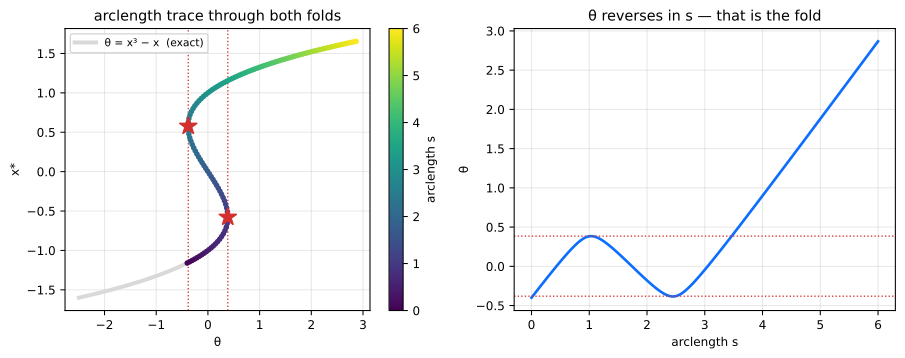
Colour is arclength, so the trace reads as one continuous walk: up the lower branch, through the first fold (star), back across the middle branch, through the second fold, and out along the upper branch. The right panel is the same run against arclength — \(\theta\) rises, reverses, and rises again. Those reversals are precisely where a method that treats \(\theta\) as the independent variable has nowhere to go.
(Regenerate with python3 scripts/make-docs-figures.py.)
direction sets the sign of the initial step in \(\theta\);
newton_tol / newton_max control the corrector.
Chemical-engineering example: phase envelopes and inverse design
The phase boundary of a multicomponent mixture is a natural fold problem. With equilibrium ratios \(K_i=y_i/x_i\), a fixed vapor fraction \(\beta\), and a Peng–Robinson fugacity model, an isopleth is the square system
\[ \log K_i + \log\phi_i^v(y,T,P)-\log\phi_i^l(x,T,P)=0, \qquad \sum_i(y_i-x_i)=0. \]
A pressure ladder stops at the cricondenbar, while a prescribed-parameter predictor can silently land on the algebraically exact but physically vacuous \(K_i=1\) branch. Pseudo-arclength continuation passes the fold. For a quantitative extremum, the example then solves the augmented simple-fold system
\[ F(x,\theta,q)=0,\qquad F_xv=0,\qquad v^Tv=1, \]
where \(q\) contains \(N-1\) unconstrained log-ratio composition coordinates and one binary interaction parameter \(k_{ij}\). This removes the arclength-grid error from the reported cricondenbar or cricondentherm and makes the refined extremum differentiable with respect to the physical design.
Notebook
34_phase_envelope_peng_robinson.ipynb
contains the complete workflow and uses the tested
pounce.examples.phase_envelope implementation. It independently reproduces
the 282.53 K methane/propane maxcondentherm reported by
Deiters and Bell (2019), validates every
binary design derivative by central perturbations that each retrace the full
envelope, and verifies an inverse composition design with another fresh trace.
The guards in the example check equation residuals, composition normalization, distance from the trivial branch, and admissibility of the selected cubic roots. They are deliberately described as local guards: a production flash or envelope code should also perform a global tangent-plane-distance stability test and should not treat this example module as a general property package.
Inverse / uncertainty mapping: inverse_map_rhs
A related problem runs the map backwards: given a prescribed path in output space, what input path produces it? For an output \(y = h(x^*(\theta), \theta)\) of the embedded optimizer, the Alves–Kitchin–Lima inverse map integrates
\[ \frac{d\theta}{ds} = \Big(\frac{\partial y}{\partial \theta}\Big)^{-1} \frac{dy}{ds}, \qquad \frac{\partial y}{\partial \theta} = \frac{\partial h}{\partial x} J + \frac{\partial h}{\partial \theta}, \]
with \(J = \partial x^*/\partial\theta\) off the held factor and the output Jacobians by autodiff. Note this is a linear solve against the sensitivity, not a Jacobian-vector product, so \(\partial y/\partial \theta\) must be square: the output dimension must equal the parameter dimension (with the default identity output, \(n = p\)).
inverse_map_rhs builds the right-hand side and hands the stepping to an
off-the-shelf integrator — no hand-rolled stepper, no NLP inversion:
Here the output is the solution itself (\(h = x^*\), the default), and \(f = (x - \theta)^2 + 0.05x^4\) makes the map explicit (\(\theta = y + 0.1y^3\)) so the trace can be checked analytically:
import diffrax
from pounce.jax import inverse_map_rhs
def f_inv(x, p):
return (x[0] - p[0]) ** 2 + 0.05 * x[0] ** 4
jp_inv = JaxProblem(f=f_inv, g=None, n=1, m=0, p_example=jnp.zeros(1),
options={"tol": 1e-11, "print_level": 0, "sb": "yes"})
# A closed loop in output space, and its velocity.
y_of_s = lambda s: jnp.array([0.5 + 0.3 * jnp.sin(2 * jnp.pi * s)])
dy_ds = lambda s: jnp.array([0.3 * 2 * jnp.pi * jnp.cos(2 * jnp.pi * s)])
rhs = inverse_map_rhs(jp_inv, dy_ds) # f(s, θ) -> dθ/ds
y0 = float(y_of_s(0.0)[0])
theta0 = jnp.array([y0 + 0.1 * y0 ** 3]) # θ0 with x*(θ0) = y(0)
term = diffrax.ODETerm(lambda s, theta, args: rhs(s, theta))
sol = diffrax.diffeqsolve(
term, diffrax.Dopri5(), t0=0.0, t1=1.0, dt0=0.01, y0=theta0,
stepsize_controller=diffrax.PIDController(rtol=1e-9, atol=1e-11),
max_steps=100_000,
)
A closed loop in output space must come back to a closed loop in input space; that round trip is the cheapest correctness check you have on an inverse map.
Under JAX the whole evaluation (solve, sensitivity, output Jacobians,
linear solve) rides one jax.pure_callback, so the RHS is traceable and
composes under jax.jit and diffrax. Under PyTorch it is a plain
callable — drop it into scipy.integrate or torchdiffeq.
warm=True warm-starts each inner solve from the previous evaluation’s
primal, duals, and barrier \(\mu\). The converged \(x^*(\theta)\) is
unique, so the result is unchanged up to solver tolerance; only the
iteration count drops, by a measured ~1.4–1.7× on smooth low-dimensional
maps. Interior-point methods warm-start weakly, so if the NLP is
expensive and the map is smooth, prefer PathFollower — its predictor
skips solves entirely rather than making each one cheaper.
When to use which
| Situation | Use |
|---|---|
| Active set may change along the path | PathFollower.follow — the robust default |
| The path folds (singular \(\partial x^*/\partial\theta\)) | PathFollower.trace_arclength |
| Smooth map, fixed active set, want adaptive stepping / dense output | inverse_map_rhs + diffrax / scipy |
All three run on the same held KKT factor; a predict step is one back-solve, never an NLP re-solve.
Scope and limitations
PathFollower supports equality constraints (cl == cu) and
variable bounds. Two-sided inequalities (cl != cu) are rejected with an
explicit error rather than silently mis-traced: the smooth-drift
monitor’s constraint residual (max|g|, valid only at \(g = 0\)) and
the arclength system \(R\) (which treats every row as \(g = 0\)) are
not valid for them. Reformulate inequalities with slack equalities.
trace_arclength additionally requires a scalar parameter and a
fixed active set along the traced branch; use follow for a
multi-dimensional path. Bifurcation and branch switching, Hopf detection,
general DAE continuation, and inequality-active folds are out of scope.
See also
notebooks/14_path_following.ipynb— runnable tour of all of the above, with the analytic checks.examples/inverse_map_diffrax.py— standalone 2-D coupled inverse map with a round-trip check.- Sensitivity Analysis — the underlying \(\partial x^*/\partial\theta\) and the active-set margin.
- Python API —
JaxProblem/TorchProblem, anchoring, and factor lifetime.
Curve Fitting
pounce.curve_fit fits a model f(x, *params) to data — the same call shape
as scipy.optimize.curve_fit —
but returns a much richer result and adds capabilities scipy’s fitter does not
have. It runs on pounce’s interior-point solver, so it inherits parameter
constraints, and because the solver keeps its converged factorization it can
hand back the parameter covariance (from the reduced Hessian) and the
data sensitivity ∂params/∂data essentially for free.
import numpy as np
import jax.numpy as jnp
import pounce
def model(x, a, b, c):
return a * jnp.exp(-b * x) + c # write the model with jax.numpy
x = np.linspace(0.2, 5, 40)
y = 3.0 * np.exp(-0.9 * x) + 0.5 + 0.05 * np.random.default_rng(0).normal(size=x.size)
res = pounce.curve_fit(model, x, y, p0=[1, 1, 0])
print(res.summary())
res.popt # fitted parameters
res.pcov # covariance matrix
res.perr # standard errors = sqrt(diag(pcov))
res.ci # (n, 2) confidence intervals at `alpha`
How it differs from scipy.optimize.curve_fit
| scipy.curve_fit | pounce.curve_fit | |
|---|---|---|
Least-squares fit + pcov | ✅ | ✅ |
Weighted (sigma, absolute_sigma) | ✅ | ✅ |
| Box bounds on parameters | ✅ | ✅ |
Relations between parameters (e.g. a + b ≤ 1) | ❌ | ✅ |
| Robust losses with covariance | partial | ✅ (sandwich) |
| Confidence intervals / goodness-of-fit in the result | ❌ | ✅ |
Data sensitivity ∂params/∂data | ❌ | ✅ |
| Exact derivatives via JAX | ❌ | ✅ |
The statistics follow the same conventions as scipy and
pycse.nlinfit: the covariance is
s² · (JᵀJ)⁻¹ with s² = SSE/(m − n) (the reduced χ²) unless
absolute_sigma=True, and confidence intervals use the Student-t quantile
popt ± t_{dof,1−α/2} · perr.
Already modelling in Pyomo?
pyomo_pounce.sens_covariancecomputes the parameter covariance for an estimation model written directly in Pyomo — residuals as constraints, arbitrary surrounding structure — instead of af(x, *params)callable, using the same scale-and-invert-the-reduced-Hessian recipe read from the same held KKT factor. One caveat for nonlinear models:curve_fithere reports the Gauss-Newton covariance2·s²·(JᵀJ)⁻¹(the scipy/nlsconvention, always ≥ 0), whereassens_covariance()reports the observed-information covariance from the exact Hessian; they match for linear models and in the small-residual limit and differ by a few percent on a strongly-curved fit. See Parameter covariance and identifiability. Usecurve_fitwhen the fit is naturally a model-plus-data call (or when you want scipy-matching numbers); usesens_covariance()to interrogate a Pyomo model you already have.
Derivatives: prefer JAX
Accurate derivatives are what make the covariance and sensitivity sharp — and
they let the solver converge in a couple of iterations so the pounce-native
factor route is available. The Jacobian ∂f/∂p is resolved in this order:
- an analytic
jac=<callable>returning(len(x), n_params), - JAX autodiff (the default when the model is written with
jax.numpy), - a finite-difference fallback (used only if neither of the above applies; it emits a warning and the covariance falls back to the Jacobian form).
res = pounce.curve_fit(model, x, y, p0=[1, 1, 0]) # JAX (model uses jnp)
res = pounce.curve_fit(model, x, y, p0=[1, 1, 0], jac=myjac) # analytic
res = pounce.curve_fit(model_np, x, y, p0=[1, 1, 0]) # numpy model -> FD (warns)
Loss functions
Only smooth (C²) losses are supported, because the underlying solver is an interior-point method. Non-smooth L1/MAE is intentionally out of scope; use a robust loss instead.
loss | use |
|---|---|
"sse" (default), "chi2" | ordinary / weighted least squares |
"soft_l1" = "huber" | smooth pseudo-Huber, downweights outliers |
"cauchy" | strong outlier rejection |
"huber" and "soft_l1" are the same smooth (C²) pseudo-Huber loss: a
true piecewise Huber is only C¹ (its curvature jumps at the knee), which the
interior-point solver can’t use, so both names map to the C² form.
res = pounce.curve_fit(model, x, y, p0=[1, 1, 0], loss="huber", f_scale=0.1)
res.cov_source # "sandwich" (robust covariance estimator)
Parameter constraints
Box bounds express positivity / negativity / ranges; constraints=
expresses relations between parameters using the scipy-style dict format.
# positivity, ranges
pounce.curve_fit(model, x, y, p0=[1, 1, 0.2],
bounds=[(0, np.inf), (None, None), (0, 1)])
# a relation: require a + b <= 1 (ineq g(p) >= 0)
cons = [{"type": "ineq", "fun": lambda p: 1.0 - (p[0] + p[1])}]
pounce.curve_fit(model, x, y, p0=[0.4, 0.4, 0], constraints=cons)
When a bound or constraint is active at the optimum, the covariance is
projected onto the active-constraint nullspace (pounce’s reduced Hessian does
exactly this), and the affected parameter is flagged in res.active_mask with
an effectively degenerate confidence interval. res.cov_source reports
"reduced_hessian(projected)" in that case.
Data sensitivity: ∂params/∂data
Pass sensitivity=True to get res.dpopt_ddata, an (n_params, n_data)
matrix whose entry [j, i] is how fitted parameter j moves when data point
y_i is perturbed. This is the implicit-function-theorem influence
∂p*/∂y_i = 2 wᵢ² · H_S⁻¹ gᵢ, computed as a single batched back-solve against
the converged factor (Solver.kkt_solve_many).
By default H_S is the Gauss-Newton Hessian, the same one curve_fit
hands the solver as its search Hessian and the same one behind pcov — so this
is the first-order influence, not the exact derivative of the re-solve. The two
differ by the neglected residual-curvature term Σ rₖ ∇²fₖ, which grows with
the residuals: measured on a 3-parameter exponential, 0.6–10% on an interior
fit and 27–67% where a bound or constraint holds the fit away from its
unconstrained optimum.
sensitivity="exact" removes that gap. It rebuilds the influence from the
exact objective Hessian, obtained by central-differencing the objective
gradient at the optimum — 2n extra gradient evaluations, once. On the same
three cases the error drops to ≤ 0.2%. It cannot reuse the held factor (that
was built from the Gauss-Newton matrix), so it goes through a dense n × n
inverse; on a large-n fit that is the trade.
sensitivity= | cost | error vs. re-solve |
|---|---|---|
True / "gn" | one back-solve per point, effectively free | 0.6–67% |
"exact" | +2n gradient evaluations, dense inverse | ≤ 0.2% |
The Gauss-Newton spread is wide because the dropped term scales with the
residuals, so it depends on the fit and not just the model: the same
three-parameter exponential gives 0.6% interior / 67% bound-active on one
dataset and 10% / 27% on another. Do not carry a number across from one fit to
the next — if it matters, measure it, which is one sensitivity="exact" call.
Use True to rank points by influence — the ranking is stable well before
the magnitude is — and "exact" when a specific number matters
(#923).
Under a robust loss the right-hand side additionally carries the weight
ρ′ + 2zρ″, the same per-point factor the Gauss-Newton Hessian applies. It is
identically 1 for sse. It matters a great deal otherwise: on a fit with real
outliers it reaches -0.12 under cauchy, so before
#925 a downweighted outlier’s
influence was not merely mis-scaled (86% for cauchy, 73% for soft_l1) but
pointed the wrong way. Note that sensitivity="exact" does not repair
this on its own — the exact Hessian is the left-hand side, and this is the
right.
When bounds or general constraints are active, the influence is projected
onto the joint active-constraint nullspace — the same reduced-Hessian recipe
pcov uses. A parameter pinned at a bound gets a row of exactly zero, since it
cannot move at all, and the columns satisfy A · ∂p*/∂y_i = 0 so a perturbation
leaves the active constraints satisfied. Before
#922 the unconstrained formula
was returned regardless, which reported nonzero influence for pinned
parameters, sign errors on the free ones, and columns that violated the very
constraint the fit was solved under.
res = pounce.curve_fit(model, x, y, p0=[1, 1, 0], sensitivity=True)
db = res.dpopt_ddata[1] # sensitivity of parameter b
i = int(np.abs(db).argmax()) # most influential point for b
print("most influential x:", x[i])
The result object
CurveFitResult carries everything in one place and supports dict-style access
(res["popt"]).
| field | meaning |
|---|---|
popt, pcov, perr, ci | parameters, covariance, std errors, confidence intervals |
correlation | normalized covariance |
residuals, sse, rmse, mae | fit residuals and error norms |
r_squared, adj_r_squared | coefficient(s) of determination |
chi_square, reduced_chi_square, dof | χ² statistics and degrees of freedom |
param_names | parameter names inferred from the model signature |
active_mask | which parameters sit on a bound |
cov_source | how the covariance was computed |
dpopt_ddata | data sensitivity (if requested) |
optimize_result | the raw solver info dict |
Methods: res.predict(xnew), res.confidence_band(...) (see below), and
res.summary() (a formatted report).
Confidence vs prediction bands
res.confidence_band(x, kind=..., sigma=...) returns (yhat, lower, upper),
but there are two different bands and they answer different questions.
-
Confidence band (
kind="confidence", the default) — uncertainty in the fitted curve itself, i.e. where the true meanE[y | x]lies. Its variance isgᵀ Σ g(delta method,g = ∂f/∂p,Σ = pcov). It is narrow, it shrinks toward zero as you collect more data, and most data points fall outside it — that is correct, not a miscalibration. -
Prediction band (
kind="prediction") — uncertainty in a new observationy = f(x) + ε. It adds the observation-noise variance:gᵀ Σ g + σ²(x). This is the band that contains about1 − alphaof the data; it does not shrink to zero, it floors at the noise level.
Both use the Student-t quantile t_{dof, 1−α/2} (not the normal z), so the
degrees of freedom are accounted for.
yhat, lo, hi = res.confidence_band(xx) # band on the curve
yhat, lo, hi = res.confidence_band(xx, kind="prediction") # band on new data
For the prediction band the noise level σ(x) is taken from the fit: the
sigma weights you supplied, scaled by the fitted variance s² (so a
heteroscedastic fit gives a heteroscedastic band — wider where the noise is
larger), or the homoscedastic level √s² if the fit was unweighted. Pass an
explicit sigma= (scalar or array over x) to override it, e.g. for new x
where you know the measurement noise.
Rule of thumb: use the confidence band to show how well the model is pinned down; use the prediction band to show where the next measurement will land. If “~95% of my points should be inside,” you want the prediction band.
Out-of-core data: curve_fit_streaming
When the dataset is too large to hold in memory, pounce.curve_fit_streaming
fits exactly the same model and objective as curve_fit, but reads the data
in mini-batches instead of as in-memory arrays. The solver’s objective,
gradient, and Gauss-Newton Hessian are all additive sums over data points, so
streaming and accumulating them produces the identical fit — only one batch
(plus an n_params × n_params matrix) is ever resident.
Instead of xdata, ydata you pass a data_source: a zero-argument callable
(a factory) that returns a fresh iterator of (x_batch, y_batch) — or
(x_batch, y_batch, sigma_batch) — tuples. It is called once per solver pass,
so it must yield the full dataset every time (re-open the file, re-slice the
mmap, …); a one-shot iterator is rejected.
import numpy as np
import pounce
# 50M points living on disk — re-read in 100k-row batches each pass
x_mm = np.load("x.npy", mmap_mode="r")
y_mm = np.load("y.npy", mmap_mode="r")
BATCH = 100_000
def data_source(): # fresh iterator every call
for i in range(0, x_mm.shape[0], BATCH):
yield x_mm[i : i + BATCH], y_mm[i : i + BATCH]
res = pounce.curve_fit_streaming(model, data_source, p0=[1, 1, 0])
print(res.summary())
res.popt, res.pcov, res.perr # identical to the in-memory fit
Notes and trade-offs:
- Re-readable, not one-shot. Each solver iteration (~10–50) makes one pass
over
data_source, so it must replay the whole dataset on every call. Uniform batch sizes avoid an extra JAX retrace on a smaller final batch. - Provide
p0. The data-driven seedcurve_fituses needs a full in-memory pass, so give a starting vector. With onlyn_paramsthe seed falls back to ones clipped intobounds. If the model signature doesn’t name the parameters and you omitp0, passn_params=. - What you get back is the same — all scalar diagnostics (SSE, χ², R², dof)
and the full covariance / standard errors / confidence intervals are computed
and are bit-for-bit the in-memory result. Everything else carries over too:
weighted fits (
sigmabatches), robustloss(the sandwich covariance is accumulated over batches),bounds, andconstraints(active sets project the covariance exactly as in the in-memory fit). - What is omitted — the two
O(n_data)outputs are not returned:res.residualsand the data sensitivityres.dpopt_ddataare bothNone(they are the size of the data and would defeat the purpose).confidence_bandstill works for newx, but uses a homoscedastic noise level since the per-pointsigmais not retained.
Multiple parameter sets: curve_fit_minima
Nonlinear least squares is generally non-convex, so the objective curve_fit
minimizes can have several local minima — distinct parameter sets that each
explain the data (peak-assignment ambiguity, frequency aliasing in sinusoids,
amplitude/decay trade-offs in sums of exponentials, sign/label symmetry, …).
pounce.curve_fit_minima drives find_minima over exactly
the same objective — same sigma weighting, robust loss, f_scale,
constraints, and resolved Jacobian — to enumerate those minima, then refines
each into a full CurveFitResult:
fits = pounce.curve_fit_minima(
model, x, y,
bounds=[(0, 3), (-10, 10), (0.1, 2.5)], # finite bounds = the search box
method="multistart", # or "deflation" | "flooding" | "mlsl" | ...
n_minima=5,
seed=0,
)
for r in fits: # ranked best (lowest SSE) first
print(r.popt, r.sse, r.r_squared)
fits[0].summary() # each is a full CurveFitResult
It reuses everything curve_fit does: the data-driven seed becomes the
search’s starting point, the model Jacobian is reused as the search gradient
and the Gauss-Newton matrix as the search Hessian — which sharpens the basin
escapes and lets find_minima certify each point as a true minimum (rejecting
saddles) before recording it. The returned list is ranked by SSE and may contain
fewer than n_minima entries when the landscape has fewer minima.
Finite
boundsare strongly recommended — they define the box the search samples / repels within. With the default unbounded box the search degrades to jittered restarts around the seed. Themethod,n_minima,max_solves,patience,dedup, andseedarguments pass straight through tofind_minima; see Finding Multiple Minima and Choosing a Method.
See python/examples/curve_fit_demo.py and the
22_curve_fit.ipynb
and
23_curve_fit_minima.ipynb
notebooks for complete, runnable walkthroughs.
Boundary Value Problems
pounce.bvp.solve_bvp solves two-point boundary value problems
dy/dx = f(x, y, p), a ≤ x ≤ b
bc(y(a), y(b), p) = 0
with a drop-in for scipy.integrate.solve_bvp. It
discretises the problem with the 4th-order Lobatto IIIA (Hermite–Simpson)
collocation scheme — the same one SciPy uses — and solves the resulting
square root-find as a pounce feasibility NLP (min 0 subject to the
collocation residual R(z) = 0).
The motivation is differentiability: because the discretised problem is
an NLP, the converged solution z*(θ) is differentiable with respect to
any parameter θ baked into f or bc, via the implicit-function theorem
on the collocation KKT system. The differentiable entry points live in the
autodiff frontends, pounce.jax.solve_bvp and pounce.torch.solve_bvp.
A runnable tour of every feature is in
python/notebooks/24_boundary_value_problems.ipynb, and a SciPy speed/accuracy comparison inpython/examples/bvp_scipy_compare.py(plus the GLC tritium-column case inpython/examples/glc_feral_vs_scipy.py). The GLC problem was suggested by Milan Rother and is adapted from pathsim-chem (MIT License).
Drop-in NumPy solve
import numpy as np
import pounce
# y'' = -|y|, y(0) = 0, y(4) = -2
def fun(x, y):
return np.vstack((y[1], -np.abs(y[0])))
def bc(ya, yb):
return np.array([ya[0], yb[0] + 2.0])
x = np.linspace(0, 4, 41)
y0 = np.zeros((2, x.size)); y0[0] = 1.0
res = pounce.solve_bvp(fun, bc, x, y0)
print(res.success, res.rms_residuals.max())
res.sol(np.linspace(0, 4, 9)) # cubic-Hermite interpolant, shape (n, 9)
The call signature and the returned bunch (sol, x, y, yp, p,
rms_residuals, niter, status, message, success) match SciPy, so
existing code consumes the result unchanged. Unknown parameters work the
same way — pass p=[...] and a fun(x, y, p) / bc(ya, yb, p):
# Eigenvalue: y'' + k² y = 0, y(0)=y(1)=0, y'(0)=k
def fun(x, y, p): return np.vstack((y[1], -p[0]**2 * y[0]))
def bc(ya, yb, p): return np.array([ya[0], yb[0], ya[1] - p[0]])
res = pounce.solve_bvp(fun, bc, x, y0, p=[3.0])
res.p # ≈ [π]
Differences from SciPy
- Mesh.
adaptive=True(default, like SciPy) refines the mesh to meettol.adaptive=Falsesolves the mesh you pass as-is — fast and predictable, and the mode the differentiable frontends use internally (a fixed mesh keepsθ ↦ ysmooth). verbosemirrors SciPy:1prints a one-line termination report,2also prints per-iteration mesh-refinement progress.- Solver (
method).method="newton"(default) runs a modified (frozen-Jacobian) Newton on the square collocation system, factorising theN×NJacobian with FERAL’s unsymmetric sparse LU (pounce._pounce.SparseLU) and reusing that factor across steps (refactoring only when progress stalls — the same trick SciPy’ssolve_newtonuses). Both scale linearly in the mesh; at equal mesh pounce is typically faster than SciPy (≈0.6–1.0×), including large nonlinear problems, because the factorisation dominates and it does far fewer of them. The Jacobian is the exact sparse collocation Jacobian (analytic per-node∂f/∂yblocks fromfun_jac/bc_jacif supplied, else a vectorised finite difference that perturbs each state across the whole mesh —O(n)funcalls, notO(n·m)).method="ipm"instead poses the system as a pounce feasibility NLP and solves with the interior-point method (factoring the2Nsaddle KKT each iteration — slower, but the basis for the constrained solver below). Accuracy is identical to SciPy either way. - Singular term
Sis not yet supported.
Differentiable solves (JAX / PyTorch)
The differentiable frontends take fun(x, y, p, theta) / bc(ya, yb, p, theta) (drop p when there are no unknown parameters), where theta is
the autodiff knob, and return a solution whose y / p participate in the
autodiff graph. Everything fun / bc close over is differentiable: a
physical coefficient, a boundary value, or the sensitivity of a solved-for
unknown parameter.
import jax, jax.numpy as jnp
import pounce.jax as pj
# Bratu: y'' + λ e^y = 0, y(0)=y(1)=0
def fun(x, y, lam): return jnp.vstack((y[1], -lam * jnp.exp(y[0])))
def bc(ya, yb, lam): return jnp.array([ya[0], yb[0]])
x = jnp.linspace(0, 1, 51)
y0 = jnp.zeros((2, x.size))
def y_mid(lam):
sol = pj.solve_bvp(fun, bc, x, y0, theta=lam)
return sol.y[0, sol.y.shape[1] // 2]
grad = jax.grad(y_mid)(1.0) # d y(0.5) / d λ
J = jax.jacobian(lambda l: pj.solve_bvp(fun, bc, x, y0, theta=l).y[0])(1.0)
The PyTorch frontend mirrors this exactly:
import torch
import pounce.torch as pt
torch.set_default_dtype(torch.float64)
lam = torch.tensor(1.0, dtype=torch.float64, requires_grad=True)
sol = pt.solve_bvp(fun, bc, x, y0, theta=lam) # fun/bc written with torch ops
sol.y[0, 25].backward()
lam.grad
What’s differentiable
| Target | How | Demo |
|---|---|---|
ODE/BC coefficient θ | jax.grad / .backward() through sol.y | examples/bvp_scipy_compare.py (a) |
| Boundary value | put it in bc and differentiate θ | (b) |
Solved-for unknown p* | differentiate sol.p | (c) |
Full solution dy/dθ | jax.jacobian over sol.y | (d) |
Vector θ | one reverse pass | (e) |
| Second derivative / Hessian | second_order=True | (f) |
All of these are validated against finite differences to ~1e-11 in
python/examples/bvp_scipy_compare.py, which also benchmarks accuracy and
speed against SciPy.
Differentiable solver backends (method)
The differentiable solve_bvp (both pounce.jax and pounce.torch) takes
the same method switch:
method="newton"(default) — the fast path. Forward is the FERAL sparse-LU Newton solve; the backward is the implicit-function-theorem VJPdz/dθ = −R_z⁻¹ R_θ, solvingR_zᵀu = vwith the same sparse LU (SparseLU.solve_transpose). Both directions stay on theNsystem — no2Nsaddle — so it is fast and differentiable. First-order only (the forward is an opaque callback).method="ipm"— routes the forward throughpounce.jax.solve/pounce.torch.solve(the interior-point feasibility NLP). Needed for second-order derivatives (below).
Second-order derivatives
With method="ipm", pass second_order=True to wrap the solve in a
custom_jvp whose tangent rule re-applies the implicit-function theorem to
the square collocation root-find,
dz/dθ = -(∂R/∂z)⁻¹ (∂R/∂θ),
and recovers z* through the same custom-ruled primitive, so JAX
recurses to arbitrary order:
def y_mid(lam):
sol = pj.solve_bvp(fun, bc, x, y0, theta=lam,
method="ipm", second_order=True)
return sol.y[0, sol.y.shape[1] // 2]
jax.grad(jax.grad(y_mid))(1.0) # d²y(0.5)/dλ² — works
The cost is one extra forward solve per differentiation level (the rule
re-solves to recover z*); the opaque forward is still only evaluated for
primal values. Leave it off for plain gradient-based training; turn it on
for Hessians / Newton-type outer loops.
Adaptive mesh refinement
Adaptive refinement is on by default (like SciPy), driven by tol /
max_nodes. Pass adaptive=False to solve the given mesh as-is:
res = pounce.solve_bvp(fun, bc, x, y0, tol=1e-6, max_nodes=2000) # adaptive
res = pounce.solve_bvp(fun, bc, x, y0, adaptive=False) # fixed mesh
Each round: solve on the current mesh (to round-off), estimate the relative
RMS residual of the continuous solution per interval with a 5-point Lobatto
quadrature at the superconvergent Gauss points x_mid ± ½h√(3/7), insert
nodes where it exceeds tol (one node, or two if it’s >100× over), and
re-solve warm-started off the previous solution. This is a faithful port of
SciPy’s estimator and refinement rule, so it reproduces SciPy’s mesh
sequence essentially node-for-node:
| problem | SciPy nodes | pounce nodes | solution agreement |
|---|---|---|---|
y''+y=0 | 6 → 31 | 6 → 31 | 1e-16 |
| Bratu | 5 → 29 | 5 → 29 | 6e-17 |
| `y’’=- | y | ` (kink) | 11 → 58 |
Adaptive is numpy-only — the differentiable pounce.jax /
pounce.torch paths are always fixed-mesh, because a parameter-dependent
mesh would make y(θ) nonsmooth and break the gradients. Pick a fixed mesh
fine enough for your θ range, or run an adaptive solve once to size it.
Constrained / optimal-control BVPs (pounce-unique)
pounce.solve_bvp_constrained solves a collocation BVP subject to bounds
on the states/parameters and inequality path constraints, optionally
minimising an objective:
dy/dx = f(x, y, p), bc(y(a), y(b), p) = 0
ylo <= y(x) <= yhi (state bounds, every node)
clo <= c(x, y, p) <= chi (path constraints, every node)
minimise J(Y, p) (optional)
This is a genuine NLP, so it goes through pounce’s interior-point method
(not the Newton path), and SciPy’s solve_bvp cannot express any of it.
A fully determined BVP (n + k boundary residuals) has a unique solution,
so constraints only bite when there is freedom — return fewer boundary
residuals and let the objective resolve the remainder (an optimal-control
collocation):
import numpy as np, pounce
# minimise ∫(y-1)² s.t. y''=0, y(0)=0 (slope free) — optimal control.
def fun(x, y): return np.vstack((y[1], np.zeros_like(y[0])))
def bc(ya, yb): return np.array([ya[0]]) # one boundary residual → 1 DOF
x = np.linspace(0, 1, 41); y0 = np.zeros((2, x.size)); y0[0] = x
obj = lambda Y, p: np.trapezoid((Y[0] - 1.0) ** 2, x)
r = pounce.solve_bvp_constrained(fun, bc, x, y0, objective=obj) # y(1) ≈ 1.5
rc = pounce.solve_bvp_constrained(fun, bc, x, y0, objective=obj,
y_bounds=([-np.inf, -np.inf], [1.2, np.inf]))
rc.y[0].max() # ≤ 1.2 — the bound is active and respected
path=path(x, Y, p) -> (q, m) with path_bounds=(clo, chi) adds inequality
path constraints at every node (assembled with a sparse block-diagonal
Jacobian). The objective’s gradient is finite-differenced; the Lagrangian
Hessian uses pounce’s limited-memory quasi-Newton (the path constraints
make it nonzero in general).
How it works
For a mesh x₀ < … < x_{m-1}, each interval contributes the Hermite–Simpson
collocation residual
y_mid = (y_i + y_{i+1})/2 - h/8 (f_{i+1} - f_i)
r_i = y_{i+1} - y_i - h/6 (f_i + 4 f(x_mid, y_mid) + f_{i+1}) = 0
Stacking the n·(m-1) collocation residuals with the n + k boundary
residuals gives a square system R(z) = 0 in the unknowns
z = [vec(Y); p] of size N = n·m + k. pounce solves it as min 0 s.t.
R(z) = 0. At the solution the interior-point method holds the KKT factor
of [[H, Jᵀ], [J, 0]] with J = ∂R/∂z; for this all-equality, no-bounds,
zero-objective problem the generic
implicit-diff backward collapses to the Newton
sensitivity
dz*/dθ = -(∂R/∂z)⁻¹ (∂R/∂θ),
which is exactly what jax.grad / autograd return — no BVP-specific
backward code. The collocation residual itself is shared verbatim across
the NumPy, JAX, and PyTorch paths (pounce/bvp/_core.py).
Uncertainty-Aware Catalyst-Pellet Inverse Design
Notebook
37_catalyst_pellet_inverse_design.ipynb
is a reproducible, activity-only inverse-design study for one spherical,
nonisothermal CO2-methanation pellet. It is intentionally smaller than a
pellet-in-reactor co-design: the point is to make the equations, exact
derivatives, physical checks, covariance model, and robust redesign auditable
in one POUNCE example.
The reusable implementation is in pounce.examples.catalyst_pellet. The
notebook records the source commit, model revision, package versions, solver
tolerances, mesh, and activity basis in its saved output.
Scope and source map
The chemical kinetics are the four-species CO2 methanation correlation of Koschany, Schlereth, and Hinrichsen. The particle size, pressure, composition, solid density, and thermal conductivity are anchored to the structured-particle study of Zimmermann, Bremer, and Sundmacher. The reactor model in that paper is not copied: the tutorial prescribes one bulk state and finite external films.
| Quantity | Tutorial value | Status |
|---|---|---|
| pellet radius | 1.25 mm | Zimmermann et al., 2.5 mm particle diameter |
| pressure | 5 bar | Zimmermann et al. |
bulk mole fractions (CO2, H2, CH4, H2O) | (0.2, 0.8, 0, 0) | Zimmermann et al. inlet composition |
| bulk temperature | 555 K | Koschany kinetic reference temperature; replaces the reactor inlet temperature |
| solid density | 4500 kg m^-3 | Zimmermann et al. |
| effective thermal conductivity | 2.5 W m^-1 K^-1 | fixed-particle value used by Zimmermann et al. |
| pellet porosity | 0.35 | explicit tutorial assumption |
| effective diffusivities | (1.0, 2.8, 1.2, 1.1)e-6 m^2 s^-1 | explicit tutorial assumptions for (CO2, H2, CH4, H2O) |
| external mass-transfer coefficients | (0.08, 0.14, 0.09, 0.09) m s^-1 | explicit tutorial assumptions |
| external heat-transfer coefficient | 250 W m^-2 K^-1 | explicit tutorial assumption; selected before optimization to keep the uniform reference on a steady low-temperature branch, not fitted to a target profile |
| reaction enthalpy | -164 kJ mol^-1 CO2 | fixed tutorial thermochemical approximation |
| temperature ceiling | 613 K | upper end of the published kinetic-correlation range, stricter than the 725 K particle-design limit in Zimmermann et al. |
| mean catalyst activity | 0.16 | explicit design inventory |
Every assumption above is a field of PelletConfig; none is hidden in the
optimizer. Replace the assumed transport data before treating the calculation
as a design for a particular support or reactor.
Primary references:
- F. Koschany, D. Schlereth, and O. Hinrichsen, Applied Catalysis B 181 (2016) 504-516, doi:10.1016/j.apcatb.2015.07.026.
- R. T. Zimmermann, J. Bremer, and K. Sundmacher, Chemical Engineering Journal 387 (2020) 123704, doi:10.1016/j.cej.2019.123704.
- R. Baratti, H. Wu, M. Morbidelli, and A. Varma, Chemical Engineering Science 48 (1993) 1869-1881, doi:10.1016/0009-2509(93)80357-V.
Equations and units
For species i, positive nu_i denotes production. In a spherical pellet,
(1/r^2) d/dr (r^2 D_i dc_i/dr) + nu_i rho_cat a(r) r_K(c,T) = 0
(1/r^2) d/dr (r^2 k_eff dT/dr)
+ (-Delta H) rho_cat a(r) r_K(c,T) = 0
with stoichiometry nu = (-1, -4, 1, 2). Concentrations are mol m^-3,
temperature K, D_i m^2 s^-1, k_eff W m^-1 K^-1, and r_K mol CO2
(g_cat s)^-1. The ideal-gas relation converts cell concentrations to partial
pressures in bar for the kinetic law.
The Koschany rate is
r_K = k sqrt(p_H2 p_CO2)
[1 - p_CH4 p_H2O^2 / (K_eq p_CO2 p_H2^4)]
/ [1 + K_OH p_H2O/sqrt(p_H2)
+ K_H2 sqrt(p_H2) + K_mix sqrt(p_CO2)]^2.
The Arrhenius/van’t Hoff constants and their units are collected in
KoschanyKinetics. At 555 K, 1 bar CO2, 4 bar H2, and zero products, the
implementation returns 9.084226002938914e-5 mol (g_cat s)^-1; CI pins this
published-table calculation independently.
At r=0, every flux is zero. At r=R, finite films impose inward species
transfer k_m,i (c_i,bulk - c_i,surface) and outward heat transfer
h (T_surface - T_bulk). The discretization uses equal-volume spherical
finite volumes. The center face has exactly zero area, so it never evaluates a
numerical 1/r term. Summing the cell equations reproduces the external molar
and heat fluxes; the test and notebook report both closure errors.
Validation ladder
The tutorial does not optimize until these checks pass:
-
solve_first_order_spherereproduces the analytical sphere effectiveness factoreta(phi) = (3/phi) [coth(phi) - 1/phi]from reaction-limited through diffusion-limited conditions.
-
The uniform four-species pellet closes each integrated species balance and the energy balance, stays positive, respects the 613 K ceiling, responds in the expected direction when the external film is slowed, and is re-solved on a finer mesh.
-
The implicit-function derivative
ds/da = -(dR/ds)^-1 (dR/da)is checked against full central perturb-and-resolve calculations for production and peak temperature. -
A small nested outer optimization and the simultaneous POUNCE NLP are timed and compared. They use the same fixed-mesh physics but different nonlinear algorithms. Agreement supplies an independent route check; the simultaneous form is retained because all balance equations, state bounds, the inventory, and the thermal ceiling remain explicit to POUNCE.
-
The two routes are re-compared with the thermal ceiling active, not merely slack, because they enforce it by different mechanisms (see below).
The optimized profile is always re-solved after interpolating its state to a finer finite-volume mesh. That forward refinement is outside the optimization NLP and catches basis/mesh artifacts.
Two routes, one thermal ceiling, two mechanisms
temperature_limit_k is a design constraint, and both routes enforce it,
but not in the same place:
solve_design(simultaneous) carries it as an upper bound on the temperature state variables. POUNCE sees the constraint directly and the states never leave the feasible box.solve_nested_designcarries it as an explicit SLSQP inequality evaluated on the converged inner solution,temperature_limit_k - max(T) >= 0.
That difference forces a third number into PelletConfig. The nested inner
solve is a bounded least-squares root solve, so if its temperature box were
also temperature_limit_k, a candidate hot enough to violate the ceiling
could not converge: it would stall against the bound with a nonzero energy
residual, and the outer optimizer would be handed a failed state solve instead
of a negative margin. It could then never distinguish “this design is too hot”
from “the physics did not converge”, and would abort on the first thermally
difficult candidate rather than steering away from it (gh#787).
The inner solve therefore gets its own numerical bracket,
state_temperature_floor_k to state_temperature_ceiling_k (400 K to 900 K by
default), which deliberately straddles the 613 K design ceiling. The bracket is
chosen loose enough that the design constraint always binds first, and tight
enough to keep the root solve off the ignited branch. That branch is close: for
the nominal parameters, lowering the external heat-transfer coefficient turns
the low-temperature branch back just above a 613 K peak — it still converges at
h = 171.5 W m^-2 K^-1 (612.7 K) and no longer converges at
h = 170 W m^-2 K^-1. Past that fold the only remaining steady state is the
mass-transfer-limited runaway, whose external Prater temperature rise
(-Delta H) k_m c_bulk / h is of order 10^3 K here — far outside the 453 to
613 K Koschany range, and not a state the tutorial should ever return.
The bracket is not a kinetic-validity claim. A converged state above
temperature_limit_k is extrapolating the fit; it is reported as thermally
infeasible (PelletSolution.thermal_margin_k < 0,
thermally_feasible is False) and is never returned as a design.
PelletSolution.success stays a statement about the state solve alone, so the
two failure modes remain separable at the API level. Below the turning point
the distinction is real and the routes agree: with the ceiling moved to 570 K,
under the 572.5 K peak of the equal-inventory uniform pellet, both routes drive
the constraint active and return the same design.
Nominal design problem
The pellet volume is divided into a small number of equal-volume activity zones. The finite-volume cell count must be divisible by the zone count; the public solve/design/refinement functions reject other combinations so catalyst inventory cannot drift when the mesh changes. The NLP maximizes normalized methane production with a quadratic manufacturability penalty,
maximize production / production_uniform
- lambda sum_j (a[j+1] - a[j])^2
subject to 0 <= a[j] <= 1
sum_j volume_fraction[j] a[j] = 0.16
species balances, energy balance, c_i >= 0, T <= 613 K.
The T <= 613 K row is the design ceiling in both routes; only the mechanism
that enforces it differs, as described above.
lambda=0.5 is fixed before the solve. The notebook compares equal-inventory
uniform, ideal step egg-shell, and regularized optimized profiles. The
unregularized bounded-loading limit is shell-like and step-like, consistent
with the classical loading result of Baratti et al.; regularization trades a
small amount of production for a less abrupt outer profile.
Zimmermann et al. obtained a different egg-yolk motif: active core plus an inert, low-permeability shell, while jointly changing activity, permeability, thermal conductivity, and a reactor trajectory. This tutorial holds permeability and conductivity fixed and optimizes activity in one prescribed bulk state, so its outer-active activity profile is not a reproduction of their coupled optimum. The shared qualitative result is that bounds and transport create structured, near-step radial designs; the opposite placement is a documented model-form difference, not a parameter-tuning failure.
Covariance and worst-case redesign
The study is labelled synthetic calibration, not experimental validation. It creates log-rate observations for intrinsic powder and two pellet radii, fits two interpretable log multipliers (intrinsic rate and CO2 effective diffusivity), and obtains their covariance from POUNCE’s reduced Hessian. Intrinsic data break the rate/diffusion confounding that apparent pellet rates alone would retain.
The uncertainty set contains the fitted mean and both directions of each
covariance principal axis at 1.645 standard deviations. The robust simultaneous
NLP adds one epigraph variable q and enforces
production_scenario / production_reference >= q
for every scenario while sharing one activity profile. It maximizes q minus
the same manufacturability penalty. The reported guaranteed_production_mol_s
is therefore an enforced lower bound over this finite scenario set, not a distribution-
free or global guarantee. Full sampled nonlinear re-solves are compared with
delta-method standard deviations for production and peak temperature.
Reproduce it
From the repository root, with the Python development environment installed:
PYTHONPATH=python python -m pytest -q \
python/tests/test_catalyst_pellet_example.py
jupyter nbconvert --to notebook --execute --inplace \
python/notebooks/37_catalyst_pellet_inverse_design.ipynb
Limitations
- Every design is a local NLP solution. Two documented initializations agree in the short case, but neither that check nor POUNCE certifies a global optimum for this nonlinear model.
- The low-temperature steady state is not the only one, and it does not always
exist. At the nominal operating point it folds once the external
heat-transfer coefficient drops below roughly
171 W m^-2 K^-1; past that the forward solve reportssuccess=Falserather than jumping to the ignited branch. That is a statement about the model’s steady states, not about the thermal design constraint, andthermal_margin_kis what distinguishes the two. - Effective diffusivities, porosity, films, and reaction enthalpy are tutorial assumptions. Model-form uncertainty is not in the two-parameter covariance.
- Independent Fick diffusion omits Stefan-Maxwell coupling and pressure-driven pore transport; the prescribed bulk state omits axial reactor feedback.
- Activity is piecewise constant. No pore morphology, minimum physical feature size, thermal-conductivity design, permeability design, transient operation, or dead-core/free-boundary model is claimed.
- The finite principal-axis set and local delta method cover nearby parameter uncertainty only. Sampled re-solves validate that local approximation; they do not turn synthetic data into experimental evidence.
Phase-Changing Flash as a Complementarity Problem
Notebook
38_phase_changing_flash_mpcc.ipynb
solves a single vapour–liquid equilibrium stage across a temperature path
that crosses single-liquid, two-phase and single-vapour — with the number
of variables and equations fixed at every point, and the phase logic
carried by two complementarity conditions.
The reusable implementation is pounce.examples.flash_mpcc. The evidence
harness that runs the full route matrix, both traversal directions and the
machine-readable result contract is
benchmarks/flash/;
python/tests/test_flash_mpcc.py is the fast regression.
This is Gate 1 of gh#776. Gate 0 (gh#794) established which POUNCE route is supported for small MPCCs on a corpus that was deliberately not a process model; this is the first model with physics in it, and it stops at one flash.
Scope
| mixture | ethane / n-butane, equimolar feed |
| thermodynamics | Peng–Robinson, classical one-fluid mixing, k_ij = 0 |
| constants | the ethane and n-butane rows of phase_envelope.NATURAL_GAS |
| condition | 10 bar, 34 temperatures from 230 to 360 K |
| unknowns | vapour fraction and both phases’ mole numbers — 5 variables, 8 rows |
| switch points | bubble 268.8896 K, dew 323.3849 K, both interior to the path |
It is not a property package, a tray model, or evidence about anything with more than one equilibrium stage.
What the formulation is, and is not, for
The notebook measures the honest comparison before making any claim: ordinary successive substitution solves every point on this path correctly in 7–10 sweeps, against roughly a hundred interior-point iterations for the complementarity form. As a way of computing one flash, the MPCC loses.
The case for it is composability. Successive substitution is a procedure
with an inner loop and a regime branch, its vapour fraction comes out of a
Rachford–Rice solve that clips to [0, 1] (so its derivative with respect
to an upstream variable is identically zero in the single-phase regions —
wrong, and silently so), and it carries no phase-state certificate. None of
that can be embedded in a simultaneous transcription and handed to one NLP
solver, which is what a tray, a column, or a dynamic startup model needs.
The complementarity form gives up speed to buy a fixed-dimension algebraic system with exact derivatives. The notebook’s job is to establish that it gets the right answers on a problem where the answer is independently known, before it is used where it is not.
The complementarity pairs
The pairing is phase amount against stability slack — not L ⟂ V, which
would say the two phases cannot coexist:
z_i = (1 - beta) x_i + beta y_i balance
ln x_i + ln phi_i^L(x/Sx) = ln y_i + ln phi_i^V(y/Sy) isofugacity
0 <= beta _|_ 1 - Sy >= 0 pair V
0 <= 1 - beta _|_ 1 - Sx >= 0 pair L
At beta = 0 the balance forces x = z, and the isofugacity rows collapse
to Michelsen’s tangent-plane stationarity for the trial vapour; Sy <= 1 is
then exactly TPD >= 0. The complementarity is not an encoding of the
stability test — it is the stability test. At the bubble point beta = 0
and Sy = 1 hold together, so pair V is biactive; at the dew point pair L
is. The two regime switches are exactly the two biactive points.
Verification
Every answer is checked against an independent calculation — Michelsen stability with a multistart per phase label, then Rachford–Rice with a Newton polish — which shares only the Peng–Robinson fugacity primitive with the model. Across all 34 temperatures and all four traversal legs (up and down, cold and warm starts) the regime label always agrees, the vapour fraction and both phase sums agree to about 1e-11, source complementarity products land at 1e-12, and no leg is path-dependent.
That check is not ceremony. The first implementation of the model
normalised inside the logarithm as well as inside phi, which adds
ln(Sy/Sx) to every isofugacity row. The term vanishes identically in the
two-phase region, so the broken model solved, converged, and agreed with
the reference at every two-phase temperature — and was wrong only in the
single-phase regimes, the ones the fixture exists to reach. The notebook
reproduces that defect side by side with the correct row.
Two findings
The supported route’s second half needs a fallback on a square flash.
Gate 0’s scholtes_then_ncp finishes with one exact-product (prod_eq)
solve. Here that solve is refused with Not_Enough_Degrees_Of_Freedom
after zero iterations at every temperature: a square flash has no objective
and no slack, so making both product rows equalities gives six equality rows
against five variables, and POUNCE refuses that before iteration zero,
mirroring upstream Ipopt. Gate 0’s corpus had an objective and never met
this; every equilibrium-stage model meets it by construction.
The gate is correct and is not worked around — the fix is in the route.
Route.finish_fallback substitutes the direct G*H <= 0 lowering where
the equality form cannot run; the two have identical feasible sets (with
G, H >= 0 the inequality is active only at G*H = 0) but an inequality
does not count against the gate. It is a fallback and not a
replacement, and that is measured: run unconditionally over Gate 0’s
corpus the inequality finish ties on cells solved and cells at the known
optimum, beats the equality finish on complementarity by 27×, and returns
three cells below the MPCC optimum where the equality finish returns
none — the one axis Gate 0 chose that finish for. Re-measured with the
conditional in place, Gate 0’s corpus is bit-identical, so the fallback
buys Gate 1 its finishing solve at no cost to Gate 0.
Reverse-mode autodiff loses the Hessian at the bubble point. Under
jax.jit, jax.hessian — which is jacfwd(jacrev(·)) — is wrong by O(20)
at exactly the two path points straddling the bubble temperature, where the
cubic approaches a double root and Cardano’s trigonometric branch runs
arccos into its endpoint singularity. Forward-over-forward is exact there
and costs the same, so pounce.examples.flash_mpcc uses it. The Jacobian is
unaffected in every mode, which is what makes this dangerous rather than
merely wrong: gradients, KKT residuals and converged answers were all
correct while the Hessian was not.
Limitations
- One equilibrium stage, two components, one operating parameter. Nothing here bounds a tray, a column, or a dynamic transcription.
- The reduced DiscOpt GDP/SOS1 regime cross-validation that gh#776 also asks of Gate 1 is blocked on the live DiscOpt slices #1147 then #1148 and was not run; every result file records that explicitly. #1123 is closed and is the design record, not the blocker.
- The path stays far from the mixture critical point. Ethane is above its
own
Tcover the top third of it, which is ordinary and is not a supercritical mixture state. - POUNCE is a local solver. The reference calculation’s stability test is a multistart, a stronger claim than the MPCC’s single stationary point — which is why agreement is evidence and a disagreement would be a finding about the MPCC.
ODE / DAE Initial Value Problems
pounce.ode.solve_ivp integrates stiff initial value problems
M y' = f(t, y), y(t0) = y0
as a drop-in for scipy.integrate.solve_ivp with the
implicit Radau method. It implements the 3-stage Radau IIA collocation
scheme (order 5, L-stable) — the same method SciPy’s Radau uses, and the
classic RADAU5 of Hairer & Wanner. Each step’s coupled stage system is
solved by a simplified Newton iteration whose Jacobian is factored with
FERAL’s sparse LU.
Two things set it apart from SciPy:
- Mass matrix / DAEs. Pass
mass=Mto integrateM y' = f. WhenMis singular this is an index-1 differential-algebraic equation — somethingscipy.integrate.solve_ivpcannot do at all. - Differentiability.
pounce.jax.odeintandpounce.torch.odeintintegrate on a fixed mesh and return the trajectory differentiably with respect to the ODE parameters and the initial condition, via the implicit-function theorem on the collocation system (no per-step adjoint, no unrolled tape).
solve_ivp only implements method="Radau" — the implicit, stiff/DAE
capable method that is pounce’s niche. For non-stiff explicit integration,
SciPy or diffrax are the right tools, and solve_ivp raises for
those methods rather than silently substituting.
A SciPy speed/accuracy comparison, a DAE example, and a differentiability demo are in
python/examples/ode_scipy_compare.py.
Drop-in stiff solve
import numpy as np
import pounce.ode as po
# Van der Pol, mu = 1000 (very stiff)
mu = 1000.0
def f(t, y):
return [y[1], mu * (1 - y[0]**2) * y[1] - y[0]]
res = po.solve_ivp(f, (0.0, 3000.0), [2.0, 0.0],
method="Radau", rtol=1e-6, atol=1e-8, dense_output=True)
print(res.t.shape, res.y.shape) # (nsteps,) (2, nsteps)
ys = res.sol(np.linspace(0, 3000, 1000)) # continuous extension
The call signature and the returned object match SciPy: res.t, res.y
(n, n_points), res.sol (when dense_output=True), res.nfev /
res.njev / res.nlu, res.status / res.message / res.success. The
result is also dict-subscriptable like SciPy’s Bunch, so res["y"] and
"success" in res work too.
Provide an analytic Jacobian with jac=... (else it is estimated by finite
differences), and the usual t_eval, args, first_step, max_step,
rtol, atol controls.
Index-1 DAE via a mass matrix
A singular mass matrix turns the same solver into a DAE integrator. Robertson kinetics, written with the conservation law as an algebraic constraint:
import numpy as np
import pounce.ode as po
k1, k2, k3 = 0.04, 3e7, 1e4
def f(t, y):
return [-k1*y[0] + k3*y[1]*y[2],
k1*y[0] - k3*y[1]*y[2] - k2*y[1]**2,
y[0] + y[1] + y[2] - 1.0] # 0 = ... (algebraic)
M = np.diag([1.0, 1.0, 0.0]) # third equation is algebraic
res = po.solve_ivp(f, (0, 1e4), [1.0, 0.0, 0.0], mass=M,
rtol=1e-6, atol=1e-8)
The algebraic constraint is satisfied to round-off at every accepted step.
Inconsistent initial conditions
The algebraic components of y0 are determined by the differential ones,
so passing a rough guess for them is the normal case. When M is singular,
solve_ivp projects y0 onto the algebraic manifold 0 = f before
integrating — the same IDA_YA_YDP_INIT projection solve_dae uses — so
res.y[:, 0] is always a state the model admits:
# 0 = y1 - y0**2 => a consistent IC with y0 = 1 needs y1 = 1. Pass y1 = 5.
f = lambda t, y: [-y[0], y[1] - y[0] ** 2]
M = np.diag([1.0, 0.0])
r = po.solve_ivp(f, (0.0, 2.0), [1.0, 5.0], mass=M)
print(r.y[:, 0]) # [1. 1.] — projected onto the manifold
Pass consistent="assume" to opt out and use y0 verbatim (the old
behavior) when you know it is already consistent and rely on res.y[:, 0]
echoing your input. consistent is ignored for a non-singular mass (a plain
ODE has no manifold to project onto).
On-manifold output points
Radau IIA is stiffly accurate, so the constraint holds exactly at the solver’s
own accepted steps — but the dense-output polynomial only interpolates it
between them. For a linear conservation law (mass, atom, charge, or site
balance, sum(x) = 1) the interpolant satisfies the constraint exactly, so
there is nothing to fix. For a nonlinear algebraic constraint the
interpolated residual is small but nonzero. Pass project_output=True to
Newton-polish the algebraic components of every requested output point
(res.sol(t) and res.y at t_eval) back onto the manifold:
te = np.linspace(0, 2, 100)
r = po.solve_ivp(f, (0, 2), [1.0, 1.0], mass=M, t_eval=te,
project_output=True) # nonlinear 0 = y1 - y0**2
# max|y1 - y0**2| over te drops from ~5e-9 to ~1e-10
This is off by default, is skipped automatically for affine constraints
(where it buys nothing), and changes only what you read back — never the
trajectory, step sequence, or error control. See
python/examples/dae_manifold_gap.py to measure the interpolation gap on your
own DAE.
Differentiable integration (JAX / PyTorch)
For gradient-based work — fitting ODE parameters, neural ODEs, optimal
control — use the autodiff frontends. They integrate on a fixed mesh
t (make it fine enough to resolve the dynamics) and return the trajectory
differentiably w.r.t. the parameters theta and the initial condition
y0:
import jax, jax.numpy as jnp
import pounce.jax as pj
def f(t, y, theta): # dy/dt, JAX-traceable
k = theta[0]
return jnp.array([-k * y[0]])
t = jnp.linspace(0.0, 2.0, 81)
def y_final(k):
sol = pj.odeint(f, jnp.array([1.0]), t, jnp.array([k]))
return sol.y[0, -1]
val = y_final(0.7) # = exp(-0.7 * 2)
grad = jax.grad(y_final)(0.7) # exact d/dk via the implicit-function theorem
The PyTorch mirror is pounce.torch.odeint, with theta/y0 as tensors and
.backward() filling theta.grad / y0.grad. Both return a solution whose
y is (n, m) in SciPy layout and carries the autodiff graph; sol is a
(detached) cubic-Hermite interpolant for plotting.
Under the hood an IVP on a fixed mesh is just a boundary value problem with
bc(ya, yb) = ya - y0, so the differentiable path reuses pounce’s
Hermite–Simpson collocation and the same FERAL sparse-LU implicit-diff
back-solve as pounce.jax.solve_bvp. The result is the collocation
solution on the mesh you pass, and its gradients are exact for that
discretisation.
Performance
pounce.ode runs the same algorithm as scipy.integrate.solve_ivp(method= "Radau") (a faithful RADAU5), so it takes essentially the same number of steps
and reaches the same accuracy. The wall-clock difference is implementation
overhead: pounce’s stepper is pure Python, SciPy’s inner loop is compiled.
Practical guidance:
- Small / few-state stiff systems (state dimension up to roughly 10–20): pounce is at or below SciPy’s wall-clock. There is effectively no speed penalty for a single solve — and you get DAE support and differentiability on top.
- Large stiff systems (hundreds of states, e.g. a method-of-lines PDE): pounce is currently ~3–4× slower than SciPy in absolute terms, but still sub-second. That gap matters only when solving such a system many thousands of times in a loop — and if you need the differentiable path, SciPy is not an option at all.
Illustrative single-solve timings (best of 7; relative ratios are stable, the absolute milliseconds are machine-dependent):
| problem | states | pounce.ode | SciPy Radau |
|---|---|---|---|
| Van der Pol, μ=1000, t∈[0, 3000] | 2 | ~100 ms | ~105 ms |
| Brusselator (method-of-lines) | 100 | ~80 ms | ~24 ms |
| Brusselator (method-of-lines) | 300 | ~410 ms | ~94 ms |
These reflect three optimisations in the stepper, none of which change accuracy
or the public API: a RADAU5 stage predictor (warm-start each step’s Newton
from the previous step’s collocation polynomial), a wider step-size hold band
(reuse the cached factor across more steps), and reusing the LU pattern
across refactors (build FERAL’s symbolic analysis once per solve, refactor in
place). The last is what makes the large-n cost scale sensibly.
What it is and isn’t
- It is a faithful, L-stable Radau IIA(5) implementation that tracks SciPy’s
Radaustep-for-step on stiff problems and adds DAE and differentiability support SciPy lacks. - It is not a general non-stiff integrator: only
method="Radau"is implemented. - Event detection (
events=) is supported, matching SciPy: each event is a callableg(t, y)with optionalterminal(bool/ count) anddirectionattributes; crossings are root-found on the dense output and returned int_events/y_events(a terminal event stops withstatus=1). - The differentiable layer is fixed-mesh (the mesh keeps
theta → ysmooth); the adaptive solver is the non-differentiablesolve_ivp.
Fully-implicit DAEs
pounce.ode.solve_dae integrates a fully-implicit, index-1
differential-algebraic equation
\[ F(t, y, y’) = 0 \]
with the same Radau IIA(5) collocation as solve_ivp, written in
residual form. This is a pounce extension: scipy.integrate.solve_ivp has no
fully-implicit DAE solver (its closest relative, the mass-matrix form
M y' = f, is also available via solve_ivp(..., mass=M)).
import numpy as np
from pounce.ode import solve_dae
# Robertson kinetics as an index-1 DAE: two rate equations + a conservation law.
k1, k2, k3 = 0.04, 3.0e7, 1.0e4
def F(t, y, yp):
return np.array([
yp[0] - (-k1*y[0] + k3*y[1]*y[2]),
yp[1] - ( k1*y[0] - k3*y[1]*y[2] - k2*y[1]**2),
y[0] + y[1] + y[2] - 1.0, # algebraic constraint (no y')
])
res = solve_dae(F, (0.0, 1e4), y0=[1.0, 0.0, 0.0], rtol=1e-8, atol=1e-10)
print(res.y[:, -1], res.y[:, -1].sum()) # constraint held to round-off
Consistent initial conditions
A DAE solve needs (y0, y'0) with F(t0, y0, y'0) = 0. By default
(consistent="project") solve_dae computes them for you: it detects which
variables are algebraic (those that F does not depend on y' for — a
structurally-zero column of ∂F/∂y') and Newton-projects onto the constraint
manifold, holding the differential y and algebraic y' fixed and solving for
the differential y' and algebraic y (the IDA IDA_YA_YDP_INIT computation).
So a rough y0 (even one off the constraint) and yp0=None are fine:
# y0 violates the constraint (sum = 1.5) and no derivative guess is given —
# both are projected to a consistent state before integrating.
solve_dae(F, (0.0, 1e4), y0=[1.0, 0.0, 0.5], yp0=None)
Pass consistent="assume" with an explicit yp0 to skip the projection (you
guarantee F(t0, y0, yp0) == 0).
On-manifold output points
Radau IIA is stiffly accurate, so F_alg = 0 holds at every accepted step, but
the dense output only interpolates the constraint between steps. For an affine
constraint the cubic satisfies it exactly; for a nonlinear one the
interpolated residual is small but nonzero at intermediate res.sol(t) /
t_eval points. Pass project_output=True to Newton-polish the algebraic
components of each requested output point back onto 0 = F_alg, holding the
differential components fixed:
te = np.linspace(0.0, 2.0, 100)
res = solve_dae(F, (0.0, 2.0), y0=[1.0, 1.0], t_eval=te, project_output=True)
Off by default; skipped automatically when the algebraic rows are affine (it
buys nothing there — see solve_ivp’s DAE section and gh #216). It
changes only what you read from res.sol / res.y, not the trajectory or step
control.
Jacobians
jac(t, y, yp) -> (∂F/∂y, ∂F/∂y') is optional; both blocks are
finite-differenced (2n evaluations) when omitted. Supplying them avoids the
FD cost and improves robustness on stiff problems.
Scope
- Index-1 only. The stage matrix
I₃⊗∂F/∂y' + h(A⊗∂F/∂y)stays nonsingular for index-1 problems; higher index needs index reduction (not done here). - Same adaptive Radau engine as
solve_ivp— stiff-capable, sparse-LU stage solve, dense output (dense_output=True/t_eval=),args=. - Events are not supported.
Differentiable integration (JAX / PyTorch)
pounce.jax.daeint / pounce.torch.daeint integrate F(t, y, y', theta) = 0
on a fixed mesh and return the node trajectory differentiable w.r.t. the
parameters theta and the initial condition y0, via the
implicit-function theorem on the collocation system. As with
pounce.jax.odeint, the mesh is fixed (keeping the solution map smooth);
accuracy is controlled by the mesh. The default scheme is BDF2 (order=2,
L-stable, second-order); pass order=1 for backward Euler. F must be
framework-traceable.
import jax, jax.numpy as jnp
from pounce.jax import daeint
def F(t, y, yp, theta): # y0' + theta*y0 - y1 = 0 ; y0 + y1 = 1
return jnp.array([yp[0] + theta*y[0] - y[1], y[0] + y[1] - 1.0])
t = jnp.linspace(0.0, 2.0, 81)
y0 = jnp.array([0.5, 0.5])
loss = lambda th: daeint(F, y0, t, th)[0, -1] ** 2
g = jax.grad(loss)(1.3) # exact for the discretisation
The forward solve and the R_yᵀ back-solve run on the host (FERAL sparse LU);
the parameter VJP is taken by framework autodiff of the collocation residual at
the converged nodes. Gradients are validated against finite differences in the
test suite (python/tests/test_dae.py).
Glass Box / Black Box Optimization
pounce.trf_minimize solves problems where part of the model is an equation
and part is a program:
\[ \min_x f(x) \quad \text{s.t.} \quad h(x)=0,\; g(x)\le 0,\; y = d(w) \]
Here \(f, h, g\) are ordinary algebra with exact derivatives — the glass box — while \(d\) is a black box: a CFD solve, a converged unit model, a trained network. Something you can call but cannot hand to an NLP solver as equations. \(w\) and \(y\) are subvectors of \(x\).
This is common in process engineering, where a flowsheet is algebraic except for one unit that needs its own simulator.
Why not just fit a surrogate and optimize that?
Because it does not work, and it fails quietly. Consider
\[ \min\; x_1^2 + x_2^2 \quad \text{s.t.}\quad x_2 = x_1^3 + x_1^2 + 1 \]
whose solution is \((0, 1)\) with \(f = 1\). Replace the constraint with a linear surrogate \(x_2 = x_1 + b\), fit \(b\) so the surrogate matches the truth model at the current point, optimize, refit, repeat. Started exactly at the optimum, this iteration walks away and converges to \((-1, 1)\), where \(f = 2\) — a local maximum of the real problem (Biegler 2024, Fig. 2a).
The reason is that matching values gives feasibility but says nothing about optimality, which is a statement about gradients. The trust-region filter method fixes this by (a) correcting the surrogate to match the truth model in both value and slope, and (b) confining each step to a region where that correction is still valid.
Quick start
import numpy as np
import pounce
# Minimize (z-1)^2 + x^2 subject to z = sin(x), treating sin as a black box.
# The variable vector is v = [x, z]: v[0] is the black-box input w,
# v[1] is its output y.
res = pounce.trf_minimize(
fun=lambda v: (v[1] - 1.0) ** 2 + v[0] ** 2,
x0=[0.5, 0.0],
truth_model=lambda w: np.sin(w),
w_index=[0],
y_index=[1],
jac=lambda v: np.array([2 * v[0], 2 * (v[1] - 1.0)]),
truth_jac=lambda w: np.cos(w).reshape(1, 1),
)
print(res.x, res.fun, res.n_truth_evals)
You do not write the relationship y = d(w) into constraints yourself —
w_index and y_index tell the method which variables they are, and it
installs the surrogate constraint into each subproblem.
A worked, runnable version of everything below is in
python/notebooks/29_trust_region_filter.ipynb:
the failure mode plotted against the objective contours, the ZOC/FOC identities
demonstrated on a deliberately bad basis, a basis cost comparison, and the
Eason & Biegler benchmark with its convergence traces.
How it works
At each iteration the method:
-
Builds a corrected surrogate at the current point \(w_k\): \[ r_k(w) = \bar r(w) + \big(d(w_k) - \bar r(w_k)\big) + \big(J_d(w_k) - J_{\bar r}(w_k)\big)(w - w_k) \] The last two terms are the zero- and first-order corrections (ZOC/FOC). They guarantee \(r_k(w_k) = d(w_k)\) and \(J_{r_k}(w_k) = J_d(w_k)\) for any differentiable basis \(\bar r\).
-
Solves an ordinary NLP with \(d\) replaced by \(r_k\), and the trust region imposed as bounds on the decision variables: \(\max(l, u_k - \Delta) \le u \le \min(b, u_k + \Delta)\).
-
Evaluates the truth model at the trial point and measures the mismatch \(\theta = \lVert y - d(w) \rVert\).
-
Accepts or rejects via a filter on \((\theta, f)\) — a Pareto front of trade-offs rather than a penalty function with a parameter to tune.
Because ZOC/FOC makes the surrogate κ-fully linear automatically, the compatibility check and criticality phase of the original 2016 algorithm are unnecessary and \(\Delta\) need not shrink to zero.
Choosing a basis
The basis \(\bar r\) affects efficiency, not correctness — the corrections hold regardless of how good it is.
basis | Samples per iteration | Use when |
|---|---|---|
"zero" (default) | 0 (base point only) | Always start here. The surrogate is a plain linearization; this is also what pyomo.contrib.trustregion does by default. |
"quadratic" | \((n_w{+}1)(n_w{+}2)/2\) | Curvature matters and truth calls are cheap. Grows fast: 66 samples at \(n_w = 10\). |
You can also pass any object implementing the Basis protocol
(fit, predict, jacobian) — a low-fidelity physical model, a symbolic
regression fit, a Gaussian process. No adapter or registration is needed.
There is no "linear", and that is not an oversight
Only curvature survives the correction. Write the ZOC/FOC formula with an affine basis \(\bar r(w) = a + B(w - w_{\text{ref}})\). Its Jacobian is \(B\) everywhere, so the basis-dependent part is
\[ \bar r(w) - \bar r(w_k) - B(w - w_k) = B(w-w_k) - B(w-w_k) = 0 \]
leaving \(r_k(w) = d(w_k) + J_d(w_k)(w - w_k)\) — exactly the "zero" result.
An affine basis is therefore provably incapable of changing anything, while
costing \(n_w + 1\) truth-model calls per iteration to compute it. Before
adding any basis, check whether it is affine in \(w\); if it is, it cannot help.
Two findings from the literature worth internalizing before reaching for something fancy:
- Fit quality does not predict optimization performance. Pedrozo et al. (2025) benchmarked five surrogate families on a CO₂ pooling problem. Radial basis functions had the best R² of any model and needed 8 TRF iterations; Kriging needed 2; global polynomials were worst at both.
- Simple often wins outright. On Williams-Otto, Eason & Biegler (2016) found linear interpolation beat Kriging by 91 truth-model calls to 3141.
Fit the basis once and freeze it
By default a string basis is re-fitted from fresh truth-model samples every iteration. That is the wrong trade when the truth model is expensive, and it is not how the literature uses surrogates: Pedrozo et al. fit an ALAMO model once from a designed dataset and then let ZOC/FOC re-anchor it at each new point.
Pass a pre-fitted object and trf_minimize freezes it — fit is never called,
no per-iteration sampling happens, and each iteration costs one truth-model
evaluation plus a gradient. On the sin example:
| configuration | iterations | truth evals in the loop |
|---|---|---|
"zero" | 7 | 8 |
"quadratic", refit each iteration | 3 | 10 |
"quadratic", frozen | 3 | 4 (+3 upfront) |
Freezing keeps the quadratic’s three-iteration convergence but drops the in-loop cost from 10 calls to 4.
Freezing beats refitting the same basis; it does not automatically beat
"zero". At \(n_w = 3\) on a similar problem the numbers come out:
| configuration | iterations | in-loop | upfront | total |
|---|---|---|---|---|
"zero" | 9 | 10 | 0 | 10 |
"quadratic", refit | 4 | 41 | 0 | 41 |
"quadratic", frozen | 6 | 7 | 10 | 17 |
Freezing cuts the quadratic’s cost by more than half (41 → 17), but the free
"zero" basis still wins outright. The upfront design is
\((n_w{+}1)(n_w{+}2)/2\) calls — 10 at \(n_w=3\), 66 at \(n_w=10\) — paid
whether or not the curvature turns out to help. It amortizes when the run is
long or each truth call is genuinely expensive, and not otherwise.
Start with "zero". Reach for a frozen curved basis when you can see the
iteration count is the bottleneck and you have samples to spare.
from pounce.trf import QuadraticBasis, quadratic_design
design = quadratic_design(w0, 0.05)
basis = QuadraticBasis().fit(design, np.vstack([truth_model(w) for w in design]))
res = pounce.trf_minimize(..., basis=basis) # frozen automatically
The default is auto: string bases refit, user-supplied objects freeze — if
you fitted a model yourself it will not be clobbered. Override either way with
refit_basis=True|False.
This is also sound rather than merely cheap. Because ZOC/FOC forces \(r_k(w_k) = d(w_k)\) and \(J_{r_k}(w_k) = J_d(w_k)\) at every new base point, a basis fitted somewhere else entirely still converges to the truth model’s solution — it only contributes curvature.
Supply truth_jac if you possibly can
It is the single highest-value option here. It removes \(n_w\) truth-model calls per iteration and makes the surrogate exactly first-order accurate rather than accurate to the finite-difference step. Many simulators expose it — COMSOL’s sensitivity module, Aspen’s equation-oriented mode — and the ZOC/FOC variant is designed around the assumption that it is available.
Without it, the method finite-differences at the sampling radius \(\sigma_k\). That radius is deliberately not machine epsilon: the right perturbation is a property of the truth model. Eason & Biegler had to inflate it to \(\min(0.1, 0.8\Delta)\) for a boiler model “to compensate for greater numerical noise in the model outputs”, against \(10^{-5}\) for smooth steam tables.
Two radii, not one
trust_radius (\(\Delta\)) bounds the step. sampling_radius
(\(\sigma \le \Delta\)) bounds where the surrogate is fit. Eason &
Biegler (2018) introduced this separation and reported it more than doubled the
number of problems their test set could solve: with one radius doing both jobs,
the algorithm is forced into tiny steps near the solution purely to keep the
model accurate.
Convergence
trf_minimize reports success when both:
- \(\theta \le\)
feasibility_tol— the surrogate agrees with the truth model, so the point is feasible for the real problem; and - the step in \(w\) is below
criticality_tol— so the FOC gradient match is still valid at the solution.
The second is not optional. ZOC/FOC pins \(J_{r_k} = J_d\) only at the base point, so a large accepted step leaves the subproblem solving KKT conditions with a stale Jacobian. Testing feasibility alone will report convergence at points whose true gradient is of order one.
Limitations
Noise. The truth model must be deterministic and smooth. Eason & Biegler assume noise is negligible and list rigorous noise handling as open. For optimization against physical measurements, use a noise-aware method such as Bayesian optimization.
Local. Converges to a local KKT point. Pair it with
find_minima for a multistart sweep.
No restoration phase. The published algorithm calls a restoration procedure in two situations; this implementation approximates one and detects the other.
Incompatible subproblem. The glass-box constraints may have no solution inside
the current trust region — common on the first iteration, when the default
radius is simply too small for the constraints to be satisfiable. Contracting
would be exactly backwards, so trf_minimize expands the radius and retries,
logging the iteration as incompatible. On Eason’s example 1 this fires three
times before the first real step:
0 incompatible (Infeasible_Problem_Detected); Delta -> 2.000e-01
1 incompatible (Infeasible_Problem_Detected); Delta -> 4.000e-01
2 incompatible (Infeasible_Problem_Detected); Delta -> 8.000e-01
3 f= 0.2748077559 theta=4.513e-02 Delta=2.677e+00 f-step
If the radius reaches trust_radius_max and the subproblem is still
infeasible, the constraints are infeasible for reasons unrelated to the trust
region, and you get a clear error rather than a wrong answer.
Blocked filter. When the filter rejects every candidate, the iteration can
settle into an f-step / θ-step / rejected limit cycle in which θ creeps down but
the step length never shrinks. Real restoration would find a point acceptable to
the filter; without it, trf_minimize detects the stall and returns
success=False with a Stalled: message rather than silently burning its
iteration budget. If you hit it, try a larger trust_radius, a richer basis, or
a looser feasibility_tol.
References
- Eason, J.P. & Biegler, L.T. A trust region filter method for glass box/black box optimization. AIChE J. 62, 3124–3136 (2016).
- Eason, J.P. & Biegler, L.T. Advanced trust region optimization strategies for glass box/black box models. AIChE J. 64, 3934–3943 (2018).
- Yoshio, N. & Biegler, L.T. Demand-based optimization of a chlorobenzene process… AIChE J. 67, e17054 (2021).
- Biegler, L.T. The trust region filter strategy. Digital Chemical Engineering 13, 100197 (2024).
- Pedrozo, H.A. et al. Surrogate model optimization: a comparison case study with pooling problems of CO₂ point sources. Comput. Chem. Eng. 200, 109199 (2025).
WebAssembly: POUNCE in the Browser
POUNCE’s default build is pure Rust — no C, no Fortran, no BLAS to link —
so the entire solver compiles to WebAssembly and runs in a browser tab:
the AMPL .nl reader, the reverse-mode AD tape, the sparse LDL^T
factorization, and the interior-point algorithm. Nothing is sent to a
server.
Two pages ship with the docs, both published from main and both running
the solver locally in your tab:
- /demo — drop a
.nlfile on the page, see what is in the model, solve it, download the solution. - /demo/python — write a Pyomo model in Python and solve it, via Pyodide.
To run them from a checkout:
rustup target add wasm32-wasip1 # once
crates/pounce-wasm/build.sh --serve # the .nl page, :8000
crates/pounce-wasm/build.sh --serve-python # the Python page, :8000
Or make wasm to build the module without serving anything.
Hosting it
Each page is a static directory (crates/pounce-wasm/web/ and
crates/pounce-wasm/web-python/) — deploying either is a copy. Neither
needs a special server: no threads means no
SharedArrayBuffer, so none of the Cross-Origin-Opener-Policy /
Cross-Origin-Embedder-Policy headers that thread-enabled wasm requires,
and every URL the page fetches is relative, so it works under any base
path. If a host serves .wasm as something other than application/wasm,
the page falls back from streaming compilation to a buffered
WebAssembly.instantiate on its own.
GitHub Pages is what this repository uses: .github/workflows/docs.yml
builds the module and stages the two directories into the docs site at
/demo/ and /demo/python/, so both ship with every docs deployment from
main. They are version-independent — one live build each, not one per
archived release tag.
What you get
Dropping a model shows the problem summary POUNCE derives while building
its evaluator — sizes, degrees of freedom, how many rows are equalities,
how much of the model is nonlinear, Jacobian and Hessian sparsity, and how
the variable bounds break down. Solving streams the usual iteration table
into the page (that really is the solver’s stdout) and reports the exit
status, KKT residuals, evaluation counts, and the solution vector next to
the .col / .row names when you drop those alongside the .nl.
Solve options are ipopt.opt-format text — the same option names the CLI
and the Python API take.
Three downloads come off a finished solve:
| Download | What it is |
|---|---|
.sol | An AMPL solution file — byte-identical to what pounce model.nl writes, including the ipopt_zL_out / ipopt_zU_out reduced-cost suffixes. AMPL and Pyomo read it back. |
| CSV | One row per variable and per constraint: name, value, bounds, multiplier. |
| log | The solver output, as printed. |
The .sol and CSV are formatted inside wasm from the full solution, not
from the table on screen — the page truncates long vectors at 2,000 rows to
stay renderable, and a download that stopped there would be worse than none.
Dropping a new file resets everything: the page throws away its worker and starts a fresh wasm instance, so no parsed model, solver state, or grown heap carries from one file into the next.
The Python page
Pyodide supplies CPython compiled to WebAssembly, and there are two ways to reach the solver from it. A script picks one by what it imports; neither is installed until a run asks for it.
import pounce is the pounce-solver package itself, built for emscripten
and installed by micropip — the same API as a local install, running inside
Pyodide’s own wasm instance, so callbacks are called during the solve rather
than marshalled through a file:
import numpy as np
import pounce
res = pounce.minimize(
lambda x: (1 - x[0]) ** 2 + 100 * (x[1] - x[0] ** 2) ** 2,
np.array([-1.2, 1.0]),
constraints=[{"type": "ineq", "fun": lambda x: 1.0 - x @ x}],
)
print(res.message, res.x)
import pounce_browser takes the Pyomo route instead: micropip installs
Pyomo (a py3-none-any wheel — nothing to build), you write an ordinary
Pyomo model, and:
from pyomo.environ import *
import pounce_browser
m = ConcreteModel()
m.x = Var([1, 2], initialize=0.5, bounds=(-10, 10))
m.circle = Constraint(expr=m.x[1]**2 + m.x[2]**2 == 1)
m.obj = Objective(expr=m.x[1])
m.dual = Suffix(direction=Suffix.IMPORT)
res = pounce_browser.solve(m, options="print_level 5")
print(res.status, value(m.x[1]), m.dual[m.circle])
solve() writes the model with Pyomo’s own NL writer, hands the .nl text
to the POUNCE wasm module, and loads the returned .sol back onto the
model, so x.value and model.dual[c] read exactly as after a local solve.
Variables and rows are matched by the writer’s own ordering
(NLWriterInfo.variables / .constraints), so the mapping cannot drift
from the file it just wrote — crates/pounce-wasm/tests/pyomo_roundtrip.py
pins that with a model whose optimum and multipliers are known in closed
form, and CI runs it on every PR with Node standing in for the browser.
import matplotlib is a third on-demand install, orthogonal to both routes:
the worker sets MPLBACKEND=AGG before anything imports matplotlib, since
Pyodide’s interactive backends draw into the DOM and a worker has none, and
replaces plt.show() with a function that saves every open figure to a PNG
and posts it to the page. Figures still open when a script ends are flushed
too, including when it ends by raising. They arrive as <img> elements below
the output, so they are pictures rather than interactive canvases.
The script box is a small editor — Python highlighting, line numbers,
Tab/Shift-Tab indent, indentation carried across Enter — built from a
highlighted <pre> behind a transparent <textarea> so the caret and undo
stay native. No editor library: a CDN dependency would be absent in exactly
the offline setup ?pyodide= exists for.
Two wasm runtimes are in play — Pyodide’s CPython and POUNCE — with separate
memories; all that crosses between them is .nl text one way and JSON plus
.sol text the other.
The Pyomo route is the one that stays available with no wheel deployed, and
it is how a Pyomo model reaches POUNCE without a translation layer — but it
is Pyomo’s modelling surface, not POUNCE’s own Python API, and the model
reaches the solver as a file, so there are no Python callbacks mid-solve.
That is what import pounce is for.
The emscripten wheel is built by crates/pounce-wasm/build-wheel.sh and
staged into web-python/wheels/ beside a manifest naming it and recording
the Pyodide and emscripten versions it was compiled against. A wheel is valid
for exactly one Pyodide build: the worker compares the manifest against its
own pin and says so in those words, rather than letting micropip report the
skew as a missing package. The script pins Pyodide, pyodide-build,
emscripten, the Rust nightly, and the wasm-exception-handling sysroot
together, and refuses to run against an emsdk that is not the one
pyodide xbuildenv install-emscripten produces — Pyodide patches
emscripten’s side-module export check, and without that patch emscripten
cannot link any Rust side module at all. Rebuild the wheel whenever the
Pyodide pin moves; build-wheel.sh --check verifies a staged one.
The page needs the network for its first load — Pyodide from a CDN, about
13 MB with a route installed, another ~9.5 MB if a script plots, cached
afterwards. Self-host everything and
pass ?pyodide=…&pyomo=…&pounce=… to avoid it entirely; see
crates/pounce-wasm/web-python/README.md. The solve itself is local either
way.
Numerical parity with the native build
The wasm build runs the same code, so it produces the same answers. Over
all 37 .nl fixtures in crates/pounce-cli/tests/fixtures, driven through
the same entry points on both sides:
- exit status: identical on 37 of 37
- iteration count: identical on 37 of 37
- objective: bit-identical on 34 of the 36 that return one; the two
exceptions (
scaled_feasible_a,feasible_x0_sentinel_bound) differ by one ulp, at objectives of 4.5e-10 and 7.1e-11
The 37th (presolve_overflow_feasible) returns InvalidNumberDetected
with no objective on either side — that is the fixture’s job.
Speed is what you would expect from wasm. Solver-internal wall time, same
build, same code path, native x86_64 vs wasm32-wasip1 under Node:
| model | n × m | native | wasm | ratio |
|---|---|---|---|---|
pooling_rt2stp | 46 × 72 | 9.9 ms | 40 ms | 4.0× |
jit1 | 25 × 32 | 8.1 ms | 43 ms | 5.3× |
airport | 84 × 42 | 20 ms | 80 ms | 4.1× |
autocorr_bern55-06 | 56 × 1 | 50 ms | 101 ms | 2.0× |
deb7 | 813 × 897 | 461 ms | 556 ms | 1.2× |
The larger the model, the closer wasm gets: small solves are dominated by
per-call overhead, while big ones spend their time in the sparse
factorization, where the gap narrows. Nothing here is tuned — no SIMD, no
wasm-opt.
How it is put together
| Piece | What it is |
|---|---|
crates/pounce-wasm | C-ABI entry points (pounce_load, pounce_solve, the exporters), bytes in / JSON out |
crates/pounce-wasm/web | the .nl page: index.html, app.js, worker.js, wasi.js |
crates/pounce-wasm/web-python | the Pyodide page: the editor, plus pounce_browser.py — the Pyomo ↔ POUNCE shim — and wheels/, the emscripten pounce-solver build |
crates/pounce-wasm/build-wheel.sh | builds pounce-solver for emscripten and stages it into web-python/wheels/ |
crates/pounce-wasm/build.sh | builds the module and stages it into both pages |
The target is wasm32-wasip1, not wasm32-unknown-unknown. WASI gives the
solver a clock (std::time::Instant::now() panics on
wasm32-unknown-unknown, and POUNCE times every solve) and a stdout to
write its iteration table to. Browsers do not implement WASI, so the page
carries a ~60-line shim, wasi.js, which answers clock_time_get from
performance.now() and turns each fd_write into a line in the log pane.
That shim is the entire cost of the approach: no wasm-bindgen, no npm, no
build step beyond cargo build.
A solve is one synchronous call into wasm that can run for seconds, so the module lives in a web worker and the page stays responsive.
Payloads cross the boundary as a little-endian u32 byte count followed by
that many UTF-8 bytes. Reading a length rather than scanning for a NUL
terminator keeps the reader’s correctness independent of what is in the
payload, and lets a bad pointer or length be reported as exactly that
instead of surfacing later as an unrelated parse error.
Limitations
- Single-threaded. No threads are spawned; rayon-parallel paths run serially. Results are unaffected.
- No AMPL imported functions. A model that calls compiled-C external
functions (
funcadd_ASL— IDAES property packages, for instance) needs a dynamic loader the browser sandbox does not provide. The summary flags such a model rather than failing mysteriously mid-solve. - No HSL. The optional
ma57backend links Fortran; the wasm build uses the default FERAL backend, like any stockcargo build. - 2.4 MB module, about 800 kB gzipped over the wire.
Embedding it in your own page
crates/pounce-wasm is a thin shim you can copy or fork. The ABI is four
exports — allocate, load, solve, free — and every payload is JSON:
const summary = fromWasm(wasm.pounce_load(nlPtr, nlLen, 0, 0, 0, 0));
const result = fromWasm(wasm.pounce_solve(optsPtr, optsLen));
const solFile = fromWasm(wasm.pounce_solution_sol()); // AMPL .sol text
const csv = fromWasm(wasm.pounce_solution_csv()); // every row
Both entry points catch panics and return {"error": …}, so a malformed
model cannot trap the instance. See crates/pounce-wasm/web/README.md for
the full walkthrough and crates/pounce-wasm/tests/smoke.mjs for a
headless (Node) driver of the same ABI.
Finding Multiple Minima
pounce.minimize finds a single local minimum from a starting point.
pounce.find_minima is its global-search companion: it drives the same
local solver in a loop to discover many distinct minima, or the global
one among them.
import pounce
result = pounce.find_minima(
fun, x0,
method="deflation", # see the method families below
jac=jac, hess=hess, # same as minimize; analytic derivatives recommended
bounds=bounds,
n_minima=6, # target number of distinct minima
max_solves=None, # budget; default 8 * n_minima
patience=8, # give up after this many solves with nothing new
dedup=1e-3, # minima closer than this are "the same"
seed=0,
)
result.minima # list of minima, sorted by objective (lowest first)
result.values # their objective values
result.x # the best (lowest) minimum
result.status # "target_reached" | "converged" | "budget_exhausted"
result.n_solves # solver calls used
result.trace # per-solve diagnostics
Every method reuses minimize, so bounds and constraints carry through
unchanged, and the acceptance test is shared: each candidate is polished
on the clean objective, checked against the bounds, and — when a Hessian is
supplied — certified as a true minimum (positive-semidefinite Hessian, so
saddles and maxima are rejected) before being de-duplicated and recorded.
The six methods fall into three families by how they escape a minimum they have already found.
Repulsion — transform the problem and re-solve
These modify the problem so the solver can no longer settle where it just did, then re-solve. They share the lineage of the filled-function method and metadynamics: make the found minimum unattractive.
flooding
Add a repulsive Gaussian bump to the objective at each found minimum
x*_k:
F(x) = f(x) + Σ_k A_k · exp(−‖x − x*_k‖² / 2σ_k²)
The bump does not move the stationary point (a Gaussian is flat on top); it
flips its curvature. The minimum turns into a saddle once the bump is
taller than the basin’s curvature — precisely when
A/σ² > λ_min(∇²f(x*)) — and the solver rolls off it into a new
basin. The bump is smooth with an analytic gradient and Hessian, so the
flooded problem is as solvable as the original.
- Knobs (
strategy_kw):sigma(width) andamplitude(height). Both are"auto"by default.sigmais per-dimension — a fraction (sigma_frac, default 0.1) of each variable’s bounds range — so variables on very different scales are handled automatically.amplitudeis set per minimum from the local curvature (amp_margin × μ_min, the well-tempered escape height, whereμ_minis the smallest generalized eigenvalue of the Hessian against the bump metric) and raised adaptively if the solver returns to a flooded basin — so no manual energy scale is needed (a steep PES whose wells are ~150 deep needs noamplitude=150). Override either with a scalar or a length-nvector (sigma). - Best for broad enumeration of all minima of a smooth objective.
- References. Ge, R. “A filled function method for finding a global minimizer of a function of several variables.” Mathematical Programming 46, 191–204 (1990). doi:10.1007/BF01585737. Laio, A. & Parrinello, M. “Escaping free-energy minima.” PNAS 99(20), 12562–12566 (2002). doi:10.1073/pnas.202427399. Grubmüller, H. “Predicting slow structural transitions in macromolecular systems: Conformational flooding.” Phys. Rev. E 52(3), 2893–2906 (1995). doi:10.1103/PhysRevE.52.2893. Adaptive bump heights: Barducci, A., Bussi, G. & Parrinello, M. “Well-tempered metadynamics.” Phys. Rev. Lett. 100, 020603 (2008). doi:10.1103/PhysRevLett.100.020603.
deflation
Instead of a finite local bump, add a singular pole penalty:
F(x) = f(x) + Σ_k η / (‖x − x*_k‖² + s)^(p/2)
Each found minimum becomes infinitely costly. The pole reaches further than
a Gaussian (it decays as 1/r^p rather than vanishing exponentially), so
it can clear a basin a narrow Gaussian would miss. This is the additive,
minimization-friendly realization of the deflation idea, whose original
form multiplies the residual of a nonlinear system by a deflation operator
to exclude known roots for a Newton iteration.
- Knobs:
eta(penalty strength),powerp,softs(softening that keeps the pole finite), andlength— the per-dimension pole scale, also"auto"from the bounds range by default (scalar or vector to override). - Best for enumeration on problems where the longer-reach repulsion helps; the most Newton/IPM-native of the repulsion methods.
- References. Brown, K.M. & Gearhart, W.B. “Deflation techniques for the calculation of further solutions of a nonlinear system.” Numerische Mathematik 16, 334–342 (1971). doi:10.1007/BF02165004. Farrell, P.E., Birkisson, Á. & Funke, S.W. “Deflation techniques for finding distinct solutions of nonlinear partial differential equations.” SIAM J. Sci. Comput. 37(4), A2026–A2045 (2015). doi:10.1137/140984798.
tunneling
Rather than climb out of a basin, tunneling crosses sideways at constant height to a point past the barrier, then descends. Between local solves it seeks a point at the height of the most-recently found minimum while being repelled from all known minima, and then re-minimizes there. The result is a monotonically non-increasing sequence of minima.
- Knobs:
eta,power,soft(the repelling poles). - Best for finding the global minimum and a descending trail to it, not exhaustive enumeration.
- Reference. Levy, A.V. & Montalvo, A. “The tunneling algorithm for the global minimization of functions.” SIAM J. Sci. Stat. Comput. 6(1), 15–29 (1985). doi:10.1137/0906002.
A worked example of all three is in
python/notebooks/19_find_minima_repulsion.ipynb.
Restart — choose the next start cleverly
These leave the objective untouched and only change where each local solve begins.
multistart
Random (or Sobol low-discrepancy) sampling of the bounds box, one local solve per start. Simple, a strong baseline, and embarrassingly parallel.
- Knobs:
sobol(low-discrepancy sampling, on by default),restart_jitter(used when no bounds box is given). - Best for a robust default, especially when local solves are cheap and can be parallelized.
mlsl
Multi-Level Single Linkage grows a pool of sample points and starts a local solve from a sample only when (a) no better sample lies within a shrinking “reduced distance,” and (b) it is not near an already-found minimum. The effect is that each basin is descended approximately once, instead of many times as plain multistart re-discovers knowns.
- Knobs:
samples_per_round,gamma(reduced-distance scale). - Best for expensive local solves on funneling landscapes, where avoiding redundant descents matters.
- Reference. Rinnooy Kan, A.H.G. & Timmer, G.T. “Stochastic global optimization methods part II: Multi level methods.” Mathematical Programming 39, 57–78 (1987). doi:10.1007/BF02592071.
See python/notebooks/20_find_minima_restart.ipynb,
which shows multistart spending ~15 solves (9 redundant) to find all six
camel minima where MLSL needs ~6 (0 redundant).
Hopping — a Markov chain over minima
basinhopping
From the current minimum, apply a random perturbation, locally minimize to a neighboring minimum, and accept or reject by a Metropolis rule on the objective. The chain is biased downhill, so it reliably reaches the global minimum while collecting the distinct minima it visits.
- Knobs:
step(perturbation size),temperature(acceptance). - Best for the global minimum on rugged, high-dimensional landscapes — the workhorse of cluster and protein optimization.
- References. Li, Z. & Scheraga, H.A. “Monte Carlo-minimization approach to the multiple-minima problem in protein folding.” PNAS 84(19), 6611–6615 (1987). doi:10.1073/pnas.84.19.6611. Wales, D.J. & Doye, J.P.K. “Global optimization by basin-hopping…” J. Phys. Chem. A 101(28), 5111–5116 (1997). doi:10.1021/jp970984n. Cousin with history feedback: Goedecker, S. “Minima hopping…” J. Chem. Phys. 120(21), 9911–9917 (2004). doi:10.1063/1.1724816.
See python/notebooks/21_find_minima_hopping.ipynb.
Beyond minima: saddle points and critical points
The same ideas extend to every stationary point of f — saddles
(transition states) and maxima included. A critical point has ∇f(x) = 0;
its Morse index (the number of negative Hessian eigenvalues) classifies
it: 0 = minimum, 1 = transition state, …, n = maximum. Two entry
points are provided.
find_critical_points — enumerate and classify
Stationary points are the roots of ∇f(x) = 0, which are exactly the minima
of the gradient-norm merit ½‖∇f(x)‖² (zero there). So find_critical_points
runs find_minima on that merit — using any enumeration method
("deflation", "multistart", …) — then keeps the points where ‖∇f‖ is
truly zero and labels each by its Morse index. This treats pounce as a
root-finder and reuses the whole find_minima machine.
r = pounce.find_critical_points(
fun, x0, grad=grad, hess=hess, bounds=bounds,
method="deflation", n_points=12, dedup=1e-2,
)
r.minima # index 0
r.saddles # 0 < index < n (transition states)
r.maxima # index n
for p in r.points:
print(p.kind, p.x, p.f, p.index)
find_saddles — eigenvector following
A saddle is a minimum in most directions and a maximum along a few. By
walking uphill along the index softest Hessian eigenvectors and Newton-
downhill in the rest, eigenvector following lands directly on an
index-index saddle; multistart enumerates several.
s = pounce.find_saddles(fun, x0, grad=grad, hess=hess, bounds=bounds,
index=1, n_saddles=4)
Together with the minima, the index-1 saddles between them form the transition-state network / disconnectivity graph — flooding fills the basins, and the saddles are the barriers crossed between filled basins.
reaction_network — states, barriers, and connectivity in one call
reaction_network packages the whole workflow: it finds the minima (stable
states), finds the index-1 transition states, and connects each
transition state to the two minima it joins — by descending its unstable
mode into each adjacent basin — returning the barrier table and the
minimum-energy paths.
net = pounce.reaction_network(
fun, x0, grad=grad, hess=hess, bounds=bounds,
n_states=3, n_transition_states=2,
minima_kw={"sigma": 0.4, "amplitude": 150.0}, # find_minima tuning
saddle_kw={"max_step": 0.05}, # find_saddles tuning
)
print(net.summary())
net.minima # stable states, sorted by energy (CriticalPoint)
net.transition_states # index-1 saddles
net.connections # each: .ts, .minima=(i,j), .barrier=(fwd,rev), .path (MEP)
net.barrier(i, j) # lowest single-step barrier from state i to state j
net.neighbors(i) # states reachable from i over one transition state
net.path_between(i, j) # the connecting minimum-energy path, oriented i -> j
This is the natural high-level entry point for reaction-barrier and
energy-landscape work: the connectivity it returns is the reaction network
(equivalently, a disconnectivity graph), and the barrier of an elementary
step i → j is E(transition state) − E(state i).
- References. Cerjan, C.J. & Miller, W.H. “On finding transition states.” J. Chem. Phys. 75, 2800 (1981). Henkelman, G. & Jónsson, H. “A dimer method for finding saddle points…” J. Chem. Phys. 111, 7010 (1999). doi:10.1063/1.480097. Henkelman, G., Uberuaga, B.P. & Jónsson, H. “A climbing image nudged elastic band method…” J. Chem. Phys. 113, 9901 (2000). doi:10.1063/1.1329672. E, W. & Zhou, X. “The gentlest ascent dynamics.” Nonlinearity 24, 1831 (2011). doi:10.1088/0951-7715/24/6/008.
Runnable demos: a landscape with 4 minima, 4 saddles, and 1 maximum in
python/examples/critical_points.py,
and a molecular reaction barrier on the Müller-Brown potential — one
reaction_network call locating the stable states and the transition states
between them, then reading off barrier heights and the minimum-energy path —
in python/examples/reaction_barrier.py.
Termination
The search stops on whichever fires first, reported in result.status:
| condition | meaning | status |
|---|---|---|
n_minima distinct minima found | got what you asked for | target_reached |
patience solves in a row find nothing new | landscape appears exhausted | converged |
max_solves reached | spent the budget | budget_exhausted |
patience is what makes the “fewer minima exist than requested” case
efficient: ask for 6, find 2, try a few more times, and stop with
converged rather than burning the whole budget. find_minima always
returns however many minima it actually found — falling short of n_minima
is not an error.
A solve is many function evaluations; max_solves counts solver calls. A
true per-evaluation ceiling belongs inside each solve via
options={"max_iter": ...}.
Choosing a method
See Choosing a Multiple-Minima Method, including how the families behave as the dimension grows.
Scope
find_minima covers methods that drive pounce’s local solver as their inner
loop. Rigorous deterministic global optimization (branch-and-bound, DIRECT),
population/stochastic globals (differential evolution, CMA-ES — already in
SciPy), and homotopy continuation (all stationary points of polynomial
systems) are different machinery and out of scope.
Choosing a Multiple-Minima Method
All six find_minima methods drive the same local solver; they differ in
how they leave a minimum once found. Use this page to pick one.
By goal
| Your goal | Prefer | Why |
|---|---|---|
| Enumerate all minima of a smooth, low-dimensional objective | flooding, deflation | repulsion clears each basin so the next solve finds a new one; analytic derivatives keep the inner solve fast |
| Just the global minimum | basinhopping, tunneling | both are biased downhill and do not try to cover the whole space |
| A robust, parallel baseline | multistart | independent starts, trivially parallel, no tuning |
| Expensive solves on a funneling landscape | mlsl | clustering avoids re-descending basins it has already mapped |
| Rugged, high-dimensional landscape (clusters, conformers) | basinhopping | a local random walk over minima; the standard tool at scale |
By problem structure
- Have an analytic Hessian? Repulsion methods (
flooding,deflation) exploit it directly and certify each result as a true minimum. Without a Hessian, saddle rejection is skipped and the restart/hopping methods are a safer default. - Constrained problem? All methods pass
bounds/constraintsthrough. Repulsion only touches the objective, so it is the cleanest with general constraints; restart and hopping sample/perturb inside the bounds box. - No bounds?
multistart/mlslfall back to jittering aroundx0(give aboundsbox for genuine global coverage).flooding/deflationandbasinhoppingwork without bounds. - Variables on very different scales? Handled automatically. The
repulsion bump widths (
sigma/length) are per-dimension and"auto"by default — sized to each variable’s bounds range — and the default dedup metric measures distance in that same scaled space, so a singlededuptolerance is scale-free. Giveboundsso the scales can be inferred; pass an explicit scalar or length-nvector to override. - Symmetric or periodic coordinates (e.g. a periodic box): pass a custom
distance=metric so that images of the same minimum de-duplicate correctly.
Tuning cheat-sheet
| method | key knobs | rule of thumb |
|---|---|---|
flooding | sigma, amplitude | both "auto" by default (sigma per-dimension from the bounds; amplitude per-minimum from local curvature) — leave them; override only to force a specific width/height |
deflation | eta, power, soft, length | length is per-dimension "auto" by default; raise eta if the solver returns to a known minimum |
tunneling | eta, power | increase patience; it descends in a chain |
multistart | sobol | leave Sobol on for coverage |
mlsl | samples_per_round, gamma | more samples/round on rugged landscapes |
basinhopping | step, temperature | step ≈ basin spacing; raise temperature to cross higher barriers |
If a run stops at converged with fewer minima than you wanted, raise
patience (search longer before giving up) and/or max_solves. If it stops
at budget_exhausted, raise max_solves.
Scaling to high dimensions
The honest headline: enumerating all minima is intractable in high
dimensions for every method here — and that is a property of the problem,
not of the solver. The number of local minima typically grows exponentially
with dimension (Rastrigin has on the order of k^n; molecular energy
landscapes grow exponentially with the number of atoms). No method can list
exponentially many minima. What changes with dimension is which goal
remains reachable and which methods stay efficient.
Two costs scale independently:
- Cost per local solve. This is just pounce’s interior-point solve and
scales well with sparse, large
n— provided the objective stays sparse. Here is the catch for repulsion methods: each Gaussian or pole term adds a densen×nHessian contribution, so withKfound minima the augmented Hessian is the sparse base plusKdense updates. On large sparse problems this destroys sparsity and the inner solve slows sharply. Restart and hopping never modify the objective, so they keep the original sparsity and the per-solve cost scales asminimizeitself does. - Number of solves needed. For coverage this grows exponentially for all methods. For the global minimum it grows much more slowly for the downhill-biased methods, which is why they remain usable at scale.
How each family behaves as n grows:
- Repulsion (
flooding,deflation). Two problems compound. A Gaussian of widthσcovers a vanishing volume fraction~ σⁿ, so filling space needs exponentially many bumps; and the bumps densify the Hessian (above). The standard high-dimensional fix — used by metadynamics in practice — is to flood in a low-dimensional collective-variable subspace rather than allncoordinates. In full coordinates these are best kept to roughlyn ≲ 10–20. - Restart (
multistart,mlsl). Each start is cheap and parallel, but the number of starts to cover (or to hit the global basin) grows exponentially. MLSL’s clustering relies on a reduced radius∝ (ln N / N)^(1/n); asngrows that exponent→ 0, distances concentrate, and MLSL degenerates toward plain multistart. So MLSL’s advantage is a low-to-moderate-dimension phenomenon; in high dimension prefer plain parallelmultistart(for the global basin) and spend the budget on more starts. - Hopping (
basinhopping). This is the family that scales best in practice, and it is exactly what the chemistry/physics community uses for hundreds to thousands of degrees of freedom. It performs a local random walk in minimum-space — it never tries to cover the domain — keeps the objective (and its sparsity) untouched, and the Metropolis bias funnels toward low minima. Pair it with multiple independent chains for parallelism.
Practical guidance:
n ≲ 10–20, want all minima:flooding,deflation, ormlsl.- High
n, want the global (or a few good) minima:basinhoppingfirst;multistartwith many parallel starts as a baseline;tunnelingfor a descending trail. - High
nand you still want flooding-style biasing: restrict the bumps to a handful of collective variables, as in metadynamics, rather than the full coordinate vector. - Always: each individual solve inherits pounce’s scalability; the bottleneck is the number of solves and, for repulsion, the loss of sparsity — not the local solver.
Finding Multiple Minima from the CLI
The pounce command line solves one problem from one starting point. The
--minima family turns that single solve into a global search: it drives
the same interior-point solver in a loop, escaping each minimum it finds, and
collects the distinct local minima into a deduplicated archive. It is the
pure-Rust counterpart of the Python find_minima API and
needs no Python — it works on built-in problems and on AMPL .nl files alike.
$ pounce model.nl --minima flooding --n-minima 10
Methods
--minima <method> selects one of six strategies. They share the same local
solver and acceptance test and differ only in how they leave a minimum once
found:
| method | how it escapes a found minimum | reference |
|---|---|---|
multistart | independent random / Sobol’ starts across the box | — |
mlsl | Multi-Level Single-Linkage clustering of sampled starts | Rinnooy Kan & Timmer (1987) |
basinhopping | Metropolis random walk over minima | Wales & Doye (1997) |
flooding | repulsive Gaussian bumps added at found minima (filled-function) | Ge (1990) |
deflation | softened 1/‖x−x*‖^p poles added at found minima | Farrell, Birkisson & Funke (2015) |
tunneling | equal-height tunnel term between descents | Levy & Montalvo (1985) |
--multistart is shorthand for --minima multistart. For help choosing,
see Choosing a Method — the guidance there applies
unchanged to the CLI.
Shared options
| flag | default | meaning |
|---|---|---|
--n-minima <N> | 10 | target number of distinct minima (a stop condition) |
--max-solves <N> | 8 × n-minima | hard cap on solver calls |
--patience <N> | 8 | stop after N solves in a row that find nothing new |
--dedup <d> | 1e-4 | minima within this per-dimension-scaled distance are the same |
--psd-tol <t> | 1e-6 | smallest Hessian eigenvalue tolerated by the saddle-rejection check |
--seed <S> | 0 | seed for sampling / Sobol’ scramble (runs are reproducible) |
--sobol / --no-sobol | on | use a scrambled Sobol’ sequence for box sampling |
A candidate is accepted when its solve converged, the point is finite and
inside the bounds, its objective Hessian is positive semidefinite within
--psd-tol (saddle rejection; skipped when no Hessian is available or the
problem is large), and it is not already within --dedup of an archived
minimum. The dedup distance is measured in a per-dimension-scaled space
(‖(a−b)/L‖, with L the box width per variable), so a single tolerance is
scale-free.
The search stops at the first of: target_reached (--n-minima found),
converged (--patience consecutive empty solves), or
budget_exhausted (--max-solves reached).
Strategy knobs
Each is optional and used only by the relevant method; omit them to take the
defaults (which mirror find_minima). "auto" widths are sized per dimension
from the bounds.
| flags | method |
|---|---|
--sigma, --sigma-frac, --amplitude, --amp-margin | flooding |
--eta, --power, --soft, --length, --length-frac | deflation, tunneling |
--gamma, --samples-per-round | mlsl |
--step, --temperature | basinhopping |
--restart-jitter | all (perturbation scale for restart fallbacks) |
The repulsion methods (
flooding,deflation,tunneling) run each escape solve underhessian_approximation = limited-memory— the analytic penalty term is added to the objective and its gradient, and the quasi-Newton update supplies curvature, so the dense augmented Hessian is never assembled. Each accepted point is then polished by re-solving the clean objective with the exact Hessian, so the reported minima sit on the true problem.
Output
The console prints a ranked table of the distinct minima (rank, objective, and scaled distance to the best), followed by the stop status and the number of solves:
find-minima: 6 distinct minima in 17 solves (target_reached)
rank objective dist-to-best
0 -1.03162845e0 0.000000e0
1 -1.03162845e0 4.772232e-1
...
Solution files. With .sol output enabled, the global best minimum is
written to the usual <stub>.sol (preserving the AMPL contract), and the
remaining minima, ranked by objective, to siblings <stub>.min001.sol,
<stub>.min002.sol, … (so min001 is the second-best point).
JSON report. --json-output writes the standard single-solve report for
the best minimum, plus a backward-compatible minima section:
"minima": {
"method": "multistart",
"status": "target_reached",
"n_solves": 17,
"n_minima": 6,
"minima": [{ "x": [...], "objective": -1.0316 }, ...],
"values": [-1.0316, -1.0316, -0.2155, ...]
}
Omitting --minima leaves the default single-solve output completely
unchanged.
Example
The six-hump camel function has six local minima (two global at
f ≈ −1.0316). Searching for all of them from an .nl model:
$ pounce sixhump.nl --minima multistart --n-minima 6 \
--max-solves 120 --patience 40 --dedup 1e-3 --seed 0
References
- Ge, R. “A filled function method for finding a global minimizer of a function of several variables.” Mathematical Programming 46, 191–204 (1990).
- Rinnooy Kan, A.H.G. & Timmer, G.T. “Stochastic global optimization methods part II: Multi level methods.” Mathematical Programming 39, 57–78 (1987).
- Levy, A.V. & Montalvo, A. “The tunneling algorithm for the global minimization of functions.” SIAM J. Sci. Stat. Comput. 6(1), 15–29 (1985). doi:10.1137/0906002.
- Wales, D.J. & Doye, J.P.K. “Global optimization by basin-hopping and the lowest energy structures of Lennard-Jones clusters containing up to 110 atoms.” J. Phys. Chem. A 101(28), 5111–5116 (1997).
- Farrell, P.E., Birkisson, Á. & Funke, S.W. “Deflation techniques for finding distinct solutions of nonlinear partial differential equations.” SIAM J. Sci. Comput. 37(4), A2026–A2045 (2015). doi:10.1137/140984798.
Algorithm & Workspace
Algorithm
POUNCE implements the interior-point filter line-search algorithm of Wächter & Biegler (2006) — the same algorithm upstream Ipopt uses. A solve proceeds as a sequence of barrier subproblems: for a decreasing sequence of barrier parameters μ, it takes primal-dual Newton steps on the perturbed KKT system, accepting each step through a filter line-search that balances objective descent against constraint infeasibility. When a regular step cannot be found, a restoration phase minimizes constraint violation to return the iterate to a filter-acceptable region.
See Acknowledgments for the papers behind each component.
Workspace layout
POUNCE is a Cargo workspace. Each crate maps onto a part of the upstream Ipopt source tree:
| Crate | Purpose |
|---|---|
pounce-common | Types, exceptions, journalist, options, tagged objects, cached results (Ipopt src/Common). |
pounce-linalg | BLAS-1, dense/compound vectors and matrices, triplet storage, CSC conversion (Ipopt src/LinAlg). |
pounce-linsol | Symmetric linear-solver trait layer — no FFI; backends plug in below. |
pounce-feral | Pure-Rust sparse symmetric LDLᵀ backend. The default. |
pounce-hsl | MA57 backend via libcoinhsl (optional, behind the ma57 feature). |
pounce-nlp | TNLP trait, TNLPAdapter, IpoptApplication entry point (Ipopt src/Interfaces). |
pounce-algorithm | IteratesVector, IpoptData, calculated quantities, KKT, line search, μ update, convergence check, main loop (Ipopt src/Algorithm). |
pounce-restoration | Restoration phase (Ipopt Algorithm/Resto*). |
pounce-presolve | Presolve / problem-reduction pass run before the IPM. |
pounce-l1penalty | ℓ₁-exact penalty-barrier wrapper for degenerate / MPCC NLPs. |
pounce-sensitivity | Parametric sensitivity (port of Ipopt contrib/sIPOPT). |
pounce-cinterface | C ABI shim — CreateIpoptProblem / IpoptSolve / FreeIpoptProblem. |
pounce-py | Python bindings (the pounce Python package). |
pounce-cli | The pounce command-line driver. |
The C ABI shim lets existing PyIpopt / cyipopt / JuMP / AMPL clients link against POUNCE in place of Ipopt.
Initialization and Warm Starts
POUNCE is a local NLP solver: every solve starts from a point, and that point often decides whether the solve takes 15 iterations or 150, or whether it converges at all. This page collects the initialization story in one place: where the starting point comes from on each frontend, what the solver does with it (the part that surprises people), how to warm-start each algorithm path, and how to diagnose a bad start. The per-algorithm details live in their own pages; this is the map.
Where the starting point comes from
| Frontend | Primal starting point |
|---|---|
Python Problem.solve(x0=...) | the x0 argument |
Python minimize(fun, x0, ...) | the x0 argument |
| CLI / AMPL | the .nl file’s initial-guess segment; zeros for variables without one |
| Pyomo | each Var’s .value, serialized into the .nl by Pyomo’s writer |
| GAMS | variable levels (x.L) via GMO |
| Rust | Nlp::new(problem).x0(&[...]), or TNLP::get_starting_point |
Two silent-zero traps hide in that table:
- Pyomo: a
Varwhose.valuewas never set is written as0in the.nlfile. A model initialized “nowhere” is actually initialized at the origin, which for many process models is outside every variable’s meaningful range (and a domain error forlog,/, and friends). - GAMS: levels default to
0unless assigned. Setx.Lbefore thesolvestatement.
Dual estimates can be seeded too: Problem.solve accepts
lagrange=, zl=, zu= keyword arguments, and the .nl format
carries constraint-dual guesses when the modeling layer writes them.
Dual seeds are ignored unless you opt into a warm start (below). The
scipy-style minimize facade does not expose dual seeding; use
pounce.Problem directly when you need it.
What the solver does with your point (cold start)
The default interior-point path ports Ipopt’s iterate initializer
(crates/pounce-algorithm/src/init/default.rs). The sequence:
- The primal point is pushed into the interior of the bounds.
Per component, with bounds
lo <= x <= hi:p_l = min(bound_push * max(|lo|, 1), bound_frac * (hi - lo)), likewisep_u, andxis clamped into[lo + p_l, hi - p_u]. One-sided bounds use thebound_pushterm alone; free variables are untouched. With the defaults (bound_push = bound_frac = 1e-2), a variable sitting exactly on its lower bound1.0starts at1.01instead. Your point is honored approximately, and the deliberately-at-a-bound part of it is not honored at all. This is the single most common reason a “perfect” starting point does not behave like one. - Slacks are set to
s = d(x)and pushed into the slack bounds the same way. - Duals get fixed defaults: constraint multipliers start at
y = 0and are then replaced by a least-square estimate, unless that estimate exceedsconstr_mult_init_max(in which case it is discarded andystays at zero); bound multipliers arez = v = bound_mult_init_val = 1.0. - The barrier parameter starts at
mu_init = 0.1(monotonemu_strategy, the default) regardless of how good your point is.
The knobs, all Ipopt-compatible, and all settable through every
frontend’s option path (Problem.solve(options={...}), pounce model.nl bound_push=0.1, an ipopt.opt line, IpoptApplication:: options_mut):
| Option | Default | Meaning |
|---|---|---|
bound_push | 1e-2 | Absolute push off each bound (relative to `max( |
bound_frac | 1e-2 | Cap on the push as a fraction of the bound interval. |
slack_bound_push / slack_bound_frac | 1e-2 | Same, for inequality slacks. |
bound_mult_init_val | 1.0 | Initial bound-multiplier value. |
bound_mult_init_method | constant | constant is the only implemented mode; upstream’s mu-based parses and is then refused rather than silently served as constant. |
constr_mult_init_max | 1e3 | Cap on the least-square constraint-multiplier estimate; 0 keeps y = 0. |
least_square_init_primal | no | Replace the starting x with the min-norm solution of the linearized constraints before the interior push — but only if that actually reduces the true nonlinear violation (see Safeguarding the least-square start). |
mu_init | 0.1 | Initial barrier parameter (monotone strategy). |
start_with_resto | no | Jump straight into feasibility restoration at iteration 1 (aborts if the start is already feasible). |
An infeasible starting point is fine: the IPM does not require
feasibility, and least_square_init_primal=yes can cheaply reduce
iteration-0 infeasibility on mostly-linear models (the
mehrotra_algorithm LP/QP cascade turns it on for you, along with
more aggressive bound_push / bound_frac / bound_mult_init_val).
A point where a function fails to evaluate is not fine; see
Diagnosing a bad start.
Safeguarding the least-square start
The min-norm solution of the linearized constraints is a local model
step, not automatically a better starting point. Where the Jacobian is
small relative to the residual, the linearization asks for a very large
correction and the true nonlinear violation at the far end can be far
worse than where it started. On x₀² + x₁² = 1 from (0.05, 0.05) the
Jacobian is (0.1, 0.1), the linearized correction is about 7 units
long, and the violation at the far end is 48.5 against the 0.995 it
started with.
So the step is scored before it is taken. Writing θ(x) for the
unscaled max-norm nonlinear violation —
max(‖c(x)‖∞, ‖max(d_l − d(x), d(x) − d_u, 0)‖∞), the same quantity the
CLI reports as the model’s constraint violation — the initializer:
- evaluates
θ₀at your point, after the interior push; - computes the least-square direction
d = x_ls − x₀once; - tries
α = 1, ½, ¼, …(at mostleast_square_init_max_trials, default 4), pushing each candidate into the bound interior before measuring it, so the accepted merit is the merit of the point the algorithm will really start from; - accepts the first
αwithθ(α) ≤ (1 − η·α)·θ₀, whereη = least_square_init_accept_ratio(default1e-2). The linear model predictsθ → 0atα = 1, so this is exactly “the actual feasibility reduction is at leastηtimes the predicted one”; - keeps your original
xif no trial qualifies.
least_square_init_max_trials and least_square_init_accept_ratio are
fields on DefaultIterateInitializer, not registered options: unlike
every knob in the table above they are not settable from a frontend,
and setting them by name is rejected with Unknown option. They are
named here because the safeguard’s behaviour is defined in terms of
them, not because you can tune them.
Each trial costs one constraint evaluation; none costs a Jacobian or a KKT solve, because only the length of the step changes. A point that is already feasible is left alone — no step can improve a violation of zero.
The decision is readable after the solve:
#![allow(unused)]
fn main() {
if let Some(r) = app.least_square_init_report() {
println!("{} -> {} (alpha {}, {} rejected, {})",
r.violation_initial, r.violation_final,
r.alpha, r.rejected_trials, r.termination);
}
}From the CLI, where that accessor is not reachable, the same fields go
out once per solve at debug level:
RUST_LOG=pounce::algorithm=debug pounce model.nl model.sol \
least_square_init_primal=yes
# DEBUG pounce::algorithm: pounce: least_square_init_primal safeguard
# decision violation_initial=1.0 violation_final=0.25 alpha=0.5
# step_norm=3.2596 rejected_trials=1 termination="accepted"
What the safeguard costs, and why it is not tuned away
The guarantee above is about the starting point’s violation — the only quantity the test measures. It says nothing about the trajectory that follows. A different, more feasible starting point on a nonconvex model is entitled to reach a different local minimum and to converge into a different tolerance band, and on this corpus two models do.
Sweeping the 57 CLI fixtures with least_square_init_primal=yes, with
the safeguard against without it (gh#616, measured on a44f4e8b):
| fixture | unsafeguarded | safeguarded | what changed |
|---|---|---|---|
csfi2 | SolveSucceeded, 53 it | SolvedToAcceptableLevel, 35 it | objective bit-identical at 55.0176045 |
eigenb2 | SolveSucceeded, 55 it | SolvedToAcceptableLevel, 57 it | 1.6 → 1.599999991 |
pooling_rt2stp | −4391.826, 134 it | −3273.955, 81 it | not a stable fact — see below |
deb7 | 249.746, 479 it | 97.560, 202 it | different local optimum, much better |
eigena2 | SolveSucceeded, 78 it | SolveSucceeded, 65 it | |
unbounded_cubic | DivergingIterates, 91 it | DivergingIterates, 290 it | unbounded either way |
Fourteen fixtures move in total; SolveSucceeded goes 46 → 44 and the
solved-or-acceptable set is unchanged at 46. Under default options
the two routes are bit-identical, because least_square_init_primal
defaults to no. Under mehrotra_algorithm=yes — which turns the
option on as part of its cascade — the same 27 fixtures solve to the
same objectives on both sides, at 2475 against 2463 total iterations.
Twelve fixtures move there. Ten of them fail on both sides
(restoration failure, detected infeasibility, a step-computation
error), so only the failure label and the meaningless objective it
carries change; the other two are eigena2 and eigenb2, which solve
to the same objectives either way and differ by a single iteration.
Across the 57 fixtures the safeguard engages on 29: 16 accept, 8
decline every trial, and 5 start feasible and short-circuit. It is
inert on the other 28 — 26 are LP or convex-QP models the CLI
dispatches to pounce-convex, which does not run this initializer at
all, and 2 have no constraints for the step to act on.
The two downgrades are deliberate, and they are not a defect in the accept test. Attributing every moving fixture through the report above puts them in three different arms of the safeguard, which do not share a mechanism:
theta_0 = 0, short-circuit.unbounded_cubic,unbounded_exp,boxed_qp_fixed_varstart feasible, so no direction is computed at all.unbounded_cubic’s 91 → 290 is the unsafeguarded path having taken a step from an already-feasible point; both routes returnDivergingIterateson a model that is genuinely unbounded.- Declined.
csfi2,deb7,pooling_rt2stp,linear_eq_aggregation,linear_eq_aggregation_row_constant,issue_372_infeasible_bounds: every trial is worse thantheta_0, so the user’s point is kept. - Backtracked accept.
eigena2,eigenb2,hs71_obj1e8,user_scaling_suffix,user_scaling_var_suffixaccept atalpha < 1.
csfi2 is in the declined group. Its old SolveSucceeded came from
taking a step that raises the true violation above theta_0 = 1508.55
— exactly the step the safeguard exists to refuse. A tighter accept
test still declines it, so no tuning reaches it; only removing the
safeguard does. With the step declined, csfi2 under
least_square_init_primal=yes now matches =no to the bit, which is
the least surprising thing an off-by-default option can do.
eigenb2 is in the accepted group, and it is paired with eigena2:
the safeguard sees bit-identical numbers on both — theta_0 = 1.0,
accepted theta = 0.2500000062500001, alpha = 0.5, one rejected
trial, step norm 3.2596 — and eigena2 improves while eigenb2
drops a tolerance band. Any criterion computed from the safeguard’s own
inputs necessarily treats the two the same, so none can keep one and
drop the other. Two specific proposals were measured and rejected:
- Retuning
least_square_init_accept_ratio. Acceptance istheta_0 − theta >= eta·alpha·theta_0, soeigenb2’s trial survives everyeta <= 1.5, andeta > 1is meaningless (it would demand a negative violation atalpha = 1). No reachable setting rejects it. - A band that prefers the untouched point when the improvement is
marginal.
eigenb2’s step is not marginal: it cuts the violation 4×, the median of the sixteen accepted steps in the corpus and the same ratio asairport,cresc4and bothissue_508_infeasible_gap_*fixtures, all of which are wins. - Requiring the accepted point not to degrade the dual residual.
Measured: iteration-0
inf_duimproves on both, 100 → 13.9 oneigena2and 100 → 47.7 oneigenb2. The gate accepts the step.
So the downgrades are accepted as the cost of a route that is off by
default, and the corpus measurement is pinned by
crates/pounce-cli/tests/issue_616_ls_init_downgrades.rs rather than
left in a PR body.
One of the two downgrades has since gone away (gh#681)
Everything above is the measurement on a44f4e8b and is left as it was
taken. On current main plus gh#588’s quadratic-structure work, the
cost is one downgrade, not two: eigenb2 reaches SolveSucceeded
at 1.5999999999925176 in 54 iterations. csfi2 does not move at all,
to the bit — it is in the declined group, and a decline is not a step,
so there is no trajectory for anything downstream to perturb.
Nothing about the safeguard changed. gh#588’s Q4 evaluates a recognized
degree-≤2 row from its stored constant matrix instead of rebuilding an
AD tape each iteration, and that reassociates the sums in eval_g and
eval_jac_g — a difference that phase declares non-bitwise in advance,
because the tape adds one summand at a time in file order while the
matvec adds a merged row. eigenb2 sat close enough to the acceptable
band for the reassociation to carry it across.
The pairing argument above is strengthened, not weakened, and it is
worth being explicit about why, because the obvious reading is that
gh#616 lost its evidence. eigena2 and eigenb2 still hand the
safeguard bit-identical numbers, and the safeguard still takes the same
decision on both: theta_0 = 1.0, alpha = 0.5, step norm
3.2596011939729705, one rejected trial, accepted. The only thing that
moved in that report is two ulps of the reported violation_final
(0.2500000062500001 → 0.2500000062500003), on both models together,
and it is a diagnostic rather than an input to the accept test.
So eigenb2 crossed a tolerance band while every number the accept
test reads stayed put. Its downgrade was never a property of that test:
it was decided downstream, by where the iteration after the safeguard
landed relative to the acceptable band, and one reassociated sum was
enough to move it. An accept test retuned to chase eigenb2 — either
of the two proposals rejected above — would have been tuned against
round-off. The conclusion is the same one gh#616 reached, now resting
on a mechanism rather than on a two-model coincidence.
The test file pins both legs: the fast path’s verdict, and the tape’s
under POUNCE_DBG_NO_QUAD=1, which still reproduces gh#616’s
downgrade exactly. That is what makes a future move attributable to one
of them instead of being absorbed as noise.
And gh#693 removed the other one, by moving both models off the band
The section above argues that eigenb2’s downgrade “was never a
property of that test: it was decided downstream, by where the iteration
after the safeguard landed relative to the acceptable band”. gh#693 —
which removed the Tikhonov δ from the least-square multiplier
initializer — is a clean test of that claim, and confirms it.
The safeguard’s decision is bit-identical across gh#693 on every model
here: csfi2 and pooling_rt2stp still decline with four rejected
trials, eigenb2 still accepts at alpha = 0.5 on a step of norm
3.2596011939729705 after one rejected trial. Nothing the accept test
reads moved. The outcomes did:
| fixture | 0.10.0 | with gh#693 |
|---|---|---|
eigenb2, =yes | SolvedToAcceptableLevel, 48 it | SolveSucceeded, 17 it |
eigenb2, =no | SolveSucceeded, 67 it | SolveSucceeded, 21 it |
eigena2, =yes | SolvedToAcceptableLevel, 127 it | SolveSucceeded, 17 it |
csfi2, =yes | SolvedToAcceptableLevel, 35 it | SolvedToAcceptableLevel, 35 it |
So the safeguard’s measured cost is now csfi2 alone.
The reason to trust that as a real improvement rather than another lucky
landing — which is what gh#588’s Q4 turned out to be — is that it
survives a round-off screen. Re-running each model at 17 values of
mu_init at 0.1·(1 ± k·1e-12):
fixture, =yes | 0.10.0 | with gh#693 |
|---|---|---|
eigenb2 | 14 SolveSucceeded / 3 SolvedToAcceptableLevel | 17 SolveSucceeded |
eigena2 | 11 SolveSucceeded / 6 SolvedToAcceptableLevel | 17 SolveSucceeded |
csfi2 | 17 SolvedToAcceptableLevel | 17 SolvedToAcceptableLevel |
On 0.10.0 neither status was a stable fact — eigenb2’s pinned
SolvedToAcceptableLevel was a three-point island around the default
draw, and the majority outcome at neighbouring draws was already the
other one. gh#693 does not carry these models across the band; it moves
them off it. csfi2, which is genuinely clear of the band, does not
move at all in either build, which is the control.
This also amends gh#706. That issue recorded eigena2’s status as
platform-dependent; it is round-off-dependent on a single platform,
6 draws in 17 at a 1e-12 perturbation, which is a simpler and worse
explanation. It is deterministic after gh#693.
A declined step is not the same as never asking
Worth knowing before you read least_square_init_primal=yes results:
declining restores your x exactly, but it does not restore the
solver’s state. Computing the direction has by then driven the first
factorization through the augmented-system solver, on the W = 0
least-square matrix rather than on the first real KKT matrix.
gh#616 isolated this by forcing a decline on either side of that call.
Declining before the augmented-system solve is bit-identical to
least_square_init_primal=no on every fixture; declining after it is
bit-identical to the real safeguard. So the carrier is that one solve,
not the staging or the trial evaluations — those are free.
It shows on two of the eight declining fixtures: pooling_rt2stp takes
298 iterations with the option off and 81 with it on and declined, and
deb7 takes 154 against 202. Everywhere else declining and =no agree
exactly.
Which local optimum each route reaches on pooling_rt2stp is not a
stable fact, and this page previously reported it as one. The table
above records the two routes reaching different optima (−4391.826
against −3273.955); the test that pins this behaviour,
issue_616_ls_init_downgrades.rs, simultaneously asserted they reach
the same one. Both were written from a single draw, and neither
noticed the other. Re-measured across 17 values of mu_init at
0.1·(1 ± k·1e-12) — a perturbation at round-off scale — the two routes
agree on the optimum at 10 of 17 points on 0.10.0 and 8 of 17 after
gh#693. This model is bistable between −3273.955 and −4391.826 and a
single run picks a side essentially at random.
What is stable, at 17 of 17 points on both builds, is that the two
routes take different numbers of iterations — which is the carry-over
this section is about. The test now asserts that and nothing more. Making the decline a
true no-op would need a separate augmented-system solver for the
initializer; it was not done, because it is a trajectory change that
costs pooling_rt2stp 81 → 298 iterations to buy a tidier contract on
an off-by-default option.
Warm-starting the interior-point path
From Python, the packaged form is one object:
x, info = prob.solve(x0=x0) # cold solve
ws = pounce.WarmStart.from_info(x, info) # captures x, duals, mu
x2, info2 = prob.solve(warm_start=ws) # warm re-solve
ws.save("state.npz") # reuse across processes
warm_start= is accepted by Problem.solve and pounce.minimize,
seeds the primal and dual iterates, applies the enabling options
below, and forwards the SQP working set when the state was captured
from that path. The rest of this section is what it does under the
hood (and the only route from the CLI or an options file).
The enabling options are scoped to the call: they are installed for
that one solve and taken back afterwards, including when the solve
raises. A warm solve therefore never changes what the next ordinary
solve on the same Problem does. (Before pounce#607 it did, and the
cost was invisible: on HS071 an ordinary cold solve went from 17
iterations to 24 on a Problem that had served one warm solve, with the
same objective to ten digits.)
Passing a previous solution as x0 is not a warm start by
itself. The IPM warm start is a package of three things, and skipping
any one of them silently degrades to (roughly) a cold solve:
- Opt in and seed the duals. Set
warm_start_init_point=yesand pass the previous multipliers. - Lower
mu_init. The default0.1makes the solver walk the barrier schedule down from scratch even when started at the optimum. Seed it near the converged complementarity (e.g.1e-7after atol=1e-8solve). Since #606 this is a floor: the solver measures the point you supplied and raisesmuabove it if the point cannot support that barrier (see below). - Tighten the warm-start pushes. The warm initializer applies
its own interior clamp with
warm_start_bound_push/_frac(default1e-3), which shoves an at-the-bound solution back off its bounds. Tighten them to keep the point.
x, info = make_problem().solve(x0=x0_cold) # cold solve
warm = make_problem()
warm.add_option("warm_start_init_point", "yes")
warm.add_option("mu_init", 1e-7)
for k in ("warm_start_bound_push", "warm_start_bound_frac",
"warm_start_slack_bound_push", "warm_start_slack_bound_frac",
"warm_start_mult_bound_push"):
warm.add_option(k, 1e-9)
x2, info2 = warm.solve(
x0=x,
lagrange=np.asarray(info["mult_g"]),
zl=np.asarray(info["mult_x_L"]),
zu=np.asarray(info["mult_x_U"]),
)
On HS071 this takes the re-solve from 11 iterations to 5, while
warm_start_init_point=yes alone saves nothing; the full runnable
comparison is python/examples/hs071_warm_start.py. On the CLI the
same options apply as KEY=VALUE pairs, with dual seeds coming from
the .nl file’s dual segment when present.
| Option | Default | Meaning |
|---|---|---|
warm_start_init_point | no | Master switch: honor supplied primal and dual seeds. |
warm_start_bound_push / warm_start_bound_frac | 1e-3 | Interior clamp used instead of bound_push / bound_frac. |
warm_start_slack_bound_push / warm_start_slack_bound_frac | 1e-3 | Same, for slacks. |
warm_start_mult_bound_push | 1e-3 | Floor on seeded bound multipliers (a carried-in z = 0 must not start on the barrier’s boundary). |
warm_start_mult_init_max | 1e6 | Cap on seeded equality multipliers. |
warm_start_recentering | residual | Reconstruct the multiplier blocks the caller did not supply, and raise mu when the supplied point cannot support it. none restores the pre-#606 constants. |
What the solver does with a partial warm start
Two things about the list above are worth knowing before you tune it.
You cannot seed every multiplier block. TNLP::get_starting_point
— which is what lagrange / zl / zu reach — carries the equality
multipliers and the variable-bound multipliers. The interior-point
method also needs a multiplier for each inequality row’s slack
(v_L / v_U internally), and there is no field for those on any
frontend. On every warm start ever run they arrived as zero and were
floored at warm_start_mult_bound_push.
A constant is the wrong fill. warm_start_mult_bound_push is a
number chosen with no reference to the slacks it is paired against, so
the “warm” point it produces is not a stationary point of anything.
Under warm_start_recentering=residual (the default since #606) the
initializer instead rebuilds what it was not given:
- a bound-multiplier entry that arrives as exactly
0(orNaN) is not a legal barrier multiplier, so it was never a seed; it is re-derived from the stationarity identityP_L z_L − P_U z_U = ∇f + J_c^T y_c + J_d^T y_d(and its slack-block twinP_L v_L − P_U v_U = −y_d), floored atμ / slackso an inactive bound still gets the value complementarity implies and capped at ten times that floor, so a stationarity miss cannot be laundered into a multiplier (#617); - an equality-multiplier block that is identically zero goes through the same regularized least-squares augmented solve the cold path uses, now with real bound multipliers in its right-hand side;
muis raised to the point’s measured average complementarity when that exceedsmu_initby more than a factor of ten, so a stale seed gets a looser barrier instead of being trusted while a merely imperfect one keeps the barrier it asked for. Movingmureroutes the whole trajectory, so a near miss is not worth what the reroute costs. The measurement is clamped to[1e-11, 0.1];mu_inititself is not, so an explicit setting outside that band is a floor and is never capped. The primal and dual residuals deliberately do not movemu: a warm point at a moved parameter carries both by construction, and reacting to them discards the warm start to pay for a Newton step that was about to happen anyway.
warm_start_target_mu, when set, still pins mu outright.
A seed the solver will not believe
Everything above derives the blocks you did not supply from the ones
you did, so a supplied block that does not describe your point gets
propagated rather than caught. Two guards bound that (#617, #618). Both
are as conservative as the mu rule above, and for the same reason —
refusing a seed reroutes the trajectory exactly as much as trusting a
bad one does.
A dual block that cannot belong to this primal point is refused.
Each seeded bound-multiplier block is measured on the quantity the
barrier is: |z_i| · s_i, averaged over the entries you actually
seeded. A point on any central path — converged, mid-solve, or stale —
carries that at the order of its own barrier, and a point that misses
feasibility by inf_pr may carry it at that order too. A block reading
ten times above both cannot have come from a solve of this problem,
so it takes the pre-#606 constant fill and stops being an input to
anything. The equality block gets the matching test — a y whose
stationarity residual dwarfs ∇f and the multipliers you supplied is
not this point’s y — and while the block itself is left where you put
it (there is no constant to fall back to), the split no longer runs off
it.
A slack the point’s own infeasibility swamps is not a measurement.
Both halves of the bound reconstruction read a small slack as “this
bound is active”. On a point that misses feasibility by more than the
slack itself, that reading is not available, so those entries keep the
pre-#606 constant instead. It is a per-entry test, so a partly-stale
seed keeps the reconstruction exactly where its slacks still outrun the
residual. The comparison is made against inf_pr only once inf_pr
clears the barrier by a factor of ten — a converged solve leaves
inf_pr at its own tolerance, routinely above the pushed slacks, and
comparing the two unguarded would throw away the reconstruction on the
exact restarts it exists for.
Neither guard fires on a good seed: an exact same-model restart is bit-identical to what #606 shipped.
What happened is reported back. From Python it is info["warm_start"]:
x2, info2 = warm.solve(x0=x, zl=..., zu=...)
info2["warm_start"]
# {'primal_residual': 1.6e-09, 'dual_residual': 3.5e-10,
# 'complementarity': 4.2e-09, 'mu_in': 2.5e-09, 'mu_out': 4.2e-09,
# 'bound_duals': 'reconstructed', 'eq_duals': 'accepted',
# 'bound_duals_reconstructed': 1, 'bound_duals_rejected': 0,
# 'eq_duals_rejected': False, 'stationarity_split': True,
# 'recentering_disabled': False}
bound_duals reads rejected when a seeded block was refused, and
bound_duals_rejected counts the entries; the verdicts are per block,
so a model can refuse the blocks you seeded and still reconstruct the
slack-bound blocks nobody can seed, and the two counters keep that
legible.
From Rust it is IpoptApplication::warm_start_diagnostics(). At
print_level=5 the iteration line carries wz (bound multipliers
rebuilt), wz! (a seeded bound block was refused), wy (equality
multipliers rebuilt), wy0 (a reconstruction was discarded), wy!
(the seeded y was refused as an input) and wmu (the barrier was
loosened).
Two options that are refused
warm_start_same_structure and warm_start_entire_iterate are
registered — an ipopt.opt written for Ipopt parses unchanged — but
both name Ipopt’s TNLP::GetWarmStartIterate surface, which pounce
does not expose. Setting either to yes used to parse, set a field
nothing read, and change nothing at all. Since #606 it fails with a
message instead. warm_start_init_point=yes is the supported route
and carries the primal point and every multiplier block the TNLP
surface has.
Which model does this warm start belong to?
A warm start is a point in one model’s variable space, with multipliers in that model’s constraint space. Replay it against a model whose variables have been reordered, whose bounds have moved, or which is simply a different model of the same shape, and the arrays are still the right length — so nothing objects. What comes back is a wrong answer, or the right answer down a much longer trajectory.
Pass problem= when you capture, and the object records a
signature of the model as well: dimensions, the bound signature, the
declared sparsity, the scaling convention, the algorithm/backend, the
model-defining options, and an order-sensitive probe of the model
itself.
ws = pounce.WarmStart.from_info(x, info, problem=prob)
ws.save("state.npz")
# ... later, possibly in another process
ws = pounce.WarmStart.load("state.npz")
x2, info2 = prob.solve(warm_start=ws) # checked before the solver runs
A mismatch is refused before the solver is entered, with a report naming every facet that moved:
warm start is not compatible with this problem (1 mismatch,
exact-structure replay, schema v2):
- bounds: captured '51e5c8cd33c97b92', target '42ae305673e91939'
resolve it by one of:
- re-capture against this problem: WarmStart.from_info(x, info, problem=prob)
- transfer it explicitly: ws.transfer(prob, mapper) or, with stable IDs
on both sides, ws.reindex(prob)
- assert it transfers as-is: ws.migrate(prob)
- downgrade the check: compat='warn' or compat='unsafe'
compat picks how hard that is enforced — "strict" (the default)
raises, "warn" emits the same report as a warning and proceeds,
"unsafe" skips the comparison. Set it on the object, on load(), or
per call: prob.solve(warm_start=ws, compat="warn").
ws.describe_compatibility(prob) returns the report as a string without
raising, which is the dry run for a replay you are unsure of.
Reordered variables
Every facet listed above is a digest of what the model declares, and none of them can see a reordering: permuting a model with a uniform box and a dense jacobian leaves the bound digest and the sparsity digest bit-identical. Replaying through one produced objective 16.0909 against a true 17.0140 on permuted HS071, with nothing raised (#621).
So the signature also records a probe: the model evaluated once at a fixed point inside the bounds, summarized order-sensitively. A permutation moves those numbers, so it is refused with no help from you:
ws = pounce.WarmStart.from_info(x, info, problem=prob)
reordered_prob.solve(warm_start=ws) # refused — no var_ids needed
warm start is not compatible with this problem (1 mismatch,
exact-structure replay, schema v2):
- probe: this problem's model does not evaluate to the same numbers as
the one the warm start was captured against (a reordering of the
variables looks exactly like this; so does a different model of the
same shape)
The probe costs one model evaluation at capture, and one at replay only
when the artifact carries a probe to compare against — 0.15 ms on a
4-variable model and 1.7 ms at 10 000 variables, or 1.2% and 0.002% of a
cold solve of the same model. It is a fixed 20 floats in the artifact
whatever the problem size. Decline it with probe=False for a model
whose evaluation is expensive or has side effects:
ws = pounce.WarmStart.from_info(x, info, problem=prob, probe=False)
The comparison is to a relative tolerance (PROBE_RTOL, 1e-9), not a
hash equality: a model does not have to be bitwise reproducible to
replay. Re-associating a model’s internal sums — what a different BLAS
or thread count does — moves the probe by 5e-18 relative and is
accepted.
Stable IDs remain the rigorous answer, for two reasons. The probe
infers ordering from arithmetic, so a model that is genuinely symmetric
under the permutation looks unchanged to it; and the probe can only
refuse a reordering, where IDs let reindex repair it:
ws = pounce.WarmStart.from_info(x, info, problem=prob,
var_ids=names, con_ids=con_names)
...
prob2.solve(warm_start=ws, var_ids=names_in_prob2_order) # refused, by name
ws.reindex(prob2, var_ids=names_in_prob2_order) # ...or repaired
The probe is best-effort, and unavailable in three cases: an artifact
captured with probe=False, an artifact written before #621, and a
model that will not evaluate at an arbitrary interior point or answers
with a NaN. Each leaves the facet unrecorded, which reads as
unverifiable rather than incompatible — the replay still proceeds. When
neither the probe nor IDs were available on both sides, the report says
so rather than claiming a clean bill of health:
warm start is compatible with this problem
(note: neither a model probe nor stable IDs were available on both
sides, so a pure reordering of the variables would not have been
caught here (pounce#621). ...)
describe_compatibility() is the dry run, though, and you have to know
to call it. The enforcing path — check_compatible(), which
solve(warm_start=...) takes for you — says the same thing as a
WarmStartOrderingUnverifiedWarning (#660), so a replay that could not
have ruled a reordering out is never silent. Nothing disagreed, so it is
a warning and not a refusal; if you would rather refuse, promote it:
import warnings
warnings.simplefilter("error", pounce.WarmStartOrderingUnverifiedWarning)
Transferring a warm start: horizon shifts and reindexing
When the model has changed and you know how, say so. transfer()
takes a mapper and produces a mapped replay — labelled as such, and
still refused on any problem other than the one it was mapped to:
def shift(ctx): # ctx: source, target, problem
m = ctx.index_map("var") # target-indexed source positions, -1 = new
return {"x": ..., "lagrange": ..., "zl": ..., "zu": ...}
moved = ws.transfer(next_prob, shift, var_ids=next_ids, con_ids=next_con_ids)
With stable IDs on both sides, reindex writes that mapper for you —
entries the target shares with the source move to their new positions,
and entries only the target has are the freshly-entered stage of a
receding horizon:
moved = ws.reindex(next_prob, var_ids=next_ids, con_ids=next_con_ids)
x, info = next_prob.solve(warm_start=moved)
That covers both cases: a reordering, where the ID sets are equal, and a receding horizon, where they overlap.
What goes in the new stage
The two blocks of a prolongated stage are answered differently, and both answers were measured (pounce#622).
Its multipliers are left unseeded — NaN, which the warm
initializer reads as “you decide” — rather than fabricated. Since
pounce#606 the solver reconstructs each unseeded bound multiplier
from μ̂ / slack, the complementarity relation it is about to enforce,
which is a better number than anything this side can invent. That
reconstruction needs no dual to work from, only the slacks the point
already determines, so it runs however much or little you seeded
(pounce#622).
The equality multipliers are the asymmetric half. Completing those
takes a least-squares solve that a partial seed can support and a bare
point cannot, so a state carrying no duals at all gets them reported
unseeded and left at the constant fill — deliberately, with its own
measurement behind it (deriving them from a primal-only seed cost
1102 → 1211 iterations across the 27 parametric paths in
benchmarks/warmstart). info["warm_start"] reports the split
directly: eq_duals: accepted for a mapped replay against unseeded
for a values-only one.
So what the carried multipliers buy is that equality block, not the
bound blocks. Dropping them is close to a wash on iteration count here
— 44/55/55/47 against 45/50/54/46 over the eight-step loop tabulated
below — and the reason to carry them is that they are the only thing
that can carry y across the shift.
Its primal values are the fill_x argument, and they matter more
than they look:
fill_x | what lands in the new stage |
|---|---|
"prolong" (default) | Repeat the last stage. When the identifier map is a pure shift — every matched entry the same distance from its counterpart, which is what a receding horizon is — that distance is the layout’s own period, and each new entry takes the value one period behind it, clipped into its box. One variable per stage or (p, v, u) interleaved, the value lands in the same kind of slot; a tail longer than one stage repeats the terminal stage. Not a shift (a reordering, an interpolation) means no stage to repeat, and this degrades to "zero". |
"zero" | Zero clipped into the variable’s box: independent of the point, and of the model. The pre-#622 default. |
| an array or scalar | Your values, used as-is — nothing is prolongated on top of an explicit answer. |
The default is worth what it costs to state. On a chain with a slew
limit, "zero" enters the new stage 2.25 away from feasible — the new
variable starts at 0 next to a neighbour at 2.75 under a limit of
0.5 — and the filter’s first iterations go on walking that back: 11
iterations against 7 for a cold solve. "prolong" enters it feasible
(primal residual 1.7e-10) and costs 8, and over the closed loop 21
against cold’s 22.
Where the transfer pays properly is over a sequence, at a horizon long enough to have something to carry. Eight steps of a receding horizon on the sinusoidal tracking family, total iterations, transferred against cold:
| horizon | transferred | cold |
|---|---|---|
| 5 | 45 | 67 |
| 10 | 50 | 75 |
| 20 | 54 | 77 |
| 40 | 46 | 76 |
"zero" runs the same loop in 42 / 47 / 55 / 53 — ahead at the two
short horizons, behind at the two long ones, and 27 against 21 on the
slew fixture. The default is not the one that wins every row; it is the
one that never hands the solver a point the model itself rejects. When
your own prolongation is better than repeating a stage — a simulation
step, a tangent predictor — transfer() with an explicit mapper is
where it goes.
Those numbers are 66cc1d4 + pounce#622, and they are the reverse of
what this page said before pounce#620: a transferred start used to lose
to a cold solve by more the longer the horizon got. Residual-adaptive
recentering (pounce#606/#620) is what turned that around; the fill
policy above is what fixed the case it did not reach.
Could a better transfer do better? (pounce#622)
Yes, by about 2x — and not by any of the obvious routes, so the measurements are recorded here rather than left for the next person to re-run. Bound the question with oracles no transfer can beat: seed each window with the next window’s converged answer. Eight-step receding horizon, total iterations:
| horizon | cold | shipped | perfect primal | perfect primal+dual |
|---|---|---|---|---|
| 5 | 67 | 45 | 21 | 9 |
| 10 | 75 | 50 | 24 | 12 |
| 20 | 77 | 54 | 26 | 18 |
| 40 | 76 | 46 | 23 | 18 |
So the barrier’s own floor is about one iteration per warm step, and roughly half of what the shipped transfer spends is the zero-order prediction rather than the interior-point method. Two ways of collecting it were measured and neither works:
A finite-difference (secant) predictor — each variable stepped by
its own drift across the last two solves, which stable identifiers make
directly observable — is worse than zero-order everywhere: 59/75/66/60
against 45/50/54/46, and at horizon 10 no better than a cold solve. The
prolongated point is feasible to 1e-10; extrapolating pushes it off the
constraint manifold and breaks the pairing between the carried
multipliers and the new slacks. This is the same failure
docs/src/continuation.md records for the predictor at horizon 80.
The KKT tangent (pounce.Solver.parametric_step, the machinery
behind the pred-ipm arm) cannot be pointed at a horizon shift at all,
for a reason worth stating plainly: a receding horizon is not a
parametric perturbation. On the stages two consecutive windows share,
theta does not move — the same physical targets are in force. What
changes is which stages exist: one leaves, one enters. Fed a shift,
parametric_step is handed a delta vector of exact zeros and correctly
returns a zero step, so the “predictor” is bit-identical to the
zero-order transfer. Give the same family a parameter that genuinely
moves — an MPC initial-condition pin — and the tangent becomes
non-trivial and then degrades with horizon: 52/87/95/137 against the
zero-order 54/78/81/93 at horizons 5/10/20/40, ahead only at the
shortest, and worst where there are the most active-set events per step.
What is left, then, is the part no first-order step can supply: the
freshly-entered stage has no history to extrapolate from. Closing the
gap means predicting it from the model — a dynamics rollout, which
transfer()’s mapper already lets you supply and which only you can
write — or changing method, which is what the active-set SQP path is
for.
Two things it still does not buy you. A single hand-off across a large parameter step on a small model is not where warm starting wins — on the five-variable slew fixture, whose targets move by 2.0 per stage, the transferred point costs 8 iterations against a cold solve’s 7 to 9 (the cold arm’s own spread over where you put the guess). And the underlying barrier/active-set limit described just below has not gone anywhere; it is still the reason the SQP path exists.
Artifacts written before pounce#607
Archives from earlier releases carry no signature. They are
unverifiable, not incompatible, so they still load and still replay;
what you get is one WarmStartLegacyWarning and a dimension check
(the only facet their own arrays witness). Two ways to clear it:
ws = pounce.WarmStart.load("old.npz") # warns on replay
ws = ws.migrate(prob) # re-sign it against this problem
ws.save("old.npz") # ... and it is a v2 artifact now
migrate is an assertion, not a conversion: it re-signs the arrays
without touching them, so use it only when they really do belong to this
problem. When they need rearranging, that is reindex / transfer. An
unsigned warm start held only in memory — from_info(x, info) with no
problem= — behaves exactly as it always has, and says nothing.
Even a well-executed IPM warm start has a structural limit: the barrier pushes iterates off the bounds, so the active-set information in a converged solution cannot be fully exploited. When you are solving a sequence of related NLPs (MPC steps, branch-and-bound nodes, homotopy paths), that limit is the reason the active-set SQP path exists.
Warm-starting the active-set SQP path
With algorithm=active-set-sqp, the warm-start payload is different:
alongside the primal/dual seeds it carries the working set (which
bounds and constraints are active), and an unchanged working set means
the next solve converges in a handful of QP iterations.
prob.add_option("algorithm", "active-set-sqp")
ws = None
for k in range(horizon_steps):
x, info = prob.solve(x0=x_prev, working_set=ws)
ws = info["working_set"]
x_prev = x
The two paths’ warm-start inputs are deliberately path-local: the
IPM-side options above (warm_start_init_point, mu_init,
bound_push, …) are silently ignored on the SQP path, and
working_set= is ignored on the IPM path. Details, the
classify_working_set helper for reconstructing a working set from
multipliers, and the GAMS sqp_state_file / marginal-based routes are
in Active-Set SQP & Warm Starts. Note the GAMS
warm-start features currently live in the native C link only, not the
pip link (see GAMS).
Sequences of solves: batch chaining and sessions
For MPC chains, parametric sweeps, and B&B node relaxations from
Python, solve_nlp_batch packages the whole IPM warm-start recipe
for you:
results = pounce.solve_nlp_batch(batch_t) # cold
results = pounce.solve_nlp_batch(batch_t1, warms=results) # warm
Each instance is seeded with the previous primal and duals, the
converged mu is threaded into mu_init, and
warm_start_init_point=yes is forced; see
Batched NLP solving.
For post-solve sensitivity queries against the converged KKT factor
(a different kind of reuse, no re-solve at all), see
Sessions. JAX users get warm-start hand-off along a
parameter trajectory via JaxProblem; see
the Python guide.
Diagnosing a bad start
The first stop is the preflight check, which evaluates the model once at its starting point (no solve) and reports everything this page has warned about: NaN/inf evaluations, bound violations, how far the interior clamp will move the point, initial constraint violation, derivative scale spread, and the factors automatic scaling will pick here.
pounce check-x0 model.nl # text report; --json for tools
pounce check-x0 model.nl --x0-file candidate.txt
pounce check-x0 model.nl --scaling-max-gradient 10 # preview another cutoff
report = pounce.preflight(problem_obj, x0, lb=lb, ub=ub, cl=cl, cu=cu)
print(report) # report.fatal, report.warnings, report.to_dict()
Exit code 0 means the model evaluates cleanly at x0 (warnings allowed); 21 means a solve from this point would abort. The other diagnostics:
Invalid_Number_Detectedmeans an evaluator returned NaN/inf, and the very first evaluation at the starting point is the usual culprit (log(0)or a division at an all-zeros default start). The interior clamp only repairs bound violations; it cannot fix domain errors on free variables. Move the start into the domain, or add bounds that keep the clamp inside it.- The
automatic scaling at x0section shows whatnlp_scaling_method=gradient-basedwill actually do here: the objective factor, whether each row block clears thenlp_scaling_max_gradientcutoff at all, and — for a.nlmodel — the coefficient magnitudes of its quadratic rows. That last part exists because the automatic scaler is a point sample: a row likex'Qx <= bwritten about the origin has a zero Jacobian atx0 = 0, so it is left unscaled no matter how farQandbdisagree. See Scaling. derivative_test=first-orderruns the derivative checker at the starting point; wrong derivatives look exactly like a bad start (immediate restoration, tiny steps).- The interactive debugger (
--debug) breaks at iteration 0, so you can inspect the initial objective,inf_pr, andinf_dubefore a single step is taken, andresolvefrom an edited iterate. - Presolve (
presolve=yes) reports structural trouble that no starting point can fix, like rank-deficient equality blocks (LICQ check), and its bound tightening shrinks the box the interior clamp places you in. See Troubleshooting Recipes and FBBT. pounce-studio analyze-nlgives a structural pre-flight of a model file without solving.
Conditioning the starting point
Two options displace the point before the first barrier iteration. Both are off by default and both are trajectory changes: they alter which local solution the run converges to, not just how fast it gets there. Neither is set by anything automatic except the third rung of the local-infeasibility ladder, which only runs after a solve has already failed.
They exist because of a measurement. Over a 244-problem corpus taken
from the KRONOS benchmark set (Ahmed & Hasan 2026 — see
Acknowledgments),
fifteen models ended Infeasible_Problem_Detected or
Invalid_Number_Detected from their bundled starting point. Ten of
those are models an independent solver proves feasible to 2.4e-7 or
better, so the verdict was wrong. What recovered them:
| Remedy | Recovered (of 15) |
|---|---|
| default | 0 |
start_with_resto=yes | 0 |
expect_infeasible_problem=yes | 0 |
mu_strategy=adaptive | 4 |
| Adam warm-up | 3 |
| one displaced start | 13 |
| restoration + displaced start | 14 |
That ordering is the diagnosis. The iterate does not need to be better, it needs to be non-degenerate. The common failure is a start at which the constraint Jacobian is rank-deficient — a squared slack sitting at zero, or an origin start on a homogeneous quadratic — where LICQ fails and the filter line search has no descent direction to find, whatever else it is given. Restoration does not help because restoration inherits the same degenerate point.
Jitter (start_point_perturbation)
pounce model.nl start_point_perturbation=1e-2
pounce model.nl start_point_perturbation=1e-2 start_point_perturbation_seed=7
Each variable is displaced by scale * (1 + |x_i|) * u_i, with u_i
drawn uniformly from [-1, 1), then clipped back inside any bound it
has. The (1 + |x_i|) factor is the part that matters: a purely
relative perturbation is identically zero at x_i = 0, and a start at
the origin is the single most common degenerate start in the corpus
above.
Non-finite entries are repaired first — replaced by the midpoint of a
two-sided box, one unit inside a one-sided bound, or zero if the
variable is free — because NaN plus noise is NaN, and without that step
the displacement reproduces the original Invalid_Number_Detected
exactly.
The draw is SplitMix64 seeded by start_point_perturbation_seed and
nothing else — no clock, no address, no thread identity — so the same
seed and the same incoming point give the same displaced point on every
platform and every run. Vary the seed to drive a multistart by hand.
Only x is displaced; a warm-started z or lambda is passed through
untouched. Read that as a caveat rather than a safeguard: under
warm_start_init_point=yes the displacement does pair a moved primal
point with multipliers certified at the old one. There is no meaningful
“same displacement” for a dual, so moving them alongside is not on
offer, and declining to displace at all would switch the third retry rung
off for exactly the warm-started runs. That is the wrong trade — the rung
only ever runs after a solve has already failed, so the stale duals are
being weighed against a verdict, not against a solution. The barrier’s
first iteration re-derives z from the bounds in any case; lambda is
what actually carries over.
The conditioned point is computed once per incoming start and cached, so a warm start does not pay for the Adam warm-up twice.
Adam warm-up (start_point_conditioner=adam)
pounce model.nl start_point_conditioner=adam
pounce model.nl start_point_conditioner=adam \
adam_warmup_iters=500 adam_warmup_penalty=1.0
Runs Adam on the penalised merit
f(x) + rho * || violation(x) ||^2
and starts the barrier solve from where it lands. This is stage 0 of
the KRONOS algorithm, generalised from that paper’s equality-only
rho*||h(x)||^2 so it applies to an arbitrary NLP rather than only to
a squared-slack reformulation: the violation of a row is its distance
outside [g_l, g_u] and zero inside, which reduces to g - b on an
equality row. Iterates are clipped into the variable bounds at every
step, so the warm-up never hands back a point outside the box.
It changes only where the solve starts. No algorithm, no derivative and no option below it moves, so the barrier solve that follows is exactly the solve POUNCE would have run had the conditioned point been passed in by hand.
| Option | Default | Meaning |
|---|---|---|
adam_warmup_iters | 200 | Iteration budget |
adam_warmup_learning_rate | 5e-2 | Step size |
adam_warmup_penalty | 10.0 | rho on the squared violation |
The defaults are KRONOS’s published stage-0 values. Two properties are
worth knowing before tuning them. Adam normalises by its second-moment
estimate, so the learning rate is very nearly the per-coordinate step
length in the model’s own units — it wants setting against the size
of the variables, not the size of the derivatives. And because the step
is size-capped near the learning rate regardless of how large the
gradient is, the budget buys roughly iters * learning_rate units of
travel per coordinate: about 10 units at the defaults. A start that is
1000 units from anywhere useful will not arrive in 200 iterations.
The warm-up is guarded: if it does not reduce the merit it restores the original point and reports zero iterations, so enabling it can never cost more than the function evaluations it spent.
Why it is not a default
It is a real preconditioner with a fat tail. Measured over 40 problems POUNCE already solves, it broke none of them and cut the iteration count on 22, sometimes hard:
| Model | before | after |
|---|---|---|
rk23 | 82 | 11 |
bt5 | 45 | 9 |
chnrosnb | 40 | 10 |
hs056 | 42 | 12 |
Median 0.83x, geometric mean 0.79x — and yet the total rose 1.62x,
3030 to 4900 iterations, driven by two models: palmer1c 71 -> 1023
and biggs6 1906 -> 2938. Excluding those two the ratio is 0.89x.
palmer1c is the case to understand. A fixed, unscaled penalty against
a badly-scaled model walks the iterate somewhere that the barrier
method then has to walk back from, and it is adam_warmup_penalty that
is wrong there, not the idea. If the warm-up hurts a particular model,
that is the first knob to move.
A median win with a 14x tail is an option, not a default.
No good starting point at all?
Three composable primitives cover the “generate or repair a point” workflows from Python:
# N diverse starts (the sampler behind find_minima): sobol / uniform /
# jitter / bounds midpoint. Feed them to solve_nlp_batch or race them.
starts = pounce.generate_starts(16, bounds=bounds, seed=0)
# Safeguarded sparse elastic repair of a candidate onto the constraints
# + bounds (the standalone form of least_square_init_primal). Never
# returns a point whose true nonlinear violation is worse than the one
# you gave it; pass return_report=True for the diagnostics.
x0 = pounce.project_to_feasible(problem_obj, x0, lb=lb, ub=ub, cl=cl, cu=cu)
x0, rep = pounce.project_to_feasible(problem_obj, x0, lb=lb, ub=ub,
cl=cl, cu=cu, return_report=True)
# rep.violation_initial / .violation_final / .step_norm /
# .rejected_trials / .elastic_total / .termination
# Cheap tournament: a few iterations from each start, ranked; continue
# the winner at full effort with a WarmStart.
best = pounce.race_starts(fun, starts, bounds=bounds, iters=10)[0]
res = pounce.minimize(fun, best.x,
warm_start=pounce.WarmStart.from_info(best.x, best.info))
Racing starts: the successive-halving ladder
The default policy, policy="fixed", spends the same budget on every
candidate from a cold start and ranks the field once at the end. That
keeps most of multistart’s cost — the candidate that was hopeless after
two iterations is still charged for ten — and throws away the solver
state between rounds. pounce#610 adds an opt-in alternative,
policy="halving", an adaptive successive-halving ladder:
- every candidate runs for a small budget;
- the field is ranked on five signals (below);
- the weakest fraction is eliminated;
- the survivors are resumed from their held solver state with a
budget
etatimes larger, and the ladder repeats.
The winner ends up with about the effort iters would have given it
under the fixed policy; what changes is what the losers cost.
It is opt-in, and the reason is measured — read this before using
it. The ladder’s early rungs rank the field on a handful of
iterations. On a strongly multimodal model that ranking carries almost
no information about which basin ends lowest, so rung 0 discards the
eventual winner. On 2-D Ackley from 27 Sobol starts with iters=40 —
so rung 0 is four iterations and cuts 27 candidates to 9 — the start
that reaches the global minimum at full effort is cut at rung 0 in
every seed tried, ranked 19th, 13th and 24th of 27. The fixed policy
returns 4e-16 on all three seeds; the ladder returns 3.57, 5.38 and
3.57. Across an independent five-model set the ladder was 30% cheaper
overall and returned a worse answer in 13 of 45 configurations, and the
gap widened with more starts, because a larger field is culled harder
on the same weak signal.
Nor is that a tuning accident. explore does not help — it retains the
candidate farthest from those kept, which is not the winner — and the
only setting that recovered the answer, min_rung_iters=20 (half the
total budget, i.e. a single cut), cost slightly more than the fixed
policy on both models. On a genuinely multimodal problem the ladder’s
saving is the quality loss.
Reach for policy="halving" when a solver iteration is expensive and
the basins are few or well separated, and check the answer against the
default before relying on it. python/tests/test_starts_racing.py::
test_the_ladder_can_cut_the_winner_at_rung_zero pins the failure
mode, so if the rung-0 ranking ever becomes informative on that model
the test fails and the default is worth revisiting.
best, race = pounce.race_starts(fun, starts, jac=jac, bounds=bounds,
constraints=cons, iters=20,
policy="halving", return_report=True)
print(race.report())
# race: policy=halving eta=3 candidates=16 rungs=2
# rung 0: budget=37 evals entrants=16 -> survivors=7 spent=530 evals / 112 iters (0 resumed, 16 started)
# - #10: duplicate of candidate 6 (scaled distance 0.000606 <= 0.001)
# - #14: below halving cut (rank 7 of 15, keep 6)
# - #5: below halving cut (rank 8 of 15, keep 6)
# ... seven more
# rung 1: budget=111 evals entrants=7 -> survivors=7 spent=272 evals / 61 iters (7 resumed, 0 started)
# total 834 evals / 173 iters, 7 resumes
(HS71, 16 Sobol starts, iters=20 — the hs71 row of the benchmark
table below. The fixed policy spends 259 iterations on the same field.)
RaceReport carries the per-rung resource spend and a reason for every
candidate’s exit; RaceCandidate carries each one’s evaluations,
iterations, resumes, restoration calls and final residuals.
What “resumed” means, precisely. POUNCE has no API for suspending an
IPM mid-iteration and re-entering the same algorithm object — every
Solver.solve builds its application afresh. What a pause carries is the
whole interior-point iterate: the primal point, the constraint
multipliers, both bound-multiplier blocks, and the barrier parameter μ,
replayed through the warm-start machinery above so that pounce#606’s
recentering measures the point it is actually handed. That is materially
not a cold restart. Measured on the rastrigin_eq fixture in
python/tests/test_starts_racing.py:
| paused at | resumed (state + point) | restarted (point only) |
|---|---|---|
| 3 iterations | 32 iters / 330 evals | 43 iters / 368 evals |
| 5 iterations | 17 iters / 250 evals | 43 iters / 376 evals |
| 8 iterations | 0 iters / 80 evals | 43 iters / 372 evals |
Both arms start from the identical iterate and reach the identical objective, start for start. The last row is the clearest: by 8 iterations every candidate has converged, the resumed solve recognises it immediately because the carried duals and μ satisfy the convergence check on entry, and the restarted solve — handed the same point and nothing else — needs 5 to 8 iterations each to re-derive the same certificate.
The size of that gap is model-dependent. On HS71 the same comparison is
a wash (98/92/77 iterations resumed against 102/87/79 restarted), which
is the regime pounce#608 warns about: a warm-started IPM often converges
in one iteration per step, and where it does a resume has nothing left
to remove. What a pause does not carry is the filter history and the
line-search state; that would need a Solver.resolve(), which does not
exist yet.
Ranking. Eliminations are decided on a weighted sum of five rank-normalized signals — rank-normalized so that a violation in mol/s and a dimensionless KKT residual can be combined without an invented scale factor:
| signal | what it reads | default weight |
|---|---|---|
violation | how infeasible the iterate is now | 3.0 |
feasibility_progress | how much of its initial violation it has removed | 1.0 |
kkt | the scaled first-order residual, in log units | 1.5 |
objective_progress | objective removed per evaluation spent, damped while infeasible | 1.0 |
health | restoration share, non-finite objective, failed exit | 1.0 |
Feasibility carries the most weight because an infeasible candidate’s
objective is not a number about the problem being solved. Pass
weights= to re-balance. Diversity is protected two ways: survivors
within cluster_tol of each other in scaled units are collapsed to the
best of the group, and explore candidates from outside the cut are
retained anyway, chosen farthest-first from those already kept.
Evaluations, not iterations, are the resource. Rung 0 has no
evaluation budget — it is the calibration — and every later rung’s
budget is a multiple of what rung 0 actually cost. Each candidate then
converts its remaining budget into an iteration cap through its own
measured evaluations-per-iteration, so a candidate whose iterations are
expensive (a dozen line-search trials, a restoration excursion) is
granted fewer of them for the same resource. A cumulative iteration
ceiling rising to iters bounds the other side.
When not to use it. A rung boundary costs a fresh solver application
and a re-evaluation at the seed. On a model where that fixed cost is a
large fraction of the whole solve — one variable, no constraints, a
handful of evaluations per iteration — the ladder cuts iterations but
comes out level or slightly up on evaluations. Measured over
benchmarks/scripts/race_starts_bench.py (six multi-basin models × three
field sizes): 17.9% fewer user-callable evaluations overall with no
quality regression on that set, ranging from 43.8% fewer on HS71
with 27 starts to 5.5% more on the two-variable himmelblau_disc
with 16. Iterations fall in every one of the eighteen configurations.
That set is not a promise about your model — see the quality caveat
above. Where the ladder does not pay, the default policy="fixed" is
the pre-#610 policy, kept verbatim and reproducing its old answers
exactly:
best = pounce.race_starts(fun, starts, bounds=bounds, iters=10) # fixed
best = pounce.race_starts(fun, starts, bounds=bounds, iters=10,
policy="halving") # the ladder
policy="halving" runs on the NLP path only — it holds a
pounce.Solver session per candidate, which is what a pause suspends —
and refuses a non-"nlp" solver_selection rather than silently losing
the session it needs.
When the model has many local minima and you want all of them (or a
managed search rather than a tournament), the
global search drivers (multistart, mlsl,
deflation, flooding, tunneling, basinhopping) manage
populations of starting points and warm-start bookkeeping for you,
from Python (pounce.find_minima) or the CLI (--minima).
Tutorial: active-set SQP and working-set warm starting
This is the user-facing walkthrough for pounce’s Phase 5b/5c
active-set SQP driver. It assumes you can already drive pounce’s
default IPM via the standard interface (Problem.solve in Python,
IpoptSolve in C, option nlp = pounce in GAMS).
The design rationale and algorithmic choices live in the design note — read that if you want to know why the solver works the way it does. This tutorial covers how to use the solver: switching to the SQP path, carrying a working set across solves, and stitching the parametric predictor + SQP corrector pattern together.
1. When to use the active-set SQP
Use it when the same NLP shape is solved many times under small perturbations — MPC closed-loop, parametric continuation, homotopy sweeps, sensitivity-driven design exploration. The IPM re-solves each instance from scratch (the central-path push at the beginning of a fresh solve typically costs 4–8 iterations even when the previous optimum is essentially correct); the SQP warm-started from the previous working set typically picks up where it left off in 0–3 outer iterations when the active set is stable, or grows by a few QP add/drop steps when one or two constraints flip.
Stick with the IPM (the default) for cold solves of a single problem. The IPM scales linearly in the active set; the active-set SQP’s per-QP cost grows with the number of active constraints, so a cold SQP solve does lose ground as the problem grows.
A warm one does not, which is the case worth being precise about. On the warm-start benchmark’s MPC sweep the warm-started SQP’s advantage over its own cold twin improves with problem size all the way to 1645 active constraints (0.17× → 0.02× wall time from N = 10 to N = 80, and 0.02–0.03× at n = 602–2402), because warm cost is set by how far the active set moved rather than by how large it is. An earlier version of this page warned against the SQP for “large-scale problems with thousands of active inequalities”; the measured behavior does not support that for warm-started sequences.
The awkward case in such a sequence is the first solve, which has no
previous working set to inherit and so pays the cold-SQP cost the
paragraph above warns about. Crossover fills that gap:
run the first solve on the IPM with crossover=yes, and
last_sqp_working_set() returns an identified active set the following
SQP solve can warm-start from. Before it, the only source of a working
set was another SQP solve.
2. Switching to the SQP path
The switch is a single option flip — algorithm from its default
interior-point to active-set-sqp. Everything else (callbacks,
bounds, starting point, finalize_solution) is unchanged.
Python
import pounce
import numpy as np
prob = pounce.Problem(
n=2, m=1, problem_obj=MyNlp(),
lb=[0.0, 0.0], ub=[10.0, 10.0],
cl=[1.0], cu=[1.0],
)
prob.add_option("algorithm", "active-set-sqp")
prob.add_option("print_level", 0)
x, info = prob.solve(x0=np.array([0.5, 0.5]))
C
#include "pounce.h"
IpoptProblem prob = CreateIpoptProblem(/* ... */);
AddIpoptStrOption(prob, "algorithm", "active-set-sqp");
double x[2] = {0.5, 0.5};
double obj;
int status = IpoptSolve(prob, x, NULL, &obj, NULL, NULL, NULL, NULL);
Rust
The flip is one option, so it needs no cargo feature — the default
pounce-rs build reaches the SQP path. On the builder API:
#![allow(unused)]
fn main() {
use pounce_rs::prelude::*;
let sol = Nlp::new(MyNlp)
.var_bounds(&[0.0, 0.0], &[10.0, 10.0])
.constraint_bounds(&[1.0], &[1.0])
.x0(&[0.5, 0.5])
.option_str("algorithm", "active-set-sqp")
.solve();
}or, driving IpoptApplication directly:
#![allow(unused)]
fn main() {
let mut app = IpoptApplication::new();
app.initialize()?;
app.initialize_with_options_str("algorithm active-set-sqp\n")?;
let status = app.optimize_tnlp(tnlp);
}Carrying a working set across solves — §3 below — additionally needs
features = ["qp"], because the WorkingSet type belongs to the QP engine.
GAMS
* pounce.opt
algorithm active-set-sqp
Model mymodel / all /;
option nlp = pounce;
mymodel.optfile = 1;
Solve mymodel using nlp minimizing obj;
SQP-specific options
All SQP knobs live under the sqp_* namespace. The defaults
mirror SqpOptions::default().
| Option | Default | Meaning |
|---|---|---|
sqp_globalization | filter | filter or l1-elastic (Fletcher-Leyffer / Han-Powell) |
sqp_hessian | exact | exact, damped-bfgs, or lbfgs |
sqp_max_iter | 200 | outer iteration cap |
sqp_tol | 1e-8 | stationarity tolerance (max-norm) |
sqp_constr_viol_tol | 1e-6 | constraint-violation tolerance |
sqp_dual_inf_tol | 1e-4 | dual-infeasibility tolerance |
sqp_l1_penalty | 1.0 | initial ν (Han-Powell only) |
sqp_l1_penalty_safety | 0.1 | additive ν margin |
sqp_l1_penalty_max | 1e10 | ν upper clamp |
sqp_bt_reduction | 0.5 | backtracking factor |
sqp_bt_min_alpha | 1e-12 | minimum step before line-search failure |
sqp_print_level | 0 | 0=silent, 1=per-iter summary, 2+=trace |
sqp_lbfgs_max_history | 6 | L-BFGS history size |
Confirming the engine actually ran
The copyright banner says “interior-point” on every run — it is a fixed
string and does not read algorithm. Three things do tell you:
-
The routing line.
Selected solver: active-set SQP (pounce-qp subproblems), printed under the banner. -
sqp_print_level=1, which prints the outer-iteration table:iter objective inf_pr inf_du ||p|| alpha ws 0 1.6000000e+09 1.20e+01 1.20e+09 - - - 1 1.5937500e+09 1.62e+00 2.41e+08 1.25e+00 1.00e+00 2Row
kreports the residuals atx_k; the step columns describe the step that arrived there, so they are blank on row 0 — the same convention the interior-point table uses.wsis that iteration’s QP working-set changes.sqp_print_level=2adds a per-iteration trace of the iterate, the QP step and the line search. -
--json-output, whosesolution.enginereadssqp-active-set. From Python,info["n_qp_solves"]is nonzero if and only if this engine ran.
Two summary lines also fingerprint this arm, though neither is meant as an
indicator: Complementarity is exactly zero (there is no barrier term) and
Variable bound violation reads nan.
The inner QP subproblem (sqp_qp_*)
Each outer SQP iteration solves a QP subproblem with the pounce-qp
active-set engine. These knobs control that inner solve, and are read
only on the SQP path.
| Option | Default | Meaning |
|---|---|---|
sqp_qp_feas_tol | 1e-9 | QP constraint-feasibility tolerance |
sqp_qp_opt_tol | 1e-9 | QP optimality (KKT) tolerance |
sqp_qp_max_iter | 200 | active-set pivots per QP solve |
sqp_qp_elastic_gamma | 1e6 | penalty on the elastic (phase-1) slacks |
sqp_qp_anti_cycling | expand | expand (Harris two-pass), bland, or none |
sqp_qp_certify_second_order | no | check second-order optimality before certifying the QP |
sqp_qp_use_homotopy | no | trace the parametric homotopy on a cold QP solve |
sqp_qp_use_schur_updates | no | absorb working-set changes as rank-2 Schur updates |
sqp_qp_max_schur_updates_before_refactor | 50 | updates to absorb before refactoring (Schur path only) |
Three of these are worth more than a table row.
sqp_qp_certify_second_order is the one that changes answers rather
than speed. Every Optimal the active-set engine returns is a
first-order verdict — vanishing projected gradient, sign-admissible
working-set multipliers — and a saddle point of an indefinite Hessian
satisfies that exactly. Set it to yes and the engine must also fail to
find a direction d with A_W d = 0 and dᵀHd < 0 before certifying;
where it finds one it follows it to the next blocking row (gh #848).
This fixes real wrong answers on this path — a constrained maximum
reported as Solve_Succeeded.
It is no by default anyway, because here the QP is a local model
and its second-order verdict is not the NLP’s: at iteration 0 the
multipliers are still zero, so HS071 started at its own solution reports
negative curvature and takes five iterations instead of one. Making it
the default needs Hessian modification first (gh #856). The check is
skipped outright when the Hessian is known positive semidefinite, so
quasi-Newton runs (sqp_hessian=damped-bfgs or lbfgs) pay nothing
either way.
Note the asymmetry with standalone QP solves
(solver_selection=qp-active-set, pounce.qp.solve_qp): there the QP
is the question, so certification is on by default. Setting this option
explicitly reaches those solves too, and setting it to no there is a
way to get a saddle certified as Optimal (gh #872).
sqp_qp_use_schur_updates keeps a cached factor of the
fixed-dimension K_max matrix and absorbs each working-set change as a
Sherman-Morrison-Woodbury rank-2 update, refactoring every
sqp_qp_max_schur_updates_before_refactor updates (Kirches 2011;
qpOASES-extended). With it off, each iteration assembles a fresh
active-set KKT and factors it from scratch — algorithmically identical,
but every working-set change repeats the full symbolic analysis, which
measured 32% of runtime on Q25FV47.
Its default of no is a measured choice, not an oversight. On
Maros-Meszaros the update path is 28–88× faster where it works
(Q25FV47: 19.7 s → 0.5 s), but it is less robust: of the 46 instances
the default path solves correctly, enabling updates breaks 9
(InternalError, TimeOut, or a wrong objective), and total wall over
that set rises 107 s → 251 s on the new timeouts. Treat it as opt-in for
warm-started workloads where the speedup dominates, not as a general
accelerator.
sqp_qp_use_homotopy changes the cold-start path: the solve starts
from the box-only relaxation (all general rows dropped, which the box
fast path solves directly) and tightens the row bounds toward their
targets along t ∈ [0, 1], jumping the working set wherever a row
becomes binding or an active multiplier reaches zero. The iterate stays
feasible for the t-problem throughout, so there is no phase-1 to stall
in — the failure mode the conventional path hits on degenerate
netlib-derived QPs. Default no while it is evaluated against the
conventional path; see
the warm-start benchmark for measurements.
Algorithm-path isolation guarantees
The two solver paths share the TNLP layer, the OrigIpoptNlp
adapter, the linear-solver backend, the options registry, and
finalize_solution. Beyond that they are deliberately
isolated, so toggling algorithm is always safe — no Phase 5
addition can change IPM behaviour, and no IPM warm-start setting
can change SQP behaviour. Concretely:
- The default (
algorithm = interior-point) is unchanged. No user who hasn’t typedactive-set-sqpever runs Phase 5 code. sqp_*options are silently ignored on the IPM path. Settingsqp_globalization,sqp_hessian,sqp_max_iter, … whilealgorithmisinterior-pointis a no-op. The option-list parser still validates them (out-of-range numeric values fail validation regardless ofalgorithm), but the IPM driver never reads the resolved values.- IPM warm-start options are silently ignored on the SQP path.
bound_push,bound_frac,slack_bound_push,mult_init_max,mu_init,mu_targetand the rest of the IPM-side initializer knobs sit on theAlgorithmBuilderbut are not consulted when the SQP outer loop runs. The one exception iswarm_start_init_point, which the C ABI also reads — see the next bullet. - Warm-start payloads are path-local.
IpoptApplication::set_sqp_warm_start(SqpIterates)/Problem.solve(working_set=…)/IpoptSetWarmStartWorkingSetfeed the SQP loop only — the IPM never readssqp_warm_start. The primal start is not path-local, though: every frontend warm-starts the SQP from the samex0it would have cold-started from (Problem.solve(x0=…), thexbuffer handed toIpoptSolve), so supplying a working set never displaces the caller’s iterate. Initial multipliers reach the SQP whenever the caller supplied both a working set and duals:zl=/zu=/lagrange=onProblem.solve, and — underwarm_start_init_point=yes, which is what makes them inputs at all in upstream Ipopt —mult_x_L/mult_x_U/mult_gonIpoptSolve. Without a working set they feed the IPM only. The SQP packs them signed aslambda_x = z_l − z_u. - You can flip between paths across solves on the same
Problemhandle. The application’s per-solve setup (restoration factory, options snapshot, statistics reset) is rebuilt for everysolve(), so a cold IPM solve followed by an SQP solve withalgorithmre-set in between is a supported pattern. This is exactly how the parametric corrector in §4 hands off from a cold IPM warm-up to the SQP corrector. - The C ABI is strictly additive. Existing cyipopt / JuMP /
AMPL clients link against the new
libpounce_cinterfaceunchanged; the four new entry points (IpoptGetWorkingSet,IpoptSetWarmStartWorkingSet,IpoptClearWarmStartWorkingSet,IpoptSolveWarmStart) are pure additions. info["working_set"]is always present, sometimesNone. Python callers that don’t touch the SQP path never have to read that key, but reading it is safe — it returnsNoneon the IPM path so a downstream loop won’t crash on a missing key.
This isolation is verified by the existing test suite: 868
workspace tests cover both paths, plus crosscutting tests like
application_sqp_warm_start_auto_clears_after_use (asserts the
SQP-side warm-start state doesn’t leak between solves) and
application_default_does_not_select_sqp (asserts the default
solver path is IPM).
Measuring whether the warm start paid
Do not judge a warm start by info["iter_count"]. That is the
outer SQP iteration count, and on a problem whose subproblem
is already a QP the outer loop terminates in one iteration
whether or not you warm started — the number reads the same cold
and warm while the work underneath differs by an order of
magnitude. The saved work is inside the QP subproblems, and two
further keys report it:
| key | meaning |
|---|---|
info["n_qp_solves"] | QP subproblems solved during this solve |
info["n_qp_ws_changes"] | active-set changes (adds + drops) across those QPs |
Both are 0 on the IPM path, which solves no QP subproblems.
n_qp_ws_changes is the measurement to watch across a sequence:
prob.add_option("algorithm", "active-set-sqp")
ws = None
for k in range(horizon_steps):
x, info = prob.solve(x0=x_prev, working_set=ws)
print(k, info["iter_count"], info["n_qp_ws_changes"])
ws, x_prev = info["working_set"], x
A warm start that is working drives the second column toward zero while the first stays flat. The warm-start benchmark is built on exactly this measurement, and reports what the effect is worth across eight problem families and all three solve paths.
3. The working-set warm-start contract
The §6 contract is the tuple (x, λ_g, λ_x, 𝒲) — primal, constraint
multipliers, packed bound multipliers, and the discrete working
set 𝒲 (which bounds and constraints are active at the optimum).
The first three are floating-point; only the last is the
parametric-warm-start payoff over the IPM, because IPM-side
multipliers are continuous interior-point estimates whereas the
active set is what tells the next QP which rows to keep in the
KKT block from iteration zero.
Python: carry across solves
prob.add_option("algorithm", "active-set-sqp")
ws = None
for k in range(horizon_steps):
# ... user code updates the parameter inside MyNlp ...
x, info = prob.solve(x0=x_prev, working_set=ws)
ws = info["working_set"] # (bounds_int8_array, constraints_int8_array)
x_prev = x
The status codes in the working_set tuple use these values
(int8 arrays):
0 = Inactive
1 = AtLower (active at lower bound)
2 = AtUpper (active at upper bound)
3 = Fixed (variable) or Equality (constraint)
C: carry across solves
IpoptBoundStatus *bounds = malloc(n * sizeof *bounds);
IpoptConsStatus *cons = malloc(m * sizeof *cons);
for (int k = 0; k < horizon_steps; k++) {
/* ... user code updates the parameter ... */
if (k == 0) {
IpoptSolve(prob, x, NULL, &obj, NULL, NULL, NULL, NULL);
} else {
IpoptSolveWarmStart(prob, x, NULL, &obj, NULL, NULL, NULL,
bounds, cons, /* in */
bounds, cons, /* out, may alias */
NULL);
}
/* read the WS out for next iteration */
IpoptGetWorkingSet(prob, bounds, cons);
}
Rust: carry across solves
[dependencies]
pounce-rs = { version = "0.9", features = ["qp"] }
The round trip is last_sqp_working_set out, SqpIterates in:
#![allow(unused)]
fn main() {
use pounce_rs::prelude::*;
use pounce_rs::sqp::SqpIterates;
let mut app = IpoptApplication::new();
app.initialize()?;
app.initialize_with_options_str("algorithm active-set-sqp\n")?;
let mut working = None;
let mut x = x0.clone();
for _ in 0..horizon_steps {
// ... user code updates the parameter inside the TNLP ...
if let Some(w) = working.take() {
app.set_sqp_warm_start(SqpIterates {
x: x.clone(),
lambda_g: lambda_g.clone(),
lambda_x: lambda_x.clone(), // packed: z_l − z_u
working: Some(w),
});
}
app.optimize_tnlp(Rc::clone(&tnlp));
working = app.last_sqp_working_set().cloned();
x = /* the x captured in finalize_solution */;
}
}The warm start is consumed by the solve that follows it, so each pass
installs a fresh one; clear_sqp_warm_start() drops an unused one. Reading
individual rows uses the same status enums the Python int8 codes above
encode — BoundStatus::{Inactive, AtLower, AtUpper, Fixed} and
ConsStatus::{Inactive, AtLower, AtUpper, Equality}, both re-exported from
pounce_rs::sqp.
When the seed comes from a sensitivity predictor instead of a previous
solve (§4), there is no working set to carry —
pounce_rs::sqp::classify_working_set derives one from the predicted point
and its multipliers.
GAMS: working set persists automatically
The GAMS solver link reads variable and equation marginals (x.m,
con.m) at the top of each pouCallSolver invocation and
reconstructs the working set from them. No solve-statement
gymnastics required — every subsequent solve automatically
warm-starts from the previous solution’s marginals.
Use the §7.4(b) state file option for the precision-critical case where the marginal signs are ambiguous (degenerate active set):
* pounce.opt
algorithm active-set-sqp
sqp_state_file .mymodel.pou-ws
The link writes a small binary blob after each solve and reads
it at the start of the next, keyed by a checksum over
(n, m, x_l, x_u, g_l, g_u) so structural changes invalidate
the file cleanly.
4. Worked example: parametric continuation
The headline use case. You have an NLP
min f(x; p) s.t. g(x; p) = 0, x ≥ 0
and you want to trace x*(p) as p sweeps a path. The pounce
playbook is:
- Solve at
p₀with the IPM (better cold-start convergence than the SQP elastic phase). - Predictor: ask
pounce_rs::sensitivity::SensSolveforΔx ≈ ∂x*/∂p · Δpatp₀. - Classify the active set at the converged IPM iterate via
pounce.classify_working_set(...). - Update
pin your TNLP. Applyx* + Δxas the predictor. - Corrector: switch
algorithmtoactive-set-sqp, install the working set + predictor as warm start, solve. - The corrector lands on
x*(p₀ + Δp)in 0–3 outer iterations for small Δp.
Python (full code)
import numpy as np
import pounce
class ParamNlp:
"""min ½‖x − p‖² s.t. sum(x) = 1, x ≥ 0 with parameter p."""
def __init__(self):
self.p = np.zeros(3)
def set_p(self, p):
self.p = np.asarray(p, dtype=float)
def objective(self, x):
d = x - self.p
return 0.5 * float(d @ d)
def gradient(self, x):
return x - self.p
def constraints(self, x):
return np.array([float(x.sum())])
def jacobianstructure(self):
return (np.zeros(3, dtype=np.int64), np.arange(3, dtype=np.int64))
def jacobian(self, x):
return np.ones(3)
def hessianstructure(self):
idx = np.arange(3, dtype=np.int64)
return (idx, idx)
def hessian(self, x, lagrange, obj_factor):
return np.full(3, obj_factor)
nlp = ParamNlp()
def build_problem(algorithm):
p = pounce.Problem(
n=3, m=1, problem_obj=nlp,
lb=[0.0] * 3, ub=[1e20] * 3,
cl=[1.0], cu=[1.0],
)
p.add_option("algorithm", algorithm)
p.add_option("print_level", 0)
return p
# --- Step 1: cold IPM solve at p₀ ---
nlp.set_p([0.5, 0.4, -0.1])
x_ipm, info_ipm = build_problem("interior-point").solve(x0=np.full(3, 1.0 / 3))
print(f"IPM converged: x = {x_ipm}, f = {info_ipm['obj_val']:.4f}")
# --- Step 3: classify the active set at x_ipm ---
ws = pounce.classify_working_set(
x=x_ipm,
x_l=np.array([0.0, 0.0, 0.0]),
x_u=np.array([1e20, 1e20, 1e20]),
g=info_ipm["g"],
g_l=np.array([1.0]),
g_u=np.array([1.0]),
lambda_g=info_ipm["mult_g"],
z_l=info_ipm["mult_x_L"],
z_u=info_ipm["mult_x_U"],
m_eq=1,
)
bounds, cons = ws
print(f" working set: bounds = {bounds.tolist()}, cons = {cons.tolist()}")
# --- Step 4: perturb p and run the SQP corrector ---
nlp.set_p([0.52, 0.39, -0.05]) # Δp = (0.02, -0.01, 0.05)
x_sqp, info_sqp = build_problem("active-set-sqp").solve(
x0=x_ipm, working_set=ws,
)
print(f"SQP corrector: x = {x_sqp}, f = {info_sqp['obj_val']:.4f}")
print(f" info['working_set'] for the next step: {info_sqp['working_set']}")
Expected output (deterministic, ran live before this tutorial was checked in):
IPM converged: x = [5.5e-01 4.5e-01 1.2e-07], f = 0.0075
working set: bounds = [0, 0, 1], cons = [3]
SQP corrector: x = [0.565 0.435 0. ], f = 0.0033
info['working_set'] = (array([0, 0, 1], dtype=int8), array([3], dtype=int8))
The IPM lands x₃ essentially-zero (1.2e-7) — it’s an IPM
artifact of the central-path push; for classify_working_set’s
default primal_tol = 1e-6 that’s already inside the
“at the bound” band, so bounds[2] = 1 (AtLower). The SQP
corrector hits x₃ = 0 exactly because the working set tells
it x₃ is an active lower bound from iteration zero — no
central-path detour.
bounds = [0, 0, 1] means x[0], x[1] inactive (interior),
x[2] at its lower bound. cons = [3] means the sum constraint
is binding (equality).
Running it
Save as parametric_demo.py and run:
python parametric_demo.py
For an executable variant see
python/examples/sqp_warm_start_mpc.py (a 20-step parametric
sweep) and the Jupyter notebook in
python/notebooks/06_sqp_parametric_continuation.ipynb.
5. Choosing a globalization
sqp_globalization = filter (the default) follows Fletcher-Leyffer
2002 — a Pareto-frontier filter on (constraint violation, objective). Robust, no penalty parameter to tune, recommended
for general nonlinear NLPs.
sqp_globalization = l1-elastic is the SNOPT-style Han-Powell
merit φ(x; ν) = f(x) + ν · violation(x) with adaptive ν. The
new sqp_l1_penalty_safety (default 0.1) and sqp_l1_penalty_max
(default 1e10) options control the ν update:
ν ← clamp(max(ν, ‖λ_qp‖_∞ + sqp_l1_penalty_safety), 0, sqp_l1_penalty_max)
Use l1-elastic when you want behaviour close to SNOPT for
comparison studies, or when the filter is rejecting too many
trial steps on a problem where the merit decreases steadily.
6. Choosing a Hessian source
| Source | When to use |
|---|---|
exact | NLP provides eval_h; the QP’s inertia-control handles indefinite ∇²L |
damped-bfgs | Dense n×n Powell-damped BFGS; guaranteed PSD; n ≤ a few hundred |
lbfgs | Limited-memory BFGS with sqp_lbfgs_max_history pairs; large n |
The default exact is fastest when reliable. Switch to
damped-bfgs for ill-scaled nonconvex NLPs where the QP solver’s
inertia retries dominate the iteration cost. Use lbfgs only
when the dense n² BFGS storage is the bottleneck (n ≥ ~1000).
7. Pitfalls
- Calling
Problem.solve(working_set=…)with a stale working set whose dimensions changed. Validated and rejected withValueError. Pass the WS only when it came from a solve of the same problem shape. - Mixing IPM and SQP across solves without resetting state.
The IPM path ignores
set_sqp_warm_start, and the SQP path ignores the IPM warm-start options (warm_start_init_pointetc.). Each path’s warm-start input is path-local. - Degenerate active set after IPM convergence. The
multiplier-sign + primal-distance heuristic in
classify_working_setis lossy at degenerate optima — same trade-off CONOPT/IPOPT/KNITRO have under GAMS. The first QP step in the SQP corrector re-classifies any wrongly-tagged rows, so correctness is preserved; only the iteration count may be slightly higher than ideal. - L1Elastic with a hard cap. If your problem’s QP multipliers
spike (poorly scaled constraints), bump
sqp_l1_penalty_maxor rescale.
8. Where the code lives
| Concern | File |
|---|---|
| SQP outer loop | crates/pounce-algorithm/src/sqp/sqp_alg.rs |
| QP subproblem solver | crates/pounce-qp/src/solver.rs |
| Working set type | crates/pounce-qp/src/working_set.rs |
| Classifier | crates/pounce-algorithm/src/sqp/warm_start.rs |
| IpoptApplication hooks | crates/pounce-algorithm/src/application.rs |
| C ABI | crates/pounce-cinterface/src/lib.rs + include/pounce.h |
| Python binding | crates/pounce-py/src/{problem,warm_start}.rs |
| GAMS link | gams/gams_pounce.c |
| Design rationale | Design Note |
9. Reading list
- Hock, Schittkowski (1981) Test Examples for Nonlinear Programming Codes — the in-repo HS subset reference.
- Nocedal, Wright (2006) Numerical Optimization, ch. 18 — SQP fundamentals.
- Fletcher, Leyffer (2002) — filter line search.
- Han (1977) / Powell (1978) — l1-merit and damped-BFGS update.
- Wächter, Biegler (2006) — pounce’s IPM heritage.
- Gill, Murray, Saunders (2002) — SNOPT / l1-elastic phase 1.
- Forsgren, Gill, Wright (2002) — IPM vs SQP comparison.
- Kirches (2011) — parametric active-set SQP.
Design note — Active-set SQP for warm-started NLP sequences
Status: implemented. This note was originally the research →
plan half of the research → plan → implement workflow that
operationalized the C1 active-set SQP entry of the future-work
roadmap (dev-notes/research/future-work-roadmap.md, §3.2, §5 Phase 5).
The driver (Phase 5b/5c) has since landed and is wired through the
Rust API, C ABI, Python bindings, and the GAMS link; see the user
tutorial at Active-Set SQP & Warm Starts.
The note is retained as design rationale and pins each algorithmic
choice to the literature.
The target is a state-of-the-art sparse active-set SQP solver that (a) reuses pounce’s NLP / derivative / sparse-linalg foundation, (b) warm-starts on the working set across solves (not just primal-dual seeds), and (c) integrates symmetrically across the Rust API, C ABI, Python bindings, and GAMS link.
1. What this is
A sequential quadratic programming algorithm with a sparse parametric active-set QP subproblem — a second solver inside pounce sharing the model / derivative / linalg foundation but with its own iteration skeleton — designed for warm-started sequences of related NLPs:
- Model predictive control (MPC): re-solve a similar NLP every control step. The horizon shifts by one stage; the active set rarely changes.
- MINLP branch-and-bound: thousands of node relaxations differing by a few bound changes. Bounds-only active-set updates dominate.
- Parametric homotopy / continuation: trace the solution along a parameter path. Predictor (sensitivity) + corrector (SQP step from the predicted point) reuses the working set across path steps.
The motivation is the warm-start gap in interior-point methods: the barrier pushes iterates to the interior, so a near-optimal point from a previous solve sits near the bound boundary and cannot be exploited. Active- set methods, by contrast, carry the working set across solves; if the optimal active set is unchanged, the next solve converges in O(1) QP iterations. This is the documented reason qpOASES, SNOPT, and filterSQP dominate in MPC.
2. The architectural mismatch (read this first)
IpoptData / IpoptCalculatedQuantities are shaped around primal-
dual interior-point variables — slacks s, barrier μ, bound
multipliers z_l/z_u, complementarity quantities. Active-set SQP
has none of these: it carries (x, λ, 𝒲) where 𝒲 is the working
set — the indices of currently active inequalities and bounds — and
globalizes on a merit function or filter without a barrier at all.
This is therefore a new AlgorithmStrategy end to end — a Tier 3
addition in the roadmap’s tier ladder — and not an edit to the existing
loop. The existing IPM
(IpoptAlgorithm::optimize in
crates/pounce-algorithm/src/ipopt_alg.rs) is left untouched and
remains the default solver. Active-set SQP is opt-in via a new
top-level algorithm option (§7.1), parallel to the existing
linear_solver (Ma57/Feral) and mu_strategy (Monotone/Adaptive)
choices in alg_builder.rs:54-63.
The dual-skeleton commitment is the cost; the warm-start strength is the payoff.
3. What pounce already has that SQP can reuse
| Need | Existing component | Location |
|---|---|---|
NLP model trait (f, g, ∇f, J, ∇²ℒ) | IpoptNlp / TNLP | crates/pounce-algorithm/src/ipopt_nlp.rs, crates/pounce-nlp/ |
.nl and CUTEst frontends | pounce-cli, benchmarks/cutest | unchanged |
| Sparse storage (triplet + CSC) | SymTMatrix, triplet→CSR converter | crates/pounce-linalg/src/triplet.rs:374-405, triplet_convert.rs:40 |
| Sparse symmetric LDLᵀ with inertia | SparseSymLinearSolverInterface (FERAL, MA57) | crates/pounce-linsol/src/sparse_sym_iface.rs:42-84 |
| Multi-RHS solve sharing one factor | t_sym_solver.rs::multi_solve | crates/pounce-linsol/src/t_sym_solver.rs:174 |
| Inertia reporting (eigenvalue counts) | SparseSymLinearSolverInterface::provides_inertia | crates/pounce-linsol/src/sparse_sym_iface.rs:84 |
| Limited-memory BFGS / SR1 | hess/quasi_newton.rs | reused for SQP Hessian approximation |
| Filter acceptor | line_search/filter_ls_acceptor.rs | dominance test reusable for SQP filter |
| Convergence-check trait | conv_check::trait::ConvCheck | reused; KKT-error formula is identical |
| Option / journalist / iteration-output | pounce-common + output/ | reused; new fields for working-set events |
Warm-start primal/dual seeds from TNLP | init/warm_start.rs:60-100 | extended (§6) with working-set state |
| Parametric sensitivity (sIPOPT port) | pounce-sensitivity | provides predictor for parametric-homotopy use case |
The interfaces below pounce-nlp are stable enough that SQP inherits the full derivative and linalg layer unchanged. Everything new lives at the algorithm / solver level.
4. The algorithm — fully pinned
This section pins each algorithmic choice to literature. There is no remaining “decide during implementation” discretion at the level of algorithm class; only tuning constants are open.
4.1 Outer SQP loop — filter line search with Maratos correction
The outer loop is the filter SQP of Fletcher-Leyffer-Toint, with
the Wächter-Biegler second-order correction (Maratos effect) and
watchdog mechanism already implemented in line_search/. Filter
because:
- It avoids the penalty-parameter tuning of l1-merit (Han-Powell).
- It reuses pounce’s existing
FilterLsAcceptor(line_search/filter_ls_acceptor.rs) without modification — the dominance test on(‖c‖, f)is identical. - It is the globalization in filterSQP (Fletcher-Leyffer) and WORHP, the two open-source SQP solvers that compete with SNOPT on CUTEst, and the documented choice in Nocedal-Wright §18.10.
Alternative offered as opt-in: l1-elastic merit (the SNOPT
choice), via a sqp_globalization option. l1 is simpler to reason
about under MPCC-like degeneracies; filter is faster on smooth
nonconvex NLPs in published benchmarks (Fletcher-Leyffer-Toint 2002
§6; Wächter-Biegler 2006 Tab. 3-5).
References:
- Fletcher, Leyffer, “Nonlinear programming without a penalty function”, Math. Prog. 91 (2002), 239–269.
- Fletcher, Leyffer, Toint, “On the global convergence of a filter- SQP algorithm”, SIAM J. Optim. 13 (2002), 44–59.
- Wächter, Biegler, “Line search filter methods for nonlinear programming: Motivation and global convergence”, SIAM J. Optim. 16 (2005), 1–31.
- Wächter, Biegler, “On the implementation of an interior-point filter line-search algorithm for large-scale nonlinear programming”, Math. Prog. 106 (2006) — pounce’s existing filter implementation.
4.2 QP subproblem — sparse Schur-complement parametric active-set
The QP subproblem solver is a sparse parametric active-set method with Schur-complement basis updates, the lineage of qpOASES extended to sparse Hessian and Jacobian. This is the SOTA choice for SQP subproblems in industrial MPC and for parametric / homotopy use: it is the only active-set QP family in the literature with proven cross-solve warm-start performance in the sparse regime.
Why this family (vs alternatives):
| Family | Sparse? | Indefinite H? | Parametric WS warm-start? | Reference |
|---|---|---|---|---|
| Goldfarb-Idnani (1983) | no (dense) | no (convex only) | partial | Goldfarb-Idnani 1983 |
| Range-space (SQOPT) | partial | yes | partial | Gill-Murray-Saunders 2008 |
| Null-space (Gould-Hribar-Nocedal) | partial | yes | partial | Gould-Hribar-Nocedal 2001 |
| qpOASES (online active set) | no (dense) | yes | yes (homotopy) | Ferreau et al. 2014 |
| Sparse Schur-complement parametric | yes | yes | yes | Kirches 2011, Janka 2017 |
| OSQP (ADMM) | yes | no (convex only) | seed only | Stellato et al. 2020 |
| PIQP / HPIPM (interior-point) | yes | yes | seed only | Schwan 2023, Frison-Diehl 2020 |
Only the sparse Schur-complement parametric method covers all three columns. It is what is needed.
Algorithm sketch. At any iterate the QP solver maintains a factorization of the base KKT matrix for some “base” working set 𝒲_base:
┌ H Aᵀ_𝒲 ┐
K_𝒲 = │ │, LDLᵀ via pounce-linsol (FERAL/MA57)
└ A_𝒲 0 ┘
When the working set changes (a constraint is added or dropped during
the homotopy), the new system is not refactorized. Instead, the
change is absorbed by a Schur-complement update: the modified
system has the form K_𝒲 + UVᵀ (low-rank correction), and solves
against the modified factor are obtained by the Schur-complement
formula
(K + UVᵀ)⁻¹ b = K⁻¹b − K⁻¹U (I + Vᵀ K⁻¹ U)⁻¹ Vᵀ K⁻¹ b
so each active-set change costs one rank-1 update of the dense Schur
complement S = I + Vᵀ K⁻¹ U plus one back-solve against the cached
sparse factor. This is the Bartels-Golub-Reid principle from
sparse simplex adapted to symmetric QP. When S grows too large
(default: 50 updates) or its condition number degrades, a fresh
sparse refactorization of K_𝒲 resets the cycle.
The homotopy itself follows qpOASES: between two QPs (H₀, g₀, A₀, b₀) and (H₁, g₁, A₁, b₁), the solver traces the parametric path
(H_t, g_t, A_t, b_t) = (1-t)·QP₀ + t·QP₁ for t ∈ [0, 1], jumping
the working set at each t where a multiplier hits zero or a
constraint hits its bound. If the active set is identical at the two
endpoints (the warm-start sweet spot), the homotopy completes with
zero working-set changes.
Why Schur-complement, not direct LDLᵀ update? Direct sparse LDLᵀ
factor updates (the symbolic+numeric reanalysis required when a
constraint row is added or dropped) are known to be unstable under
many updates because fill-in is not bounded (Davis 2006 §11). The
Schur-complement / Bartels-Golub-Reid approach bounds the
asymptotic update cost and is the technique that production sparse
simplex (CPLEX, Gurobi, HiGHS) and SOTA sparse parametric QP
(Kirches’s qpDUNES, the Janka parOSQP lineage) use.
References:
- Ferreau, Kirches, Potschka, Bock, Diehl, “qpOASES: a parametric active-set algorithm for quadratic programming”, Math. Prog. Comp. 6 (2014), 327–363 — the dense reference algorithm.
- Kirches, Fast Numerical Methods for Mixed-Integer Nonlinear Model-Predictive Control, Vieweg+Teubner (2011), Ch. 5–7 — the sparse Schur-complement extension; the canonical reference.
- Janka, Kirches, Sager, Schlöder, “An SR1/BFGS SQP algorithm for nonconvex nonlinear programs with block-diagonal Hessian matrix”, Math. Prog. Comp. 8 (2016), 435–459 — block-sparse extension.
- Kirches, Potschka, Bock, Sager, “A parametric active set method for quadratic programs with vanishing constraints”, Pacific J. Optim. 9 (2013) — MPCC structure handling, relevant to C4 reuse.
- Bartels, “A stabilization of the simplex method”, Numer. Math. 16 (1971); Reid, “A sparsity-exploiting variant of the Bartels-Golub decomposition”, Math. Prog. 24 (1982) — the Schur-complement basis-update lineage.
- Eldersveld, Saunders, “A block-LU update for large-scale linear programming”, SIAM J. Matrix Anal. Appl. 13 (1992).
- Gill, Murray, Saunders, “SNOPT: An SQP algorithm for large-scale constrained optimization”, SIAM Rev. 47 (2005) — the range-space active-set used inside SNOPT; competing family.
- Davis, Direct Methods for Sparse Linear Systems, SIAM (2006) — fill-in and refactor cost analysis.
4.3 Phase-1 / initial feasibility — l1 elastic mode
Active-set QP requires a feasible starting working set. The l1-elastic mode (Gill-Murray-Saunders, SQOPT) reformulates the infeasibility problem inside the same QP: each constraint gets a nonnegative elastic slack with a large linear cost γ, the working set starts empty, and elastic slacks are driven to zero as the homotopy proceeds. If the original QP is feasible the elastic slacks vanish at the solution; if infeasible the residual elastic slacks certify the minimal infeasibility.
This is preferred over the Big-M approach used in dense qpOASES
because it preserves sparsity (the cost vector grows by m entries,
the Jacobian by m columns; no large constants in H).
References:
- Gill, Murray, Saunders, User’s Guide for SQOPT 7.7, Stanford SOL Report (2008) — elastic-mode reference implementation.
- Friedlander, Saunders, “A globally convergent linearly constrained Lagrangian method for nonlinear optimization”, SIAM J. Optim. 15 (2005) — elastic mode as feasibility restoration.
4.4 Anti-cycling — EXPAND
Degeneracy in the working set (multiple constraints active with linearly dependent rows, or zero step lengths) can cause cycling in naive active-set methods. The SOTA anti-cycling rule is EXPAND (Gill-Murray-Saunders-Wright 1989): a small primal perturbation is introduced and grown over iterations so that the step length is always strictly positive, with periodic resets.
Bland’s rule (1977) and Wolfe’s rule (1963) are alternatives, but EXPAND is faster in practice and is the rule used by SNOPT, MINOS, LANCELOT, and qpOASES.
References:
- Gill, Murray, Saunders, Wright, “A practical anti-cycling procedure for linearly constrained optimization”, Math. Prog. 45 (1989), 437–474.
4.5 Indefinite reduced Hessian — inertia control + projected modified Cholesky
For nonconvex NLP subproblems the Hessian of the Lagrangian is indefinite. The QP must still be solved to a meaningful descent direction. Two-layer scheme, both standard:
- Detect via inertia of the LDLᵀ factor of
K_𝒲. pounce-linsol already exposes inertia viaprovides_inertia()/number_of_neg_evals(sparse_sym_iface.rs:84). The correct inertia for an SQP subproblem withmworking constraints is(n − m, m, 0); any deviation flags reduced-Hessian indefiniteness. - Correct via projected modified Cholesky on the reduced
Hessian: when wrong inertia is detected, shift
H ← H + δIwith δ chosen by the same inertia-correction logic pounce already uses inkkt/perturbation_handler.rs:141-356. This restores correct inertia at minimal modification.
References:
- Gould, “On modified factorizations for large-scale linearly constrained optimization”, SIAM J. Optim. 9 (1999), 1041–1063.
- Gould, Hribar, Nocedal, “On the solution of equality constrained quadratic programming problems arising in optimization”, SIAM J. Sci. Comput. 23 (2001), 1376–1395 — the inertia-correction prescription for SQP subproblems.
- Forsgren, “Inertia-controlling factorizations for optimization algorithms”, Appl. Num. Math. 43 (2002), 91–107.
4.6 Hessian approximation — exact, damped BFGS, L-BFGS
The SQP outer loop accepts three Hessian sources via the existing
HessianUpdater trait (hess/r#trait.rs):
- Exact
∇²ℒfrom the NLP (default when available). Indefinite on nonconvex problems; handled by §4.5. - Damped BFGS (Powell 1978): full dense BFGS with Powell’s
damping rule, guaranteed PSD. Default fallback when exact Hessian
is unavailable, for problems where
nis small. - Limited-memory BFGS / SR1 (Liu-Nocedal 1989, Byrd-Nocedal-Schnabel
1994): the existing pounce L-BFGS implementation. Default for
large
n. SR1 is the indefinite-Hessian variant preferred in Janka 2016 for nonconvex SQP block-sparse problems.
The QP subproblem absorbs whichever Hessian is supplied; only the indefinite-handling path (§4.5) differs.
References:
- Powell, “A fast algorithm for nonlinearly constrained optimization calculations”, in Numerical Analysis Dundee 1977 (1978) — damped BFGS for SQP.
- Liu, Nocedal, “On the limited memory BFGS method for large scale optimization”, Math. Prog. 45 (1989), 503–528.
- Byrd, Nocedal, Schnabel, “Representations of quasi-Newton matrices and their use in limited memory methods”, Math. Prog. 63 (1994), 129–156.
4.7 Iterative refinement
Single iteration of fixed-precision iterative refinement on every QP
solve, using the cached factorization. Standard practice; pounce-feral
and MA57 backends already implement it (t_sym_solver.rs::multi_solve
applies refinement when configured).
References:
- Wilkinson, The Algebraic Eigenvalue Problem, OUP (1965) — original.
- Higham, Accuracy and Stability of Numerical Algorithms (2nd ed., SIAM 2002), §12.
5. New crate pounce-qp — concrete types
Standalone crate. Depends on pounce-linalg and pounce-linsol;
depended on by pounce-algorithm (for SQP), pounce-sensitivity
(for the parametric corrector in Phase 5c+), optionally
pounce-presolve (for tighter feasibility checks in future work).
5.1 Types
All types are sparse from the start, using the existing
pounce-linalg storage conventions (SymTMatrix triplet → CSC for
the symmetric Hessian; GenTMatrix for the Jacobian).
#![allow(unused)]
fn main() {
// crates/pounce-qp/src/problem.rs
use pounce_linalg::triplet::{SymTMatrix, GenTMatrix};
/// A convex-or-nonconvex sparse QP:
/// min ½ xᵀ H x + gᵀ x
/// s.t. bl ≤ A x ≤ bu
/// xl ≤ x ≤ xu
/// Two-sided general bounds; H is symmetric (upper triangle stored)
/// and may be indefinite (caller sets `hessian_inertia`).
pub struct QpProblem<'a> {
pub n: usize,
pub m: usize,
pub h: &'a SymTMatrix, // symmetric, upper triangle, may be indefinite
pub g: &'a [f64],
pub a: &'a GenTMatrix, // m × n, sparse
pub bl: &'a [f64], pub bu: &'a [f64],
pub xl: &'a [f64], pub xu: &'a [f64],
pub hessian_inertia: HessianInertia, // PSD | Indefinite | Unknown
}
/// Discrete state per primal-and-constraint index. Carried across
/// solves to implement working-set warm start.
#[derive(Copy, Clone, Debug, Eq, PartialEq)]
pub enum BoundStatus { Inactive, AtLower, AtUpper, Fixed }
#[derive(Copy, Clone, Debug, Eq, PartialEq)]
pub enum ConsStatus { Inactive, AtLower, AtUpper, Equality }
pub struct WorkingSet {
pub bounds: Vec<BoundStatus>, // length n
pub constraints: Vec<ConsStatus>, // length m
}
pub struct QpWarmStart {
pub x: Vec<f64>,
pub lambda_g: Vec<f64>, // length m
pub lambda_x: Vec<f64>, // length n (z_l − z_u, signed)
pub working: WorkingSet,
}
pub struct QpSolution {
pub x: Vec<f64>,
pub lambda_g: Vec<f64>,
pub lambda_x: Vec<f64>,
pub working: WorkingSet,
pub obj: f64,
pub status: QpStatus, // Optimal | Infeasible | Unbounded | MaxIter | TimeLimit | …
pub stats: QpStats, // n_active_set_changes, n_refactor, time …
}
}5.2 Trait surface
#![allow(unused)]
fn main() {
// crates/pounce-qp/src/solver.rs
use pounce_linsol::sparse_sym_iface::SparseSymLinearSolverInterface;
pub trait QpSolver {
/// Solve a single QP. `ws` is `None` for cold start.
fn solve(
&mut self,
qp: &QpProblem,
ws: Option<&QpWarmStart>,
opts: &QpOptions,
) -> Result<QpSolution, QpError>;
/// Parametric solve: trace the homotopy from a previous QP+solution
/// to a new QP. The path interpolates `g` and the row bounds only, so
/// it is traced when the two problems share a shape, a bit-identical
/// `H`, and the same bound topology (which rows are equalities, which
/// variables fixed); otherwise the previous *working set* is still
/// reused, through `solve_with_working_set`, and only an unusable one
/// falls all the way back to a cold `solve` (gh #602).
fn solve_parametric(
&mut self,
qp_prev: &QpProblem,
sol_prev: &QpSolution,
qp_new: &QpProblem,
opts: &QpOptions,
) -> Result<QpSolution, QpError>;
}
pub struct QpOptions {
pub time_limit: Option<std::time::Duration>, // whole solve; default None
pub algorithm: QpAlgorithm, // ParametricActiveSet | …
pub linear_solver_factory: …, // injected from pounce-algorithm
pub max_iter: usize,
pub feas_tol: f64,
pub opt_tol: f64,
pub max_schur_updates_before_refactor: usize, // default 50, ref §4.2
pub anti_cycling: AntiCyclingChoice, // Expand (default), Bland, None
pub elastic_gamma: f64, // §4.3 penalty for elastic mode
pub print_level: i32,
}
}The wall-clock limit covers the complete top-level active-set solve, including
homotopy, elastic phase-1, feasibility/recovery solves, and seeded retries.
Those nested stages share one monotonic deadline rather than restarting the
duration. Expiration returns QpStatus::TimeLimit; an in-flight backend
factorization completes before the next check.
The linear_solver_factory injection mirrors
alg_builder.rs::LinearBackendFactory (line 50) so pounce-qp
remains backend-agnostic: FERAL by default, MA57 when built with the
ma57 feature.
5.3 Internal structure
crates/pounce-qp/
├── Cargo.toml
└── src/
├── lib.rs
├── problem.rs — types from §5.1
├── working_set.rs — WorkingSet ops: add, drop, validate
├── kkt.rs — KKT assembly from QP + 𝒲
├── factor.rs — sparse LDLᵀ wrapper + Schur-complement state
├── schur.rs — block-LU update (Eldersveld-Saunders 1992)
├── homotopy.rs — parametric step engine (§4.2 t ∈ [0,1])
├── elastic.rs — phase-1 elastic mode (§4.3)
├── expand.rs — EXPAND anti-cycling (§4.4)
├── inertia.rs — indefinite handling (§4.5)
├── refine.rs — iterative refinement (§4.7)
├── solver.rs — QpSolver impl
└── options.rs — QpOptions, defaults
6. SQP iterate state and working-set warm-start contract
#![allow(unused)]
fn main() {
// crates/pounce-algorithm/src/sqp/iterates.rs
pub struct SqpIterates {
pub x: Rc<DenseVector>,
pub lambda_g: Rc<DenseVector>,
pub lambda_x: Rc<DenseVector>,
pub working: WorkingSet, // §5.1
pub h_approx: HessianStore, // exact | DampedBfgs | LBfgs (existing)
pub merit: Option<f64>, // l1-elastic mode or filter pair cache
}
}The warm-start contract carried across calls to
SqpAlgorithm::optimize is the tuple (x, λ_g, λ_x, 𝒲, H):
(x, λ_g, λ_x)— already supported by the existinginit/warm_start.rsmachinery; reuse the seed-from-NLP path (warm_start.rs:60-100).𝒲(working set) — new. Encoded as(Vec<BoundStatus>, Vec<ConsStatus>). Transmitted via:- Rust: a new
SqpWarmStartIterateInitializerparallel to the IPM one, populated by an extendedTNLP::get_warm_start_working_sethook (Rust trait default: returnsNone⇒ cold-start the working set via §4.3 elastic mode). - C/Python/GAMS: §7.
- Rust: a new
H(Hessian) — already supported via the existing L-BFGS carry-forward path; reuse unchanged.
Cold-warm bootstrap (no prior 𝒲): elastic-mode QP §4.3 with
empty initial working set. The first QP infers 𝒲₀ from which
elastic slacks vanish at its solution.
Validation: before consuming a user-supplied 𝒲_prev, run a
linear feasibility check against the new bounds. If a previously
active bound is now infeasible, drop it (degrades to a cheaper warm
start, never to incorrectness). This is the same defensive check
qpOASES does on set_warm_start_x.
7. Integration with pounce — symmetric across interfaces
Each interface today is documented in the survey above. The integration plan below adds the same five-point contract (algorithm choice + suboptions + warm-start input + warm-start output + working-set typed-or-string surface) to each, without disturbing existing IPM users.
7.1 Rust / alg_builder.rs — the source of truth
New enum following the established LinearSolverChoice /
MuStrategyChoice pattern at alg_builder.rs:54-63:
#![allow(unused)]
fn main() {
#[derive(Debug, Clone, Copy, PartialEq, Eq)]
pub enum AlgorithmChoice {
InteriorPoint, // default; existing IpoptAlgorithm
ActiveSetSqp, // new SqpAlgorithm
}
}AlgorithmBuilder gains an algorithm: AlgorithmChoice field with
default InteriorPoint. build_inner branches on it, returning
either the existing AlgorithmBundle (IPM) or a new
SqpAlgorithmBundle. The two bundles share init, conv_check,
hess, iter_output; differ in main-loop driver.
New options registered in upstream_options.rs (the registry
pattern at lines 510-703 for the existing warm-start knobs):
| Option | Type | Default | Meaning |
|---|---|---|---|
algorithm | enum | interior-point | interior-point ‖ active-set-sqp |
sqp_qp_solver | enum | parametric-active-set | placeholder for future QP backends |
sqp_globalization | enum | filter | filter ‖ l1-elastic |
sqp_hessian | enum | exact | exact ‖ damped-bfgs ‖ lbfgs |
sqp_warm_start_working_set | bool | no | accept caller-supplied 𝒲 |
sqp_max_qp_iter | int | 200 | per-QP iteration cap |
sqp_qp_feas_tol | num | 1e-9 | QP feasibility tolerance |
sqp_elastic_gamma | num | 1e6 | elastic-mode penalty (§4.3) |
sqp_max_schur_updates | int | 50 | refactor frequency (§4.2) |
7.2 C API (crates/pounce-cinterface/)
Three additions, all backward-compatible (existing IPM users see no change).
(a) Option exposure. No new C entry point — AddIpoptStrOption
already accepts arbitrary option names. Setting algorithm via
AddIpoptStrOption(problem, "algorithm", "active-set-sqp") selects
the SQP path. This is identical to how linear_solver is selected
today.
(b) Working-set transfer. Three new C entry points in
include/pounce.h, ABI-stable (no change to existing structs):
/* Length-n status vectors. 0=Inactive, 1=AtLower, 2=AtUpper, 3=Fixed/Equality. */
typedef int IpoptBoundStatus;
typedef int IpoptConsStatus;
/* Retrieve the working set from the last solve. Returns 0 on success.
* Buffers must be sized n and m respectively. NULL buffer ⇒ skip that side. */
int IpoptGetWorkingSet(
IpoptProblem problem,
IpoptBoundStatus *bound_status_out, /* length n, or NULL */
IpoptConsStatus *cons_status_out /* length m, or NULL */
);
/* Supply a warm-start working set for the next solve. Buffers may
* be NULL ⇒ that side is cold-started. Caller-owned; copied. */
int IpoptSetWarmStartWorkingSet(
IpoptProblem problem,
const IpoptBoundStatus *bound_status_in, /* length n, or NULL */
const IpoptConsStatus *cons_status_in /* length m, or NULL */
);
/* One-shot solve with warm-start state. Equivalent to IpoptSolve
* preceded by IpoptSetWarmStartWorkingSet. Returns working set in
* the supplied output buffers if non-NULL. */
int IpoptSolveWarmStart(
IpoptProblem problem,
Number *x, Number *g, Number *obj_val,
Number *mult_g, Number *mult_x_L, Number *mult_x_U,
const IpoptBoundStatus *bound_status_in, /* in, or NULL */
const IpoptConsStatus *cons_status_in, /* in, or NULL */
IpoptBoundStatus *bound_status_out, /* out, or NULL */
IpoptConsStatus *cons_status_out, /* out, or NULL */
UserDataPtr user_data
);
IpoptProblem (lib.rs:67) gains an internal Option<WorkingSet>
slot; the existing IpoptSolve signature is unchanged. The C ABI
adds three symbols; existing cyipopt / JuMP / AMPL clients are
unaffected.
(c) Suboption strings. Already covered by §7.1’s option registry
via the existing AddIpoptStrOption / AddIpoptIntOption /
AddIpoptNumOption setters; no new C signatures required.
7.3 Python (crates/pounce-py/)
PyO3 bindings extend symmetrically. pounce.Problem.add_option
already accepts algorithm and the suboption strings from §7.1; no
binding change.
New methods on PyProblem (crates/pounce-py/src/problem.rs):
class Problem:
# existing ────────────────────────────────────────
def add_option(self, name: str, value): ...
def solve(self, x0,
lagrange=None, zl=None, zu=None,
# NEW kwargs, default None ⇒ cold:
working_set: Optional[WorkingSet] = None
) -> SolveResult: ...
# NEW ─────────────────────────────────────────────
def get_working_set(self) -> WorkingSet: ...
@dataclass
class WorkingSet:
bounds: np.ndarray # dtype=int8, length n
constraints: np.ndarray # dtype=int8, length m
@dataclass
class SolveResult:
x: np.ndarray
obj_val: float
mult_g: np.ndarray
mult_x_L: np.ndarray
mult_x_U: np.ndarray
working_set: Optional[WorkingSet] # populated when algorithm == "active-set-sqp"
info: dict
The MPC / parametric-continuation Python idiom becomes:
prob = pounce.Problem(...)
prob.add_option("algorithm", "active-set-sqp")
prob.add_option("sqp_warm_start_working_set", True)
ws = None
for step in range(horizon):
res = prob.solve(x0=x_prev, working_set=ws)
ws = res.working_set # carry across solves
x_prev = shift(res.x)
This is the same ergonomics as qpOASES’s Python binding, deliberately.
7.4 GAMS (gams/gams_pounce.c)
GAMS is the hardest case because the link is single-shot per solve
statement and there is no in-process persistence between solves. Two
mechanisms cover the use cases:
(a) Algorithm and suboption selection via the existing
pounce.opt option file (gams_pounce.c:220-273). No code change —
the option file already forwards unknown keys to the C API via
AddIpoptStrOption etc. Adding the keys from §7.1 to the documented
GAMS options list is the only deliverable here:
* pounce.opt
algorithm active-set-sqp
sqp_globalization filter
sqp_hessian exact
sqp_warm_start_working_set yes
(b) Working-set transfer across solves. GAMS has no native discrete-multiplier carry. Two mechanisms, both standard in GAMS solver links:
- Marginal-based reconstruction (the GAMS-native idiom). After
a solve, GAMS variable
.m(marginal) holds the bound multiplier and equation.mholds the constraint multiplier. The next solve’s link reads these and reconstructs an approximate working set by sign + tolerance test:bound_status[i] = AtLower if x.m[i] > tol else (AtUpper if x.m[i] < -tol else Inactive). This is lossy (degenerate cases ambiguous) but matches what CONOPT, IPOPT, and KNITRO already do under GAMS. Implemented ingams_pounce.c::pouCallSolver(:437) prior to building the problem. - Persistent state file (the precise idiom). The solver writes
a per-model state file (e.g.
.<modelname>.pou-ws) at the end of each solve and reads it at the start of the next. The state file holds(bound_status, cons_status)as a small binary blob, keyed by the model’s GMO checksum so a structural change invalidates it cleanly. The GAMS optionsqp_state_filecontrols the path; absence means cold-start.
Both mechanisms ship in Phase 5c; mechanism 1 is the default (no configuration required), mechanism 2 is opt-in for users who care about precision in degenerate cases. Documented limitation: full fidelity requires a GUSS-style scenario sweep within a single GAMS session.
7.5 Interface summary
| Layer | Algorithm switch | Working-set in | Working-set out | Bridge |
|---|---|---|---|---|
| Rust | AlgorithmChoice::ActiveSetSqp | SqpWarmStartIterateInitializer | SqpSolution.working | direct |
| C ABI | AddIpoptStrOption("algorithm", …) | IpoptSetWarmStartWorkingSet | IpoptGetWorkingSet | thin shim |
| Python | add_option("algorithm", …) | solve(…, working_set=ws) | res.working_set | PyO3 over C ABI |
| GAMS | pounce.opt | marginals ‖ state file | marginals ‖ state file | C code in pouCallSolver |
8. Test harness
The harness is layered: cheap analytical smoke tests on every commit, fixed reference problems on every PR, scaling sweeps weekly, full regression suite on phase-gate. Each layer below names specific problems, specific size parameters where applicable, and specific reference numbers from published literature so a regression is detectable rather than handwaved.
8.0 Analytical correctness ladder — CI smoke tests
Closed-form problems with hand-computable answers. Run on every
cargo test. Each catches a distinct class of bug in hour 1, not
week 3. These are the unit-level equivalent of pounce-feral’s
“factor a 3×3” smoke tests.
| # | Problem | Closed form | What it catches |
|---|---|---|---|
| 1 | Unconstrained QP, H=I, arbitrary g | x* = −g, one Newton step | KKT sign convention, gradient assembly |
| 2 | Equality-only QP: min ½xᵀHx + gᵀx s.t. Ax = b, with H, A full rank | [x*; λ*] = [H Aᵀ; A 0]⁻¹ [−g; b] (one linear solve) | KKT factor block layout, multiplier sign |
| 3 | Separable box-constrained QP: H = diag(h), xl ≤ x ≤ xu, no general constraints | x*_i = clip(−gᵢ/hᵢ, xlᵢ, xuᵢ) per coordinate | Bound-multiplier sign, working-set add/drop |
| 4 | Strictly convex QP with one redundant constraint | Same as without redundant; redundant row stays inactive | Degeneracy detection, EXPAND triggering |
| 5 | Infeasible QP (xl > xu on one coord) | Elastic mode returns minimal-infeas point | §4.3 phase-1 elastic detection |
| 6 | Indefinite Hessian, single equality, reduced Hessian PD | Solvable; reduced-Hessian inertia OK | §4.5 inertia-control trigger |
Implemented as #[test] functions in pounce-qp/src/tests/analytical.rs.
Total runtime budget: < 50 ms across all six. Exit: all six pass
to 1e-12 relative.
8.1 QP correctness — fixed reference set (Phase 5a, PR-level)
- Maros-Mészáros QP test set (Maros-Mészáros 1999): 138 problems,
sizes
n ∈ [2, 12955]. Format:.qps(QP-extended MPS); new reader inpounce-qp/src/maros.rs, sharing infrastructure with pounce-cli’s MPS handling. - Reference oracle:
- qpOASES (Ferreau 2014) for dense problems — exposes a C API we FFI.
- OSQP (Stellato 2020) for sparse convex problems — widely available, sparse, Python bindings.
- CPLEX/Gurobi via Python as tiebreaker on indefinite cases where qpOASES and OSQP disagree.
- Tolerance: 1e-6 relative objective, 1e-7 KKT residual.
- Exit: ≥ 95 % of Maros-Mészáros pass within tolerance. The remaining ≤ 5 % are documented as “known indefinite hard” with the per-problem reason. qpOASES itself reports ~97 % pass on its reference table (Ferreau 2014 Tab. 2), so 95 % is the floor.
8.2 QP scaling sweep — system size dependence (Phase 5a, weekly)
The deliverable here is a plot — iteration count and wall time vs
n — and a published reference curve to compare against. Three
families, each with a single size axis:
(a) LASSO QP (the canonical OSQP benchmark; Stellato 2020 Tab. 4).
Formulation min ½‖Ax − b‖² + λ‖x‖₁, reformulated as a sparse QP of
dimension 2n with 2n inequality constraints. Sweep
n ∈ {10², 10³, 10⁴, 10⁵} with fixed sparsity 5 %.
- Reference: OSQP paper Tab. 4 reports per-solve time ~0.01s / 0.1s / 1s / 12s respectively on a 2.6 GHz Xeon.
- Exit: within 3× of OSQP at every size; ideally within 2× by Phase 5a end. (Active-set is slower than ADMM on cold convex LASSO; the warm-start sequence in §8.4 reverses that.)
(b) MPC quadrotor scaling (Frison-Diehl HPIPM 2020 §5; the
acados reference). Linear-quadratic MPC with state dim 12, horizon
h ∈ {10, 20, 40, 80, 160}. Sweep yields n = 12·h, m = 12·h sparse
QPs with block-banded structure.
- Reference: HPIPM paper reports ~0.1 ms / 0.4 ms / 1.6 ms /
6.4 ms / 25.6 ms cold solve (linear in
h, as the block factor isO(h)). - Exit: linear scaling in
h(i.e., not super-linear) within 10× HPIPM at every horizon.
(c) Maros-Mészáros size buckets. Same problems as §8.1, sliced by
size. Bucket boundaries n ∈ [1, 10²) ∪ [10², 10³) ∪ [10³, 10⁴) ∪ [10⁴, ∞). Solve time per bucket reported as median + p95.
- Reference: qpOASES reports total time for the full set; per-
bucket numbers are computed once during Phase 5a and committed as
pounce-qp/benches/maros_baseline.json. Regression alert if median doubles or p95 quadruples between commits.
8.3 NLP correctness — fixed reference set (Phase 5b)
- Hock-Schittkowski test set (HS001-HS119; Hock-Schittkowski 1981).
The SQP-community gold standard. Tiny problems (
n ≤ 30mostly) with documented solutions. Every SQP paper reports HS results; filterSQP (Fletcher-Leyffer) and SNOPT (Gill-Murray-Saunders) both publish per-problem iteration tables.- Source: the CUTEst harness already contains all HS problems
(
benchmarks/cutest/problem_list.txtincludesHS001–HS119). - Exit: ≥ 117 of 119 converge; the two allowed failures are
HS013andHS099which most SQP solvers also fail (Wächter 2002 Tab. 6.1).
- Source: the CUTEst harness already contains all HS problems
(
- CUTEst small NLP subset (
n < 1000, the defaultproblem_list.txtminus large-scale entries — roughly 500 problems).- Reference numbers: Wächter-Biegler 2006 Tab. 5 and Fletcher- Leyffer 1999 Tab. 6 publish per-problem iteration counts for IPM and filter-SQP on CUTEst.
- Exit: total iteration count within 30 % of the median of {filterSQP, SNOPT, IPOPT} published numbers; success rate ≥ 90 %.
8.4 NLP scaling sweep — system size dependence (Phase 5b, monthly)
Two families giving a single size axis to test scaling claims:
(a) AC OPF — pglib-OPF (Babaeinejadsarookolaee 2019). Standard
power-grid benchmark, scales 14 → 30000 buses. Pounce’s CUTEst list
already has ACOPP14, ACOPP30, ACOPR14, ACOPR30; extending to
the full pglib-OPF set (14, 30, 57, 118, 200, 300, 1354, 2853, 9241,
13659, 30000 buses) gives a clean two-order-of-magnitude sweep with
real-world structure (sparse Jacobian, near-degenerate binding
limits — exactly what active-set should be measured on).
- Reference: the MATPOWER project publishes IPOPT solve times for pglib-OPF on each instance; PowerModels.jl benchmarks filterSQP and KNITRO on the same set.
- Exit: ≤ 2× IPOPT time at every bus count for cold solve. The warm-start advantage shows up in §8.5(a).
(b) Poisson boundary optimal control (Biegler 2010, Nonlinear
Programming, §11.3). PDE-constrained NLP: minimize tracking-cost
on u subject to −Δu = f + Bv on [0,1]² with boundary-control
v. Standard reference NLP scaling family. Mesh sweep
grid = 16 × 16, 64 × 64, 256 × 256, 1024 × 1024 gives
n ∈ {256, 4096, 65536, 10⁶} with smooth, well-characterized
continuous solution.
- Reference: Biegler 2010 Ch. 11 publishes IPOPT iter counts for exactly this family at each mesh.
- Exit: mesh-independent iteration count (≤ 30 outer iters at every mesh, as the continuous problem is well-posed).
8.5 Warm-start sweep — the actual deliverable (Phase 5c)
The headline result. A perturbation-magnitude axis × cold/warm comparison for each warm-start workload. Plotted as iteration count and active-set-change count vs perturbation size.
(a) MPC closed-loop with horizon shift. Quadrotor or autonomous- vehicle model (acados examples; Verschueren 2022). 200-step closed-loop simulation. At each step, the NLP is the horizon-shifted neighbor of the previous; the warm-start carries the working set shifted by one stage.
- Metrics:
- Mean SQP iterations per step (cold vs warm).
- Mean QP-subproblem active-set changes per SQP iteration (cold vs warm).
- 99th-percentile per-step wall time (worst case for real-time deployment).
- Reference: qpOASES paper (Ferreau 2014 Tab. 3-4) reports 5–50× iteration speedup on closed-loop MPC; acados paper (Verschueren 2022 Tab. 2) reports per-step times for HPIPM and qpOASES. Beat HPIPM-warm-start on worst-case latency — that’s the whole point.
- Exit: ≥ 5× iteration speedup, ≤ 3 active-set changes per step in the steady-state regime.
(b) Parametric continuation. Trace the solution of a parametric
NLP min f(x;t) s.t. g(x;t) ≤ 0 as t sweeps [0, 1] in 100
steps. Use the Beltistos parametric NLP benchmark (Pirnay-López-
Negrete-Wächter 2012) or a Wächter-Biegler 2006 §5 instance.
- Metrics: total iterations across the full path; size of largest discontinuous active-set jump.
- Reference: the
pounce-sensitivity(sIPOPT port) already has a baseline number for IPM-warm-start on the same path. Beat it. - Exit: ≥ 3× total-iteration speedup over IPM-warm-start.
(c) MINLP B&B trace. Record bound changes from a small MINLP
B&B run (one of the minlplib instances with documented bound-
tightening trace; Bussieck 2003). Replay the bound sequence,
warm-starting each child from its parent.
- Metrics: total iterations across the B&B trace.
- Reference: the
minlplibinstances have published Bonmin baselines; Bonmin uses IPOPT-warm-start internally. - Exit: ≥ 2× speedup vs Bonmin.
(d) Perturbation-size sweep. A synthetic perturbation axis on a fixed problem: start from a solved QP, perturb (i) one bound by ε ∈ {1e-6, 1e-3, 1e-1, 1}, (ii) ε of all bounds, (iii) drop one constraint, (iv) add one constraint. Plot iter count vs perturbation magnitude on log-x; the curve characterizes the “warm-start cliff” where active-set adaptation cost crosses cold-start cost.
- Reference: no published baseline; this curve becomes pounce-qp’s own published characterization. It’s what tells prospective users when warm-start helps.
- Exit: monotone in perturbation magnitude; sub-linear up to 10 % bound change.
8.6 Cross-phase comparison — the headline plot
One plot per benchmark family: iter count and wall time vs n, with
four curves on each panel:
- SQP cold
- SQP warm (with prior solve at the same
n) - IPM cold (pounce-default)
- IPM warm (pounce-default + warm_start_init_point=yes)
This is the deliverable that justifies the whole Phase-5 effort. The expected story: cold curves IPM ≤ SQP; warm curves SQP ≪ IPM at all sizes. Two-line summary in the eventual paper / README.
Committed in benchmarks/sqp_scaling/ alongside Phase 5c.
8.7 Unit tests — per-module
For each module in pounce-qp/src/:
factor.rs(sparse LDLᵀ wrapper): roundtrip factor-then-solve on the 6 analytical-ladder problems.schur.rs(Schur-complement updates): each rank-1 update validated against a full refactor of the equivalent KKT matrix, Frobenius-norm diff < 1e-10.expand.rs: anti-cycling verified on Beale’s cycling LP example (Beale 1955), Hoffman’s cycling LP (Hoffman 1953), and Maros 1996 §4.2 degenerate QP.elastic.rs: feasibility detection on the infeasible subset of Maros-Mészáros (problemsQPCBOEI2,QSCAGR25,QSCFXM1— documented infeasible).working_set.rs: random add/drop sequence (50 ops on a random working set), validated against ground-truth full KKT solves.homotopy.rs: parametric trace from QP₀ to QP₁ with identical optimal active set; verify zero working-set changes (the warm- start sweet spot).inertia.rs: indefinite-Hessian QP with reduced Hessian PD; verify §4.5 path produces a stationary point.
Total unit-test runtime budget: < 5 s; runs on every cargo test.
8.8 Phase-gate matrix
| Phase | Required passing |
|---|---|
| 5a (QP standalone) | §8.0 + §8.1 + §8.2 + §8.7 |
| 5b (cold SQP NLP) | All 5a + §8.3 + §8.4 |
| 5c (warm SQP) | All 5b + §8.5 + §8.6 |
| 5d (l1-elastic opt) | All 5c + side-by-side §8.5 comparison filter vs l1-elastic |
A phase is not declared shipped until every cell in its row passes the named exit criterion.
9. Per-workload notes
9.1 MPC
- Block-shift working-set carry:
𝒲_{k+1}[i] = 𝒲_k[i+1]with new terminal stage seeded cold. Modeling-layer convention; the solver only needs the warm-start API to be cheap. - The qpOASES paper (Ferreau 2014 Tab. 3) reports the homotopy completing in 1–3 working-set changes per shift in the well-warm- started regime. This is the headline benchmark for Phase 5c.
9.2 MINLP branch-and-bound
- Sibling/child relaxations differ in one bound. The previous solve’s 𝒲 is feasible for the child unless the bound change invalidates it; then one active-set update fixes it. Documented in Pirnay-Lopez- Negrellos-Wachter (2012) §4 for IPM warm start; the active-set numbers are categorically better.
9.3 Parametric homotopy / continuation
- Step in parameter
t:min f(x; t) s.t. g(x; t) ≤ 0. - Predictor:
pounce-sensitivitycomputesdx/dt,dλ/dtfrom the reduced Hessian at the previous solution. Reuse unchanged. - Corrector: one SQP solve from
(x + Δt·dx/dt, λ + Δt·dλ/dt, 𝒲_prev). If 𝒲_prev is still optimal, one QP iteration. - This is the workload where SQP outperforms a well-warm-started IPM most clearly. Cleanest demo target.
10. Implementation status
The driver shipped in four milestones, each with standalone value: 5a builds the standalone sparse QP solver, 5b the cold SQP NLP driver, 5c the working-set warm start and full-stack integration, and 5d the l1-elastic alternative. Everything below is implemented and self-tested; the only outstanding work is the external-oracle regression comparisons called out at the end.
Phase 5a — pounce-qp standalone sparse QP solver
- §4.2 active-set inner loop with cached-factor
resolveand an opt-in sparse Schur-complement update layer (QpOptions::use_schur_updates). TheSchurStateownsU, V, K₀⁻¹U, Sand applies Sherman-Morrison-Woodbury rank-2 updates per working-set change, cross-checked against a fresh factorization to 1e-9. - §4.3 l1-elastic mode (Gill-Murray-Saunders, SQOPT): an augmented QP
with two non-negative slacks per row and penalty γ, solved through the
standard active-set path; infeasibility is certified when residual
slacks exceed
feas_tol. - §4.4 anti-cycling: Bland’s rule plus the full GMSW EXPAND τ-growth with snap-reset, built on a Harris-style two-pass ratio test.
- §4.5 inertia control:
factorize_with_inertia_controlwraps every factor call site with a diagonal-shift retry onWrongInertia/Singular, matching thepounce-algorithmperturbation-handler defaults. - §4.7 iterative refinement inherited from
pounce-feral(on by default). - Test harness: the §8.0 analytical correctness ladder, a pure-Rust
Maros-Mészáros
.qpsreader (including RANGES), and per-module unit tests forkkt,elastic,refinement, andqps.
Phase 5b — cold SQP NLP driver
- Outer loop (
SqpAlgorithm::optimize) runs end-to-end on nonlinear NLPs, assembling each QP subproblem from the linearization (SqpQpData::build) and consuming any NLP the IPM consumes viaIpoptNlpAdapter(.nl, CUTEst, Python bindings). - Globalization: both an l1-merit line search (Han-Powell with ν
adaptation + Armijo backtracking) and §4.1 filter globalization
(Fletcher-Leyffer 2002), selectable via
sqp_globalization. - Hessian sources: exact, §4.6 damped BFGS (Powell 1978, guaranteeing
PD iterates so the QP solver needs no inertia control), and L-BFGS (a
circular curvature-pair history seeded by the Nocedal-Wright γI
scaling), selectable via
sqp_hessian. - Dispatch:
add_option("algorithm", "active-set-sqp")routes throughoptimize_sqp_tnlp, which builds the NLP chain (TNLPAdapter → OrigIpoptNlp → IpoptNlpAdapter) and mapsSqpStatusback toApplicationReturnStatus; the IPM path is unchanged when the defaultinterior-pointis selected. - Options: eleven registered
sqp_*suboptions (globalization,hessian,max_iter,tol,constr_viol_tol,dual_inf_tol,l1_penalty,bt_reduction,bt_min_alpha,print_level,lbfgs_max_history), all defaulting toSqpOptions::default()and applied throughapply_sqp_options.
Phase 5c — working-set warm start and integration
- Rust:
SqpAlgorithm::optimize_with_warm_startconsumes the §6 tuple(x, λ_g, λ_x, 𝒲)and feeds the working set into pounce-qp’ssolve_with_working_set;IpoptApplicationexposesset_sqp_warm_start,clear_sqp_warm_start, andlast_sqp_working_set(input iterate consumed once and auto-cleared, output working set valid until the next solve overwrites it). - C ABI (§7.2):
IpoptGetWorkingSet,IpoptSetWarmStartWorkingSet,IpoptClearWarmStartWorkingSet, andIpoptSolveWarmStart, withPOUNCE_WS_*status codes. Existing cyipopt / JuMP / AMPL clients are unaffected — no existing signature changes. - Python (§7.3): the
working_set=(bounds, cons)kwarg onProblem.solve, theset/clear/get_working_setmethods, theinfo["working_set"]return key, and a module-levelpounce.classify_working_set(...)so parametric-continuation users can wire IPM-converged multipliers in without dropping into Rust. - GAMS (§7.4): the marginal-based reconstruction path (§7.4(a))
classifies the working set from
gmoGetVarM/gmoGetEquM, with the opt-in persistent state file (§7.4(b),sqp_state_file) as the lossless alternative — a binary format with an FNV-1a checksum keyed by(n, m, x_l, x_u, g_l, g_u)so structural changes invalidate cleanly and fall back to §7.4(a). - Sensitivity corrector:
classify_working_setbuilds aWorkingSetfrom any (primal, multipliers, bounds) snapshot, completing the parametric “predictor (sensitivity) + corrector (SQP)” pattern. The worked end-to-end pipeline ships aspython/examples/sqp_warm_start_mpc.py,gams/examples/parametric_sqp_warm_start.gms, and thetests/parametric_sqp_corrector.rsintegration test, which validates a cold IPM solve → active-set classification → predictor step → SQP corrector to the exact perturbed optimum at 1e-8.
Phase 5d — l1-elastic alternative
Shipped and self-tested: sqp_l1_penalty_safety and sqp_l1_penalty_max
clamp the Han-Powell ν update, and comparison tests certify that the
Filter and L1Elastic globalizations converge to the same optimum on the
shared Hock-Schittkowski fixtures (HS28, HS35).
Deferred — external-oracle regressions
These are benchmarking comparisons that each need a third-party solver or problem distribution wired in; none gate algorithmic completeness:
- Maros-Mészáros 138-problem regression vs qpOASES / OSQP. The in-repo
framework parses each
.qpsand asserts against a supplied optimum; the distribution and reference-optima table are what remain. - Hock-Schittkowski 119-problem regression vs CUTEst.
- AC OPF (pglib-OPF) and Poisson boundary-control scaling sweeps vs MATPOWER / PowerModels.jl.
- A measured ≥5× iteration-count drop on the MPC and parametric suites vs HPIPM / qpOASES / acados, and a small-NLP iteration-count comparison vs filterSQP / SNOPT.
Phases 5a and 5b each have standalone value (the sparse QP solver and the cold SQP NLP driver); 5c is where the warm-start payoff lands; 5d is the comparison work.
11. Risk
- Maintenance. Two solver paths is a permanent maintenance
liability. Mitigation: SQP shares the
IpoptNlp, derivative, scaling, options, journalist, conv-check, and Hessian layers unchanged; only the iteration skeleton + QP subproblem are net new. - Indefinite-Hessian failure modes. Reduced-Hessian indefiniteness
with bad scaling can defeat §4.5 inertia control. Mitigation: SR1
fallback (§4.6) and the same
kappa_ddamping pounce already applies inmu/adaptive.rs. - Schur-complement growth. If the working set changes O(n) times
before a refactor, the dense Schur block becomes a cost concern.
Mitigation: refactor cap
sqp_max_schur_updates(default 50, §7.1); Davis 2006 §11 and Eldersveld-Saunders 1992 give empirical guidance. - GAMS state-transfer ambiguity. Mechanism §7.4(a) is lossy on degenerate active sets. Mitigation: §7.4(b) state file as opt-in; documentation calling out the limitation.
- Benchmark target completeness. No MPC, MINLP, or parametric
workload sits in
benchmarks/today. Phase 5c ships with at least one each (§8.2) committed alongside.
12. Design decisions
The scope-and-policy questions raised during design were resolved as follows:
- Hessian default for cold SQP. Exact Hessian, with a damped-BFGS auto-fallback when the QP repeatedly fails — fastest when reliable, robust on hard nonconvex problems.
- GAMS state-file format. Binary, with a checksum keyed by the problem structure so a changed shape invalidates the file cleanly.
- C API entry-point granularity. Both the three-call primitive
(
IpoptSet… / IpoptSolve / IpoptGet…) and the one-shotIpoptSolveWarmStartconvenience wrapper ship; the sequence is the primitive, the one-shot is convenience. pounce-sensitivityintegration. Landed in Phase 5c, so the parametric workload is a real end-to-end test rather than a unit-test stub.- Crate placement.
crates/pounce-qp/, matching the existing workspace convention.
13. References
Algorithm — outer SQP
- Fletcher, Leyffer (2002), Math. Prog. 91, 239–269 — filter SQP.
- Fletcher, Leyffer, Toint (2002), SIAM J. Optim. 13, 44–59 — convergence of filter SQP.
- Wächter, Biegler (2005), SIAM J. Optim. 16, 1–31 — filter line search.
- Wächter, Biegler (2006), Math. Prog. 106 — IPOPT reference.
- Nocedal, Wright, Numerical Optimization (2nd ed., Springer 2006), Ch. 16 (QP), Ch. 18 (SQP).
Algorithm — QP subproblem
- Ferreau, Kirches, Potschka, Bock, Diehl (2014), Math. Prog. Comp. 6, 327–363 — qpOASES, dense parametric active set.
- Kirches (2011), Fast Numerical Methods for Mixed-Integer Nonlinear Model-Predictive Control, Vieweg+Teubner — sparse Schur-complement extension; the canonical reference for §4.2.
- Janka, Kirches, Sager, Schlöder (2016), Math. Prog. Comp. 8, 435–459 — block-sparse SR1/BFGS SQP.
- Goldfarb, Idnani (1983), Math. Prog. 27 — dual active-set for convex QP (competing family).
- Gill, Murray, Saunders (2005), SIAM Rev. 47, 99–131 — SNOPT.
- Gould, Hribar, Nocedal (2001), SIAM J. Sci. Comput. 23, 1376–1395 — null-space, indefinite Hessian (§4.5).
- Stellato, Banjac, Goulart, Bemporad, Boyd (2020), Math. Prog. Comp. 12 — OSQP (operator-splitting alternative).
Algorithm — sparse linear algebra and updates
- Bartels (1971), Numer. Math. 16 — basis-update lineage.
- Reid (1982), Math. Prog. 24 — Bartels-Golub-Reid sparse variant.
- Eldersveld, Saunders (1992), SIAM J. Matrix Anal. Appl. 13 — block-LU update used for the Schur complement.
- Davis, Direct Methods for Sparse Linear Systems (SIAM 2006) — fill-in analysis.
Algorithm — anti-cycling, elastic mode, inertia
- Gill, Murray, Saunders, Wright (1989), Math. Prog. 45, 437–474 — EXPAND.
- Gill, Murray, Saunders (2008), User’s Guide for SQOPT 7.7 — l1-elastic mode.
- Friedlander, Saunders (2005), SIAM J. Optim. 15 — elastic globalization.
- Gould (1999), SIAM J. Optim. 9, 1041–1063 — modified factorizations.
- Forsgren (2002), Appl. Num. Math. 43 — inertia control.
Algorithm — Hessian approximation
- Powell (1978), in Numerical Analysis Dundee 1977 — damped BFGS for SQP.
- Liu, Nocedal (1989), Math. Prog. 45, 503–528 — L-BFGS.
- Byrd, Nocedal, Schnabel (1994), Math. Prog. 63 — compact representations.
Test harness and benchmarks
- Hock, Schittkowski, Test Examples for Nonlinear Programming Codes, Lecture Notes in Economics and Mathematical Systems 187 (Springer 1981) — the HS001–HS119 reference set used in §8.3.
- Maros, Mészáros (1999), Optim. Methods Softw. 11/12 — Maros-Mészáros QP test set.
- Maros (1996), Computational Techniques of the Simplex Method, Springer — degenerate-QP cycling examples used in §8.7.
- Beale (1955), “Cycling in the dual simplex algorithm”, Naval Res. Logistics Quart. 2 — cycling LP smoke-test instance.
- Hoffman (1953), “Cycling in the simplex algorithm”, National Bureau of Standards Report 2974 — second cycling smoke-test.
- Stellato, Banjac, Goulart, Bemporad, Boyd (2020), Math. Prog. Comp. 12 — LASSO scaling reference numbers in §8.2(a).
- Frison, Diehl (2020), “HPIPM: a high-performance quadratic programming framework for model predictive control”, IFAC- PapersOnLine 53 — MPC scaling reference numbers in §8.2(b).
- Babaeinejadsarookolaee et al. (2019), “The power grid library for benchmarking AC optimal power flow algorithms”, arXiv:1908.02788 — pglib-OPF used in §8.4(a).
- Biegler, Nonlinear Programming: Concepts, Algorithms, and Applications to Chemical Processes, SIAM (2010), §11.3 — Poisson optimal-control scaling family used in §8.4(b).
- Verschueren et al. (2022), Math. Prog. Comp. 14 —
acadosMPC benchmark suite used in §8.5(a). - Pirnay, López-Negrete, Wächter (2012), Math. Prog. Comp. 4 — Beltistos parametric NLP and IPM warm-start comparison baseline used in §8.5(b).
- Bussieck, Drud, Meeraus (2003), INFORMS J. Comp. 15 — MINLPLib instances used in §8.5(c).
- Wächter (2002), An Interior Point Algorithm for Large-Scale Nonlinear Optimization with Inexact Step Computations, PhD thesis, CMU — HS failure documentation referenced in §8.3.
Roadmap context
- The future-work roadmap’s C1 entry — the active-set SQP track this note operationalizes.
- Sister design notes cover C3 (the composite-step Byrd-Omojokun trust-region globalization) and C5 (the matrix-free interior-CG / Krylov-KKT track).
Crossover: identifying an exact active set
An interior-point method never puts an iterate on a constraint. The fraction-to-boundary rule keeps every slack strictly positive, so when the solve converges, “which constraints are active” is something you infer from a tolerance test, not something the solve established.
Usually the inference is right. Where it is not — and the case where it is not is sharply defined — POUNCE can run an opt-in crossover phase: after the interior-point solve converges, it pivots to the active-set path and returns a point at which a linearly independent set of constraints is satisfied to equality, with multipliers that certify stationarity against exactly that set.
crossover yes | no (default: no)
crossover_max_iter integer (default: 30)
crossover_mult_tol number (default: 1e-8)
crossover_primal_tol number (default: 1e-6)
This is the NLP feature. The convex LP path has its own, separate
qp_crossoveroption, which purifies an LP iterate to an exact vertex — different engine, different problem class. Setting one does not affect the other.
When you need it
The discriminating property is failure of strict complementarity: a
constraint that is active but whose multiplier is zero. At such a point the
barrier’s own geometry places the iterate O(√μ) from the constraint. With
μ around 1e-9 at termination, that is a distance of about 1e-5 — four
orders of magnitude larger than the 1e-8 tolerance the solve reports
converging at. No tolerance test applied afterwards can recover the answer,
because the information is not in the iterate.
Three parts of POUNCE already pay for this:
- Sensitivity.
sens_covariance()classifies each constraint as STRONGLY ACTIVE / WEAKLY ACTIVE / AMBIGUOUS (loosely converged) / UNIDENTIFIED (see Sensitivity Analysis). The AMBIGUOUS class exists because the interior iterate cannot decide. Crossover collapses it. - Degeneracy. A degenerate solution collapses the reduced Hessian, and that has repeatedly surfaced as an inertia problem met with a perturbation-side heuristic. Crossover attacks the same thing structurally: it produces a linearly independent active set.
- Warm starts. The active-set SQP could previously only warm-start from
a previous SQP solve (Active-Set SQP & Warm
Starts). After crossover,
last_sqp_working_set()returns the identified set, so a sequence whose first solve wants the interior method — MPC with a cold first solve, parameter continuation — can hand off to the active-set path.
Symptoms that point here: a parameter estimate sitting exactly at a bound with a confidence interval you do not trust; shadow prices off a degenerate model; an over-modeled engineering model where several constraints bind at once.
When you do not
If your solution satisfies strict complementarity — the bulk of well-posed models — crossover has nothing to correct. It will run, take one step, find the point already satisfies the stopping tolerances, and return it. That costs roughly one extra iteration and changes nothing. Leaving it off is the right default.
It also does nothing useful on a solve that did not converge: an unconverged
interior point is not a KKT point, so there is no active set at it worth
identifying. Crossover is skipped unless the solve reached Solve_Succeeded
or Solved_To_Acceptable_Level.
What it does
The phase follows Byrd, Nocedal & Waltz, KNITRO: An Integrated Package for Nonlinear Optimization (2006), §7.
- The interior-point method terminates at
(x, y, z)within its tolerance. - Estimate the active set by a tolerance test on primal distance
(
crossover_primal_tol) and multiplier magnitude (crossover_mult_tol). - Take one EQP-equivalent step over that set, plus a line search on the
ℓ₁ penalty model with
ν₀set just above the largest|multiplier|at the interior solution. If the result satisfies the stopping tolerances, stop. This is the common path, and it solves no LPs. - Otherwise run the full active-set SQP from the interior iterate,
seeded with the estimated set and the same
ν₀, for at mostcrossover_max_iterouter iterations.
It works against the bounds you declared
The interior method widens every bound by bound_relax_factor (default
1e-8) before it starts — that widening is what lets an iterate approach a
bound without ever being pinned to it. Crossover undoes it: the pivot and
the activity test both run against the box and row bounds as written.
This is not a detail. A point sitting exactly on a declared bound is a full
1e-8 inside the relaxed one, so measured against the relaxed bounds
every binding constraint reads as inactive and the pivot stops just short of
each one. Crossover would run, succeed, and report an empty active set.
A consequence worth knowing: the crossed-over point can sit ~1e-8 closer
to a bound than the interior solution did, and on the bound rather than
inside it. That is the intended result, and it is inside constr_viol_tol
by construction — the relaxation is capped there. It also makes
honor_original_bounds a no-op on a crossed-over solution: the point is
already in the declared box.
Where this departs from the paper
KNITRO’s active-set path is SLQP — an LP phase picks the working set, an EQP
phase computes the step. POUNCE’s is an ordinary line-search SQP over
pounce-qp’s working-set interface. So:
- Step 3 is one
pounce-qpsolve against the NLP linearization at the interior iterate, warm-started with the estimated set. That call factorizes the hinted set to recover a primal and then pivots, which is what “solve the EQP overA, and fixAwhere the tolerance test got it wrong” amounts to here. The paper’s property that step 3 avoids an LP is preserved. - Step 4’s LP trust region (the paper’s eq. 7.22, sized to exclude every
inactive constraint) has no analogue in a line-search SQP and is not
implemented. Only the
ν₀half of that setup is reproduced.
It cannot make a solve worse
Crossover is a refinement of a solve that already succeeded, so the bar is not “did it solve” but “is this at least as good a KKT point”. The crossed-over point replaces the interior one only if all three hold against the interior iterate:
- constraint violation no worse, allowing movement within
sqp_constr_viol_tol; - stationarity no worse, allowing movement within the stationarity tolerance;
- the objective did not increase beyond a small relative slack.
Any failure returns the interior solution untouched. The tolerances rather
than the raw residuals are the comparison point on purpose: crossover puts
the iterate on the active constraints, which can move a residual from
1e-12 to 1e-10 while the point is unambiguously better identified.
Refusing that would reject exactly the cases the phase exists for. What the
gate still refuses is a residual crossing its own tolerance.
Because it runs strictly after convergence and is off by default, enabling it moves no interior trajectory.
Which bounds the reported residuals are measured against
bound_relax_factor (default 1e-8) widens every bound by δ before the
solve. That is invisible during the interior iteration, which never touches
even the widened bound — but crossover puts the iterate exactly on the
declared one, which is δ inside the relaxed one. Measured in the
relaxed frame the returned point therefore has slack δ at every active
constraint, and the complementarity term reads v·δ rather than ~μ.
For a unit multiplier and the default relaxation that is 1e-8 — which is
tol. So the summary printed a converged, strictly better point as having
an Overall NLP error at or above the tolerance it converged at, and the
opt-in kkt_fidelity_tol gate (applied after crossover) downgraded
Solve_Succeeded on it. That was #646,
and it is fixed: when crossover is accepted, the reported complementarity
and the two KKT aggregates are measured against the declared bounds — the
frame crossover solved in, and the frame the never-regress gate already
judged the point in.
Measured on HS14 (strictly complementary, v ≈ 1.85):
| without crossover | with crossover | |
|---|---|---|
| Dual infeasibility | 1.9e-12 | 8.9e-16 |
| Constraint violation | 2.9e-13 | 2.2e-16 |
| Complementarity | 2.5e-09 | 3.5e-16 |
| Overall NLP error | 2.5e-09 | 8.9e-16 |
Two details of the substitution are worth stating, because they are the places it could have been done wrong:
- Only complementarity moves. Stationarity involves no bounds, and the crossed-over point is strictly interior to the relaxed box, so its constraint violation is zero under either reading.
- The slacks are raw. The interior machinery floors a slack that falls
below
eps·min(1,μ)up to aboutμ/z, which is part of what keeps the barrier’sΣ = V/Sfinite while the iteration runs (the other part is the representability floors ≥ max_i z_i / (f64::MAX/4), which is what covers a subnormalμ— see below). At a purified point the active slacks are exactly zero, and that floor would putμ/z ≈ 1e-9straight back — reintroducing as a reporting artifact the very quantity crossover removed. The declared-frame measurement does not apply theμ/zcorrection. It does carry the representability floor, for the reason given below.
This is a change to reporting only. It runs after the exit status is already decided, and it applies solely to a point the never-regress gate accepted on its declared-bound residuals, so it cannot dress up a worse iterate — the reading it replaces is the artifact, not the point.
What it does to a downstream sensitivity result
Crossover moves the iterate onto its active bounds, which changes the
barrier diagonal Σ = z/s the sensitivity path factorizes. That was
expected to be a hazard — a slack driven to zero divides badly — and it
is the opposite. Σ is the stiffness with which the barrier pins a
bounded variable, and a reduced Hessian read off the held KKT factor
carries a residual error of exactly O(1/Σ): the leftover of that pin
being finite rather than exact. A larger Σ is a sharper pin and a
more accurate answer.
Measured on min ½xᵀQx − qᵀx with two parameters held by pin rows and a
third variable capped by a bound that binds with multiplier 4.5. The
reduced Hessian over the pins has an O(1) gap between the
bound-pinned answer and the free one, so drift is unmissable:
Σ at the active bound | reduced-Hessian error | |
|---|---|---|
crossover=no | 8.1e+09 | 4.95e-10 |
crossover=yes, bound_relax_factor=0 | 2.0e+16 | 4.44e-16 |
crossover=yes, default relaxation | 2.0e+16 | 4.44e-16 |
Against the bounds as declared, crossover sharpens the result by
exactly the factor Σ grew. The error is Q_aw²/Σ, the bound block’s
Schur complement, and it holds to every printed digit until Σ grows
large enough that the prediction drops below the roundoff of the answer
itself — which is where the two crossover rows above sit. With the point
on its bound the pin is as exact as double precision expresses.
The two crossover rows are identical, and that is recent. Until
#654 the second one read
4.5e+08 / 8.89e-09 — 18× worse than not crossing over at all,
rising toward 400× as the bound’s multiplier grew. The crossed-over point
sits exactly δ = bound_relax_factor inside the live relaxed bound, so
the barrier saw a slack of δ where an interior iterate would have
carried μ/z, making Σ = z/δ instead of z²/μ and loosening the pin
by z·δ/μ. That was the same frame mismatch as
#646 reaching the
numerics rather than the printed residuals, and it is fixed the same way:
when crossover is accepted, Σ is re-measured against the declared
bounds — for variable bounds and inequality-row bounds alike — before
the sensitivity path factors with it or classifies against it.
The correction is applied at the consumer boundary, not on the live
iterate: the relaxed bounds are still what the algorithm ran against, and
nothing about the solve moves. It covers sens_covariance(),
sens_information(),
classify_activity(), compute_reduced_hessian, the parametric steps,
and the SensSolve builder, because all of them read the one held
factor.
So crossover=yes and bound_relax_factor = 0 are now independent
choices: a crossed-over solve reports the same downstream numbers either
way. You may still want bound_relax_factor = 0 for
classify_activity(), which requires it for an unrelated reason — the
central-path checks it makes read the barrier’s own slacks, which the
relaxation shifts.
Σ never becomes infinite, in either frame — but the two frames get
there by different floors, and it is worth knowing which supplies the
guarantee where.
On the live interior path, CalculateSafeSlack carries two. The
first, eps·min(1, μ), is a threshold on the barrier term; nothing in
it mentions the multiplier, so it bounds Σ only because a normal μ
makes μ/z a usable slack. Push μ into the subnormal range and it
stops covering anything — at μ = 9.1e-308 the threshold is 2.0e-323,
small enough that a slack of 2.0e-308 clears it untouched and z/s
overflows (#655). What
makes Σ finite unconditionally is the second, s ≥ max_i z_i / (f64::MAX/4), which is stated in terms of the quantity that has to stay
representable rather than in terms of μ.
The declared frame does not go through that function at all — the
max(μ/z, s_min) correction is exactly the standoff crossover exists to
remove, and applying it would put back as an artifact what the phase
just took out. So it carries its own pair: eps·max(1,|bound|), the
distance at which the point is the bound, which covers a pivot landing
on it exactly; and the same max_i z_i / (f64::MAX/4) as above, because
a representability bound is about what a double can hold rather than
about where the barrier would have put the point, and it would otherwise
stop at the frame boundary.
Neither floor is reached in ordinary use. On the fixture in the table
above the crossed-over slack does reach the first one; the slack measured
in #653 bottomed out at
1.8e-12 — the residual of the QP step plus line search — and reached
neither. The representability half matters for solves at pathological
tolerances, not for these.
There is a bound at the other end too, and it is not symmetric with
these. A floor keeps Σ from leaving the double range; the ceiling
#737 added keeps it
from swamping the constraint rows the same variable sits in, which
happens at a Σ that is perfectly representable. It applies to the
sensitivity system in either frame, and only to a variable that appears
in a constraint row — never to the bound-pinned, otherwise-unconstrained
variable of the table above, whose stiffness is the accuracy being
measured. See A Param pinned to exactly a
bound.
Reading the result
The returned solution — x, the objective, g, and every multiplier — is
the crossed-over point, reported through the same path as any other solve.
There is no separate “crossover solution” to fetch.
Beyond that, from Rust:
#![allow(unused)]
fn main() {
let status = app.optimize_tnlp(tnlp);
// None ⇒ crossover never ran (option off, or the solve did not converge).
// Some ⇒ it ran; `accepted()` says whether it replaced the interior point.
if let Some(r) = app.crossover_report() {
println!("accepted: {}", r.accepted());
println!("phase: {:?}", r.phase); // EqpStep | ActiveSet
println!("declined: {:?}", r.declined); // why, when it did not
println!("active: {} bounds, {} rows", r.active_bounds, r.active_constraints);
println!("estimated {} active before pivoting", r.estimated_active);
println!("KKT {:e} -> {:e}", r.kkt_before, r.kkt_after);
println!("complementarity (declared frame): {:e}", r.compl_after);
}
// The identified set, ready to seed an `algorithm=active-set-sqp` solve.
let ws = app.last_sqp_working_set();
}“Crossover never ran” and “crossover ran and declined” are different facts
about a solve, and the reason crossover_report() distinguishes them: a
consumer reasoning about active-set certainty must not read a declined
crossover as a confirmed active set.
estimated_active versus active_bounds + active_constraints is the
measurement the phase exists to make. They differ exactly where the
tolerance test on the interior iterate was wrong.
Scope
Crossover is an opt-in post-convergence phase. It does not add SLQP as an algorithm, is not a default, and changes nothing about the interior iteration itself.
NLP and Linear-System Scaling
Optimization problems whose objective, constraints, or KKT system span many orders of magnitude often converge poorly — or not at all — without some form of rescaling. pounce inherits two independent scaling layers from Ipopt and adds a third option at the linear-system level (see issue #61).
The two layers are conceptually separate:
| Layer | Option | What it touches |
|---|---|---|
| NLP scaling | nlp_scaling_method | The objective f and each constraint row c_i, before the IPM sees them. Changes algorithmic behavior (filter, tol, μ). |
| Linear-system scaling | linear_system_scaling | Symmetric scaling of the KKT augmented system D K D for the factorization. Purely numerical — the IPM sees the same iterates. |
You can configure them independently. Defaults match upstream Ipopt:
nlp_scaling_method = gradient-based, linear_system_scaling = none.
NLP-level scaling
| Option | Default | Effect |
|---|---|---|
nlp_scaling_method | gradient-based | none / gradient-based / user-scaling / curvature-based. |
nlp_scaling_max_gradient | 100.0 | Cutoff above which gradient-based scaling applies. Per-row scale = min(1, max_gradient / ‖∇c_i‖_∞). |
nlp_scaling_min_value | 1e-8 | Floor on computed scale factors — prevents inverting near-zero gradients. |
nlp_scaling_obj_target_gradient | 0.0 | When > 0, pins the scaled objective gradient ∞-norm to this value. Overrides the max_gradient cutoff. |
nlp_scaling_constr_target_gradient | 0.0 | Same as above, per constraint row. |
obj_scaling_factor | 1.0 | Constant multiplier on the objective, applied after the automatic factor. |
gradient-based (default)
Evaluates ∇f and ∇c_i once at the starting point x_0 and
chooses per-row scales that pull each gradient ∞-norm into a
reasonable band. Single-shot is mandatory — recomputing per iteration
would invalidate the filter’s history (Wächter, 2013).
The clamp at 1.0 means scaling never amplifies a small row; it only damps large ones.
Two consequences of the single shot are worth knowing before you rely
on it. The cutoff is a per-block gate: unless some row of a block
(the equalities, or the inequalities) exceeds
nlp_scaling_max_gradient, no scale vector is produced for that block
at all. And the sample is only as informative as the point it is taken
at — which is the next section.
Quadratic rows the sampler cannot see
A row written ½·x'Qx ≤ b about the origin has ∇g(0) = 0. Started
from x0 = 0 — the default for a model with free variables and no
initial guess — the sample reads nothing, and the row is assigned
factor 1.0 however far Q and b disagree in magnitude. This is
not a cutoff set too high: 100/0 and 1e-6/0 both clamp to 1.0, so
no value of nlp_scaling_max_gradient reaches the row.
It matters because the row’s slack s = −g(x) then inherits the
right-hand side’s scale, and so does the −s/λ diagonal of the KKT
system. On a QCQP whose right-hand sides run four orders of magnitude
above its curvature, supplying the row scales by hand is worth several
times the iteration count.
pounce check-x0 reports both halves — the factors the sampler will
pick, and the coefficient magnitudes it cannot see:
pounce check-x0 model.nl
automatic scaling at x0 (nlp_scaling_method=gradient-based, nlp_scaling_max_gradient=100):
objective: ||grad f|| 9.983e1 -> factor 1.000e0 (below the cutoff: unscaled)
inequalities: 5007 row(s), no row above the cutoff -> the whole block is unscaled
7 row(s) have an all-zero Jacobian at x0 (the sample cannot scale them)
quadratic rows: 7 recognized; 7 left at factor 1.0, 7 with a zero Jacobian at x0
worst |b|/||Q||_inf mismatch 5.588e1
||Q||_inf is the largest absolute row sum of the row’s Hessian —
Gershgorin’s bound on its largest eigenvalue, so the reported mismatch
is a lower estimate of the real one. --scaling-max-gradient previews
a different cutoff; --json puts the same numbers under a scaling
key.
curvature-based below computes exactly that correction for you;
user-scaling lets you supply it by hand. See
dev-notes/quadratic-structure-exploitation.md §8 for the derivation
and the measurements.
curvature-based
Derives the scaling from the model’s quadratic coefficients instead of
from a derivative sample, so a row’s factor does not depend on where the
modeller happened to start. Two stages, both from
dev-notes/quadratic-structure-exploitation.md §8:
- one joint variable scaling
D, Ruiz-equilibrated across the whole pencilQ_0 + Σ λ_i Q_i— via the λ-independent magnitude envelope of that family, so it balances every constraint at once rather than eachQ_iagainst its own column scaling; - a per-row
e_i = 1 / max(‖D Q_i D‖_∞, ‖D a_i‖_∞, |b_i|).
The objective is deliberately left unscaled: the Ruiz pass already anchors the Hessian block against the constraint blocks, and shrinking it below the constraint scale costs strong convexity.
pounce model.nl model.sol nlp_scaling_method=curvature-based
It requires every row and the objective to be degree ≤ 2 — the envelope
above exists only because each Q_i is a constant matrix — and it refuses
with a message rather than silently solving unscaled. A model with a
genuine nonlinearity is not one this method is defined for.
What it buys is best stated as invariance rather than speed. Given a QCQP
and the same QCQP with an exact change of variables x_j → x_j / c_j
spanning nine orders of magnitude:
| column span | gradient-based | curvature-based |
|---|---|---|
| 1 | 75 it, 2.4779690299303e4 | 16 it, 2.4779690299303e4 |
| 1e3 | 92 it, 2.4779690302194e4 | 16 it, 2.4779690299303e4 |
| 1e6 | 154 it, 2.4779690388034e4 | 16 it, 2.4779690299303e4 |
| 1e9 | Maximum_Iterations_Exceeded | 16 it, 2.4779690299303e4 |
Three caveats, all measured over POUNCE’s own CLI fixture corpus (66 models, of which this method accepts 47 and refuses 19):
- It is off by default, and asking for it is not free. Of the 47 it
accepts, 33 change status, iteration count or objective and 14 do not.
This is not a knob to turn on speculatively: it is the answer to a
specific pathology (a
Qthe default’s gradient sample cannot see), and on a model that does not have that pathology it is simply a different scaling with different behaviour. - Asking for it can change which engine runs. The factors reach the
solver through the
get_scaling_parameterscallback, which the convex drivers never call, so on a convex-classified modelsolver_selection=autodeclines the fast path and uses the general NLP interior-point solver — the same bargainuser-scalinghas made since #483. It says so on stderr. That reroute is what the option costs onconvex_qp_share1b: 28 iterations on the convex driver, 218 on the general one, same objective. It also means the general path’s verdicts apply: a handful of corpus models that the convex presolve rejects asInfeasible_Problem_Detectedare reported by the NLP path asInvalid_Problem_DefinitionorNot_Enough_Degrees_Of_Freedominstead. Every one of those is reachable today by passingsolver_selection=nlp; none is new. Exception: a model with no quadratic coefficient at all — an LP is degree ≤ 2 with everyQempty — has no curvature to read, so the scheme degenerates to Ruiz equilibration of[A b], which the convex driver already does internally. Those keep the fast path unchanged, with a note saying so. Without that exceptionlp_israelwent from 29 iterations to 296 for asking. - On a nonconvex model, changing the scaling changes which local minimum
you reach — and which one is a coin flip, not a property of the method.
On one draw
pooling_rt2stpgoes from-3273.955in 128 iterations to-4391.826(the published global optimum of that instance) in 1083. Do not read that as “curvature-based finds better optima, slowly”: this model is bistable between those two values, and across 11 round-off-scale perturbations ofmu_initthe default lands on the better optimum 3 times out of 11 andcurvature-based4 out of 11, with median iteration counts of 204 and 108 respectively. Treat a nonconvex re-scale as a different search whose outcome is not carried over from the old one.
user-scaling
The TNLP is asked for obj_scaling, a per-variable x_scaling, and a
per-constraint g_scaling via the get_scaling_parameters callback.
Use this when you know the natural units of your problem (e.g. mass in
kg vs. distance in mm) and can supply better scales than the
gradient-based heuristic.
If the TNLP’s get_scaling_parameters returns false (the default),
pounce falls back to no automatic scaling.
Per-variable factors are a change of variables.
OrigIpoptNlpmodelsobj_scalingand per-constraintg_scalingonly (the design in issue #61), sox_scalingis applied one level below the algorithm instead: a wrapper substitutesx̃ = d ⊙ x, the IPM works in the scaled coordinates, and everything reported back — the solution, the duals, the bound multipliers, and every sensitivity accessor — is in your own units (issue #486). No clone of the model is made and nopropagate_solutionstep is needed, which is what distinguishes this from Pyomo’score.scale_model.Factors must be finite and strictly positive. Zero and negative are refused rather than applied: a negative factor reverses a variable’s direction and swaps its bounds. A factor that would push a finite bound past
nlp_lower_bound_inf/nlp_upper_bound_inf— turning a bounded variable into a free one — is refused too, naming the threshold it crossed. Absent bounds stay absent: the±1e19sentinel is an ordinary finite number, so it is passed through unscaled rather than multiplied into range.One user-visible consequence:
tolkeeps comparing scaled quantities, matching upstream Ipopt, so the sametolstops at a different point than it would on the unscaled model.
Setting user scaling
-
From an
.nlfile (AMPL, Pyomo, any NL-writing frontend) — attach ascaling_factorsuffix to the objective, to constraints, or to both, and passnlp_scaling_method=user-scaling. This is the same channel Ipopt reads through ASL. In Pyomo:m.scaling_factor = Suffix(direction=Suffix.EXPORT) m.scaling_factor[m.obj] = 1e-3 m.scaling_factor[m.mass_balance] = 1e2 SolverFactory('pounce').solve(m, options={'nlp_scaling_method': 'user-scaling'})Components the suffix does not list are unscaled, as are components listed with a factor of
0(AMPL’s suffix default). With noscaling_factorsuffix at all the option falls back to no scaling. See Pyomo for the pyomo-pounce specifics. -
From C — call
SetIpoptProblemScaling(problem, obj, x_scaling, g_scaling)thenAddIpoptStrOption("nlp_scaling_method", "user-scaling"). Seecrates/pounce-cinterface/include/pounce.h. -
From Rust — implement
TNLP::get_scaling_parameterson your problem type. -
From Python —
pounce.Problem.set_problem_scaling(obj_scaling, x_scaling=..., g_scaling=...), followed byadd_option("nlp_scaling_method", "user-scaling"). Walked through end-to-end inpython/notebooks/07_scaling.ipynb.
Specialized solvers. A model that classifies as an LP, convex QP, or SOCP normally routes to
pounce-convex, which equilibrates internally and never reads the TNLP scaling callback. Whennlp_scaling_method=user-scalingis set and the.nlcarriesscaling_factorsuffixes,solver_selection=autodeclines that fast path and uses the general NLP interior-point solver so the scaling is honored; an explicitsolver_selectionis respected and warns.
Target-gradient overrides
nlp_scaling_obj_target_gradient and
nlp_scaling_constr_target_gradient are subtle. When set to a
positive value, they override the max_gradient cutoff and the 1.0
clamp: the scaling is computed unconditionally as
target / max_gradient_norm, so the scaled gradient ∞-norm becomes
exactly the target. Useful when you have a specific numeric range you
want the IPM to see.
The default 0.0 means “use the cutoff path” — i.e. only scale rows
that are above nlp_scaling_max_gradient.
Linear-system-level scaling
| Option | Default | Effect |
|---|---|---|
linear_system_scaling | none | none / ruiz / slack-based. mc19 is accepted by the option registry but not yet implemented and falls back to none. |
linear_scaling_on_demand | yes | Defer scaling computation until a linear solve is poor; reduces overhead for well-conditioned KKT systems. |
The KKT augmented system is symmetric; all linear-system scalers in
pounce use the symmetric form D K D (single diagonal) to preserve
that structure for the downstream factorization (MA57, MUMPS,
FERAL/SSIDS).
-
none— first-class choice. The inner linear solver (MA57, MUMPS, FERAL) often does its own scaling under some configurations; stacking pounce-level scaling on top can hurt. Default. Usema57_automatic_scaling=yesto get MA57’s internal scaling instead. -
ruiz— iterative symmetric ∞-norm equilibration (Ruiz, CERFACS TR/PA/01/14). Pure Rust, no Fortran dependency. Converges geometrically; capped at 10 iterations. A good starting point when MA57’s internal scaling is off. -
slack-based— port of Ipopt’sIpSlackBasedTSymScalingMethod. Scales thesblock bymin(Pd_L·slack_s_L + Pd_U·slack_s_U, 1)and leaves thex,y_candy_dblocks at 1, so the rows whose barrier terms are blowing up as a slack approaches its bound are damped and nothing else is touched. This is the one scaler whose factors depend on the iterate rather than on the matrix, so they are recomputed every iteration.Ipopt’s recommended configuration for large collocation NLPs uses it. It was accepted but inert before #677 — on any earlier release, setting it silently did nothing.
-
mc19(not yet implemented) — intended HSL MC19 row/column scaling (Curtis-Reid 1972; minimizes Σ log²|a_ij|). Accepted by the registry but currently logs a warning and falls back tonone.
Scaling choices only differ when scaling actually runs. With the default
linear_scaling_on_demand=yes, factors are computed only once a solve
looks troubled, so on a clean problem every choice behaves identically.
Set linear_scaling_on_demand=no to compare them. On cresc4, forced
on: none 81 iterations, slack-based 74, ruiz 61.
Worked example — nql180
nql180 is one of the Mittelmann NLP benchmarks where both default
pounce and default Ipopt fail to clear the strict tol gate (see
issue #25). Forcing
Ruiz symmetric equilibration on the augmented KKT system is enough to
push pounce all the way to “Optimal Solution Found”:
pounce nql180.nl presolve=yes linear_system_scaling=ruiz \
linear_scaling_on_demand=no
| default | + Ruiz (forced) | |
|---|---|---|
| Exit status | Solved To Acceptable Level | Optimal Solution Found |
| Iterations | 41 | 50 |
| Primal infeasibility | 4.0e-11 | 1.2e-15 |
| Dual infeasibility | 1.0e-5 | 3.1e-4 |
| Complementarity | 1.2e-9 | 9.9e-10 |
| Overall NLP error | 2.4e-7 | 9.9e-10 |
The four-orders-of-magnitude primal-feasibility improvement and ~3
orders on the overall NLP error are the textbook Ruiz benefit:
symmetric ∞-norm equilibration lowers the condition number of the KKT
matrix enough that the back-solve residuals drop the extra fractional
digits needed to clear tol. The extra nine iterations are well spent
— the 50-iter Ruiz solution is mathematically of strictly higher
quality than the 41-iter unscaled “acceptable” solution.
linear_scaling_on_demand=no forces always-on Ruiz; the default
(yes) defers scaling computation until the linear solver flags an
iterate as poorly scaled, which is the right behavior for problems
that don’t need it (most of the Mittelmann set, where the iter count
is unchanged with or without Ruiz).
Reporting
All scaling effects are undone before the solve report (final objective, multipliers, dual residuals, KKT termination metric) is handed back to the user. You always see quantities in the natural units of your TNLP.
Internally, the IPM operates in scaled space: stopping criteria
(tol, acceptable_tol) compare scaled values, the barrier parameter
μ is in scaled units, and the filter’s history is built from scaled
function values.
When to override the defaults
Reach for non-default scaling when:
- The constraint Jacobian has entries spanning many orders of magnitude
(chemistry, power-flow, mixed-unit mechanics). Try
mc19orruizat the linear-system level, after disabling MA57’s internal scaling. - The IPM stalls with small step sizes but no clear infeasibility.
Worth turning
nlp_scaling_method=noneto see whether the default gradient scaling is doing the wrong thing; then re-enable with problem-specific target gradients. - You know the natural units of your problem better than the solver
can infer from gradients at
x_0. Wireuser-scaling. - The model has quadratic constraints written about the origin and
started from zero.
gradient-basedcannot scale those rows at all — see Quadratic rows the sampler cannot see — andpounce check-x0will say so. Trycurvature-based. - The model is a QCQP whose variables are in wildly different units.
curvature-basedequilibrates the columns jointly across every quadratic form;gradient-basedhas no column stage at all.
Otherwise the upstream-Ipopt-style defaults (gradient-based at the
NLP level, none at the linear-system level with MA57’s internal
scaling on) are a reasonable starting point.
References
- Wächter, A. On the effects of scaling on the performance of Ipopt. arXiv:1301.7283 (2013). https://arxiv.org/abs/1301.7283
- Ruiz, D. A scaling algorithm to equilibrate both rows and columns norms in matrices. CERFACS TR/PA/01/14. https://cerfacs.fr/wp-content/uploads/2017/06/14_DanielRuiz.pdf
- Curtis, A. R. and Reid, J. K. On the Automatic Scaling of Matrices for Gaussian Elimination. (1972). HSL MC19 reference.
- pounce issue #61.
Feasibility-Based Bound Tightening (FBBT)
pounce supports feasibility-based bound tightening on nonlinear
constraints: interval-arithmetic propagation through the constraint
expression DAG to discover variable bounds the user did not write
down (e.g. x² + y² ≤ 1 ⇒ x ∈ [-1, 1], exp(x) ≤ 10 ⇒
x ≤ ln 10). It pairs with the linear bound-tightening already in
the presolve pipeline (which only handles linear constraints).
Tracks issue #62. References: Belotti, Cafieri, Lee, Liberti (2010).
When it helps
- The Jacobian / objective row magnitudes are wildly different from what the user-declared bounds suggest.
- A nonlinear equality or one-sided inequality is much tighter than
the user’s
[lo, hi]box. - Loose bounds were inherited from a modeling tool that doesn’t propagate constraints back to variable boxes (most modeling tools don’t).
FBBT cannot help when:
- The TNLP has no structural-expression representation.
.nl-loaded problems (NlTnlp) expose one, andpounce-rsbuilder problems can opt in withProblem::constraint_expression. Python (PyTnlp) and C-callback (CCallbackTnlp) problems still silently opt out. - The expression uses operators FBBT doesn’t reason about
(
Funcallto AMPL imported functions, variable-exponent powers,sin/cosreverse pass). Those subtrees become opaque and block tightening through them, but the rest of the constraint still propagates normally.
Options
| Option | Default | Effect |
|---|---|---|
presolve_fbbt | no | Master switch. Requires presolve=yes and an ExpressionProvider. |
fbbt_tol | 1e-6 | Minimum per-variable bound improvement to keep iterating. |
fbbt_max_iter | 10 | Outer-sweep cap. |
fbbt_max_constraints | 0 | Per-sweep cap on constraints inspected (0 = unlimited). |
FBBT runs after the linear bound-tightening (Phase 1) and before the redundant-constraint pass (Phase 2), so any FBBT-derived tightening feeds forward into row drops, the LICQ check, and the bound-multiplier warm starts.
Reading the presolve banner
With presolve_fbbt=yes, the per-solve presolve banner prints two
lines instead of one:
Presolve: tightened 170 bounds (82 newly-finite), dropped 46 redundant rows, LICQ=Full
Presolve FBBT: 10 sweeps, 1362 variable tightenings (Σ|Δ|=7.5e20)
Fields:
sweeps— number of outer iterations actually executed (≤fbbt_max_iter). Hitting the cap is informational, not an error.variable tightenings— total count of per-variable(x_lo[j], x_hi[j])updates that strictly improved the box.Σ|Δ|— sum of absolute bound improvements across all updates. Provided as a coarse “how much did we move” signal — not part of the FBBT algorithm.
If FBBT detects infeasibility (the constraint bound is disjoint
from the interval enclosure at the current variable box), it stops
and emits pounce: FBBT detected infeasibility (witness constraint N). The solve continues with the partially-updated bounds — the
IPM will then report infeasibility through its own channels.
Should I turn it on?
The issue’s design says: default off until benchmark evidence justifies a flip. Today’s evidence:
- On small problems (e.g.
tutorial_flow_density.nl): FBBT moves iteration count slightly, sometimes up, sometimes down. - On larger problems (e.g.
gaslib11_steady.nl): FBBT enables additional redundant-row drops and can promote the LICQ verdict fromStructuralRanktoFull, but the iteration count change is mixed.
So: try it on your problem. If you see fewer iterations or a
cleaner LICQ verdict, keep it on; if it costs iterations, turn it
off again. The cost of FBBT itself is small (one pass over the
expression DAGs per sweep, capped at fbbt_max_iter).
Soundness guarantees
FBBT uses outward-rounded interval arithmetic. Every operation
widens its result by one ULP outward so accumulated floating-point
error always increases the interval, never shrinks it. Non-finite
endpoints round outward too: an overflowed +inf upper endpoint
stays +inf, an overflowed -inf lower endpoint stays -inf, and
an endpoint that arithmetic destroyed (∞−∞, ∞/∞) widens to the
matching infinity rather than propagating a NaN.
The consequence: FBBT may produce a looser tightening than ideal,
but it does not drop a feasible point — provided the tape it is
given obeys the tape contract below. That proviso is not a
formality. It is the whole of gh #877: an earlier revision of this
crate rounded non-finite endpoints by leaving them alone, computed
n-th roots as powf(1.0/n) with a one-ULP pad, and reverse-
propagated out of every tape slot. Each of those turned a feasible
point into a cut one — the last of them silently, reporting
Solve_Succeeded on an answer wrong by the entire feasible range.
The contract a caller’s tape must satisfy — enforced by construction
for .nl models, and the caller’s responsibility when a
Problem::constraint_expression implementation hand-writes one:
- The tape restates the constraint. Its root value must equal
what
constraints()returns at every point of the box, not only at the two pointspounce-rssamples as a smoke test. - Every slot influences the root’s value. A slot the root does
not depend on carries no information about the constraint, so
propagating a bound backwards out of it fabricates one. Since
PowInt(a, 0)is1for everya, this is strictly stronger than reachability: the reverse pass computes influence itself (influencing_slots) and skips the rest, so a tape carrying dead or^0-masked slots is tightened conservatively rather than wrongly. Keeping them out of the tape is still cheaper.
The pointwise soundness fuzz tests in
crates/pounce-presolve/src/fbbt/{forward,reverse,orchestrator}.rs
verify the property on random sample grids, and
crates/pounce-presolve/tests/issue877_fbbt_unsound_tightening.rs
pins each of the three gh #877 mechanisms against the branch it
reaches.
Operator support
Forward + reverse rules cover the operators that account for ~all nonlinear constraints in practice:
| Operator | Forward | Reverse |
|---|---|---|
+ - * / neg | ✓ | ✓ |
pow (integer constant) | ✓ | ✓ (branch-selecting for even powers) |
pow (variable / non-integer) | opaque | opaque |
sqrt exp ln abs | ✓ | ✓ (with domain clipping) |
sin cos | ✓ (loose) | declines to tighten |
log10 | rewritten as ln / ln(10) | follows the rewrite |
AMPL imported Funcall | opaque | opaque |
n-ary Sum | folded into binary Add | follows the fold |
Opaque slots evaluate to [-∞, +∞] on the forward pass and block
reverse propagation through them — they don’t pollute the rest of
the constraint.
Extending support to new TNLP sources
Builder users implement the optional hook and enable both presolve and
presolve_fbbt:
#![allow(unused)]
fn main() {
impl Problem for MyProblem {
fn constraint_expression(&self, i: usize) -> Option<pounce_rs::FbbtTape> {
Some(tapes[i].clone())
}
}
}The builder returns the resulting FbbtReport on Solution::fbbt_report.
The tape for row i must exactly restate constraints(x)[i]. A mismatch can
tighten bounds around the wrong function and cut off the true optimum.
try_solve rejects disagreements found at the starting point or box midpoint,
but this is only a smoke check, and a loose one: two points, compared to a
relative tolerance of sqrt(f64::EPSILON) (~1.5e-8). A mismatch elsewhere, or
a smaller one at those points, has no diagnostic. Generate the callback and
tape from one expression source when possible.
FBBT consumes the pounce_nlp::expression_provider::ExpressionProvider
trait. Any TNLP can opt in by implementing:
#![allow(unused)]
fn main() {
impl ExpressionProvider for MyTnlp {
fn constraint_expression(&self, i: usize) -> Option<pounce_nlp::FbbtTape> {
// Build a tape from your problem's symbolic structure.
// Return None to decline (FBBT becomes a no-op on that
// constraint).
}
}
}FbbtTape is a flat tape of FbbtOp nodes; the existing
NlTnlp implementation in crates/pounce-cli/src/nl_fbbt_translate.rs
is the canonical template (it walks an AMPL Expr tree, preserving
CSE sharing via Rc::as_ptr keying). Building a similar tape from
a Pyomo, JAX, or sympy expression is a finite-effort project.
References
- Belotti, Cafieri, Lee, Liberti. On feasibility based bounds tightening. (2010). https://enac.hal.science/hal-00935464v1/document
- Liberti et al. Feasibility-based bounds tightening via fixed points. COCOA 2010. https://www.lix.polytechnique.fr/~liberti/fbbt-cocoa10.pdf
- Puranik, Sahinidis. Domain reduction techniques for global NLP and MINLP optimization. Constraints 22 (2017). https://arxiv.org/pdf/1706.08601
- pounce issue #62.
Auxiliary-Equality Preprocessing
POUNCE’s auxiliary-equality preprocessing pass identifies small, self-contained equality sub-systems in an NLP and solves them before the IPM starts. Variables determined by those sub-systems are pinned to their values; the equality rows are dropped from the problem the IPM sees. The IPM then handles the reduced problem, which is smaller, often better-conditioned, and sometimes solvable in zero iterations.
The pass is a port of ripopt PR #32 by
David Bernal Neira to pounce’s TNLP wrapper. It lives
entirely inside pounce-presolve and is enabled by setting two
options:
pounce problem.nl presolve=yes presolve_auxiliary=yes
What it does, in words
For each call to the inner TNLP, the wrapper:
- Builds a bipartite graph between equality constraint rows and variables, using the Jacobian sparsity.
- Finds a maximum matching (Hopcroft-Karp).
- Runs a Dulmage-Mendelsohn partition, slicing the graph into three pieces: overdetermined, underdetermined, and square (the piece where rows and variables pair up one-to-one).
- Decomposes the square piece into independent connected components, and each component into an ordered sequence of blocks via Tarjan SCC.
- Classifies each block by how it’s coupled to the rest of the problem: pure equality, objective-coupled, inequality-coupled, or both.
- Solves each pure-equality (or, with
aggressivecoupling, objective-coupled) block via a small dense-LU Newton step and verifies the full-space residual is within tolerance. - Applies accepted blocks by clamping the fixed variables’
bounds (
x_l = x_u = value) and dropping the dropped rows. - After the IPM finishes, recovers the Lagrange multipliers for the dropped rows via a small dense-LU stationarity solve, and hands the user back a complete full-space KKT solution.
If the model has no eliminable structure, the pass is a tested no-op and the IPM runs as usual.
When it helps
The pass is most valuable when an NLP contains:
- Algebraic auxiliary variables that appear in one or two linear constraints with no other coupling (common in process-engineering and energy-system models).
- Internal chains where one variable is defined as a function of
another (e.g.
T_out = T_in + delta_TwithT_inalready known). - Mass-balance equalities that form a small square block on a subset of stream variables.
ripopt reports gaslib11_steady going from 204 / 200 vars / cons to
140 / 136 vars / cons under this pass, and tutorial_flow_density
going from 6–7 IPM iterations to 0.
Coupling classes
Every candidate block is classified by what it touches:
| Class | Touches inequality? | Touches objective grad? | Eliminated under safe? | Eliminated under aggressive? |
|---|---|---|---|---|
PureEquality | no | no | yes | yes |
ObjectiveCoupled | no | yes | no | yes (postsolve candidate) |
InequalityCoupled | yes | no | no | no |
ObjectiveAndInequalityCoupled | yes | yes | no | no |
safe is the default. Inequality-coupled blocks are never
eliminated in v1 — fixing such a variable could violate the
inequality.
Options
See Solver Options → NLP Presolve for the full list. The two switches you most often touch are:
| Option | Default | Effect |
|---|---|---|
presolve_auxiliary | no | Master switch. Off → pass is a no-op. |
presolve_auxiliary_coupling | safe | none / safe / aggressive policy. |
Diagnostics
The pass populates an
AuxiliaryPreprocessingDiagnostics
struct on every call. From Rust:
#![allow(unused)]
fn main() {
use pounce_presolve::{wrap_with_presolve, PresolveOptions};
let opts = PresolveOptions { enabled: true, auxiliary: true, ..PresolveOptions::defaults() };
let wrapped = wrap_with_presolve(inner, opts)?;
// ... run a solve ...
// Access via the typed handle returned by PresolveTnlp::new:
// let diag = typed.auxiliary_diagnostics();
// println!("{diag}");
}The Display impl produces output like:
auxiliary-preprocessing: 1 of 1 candidate block(s) eliminated, fixing 2 variable(s) and dropping 2 row(s) in 0 ms
max block dim: 2, max residual: 0.000e0
coupling: pure=1, obj=0, ineq=0, both=0
Per-stage timings (stage_time_ms.incidence_ms /
matching_ms / dm_ms / components_ms / btf_ms /
block_solve_ms / residual_check_ms) and per-class accept counts
are also available.
From the command line, set presolve_auxiliary_diagnostics=yes to
have the same summary emitted to stderr automatically after every
Phase-0 pass:
pounce problem.nl presolve=yes presolve_auxiliary=yes \
presolve_auxiliary_diagnostics=yes
Limitations (v1)
Both linear and nonlinear blocks are eliminated. The linear path reuses the pre-fetched Jacobian; the nonlinear path drives Newton through TNLP callbacks.
Fixed variables are assumed to be interior to their original bounds at the optimum; postsolve sets their bound multipliers to zero implicitly. Lifting this assumption — handling the case where a fixed variable is at an original bound — is a known follow-up.
The pass currently runs once, at the start of the solve. Iterative re-elimination (running the pass again on the reduced problem) is not supported in v1.
Interaction with the rest of presolve
The auxiliary pass runs before the existing bound-tightening
phase (presolve_bound_tightening=yes). The two phases interact at
the bounds: aux clamps x_l[i] = x_u[i] = value for variables it
fixes; bound tightening then propagates the remaining constraints.
The orchestrator filters out aux-dropped rows before tightening
runs, so they can’t propagate contradictions back over the clamps.
If tighten_bounds still flags infeasibility — for example because
an aux-fixed value disagrees with a kept-row’s bound — the
orchestrator rolls back the aux pass for that solve and re-runs
tightening on the unfiltered rows. A one-line warning lands on
stderr when this happens.
Interaction with sensitivity / reduced-Hessian post-processing
When the input .nl file carries sensitivity suffixes
(sens_init_constr / sens_state_*) or the CLI is invoked with
--compute-reduced-hessian, the entire presolve layer — including
auxiliary preprocessing — is silently disabled. The user sees a
single warning on stderr (pounce: disabling presolve — ...) and
the solve proceeds without any presolve transformation. This is
because the existing sensitivity / reduced-Hessian code paths
assume the IPM’s variable and row indices match the user’s
original .nl. Lifting this restriction is tracked separately
(pounce#19).
Caveat: nonconvex problems can land at a different local optimum
When the auxiliary pass eliminates a block, it pins the block’s
variables to a specific feasible point of the equality system —
the one Newton converges to from the probe point. On convex
problems this is the unique local optimum and the IPM would reach
the same values anyway. On nonconvex problems with multiple
feasible solutions to the equality system, the auxiliary pass may
fix variables to a feasible point in a different basin of
attraction than where the un-presolved IPM would eventually settle.
The full-space objective then differs between
presolve_auxiliary=yes and presolve_auxiliary=no, both
solutions remain feasible and locally optimal.
The vendored gaslib11_steady.nl benchmark in
crates/pounce-cli/tests/fixtures/aux_presolve/ exhibits exactly
this — presolve_auxiliary=yes converges to objective ≈ 1.825e-02
while the un-presolved path settles at ≈ 3.286e-02. Both points
satisfy the model’s KKT conditions; aux just lands in a different
basin. The regression test for gaslib11_steady deliberately does
NOT assert objective parity for this reason; the test name and
comments document the constraint.
If matching the un-presolved path’s local optimum is important
for your workflow, leave presolve_auxiliary=no until iterative
re-elimination or a multiple-basin-aware policy lands (tracked on
pounce#53).
Worked example
Run any of these to see the pipeline in action:
cargo run -p pounce-presolve --example pipeline_demo
cargo run -p pounce-presolve --example phase0_via_tnlp
The first runs the algorithmic pipeline directly on a hand-crafted
problem and prints each stage’s output. The second wraps a real
TNLP with presolve_auxiliary=yes and exercises the end-to-end
elimination + multiplier recovery.
References
- Issue tracking the port: pounce#53.
- Upstream: ripopt PR #32 by David Bernal Neira
(@bernalde). The
tutorial_flow_density{,_perturbed}.nlandgaslib11_steady.nlfixtures vendored intocrates/pounce-cli/tests/fixtures/aux_presolve/originate from that ripopt PR. - Design notes:
dev-notes/auxiliary-equality-preprocessing.mdin the pounce repo.
Troubleshooting Recipes
When a pounce solve fails, stalls, or settles for “acceptable” instead of “optimal”, the default options aren’t always the best fit. This page collects concrete, reproducible recipes that turn failures into successes (or improve already-successful solves) on real problems.
Each entry follows the same shape:
- When to try it — symptoms in the iter table or the final report that point to this knob.
- The knob — exact option(s) and CLI invocation.
- Worked example — before/after table on a named problem so you can verify the recipe reproduces on your machine.
A recipe earns a place on this page when there’s a named problem where it demonstrably helps. “Should help in theory” entries belong in the reference pages (Scaling, FBBT, Options), not here. If you find a new win, the contribution guide (CONTRIBUTING.md) walks through adding it.
Quick lookup by symptom
| Symptom | Recipe |
|---|---|
| Exit “Solved To Acceptable Level” but you need strict optimality | Ruiz linear-system scaling |
| Hundreds of small steps, slow convergence on a problem with loose bounds | FBBT on nonlinear constraints |
Search Direction is becoming Too Small early in the iter table | Ruiz linear-system scaling, then μ-strategy switch |
| Restoration phase fires repeatedly | ℓ₁ exact-penalty wrapper |
| Iterates wander on an LP-like / linearly constrained problem | mehrotra_algorithm=yes |
| Hundreds of iterations, monotone μ stair-steps slowly toward optimal | mu_strategy=adaptive |
| Collocation, optimal-control or PDE-in-time model that is slow per iteration | feral_ordering=metis |
| Iter count looks fine but seconds-per-iter is dominated by the linear solve on a hard QCQP / banded problem | feral_ordering=auto_race |
alpha_pr halves toward 1/128 while ||d|| grows and the dual residual stalls | feral_singular_pivot_floor |
Infeasible_Problem_Detected on a model you believe is feasible | the second-opinion ladder, then what POUNCE says about the start |
Invalid_Number_Detected with no indication of which number | what POUNCE says about the start |
| Fails from the bundled start, solves from a hand-picked one | conditioning the starting point |
Presolve: bound-tightening and row drops
presolve=yes (start here)
The pounce presolve pipeline drops fixed variables, propagates bounds from linear rows, detects empty / redundant constraints, and warm-starts bound multipliers. It is off by default to match upstream Ipopt’s no-surprises behavior; turn it on for any non-trivial NLP.
pounce problem.nl presolve=yes
Cheap, almost always helpful, and a prerequisite for FBBT.
FBBT (feasibility-based bound tightening)
Interval propagation through the nonlinear constraint DAG to discover
variable bounds the user did not write down (x² + y² ≤ 1 ⇒
x ∈ [-1, 1], exp(x) ≤ 10 ⇒ x ≤ ln 10, etc.). Full reference
in Feasibility-Based Bound Tightening.
When to try it. Hundreds of small steps in the iter table, the
primal infeasibility stuck against a bound, or a problem that’s
clearly under-constrained from the modeler’s side. Requires a
structural-expression representation, which today means an .nl
input.
The knob.
pounce problem.nl presolve=yes presolve_fbbt=yes
Worked example — clnlbeam (Mittelmann):
presolve=yes | + presolve_fbbt=yes | |
|---|---|---|
| Exit status | Optimal Solution Found | Optimal Solution Found |
| Iterations | 552 | 65 |
| Wall time | 41.4 s | 8.2 s |
FBBT discovers tight nonlinear bounds the linear sweep missed; the IPM then has a much smaller feasibility gap to close and converges in roughly one-eighth the iterations.
Not every problem benefits. On corkscrw and arki0003 FBBT
produces no measurable change or a slight regression — the
infrastructure is cheap (one pass per constraint per outer sweep,
capped at fbbt_max_iter=10), so the worst case is a few percent of
extra presolve time.
Scaling
Full reference in Scaling. The two layers are independent.
Ruiz scaling on the augmented KKT system
When to try it. Exit status is “Solved To Acceptable Level” with
small step sizes near the end, or dual_inf plateaus several orders
above tol while primal feasibility is already at machine epsilon.
That pattern signals a poorly-conditioned KKT augmented matrix — the
back-solve loses the last few fractional digits the convergence check
needs.
The knob.
pounce problem.nl presolve=yes linear_system_scaling=ruiz \
linear_scaling_on_demand=no
linear_scaling_on_demand=no forces always-on Ruiz; the default
(yes) defers scaling until the linear solver flags an iterate as
poorly scaled. For diagnostic runs, force it on.
Worked example — nql180 (Mittelmann):
| default | + linear_system_scaling=ruiz | |
|---|---|---|
| Exit status | Solved To Acceptable Level | Optimal Solution Found |
| Iterations | 41 | 50 |
| Primal infeasibility | 4.0e-11 | 1.2e-15 |
| Dual infeasibility | 1.0e-5 | 3.1e-4 |
| Complementarity | 1.2e-9 | 9.9e-10 |
| Overall NLP error | 2.4e-7 | 9.9e-10 |
Symmetric ∞-norm equilibration improves primal feasibility by four
orders of magnitude and overall NLP error by ~3 orders, letting the
solver clear the strict tol gate. The extra nine iterations are
well spent. Resolves issue #25.
Worked example — WM_CFy (Mittelmann ampl-nlp, n=8709, m=12850):
| default | + linear_system_scaling=ruiz | |
|---|---|---|
| Exit status | Optimal Solution Found | Optimal Solution Found |
| Iterations | 605 | 241 |
| Wall time | ~2300 s | ~543 s |
| Overall NLP error | 3.4e-9 | 2.6e-9 |
A 4× wall-time speedup on a problem that previously sat in the “hard
W-B” bucket: every Ipopt + linear-solver combination tried in
issue #29 had failed
to converge within a 600 s budget. Ruiz wasn’t just an iteration-count
win — at 605 iters / 2300 s default-pounce was the only configuration
that even finished; Ruiz cuts that to under ten minutes. Same
underlying mechanism as nql180: the augmented KKT system is
ill-conditioned enough that the back-solve burns iterations chasing
residuals symmetric ∞-norm equilibration fixes in one preconditioning
pass.
Pairing mu_strategy=adaptive with Ruiz on this problem solves to a
~50× tighter NLP error (5e-11) but takes twice as long (491 iters,
1100 s). For a tighter solution at any cost, use both; for a fast
solve, Ruiz alone wins.
NLP-level scaling: when the default hurts
The gradient-based default at the NLP level is computed once at
x_0 and is sometimes the wrong fingerprint of the problem — for
instance when the starting point lives near a flat region of the
objective. If the IPM stalls with no clear infeasibility and the
unscaled gradients in the report look reasonable, try turning NLP
scaling off:
pounce problem.nl nlp_scaling_method=none
Or, if you know the natural units of your problem better than the
solver does, supply user-scaling (see Scaling for the
end-to-end recipe).
μ-strategy
Monotone vs. adaptive
Monotone (the default) decreases the barrier parameter μ in geometric steps; adaptive uses a quality-function oracle to pick each new μ based on the current iterate’s complementarity. Adaptive is more aggressive in well-conditioned regions and more conservative near degeneracy.
When to try it. Convex or nearly-convex problems where the monotone schedule wastes iterations stair-stepping toward a μ that the iterate clearly accepts; alternately, ill-conditioned problems where monotone overshoots and triggers restoration.
The knob.
pounce problem.nl mu_strategy=adaptive
Pair with mu_oracle=quality-function (the default) or
mu_oracle=probing for the Mehrotra-style affine probe.
Worked example — arki0009 (Mittelmann):
mu_strategy=monotone (default) | mu_strategy=adaptive | |
|---|---|---|
| Exit status | Optimal Solution Found | Optimal Solution Found |
| Iterations | 358 | 108 |
A 70 % iteration-count reduction with no quality regression. The quality-function oracle picks larger μ-decrements when the complementarity gap is well-balanced, skipping the slow stair-step that monotone is forced into on this instance.
nql180 is also rescued by mu_strategy=adaptive alone
(Acceptable → Optimal in 61 iters) — so for that problem you have a
choice between the Ruiz recipe (above) and the adaptive-μ recipe.
Ruiz gives a numerically cleaner solution (primal infeasibility
1.2e-15 vs ~5e-12); adaptive μ is one knob instead of two and has no
linear-system overhead.
Mehrotra predictor-corrector
For problems that are LP-like (linear or mildly nonlinear constraints, quadratic objective), the Mehrotra predictor-corrector mode short-circuits the filter line search and accepts every trial step:
pounce problem.nl mehrotra_algorithm=yes
This sets a Mehrotra-canonical configuration (adaptive_mu_globalization=never-monotone-mode,
accept_every_trial_step=yes, alpha_for_y=bound-mult, larger
bound_push and bound_mult_init_val). On well-conditioned LP-like
problems it routinely cuts iteration counts in half. On nonconvex
NLPs it can destabilize — see
issue #58 for the
trade-off discussion.
Restoration & ℓ₁ exact-penalty wrapper
When restoration fires repeatedly, the standard IPM is stuck on an infeasible subproblem the filter cannot accept. The ℓ₁ exact-penalty wrapper rephrases the constraints as an additive penalty term and solves a sequence of bound-constrained subproblems instead:
pounce problem.nl l1_exact_penalty_barrier=yes
Or, only invoke the wrapper as a fallback when standard restoration fails:
pounce problem.nl l1_fallback_on_restoration_failure=yes
This is the recipe for problems with rank-deficient constraints, ill-defined bounds at the starting point, or pathological LICQ violations — anywhere the filter’s history rules out feasibility restoration paths the wrapper can still find.
Worked example: certifying genuine infeasibility
The built-in infeasible-eq problem is the smallest fixture that
exercises the fallback end-to-end:
min x0^2 + x1^2
s.t. x0 + x1 = 1 (g0)
x0 + x1 = 2 (g1)
The two equalities are mutually contradictory, so no x exists with
||g(x)||_∞ = 0. The standard solve diagnoses this without the
wrapper:
$ pounce --problem infeasible-eq
...
EXIT: Converged to a point of local infeasibility. Problem may be infeasible.
That message is the filter giving up: it found an iterate where the constraint gradients are linearly dependent and no admissible step reduces infeasibility further. The output does not tell you whether the problem is genuinely infeasible or whether the filter rejected a feasible neighborhood that another method could reach. Re-run with the wrapper to find out:
$ pounce --problem infeasible-eq l1_fallback_on_restoration_failure=yes
iter objective inf_pr inf_du lg(mu) ||d|| lg(rg) ...
0 0.0000000e+00 2.00e+00 0.00e+00 -1.0 0.00e+00 - ...
1 1.1250000e+00 5.00e-01 4.22e-09 -1.0 7.50e-01 - ...
2r 1.1250000e+00 5.00e-01 9.99e+02 -0.3 0.00e+00 - ... ← restoration
...
iter objective inf_pr inf_du lg(mu) ||d|| lg(rg) ... ← second inner solve
0 3.0202000e+00 9.90e-03 0.00e+00 -1.0 0.00e+00 - ...
...
6 1.5000000e+00 2.22e-16 2.53e-14 -8.6 1.88e-06 - ... ← wrapper converges
in the slacked
problem
EXIT: Converged to a point of local infeasibility. Problem may be infeasible.
Read this trace carefully. The wrapper’s inner solve converges to
KKT tolerance on the slacked problem — inf_pr falls to 1e-16 in
six iterations because the added slack variables s+, s- absorb the
inconsistency g0 ≠ g1. But pounce reports the overall verdict on
the original constraints, so the final Constraint violation = 0.5
is unchanged: that’s the irreducible gap (g1 − g0)/2. Two
independent solvers (filter IPM and ℓ₁-penalty barrier) landing on
the same least-infeasible iterate, from different starting strategies,
is what makes this an infeasibility certificate rather than a
diagnosis of solver fragility.
The recipe in plain English:
- Standard solve says “local infeasibility” → may or may not be a real obstruction; could be filter history, LICQ degeneracy, or a bad starting point.
- Wrapper agrees on the same least-infeasible iterate → trust the certificate; reformulate the model.
- Wrapper promotes to
Solve_Succeeded→ the standard filter was rejecting a feasible neighborhood it could not reach; the model itself is fine.
Implementation note — running this case used to panic with
restoration factory invoked more than oncebecause the CLI wired a one-shot restoration factory into the application. The fix (pounce#24) routes through a multi-pass provider so the wrapper can mint a fresh restoration phase per inner solve. The regression test that guards it (crates/pounce-cli/tests/l1_fallback_no_panic.rs) uses this sameinfeasible-eqbuiltin.
The second-opinion ladder (what those extra solves in your log are)
Before shipping a local-infeasibility verdict POUNCE re-solves the problem along up to four different trajectories and only keeps the verdict if they agree. This is not a CLI feature — see The ladder is not a CLI feature below — but the CLI is where you see it narrated:
EXIT: Converged to a point of local infeasibility. Problem may be infeasible.
pounce: local infeasibility — re-solving along 3 different trajectories before
believing it (second-opinion ladder: feral_scaling=mc64,
mu_strategy=adaptive, start_point_perturbation=1e-2).
pounce: second opinion — re-solving with feral_scaling=mc64…
pounce: feral_scaling=mc64 re-solve did not recover (InfeasibleProblemDetected).
pounce: second opinion — re-solving with mu_strategy=adaptive…
pounce: mu_strategy=adaptive re-solve recovered the problem — promoting (SolveSucceeded).
Status: Solve_Succeeded
An Invalid_Number_Detected opens the ladder too, but reaches only the third
rung. A NaN out of your model is a statement about the callbacks at a point;
re-running the same callbacks at the same point under a different
linear-solver scaling or a different barrier strategy evaluates the same
non-finite quantity again, so those two rungs are not evidence about it and
would only burn solves.
Restoration_Failed opens it as well, and reaches rungs 3 and 4
(pounce#815,
pounce#857). Restoration
failing is a report about the path: the iterate reached somewhere the
restoration sub-problem could not work from. Rungs 1 and 2 vary the path from
the same starting point and can arrive somewhere just as bad; rung 3 moves the
point, which makes it a different sub-problem. Note that this is not a
budget exit — a restoration failure typically stops far short of max_iter,
so “give it more iterations” is not the available answer.
Maximum_Iterations_Exceeded reaches rung 4 only, and only when the solve
actually escalated its factorization. A budget exit is normally not evidence of
anything except a small budget, and the honest answer to it is a bigger budget,
which is why no other rung opens on it. The exception is narrow and measured:
feral_increase_quality reroutes the trajectory when the linear solver’s
refinement stalls, and where that reroute is what walked the solve into the
wall, a bigger budget just re-runs the same wall.
square_flowsheet_resto under hessian_approximation=limited-memory is the
case — 3000 iterations at the cap with the escalation, 178 and Optimal
without it. The gate is the quality_escalations statistic: a solve that never
escalated is provably not a candidate and opens no rung at all, so this is not
a blanket extra solve on every capped run. Turn it off with
feral_increase_quality_retry=no, which holds a capped run to exactly the
budget it was given.
Rung 4 also opens on Infeasible_Problem_Detected, under the same escalation
gate, and for the same reason read one step further: the reroute can produce a
false infeasibility verdict, which is worse than a budget exit because it is
a wrong answer on a feasible model reported as a verdict rather than as a
failure. The same square_flowsheet_resto limited-memory leg exits that way on
linux/x86_64 — identical iteration count and identical escalation count,
different verdict — and rungs 1–3 all fail to rescue it. On a model that really
is infeasible the rung cannot recover anything and the extra solve only
confirms the verdict, which is a real cost paid on purpose; the escalation gate
is what limits it to the runs where the escalation is a candidate explanation.
Note the trailing Status: line. Each rung prints its own EXIT: banner,
so a laddered run has several and only the last one is the verdict that
shipped — if you are parsing pounce’s output, read Status: and ignore the
banners. It carries the upstream IPOPT enumerator spelling
(Infeasible_Problem_Detected, Maximum_Iterations_Exceeded, …).
The specialized convex engines (LP / QP interior-point, the parametric
active-set QP engine, and the conic QCQP engine) print the same EXIT: block
and the same Status: line, in the same spelling, so a parser needs no
convex-specific case. If you are reading the JSON report rather than the log,
compare against solution.status_upstream, which carries that spelling;
solution.status is the Rust enum-variant name (Solve_Succeeded vs
SolveSucceeded) and does not match IPOPT’s tables.
The four rungs probe different things, and the distinction matters when you are reading a log:
| rung | option | varies |
|---|---|---|
feral_scaling=mc64 | feral_infeasibility_scaling_retry | the linear algebra |
mu_strategy=adaptive | infeasibility_mu_strategy_retry | the barrier trajectory |
start_point_perturbation=1e-2 | infeasibility_perturbed_start_retry | where the trajectory starts |
feral_increase_quality=no | feral_increase_quality_retry | whether a stalled factorization was allowed to reroute the trajectory |
Rung 4 is the odd one out in a second way: every other rung’s gate is a
property of the options the failing solve ran under, so the ladder can be
assembled before the solve. Rung 4’s gate is a measurement of the solve that
just failed — it needs quality_escalations >= 1, and an escalation leaves no
other trace, not in the status, the objective, the iteration count or the
engine.
To switch the ladder off entirely you must name all four options — there is no single master switch, and each option’s own text says “set to no to keep behaviour bit-for-bit faithful to upstream IPOPT”, which is true of that rung and not of the solver:
feral_infeasibility_scaling_retry no
infeasibility_mu_strategy_retry no
infeasibility_perturbed_start_retry no
feral_increase_quality_retry no
Naming a subset leaves the remaining rungs live. This bit four of POUNCE’s
own regression tests when rung 4 was added — three Rust ones that had used
infeasibility_perturbed_start_retry=no as shorthand for “no ladder”, and
the Python test_turning_the_whole_ladder_off_restores_upstream_behaviour,
whose “whole ladder” was a dict of the other three.
The first rung is evidence only when the trajectory is
hypersensitive — two equally backward-stable scalings staying
bit-identical for many iterations, then diverging by ~1 ULP into
different basins (discs.nl is the canonical case). When it is not,
MC64 retraces the same iterates and agrees for the same reason the
first solve was wrong, so the scaling rung agreeing is not by itself
a reason to believe the verdict. That is why the barrier rung exists
(pounce#524: CUTE
cresc4 is feasible, Ipopt solves it in 71 iterations, and the MC64
re-solve reproduced the failing trajectory bit-identically).
The third rung changes neither of those — it changes the point the
trajectory starts from, by displacing each variable by a relative 1e-2
and clipping back into its bounds. It is last because it is the biggest
change, and it exists because measurement said it is by far the most
effective. Over a 244-problem corpus taken from the
KRONOS benchmark set, fifteen models failed from
their bundled start; ten of them are models an independent solver proves
feasible to 2.4e-7 or better, so the verdict was wrong. Of those fifteen:
| what was tried | recovered |
|---|---|
| nothing (the default) | 0 / 15 |
start_with_resto | 0 / 15 |
expect_infeasible_problem | 0 / 15 |
mu_strategy=adaptive | 4 / 15 |
| a displaced start | 13 / 15 |
| a displaced start + restoration | 14 / 15 |
That ordering is the diagnosis. The iterate does not need to be better, it needs to be non-degenerate. The common failure is a start at which the constraint Jacobian is structurally rank-deficient — a squared slack sitting at zero, or an origin start on a homogeneous quadratic — where LICQ fails and the filter line search has no descent direction to find, whatever you hand it. Displacing the point restores rank, and the solve that follows is an ordinary one.
The displacement is deterministic: it is drawn from a SplitMix64 stream
seeded by start_point_perturbation_seed and nothing else — no clock, no
address, no thread identity — so a promoted retry reproduces and a failed
one is reportable. Non-finite entries in the starting vector are replaced
with a finite in-bounds value first, because NaN plus noise is NaN.
You can apply the same displacement yourself, without waiting for a
failure, with start_point_perturbation 1e-2; vary
start_point_perturbation_seed to drive a multistart by hand.
Things worth knowing:
- A rung is promoted only if it returns
Solve_Succeeded/Solved_To_Acceptable_Level, so an overturned verdict always comes with a point that passed the ordinary convergence check. - Rungs are applied to your baseline options, not stacked on each
other, and a rung that would change nothing (you already set
mu_strategy=adaptive) is skipped. - The extra solves are spent only on runs that would otherwise report failure. Nothing changes on a successful solve.
- All three rungs are on by default; set them to
nofor upstream IPOPT’s behaviour of shipping the first verdict. - If a rung recovers the problem, that is a signal about your model as well as about the solver: the verdict was trajectory-dependent, so the starting point or the scaling of the formulation is worth a look.
The ladder is not a CLI feature
Every ordinary single-solve entry point runs it, on by default and with
the same three options: the CLI, the Python Problem.solve, the C
IpoptSolve, and the pounce-rs builder. If you drive POUNCE from a
modelling layer you are, if anything, the caller who needs it most — an
uninitialized decision variable reaches the solver as a zero, and the
origin is where a squared slack or a homogeneous quadratic loses rank.
Three entry points deliberately do not run it, and it is worth
knowing which, because on a model the ladder would have recovered they
report the failure that Problem.solve does not:
| Entry point | Why not |
|---|---|
solve_nlp_batch | A failed start is routine in a multi-start; up to three extra solves per failed start multiplies the search cost for no benefit. |
the CLI’s minima global search | Same reason. |
Problem.solve_with_sens | Sensitivity is taken about a particular solution. The third rung displaces the starting point, which on a multi-modal model can converge somewhere else entirely — and your pin_constraint_indices and deltas are posed against the solution you expected, so silently answering about a different local optimum is worse than reporting the failure. |
So problem.solve(x0) and problem.solve_with_sens(x0, ...) can
disagree about whether a model is solvable, and on a degenerate start
they will. If you want the ladder’s starting point and sensitivity
about it, run solve first, then pass the x it returns back into
solve_with_sens as x0 — that makes the choice of base point explicit
and reproducible, which is what sensitivity analysis wants anyway.
info["second_opinion"] is always None from solve_with_sens.
From Python, what the ladder did comes back in the info dict:
x, info = problem.solve(x0)
so = info["second_opinion"] # None if the ladder never ran
if so:
print(so["tried"]) # e.g. ['feral_scaling=mc64', 'mu_strategy=adaptive']
print(so["promoted_by"]) # the rung that was adopted, or None
print("\n".join(so["log"])) # the narration the CLI prints to stderr
info["second_opinion"] is None on the overwhelmingly common path —
the solve did not fail in a way the ladder second-guesses, and nothing
extra was spent. When it is not None and promoted_by is None, the
original verdict survived every rung, which is a much stronger statement
about your model than a single failed solve.
The narration is collected rather than printed for the library callers, so an embedded solve does not write to someone else’s stderr; the C interface prints it, matching where the solver’s own banners already go.
One place deliberately does not run it: the multi-start paths
(solve_nlp_batch, the CLI’s minima global search). A failed start is
routine there, and up to three extra solves per failed start multiplies
the cost of a search for no benefit.
What POUNCE says when it stops from a degenerate point
If the ladder runs out and the failure verdict stands, POUNCE audits
the starting point once — one evaluation of each callback, spent only
on a run that has already failed — and prints what it finds before the
machine-readable Status: line. There are two findings.
The model is not finite where it starts. All four
Invalid_Number_Detected cases in the corpus above were correct stops
reported unhelpfully: the solver said a number was invalid without
saying which one. Now it names it.
$ pounce nanstart.nl
pounce: invalid number — re-solving along 1 different trajectory before believing it
(second-opinion ladder: start_point_perturbation=1e-2).
pounce: second opinion — re-solving with start_point_perturbation=1e-2…
pounce: start_point_perturbation=1e-2 re-solve did not recover (InvalidNumberDetected).
pounce: keeping the original Invalid_Number_Detected verdict; it survived
1 independent re-solve(s) (start_point_perturbation=1e-2).
pounce: the model is not finite at its own starting point: objective f(x) = NaN.
Status: Invalid_Number_Detected
The audit covers x itself, f, grad f, g and the Jacobian, names
the offending index (and column, for a Jacobian entry), and reports the
value’s sign for an infinity. It caps the list and counts the rest, so
a model that is non-finite everywhere prints a line, not a wall. One
corpus model, hong, ships a starting point that is literally
[nan, nan, nan, nan, 0, …] — worth knowing before you go looking for
a bug in the objective.
The constraint Jacobian is rank-deficient there. This is the one that changes an answer rather than a message. A local-infeasibility verdict reached from a point where LICQ fails is not evidence about the problem:
$ pounce degen.nl
pounce: keeping the original Infeasible_Problem_Detected verdict; it survived
3 independent re-solve(s) (feral_scaling=mc64, mu_strategy=adaptive,
start_point_perturbation=1e-2).
pounce: the constraint Jacobian is rank-deficient there: 2 of 2 constraint rows
have an identically zero gradient here (rows 0, 1); 2 of 2 variable
columns are identically zero here (variables 0, 1).
pounce: LICQ fails at a point like that, so a local-infeasibility verdict reached
from it is as much a statement about the starting point as about the
problem. Try a different starting point, or `start_point_perturbation 1e-2`.
Status: Infeasible_Problem_Detected
Two caveats on how to read it. POUNCE reports identically zero rows and columns, not a rank estimate — an SVD is not affordable to run speculatively on every failed solve, and a zero row is the degeneracy that actually shows up in practice (a squared slack at zero, an origin start on a homogeneous quadratic). A full-rank-looking Jacobian can still be numerically rank-deficient, so the absence of this line is not a clean bill of health. And structural absence is never reported: a column the model never declared is not a finding, only a column the model declared and then evaluated to zero.
The audit runs on your own model — before presolve, elimination and
scaling — so the indices it prints are the ones in your file. That is
deliberate: a wrapper renumbers variables, and naming x[3] of a
presolved model would point at a neighbouring variable’s answer.
When the residual is small but the verdict still says infeasible
Some models cannot reach a small absolute residual no matter how well
they are solved. An ill-conditioned change of variables — a moving-boundary
PDE on a Landau coordinate, say — can leave a row carrying a coefficient
of 1e9, so a residual of 1e-3 is eleven relative digits: the equation
is satisfied about as well as double precision allows, and no absolute
tolerance will ever be met. That is exactly the regime the acceptable-level
fallback exists for, and the exit you want is
Solved_To_Acceptable_Level.
Set acceptable_tol to a level you can actually reach, and read the
result there:
$ pounce model.nl -AMPL tol=1e-6 acceptable_tol=1e-3
Three things are worth knowing about how that interacts with the infeasibility detector:
acceptable_constr_viol_tol(default1e-2) is the feasibility band the acceptable-level exit uses, and it is separate fromconstr_viol_tol. Widening the latter does not widen the former.- Tightening
constr_viol_toldoes not make POUNCE readier to call a model infeasible. The rapid-infeasibility detector’s violation floor is clamped so it never convicts a point whose violation sits inside the band the defaults call acceptable (pounce#519). If you are still seeingInfeasible_Problem_Detected, the point is outside the band you declared: compare the reportedOverall NLP erroragainst youracceptable_tol, and theConstraint violationagainstacceptable_constr_viol_tol. - If the solve did pass through an acceptable iterate before giving up, that point is returned rather than discarded, whichever internal route reached the verdict (pounce#505).
If the residual is large relative to its own row — not just in absolute terms — the verdict is the honest one, and the ℓ₁ wrapper above is the way to corroborate it.
Linear solver choice
linear_solver=ma57 (when built with HSL):
pounce problem.nl linear_solver=ma57
For problems that go many hundreds of iterations, the round-off chain of the inner sparse factorization matters — MUMPS, FERAL/SSIDS, and MA57 do not produce bitwise-identical iterates, and on the worst-case instances the difference can be the difference between convergence and a μ-reset spiral (issue #58, issue #64).
Consider pairing with ma57_automatic_scaling=yes and leaving
linear_system_scaling=none — MA57’s internal scaling and a
pounce-level Ruiz pass should not be stacked. Note that
ma57_automatic_scaling defaults to no, matching upstream Ipopt;
turning it on is a deliberate step. (This page previously called it
“default in HSL builds”, which was never true — and until the fix for
issue #825 setting it
either way had no effect, because no ma57_* option reached the
backend.)
FERAL ordering: when the adaptive dispatcher guesses wrong
When linear_solver=feral (the default) and per-iter wall time is
dominated by the linear solve — typical on dense / quadratically-
coupled KKT systems where iteration counts look reasonable but
seconds-per-iter are high — the fill-reducing ordering choice often
matters more than any other knob. By default, feral_ordering=auto
picks AMD for very large, very sparse matrices and AMF for everything
else — it never picks nested dissection. That is right in the common
case and misses badly on one whole class.
If the model is a collocation, optimal-control or PDE-in-time
transcription, set metis:
pounce problem.nl feral_ordering=metis
Its KKT matrix is a space-by-time mesh, which is the shape nested
dissection exists for; with feral 0.18 this runs GasLib-40 transient
control 2.1× faster at 56k variables and 3.3× at 112k, and the
laptime collocation benchmark 2×. It is slower on other shapes, so it
is a per-model choice — the measurements, and where it loses, are under
collocation models.
For any other hard model, measure rather than guess:
pounce problem.nl feral_ordering=auto_race
This runs symbolic factorization on AMD and METIS (feral ≥ 0.18)
and keeps the one with the smallest factor_nnz. Smallest fill is not
always fastest, so confirm its pick against a pinned run. Costs ~2× a
single symbolic pass — paid once per problem because symbolic factorization
is cached across numeric refactorizations with the same pattern, so
the overhead is invisible to the per-iter cost on anything but a
one-iter problem.
feral_ordering=amd (concrete pin) is the right escalation when the
race itself is showing AMD winning consistently — pinning skips the
race entirely on subsequent runs. See the full
feral_ordering table for the
other variants.
feral_singular_pivot_floor: a reduced Hessian that collapses to singular
When to try it
alpha_pr walks down 1/2, 1/4, … 1/128 with a matching ls count,
||d|| grows instead of shrinking, and the run exits with dual_inf
parked a couple of orders of magnitude above tol — or reaches tol
only after a long tail of tiny steps. Feasibility is usually already at
machine precision, and the objective is right to many digits; only the
dual residual will not come down. The lg(rg) column in that tail is
typically churning — small values re-escalating iteration after
iteration — rather than settling.
That combination means the reduced Hessian Zᵀ W Z has become
numerically singular, so the Newton step runs off along a direction
whose curvature is at the noise floor and the line search has no choice
but to cut the step to nothing. It shows up on problems whose solution
set is a manifold rather than a point — degenerate eigenvalue models
are the classic case — and it is not something the exit criteria can
fix, because the iterate handed to them is the problem.
Since #544 pounce already
handles the sharpest form of this automatically: when the KKT is
singular to working precision its inertia count is meaningless, and
feral_inertia_pivot_floor (default n · eps since
#592, where n is the
order of the factored KKT) routes that case to δ_c rather than
answering an unmeasurable test with δ_w. The recipe below
is for what remains — it attacks the same degeneracy higher up, capping
the null-direction step outright, and on some models that is still
markedly faster.
To confirm before reaching for the knob, dump the KKT systems and look at the smallest pivot:
pounce problem.nl --dump kkt:all --dump-dir /tmp/dump-problem
The knob
pounce problem.nl feral_singular_pivot_floor=1e-8
FERAL force-accepts a pivot at the working-precision floor and still
reports a clean factorization with the right inertia. This option is
pounce’s analog of MA57’s CNTL(2): after a successful factor the
smallest accepted D-block pivot is compared against the floor, and a
factor below it is reported singular so the perturbation handler
escalates δ_w. The default 1e-20 almost never fires — deliberately,
because on a bounded problem a tiny pivot usually comes from the
barrier blocks (Σ_x = z/x as a bound activates) and is both expected
and harmless. Raising it is a per-problem call, not a global default:
airport, jit1 and pooling_rt2stp all converge to Optimal with
smallest pivots between 1e-12 and 1e-21, and a 1e-8 floor would
flag every one of them.
Start at 1e-8 and back off toward 1e-10/1e-12 if the extra
factorizations cost more than they save.
Worked example: eigenb2 (Vanderbei)
110 variables, 55 equality constraints, no bounds at all. Zᵀ W Z’s
smallest eigenvalue falls from 1.4e+02 at iteration 2 to 1.4e-11 by
iteration 36, against ‖W‖ ≈ 1.3e+02. The KKT is singular to working
precision down that tail, so its negative-eigenvalue count stops being
measurable — FERAL reports anywhere from 43 to 64 against an expected
55.
Since #544 the default solve certifies Optimal (before it, this
exited Solved To Acceptable Level in 67 iterations). Since #693 the
default is also the fastest route on this model, and the knob is no
longer worth reaching for here:
| options | iterations | dual inf | exit |
|---|---|---|---|
| (defaults) | 21 | 2.71e-09 | Optimal Solution Found |
feral_singular_pivot_floor=1e-8 | 72 | 2.39e-08 | Solved To Acceptable Level |
feral_singular_pivot_floor=1e-8 mu_strategy=adaptive | 86 | 1.77e-08 | Solved To Acceptable Level |
mu_strategy=adaptive | 21 | 2.71e-09 | Optimal Solution Found |
For the record, on 0.10.0 the same four rows read 67 / 39 / 30 / 63
iterations, all Optimal Solution Found. #693 removed a Tikhonov
perturbation from the equality-multiplier initializer; eigenb2’s
default trajectory got three times shorter and the knob’s inverted from
a speedup into a cost that also loses the certificate.
So do not read this section as “try feral_singular_pivot_floor=1e-8
on a model like eigenb2”. More generally, do not read it as a
recommendation at all. It is a gamble worth taking when you are already
stuck, and the odds have now been measured rather than guessed.
What the knob is actually worth, across the corpus
The 110 hardest problems in the benchmark corpus — every one that either
exits non-Optimal with dual_inf above tol, or takes 100+ iterations
to certify — run with and without feral_singular_pivot_floor=1e-8:
| outcome | count |
|---|---|
| unchanged | 89 |
| rescues a failed or acceptable-level solve | 5 |
≥20% faster, both Optimal | 5 |
| costs the certificate or the solve | 7 |
≥25% slower, both Optimal | 4 |
Ten better, eleven worse. In aggregate the knob is a coin flip — but the individual effects are large in both directions, which is what makes it worth trying and worth measuring:
| the best cases | the worst cases | ||
|---|---|---|---|
britgas | Restoration Failed @2748 → Optimal @54 | twirism1 | Optimal @178 → Optimal @1679 |
ex9_1_1 | Error In Step Computation @99 → Optimal @27 | palmer7e | Optimal @1677 → hits the 3000 cap |
ssebnln | Error In Step Computation @215 → Optimal @101 | ncvxqp6 | Optimal @301 → Error In Step Computation @505 |
deconvu | Optimal @321 → Optimal @95 | scosine | Optimal @129 → Acceptable @326 |
(38 further problems hit a wall-clock cap in one arm or the other and are excluded rather than counted — they were measured 8-way parallel and the cap says more about the machine than about the solver.)
Two things follow, and they are the practical advice:
- The characteristic failure mode is losing the certificate, not
losing the answer. Five of the seven regressions above are
Optimal → Solved To Acceptable Level: the point is still right, the dual residual just parks an order of magnitude abovetol. That is the same thingeigenb2now does. So after setting this knob, checkdual_infagainsttolin the exit block — a run that still looks fine may have quietly stopped certifying. - It only pays when you are already losing. All five rescues start
from a failed or acceptable-level solve. Nothing in the corpus shows
it turning a healthy
Optimalrun into a better one often enough to justify reaching for it speculatively — it made four healthy runs substantially slower over the same sample.
So: reach for it when the symptom at the top of this section is what you
are looking at, back it off from 1e-8 toward 1e-10/1e-12 if it does
not pay immediately, and check the certificate before you trust the
result. Do not carry it into a options file as a default.
The fixture is committed, so this reproduces without a benchmark corpus:
pounce crates/pounce-cli/tests/fixtures/eigenb2.nl \
feral_singular_pivot_floor=1e-8
Full diagnosis in
dev-notes/issue-541-eigenb2-degenerate-reduced-hessian.md
(issue #541).
Diagnosing before you reach for a knob
Before trying recipes, dump the per-iter diagnostic categories that pounce supports:
pounce problem.nl --dump kkt --dump iterate \
--dump-dir /tmp/dump-problem
The dumps land as JSONL under /tmp/dump-problem/. Two categories
have wired dump sites today:
--dump kkt— KKT residuals and condition-number proxy; large values motivate Ruiz scaling.--dump iterate— primal/dual values; needed to spot whether a small step is bound-snapping or infeasibility-driven.
The
--dump muand--dump restocategories are accepted by the CLI but not yet wired to a dump site, so they currently emit no data. For the μ trajectory and restoration entries/exits, use the Studio queries below (which read the iteration stream from the solve report).
The Studio MCP (pounce-studio) wraps these dumps in higher-level
diagnostic queries (diagnose, find_stalls, restoration_windows),
which is the recommended workflow when iterating on options.
Logs, colors, and machine-readable output
POUNCE routes diagnostics through tracing.
The knobs are environment variables (see
Options › Logging and colored output),
not solver options.
When to try it
- You want more detail than the iteration table shows (which phase fired, why restoration triggered, linear-solver fallbacks).
- A downstream tool (Studio, CI) needs to parse per-iteration data.
- Color is garbling a log file, or you want color forced through a pipe.
The knobs
| Goal | Invocation |
|---|---|
| Verbose, everything | RUST_LOG=debug pounce problem.nl |
| Just the restoration phase | RUST_LOG=pounce::restoration=debug pounce problem.nl |
| Separate logs from results | pounce problem.nl > result.txt 2> solve.log |
| Plain text (no color) | NO_COLOR=1 pounce problem.nl |
| Force color through a pipe | `CLICOLOR_FORCE=1 pounce problem.nl |
| Line-delimited JSON iterations | POUNCE_LOG_FORMAT=json pounce problem.nl 2> iters.jsonl |
Logs go to stderr; the iteration table, final summary, and --dump
output are program output on stdout. The colored table uses a
tiger/rust theme — restoration lines get a kind-dependent background and
the row text reddens as the step length alpha shrinks, so a stalling or
restoration-heavy solve is visible at a glance. When stdout is not a
terminal (or NO_COLOR is set) the table is emitted as plain text with
the same column layout.
Subsystem debug gates
For output finer than RUST_LOG=<target>=debug gives on its own, several
subsystems have a POUNCE_DBG_* gate that switches on extra per-iteration
diagnostics (adaptive-μ oracle decisions, the quality-function σ sweep,
inertia-perturbation choices, restoration internals, KKT-matrix dumps, …).
Most emit at debug level, so pair the gate with the matching RUST_LOG
target. The full table — including which gate takes a value and which
prints straight to stderr — is in
Options › Environment overrides.
Contributing a new recipe
A recipe earns a place here when:
- There is a named, reproducible problem where the recipe
demonstrably helps. Mittelmann benchmark (
benchmarks/mittelmann/nl/) is preferred but any committed.nlworks. - The before/after numbers are captured at
print_level=3or higher and pasted into the worked-example table. - The recipe is not a special case of an existing one. (If your problem needs three knobs together, write one entry; if your problem benefits from a knob already documented here, file a PR to add a second worked example under that entry.)
Open a PR adding to this file with the table populated. The
maintainer-side review checks that the numbers reproduce against the
current main and that the recipe really is a recipe — not a
problem-specific accident.
Benchmarks
The benchmarks/ directory contains comparison harnesses that run
POUNCE against upstream Ipopt across several test suites: the Vanderbei
CUTE-in-AMPL collection, Mittelmann ampl-nlp, CHO parameter estimation,
GasLib pipelines, water-network design, electrolyte thermodynamics,
AC optimal power flow, and large-scale synthetic NLPs. Every suite is
.nl-driven — a directory of AMPL .nl files solved by both pounce
and ipopt.
Common targets:
make benchmark # full sweep: every suite + composite report
make benchmark-report # regenerate benchmarks/BENCHMARK_REPORT.md
make benchmark-cho # one suite at a time
make benchmark-gas
make benchmark-water
make benchmark-mittelmann
make benchmark-vanderbei # Vanderbei CUTE-in-AMPL collection (733 problems)
One suite is deliberately not .nl-driven:
the warm-start benchmark measures the cost of
solving a sequence of related problems, cold versus warm, across all
three of POUNCE’s solve paths. Carrying a working set between solves
needs an in-process handle, so it runs through the Python API instead of
the CLI, and it reports on its own rather than into the composite
report.
The benchmark inputs themselves — the .nl problem files — and the
per-run logs and JSON results are regenerated locally and not tracked in
the repository. See
benchmarks/README.md
for the full list and per-suite details.
The Warm-Start Benchmark
Every other suite in benchmarks/ answers “how fast does POUNCE solve
this problem?” This one answers a different question: when you solve a
sequence of related problems, how much does starting from the previous
answer actually save — and which of POUNCE’s three solvers should you
use?
That question has no meaning for a single isolated solve, which is why it needs its own suite. The unit of work here is a parametric family plus a path: one problem shape, one scripted sweep through its parameter space, solved end to end. MPC horizons, continuation and homotopy, sensitivity sweeps, and design exploration all have this shape.
There is no standard public benchmark for this. The nearest things —
the qpbenchmark test sets,
WARP, the AC-OPF learning datasets —
are either QP-only, interior-point-only, or ship their instances
stripped of the sequence structure that makes warm starting meaningful.
benchmarks/warmstart/README.md has the full survey.
The three solvers under test
POUNCE has three solve paths that can take a sequence, and they warm start in genuinely different ways:
| solver | algorithm / entry point | what it carries between solves |
|---|---|---|
| general NLP filter-IPM | interior-point (the default) | the previous primal-dual point and the converged barrier parameter μ |
| active-set SQP | algorithm = active-set-sqp | the previous working set — which bounds and constraints were active — plus the point |
| convex QP interior point | pounce.solve_qp (solver_selection=qp-ipm) | the previous primal-dual point |
Each runs cold and warm, giving six arms:
| arm | solver | seeded with | runs on |
|---|---|---|---|
cold-ipm | NLP filter-IPM | nothing | every family |
warm-ipm | NLP filter-IPM | previous point + μ | every family |
values-ipm | NLP filter-IPM | previous point alone, no duals | every family |
cold-sqp | active-set SQP | nothing | every family |
warm-sqp | active-set SQP | previous working set + point | every family |
cold-sqp-hom | active-set SQP, homotopy inner QP | nothing | every family |
warm-sqp-hom | active-set SQP, homotopy inner QP | previous working set + point | every family |
cold-qp-ipm | convex QP IPM | nothing | QP families only |
warm-qp-ipm | convex QP IPM | previous primal-dual point | QP families only |
The -hom pair differs from cold-sqp / warm-sqp in exactly one
option, sqp_qp_use_homotopy: the inner QP’s cold solve traces the
§4.2 parametric homotopy — start from the box-only relaxation, tighten
the row bounds along t ∈ [0,1], jump the working set at each event —
instead of the conventional phase-1/phase-2 scheme. It is the algorithm
pounce-qp is named for.
Why values-ipm exists
Every other warm arm hands the solver multipliers. That is the
comfortable case, and measuring only it left a defect invisible for
two releases: on a seed carrying no duals, the bound-multiplier
blocks reached the warm-start initializer as literal zeros and were
floored at warm_start_mult_bound_push — 1e-9 under the tightened
pushes pounce.WarmStart ships — so the start declared every bound
inactive and got worse the tighter the pushes were set (pounce#622).
The corpus was bit-identical across the fix on cold-ipm,
warm-ipm, pred-ipm and predcorr-ipm, because not one of them
enters that path.
It is not a synthetic regime. A caller who kept only x is the
default on every frontend that carries variable levels but no duals:
GAMS x.L, a Pyomo model whose dual Suffix was never loaded, a
.nl written without dual guesses.
Across the pounce#622 fix, on this corpus: values-ipm 5490 →
4385 iterations (39 of 42 rows moved), while warm-ipm stayed at
3404 and cold-ipm at 10288 to the digit. moving_bound_qp alone
went 1040 → 428.
One family moved the other way, and the arm is now what watches it:
degenerate_vertex 220 → 396. It holds 12 rows tight in 4
variables, so the true multipliers are a mass of ties near zero, and
the pre-fix fill — a bound-multiplier push small enough to read as
“every bound inactive” — happened to be right about them. Every
honest fill loses there: mu / slack costs 396, and capping that at
bound_mult_init_val costs 341 while introducing a fresh regression
on redundant_rows (162 → 292), so the cap was measured and dropped.
The regression is inherent to filling the blocks rather than to the
choice of fill, and it buys the 2.4× on moving_bound_qp.
Each warm arm is scored against its own cold counterpart. That
pairing is the whole point: warm-sqp beating cold-ipm would confound
“warm started” with “switched algorithms”, and only the paired
comparison isolates the warm start.
The problems
Fourteen families in the default sweep, each run at three step sizes
(tiny ×0.1, small ×1, large ×4 of its natural per-step parameter
increment), for 42 rows and 855 solves per arm, plus three more in an
opt-in large tier. Warm-start payoff is a function of how far the
problem moved, so a single step size would measure one point on a curve
and call it the answer.
| family | n | m | active-set regime | perturbation enters | curvature |
|---|---|---|---|---|---|
simplex_proj | 20 | 1 | flipping | objective | convex |
moving_bound_qp | 40 | 3 | flipping | variable bounds | convex |
degenerate_corner | 6 | 3 | dual degenerate (a multiplier passes through zero) | objective | convex |
redundant_rows | 6 | 5 | rank-deficient (LICQ fails; duplicated rows) | objective | convex |
degenerate_vertex | 4 | 12 | primal degenerate (12 rows tight in 4 variables) | objective | convex |
hanging_chain | 30 | 15 | flipping contacts | mixed | convex |
rosenbrock_ring | 10 | 1 | one clean activation switch | constraint RHS | nonconvex |
rosenbrock_ring_cycle | 10 | 1 | switch crossed in both directions | constraint RHS | nonconvex |
double_well_chain | 12 | 0 | none — empty active set throughout | objective | nonconvex |
nmpc_vanderpol | 47 | 32 | closed-loop MPC | constraint RHS | nonconvex |
mpc_horizon_10 | 32 | 22 | control saturation | constraint RHS | convex |
mpc_horizon_20 | 62 | 42 | control saturation | constraint RHS | convex |
mpc_horizon_40 | 122 | 82 | control saturation | constraint RHS | convex |
mpc_horizon_80 | 242 | 162 | control saturation | constraint RHS | convex |
plus an opt-in large tier (--tier large), the same MPC carried out
to a scale where the sparse factorization is what the cost is made of:
| family | n | m | nnz(J) |
|---|---|---|---|
mpc_horizon_200 | 602 | 402 | 1402 |
mpc_horizon_400 | 1202 | 802 | 2802 |
mpc_horizon_800 | 2402 | 1602 | 5602 |
The seven mpc_horizon_* families are the same linear-quadratic MPC
problem at seven horizons — only N differs, so reading down them
isolates problem size from every other property. The parameter walks the
initial state around a circle, which keeps every step about as hard as
the last while rotating the set of saturated controls. Nothing dense is
ever built for them: they declare their block-banded Jacobian and
diagonal Hessian structurally, and the convex-QP arm receives sparse
matrices, because at N = 800 a dense Hessian alone would be 46 MB
rebuilt every iteration and passing dense data to the QP solver is
60–80× slower by its own diagnostic — which would have made the QP arm
look bad for a reason that has nothing to do with the QP arm.
The three degeneracy families cover the three distinct ways an
active-set QP meets degeneracy, which are not interchangeable:
degenerate_corner fails strict complementarity (a zero multiplier),
redundant_rows fails LICQ (duplicated equality rows throughout, and a
duplicated inequality pair that activates together partway along the
path), and degenerate_vertex is primally degenerate (12 constraints
tight at a 4-variable vertex, so the ratio test is a mass of ties —
the case Harris’s two-pass test and GMSW EXPAND exist for). The
benchmark reports that pounce prunes that vertex’s active set to its
maximal independent subset: |A| never exceeds 4 of the 12 tight rows.
Apart from the horizon sweep, the families are deliberately small and analytic: this is a measurement of warm-start behavior, and small problems measure it cleanly.
How a result is produced
Three rules make the arms comparable:
- Every arm sees the identical parameter sequence. For
nmpc_vanderpol, whose path depends on its own solutions, the sequence is recorded once from the reference arm and replayed for the others. - Step 0 of a warm arm is a cold solve — there is nothing to warm from — and is excluded from the speedup ratios while still counting in the totals.
- Every step is checked. A step must return success, actually achieve a small KKT residual and be feasible (verified by the harness, not taken from the solver’s status), and not land on a worse optimum than the reference. A warm start that converges quickly to the wrong answer is a failure, not a win.
In the run reported below, every step of every arm passed — 42 rows, 6228 solves (855 steps for each of the six callback arms, 549 for the two QP-only ones), with zero correctness failures.
Results
Run on POUNCE 0.9.0, tol = 1e-8, one machine, all 42 rows, on a build
that includes the fix for
#428 — which this suite
found and which moved most of the SQP numbers below.
Does warm starting pay?
Totals across all 855 steps of all 42 rows:
| arm | Σ outer iterations | Σ solve time | incorrect steps |
|---|---|---|---|
cold-ipm | 10288 | 7.71 s | 0 |
warm-ipm | 3628 | 3.55 s | 0 |
cold-sqp | 4238 | 30.31 s | 0 |
warm-sqp | 1501 | 3.46 s | 0 |
Both solvers cut outer iterations by roughly 3×. But for the active-set SQP that number badly understates the effect — its wall time falls by 8.8× on the same iteration count — for a reason worth understanding before reading any further.
The metric trap: outer iterations hide the SQP’s warm start
On a problem whose subproblem is already a QP, the SQP outer loop
terminates in one iteration whether or not it was warm started. The
work a working-set warm start actually saves is inside the QP
subproblems, and it is reported separately as
info["n_qp_ws_changes"] — active-set changes (adds + drops) summed
over the step QPs.
The two extremes make the point:
| family | SQP outer iterations, cold→warm | QP active-set changes, cold→warm |
|---|---|---|
simplex_proj @ tiny (a QP) | 1.00× — flat | 16.0× (285 → 0) |
double_well_chain @ tiny (unconstrained) | 8.33× | 1.00× (0 → 0) |
They are mirror images. On a QP, everything happens inside; with no
constraints there is no working set to carry, so the entire effect is in
the outer loop and comes from the primal point alone. Neither column
alone summarizes this benchmark. double_well_chain exists precisely
to be that zero mark.
Warm-start effect per family
SQP is the ratio of inner QP active-set changes (raw totals in
parentheses); IPM is the ratio of outer iterations. Higher is better;
worse counts steps where warm cost more than cold.
| family | scale | SQP cold→warm | worse | IPM cold→warm | worse |
|---|---|---|---|---|---|
simplex_proj | tiny | 16.00× (285→0) | 0 | 5.05× | 0 |
simplex_proj | small | 17.46× (313→0) | 0 | 4.42× | 0 |
simplex_proj | large | 18.62× (335→0) | 0 | 4.17× | 0 |
moving_bound_qp | tiny | 6.45× (104→0) | 0 | 5.01× | 0 |
moving_bound_qp | small | 11.53× (207→0) | 0 | 2.00× | 0 |
moving_bound_qp | large | 13.74× (467→19) | 0 | 1.93× | 0 |
degenerate_corner | tiny | 1.87× (19→1) | 0 | 4.67× | 0 |
degenerate_corner | small | 1.87× (19→1) | 0 | 3.56× | 0 |
degenerate_corner | large | 1.98× (26→3) | 0 | 3.08× | 0 |
redundant_rows | tiny | 2.27× (42→0) | 0 | 5.25× | 0 |
redundant_rows | small | 3.16× (73→2) | 1 | 4.08× | 0 |
redundant_rows | large | 5.50× (114→2) | 1 | 3.54× | 0 |
degenerate_vertex | tiny | 2.16× (46→4) | 1 | 4.05× | 0 |
degenerate_vertex | small | 2.23× (50→4) | 1 | 3.17× | 0 |
degenerate_vertex | large | 2.16× (46→4) | 1 | 2.97× | 0 |
hanging_chain | tiny | 4.00× (57→0) | 0 | 1.25× | 0 |
hanging_chain | small | 4.44× (67→0) | 0 | 1.54× | 0 |
hanging_chain | large | 6.84× (124→1) | 0 | 0.85× | 17 |
rosenbrock_ring | tiny | 2.37× (30→1) | 0 | 11.37× | 0 |
rosenbrock_ring | small | 2.26× (28→1) | 0 | 8.75× | 0 |
rosenbrock_ring | large | 1.72× (18→1) | 0 | 6.73× | 0 |
rosenbrock_ring_cycle | tiny | 2.32× (29→1) | 0 | 9.16× | 0 |
rosenbrock_ring_cycle | small | 2.25× (28→1) | 0 | 8.62× | 0 |
rosenbrock_ring_cycle | large | 1.52× (17→4) | 0 | 6.14× | 0 |
double_well_chain | tiny | 1.00× (0→0) | 0 | 3.00× | 0 |
double_well_chain | small | 1.00× (0→0) | 0 | 2.29× | 0 |
double_well_chain | large | 1.00× (0→0) | 0 | 2.14× | 0 |
nmpc_vanderpol | tiny | 18.80× (366→2) | 0 | 3.63× | 0 |
nmpc_vanderpol | small | 12.55× (348→14) | 0 | 1.96× | 0 |
nmpc_vanderpol | large | 7.33× (425→72) | 0 | 1.05× | 8 |
mpc_horizon_80 | tiny | 54.75× (1105→2) | 0 | 5.17× | 0 |
mpc_horizon_80 | small | 42.98× (1552→21) | 0 | 2.23× | 0 |
mpc_horizon_80 | large | 8.21× (1176→123) | 0 | 1.12× | 3 |
Payoff tracks active-set churn, not problem size
Read down any family and the pattern is the same: the further the
problem moves per step, the less a warm start buys. churn is the
mean number of working-set entries that change between consecutive
steps.
| family | churn/step at tiny → large | SQP payoff at tiny → large |
|---|---|---|
nmpc_vanderpol | 0.21 → 2.95 | 18.8× → 7.3× |
mpc_horizon_80 | 0.21 → 5.58 | 54.8× → 8.2× |
moving_bound_qp | 0.05 → 1.63 | 6.5× → 13.7× |
hanging_chain | 0.00 → 0.47 | 4.0× → 6.8× |
simplex_proj | 0.00 → 0.21 | 16.0× → 18.6× |
The two MPC families are the clearest cases: a 14× and 27× increase in
churn costs a 2.6× and 6.7× reduction in payoff. This is the practical
rule — warm starting pays in proportion to how stable your active set
is, and problem size has little to do with it. (The families at the
bottom, whose churn stays below one entry per step even at large,
show the opposite sign: there the warm start stays essentially exact
while the cold solve gets harder, so the ratio rises.)
Warm starting can make things worse
Two rows show it, both at the largest step size:
hanging_chain @ large,warm-ipm: 0.85× — the warm-started IPM needed more iterations than a cold solve on 17 of 19 steps. The previous solution sits exactly on the constraint boundary, which is the worst possible starting point for a barrier method when the active set has since moved.nmpc_vanderpol @ large,warm-ipm: 8 of 19 steps worse, where a 4× control interval makes the plant state jump far enough that the previous point is a poor guess. The SQP arm no longer regresses on this row (it did before #428 was fixed), but its payoff still falls from 18.8× to 7.3× across the same span.
This is why the benchmark reports regressions per step rather than only a mean. A single averaged speedup would hide both.
How it scales: the MPC horizon sweep
The same linear MPC at four horizons, warm/cold wall-time ratio — below 1.00 means warm starting won:
| N | n | mean |A| | tiny SQP / IPM | small SQP / IPM | large SQP / IPM |
|---|---|---|---|---|---|
| 10 | 32 | 31.0 | 0.17 / 0.37 | 0.17 / 0.38 | 0.24 / 0.69 |
| 20 | 62 | 61.2 | 0.08 / 0.37 | 0.09 / 0.70 | 0.12 / 0.74 |
| 40 | 122 | 118.3 | 0.04 / 0.32 | 0.04 / 0.59 | 0.11 / 0.85 |
| 80 | 242 | 204.1 | 0.02 / 0.26 | 0.03 / 0.49 | 0.10 / 0.86 |
Read down the SQP columns: the warm start does not merely survive the
horizon, it improves with it — 0.17 → 0.02 at tiny, and even at
the largest perturbation 0.24 → 0.10. At N = 80 a warm-started solve is
50× faster than a cold one at small steps and still 10× faster at large
ones. The reason is that cold cost grows with the problem while warm
cost is set by how far the problem moved, which is a property of the
path, not of n.
Reading across, the familiar pattern holds: bigger steps cost more (0.02 → 0.10 at N = 80), because more of the active set has to change.
The mechanism is in the working sets. The fraction of the active set
that changes per step is essentially horizon-independent — about 3% at
large for every N, by construction, since the same angular
perturbation moves proportionally the same constraints:
| N | mean |A| | churn/step at large | as a fraction | SQP inner work, cold → warm |
|---|---|---|---|---|
| 10 | 31.5 | 1.05 | 3.3% | 242 → 14 |
| 20 | 61.2 | 2.26 | 3.7% | 486 → 41 |
| 40 | 118.8 | 4.21 | 3.5% | 893 → 76 |
| 80 | 203.1 | 5.58 | 2.7% | 1176 → 123 |
Absolute churn does grow with the problem (1.05 → 5.58 changes per step), and the warm arm’s inner work grows with it — but the cold arm’s grows faster, which is why the ratio improves. The rule stands as first stated: payoff tracks how much the active set moves, and problem size has little to do with it.
An earlier revision of this page reported the opposite — a crossover where warm-started SQP turned harmful above N = 20, reaching 2.57× at N = 80. That was #428, found by the large tier below and now fixed; the numbers above are the same measurement on the fixed solver.
At large scale: where the benchmark found a defect
Carrying the same MPC out to n = 2402 is what exposed #428, and the before/after is the clearest single result in the suite.
At default settings the warm-started SQP did not produce an answer
on the large tier: warm-sqp and warm-sqp-hom returned
Maximum_Iterations_Exceeded with zero outer iterations on 7 of 8 steps
at every one of N = 200/400/800, leaving x at the warm-start point,
while every other arm solved all 8 cleanly.
Inner working-set changes for one step, before and after the fix:
| N | n | m | cold | warm, before | warm, after |
|---|---|---|---|---|---|
| 10 | 32 | 22 | 11 | 0 | 0 |
| 20 | 62 | 42 | 25 | 43 | 1 |
| 40 | 122 | 82 | 48 | 1 | 1 |
| 80 | 242 | 162 | 66 | 164 | 3 |
| 200 | 602 | 402 | 66 | 403 | 3 |
| 400 | 1202 | 802 | 66 | 795 | 3 |
| 800 | 2402 | 1602 | 66 | 1589 | 3 |
The warm arm was Θ(m) — 1589 pivots at N = 800, 24× the cost of not warm starting at all. It is now flat at 3 across a 75× range of m, at the same optimum to 1e-11.
The cause was not gradual erosion but a step function in how far the
problem moved. Before, at N = 200, zero changed entries of the true
active set cost 0 pivots and one cost 400. solve_with_working_set
pins the hinted rows to their new boundaries; once the active set has
moved, that pinned point violates some other row by roughly the distance
the parameter moved, and a feasibility pre-check in solve routed the
whole thing to elastic phase-1 — whose recovery re-solve starts from a
cold working set. The hint was discarded rather than repaired. The fix
repairs it: the violated rows are known, so they are pinned too and the
KKT re-factored, keeping the |A| − 1 entries the hint got right. Now the
cost tracks the movement, as it should:
| Δφ | entries of the true active set that changed | warm pivots, before | after |
|---|---|---|---|
| 0.002 | 0 | 0 | 0 |
| 0.005 | 0 | 0 | 0 |
| 0.01 | 1 | 400 | 0 |
| 0.02 | 2 | 401 | 1 |
| 0.05 | 4 | 403 | 3 |
On the large tier at default settings, the whole picture inverts. Every arm is now correct on every step, and the SQP goes from unusable to the fastest thing on the board:
| N | n | warm-sqp wall vs its cold twin | warm-ipm | warm-qp-ipm |
|---|---|---|---|---|
| 200 | 602 | 0.03 | 0.58 | 0.48 |
| 400 | 1202 | 0.03 | 0.57 | 0.54 |
| 800 | 2402 | 0.02 | 0.41 | 0.50 |
Inner active-set work drops 514 → 11 per path (46.7×) identically at all three horizons. At n = 2402 a warm-started SQP sweep takes 1.34 s against 12.12 s cold.
This also revises the caveat in Active-Set SQP & Warm Starts about preferring the IPM for “large-scale problems with thousands of active inequalities”. With #428 fixed, this problem shows no such crossover up to 1645 active constraints — the active-set path wins by 30–50× there.
The parametric homotopy: a sharply mixed trade
The -hom arms differ from their twins in one option, so the delta is
the homotopy alone. Comparing inner QP active-set work on the cold
arms, where the homotopy actually engages (warm inner QPs mostly skip
the cold path):
| family | conventional → homotopy, cold inner work | ratio across the three scales |
|---|---|---|
simplex_proj | 978 → 1400 | 0.63–0.74× |
moving_bound_qp | 793 → 587 | 1.02–3.33× |
degenerate_corner | 69 → 30 | 1.91–2.73× |
redundant_rows | 247 → 30 | 3.91–11.27× |
degenerate_vertex | 154 → 132 | 1.09–1.25× |
hanging_chain | 257 → 257 | 1.00× |
rosenbrock_ring | 79 → 79 | 1.00× |
rosenbrock_ring_cycle | 77 → 77 | 1.00× |
double_well_chain | 0 → 0 | — (no inner QP work at all) |
nmpc_vanderpol | 1205 → 3575 | 0.33–0.36× |
mpc_horizon_10/20/40/80 | 9179 → 29839 | 0.25–0.37× |
| all 42 rows | 13038 → 36006 | 0.36× |
Above 1.00× the homotopy did less work. The split is not random — it tracks exactly what the homotopy was built for:
- It wins on degenerate geometry.
redundant_rows, whose active set is linearly dependent, is its best case by a wide margin, and it improves with perturbation size (4.2× → 12.3× fromtinytolarge) because the conventional cold solve degrades there while the homotopy does not.degenerate_corneranddegenerate_vertexfollow the same pattern. This is the netlib-like geometry #412 reported it gaining 20 problems on. - It loses badly on well-conditioned MPC-shaped QPs. Every
mpc_horizon_*family andnmpc_vanderpolcost about 3× the inner work with the homotopy on, consistently across scales, andsimplex_projcosts ~1.4×. - It is inert on four families — exactly 1.00×, because their inner QPs never take the cold path far enough for it to matter.
Net over all 42 rows it does 2.8× more inner work (0.36×), because the losers are also the largest problems. That is an argument for keeping it off by default on the SQP path and reaching for it on degenerate models, which is what the option now allows.
Three-way: which solver for a sequence of QPs?
Five families are literally convex QPs, so all three solvers can take them. Interior-point iterations and active-set pivots are not the same unit of work, so the like-for-like column is each solver against itself:
| family | scale | convex QP IPM cold→warm | NLP IPM cold→warm | SQP cold→warm (inner) | fastest warm arm |
|---|---|---|---|---|---|
simplex_proj | tiny | 160→46 | 182→28 | 300→15 | warm-qp-ipm |
simplex_proj | small | 162→75 | 190→38 | 328→15 | warm-qp-ipm |
simplex_proj | large | 173→96 | 200→45 | 350→15 | warm-sqp |
moving_bound_qp | tiny | 202→94 | 228→43 | 109→5 | warm-sqp |
moving_bound_qp | small | 195→121 | 224→116 | 212→5 | warm-sqp |
moving_bound_qp | large | 229→125 | 240→126 | 472→24 | warm-sqp |
degenerate_corner | tiny | 196→74 | 223→41 | 20→2 | warm-qp-ipm |
degenerate_corner | small | 174→77 | 170→40 | 20→2 | warm-qp-ipm |
degenerate_corner | large | 177→98 | 177→53 | 29→6 | warm-sqp |
redundant_rows | tiny | 189→75 | 249→41 | 42→0 | warm-qp-ipm |
redundant_rows | small | 173→80 | 207→44 | 82→11 | warm-qp-ipm |
redundant_rows | large | 171→83 | 176→43 | 123→11 | warm-qp-ipm |
degenerate_vertex | tiny | 215→73 | 192→39 | 50→8 | warm-qp-ipm |
degenerate_vertex | small | 199→87 | 149→38 | 54→8 | warm-sqp |
degenerate_vertex | large | 195→92 | 141→38 | 50→8 | warm-qp-ipm |
Geometric-mean wall time over those fifteen rows:
| cold-ipm | cold-sqp | cold-qp-ipm | warm-ipm | warm-sqp | warm-qp-ipm |
|---|---|---|---|---|---|
| 99.1 ms | 62.5 ms | 61.6 ms | 50.1 ms | 30.9 ms | 29.5 ms |
The dedicated convex solver is fastest on 9 of the 15 rows and the
active-set SQP on the other 6, with the SQP taking the rows where the
active set churns hardest. The two are within 5% of each other on the
aggregate — on a problem that really is a QP, either warm-started path
is a reasonable default. Note that this ranking is recent: before
#417 was fixed the
convex solver’s warm start was capped at 1.2–1.5× and warm-sqp led 8
of 9 rows.
What to take from this
- For a sequence of convex QPs —
solve_qpwarm-started with the previous result. It leads on most rows and needs no callbacks. - For a general NLP whose active set is stable between solves —
algorithm = active-set-sqpcarrying the working set. This is where the largest effects live (up to 55× less inner active-set work, and a 50× wall-time win on the largest default horizon), and the whole reason the active-set path exists. - Scale is not the thing to worry about; movement is. On the horizon sweep the SQP’s warm/cold ratio improves with N (0.17 → 0.02 at small steps), because cold cost grows with the problem while warm cost is set by how far the active set moved. At n = 2402 a warm-started sweep runs 30–50× faster than cold. What costs you is a large step, not a large problem.
- For a problem with no active set to speak of — unconstrained, or
with constraints that never bind — the warm start still helps, but
only through the primal point. Either solver is fine; the working set
buys nothing (
double_well_chain: 0 → 0). - When each step moves the problem a long way — check whether warm starting is helping at all. It can cost more than a cold solve, and the IPM path is more exposed to this than the SQP path.
- On degenerate models — dependent rows, vertices where many
constraints meet — try
sqp_qp_use_homotopy. It cuts inner active-set work by 2–12× on the degeneracy families and is the algorithm the active-set engine was designed around. Leave it off for MPC-shaped problems, where it roughly doubles the work. - Always verify. A fast wrong answer is the failure mode that matters, which is why the harness re-checks KKT residuals and objectives itself rather than trusting a status code.
See Active-Set SQP & Warm Starts for how to drive the warm-start APIs, and Initialization and Warm Starts for the interior-point side.
Defects this benchmark found
All three are fixed. They are listed because they show what the suite is for — two of them lived in the same configuration (nonconvex, indefinite Hessian, nothing active) that no other suite exercised:
| issue | what it was |
|---|---|
| #416 | Exact-Hessian SQP spent its entire inner-QP iteration budget making zero working-set changes; a budget of 20 gave bit-identical answers ~9× faster. Fixed in #419. |
| #423 | The #416 fix regressed unconstrained problems: with nothing able to block a negative-curvature direction, the solve died at iteration 1. Caught by double_well_chain on its first run against the new build. Fixed in #424. |
| #417 | The convex QP warm start left ~40% of its iterations unclaimed — not from the seeding but from a fraction-to-boundary parameter pinned at 0.95. Fixed in #422. |
| #428 | The SQP’s working-set hint was discarded — not repaired — the moment the active set moved by one entry, costing one inner pivot per constraint row (1589 at n = 2402, against 3 now). Invisible below N ≈ 80; at n ≥ 602 it stopped the warm-started solve returning an answer at all. Found by the large tier on its first run, fixed in #429. |
sqp_qp_use_homotopy was a no-op | Found while adding the -hom arms: the option was registered but apply_qp_subproblem_options never read it, so setting it on the SQP path did nothing while its documentation described what it would do. The inverse of #360 (read-but-unregistered), and invisible to that issue’s guard, which only checked one direction. Fixed here, with a bidirectional guard. |
Running it
The harness drives POUNCE in-process through the Python API, so it needs the extension built:
cd python && maturin develop --release
Then:
make -C benchmarks warmstart-selftest # finite-difference checks, no solver needed
make -C benchmarks warmstart-run # full sweep -> results.json + results.md
make -C benchmarks warmstart-quick # 3 families, one scale
or, for a narrower run:
python -m warmstart.run --families simplex_proj,nmpc_vanderpol --scales large -v
python -m warmstart.run --arms cold-sqp,warm-sqp --tol 1e-10
python -m warmstart.run --tier large --scales small # n = 602 → 2402
--tier large is opt-in because a single active-set solve there takes
seconds; --tier all runs both.
Results land in benchmarks/warmstart/results.json (every step of every
arm) and results.md. Both are regenerated per run and gitignored.
Adding a problem family or a new solver is documented in
benchmarks/warmstart/README.md;
nothing outside adapters/ imports a solver, so the families and the
protocol are reusable against any solver with a warm-start API.
Limits of these numbers
- Mostly small problems (n ≤ 47 outside the horizon sweep, which
reaches n = 242 by default and n = 2402 with
--tier large). The sweep gives one scaling curve on one problem shape; it is not a substitute for a large-scale study across problem classes, and the scaling it reports is specific to this MPC. - The large tier is one problem class. Linear-quadratic MPC has a particular structure — banded, mostly equalities, a large active set that barely moves — and #428 was found there. Whether a large problem with a different sparsity pattern behaves the same way is untested, and is the obvious next family to add.
- A published conclusion here has already been wrong once. The horizon sweep’s crossover held for one revision of this page before the large tier showed it was a solver defect. The measurements were right and the mechanism inferred from them was not; treat the explanations here as the current best reading of the numbers rather than as established behavior.
- Wall time carries Python callback overhead for the four callback-driven arms. Iteration and active-set-change counts are the primary measurements; times are a cross-check, and vary 10–30% between runs on the same machine.
- The QP arms are handed matrix data once per step, where the other arms re-evaluate the model every iteration. That is a real advantage of the QP path on a QP, not an artifact, but it does mean the wall times are not measuring identical work.
- One machine, one run. Iteration counts are deterministic and reproducible; timings are not.
Ask POUNCE: the in-browser docs assistant
The floating Ask button in the lower-right corner of every page opens a question box for these docs. It has two halves, and they work independently:
| What it does | What it costs | |
|---|---|---|
| Search | Ranks passages from this book and the project wiki, deep-linked to the exact heading | one ~1.3 MB index download, on first use |
| Answer | Writes those passages up into prose, with citations | a language model download, hundreds of MB, only if you ask for it |
Search always works. The answer half is strictly opt-in: nothing is downloaded until you pick a model and click Load model. If you never do, you still get ranked, linked passages, which is most of the value on a reference manual.
Nothing you type leaves your browser. There is no API key, no server, and no telemetry — the assistant is a static JavaScript file, and the only third-party request it ever makes is fetching model weights from the WebLLM CDN after you click.
What it searches
The index covers every page of this book and the five long-form wiki pages, which are not part of the book:
- Tuning POUNCE per problem
- Recovering from a bad start
- A hair’s width times a cliff
- Why multistart misses solutions
That inclusion is the point of the feature as much as the model is. The wiki
carries the measured guidance — which of the 441 options are worth setting,
what to do when a solve dies at its starting point, why bound relaxation
costs what it costs — and a reader asking “why is my solve slow” wants those
pages, not a reference entry. Wiki hits are marked wiki in the source list
and link out to GitHub.
Passages are cut at heading boundaries, so every citation lands on the section that answered rather than at the top of a long page.
Requirements for written answers
| Browser | WebGPU: Chrome/Edge 113+, Safari 26+, Firefox with WebGPU enabled |
| Download | 0.9–2.3 GB depending on the model, cached by the browser afterwards |
| Memory | roughly the model’s size in GPU memory while loaded |
Without WebGPU the panel says so and stays in search-only mode.
Three models are offered, smallest first — Llama 3.2 1B, Qwen 2.5 1.5B, and
Llama 3.2 3B. The smallest is the default because a 0.9 GB download that
answers beats a 2.3 GB one you abandon; the larger ones follow instructions
and citation formatting more reliably. If your GPU reports shader-f16 you
get the half-precision builds, which are about a third smaller.
How much to trust it
The model only ever sees the five passages your question retrieved, and it is told to answer from them alone and to cite each claim. That keeps it far closer to the docs than an unaided chatbot — but a 1B model reading correct passages can still summarize them wrongly.
Treat the answer as a routing device and the passages as the source. Every answer is shown with the passages it was built from, in rank order, linked to the heading they came from. When the two disagree, the passage is right.
The retrieval half is worth stating plainly too: it is
BM25 over words, not embeddings.
It is excellent at exact names — an option like bound_relax_factor, or a
solver status string copied straight out of your log — and weaker at questions
phrased with no term in common with the docs. If a question comes back empty,
search for the option name or the exact status string.
(Only one identifier is named in that sentence, on purpose. This page is in the index like any other, and an earlier draft that listed several real option and status names in one short paragraph became the top hit for each of them — ahead of the reference pages that actually define them. A short passage dense in rare terms is exactly what BM25 rewards.)
For maintainers
| Piece | File |
|---|---|
| Index builder | scripts/build-docs-index.py |
| Panel, retrieval, WebLLM glue | docs/assets/ask.js, docs/assets/ask.css |
| Staging and injection | scripts/build-versioned-docs.sh |
| Wiki clone | .github/workflows/docs.yml |
Two details that are easy to get wrong:
- The assistant is injected, not configured in
book.toml. It reaches every built book — including archived tag builds whose source predates it — the same way the version selector does. Listing it underadditional-jsinstead would reachdev/and nothing else until the next release, because the site root is built from the newest tag. A plainmdbook build docs(make book) therefore has no Ask button; usescripts/build-versioned-docs.shto see it. - There is one index, built from
main, shared by every version. So the assistant inside an archived book answers about current docs and links to the stable book. That is the deliberate trade: one 1.3 MB file rather than one per archived tag, and answers that describe the software as it is now.
To build the index locally, including the wiki:
$ git clone --depth 1 https://github.com/jkitchin/pounce.wiki.git /tmp/pounce-wiki
$ POUNCE_WIKI_DIR=/tmp/pounce-wiki scripts/build-versioned-docs.sh ./site
$ mkdir -p _serve/pounce && cp -a site/. _serve/pounce/
$ python3 -m http.server -d _serve 8000 # http://localhost:8000/pounce/
Serving under the real base path matters: the assistant resolves its own
paths from the injected data-p2r / data-index attributes, and a bad
relative path is only visible at a nesting depth greater than one.
The wiki clone is optional. Without POUNCE_WIKI_DIR the index is book-only
and the build still succeeds — in CI the clone step is continue-on-error
for the same reason, so an unreachable wiki degrades the assistant instead of
taking the docs site down.
Color Theme
POUNCE’s terminal output uses one tiger / rust / warm palette across
every colored surface — the iteration table, the branded wordmark, and
the interactive debugger. This page is the single reference for what the
colors mean; the palette itself lives in
pounce-common::style
(a pure, unit-tested module — no I/O, no globals).
For the environment variables that turn color on/off (NO_COLOR,
CLICOLOR_FORCE, RUST_LOG, POUNCE_LOG_FORMAT) see
Solver Options → Logging and colored output.
The palette
| Name | Hex | Role |
|---|---|---|
ALPHA_COOL | #000000 | iteration-row text at α = 1 (full Newton step) |
ALPHA_HOT | #cc2200 | iteration-row text at α → 0 (stalling); molten-claw base |
TAN | #8a6d3b | restoration soft-stay row background (s) |
AMBER | #b56a12 | restoration soft-exit row background (S) |
RUST_DEEP | #6e260e | restoration hard row background (R / resto-phase rows) |
CREAM | #f5e6c8 | restoration-row text at α = 1 |
BRIGHT_YEL | #ffe03a | restoration-row text at α → 0; molten-claw top |
TIGER_ORANGE | #e87a1e | WARN logs, banner accents, molten-claw mid |
Two further surfaces reuse these or a small extension:
| Name | Hex | Role |
|---|---|---|
| steel-hi → steel-lo | #d2d6dc → #5c6068 | wordmark letter sheen, top row → bottom row |
| gold | #ffb000 | debugger banner highlight (interior-point debugger, help) |
| dim | #7a7e88 | debugger banner gloss text |
Where the colors appear
The iteration table
Two orthogonal channels encode solver state on each row:
- Background = restoration kind, keyed off the row’s
alpha_primal_chartag:ssoft-stay → tan,Ssoft-exit → amber,Rhard (and the dedicated restoration phase’sr-suffixed rows) → deep rust.- Normal (non-restoration) rows have no background.
- Tiny-step tags (
t/T) deliberately get no background — that stall is shown by the foreground instead.
- Foreground = a smooth gradient on the primal step length α ∈ [0, 1]
(a visual stalling cue):
- Normal rows: black (α = 1, full step) → hot red (α → 0).
- Restoration rows: cream (α = 1) → bright yellow (α → 0), so the text stays legible on the dark background.
- α is clamped to
[0, 1]; a non-finite α is treated as a full step (no false stalling alarm).
So at a glance: a dark row means restoration (its shade tells you which kind), and redder / yellower text means a shorter step (the solver is struggling to move).
The branded wordmark (pounce logo)
Printed atop a normal solve and at the top of the debugger REPL. The
POUNCE block letters carry a top-lit steel sheen (light silver
#d2d6dc at the top row fading to dark steel #5c6068 at the bottom),
and three diagonal molten claw slashes rake across them, glowing
bright yellow → tiger-orange → deep red top-to-bottom — the project
logo’s forged-metal-with-lava look.
The interactive debugger
The REPL open banner (--debug) reuses the same wordmark, then a command
cheat-sheet whose shortcut keys are tiger-orange, the
interior-point debugger line and the help hint are gold, and the
descriptive gloss is dim grey. Pause banners and command output are
otherwise uncolored. (--debug-json emits no color — its stdout is a
pure JSON channel.)
viz kkt / viz L open in the external Plotly viewer
(pounce-dbg-viz),
which is a separate visual language: the sparse-matrix heatmaps use a
diverging red–blue scale keyed on entry value (sign + magnitude),
not the terminal palette.
Logs
WARN-level log lines (on stderr) take the tiger-orange accent;
other levels use the subscriber’s defaults.
Terminal support & downgrade
- Truecolor (24-bit) is used when the terminal advertises it via
COLORTERM— every color above is emitted as exact RGB. - 256-color terminals get a graceful fallback: each RGB color snaps
to the nearest xterm 6×6×6 cube color (
downgrade/nearest_ansi256). The theme still reads correctly, just quantized.
When color is emitted
Color is opt-out and TTY-aware:
- The iteration table is colored only when stdout is a terminal
(via
anstream::AutoStream, which strips escapes from redirected output while keeping identical column alignment). - The debugger banner is colored only when stderr is a terminal.
NO_COLOR(any value) disables color everywhere;CLICOLOR_FORCEforces it even into a non-terminal sink. See Solver Options.
Because the policy is consistent, redirected logs/output are always plain text — safe to diff, grep, and ingest.
For contributors
Add or change colors in pounce-common::style, never with inline ANSI:
the constants, the α-gradient (alpha_gradient_rgb), the restoration
mapping (resto_background_rgb), the composed iteration_row_style, and
the truecolor downgrade all live there and are unit-tested without a
TTY. Print sites style through anstyle + anstream (or, for the
debugger banner on stderr, gate on stderr().is_terminal() and
NO_COLOR). Keep the two iteration-table channels — background =
restoration kind, foreground = step length — orthogonal.
Acknowledgments
POUNCE’s nonlinear-programming core is a Rust port of Ipopt, the interior-point nonlinear programming solver by Andreas Wächter, Lorenz T. Biegler, and the COIN-OR community. Its algorithm, console output, and option semantics are modeled directly on that codebase, which is released under the EPL-2.0.
It is a sibling of ripopt, an earlier memory-safe interior-point NLP optimizer in Rust by the same author (DOI 10.5281/zenodo.19542664).
Convex solver inspiration
The specialized convex conic solver (pounce-convex; see
Convex Solver) is a pure-Rust port of ideas — not a
wrapper — from two reference projects, gratefully acknowledged:
- Clarabel by Paul Goulart and Yuwen Chen (University of Oxford). POUNCE’s homogeneous-free conic interior-point design — a quadratic objective handled directly over a product of symmetric cones, with Nesterov–Todd scaling for the second-order cone and a diagonal-plus-rank-1 sparse KKT representation — follows Clarabel’s approach. Clarabel is itself a pure-Rust solver; POUNCE shares the spirit but is an independent implementation.
- PaPILO, the presolving library of SCIP (the Zuse Institute Berlin optimization suite). POUNCE’s transaction-stack presolve with full primal and dual postsolve — forcing constraints, dominated columns, bound tightening with global dual recovery, parallel/duplicate rows, iterated to a fixpoint — is modeled on PaPILO’s catalog and postsolve discipline.
Starting-point conditioning: KRONOS
Two features that condition the starting point — the third rung of the
second-opinion ladder
and the optional Adam warm-up (start_point_conditioner=adam, see
Initialization)
— come directly from reading KRONOS:
Ahmed, M. G. T. and Hasan, M. M. F. (2026). “KRONOS: An algorithm for solving ill-conditioned nonlinear programs.” Computers & Chemical Engineering 215, 109839. doi:10.1016/j.compchemeng.2026.109839
KRONOS reformulates every inequality and bound as an equality with a
squared slack (g ≤ 0 becomes g + s² = 0) and runs Newton on the full
KKT system with least-norm steps. POUNCE does not adopt that
reformulation — it is precisely the thing an interior-point filter line
search cannot digest, because at s = 0 the derivative of s² vanishes
and the constraint Jacobian loses rank exactly on the active set, so LICQ
fails wherever the solution lives. What POUNCE took is what running the
two solvers against each other on KRONOS’s own 244-problem benchmark set
made visible:
- Stage 0 of KRONOS is Adam on a penalised merit, run before the
Newton phase. POUNCE reproduces it as
start_point_conditioner=adam, generalised from KRONOS’s equality-onlyρ‖h(x)‖²to two-sided constraint bounds. It is off by default, for measured reasons documented with the option. - Where POUNCE lost, it usually lost at the starting point. Fifteen
models failed from their bundled start and thirteen of them solve
cleanly from a start displaced by a relative
1e-2— which is what the ladder’s third rung now does automatically, and whatstart_point_perturbationexposes. - The failures had a shared shape worth naming out loud, which is why a failing solve now reports whether the constraint Jacobian is rank-deficient at the starting point, and which variable or callback produced a non-finite value.
The head-to-head itself, and the measurements behind each default, are
written up in
dev-notes/degenerate-starts.md.
The short version: on identical starting points POUNCE solved 223 of
244 to KRONOS’s 225, found the global optimum on 189 to KRONOS’s 175,
and was about 12× faster end-to-end on the 208 both solved. Solving the
models as KRONOS states them, with the squared slacks, POUNCE manages
only 191 — which is the reformulation point above, measured.
With the third rung in place those become 239 solved and 199 global,
for 34 extra solves and two seconds across the whole corpus. The
remaining three are a10_perm, a29_rump and hong.
Contributors
- David Bernal Neira (@bernalde)
designed and prototyped the auxiliary-equality preprocessing pass
in ripopt PR #32.
POUNCE’s
pounce-presolve::auxiliaryPhase-0 orchestrator (issue #53) is a port of that work — Hopcroft-Karp matching, Dulmage-Mendelsohn partition, Tarjan SCC, block-triangular reduction, damped-Newton block solver, reduction frame with multiplier recovery — and ships with thetutorial_flow_density{,_perturbed}.nlandgaslib11_steady.nltest fixtures David vendored. - Milan Rother (@milanofthe)
suggested the boundary value problem solver and the tritium
gas-liquid-contactor (GLC) test problem behind
docs/src/bvp.mdandpython/examples/glc_feral_vs_scipy.py. The GLC model is adapted from pathsim-chem (src/pathsim_chem/tritium/glc.py, MIT License, Copyright (c) 2025 PathSim).
Key references
- Ahmed, M.G.T., Hasan, M.M.F. “KRONOS: An algorithm for solving ill-conditioned nonlinear programs.” Computers & Chemical Engineering 215, 109839 (2026). doi:10.1016/j.compchemeng.2026.109839
- Wächter, A., Biegler, L.T. “On the implementation of an interior-point filter line-search algorithm for large-scale nonlinear programming.” Mathematical Programming 106(1), 25–57 (2006). DOI 10.1007/s10107-004-0559-y — the algorithm POUNCE implements.
- Wächter, A., Biegler, L.T. “Line search filter methods for nonlinear programming: Motivation and global convergence.” SIAM Journal on Optimization 16(1), 1–31 (2005). DOI 10.1137/S1052623403426556
- Wächter, A., Biegler, L.T. “Line search filter methods for nonlinear programming: Local convergence.” SIAM Journal on Optimization 16(1), 32–48 (2005). DOI 10.1137/S1052623403426544
- Fletcher, R., Leyffer, S. “Nonlinear programming without a penalty function.” Mathematical Programming 91(2), 239–269 (2002). DOI 10.1007/s101070100244 — the filter concept underlying the line search.
- Pirnay, H., López-Negrete, R., Biegler, L.T. “Optimal sensitivity
based on IPOPT.” Mathematical Programming Computation 4(4),
307–331 (2012). DOI
10.1007/s12532-012-0043-2
— the sIPOPT method behind
pounce-sensitivity. - Duff, I.S. “MA57—a code for the solution of sparse symmetric
definite and indefinite systems.” ACM Transactions on Mathematical
Software 30(2), 118–144 (2004). DOI
10.1145/992200.992202 — the
optional
ma57linear-solver backend. - Goulart, P.J., Chen, Y. “Clarabel: An interior-point solver for
conic programs with quadratic objectives.” (2024).
arXiv:2405.12762 /
Clarabel.rs — the
conic interior-point design behind
pounce-convex. - Gleixner, A., Gottwald, L., Hoen, A. “PaPILO: A Parallel Presolving
Library for Integer and Linear Optimization with Multiprecision
Support.” INFORMS Journal on Computing 35(6), 1329–1341 (2023). DOI
10.1287/ijoc.2022.0171 —
the presolve catalog and dual-postsolve model behind
pounce-convex::presolve. - Domahidi, A., Chu, E., Boyd, S. “ECOS: An SOCP solver for embedded systems.” European Control Conference (2013), 3071–3076. DOI 10.23919/ECC.2013.6669541 — the sparse second-order-cone KKT representation.
- Amos, B., Kolter, J.Z. “OptNet: Differentiable Optimization as a
Layer in Neural Networks.” ICML (2017), 136–145.
arXiv:1703.00443 — the implicit
differentiation behind the
pounce.jaxconvex layers. - Wilkinson, M.D. et al. “The FAIR Guiding Principles for scientific data management and stewardship.” Scientific Data 3, 160018 (2016). DOI 10.1038/sdata.2016.18 — the provenance model behind the JSON solve report.